Adaptio vs Quickenrich: B2B Data Enrichment Compared (2026)
Adaptio vs Quickenrich, broken down by data accuracy, coverage, pricing, and workflow fit — plus where a verification-first stack beats both for cold outreach.
TL;DR
- Adaptio leans toward real-time API enrichment and developer-first workflows; Quickenrich leans toward bulk list enrichment and a no-code UI for sales and ops teams.
- Neither tool wins on every axis. Pick Adaptio if you enrich inside an app or product flow; pick Quickenrich if you mostly clean and append CSVs and CRM records in batches.
- The single biggest gap in both: email verification. Enriched data decays fast, and an appended address is only useful if it actually lands.
- Pricing for both scales by credits, so your real cost depends on match rate, not the sticker price. Low accuracy means you pay twice — once for the credit, again in bounced sends.
- For most B2B teams, the winning move is an enrichment tool plus a dedicated finder/verifier layer. That's where a tool like Tomba slots in to protect deliverability.
What are Adaptio and Quickenrich?#
Both Adaptio and Quickenrich are B2B data enrichment platforms. You feed them a partial record — an email, a domain, a name, or a LinkedIn URL — and they return a fuller profile: job title, company, firmographics, social handles, and contact details.
Think of enrichment like developing a film negative. You start with a faint outline (a single email address) and the tool fills in the full picture (who this person is, where they work, how to reach them). The difference between Adaptio and Quickenrich is mostly when and how that development happens.
- Adaptio is built API-first. It's designed for engineers who want to enrich a record the moment a lead signs up, fills a form, or hits your product. Real-time, one record at a time, inside your own software.
- Quickenrich is built UI-first. It's designed for sales, marketing, and RevOps people who upload a spreadsheet or sync a CRM and want thousands of rows appended on a schedule. Batch-heavy, dashboard-driven, low-code.
That core split — real-time API versus batch UI — drives almost every other difference between them, including price and the kind of team that's happy using each one.
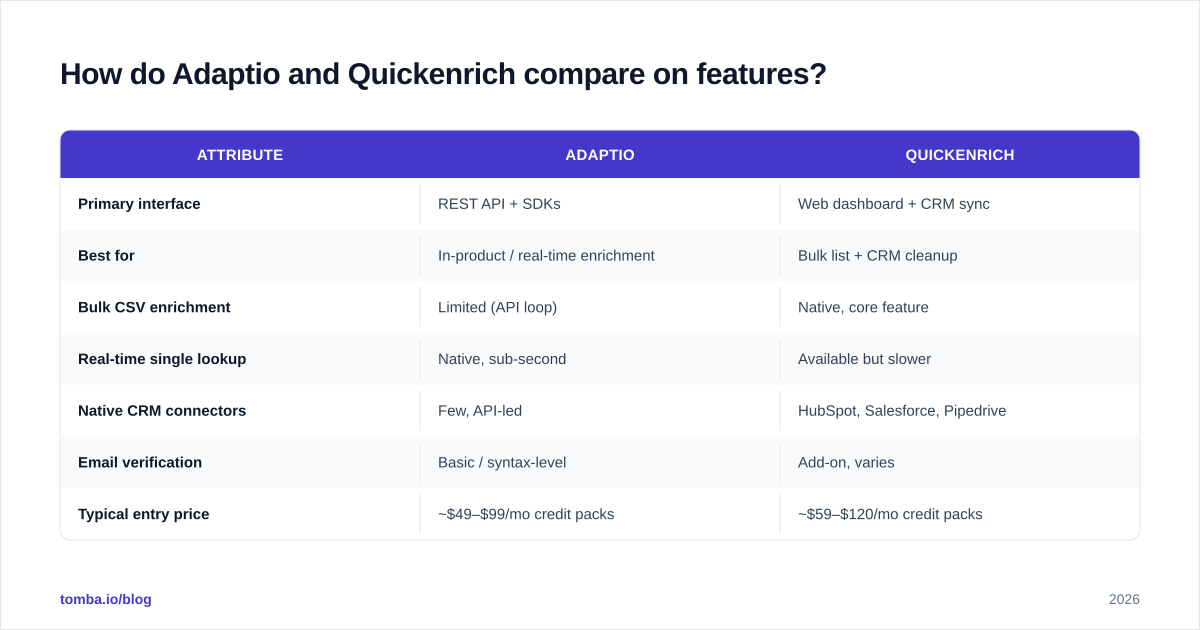
How do Adaptio and Quickenrich compare on features?#
Here's the head-to-head on the attributes that actually change your day-to-day. Treat the pricing rows as directional — both vendors price by credits and adjust tiers often, so confirm current numbers on their sites before you commit.
| Attribute | Adaptio | Quickenrich |
|---|---|---|
| Primary interface | REST API + SDKs | Web dashboard + CRM sync |
| Best for | In-product / real-time enrichment | Bulk list + CRM cleanup |
| Bulk CSV enrichment | Limited (API loop) | Native, core feature |
| Real-time single lookup | Native, sub-second | Available but slower |
| Native CRM connectors | Few, API-led | HubSpot, Salesforce, Pipedrive |
| Email verification | Basic / syntax-level | Add-on, varies |
| Typical entry price | ~$49–$99/mo credit packs | ~$59–$120/mo credit packs |
| Learning curve | Higher (dev required) | Lower (no-code) |
| Free trial | Limited credits | Limited credits |
The pattern is clear. Adaptio rewards teams with engineering resources who want enrichment baked into a product or signup flow. Quickenrich rewards go-to-market teams who live in spreadsheets and a CRM and need volume without writing code.
Neither one is a "finder" in the strict sense — they enrich records you already have a seed for. If your starting point is just a company name and you need to discover contacts from scratch, you'll still want a dedicated email finder or domain search alongside either platform.
Which has better data accuracy?#
Accuracy is the only spec that matters, and it's the hardest to verify from a pricing page. Both Adaptio and Quickenrich publish coverage and match-rate claims, but those numbers describe how often they return something — not how often that something is correct and current.
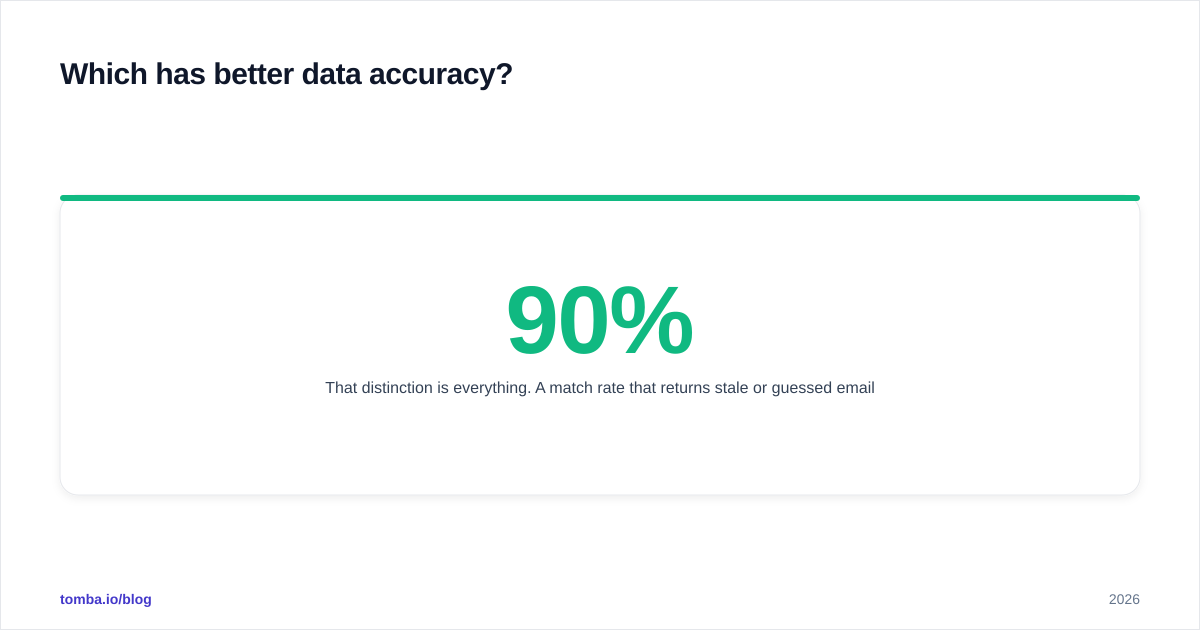
That distinction is everything. A 90% match rate that returns stale or guessed emails is worse than a 70% match rate of verified, deliverable addresses, because the bad 20% silently damages your sender reputation.

Here's how to actually test accuracy instead of trusting marketing copy:
- Build a known-truth sample. Take 100 contacts you can independently confirm — current colleagues, partners, people whose addresses you've recently emailed successfully.
- Run the sample through each tool's trial credits. Record match rate and the exact values returned.
- Verify every returned email. This is the step most buyers skip. Run the outputs through an email verifier and count how many are valid, risky, or invalid.
- Score on verified matches, not raw matches. Divide deliverable emails by total attempts. That's your real accuracy.
When you score this way, the gap between "returned a value" and "returned a value that works" usually swallows whatever headline accuracy number each vendor advertised. Both Adaptio and Quickenrich tend to look stronger on firmographic and title data than on direct, deliverable email — which is exactly why a verification layer is non-negotiable.
If you want to understand where any provider's records originate before you trust them, look at how the vendor documents its data sources. Opaque sourcing is a red flag regardless of the logo on the box.
)
You can also sanity-check third-party sentiment on independent review sites like G2 and Capterra, where verified-user reviews often surface accuracy and support complaints that don't appear in sales decks.
How do Adaptio and Quickenrich pricing models compare?#
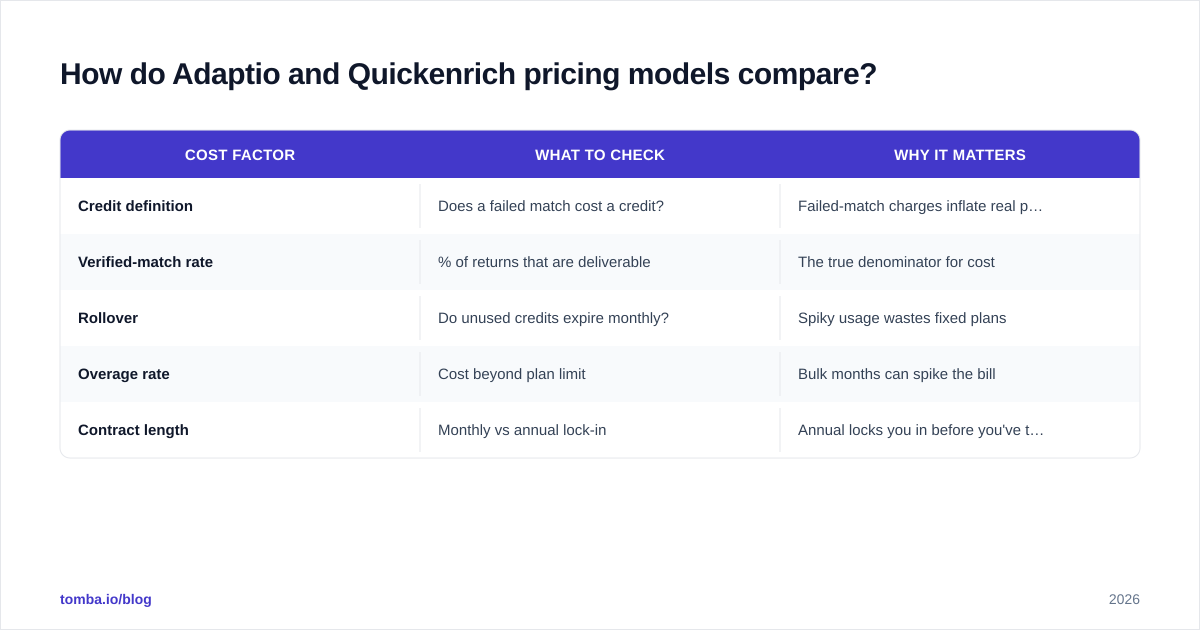
Both tools sell credits, and a credit is consumed whether or not the data that comes back is usable. That single fact changes how you should read their pricing.
If Tool A costs $0.10 per credit at a 50% verified-match rate, your effective cost is $0.20 per usable record. If Tool B costs $0.14 per credit at an 80% verified-match rate, your effective cost is $0.175 — cheaper, despite the higher sticker. Always compute cost-per-verified-record, not cost-per-credit.
| Cost factor | What to check | Why it matters |
|---|---|---|
| Credit definition | Does a failed match cost a credit? | Failed-match charges inflate real price |
| Verified-match rate | % of returns that are deliverable | The true denominator for cost |
| Rollover | Do unused credits expire monthly? | Spiky usage wastes fixed plans |
| Overage rate | Cost beyond plan limit | Bulk months can spike the bill |
| Contract length | Monthly vs annual lock-in | Annual locks you in before you've tested accuracy |
For reference on a transparent, credit-based model, Tomba pricing runs a Free tier (25 searches/mo), Starter at $49/mo, Growth at $99/mo, Pro at $249/mo, and custom Enterprise — and verification is part of the core product, not a separate upsell. When you compare Adaptio and Quickenrich, line their effective per-verified-record cost up against a number like that, not against their own list prices.
Is Adaptio better than Quickenrich for cold outreach?#
Short answer: neither is sufficient on its own for cold email, and the reason is deliverability.
Cold outreach lives and dies on whether your messages reach the inbox. Send to a list full of invalid or catch-all addresses and your bounce rate climbs, your sender reputation drops, and even your good emails start landing in spam. Enrichment tools append addresses; they rarely guarantee those addresses are safe to send to today.
)
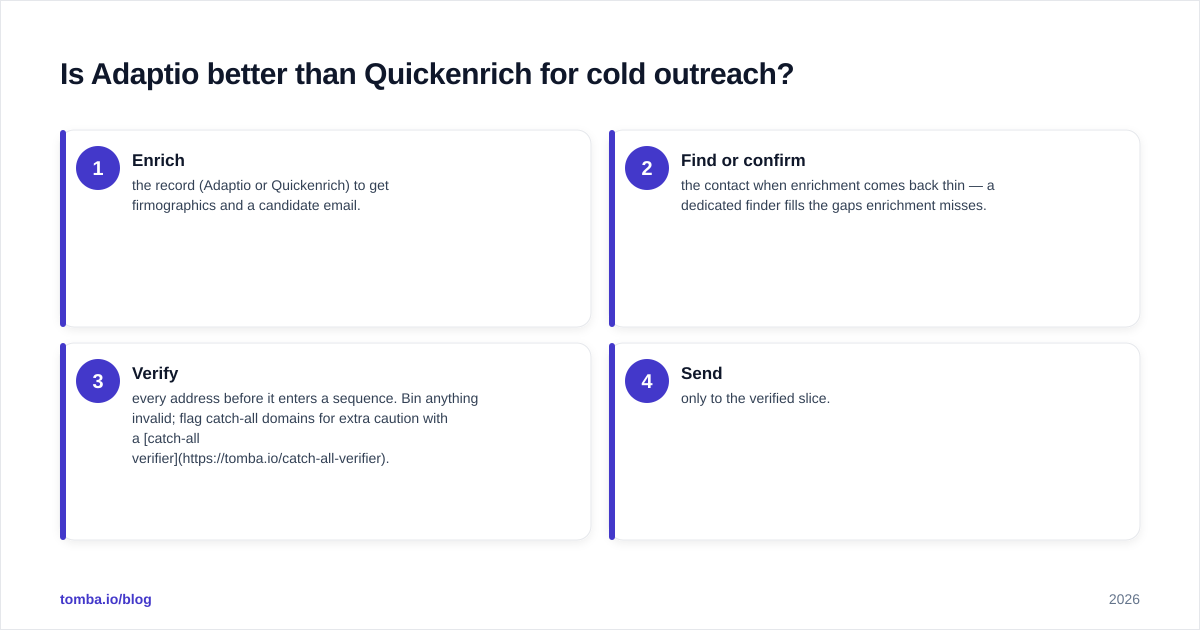
So the practical workflow for cold outreach looks like this regardless of which enrichment tool you choose:
- Enrich the record (Adaptio or Quickenrich) to get firmographics and a candidate email.
- Find or confirm the contact when enrichment comes back thin — a dedicated finder fills the gaps enrichment misses.
- Verify every address before it enters a sequence. Bin anything invalid; flag catch-all domains for extra caution with a catch-all verifier.
- Send only to the verified slice.
Adaptio's API-first design makes step 1 easy to automate inside a product, but you'll still bolt on verification. Quickenrich's batch UI makes it easy to enrich a list, but you'll still need to scrub that list before it touches your mail server. Microsoft, Google, and Yahoo have all tightened bulk-sender requirements — see Google's sender guidelines — and a high bounce rate is now one of the fastest ways to get throttled.
This is the gap both tools share, and it's why most disciplined teams treat enrichment and verification as two separate, deliberate steps.
When should you pick Adaptio vs Quickenrich?#
Use this as a quick decision guide:
Choose Adaptio if:
- You have engineering resources and want enrichment inside your product or signup flow.
- You enrich one record at a time, in real time, triggered by user actions.
- You're comfortable building your own verification and CRM glue.
Choose Quickenrich if:
- Your team is sales, marketing, or RevOps and prefers a dashboard over an API.
- You enrich in bulk — CSV uploads and scheduled CRM appends.
- You value native CRM integrations over raw flexibility.
Choose a finder + verifier layer (alongside either) if:
- You run cold outbound and deliverability is a KPI.
- Your seed data is thin and you need to discover contacts, not just append to known ones.
- You want one provider that finds, verifies, and enriches without a separate verification invoice.
Most teams land in that third category whether they realize it or not. Enrichment answers "tell me more about this person." Outbound also needs "find me this person and prove I can reach them" — a different job.
What about a verification-first alternative?#
If your end goal is reaching real people without burning your domain, lead with finding and verification, then enrich. That ordering keeps bad data out of your CRM in the first place instead of cleaning it after the fact.
A platform like Tomba is built around that order: the Tomba Email Finder discovers professional addresses by name, domain, or company; verification is native rather than an add-on; and data enrichment layers on firmographics once the contact is confirmed. You can run it in bulk through the bulk email finder, wire it into your app via the Tomba API, or work straight from Google Sheets.
It isn't that Adaptio or Quickenrich are bad tools — they're good at the specific jobs they're designed for. It's that "enrich a known record" and "reliably reach a new prospect" are different problems, and conflating them is how teams end up with a clean-looking list that still bounces.
The bottom line on Adaptio vs Quickenrich#
Adaptio vs Quickenrich comes down to interface and workflow: Adaptio for real-time, API-driven, in-product enrichment; Quickenrich for batch, no-code, CRM-centric enrichment. On pure enrichment, your pick should follow your team's technical comfort and whether you work one record at a time or thousands at once.
But both share the same blind spot — verification — and for anyone doing cold outreach, that blind spot is the whole ballgame. Score them on cost-per-verified-record, not cost-per-credit, and always plan for a verification step neither fully owns.
Ready to stop paying for data that bounces? Start with the Tomba Email Finder and its free tier of 25 searches a month. Find the contact, confirm it's deliverable, and enrich it — in one place — before it ever reaches your sequence. Your sender reputation will thank you.
// get started
Find, verify and enrich your first contacts today
Start on the free plan with 25 searches a month, then scale when your team is ready.
Free plan · No credit card required · GDPR & CCPA
// about the author