Agile CRM vs Pipedrive 2026: Which CRM Wins for B2B Sales?
Agile CRM bundles marketing, service, and sales into one cheap suite. Pipedrive is a focused, visual sales pipeline tool. Here's which one actually fits your B2B team in 2026.
Choosing a CRM usually comes down to a tension between breadth and focus. Agile CRM throws marketing, sales, and service into one low-cost suite. Pipedrive does one thing — visual sales pipelines — and does it cleanly. This Agile CRM vs Pipedrive comparison cuts through the marketing copy so you can pick the tool that matches how your team actually sells in 2026.
TL;DR: Agile CRM vs Pipedrive#
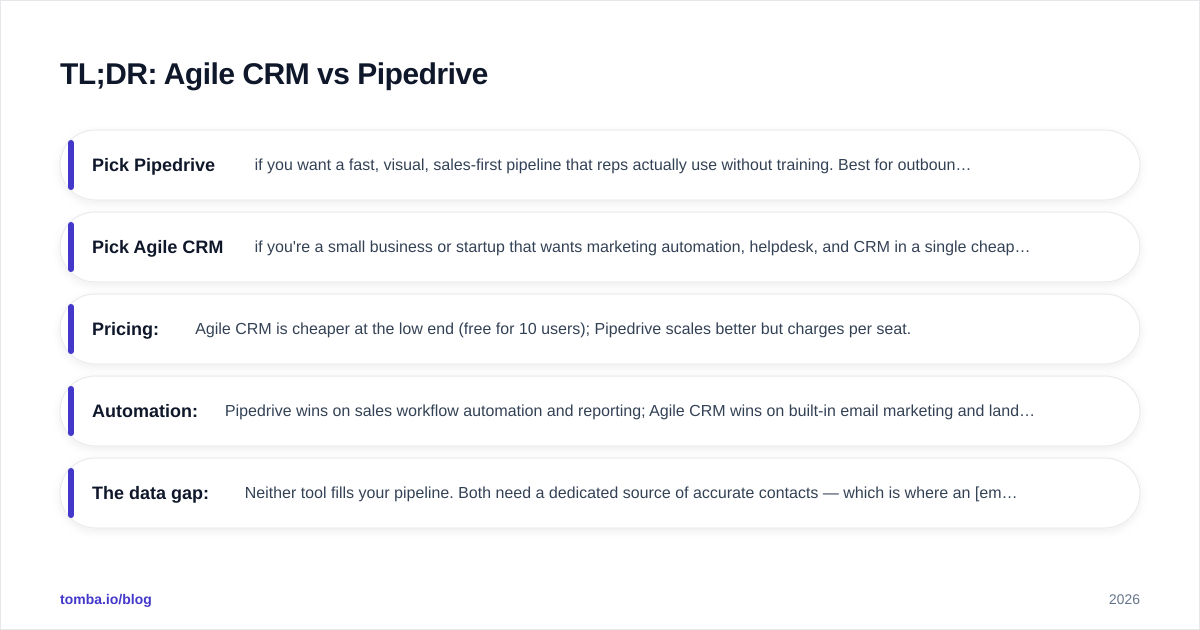
- Pick Pipedrive if you want a fast, visual, sales-first pipeline that reps actually use without training. Best for outbound and SMB-to-mid-market sales teams.
- Pick Agile CRM if you're a small business or startup that wants marketing automation, helpdesk, and CRM in a single cheap (or free) tool and can tolerate a dated UI.
- Pricing: Agile CRM is cheaper at the low end (free for 10 users); Pipedrive scales better but charges per seat.
- Automation: Pipedrive wins on sales workflow automation and reporting; Agile CRM wins on built-in email marketing and landing pages.
- The data gap: Neither tool fills your pipeline. Both need a dedicated source of accurate contacts — which is where an email finder earns its keep.
What are Agile CRM and Pipedrive?#
Pipedrive is a sales-focused CRM built around the Kanban-style deal pipeline. Founded by salespeople frustrated with bloated tools, it prioritizes one job: moving deals from "lead in" to "deal won" with as little friction as possible. It's used by 100,000+ companies and consistently rates well on G2 for ease of use.
Agile CRM is an all-in-one platform that bundles sales CRM, marketing automation, and customer service into a single product, famously offering a free tier for up to 10 users. It targets small businesses that can't justify paying for separate tools like a CRM, an email marketing platform, and a helpdesk.
The core distinction: Pipedrive is a depth tool for sales, while Agile CRM is a breadth tool for small teams wearing many hats.

How do Agile CRM and Pipedrive compare at a glance?#
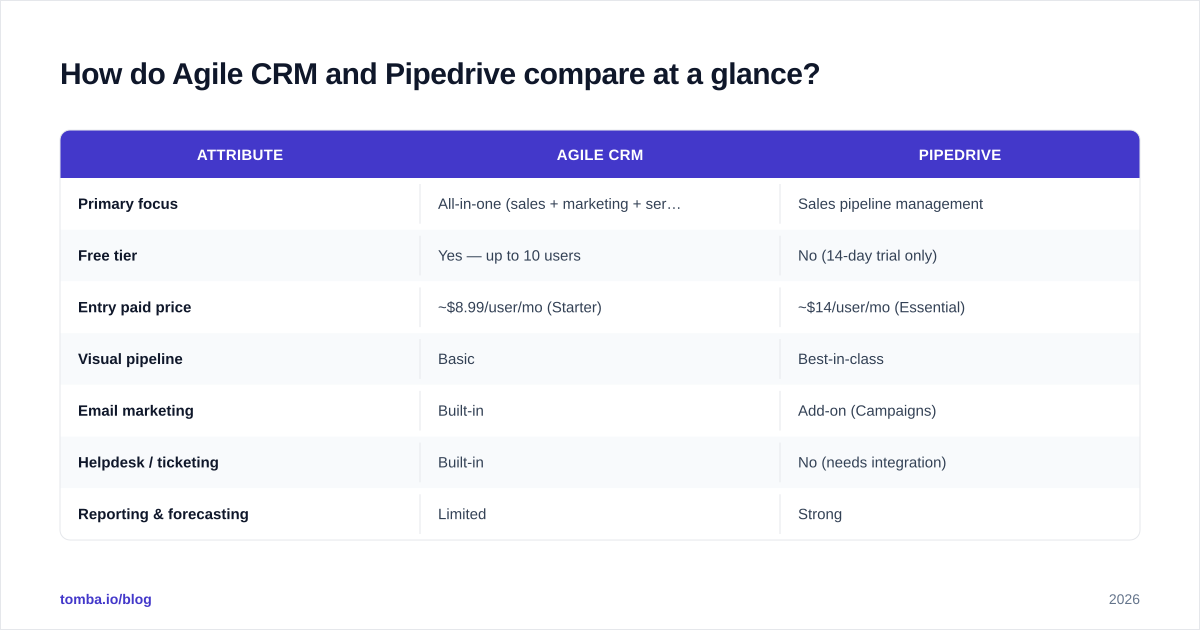
| Attribute | Agile CRM | Pipedrive |
|---|---|---|
| Primary focus | All-in-one (sales + marketing + service) | Sales pipeline management |
| Free tier | Yes — up to 10 users | No (14-day trial only) |
| Entry paid price | ~$8.99/user/mo (Starter) | ~$14/user/mo (Essential) |
| Visual pipeline | Basic | Best-in-class |
| Email marketing | Built-in | Add-on (Campaigns) |
| Helpdesk / ticketing | Built-in | No (needs integration) |
| Reporting & forecasting | Limited | Strong |
| Mobile app quality | Average | Strong |
| Ease of use | Moderate (dated UI) | Excellent |
| Best for | Budget small businesses | Dedicated sales teams |
The pattern is clear before you even open the apps: Agile CRM trades polish for breadth, Pipedrive trades breadth for a sales experience reps don't fight.
Which has better pricing: Agile CRM or Pipedrive?#
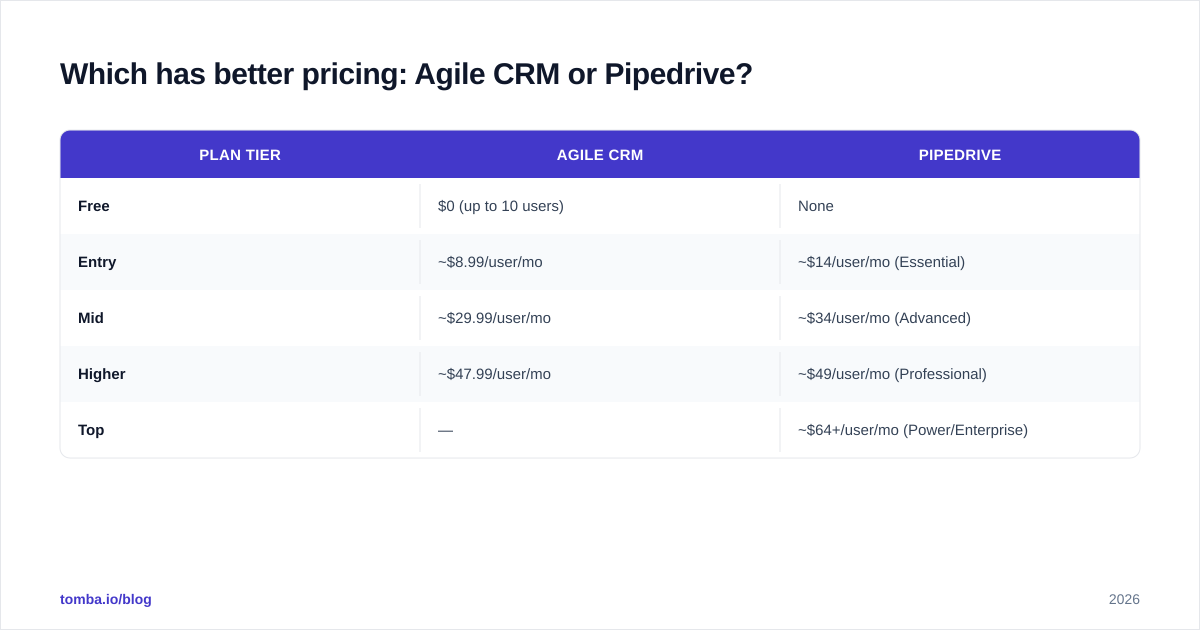
Agile CRM wins on raw cost, especially at the bottom. Its free plan covering 10 users is genuinely useful for a tiny team, and paid tiers stay affordable.
| Plan tier | Agile CRM | Pipedrive |
|---|---|---|
| Free | $0 (up to 10 users) | None |
| Entry | ~$8.99/user/mo | ~$14/user/mo (Essential) |
| Mid | ~$29.99/user/mo | ~$34/user/mo (Advanced) |
| Higher | ~$47.99/user/mo | ~$49/user/mo (Professional) |
| Top | — | ~$64+/user/mo (Power/Enterprise) |
But "cheaper" is not the same as "better value." Pipedrive's higher tiers unlock automation, revenue forecasting, and reporting that genuinely move a sales number. Agile CRM's value is in consolidation — you're replacing three tools, so compare it against your combined Mailchimp + CRM + helpdesk bill, not against Pipedrive's per-seat price alone.
A note on hidden costs: both platforms charge for things adjacent to the core CRM. Pipedrive's email Campaigns, LeadBooster, and Smart Docs are paid add-ons. Agile CRM gates higher contact volumes and integrations behind upper tiers. Always price the configuration you'll actually run, not the sticker.
Is Pipedrive better than Agile CRM for sales pipelines?#
Yes — for pure sales pipeline work, Pipedrive is the stronger tool, and it isn't close.
Pipedrive's entire interface is the pipeline. Deals are cards you drag between stages, every deal shows rot indicators when it's been idle too long, and the activity-based selling model nudges reps to always schedule a next step. New reps are productive in a day. This focus is why it dominates head-to-head Pipedrive comparisons for SMB sales.
Agile CRM has a deal pipeline too, but it's one module among many. It works, yet it feels secondary to the marketing and service features, and the UI shows its age. If your primary daily activity is working deals through stages, that friction adds up.
Where Agile CRM pulls ahead is when "sales" isn't the whole job. If the same person who closes deals also sends the newsletter and answers support tickets, Agile CRM's single-pane approach saves context-switching that Pipedrive can't.
Which CRM has better marketing and automation?#
This splits cleanly by automation type.
Marketing automation → Agile CRM. It ships with email campaigns, landing page builders, web forms, and a visual marketing workflow designer out of the box. For a small business that wants to nurture leads without buying a separate marketing platform, that's a real advantage.
Sales automation → Pipedrive. Its Workflow Automation triggers tasks, emails, and field updates based on deal events — when a deal moves to "Proposal Sent," auto-create a follow-up task and notify the manager. Combined with stronger reporting and revenue forecasting, Pipedrive automates the selling motion better.
So the honest answer to "which automates better" is: better at what? Marketing nurture leans Agile CRM; sales execution and pipeline hygiene lean Pipedrive.

How do Agile CRM and Pipedrive handle contact data and enrichment?#
Here's the uncomfortable truth that no CRM vendor leads with: a CRM is a database, not a data source. Both Agile CRM and Pipedrive are excellent at storing and organizing contacts. Neither is good at finding them or keeping them accurate.
Both offer basic enrichment and integrations, but if you're running B2B outbound, you'll quickly hit limits:
- Contacts go stale — people change jobs, and bounced emails wreck your sender reputation.
- Manual data entry eats selling time and introduces typos and duplicates.
- Neither tool natively finds verified work emails for a list of target companies.
This is the layer to solve before the CRM, not after. A dedicated data enrichment and email-discovery workflow feeds clean, verified records into whichever CRM you choose. Tomba's domain search pulls every public email pattern for a target company, the email verifier confirms deliverability before a single send, and the bulk email finder handles whole prospect lists at once.
The CRM decision and the data decision are independent. You can run Tomba into Pipedrive or into Agile CRM — the point is that neither CRM removes the need for an accurate top of funnel.
Which integrates better with your stack?#
Pipedrive has the larger and more mature marketplace, with native, well-maintained integrations across the sales stack — and it connects cleanly to data tools. Tomba, for example, plugs into both via [
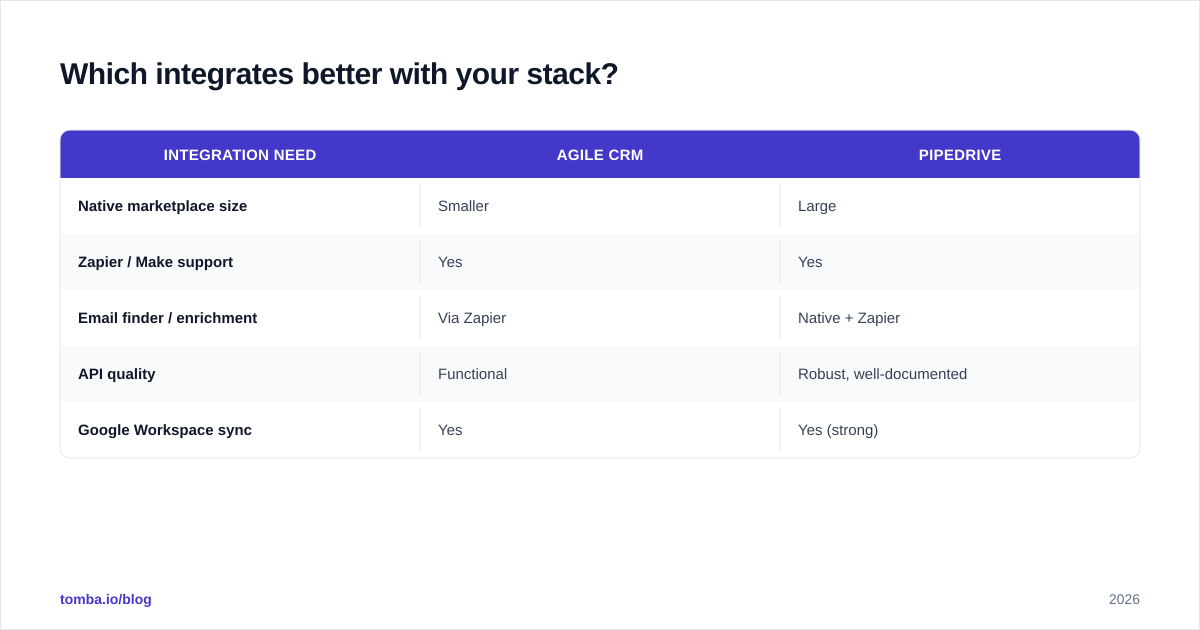
Zapier](https://tomba.io/integrations/zapier) and direct integrations, so verified contacts flow straight into your deal pipeline.
| Integration need | Agile CRM | Pipedrive |
|---|---|---|
| Native marketplace size | Smaller | Large |
| Zapier / Make support | Yes | Yes |
| Email finder / enrichment | Via Zapier | Native + Zapier |
| API quality | Functional | Robust, well-documented |
| Google Workspace sync | Yes | Yes (strong) |
If you depend on a wide tooling ecosystem — dialers, enrichment, scheduling, BI — Pipedrive's marketplace gives you more plug-and-play options. Agile CRM covers the essentials but expects you to lean on its built-in modules instead of third parties.
Which CRM should you choose in 2026?#
Decide by what your team's day actually looks like:
Choose Pipedrive if:
- Sales is a distinct function with dedicated reps.
- You value speed, visual clarity, and reporting/forecasting.
- You're scaling outbound and want strong third-party integrations.
- Per-seat pricing is acceptable for a sales-first ROI.
Choose Agile CRM if:
- You're a small team or startup where one person sells, markets, and supports.
- Budget is the hard constraint and the free tier matters.
- You want email marketing and helpdesk inside the CRM.
- A dated UI is an acceptable trade for consolidation.
Choose neither (yet) if you haven't solved your contact-data problem. The best CRM in the world is empty without accurate leads flowing in.
FAQ#
Is Agile CRM really free? Yes — Agile CRM offers a free plan for up to 10 users with core CRM features and limited contacts. It's one of the most generous free tiers among all-in-one CRMs. Heavier marketing/automation usage requires a paid tier.
Does Pipedrive have a free plan? No. Pipedrive offers a 14-day free trial but no permanent free tier. Its entry Essential plan starts around $14/user/month.
Can I use an email finder with Pipedrive or Agile CRM? Yes. Both connect to data tools via native integrations or Zapier. Tomba's email finder and verifier push clean, verified contacts into either CRM so reps aren't entering data by hand.
Which is easier to use? Pipedrive, by a wide margin. Its single-purpose pipeline interface is consistently rated easier to learn than Agile CRM's multi-module dashboard.
Which is better for marketing automation? Agile CRM — it includes email campaigns, landing pages, and marketing workflows natively. Pipedrive treats email marketing as a paid add-on.
The bottom line#
There's no universal winner in Agile CRM vs Pipedrive — there's only the right fit for your motion. Pick Pipedrive for focused, scalable sales execution; pick Agile CRM for cheap all-in-one breadth on a small team. Either way, your results depend on the quality of the contacts you load in.
Before you commit to a CRM, fix the input. Use the Tomba Email Finder to find and verify professional email addresses by domain, name, or company, then sync them straight into Pipedrive or Agile CRM. Start free with 25 searches a month and scale up on Tomba pricing when your pipeline does — so whichever CRM you choose is fed with data that actually converts.
// get started
Find, verify and enrich your first contacts today
Start on the free plan with 25 searches a month, then scale when your team is ready.
Free plan · No credit card required · GDPR & CCPA
// about the author