AI Cold Email in 2026: How to Write Emails That Get Replies
AI cold email can 3x your reply rate or torch your domain. Here's how to use AI for research, personalization, and copy without sounding like a robot.
TL;DR
- AI cold email is not "press a button, get replies." It's a workflow: clean data in, AI for research and first-draft copy, a human edit, and tight deliverability hygiene.
- The biggest win from AI isn't writing — it's research and personalization at scale. That's where reply rates move from 1% to 5%+.
- Generic AI copy ("I hope this email finds you well, I came across your impressive company") is now a spam signal. Buyers can smell it.
- Verified, accurate contact data is the foundation. AI personalization on bad emails just gets you to spam faster.
- Use AI to draft, a checklist to edit, and a verifier to protect your sender reputation. The stack below shows exactly how.
What is AI cold email?#
AI cold email is the practice of using large language models and automation to research prospects, write personalized outreach, and optimize sending — without manually typing every message from scratch.
Think of it like a sous-chef, not a vending machine. A vending machine spits out the same candy bar for everyone. A sous-chef preps the ingredients, suggests a dish, and hands it to the head chef to plate. AI is the sous-chef: it does the prep work — scraping a prospect's LinkedIn, summarizing their company's recent news, drafting a first line — but a human still decides what actually ships.
That distinction matters because the failure mode of AI cold email is obvious. When teams treat AI as a vending machine — same prompt, same template, blast 5,000 contacts — reply rates collapse and domains get blacklisted. When they treat it as prep work that a human finishes, the math works.
Does AI cold email actually work in 2026?#
Yes — but only on the research and personalization layer, not the "write my whole campaign" layer.
Here's the honest split. The thing AI is genuinely great at is reading a lot of context fast: a prospect's job history, a company's funding round, a podcast they were on, a product page. Turning that into a relevant opening line is real, repeatable value. The thing AI is mediocre at is sounding like a specific human with a specific point of view. That part still needs you.
Buyers have also adapted. In 2023 an AI-personalized first line felt clever. By 2026, inbox owners have seen ten thousand "I noticed you recently posted about scaling your sales team..." openers and pattern-match them straight to delete. Novelty is gone. What survives is specificity — a detail so precise it could only apply to that one person.
So the working definition of "AI cold email that works" in 2026 is narrow: AI handles the grunt work of research and first drafts; you supply judgment, voice, and a real reason to reach out.
How do you build an AI cold email workflow?#
A reliable AI cold email workflow has five stages, and skipping any of them is where teams blow up their domain.
1. Source verified contact data. Everything downstream depends on the email being real and deliverable. AI personalization layered on a guessed, invalid address just helps you hit a spam trap faster. Start with a quality email finder and run every address through an email verifier before it enters a sequence.
2. Enrich and research. Pull the context AI needs to personalize: role, company size, tech stack, recent triggers (hiring, funding, product launches). This is the fuel for relevance.
3. Draft with AI. Feed the research into a structured prompt and get a first draft — opener, value prop, soft CTA. Never send this raw.
4. Human edit. Cut the AI throat-clearing, sharpen the CTA, kill anything that sounds templated. Two minutes per email at the high-value tier; spot-check at the volume tier.
5. Send with deliverability hygiene. Warm domains, capped daily volume, plain-text-leaning formatting, and rigorous list hygiene. Great copy on a burned domain still lands in spam.
The stages are sequential for a reason: you cannot personalize data you don't have, and you cannot recover a reputation you've already torched.
Which AI cold email tools should you use?#
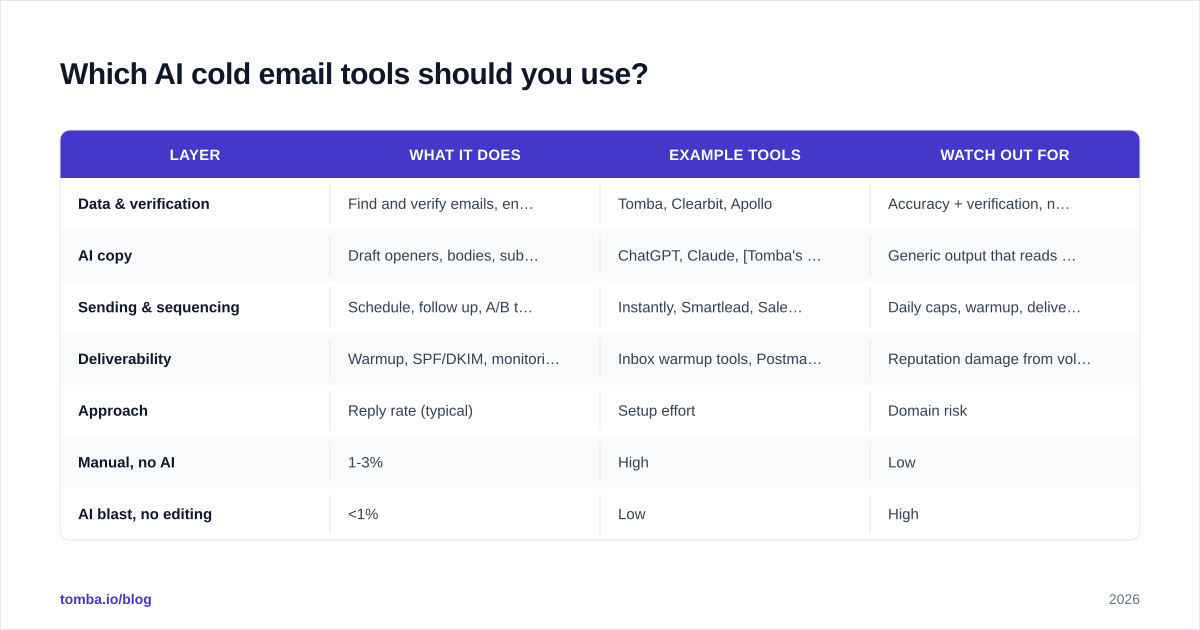
There's no single "AI cold email tool" — you assemble a small stack across data, copy, and sending. Here's how the main categories compare.
| Layer | What it does | Example tools | Watch out for |
|---|---|---|---|
| Data & verification | Find and verify emails, enrich profiles | Tomba, Clearbit, Apollo | Accuracy + verification, not just volume |
| AI copy | Draft openers, bodies, subject lines | ChatGPT, Claude, Tomba's cold email AI | Generic output that reads as spam |
| Sending & sequencing | Schedule, follow up, A/B test | Instantly, Smartlead, Saleshandy | Daily caps, warmup, deliverability |
| Deliverability | Warmup, SPF/DKIM, monitoring | Inbox warmup tools, Postmaster | Reputation damage from volume |
The mistake teams make is buying one all-in-one platform and assuming it solves all four layers well. In practice the data layer is where most "AI cold email" campaigns silently fail — the copy can be perfect, but if 30% of your list bounces, your sender reputation tanks and nothing reaches the inbox.
If you're choosing tools, compare them on G2 across categories rather than trusting any single vendor's landing page. Independent reviews on G2 surface the deliverability complaints that marketing pages bury.
| Approach | Reply rate (typical) | Setup effort | Domain risk |
|---|---|---|---|
| Manual, no AI | 1-3% | High | Low |
| AI blast, no editing | <1% | Low | High |
| AI research + human edit | 4-8% | Medium | Low-Medium |
| AI everything + bad data | ~0% | Low | Very High |
The pattern is clear: the winning row is AI for research and drafting, with a human in the loop and clean data underneath.
What does a good AI cold email prompt look like?#
A good prompt gives the model context, constraints, and a voice — not just "write a cold email."
Here's a template structure that produces usable first drafts:
You are writing a cold email from [your role] at [your company].
We help [target persona] achieve [specific outcome] by [mechanism].

Prospect context:
- Name: [name], [title] at [company]
- Recent trigger: [funding / hiring / launch / post]
- Likely pain: [specific pain tied to their role]

Rules:
- Max 90 words.
- Open with the specific trigger, not a compliment.
- One clear value sentence tied to their pain.
- Soft CTA: ask for interest, not a meeting.
- No "I hope this finds you well," no "I came across."
- Plain, direct, second person. No buzzwords.
The output still needs editing — but it starts from a far better place than "write me a sales email." The constraints (word count, banned phrases, trigger-first opener) do most of the heavy lifting.
For subject lines, give the AI the body and ask for five options under 40 characters, then test them. A subject line generator can speed this up, but always A/B test rather than trusting the model's pick.
How do you keep AI cold email out of spam?#
Deliverability is decided before you write a word — it's mostly data quality and sending behavior, not copy.
The single highest-leverage move is verifying your list. Cold email's worst enemy is the bounce: hit too many invalid addresses or spam traps and mailbox providers throttle you regardless of how good your copy is. This is why email deliverability starts with verification, not subject lines.
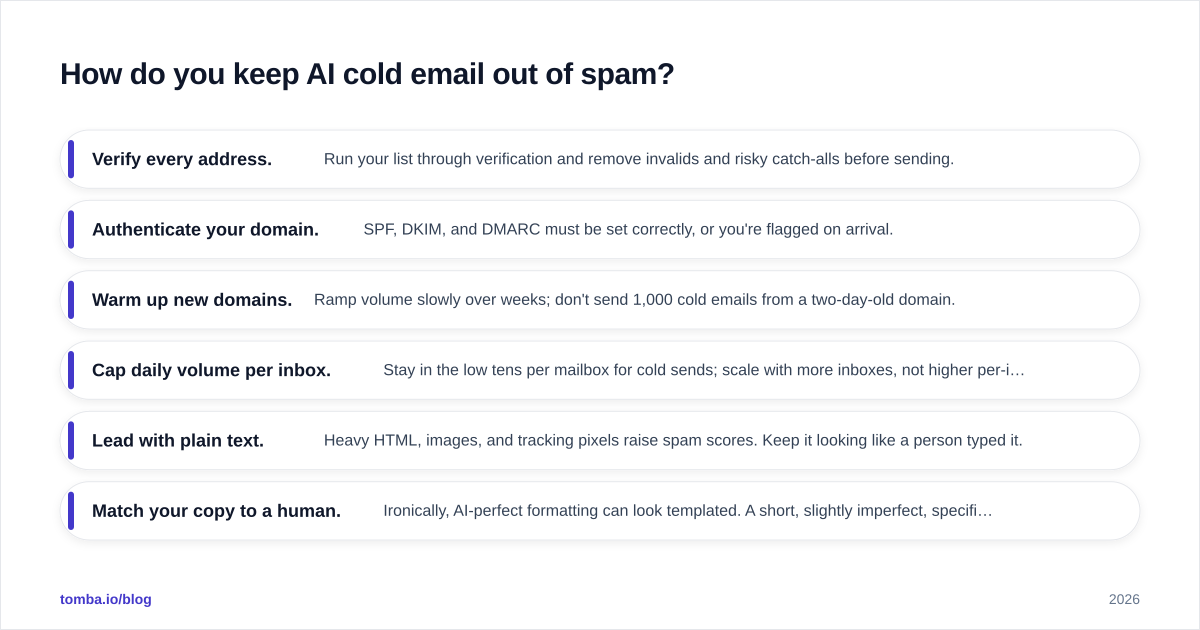
A practical deliverability checklist for AI cold email:
- Verify every address. Run your list through verification and remove invalids and risky catch-alls before sending.
- Authenticate your domain. SPF, DKIM, and DMARC must be set correctly, or you're flagged on arrival.
- Warm up new domains. Ramp volume slowly over weeks; don't send 1,000 cold emails from a two-day-old domain.
- Cap daily volume per inbox. Stay in the low tens per mailbox for cold sends; scale with more inboxes, not higher per-inbox volume.
- Lead with plain text. Heavy HTML, images, and tracking pixels raise spam scores. Keep it looking like a person typed it.
- Match your copy to a human. Ironically, AI-perfect formatting can look templated. A short, slightly imperfect, specific email reads more human.
Google's own guidance for bulk senders, published via Google Postmaster, spells out the authentication and spam-rate thresholds that now gate the inbox. Read it before you scale.
The throughline: AI can write the email, but it can't fix a bad list or a cold domain. Those are upstream problems, and they decide whether your message is ever seen.
How does AI personalization scale without sounding fake?#
The trick is to personalize on facts, not flattery — and to let data, not adjectives, carry the relevance.
Fake personalization sounds like: "I love what you're doing at Acme, your growth is so impressive!" It's generic praise that applies to any company. Real personalization sounds like: "Saw Acme just opened a second SDR pod in Austin — most teams hit a data-hygiene wall around that headcount."
The difference is that the second one is built on a verifiable fact (the hiring trigger) tied to a specific pain. AI is excellent at finding and summarizing those facts at scale — which is exactly why the data layer matters so much. Feed the model enrichment data — role, tech stack, recent triggers from data enrichment — and it can generate a fact-based opener for thousands of prospects without resorting to empty flattery.
But scale has a ceiling. The more you automate, the more you must spot-check. A good rule: at the high-value tier (named accounts, big deals), a human reads and edits every email. At the volume tier, the human audits a random sample each day and tunes the prompt when quality drifts. You're not editing every email at scale — you're maintaining the system that writes them.
This is also where contact data quality compounds. If your enrichment says someone is a "VP of Sales" but they left six months ago, your AI writes a perfectly personalized email to the wrong person. Accurate, fresh data isn't a nice-to-have for AI cold email — it's the input that determines whether personalization helps or actively embarrasses you.
What mistakes kill AI cold email campaigns?#
Five mistakes account for most AI cold email failures, and all of them are avoidable.
Sending unverified lists. The fastest way to kill a domain. Verify first, always.
Trusting raw AI output. Models hallucinate facts and default to generic phrasing. Never send a draft you haven't read.
Over-personalizing into creepiness. "I saw your daughter's soccer game post" crosses a line. Stick to professional, public, business-relevant facts.
Scaling before warming up. New domain plus high volume equals spam folder. Ramp slowly.
Optimizing copy while ignoring data. Teams obsess over subject lines while 25% of their list bounces. Fix the data first — it's the higher-leverage problem.
Notice that three of the five are data and deliverability problems, not copy problems. That's the real lesson of AI cold email in 2026: the model can write a good email, but the campaign is won or lost on the inputs.
Start with clean data, then let AI do the rest#
AI cold email rewards teams that get the unglamorous part right: accurate, verified contact data feeding a research-and-draft workflow with a human in the loop. The copy is the easy 20%; the data and deliverability are the 80% that decides whether anyone reads it.
If you want the foundation that makes AI personalization actually land, start with the data layer. Tomba's Email Finder finds verified professional emails by name, domain, or company — and pairs with the built-in verifier so your list is clean before a single AI-drafted email goes out. Check the Tomba pricing (free tier with 25 searches, Starter at $49/mo) and build your AI cold email engine on data you can trust, not addresses you guessed.
// get started
Find, verify and enrich your first contacts today
Start on the free plan with 25 searches a month, then scale when your team is ready.
Free plan · No credit card required · GDPR & CCPA
Get the Tomba newsletter
Product and data updates
// about the author