AI Cold Email Outreach in 2026: The Complete Playbook
AI cold email outreach can lift reply rates or torch your domain. Here's how to use AI for research, personalization, and sending without sounding like a bot in 2026.
TL;DR
- AI cold email outreach means using machine learning to research prospects, draft personalized copy, and time sends at scale — not blasting the same template to 10,000 people faster.
- The biggest wins come before the writing: clean data and accurate targeting. Garbage contacts in, garbage replies out.
- AI-written copy still needs a human pass. Reviewers spot the "bot smell" — generic praise, hallucinated facts, and rule-of-three filler — that tanks reply rates.
- Deliverability is the silent killer. AI lets you send more, which means more bounces and spam complaints if your list isn't verified first.
- A realistic 2026 stack: a data/email-finder layer, an AI personalization layer, a sending/warmup layer, and a human editor who says no.
What is AI cold email outreach?#
AI cold email outreach is the practice of using artificial intelligence — large language models, enrichment APIs, and predictive scoring — to handle the repetitive parts of cold email: finding the right people, learning enough about them to write something relevant, drafting the message, and deciding when to hit send.
Think of it like a sous-chef in a busy kitchen. The chef (you) still decides the menu and tastes every plate, but the sous-chef preps the ingredients, chops at speed, and keeps the line moving. AI does the prep. You still own the taste.
The mistake most teams make is treating AI as the chef. They let a model write 5,000 emails unsupervised, send them from an unwarmed domain, and wonder why their reply rate is 0.3% and their domain is blacklisted by Friday. AI amplifies whatever process you already have. A good process gets faster. A sloppy one gets sloppier, louder, and more expensive.
Does AI cold email actually work, or is it just hype?#
It works — but only at the parts it's good at. Let's be specific instead of hand-wavy.
AI is genuinely strong at three things in cold outreach: enriching and scoring a list so you contact the right accounts first, generating first-draft variations you can A/B test, and analyzing reply data to tell you which angles land. According to Gartner and most sales-tech analysts, the teams seeing ROI use AI for augmentation, not full automation.
AI is weak — and actively harmful — at two things: inventing facts about a prospect ("I loved your recent post about...") that turn out to be wrong, and producing copy so generically polished it reads as machine output. Buyers in 2026 have seen a thousand AI emails. The "Hope this finds you well, I noticed your company is scaling..." opener is now a spam signal, not a personalization signal.
So the honest answer: AI cold email works when a human stays in the loop on the two things AI gets wrong. The teams that removed the human entirely got faster results in the worst direction.
)
How is AI outreach different from traditional cold email?#
The workflow shifts where your time goes. In traditional outreach, reps spend most of their day on research and manual data entry. With AI, that time moves to strategy, review, and reply handling — the high-judgment work.
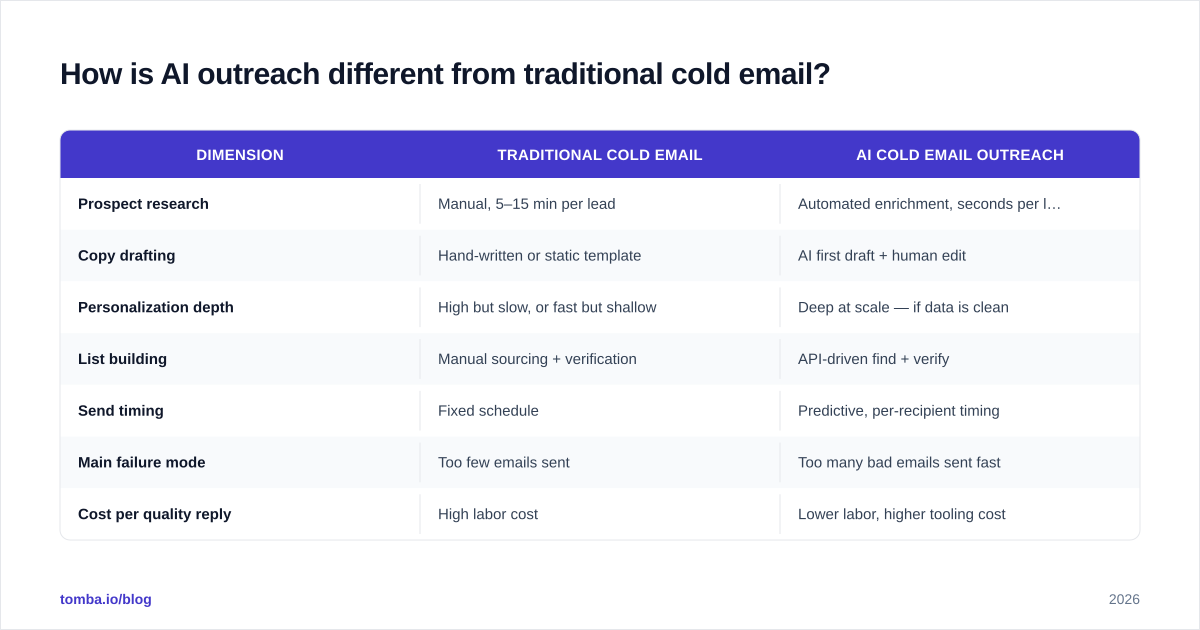
| Dimension | Traditional cold email | AI cold email outreach |
|---|---|---|
| Prospect research | Manual, 5–15 min per lead | Automated enrichment, seconds per lead |
| Copy drafting | Hand-written or static template | AI first draft + human edit |
| Personalization depth | High but slow, or fast but shallow | Deep at scale — if data is clean |
| List building | Manual sourcing + verification | API-driven find + verify |
| Send timing | Fixed schedule | Predictive, per-recipient timing |
| Main failure mode | Too few emails sent | Too many bad emails sent fast |
| Cost per quality reply | High labor cost | Lower labor, higher tooling cost |
The table makes the trade-off clear: AI doesn't remove work, it relocates it. Your new bottleneck is data quality and review capacity, not typing speed.
What does a real AI cold email workflow look like?#
Here's the sequence that separates the teams getting 8–12% reply rates from the ones getting blacklisted. Each step feeds the next.
1. Define the target precisely. Before any AI touches your campaign, write down who you're emailing and why they'd care. AI scoring can rank a list, but it can't fix a vague ideal customer profile. "VP of Engineering at 50–200 person B2B SaaS companies who recently posted a backend hiring role" beats "tech decision-makers" every time.
2. Build and verify the list. This is where most campaigns are won or lost. Use an email finder to source verified professional addresses by name and domain, then run every address through an email verifier before sending. AI lets you send 10x more — which means an unverified list produces 10x more bounces, and bounces above ~3% wreck your sender reputation.
3. Enrich for personalization. Pull real, verifiable signals — role, company size, tech stack, recent funding — using data enrichment. Feed those structured facts to your AI, not the open internet. A model given clean fields personalizes accurately; a model told to "research them online" hallucinates.
4. Draft with AI, edit as a human. Generate two or three angle variations with a tool like cold email AI, then cut anything generic. Your edit pass should kill: fake compliments, the rule-of-three ("faster, cheaper, smarter"), and any claim you can't verify. Tighten the subject line — test variants with a subject line generator if you're stuck.
5. Warm up, send, and handle replies. Send from a warmed domain at a human cadence, then route replies to a person fast. Speed-to-reply still beats clever copy. Track your response rate per variation and feed the winners back into step 4.
Which AI cold email tools should you actually use?#
There's no single "AI outreach tool" — there's a stack, and each layer does one job well. Buying an all-in-one that's mediocre at every layer is the most common over-spend in 2026. Cross-check vendor claims on G2 before committing to annual contracts.
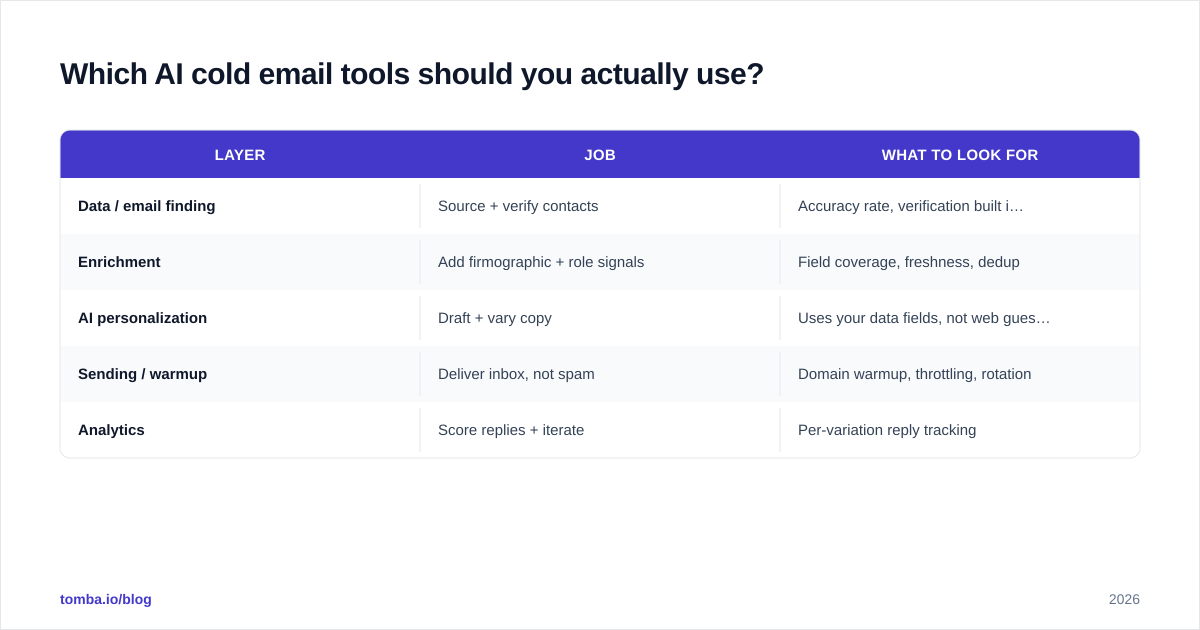
| Layer | Job | What to look for |
|---|---|---|
| Data / email finding | Source + verify contacts | Accuracy rate, verification built in, API access |
| Enrichment | Add firmographic + role signals | Field coverage, freshness, dedup |
| AI personalization | Draft + vary copy | Uses your data fields, not web guesses |
| Sending / warmup | Deliver inbox, not spam | Domain warmup, throttling, rotation |
| Analytics | Score replies + iterate | Per-variation reply tracking |
For the data and verification layers specifically, Tomba pricing starts with a free tier (25 searches/month), then Starter at $49/mo and Growth at $99/mo — which covers most early-stage outbound motions without an enterprise contract. The point isn't which logo you pick; it's that you don't skip the verification layer to save a few dollars, because that's the layer protecting your domain.
)
How do you keep AI cold email out of the spam folder?#
Deliverability is the part teams ignore until their open rates collapse. AI makes this worse by default because it removes the natural throttle of manual sending. Here's the short list that keeps you inboxing.
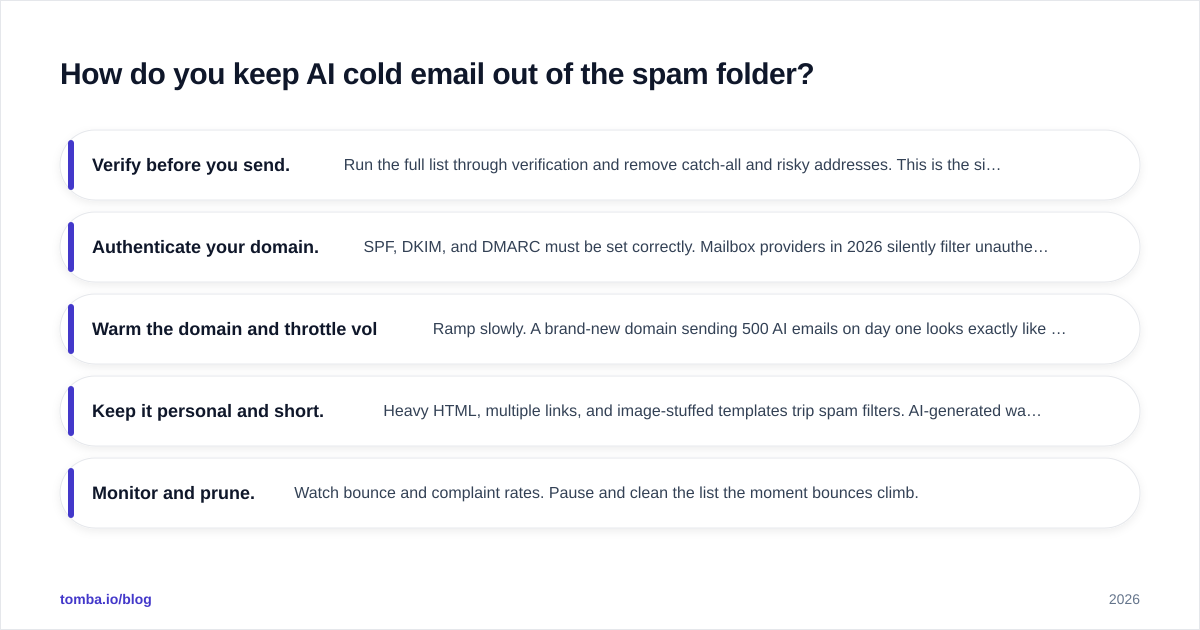
- Verify before you send. Run the full list through verification and remove catch-all and risky addresses. This is the single highest-leverage deliverability action.
- Authenticate your domain. SPF, DKIM, and DMARC must be set correctly. Mailbox providers in 2026 silently filter unauthenticated bulk senders — read HubSpot's deliverability guidance for the current baseline.
- Warm the domain and throttle volume. Ramp slowly. A brand-new domain sending 500 AI emails on day one looks exactly like a spammer to filtering algorithms.
- Keep it personal and short. Heavy HTML, multiple links, and image-stuffed templates trip spam filters. AI-generated walls of text do too.
- Monitor and prune. Watch bounce and complaint rates. Pause and clean the list the moment bounces climb.
The throughline: AI increases your sending capacity, so your guardrails — verification, authentication, throttling — have to scale up with it, not stay where they were when a human sent 40 emails a day.
What mistakes make AI outreach backfire?#
The failure patterns are predictable, which means they're avoidable. Watch for these.
Over-automation. Letting AI send without review is the cardinal sin. One hallucinated detail in a template that goes to 3,000 people is 3,000 credibility hits.
Fake personalization. "{{first_name}}, I see you're crushing it at {{company}}" fools nobody. Shallow merge-tag personalization reads worse than an honest, un-personalized note.
Skipping verification. Sourcing emails without verifying them trades short-term volume for long-term domain damage. Always pair finding with verifying.
Ignoring the reply. Teams obsess over send-side AI and then take six hours to respond to interested prospects. The fastest human in the loop wins the deal.
No measurement. If you're not tracking reply rate per variation, you're not doing AI outreach — you're just sending faster. Measure, cut losers, scale winners.
Frequently asked questions#
Is AI cold email legal? Cold email itself is legal in most B2B contexts when you follow regulations like CAN-SPAM (US) and GDPR (EU): accurate headers, a real opt-out, and a legitimate business reason to contact. AI doesn't change the rules — it just makes compliance more important because you're operating at scale. Always check your jurisdiction.
Will prospects know my email is AI-written? They will if you don't edit it. A raw AI draft has tells — generic openers, over-balanced sentences, vague praise. A drafted-then-edited email reads as a thoughtful human note, which is the whole point.
How many emails can I send per day with AI? Capacity depends on your domain warmup and reputation, not your AI tool. Start low (20–50 per mailbox per day on a warmed domain) and ramp gradually. The AI can write thousands; your domain can't safely send thousands on day one.
Does AI replace SDRs? No. It replaces the manual research and data-entry portion of the SDR's day and shifts them toward strategy, list quality, and reply handling — the judgment work AI can't do.
Start with the layer that everything else depends on#
The fastest way to make AI cold email outreach work is to fix your inputs first. No model — however good — can write a relevant email to the wrong person or deliver mail to an address that bounces. Get the data layer right, and every layer above it performs better.
Tomba's Email Finder gives you verified, professional email addresses by name, company, or domain — the clean foundation your AI personalization and sending stack are built on. Start free with 25 searches a month, verify before you send, and let the AI handle prep while you handle judgment. That's the division of labor that actually moves reply rates in 2026.
// get started
Find, verify and enrich your first contacts today
Start on the free plan with 25 searches a month, then scale when your team is ready.
Free plan · No credit card required · GDPR & CCPA
// about the author