Allegrow vs Leadsforge 2026: Deliverability or Lead Gen?
Allegrow optimizes inbox placement; Leadsforge builds AI lead lists. This 2026 breakdown shows which problem each actually solves — and where they overlap.
You typed "Allegrow vs Leadsforge" into a search bar expecting a head-to-head between two competitors. Here is the twist most comparison posts bury: these two tools barely compete. One fixes where your email lands. The other decides who you email in the first place. Pitting them against each other is like comparing a water filter to a well — both touch water, but you do not pick one instead of the other.
This guide breaks down what each platform actually does, where the rare overlap sits, what they cost, and how to decide which one (or both) belongs in your 2026 outbound stack.
TL;DR#
- Allegrow is a deliverability and inbox-placement optimization platform. It monitors sender reputation, runs seed-list inbox tests, and automates warmup-style engagement to keep you out of spam.
- Leadsforge is an AI-driven lead generation tool that builds targeted prospect lists from natural-language queries and enriches them with contact data.
- They solve different problems: Allegrow improves the delivery of emails to contacts you already have; Leadsforge supplies the contacts themselves.
- If your reply rates are low because messages hit spam, you need Allegrow. If they are low because your list is wrong, you need a data source like Leadsforge or Tomba's email finder.
- Most teams running serious outbound need a data layer and a deliverability layer — not one or the other.
What is Allegrow?#
Allegrow is a sender-reputation and inbox-placement platform aimed at sales and revenue teams running outbound at scale. Instead of guessing why your campaign underperformed, it tells you whether your emails are landing in the primary inbox, the promotions tab, or the spam folder — and then works to move that ratio in your favor.
Its core jobs:
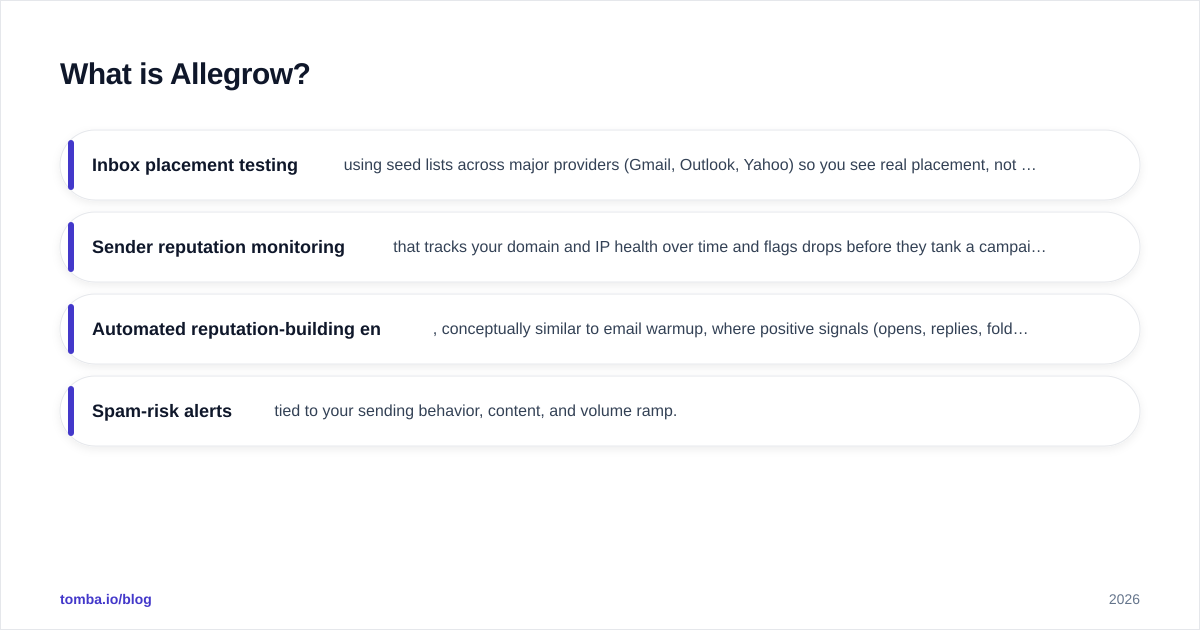
- Inbox placement testing using seed lists across major providers (Gmail, Outlook, Yahoo) so you see real placement, not just "delivered" status.
- Sender reputation monitoring that tracks your domain and IP health over time and flags drops before they tank a campaign.
- Automated reputation-building engagement, conceptually similar to email warmup, where positive signals (opens, replies, folder moves) are generated to train mailbox providers that your sender is trustworthy.
- Spam-risk alerts tied to your sending behavior, content, and volume ramp.
Allegrow sits on top of whatever sending tool you use — it does not replace your sequencer or your CRM. Think of it as the deliverability conscience watching over your existing outbound engine. You can read more about the underlying concept of email deliverability and why sender reputation is the metric that quietly governs every campaign.
What is Leadsforge?#
Leadsforge is an AI lead generation platform. You describe your ideal customer in plain language — "VP of Marketing at Series B SaaS companies in the US with 50–200 employees" — and it returns a built list of matching prospects with enriched contact details. The pitch is speed: skip the hours of filter-tuning in a clunky database UI and let an AI assistant assemble the list conversationally.
Its core jobs:
- Natural-language list building that turns a described persona into a target account and contact list.
- Contact enrichment appending emails, job titles, and company attributes.
- Export to outbound tools so the list flows into your sequencer or CRM.
The thing Leadsforge does not do is guarantee those emails land. A freshly built list with verified-looking addresses can still bounce, hit spam traps, or land in spam if your domain reputation is weak. That is precisely the gap Allegrow addresses — which is why framing them as rivals misses the point.
Is Allegrow better than Leadsforge?#
Wrong question. The honest answer is: better at what?
- If your problem is "my emails are not landing," Allegrow is better — Leadsforge does not touch deliverability at all.
- If your problem is "I do not have enough of the right people to email," Leadsforge is better — Allegrow assumes you already have a list.
Most underperforming outbound has both problems at once, which is why mature teams layer the two functions rather than choosing between them. Here is the cleaner mental model: data quality and deliverability are multiplicative, not additive. A perfect list that lands in spam converts at zero. A perfectly delivered email to the wrong person converts at zero. You need both factors above zero.

Allegrow vs Leadsforge: feature comparison#
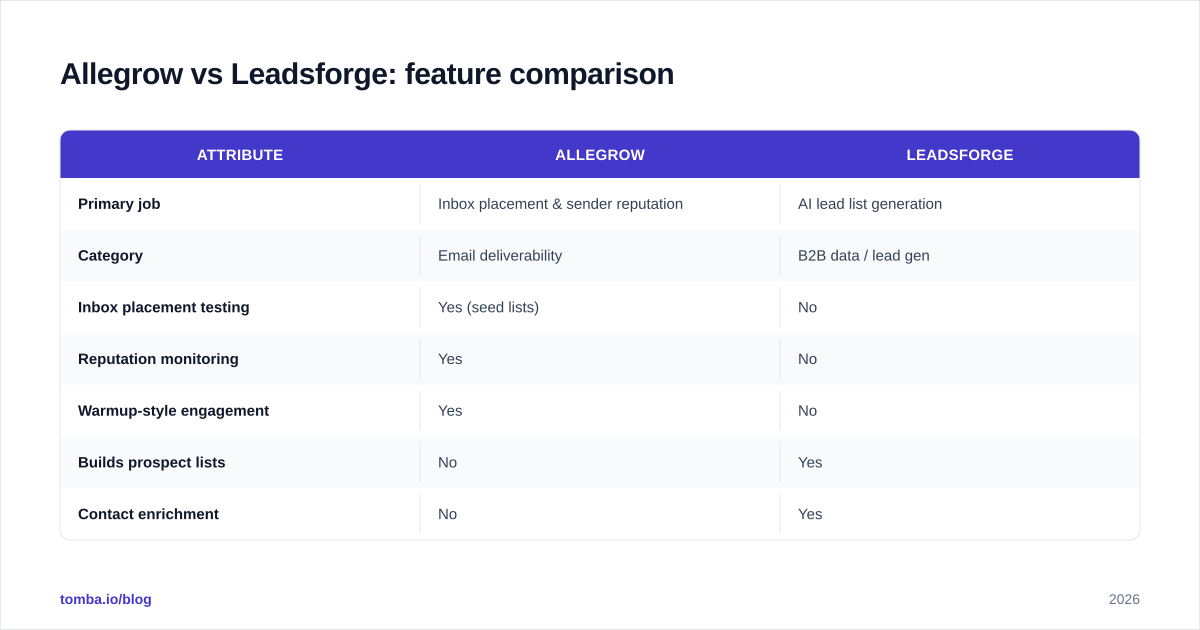
| Attribute | Allegrow | Leadsforge |
|---|---|---|
| Primary job | Inbox placement & sender reputation | AI lead list generation |
| Category | Email deliverability | B2B data / lead gen |
| Inbox placement testing | Yes (seed lists) | No |
| Reputation monitoring | Yes | No |
| Warmup-style engagement | Yes | No |
| Builds prospect lists | No | Yes |
| Contact enrichment | No | Yes |
| Email verification | Limited / not core | Partial |
| Replaces your sequencer | No | No |
| Best for | Teams already sending at volume | Teams needing fresh targeted lists |
| Typical buyer | RevOps / deliverability owner | SDR leaders / founders |
The pattern is clear: the "No" cells in one column are mostly "Yes" cells in the other. They are complementary layers in the same pipeline, not substitutes.
How do they fit into the outbound pipeline?#
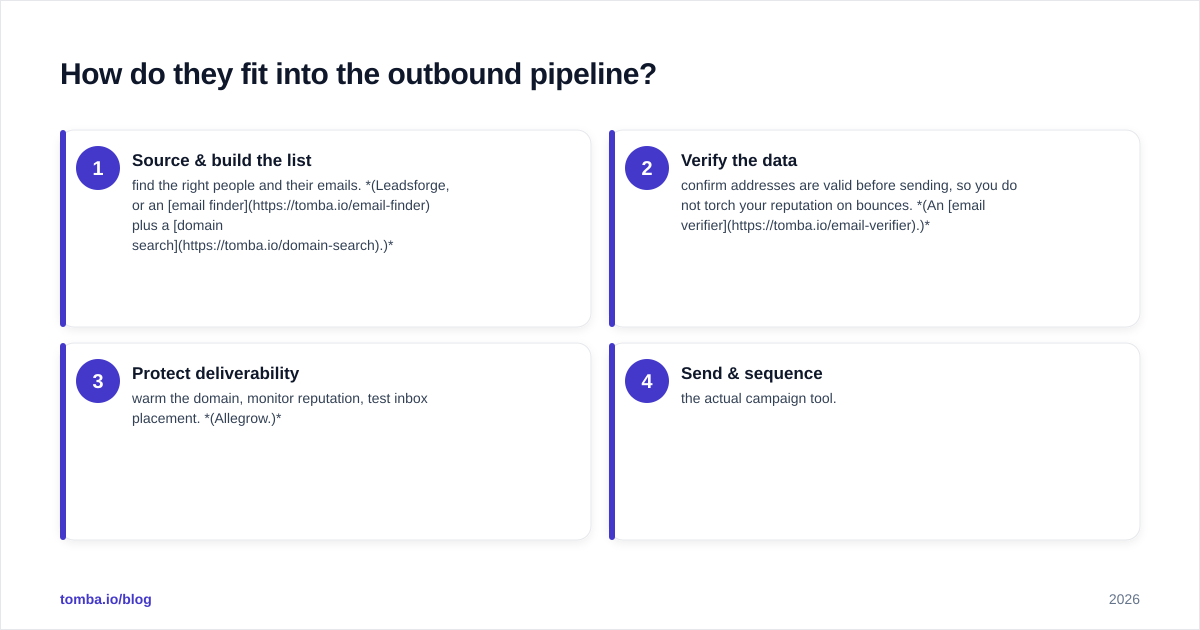
A healthy outbound motion runs in four stages, and these tools occupy different ones:
- Source & build the list — find the right people and their emails. (Leadsforge, or an email finder plus a domain search.)
- Verify the data — confirm addresses are valid before sending, so you do not torch your reputation on bounces. (An email verifier.)
- Protect deliverability — warm the domain, monitor reputation, test inbox placement. (Allegrow.)
- Send & sequence — the actual campaign tool.
Notice that Leadsforge lives in stage 1 and Allegrow lives in stage 3. Stage 2 — verification — is the bridge between them, and it is the step most teams skip. Sending to unverified addresses is the single fastest way to wreck the reputation Allegrow is trying to protect. That is why verification is not optional glue; it is load-bearing.
What about data accuracy and bounce rates?#
Accuracy is where lead-gen tools live or die, and it deserves scrutiny no matter which vendor you pick. AI list builders like Leadsforge are fast, but speed can hide stale or guessed data. Two safeguards matter:
- Coverage — does the tool actually have the contacts in your niche? AI-built lists can look complete while quietly omitting hard-to-reach roles.
- Freshness — B2B data decays at roughly 2–3% per month as people change jobs. A list built on a year-old snapshot is partly fiction.
Whatever source you use, run the output through verification before it touches your sender. If you are building lists, Tomba's data enrichment and bulk email finder cover stage 1, and the email verifier handles stage 2 — including catch-all verification, which is where most "verified" tools quietly fail. Independent reviews on G2 are a useful sanity check on any vendor's accuracy claims before you commit budget.
How much do they cost in 2026?#
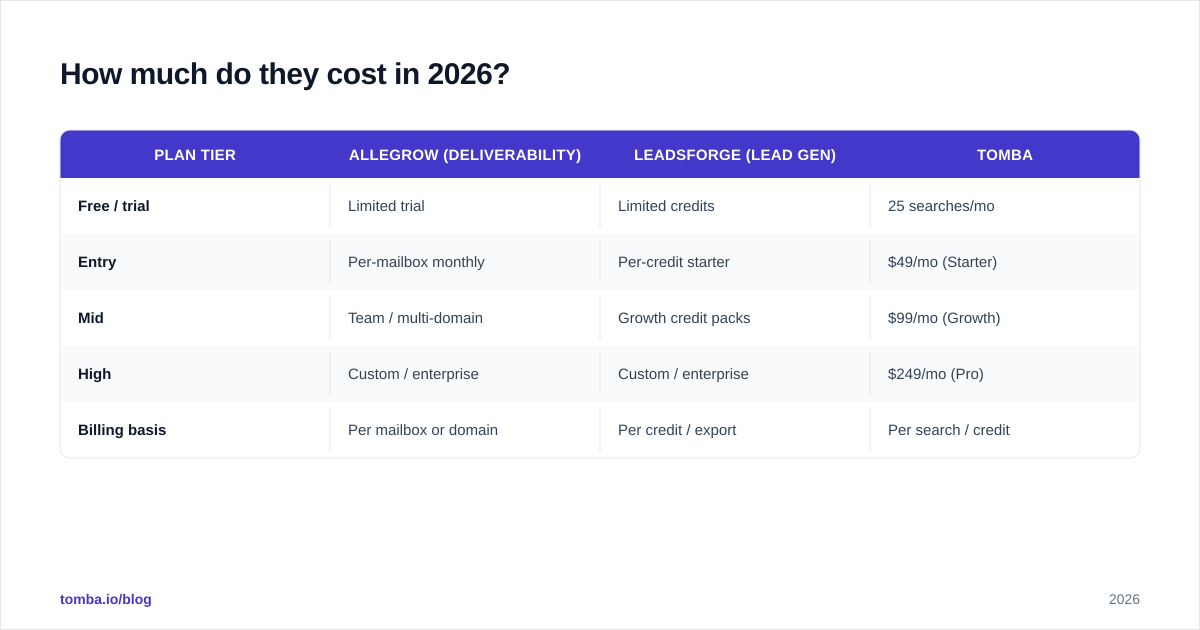
Pricing models differ because the products differ. Deliverability tools usually charge per sending mailbox or domain; lead-gen tools charge per credit or per export. Exact public pricing shifts often, so confirm on each vendor's site — but the rough shape looks like this:
| Plan tier | Allegrow (deliverability) | Leadsforge (lead gen) | Tomba |
|---|---|---|---|
| Free / trial | Limited trial | Limited credits | 25 searches/mo |
| Entry | Per-mailbox monthly | Per-credit starter | $49/mo (Starter) |
| Mid | Team / multi-domain | Growth credit packs | $99/mo (Growth) |
| High | Custom / enterprise | Custom / enterprise | $249/mo (Pro) |
| Billing basis | Per mailbox or domain | Per credit / export | Per search / credit |
The takeaway is not the dollar figure — it is the billing basis. Allegrow scales with how many inboxes you protect. Leadsforge scales with how many leads you pull. Tomba scales with how many searches and verifications you run. Budget for each separately; they are not a single line item. You can see Tomba's full breakdown on the pricing page. For the others, always confirm current numbers on the Allegrow site directly rather than trusting a third-party quote.
When should you choose Allegrow?#
Pick Allegrow (or a deliverability platform like it) when:
- You already have lists and a sending tool, but reply rates are mysteriously low.
- Seed tests or manual checks show emails landing in spam or the promotions tab.
- You are scaling volume and need early warning before reputation drops.
- Multiple SDRs send from multiple domains and you need centralized reputation monitoring.
You should not expect Allegrow to find you new prospects. It improves the odds for emails you are already sending. If your list is the problem, deliverability tooling will faithfully deliver bad emails to the inbox — and you still get no replies.
When should you choose Leadsforge?#
Pick Leadsforge (or another data source) when:
- You are out of leads or your current list is exhausted.
- You want to spin up new ICPs quickly without learning a complex filter UI.
- You are early-stage and need volume of targeted contacts fast.
But treat the output as raw material, not finished goods. Verify it, and pair it with deliverability hygiene before you send. An AI-built list is a starting point, not a guarantee.
Can you use a single tool instead of both?#
Sometimes — if you consolidate around a data platform that also covers verification, and you enforce sending discipline (proper SPF records, gradual warmup, low bounce rates) so you do not need a dedicated deliverability monitor.
This is where a broad data-and-verification platform earns its place. Tomba covers stages 1 and 2 of the pipeline — sourcing and verification — in one place:
- Email finder and domain search for building targeted lists by company or role.
- Email verifier and catch-all verifier to keep bounce rates low and protect the reputation deliverability tools fight to maintain.
- Data enrichment and bulk lead generation for scaling without losing accuracy.
Tomba does not replace a dedicated deliverability monitor like Allegrow if you send at very high volume across many domains — that is a specialized job. But by keeping bounces near zero through rigorous verification, strong source data removes the most common cause of deliverability decay in the first place. The cheapest deliverability fix is not sending to bad addresses. Google's own Postmaster Tools will confirm it: bounce and spam-complaint rates are what move reputation, and both start with list quality.
The verdict: it is not either/or#
Allegrow and Leadsforge are not competitors — they are neighbors in the same pipeline. Leadsforge (or any data source) answers who do I email. Allegrow answers will it land. Choosing "the better one" only makes sense once you have diagnosed which problem is actually costing you replies.
Run the diagnosis honestly: if your bounce rate is high and your data is stale, no deliverability tool will save you — fix the list first. If your data is clean but you are still landing in spam, no amount of new leads will help — fix delivery first. Most teams discover they need both layers, just at different times.
Where Tomba fits#
If your real bottleneck is accurate, verified contact data — the foundation everything else is built on — start there. Tomba's Email Finder finds professional addresses by name, domain, or company, and every result can be run through built-in verification so your sender reputation stays clean from day one. Begin on the free tier (25 searches/month), and scale to the $49/mo Starter plan when your outbound picks up. Get the list right, keep bounces near zero, and most "deliverability problems" never show up. Try Tomba's Email Finder and build your outbound on data you can trust.
// get started
Find, verify and enrich your first contacts today
Start on the free plan with 25 searches a month, then scale when your team is ready.
Free plan · No credit card required · GDPR & CCPA
// about the author