Allegrow vs Limeleads 2026: Deliverability vs Lead Data
Allegrow optimizes inbox placement; Limeleads builds B2B lists. Here's an honest breakdown of which tool you actually need in 2026 — and where they overlap.
Most "Allegrow vs Limeleads" searches are really one question wearing a disguise: which of these fixes my cold outbound? The honest answer is that they solve different halves of the same problem, and picking the wrong one means you optimize a pipe that has nothing flowing through it — or pour leads into a pipe that leaks straight to spam.
TL;DR#
- Allegrow is a deliverability and inbox-placement platform. It warms inboxes, monitors sender reputation, and pushes more of your sends into the primary tab instead of spam or Promotions.
- Limeleads is a B2B lead database. It builds targeted contact lists (name, title, company, email) you can export into your sequencer or CRM.
- They are complementary, not competitors. Limeleads gives you who to email; Allegrow helps make sure the email lands.
- If you must choose one first, choose based on your bottleneck: no list = Limeleads; landing in spam = Allegrow.
- Neither one finds and verifies emails on demand the way a dedicated finder does — which is the gap a tool like Tomba Email Finder fills.
What is Allegrow?#
Allegrow is a deliverability platform built around one goal: getting more of your outbound email into the inbox rather than the spam or Promotions folder. Think of it as a trainer for your sending domain — it does the unglamorous reps so your real campaigns perform on game day.
Its core functions:
- Inbox placement testing — sends seed emails across providers (Gmail, Outlook, Yahoo) and reports where you actually land.
- Reputation monitoring — tracks your sender reputation and flags drops before they tank a campaign.
- Automated warmup — generates positive engagement signals (opens, replies, moving mail out of spam) to build inbox trust over time.
- Spam-rate alerts — warns you when a sequence is trending toward the junk folder.
Allegrow does not build lead lists. It assumes you already have contacts and a sequencer (Outreach, Salesloft, Instantly, etc.) and slots in as the deliverability layer underneath them.
What is Limeleads?#
Limeleads is a B2B lead-generation database. You filter by industry, company size, location, title, and revenue, then export a list of matching contacts — typically name, job title, company, business email, and sometimes phone.
Its core functions:
- Targeted list building with firmographic and role-based filters.
- Real-time email verification at export so you're not paying for dead addresses.
- Credit-based exports — you spend credits per contact you download.
- CSV / CRM export for dropping leads straight into your workflow.
Limeleads does not warm your inbox or monitor deliverability. It hands you raw fuel; what happens after the export is on you and your sending setup.
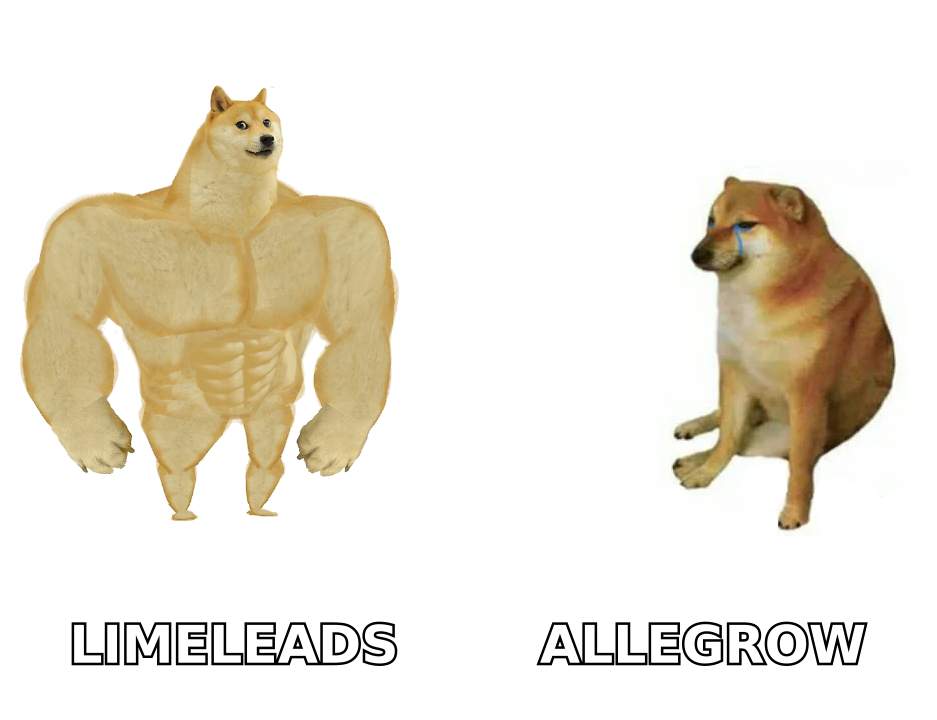
Allegrow vs Limeleads: the core difference#
Here's the cleanest way to hold it in your head. A cold email campaign has three failure points:
- Targeting — are you emailing the right people? (list quality)
- Validity — do those email addresses actually exist? (verification)
- Placement — do your emails reach the inbox? (deliverability)
Limeleads attacks #1 and partially #2. Allegrow attacks #3. Skip either layer and your reply rate collapses for reasons that look identical from the outside ("nobody's responding") but have opposite fixes.
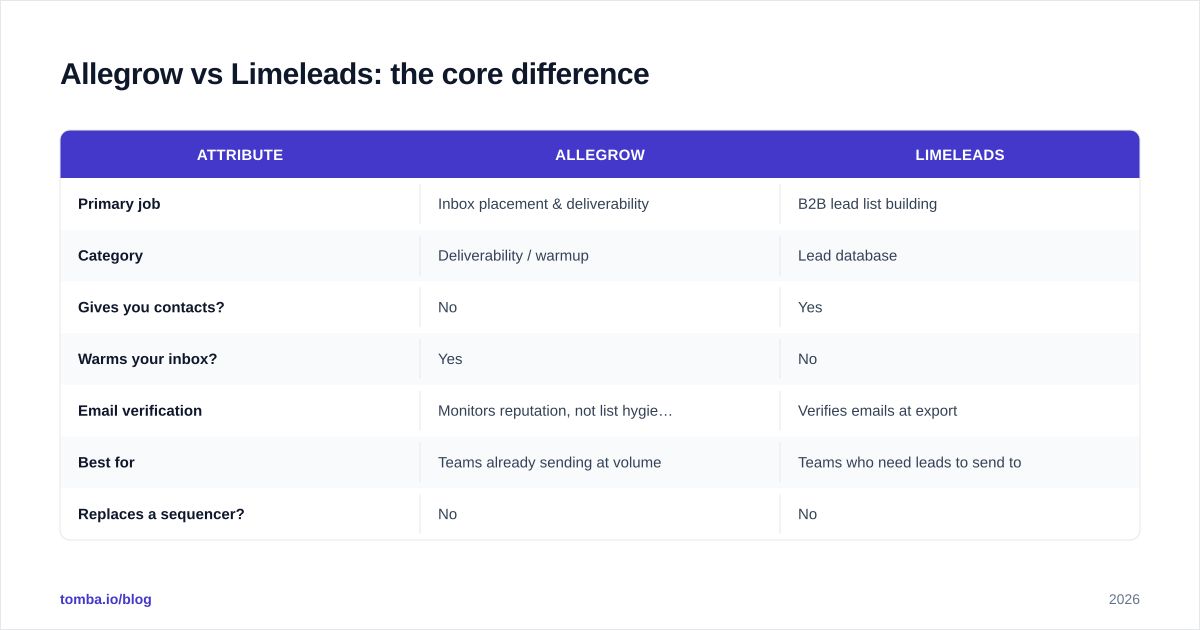
| Attribute | Allegrow | Limeleads |
|---|---|---|
| Primary job | Inbox placement & deliverability | B2B lead list building |
| Category | Deliverability / warmup | Lead database |
| Gives you contacts? | No | Yes |
| Warms your inbox? | Yes | No |
| Email verification | Monitors reputation, not list hygiene | Verifies emails at export |
| Best for | Teams already sending at volume | Teams who need leads to send to |
| Replaces a sequencer? | No | No |
| Typical buyer | RevOps / deliverability owner | SDR / demand-gen |
Is Allegrow better than Limeleads?#
Wrong question, but here's the useful version of the answer: better at what?
If your problem is "I'm sending hundreds of emails and getting near-zero replies despite good copy," that's almost always a deliverability problem, and Allegrow is the better buy. No amount of new leads fixes a domain that lands in spam — you'd just burn fresh contacts faster.
If your problem is "I've exhausted my list and need more qualified prospects in [vertical]," Limeleads is the better buy. The best inbox placement in the world is worthless with nobody to email.
The trap is buying the one that's easier to imagine working. Lead lists feel productive — you get a CSV with hundreds of rows, dopamine included. Deliverability is invisible until you measure it. That asymmetry pushes teams to over-invest in list volume and under-invest in placement, which is exactly backwards once you're sending at any real scale.
Pricing: how do they compare?#
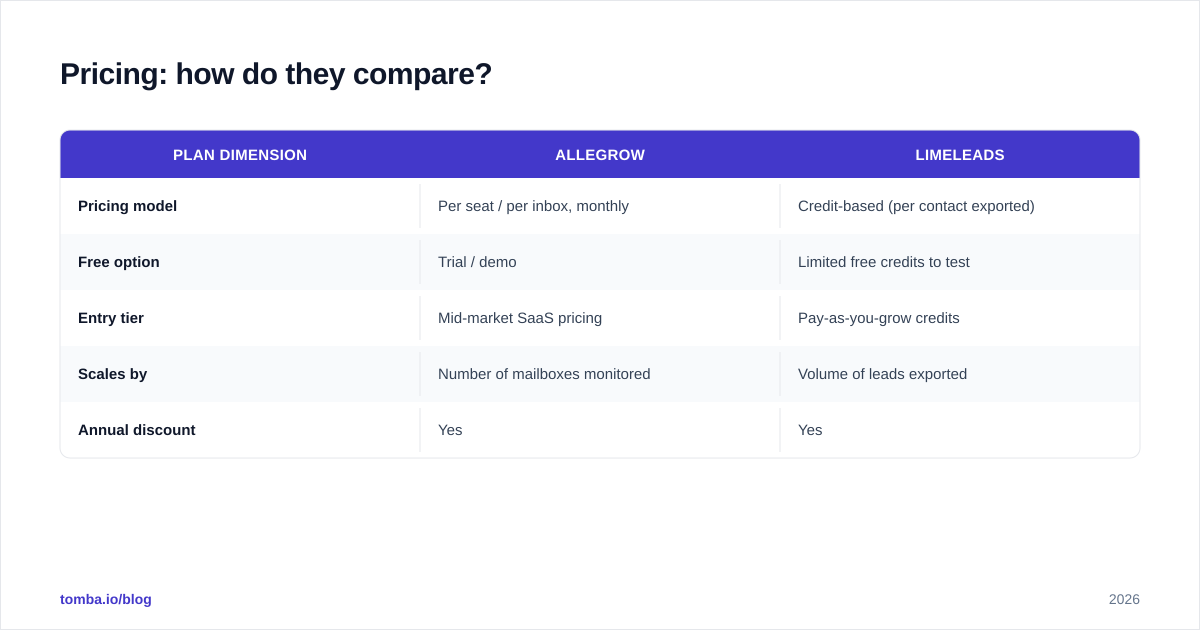
Both vendors gate exact numbers behind sign-up or sales calls and adjust tiers frequently, so treat the shape below as directional and confirm on their own sites — Allegrow and Limeleads — before you commit.
| Plan dimension | Allegrow | Limeleads |
|---|---|---|
| Pricing model | Per seat / per inbox, monthly | Credit-based (per contact exported) |
| Free option | Trial / demo | Limited free credits to test |
| Entry tier | Mid-market SaaS pricing | Pay-as-you-grow credits |
| Scales by | Number of mailboxes monitored | Volume of leads exported |
| Annual discount | Yes | Yes |
The pricing models reflect the products. Allegrow charges by inbox because deliverability is an ongoing, per-mailbox service. Limeleads charges by contact because each export is a discrete unit of value. That also means costs scale differently: Allegrow's bill is roughly flat regardless of how many emails you send, while Limeleads' cost climbs directly with how aggressively you build lists.
What about email accuracy and verification?#
This is where the comparison gets interesting, because it exposes a gap that neither tool fully covers.
Limeleads verifies emails at export, which is good hygiene — but database-sourced emails go stale fast. People change jobs roughly every 2–4 years, and B2B contact data decays around 25–30% annually per most industry estimates (see vendor benchmarks on G2). A list that was 95% valid at export can drift well below that within months.
Allegrow doesn't verify your list at all — it monitors your reputation, not the recipients' validity. So if you push a stale list into a well-warmed Allegrow inbox, you'll still rack up bounces, and bounces are one of the fastest ways to destroy the reputation Allegrow just helped you build.
The fix is a dedicated verification step between sourcing and sending. Running your list through an email verifier before a campaign catches the addresses that died since export. For teams pulling large lists, bulk verification makes this a one-step gate rather than a manual chore.
Where does an email finder fit in?#
Neither Allegrow nor Limeleads is built to find a specific person's email on demand. Limeleads gives you whoever is in its database for a given filter; Allegrow assumes you already have addresses. But a lot of real prospecting is the opposite shape: "I know exactly who I want to reach — this VP at this company — get me their email."
That's the email-finder use case. Instead of browsing a database or trusting a static list, you query by name and domain (or run a domain search to pull every public address at a company) and get a verified result back. It's the difference between fishing with a net (database) and a spear (finder) — both catch fish, but for named-account outbound the spear wins.
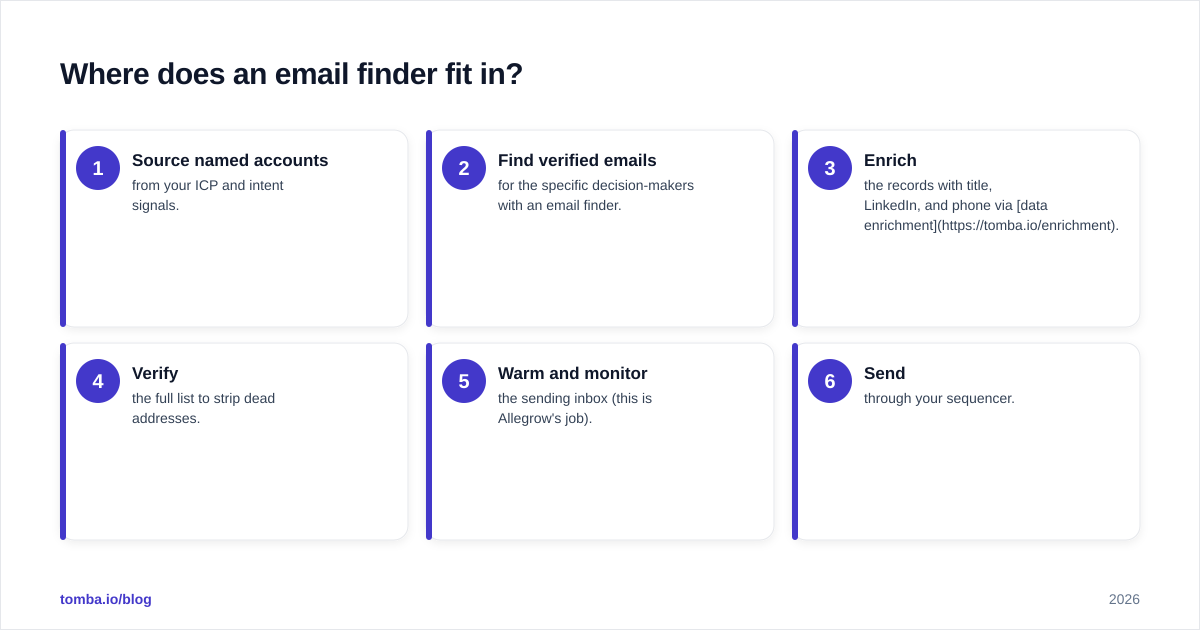
A practical stack often looks like this:
- Source named accounts from your ICP and intent signals.
- Find verified emails for the specific decision-makers with an email finder.
- Enrich the records with title, LinkedIn, and phone via data enrichment.
- Verify the full list to strip dead addresses.
- Warm and monitor the sending inbox (this is Allegrow's job).
- Send through your sequencer.
In that flow, Limeleads competes at step 1, Allegrow owns step 5, and an email finder owns step 2 — three different links in one chain.
Which should you choose in 2026?#
Decide by bottleneck, not by feature list. Run this quick diagnostic:
| Your situation | Buy first |
|---|---|
| Emails land in spam / Promotions | Allegrow |
| Low reply rate but inbox placement is fine | Better copy + list quality, not either tool alone |
| Out of leads in your target market | Limeleads |
| You have target accounts but no emails | An email finder (not these two) |
| Bounces creeping above 3% | A verifier first, then Allegrow |
| Scaling outbound from scratch | All three layers, sequenced |
Choose Allegrow if you already send at volume, have leads, and your metrics scream deliverability — high "sent" counts with suspiciously low opens and replies.
Choose Limeleads if your sending setup is healthy but your list is thin or stale, and you want a fast way to fill the top of funnel by firmographic filters.
Choose neither (yet) if your actual gap is finding and verifying specific contacts — that's an email-finder + verifier problem, and bolting on a database or a warmup tool won't solve it.
How does Tomba compare to both?#
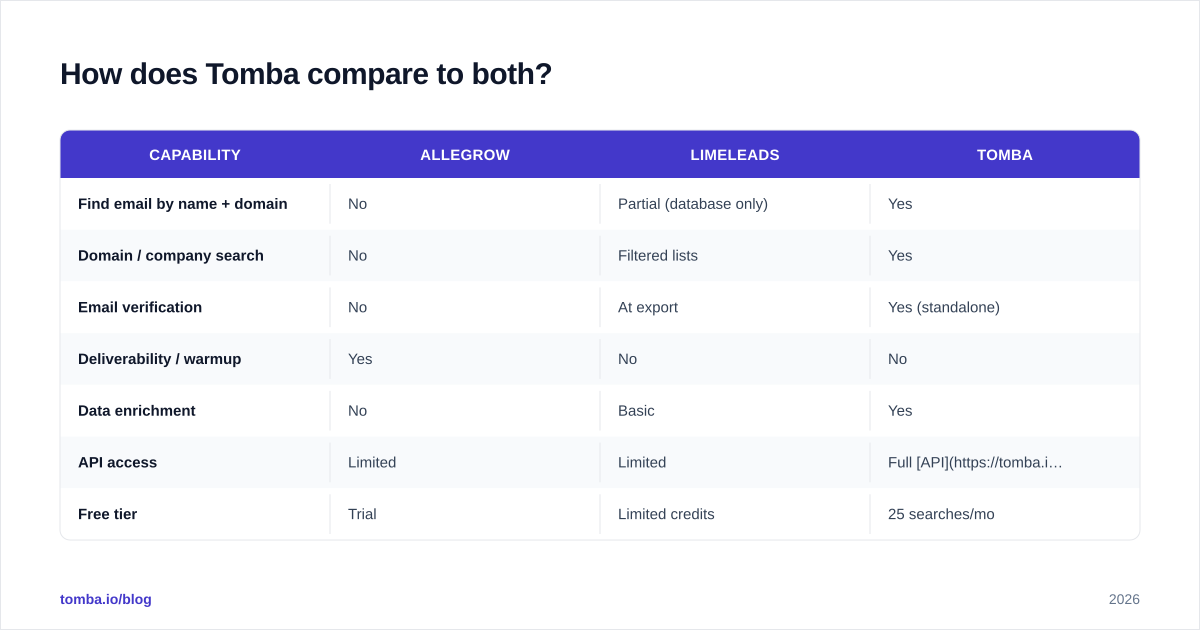
Tomba sits in the layer both tools skip: turning a name and a company into a verified, deliverable email. It overlaps with Limeleads on sourcing (you can pull contacts by domain) and with the verification gap that protects the reputation Allegrow builds — but it's purpose-built for accuracy on named contacts rather than bulk database dumps or warmup.
| Capability | Allegrow | Limeleads | Tomba |
|---|---|---|---|
| Find email by name + domain | No | Partial (database only) | Yes |
| Domain / company search | No | Filtered lists | Yes |
| Email verification | No | At export | Yes (standalone) |
| Deliverability / warmup | Yes | No | No |
| Data enrichment | No | Basic | Yes |
| API access | Limited | Limited | Full API |
| Free tier | Trial | Limited credits | 25 searches/mo |
For transparency on accuracy and where the data comes from, Tomba documents its data sources publicly — useful context when you're comparing the validity of any sourced list. Pricing is straightforward too: a free tier with 25 searches/month, then $49/mo (Starter), $99/mo (Growth), $249/mo (Pro), and custom Enterprise — full Tomba pricing is public.
The bottom line#
Allegrow and Limeleads aren't rivals — they're neighbors. Allegrow makes sure your email reaches the inbox; Limeleads makes sure you have someone to email. Buy the one that matches your current bottleneck, and recognize that a complete outbound stack needs three layers — accurate contacts, clean verification, and strong deliverability — not just the two these tools cover.
If your real gap is getting verified emails for the specific people you want to reach, start there. Tomba Email Finder turns a name and a domain into a deliverable address with verification built in — so the leads you feed into your sequencer (and the inbox Allegrow warms) don't bounce on arrival. Try it free with 25 searches a month and close the gap neither database nor warmup tool was built to fill.
Ready to find emails that actually work?
Join 150,000+ professionals who stopped guessing and started sending. Free credits on signup — no credit card required.
Get the Tomba newsletter
Practical outbound tactics and product updates — once every two weeks.
About the author