Allo Pricing, Reviews, Pros and Cons: A 2026 Buyer's Guide
A neutral 2026 breakdown of Allo's pricing tiers, real user reviews, and the honest pros and cons—plus where it fits in a modern B2B sales stack and the best alternatives to weigh first.
Choosing an AI phone and conversation tool is mostly a budgeting decision dressed up as a feature decision. You can read the marketing page in five minutes; what you actually need is whether the price scales the way your team grows, whether the reviews hide a recurring complaint, and where the tool breaks. This guide gives you the Allo pricing, reviews, pros and cons in one place, written as a buyer's analysis rather than a sales pitch.
TL;DR#
- Allo is an AI-powered phone and conversation platform aimed at teams that want to automate calls, answer inbound, and capture conversation data without staffing a full desk.
- Pricing starts low for solo and small-team use and climbs through usage-based tiers; plan on per-seat plus per-minute/credit costs rather than one flat number.
- Reviews skew positive on setup speed and call quality, with the most common complaints landing on edge-case accuracy and support response times.
- Biggest pro: fast time-to-value. Biggest con: costs and quirks that surface only at higher volume.
- Allo handles the conversation layer well, but it does not replace the data layer—you still need accurate contact details to feed it. Pair it with a dedicated email finder and phone finder.
What is Allo?#
Allo is a conversation-automation platform built around voice. Think of it as hiring a tireless front-desk rep who never sleeps, never forgets to log a call, and answers on the first ring—except it's software. You point it at a phone workflow (inbound answering, outbound follow-up, qualification), give it a script and a knowledge base, and it handles the back-and-forth, then hands structured notes to your CRM.
For B2B sales and revenue teams, the appeal is straightforward: the bottleneck in outbound has never been talking, it's been consistency. Reps skip follow-ups, mistype notes, and let warm leads cool. A tool like Allo standardizes that motion. You can read more about where this category sits in the broader sales automation landscape, but the short version is that Allo competes on conversation quality and ease of setup rather than on being a full CRM.
The thing to understand before you look at price is the architecture of value. Allo sits at the conversation layer. Above it is your strategy and offer; below it is your data. The tool is only as good as the contacts and context you feed it—a perfect AI call to a wrong number is still a wasted minute you paid for.
How much does Allo cost?#
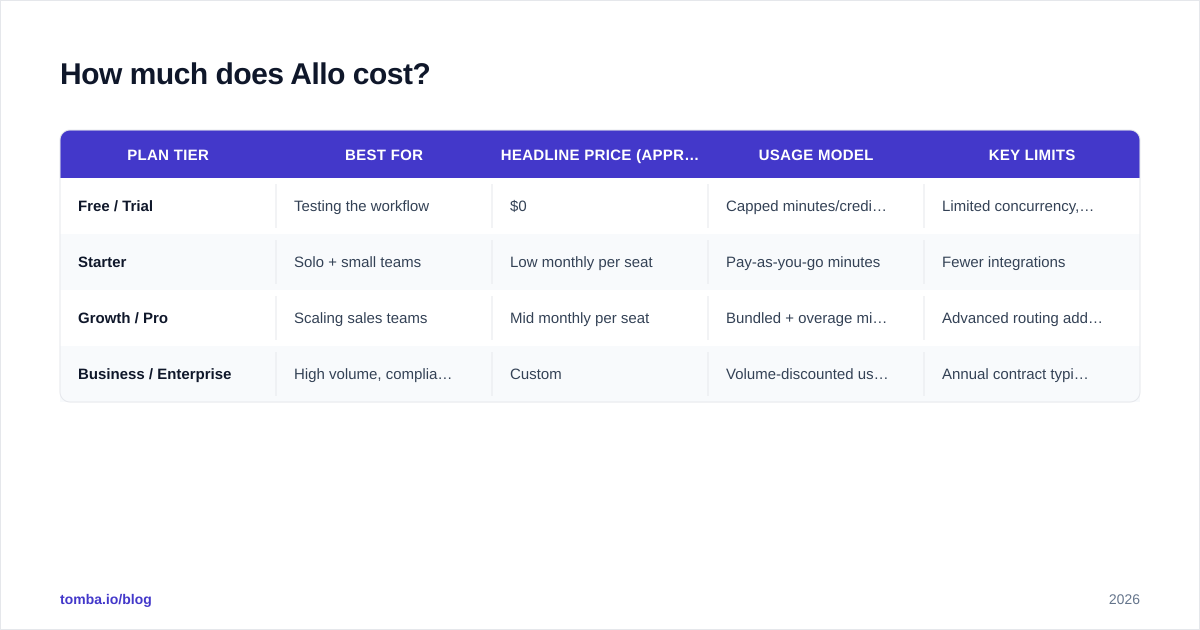
Allo uses a tiered model that combines a per-seat or per-account subscription with usage-based consumption (minutes, calls, or credits, depending on the workflow). That structure is common in this category, and it means your real monthly bill depends as much on call volume as on the headline plan price.
The table below reflects the typical shape of Allo's plans at the time of writing. Pricing in this space changes often, so confirm the live numbers on the official Allo site before you commit.
| Plan tier | Best for | Headline price (approx.) | Usage model | Key limits |
|---|---|---|---|---|
| Free / Trial | Testing the workflow | $0 | Capped minutes/credits | Limited concurrency, branding |
| Starter | Solo + small teams | Low monthly per seat | Pay-as-you-go minutes | Fewer integrations |
| Growth / Pro | Scaling sales teams | Mid monthly per seat | Bundled + overage minutes | Advanced routing add-ons |
| Business / Enterprise | High volume, compliance | Custom | Volume-discounted usage | Annual contract typical |
A few budgeting realities that the pricing page won't put in bold:
- Usage is the variable that bites. A seat price looks cheap until you multiply average call length by call volume across a quarter. Model your real minutes, not your hoped-for minutes.
- Integrations can sit behind higher tiers. If a native CRM sync matters to you, check which plan unlocks it before you fall in love with the Starter price.
- Annual vs. monthly gaps are real. Like most SaaS, the per-seat cost drops meaningfully on annual billing—useful leverage if you're confident in the tool.
If you're comparing this against the cost of building your own contact data pipeline, it's worth knowing that data tools price very differently. For reference, transparent Tomba pricing runs from a Free tier (25 searches/mo) through Starter at $49/mo, Growth at $99/mo, and Pro at $249/mo—flat monthly, not per-minute. The two categories solve different problems, but you'll likely budget for both.
)
What do Allo reviews say?#
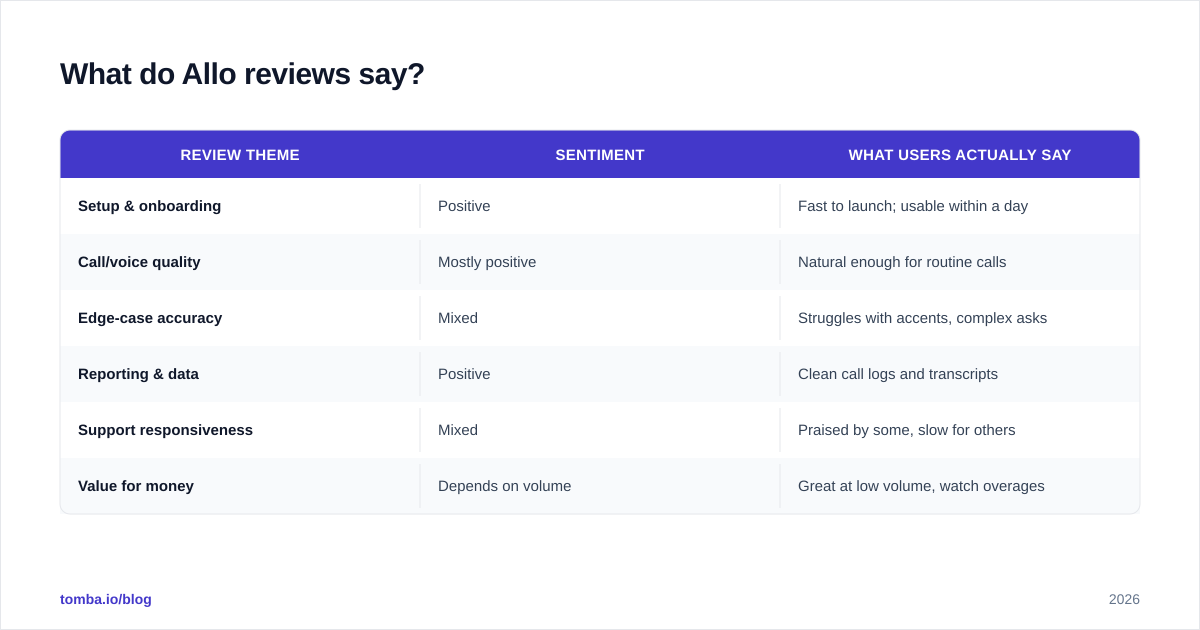
Reviews for AI conversation tools tend to cluster around a few themes, and Allo is no exception. Aggregating public sentiment from review platforms like G2 and Capterra, here's the honest read.
| Review theme | Sentiment | What users actually say |
|---|---|---|
| Setup & onboarding | Positive | Fast to launch; usable within a day |
| Call/voice quality | Mostly positive | Natural enough for routine calls |
| Edge-case accuracy | Mixed | Struggles with accents, complex asks |
| Reporting & data | Positive | Clean call logs and transcripts |
| Support responsiveness | Mixed | Praised by some, slow for others |
| Value for money | Depends on volume | Great at low volume, watch overages |
The pattern is consistent with a maturing product: the core experience lands well, the rough edges show up at the margins. Power users who push the tool into complex, high-stakes conversations report more friction than teams using it for predictable, scripted motions. That's not damning—it's the expected shape for AI voice in 2026. Read reviews with your own use case in mind, because a complaint about complex multi-turn negotiation is irrelevant if you only need appointment confirmations.
What are the pros of Allo?#
Speed to value. The single most repeated compliment. You can get a working call flow live quickly, which matters when you're testing whether automation even fits your motion.
Consistency at scale. Every call gets logged, transcribed, and structured the same way. For sales managers, that consistency is gold—it turns conversations into searchable data instead of half-remembered notes. It also feeds cleaner response rate analysis because you're finally measuring against complete records.
Lower cost than headcount for repetitive work. For high-volume, low-complexity calls—confirmations, basic qualification, routing—the math often favors automation over a human seat.
Decent integration story. Connecting Allo to your CRM and downstream tools is generally smooth on the right plan, which keeps the conversation data flowing into your pipeline instead of stranded in a silo.
What are the cons of Allo?#
Usage-based pricing surprises. The most practical risk. Teams that don't model call volume can get a bill that's double their mental estimate. This isn't unique to Allo, but it's the thing buyers underestimate most.
Edge-case handling. AI voice still stumbles on heavy accents, interruptions, and genuinely novel questions. If your calls are unpredictable or high-stakes, expect to keep a human in the loop.
Support variability. Reviews on responsiveness are inconsistent. For a tool sitting in your live customer-facing workflow, slow support is more than an annoyance—it's a revenue risk during an outage.
It's not a data source. Allo manages conversations; it does not find or verify who to contact. Feed it stale or wrong numbers and you pay (in minutes) for failure. This is the gap most buyers miss.
Who is Allo best for?#
Allo is a strong fit if you run high-volume, repeatable phone workflows: inbound answering, appointment confirmations, lead qualification by script, and first-touch follow-up. The more standardized your conversations, the better the ROI and the more predictable the bill.
It's a weaker fit if your calls are consultative, technical, or negotiation-heavy, or if you have unpredictable call volume that makes usage-based pricing hard to forecast. In those cases you'll either keep paying for human reps anyway or fight the tool's edge cases constantly.
A useful gut check: if you can write the call as a flowchart, Allo will probably shine. If the call only works because of a skilled human reading the room, automation is the wrong layer to optimize first.
How does Allo compare to alternatives?#
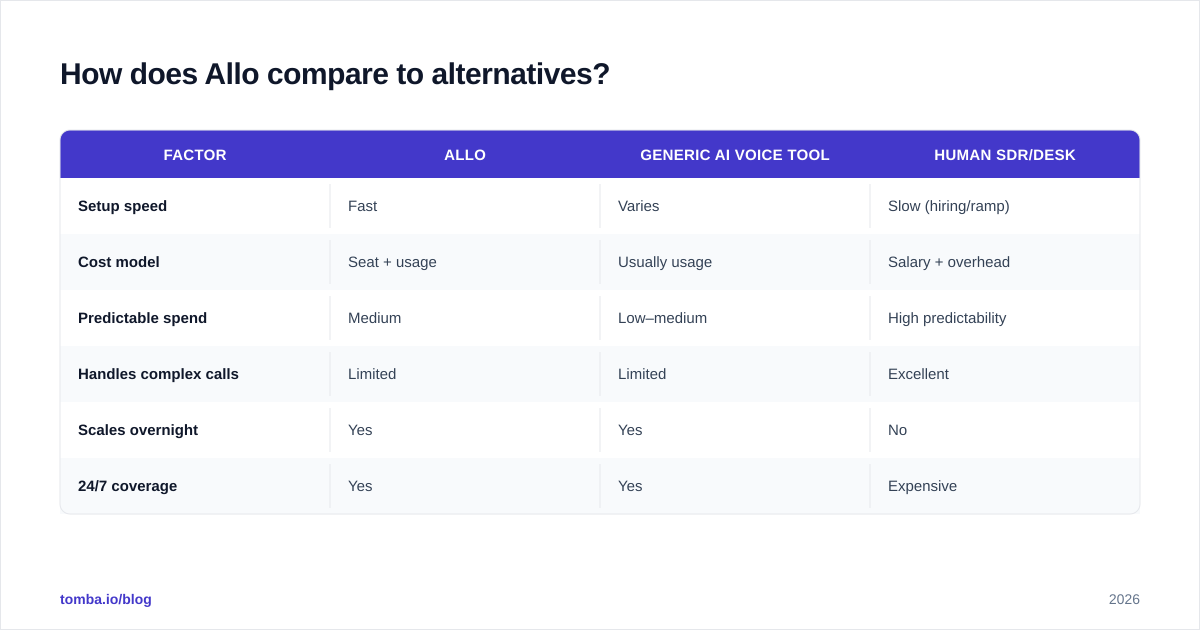
No tool wins on every axis. The right comparison depends on whether you care most about voice quality, price predictability, or breadth of automation. Use the matrix below as a starting frame, then trial your top two against a real workflow.
| Factor | Allo | Generic AI voice tool | Human SDR/desk |
|---|---|---|---|
| Setup speed | Fast | Varies | Slow (hiring/ramp) |
| Cost model | Seat + usage | Usually usage | Salary + overhead |
| Predictable spend | Medium | Low–medium | High predictability |
| Handles complex calls | Limited | Limited | Excellent |
| Scales overnight | Yes | Yes | No |
| 24/7 coverage | Yes | Yes | Expensive |
The honest takeaway: AI voice tools like Allo win on speed, coverage, and cost-per-routine-call. Humans still win on nuance. Most mature teams in 2026 run a hybrid—automation for the predictable volume, people for the deals that matter—and route between them based on lead quality.
)
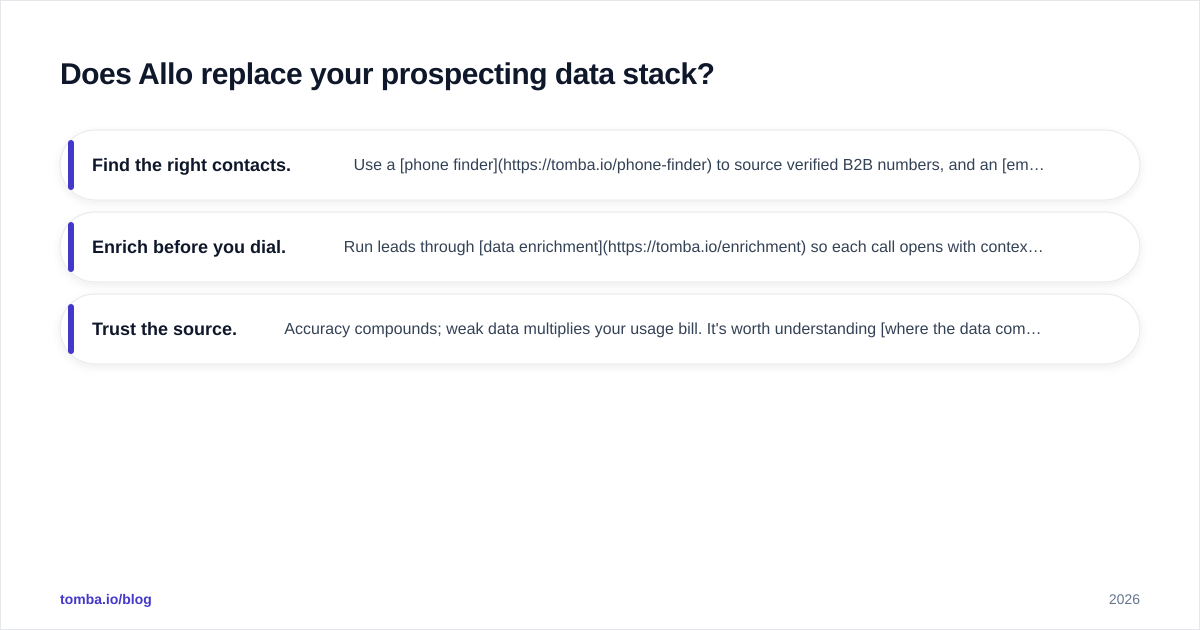
Does Allo replace your prospecting data stack?#
No—and this is the most important line in the review. Allo is a conversation engine, not a contact database. It assumes you already know who to call and that the number is correct. That assumption is where most automation ROI quietly leaks.
Picture it like a delivery fleet: Allo is the fleet of drivers who can run routes 24/7, but they still need accurate addresses. Bad data means trucks (and your paid minutes) driving to nowhere. Before any AI call tool earns its price, the data underneath it has to be right.
That's the layer to lock down first:
- Find the right contacts. Use a phone finder to source verified B2B numbers, and an email finder for multi-channel follow-up so you're never single-threaded on voice.
- Enrich before you dial. Run leads through data enrichment so each call opens with context—role, company, and intent—instead of a cold blank.
- Trust the source. Accuracy compounds; weak data multiplies your usage bill. It's worth understanding where the data comes from before you scale spend on any conversation tool.
Get the data layer right and a tool like Allo performs the way the demo promised. Get it wrong and you're paying premium per-minute rates to talk to disconnected numbers.
Frequently asked questions#
Is Allo worth the price?#
For high-volume, scripted phone work, usually yes—the cost per routine call beats a human seat. For complex or low-volume calling, the usage-based pricing makes the value harder to justify. Model your real minutes before deciding.
What's the catch with Allo's pricing?#
The seat price is rarely the full bill. Usage (minutes, calls, or credits) is the variable that drives cost, and overage charges are where teams get surprised. Always estimate spend from projected volume, not from the headline plan.
Does Allo integrate with my CRM?#
Generally yes, though native syncs can sit behind higher tiers. Confirm which plan unlocks the integration you need before subscribing, and verify it pushes the conversation data you actually want to report on.
Can Allo replace human sales reps?#
Partially. It can replace repetitive, scriptable call work and free reps for high-value conversations. It does not replace consultative selling or complex negotiation, where human judgment still wins decisively.
Do I still need contact data tools if I use Allo?#
Yes. Allo handles conversations, not contact discovery or verification. You'll still need an email and phone data source to feed it accurate, enriched leads—otherwise you're paying per minute to reach wrong numbers.
The bottom line#
Allo earns its place for teams with predictable, high-volume phone workflows that want speed, coverage, and consistency without scaling headcount. Just go in with eyes open: budget from usage, not the seat price, and keep a human in the loop for the calls that actually move revenue.
Whatever conversation tool you land on, it's only as good as the data feeding it. Before you spend a dollar on AI minutes, make sure every contact is real and reachable. Start with the Tomba Email Finder to source and verify professional contacts at scale—so every call your stack makes lands on a real person, not a dead line. It's the cheapest insurance you can buy against wasted automation spend.
// get started
Find, verify and enrich your first contacts today
Start on the free plan with 25 searches a month, then scale when your team is ready.
Free plan · No credit card required · GDPR & CCPA
// about the author