Altss vs FindThatLead 2026: Which B2B Email Finder Wins?
Altss vs FindThatLead, compared on data freshness, accuracy, pricing, and bounce rates — plus where a verification-first finder like Tomba fits in 2026.
TL;DR
- Altss is built around real-time, on-demand contact search — it queries live sources when you look someone up, which favors freshness over a giant pre-built list.
- FindThatLead is a volume-first lead generation tool: domain scraping, bulk prospecting, and a built-in cold email sender aimed at marketers who want quantity fast.
- Accuracy and bounce rate are where the two diverge most — real-time lookups tend to bounce less, while bulk scrapers trade precision for scale.
- Pricing favors FindThatLead for high-volume list building; Altss leans toward researchers and recruiters who need current, hard-to-find contacts.
- If neither fits cleanly, a verification-first finder like Tomba Email Finder gives you confidence scores and built-in verification before you ever hit send.
What are Altss and FindThatLead?#
Think of these two tools as a sniper rifle versus a fishing net. Altss is the sniper — you point it at one specific person or company and it pulls the freshest contact data it can find at that moment. FindThatLead is the net — you cast it across a domain or an entire industry and haul back as many leads as you can, then sort the keepers from the throwaways later.
Technically, Altss positions itself as a real-time B2B contact intelligence platform. Instead of serving results from a static database that may be months stale, it runs lookups against live sources when you request a contact. That matters because B2B data decays fast — people change jobs, titles shift, and roughly 30% of a contact database goes stale every year according to most data-hygiene research.
FindThatLead (findthatlead.com) has been around far longer and is squarely a lead generation suite. Its core features are domain search (give it a company URL, get back the email patterns and contacts), a Chrome extension for prospecting on the fly, bulk processing for uploading lists, and a "Scrab.in" + email-sending layer so you can prospect and send campaigns in one place. It's a marketer's tool first, a data tool second.
So the headline difference: Altss optimizes for freshness and depth on a single target, while FindThatLead optimizes for throughput and an all-in-one outbound workflow.
How accurate is each tool's data?#
Accuracy is the whole game. A list of 10,000 emails where 25% bounce is worse than a list of 2,000 where 2% bounce — the first one torches your sender reputation and lands you in spam folders.

Here's the mechanical reason the two tools differ. Altss's real-time approach means the data is generated close to the moment you need it, so it captures recent job changes and avoids serving you an email that was retired six months ago. The trade-off is coverage — a live lookup can come back empty for obscure or privacy-protected contacts.
FindThatLead leans on pattern matching and crawled data. When you search a domain, it often infers an address from a known company pattern (firstname.lastname@, f.lastname@, etc.) and presents it with a confidence guess. This is fast and scales beautifully, but inferred emails are exactly the ones most likely to bounce if the pattern is wrong or the person has left.
Neither tool fully solves the catch-all problem — domains that accept every address at the SMTP layer, so a "valid" result tells you nothing. If catch-all domains are a big part of your market, you'll want a dedicated catch-all verifier in the loop regardless of which finder you choose.
The practical takeaway: don't trust any finder's "valid" label blindly. Run found emails through an independent email verifier before a campaign. The best finders bundle verification; the rest leave it to you.
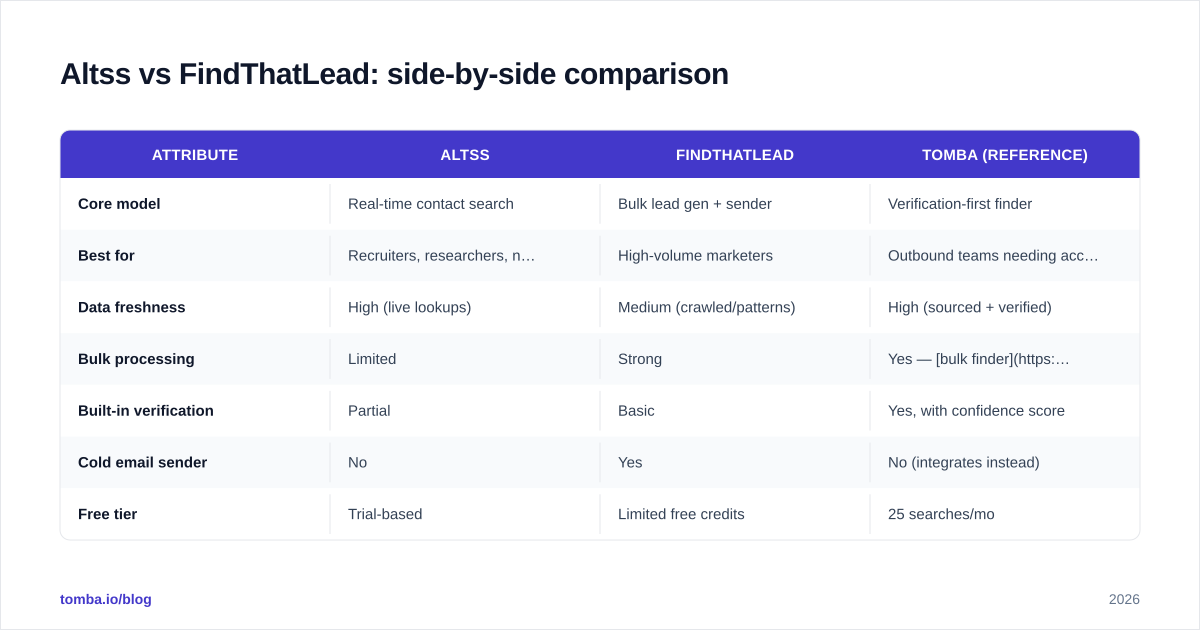
Altss vs FindThatLead: side-by-side comparison#
| Attribute | Altss | FindThatLead | Tomba (reference) |
|---|---|---|---|
| Core model | Real-time contact search | Bulk lead gen + sender | Verification-first finder |
| Best for | Recruiters, researchers, niche targets | High-volume marketers | Outbound teams needing accuracy |
| Data freshness | High (live lookups) | Medium (crawled/patterns) | High (sourced + verified) |
| Bulk processing | Limited | Strong | Yes — bulk finder |
| Built-in verification | Partial | Basic | Yes, with confidence score |
| Cold email sender | No | Yes | No (integrates instead) |
| Free tier | Trial-based | Limited free credits | 25 searches/mo |
| Entry paid price | Custom / higher | ~$49/mo range | $49/mo Starter |
| API access | Yes | Yes | Yes |

A few notes on reading this table. "Best for" is the single most useful row — these tools were built for different buyers, and most disappointment comes from using the wrong one. FindThatLead frustrates researchers who need one hard-to-find executive; Altss frustrates growth marketers who need 5,000 leads by Friday.
Which tool is better for cold email campaigns?#
For end-to-end cold email, FindThatLead is the more natural fit — but with a deliverability asterisk.
FindThatLead's appeal is that it collapses three steps into one platform: find leads, verify (lightly), and send sequences. For a solo founder or a small growth team, that consolidation is genuinely valuable. You don't stitch together a finder, a verifier, and a sending tool.
The catch is that built-in senders tucked inside lead-gen tools rarely match purpose-built cold email platforms on email deliverability. They typically lack granular warmup, inbox rotation, and the spam-testing controls that dedicated senders offer. If deliverability is critical, you're often better off exporting from your finder into a specialized sending tool.
Altss isn't a cold email tool at all — it's a data source. You'd pair it with your own sending stack. That's not a weakness so much as a different philosophy: do one thing (fresh data) extremely well, and let you choose the rest.
Before any campaign, run your subject lines through a spam checker and confirm your SPF record is correct. The cleanest list in the world won't help if your domain authentication is broken.
How do the pricing models compare?#
Pricing is where buyer-fit becomes obvious.
FindThatLead uses a credit-based model with tiers that scale by volume — the more leads and emails you process, the more you pay, with a limited free allowance to test. Because its whole value is throughput, the pricing rewards heavy bulk users and gets expensive only at the very top end.
Altss tends toward higher per-contact economics and custom/enterprise-style quoting, reflecting the cost of real-time sourcing. You pay more per lookup, but each lookup is fresher. That math works for recruiters filling a $30k placement or sales teams chasing a handful of high-value accounts — and works poorly for spray-and-pray volume.
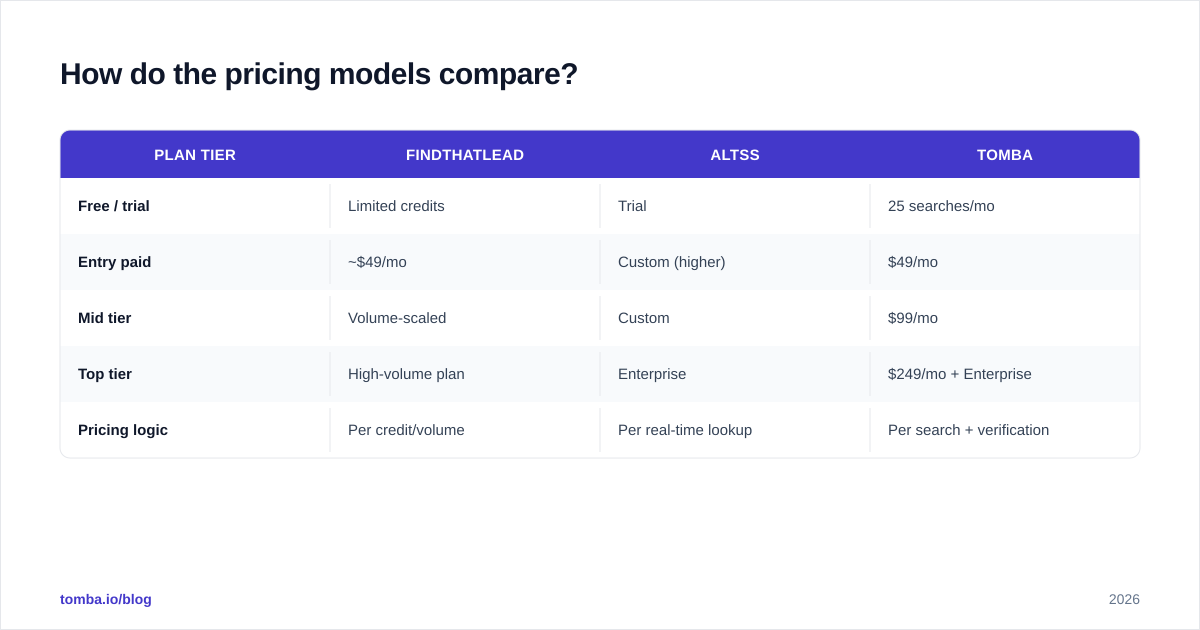
For context, here's where a verification-first alternative sits. Tomba pricing runs a Free tier at 25 searches/mo, Starter at $49/mo, Growth at $99/mo, Pro at $249/mo, and custom Enterprise. The reason to keep a third option in view: if your real pain is bounce rate, paying for accuracy and bundled verification often beats paying for raw volume you then have to clean anyway.
| Plan tier | FindThatLead | Altss | Tomba |
|---|---|---|---|
| Free / trial | Limited credits | Trial | 25 searches/mo |
| Entry paid | ~$49/mo | Custom (higher) | $49/mo |
| Mid tier | Volume-scaled | Custom | $99/mo |
| Top tier | High-volume plan | Enterprise | $249/mo + Enterprise |
| Pricing logic | Per credit/volume | Per real-time lookup | Per search + verification |
When should you pick a third option?#
Choose something else when your bottleneck is deliverability, not discovery. Both Altss and FindThatLead are good at finding contacts; neither is primarily engineered to guarantee an email is safe to mail at scale.
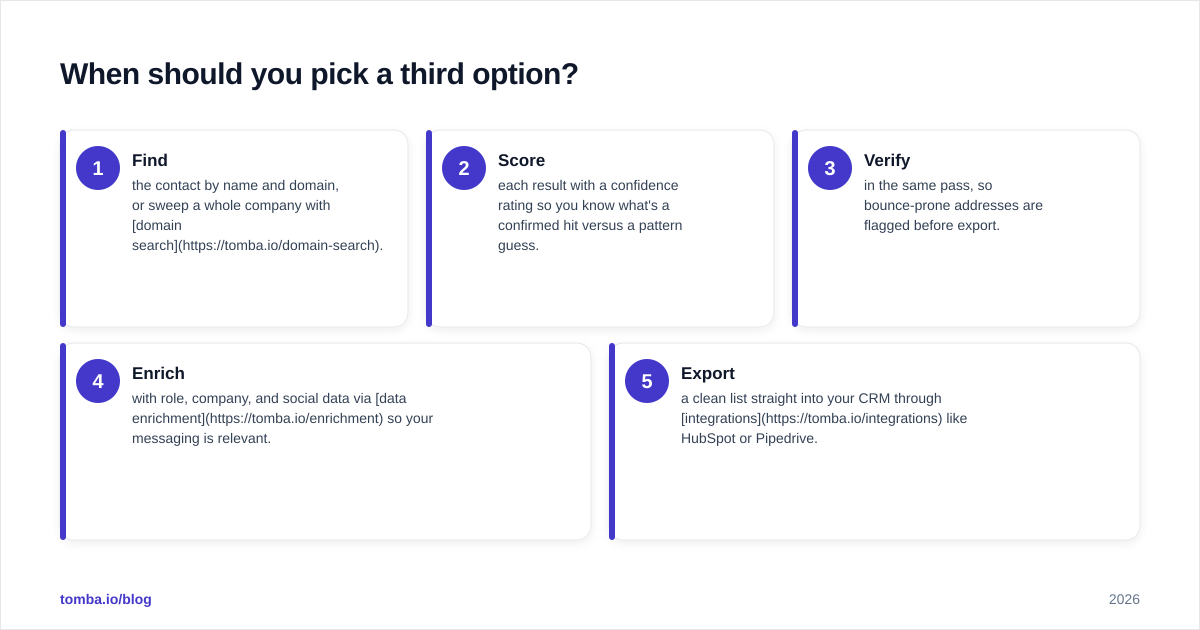
That's the gap a verification-first finder fills. The workflow looks like this:
- Find the contact by name and domain, or sweep a whole company with domain search.
- Score each result with a confidence rating so you know what's a confirmed hit versus a pattern guess.
- Verify in the same pass, so bounce-prone addresses are flagged before export.
- Enrich with role, company, and social data via data enrichment so your messaging is relevant.
- Export a clean list straight into your CRM through integrations like HubSpot or Pipedrive.
You can validate this approach independently — check vendor reviews on G2 and Capterra and look specifically at how users rate bounce rate and data accuracy, not just ease of use. Those two metrics predict campaign outcomes better than any feature list.
What about scale, bulk, and API use?#
If your motion is programmatic — enriching thousands of CRM records or building leads inside your own app — API quality matters more than the dashboard.
FindThatLead and Altss both ship APIs, but they reflect their philosophies: FindThatLead's is geared to bulk lead pulls, Altss's to real-time single lookups. Latency and rate limits differ accordingly, so test against your actual workload before committing.
For bulk operations specifically, look at how each tool handles a 10,000-row CSV: does it dedupe, does it verify inline, and does it return confidence scores per row? A bulk email finder that returns 9,000 "found" results but no verification status just moves the cleanup work downstream to you. The whole point of bulk is to reduce manual review, not relocate it.
One more scale consideration: catch-all domains explode in bulk runs. On a big list, the percentage of addresses sitting behind catch-all servers can be substantial, and a finder that marks them all "valid" inflates your apparent success while quietly seeding future bounces. Treat catch-all handling as a first-class evaluation criterion, not a footnote.
Frequently asked questions#
Is Altss better than FindThatLead? Not universally — it's better for fresh, hard-to-find individual contacts. FindThatLead is better for high-volume list building and all-in-one outbound. Match the tool to your motion.
Which has the lower bounce rate? Real-time lookups (Altss's model) generally bounce less than inferred/pattern emails, but neither replaces a dedicated verification step before sending.
Can I use both? Yes. Some teams use a bulk tool for top-of-funnel volume and a real-time or verification-first tool to clean and confirm high-value targets.
Do they integrate with my CRM? Both offer integrations and APIs. Confirm native support for your specific CRM (Salesforce, HubSpot, Pipedrive) rather than assuming a Zapier bridge is enough.
The bottom line#
Pick FindThatLead if you're a growth marketer who wants volume plus a built-in sender in one tab. Pick Altss if you're a recruiter or researcher who needs the freshest possible data on specific, hard-to-reach people and you'll bring your own sending stack.
But if what actually keeps you up at night is bounce rate, blacklisting, and whether your "valid" emails are really valid, lead with accuracy. Tomba Email Finder finds professional emails by name, domain, or company and returns a confidence score with built-in verification, so the list you export is the list you can safely send. Start free with 25 searches a month, scale to the $49/mo Starter plan when you're ready, and stop paying to clean up data that was never clean to begin with. Try it on your next 25 prospects and compare the bounce rate yourself.
// get started
Find, verify and enrich your first contacts today
Start on the free plan with 25 searches a month, then scale when your team is ready.
Free plan · No credit card required · GDPR & CCPA
// about the author