Ampliz vs Wiza (2026): B2B Data & Email Finder Compared
A neutral, hands-on breakdown of Ampliz vs Wiza — data coverage, LinkedIn extraction, pricing, and accuracy — plus where a dedicated email finder beats both.
Choosing between Ampliz and Wiza usually comes down to one question: do you need a healthcare-heavy B2B database, or do you need to turn LinkedIn lists into verified emails fast? They look similar on a feature grid, but they solve different problems. This guide breaks down where each one actually earns its price — and where a focused email finder beats both.
TL;DR#
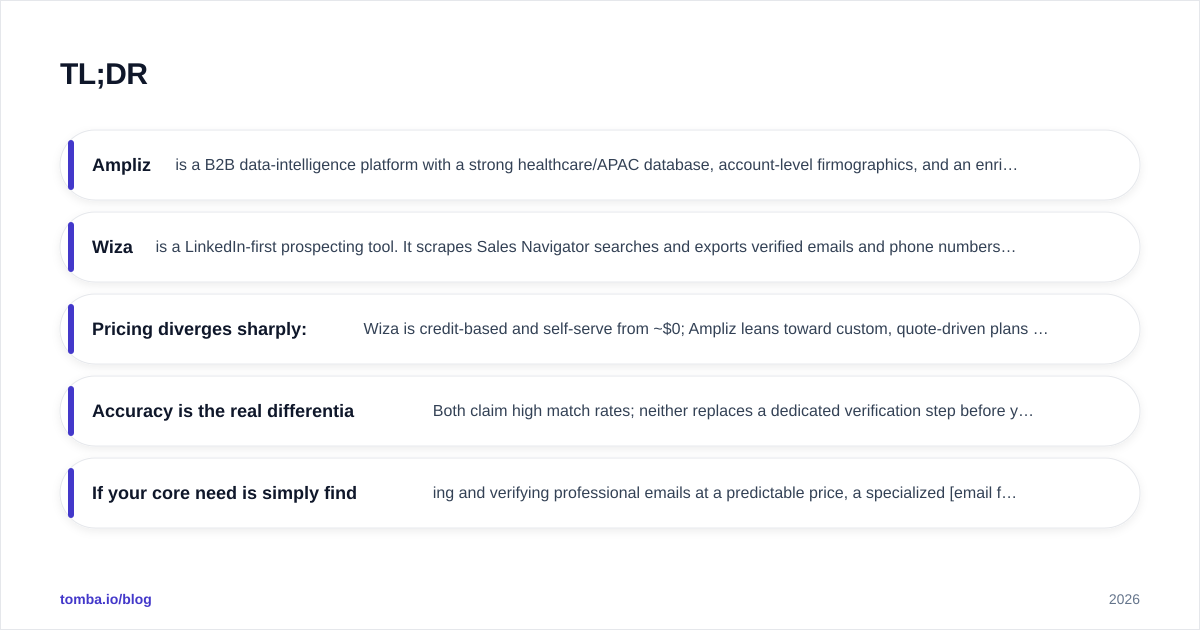
- Ampliz is a B2B data-intelligence platform with a strong healthcare/APAC database, account-level firmographics, and an enrichment API. Best for teams that sell into specific verticals and want context, not just contacts.
- Wiza is a LinkedIn-first prospecting tool. It scrapes Sales Navigator searches and exports verified emails and phone numbers in bulk. Best for SDRs living inside LinkedIn.
- Pricing diverges sharply: Wiza is credit-based and self-serve from ~$0; Ampliz leans toward custom, quote-driven plans for serious volume.
- Accuracy is the real differentiator. Both claim high match rates; neither replaces a dedicated verification step before you send.
- If your core need is simply finding and verifying professional emails at a predictable price, a specialized email finder like Tomba is cheaper and more transparent than either.
What is Ampliz?#
Ampliz is a B2B data and sales-intelligence platform. Instead of starting from a LinkedIn profile, you start from an audience: a job title, an industry, a region, a technology stack, or — its signature strength — a healthcare specialty. Ampliz then returns contact records enriched with firmographic and, in healthcare, "intelligence" fields like NPI numbers, hospital affiliation, and specialty.
Think of Ampliz less like a search box and more like a research library. You tell it the kind of account and persona you want to reach, and it surfaces matching records with context attached. That context is the point: reps selling medical devices, SaaS into hospital systems, or services across APAC markets get data that generic global databases tend to miss.
Ampliz exposes this through a web app, list-building tools, and an enrichment API for pushing data into your CRM. You can read more about how vendors source this kind of information on Tomba's data sources page, which explains the trade-offs behind any B2B dataset.
What is Wiza?#
Wiza is built around one workflow: you run a search in LinkedIn Sales Navigator (or import a list), and Wiza extracts the contacts, finds their work and personal emails, pulls phone numbers, and exports a clean CSV — or pushes it straight to your CRM. It validates emails in real time and only charges credits for valid results.
If Ampliz is a research library, Wiza is a conveyor belt bolted onto LinkedIn. Its Chrome extension and bulk export are the entire value proposition: take the prospecting you already do on LinkedIn and make it 10x faster to operationalize. For teams whose ICP lives on LinkedIn — most modern B2B SaaS and agency sales — that's exactly the right shape.
The catch is the dependency. Wiza's coverage is only as good as LinkedIn's, and its data freshness rides on profiles being current. For contacts who aren't active on LinkedIn, or whole regions and verticals that under-index there, you'll find gaps that a database-first tool like Ampliz fills.
You can see how a LinkedIn-centric approach compares to direct domain lookups in our guide to the LinkedIn finder workflow.
Ampliz vs Wiza: side-by-side comparison#
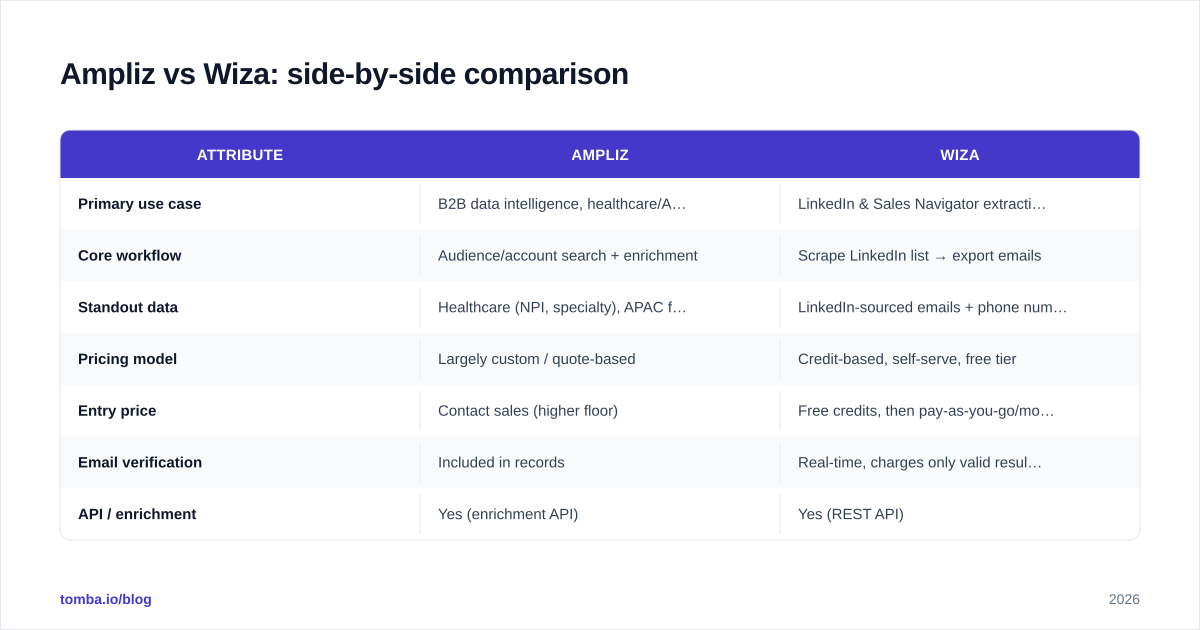
Here's the head-to-head on the attributes that actually drive a buying decision.
| Attribute | Ampliz | Wiza |
|---|---|---|
| Primary use case | B2B data intelligence, healthcare/APAC | LinkedIn & Sales Navigator extraction |
| Core workflow | Audience/account search + enrichment | Scrape LinkedIn list → export emails |
| Standout data | Healthcare (NPI, specialty), APAC firmographics | LinkedIn-sourced emails + phone numbers |
| Pricing model | Largely custom / quote-based | Credit-based, self-serve, free tier |
| Entry price | Contact sales (higher floor) | Free credits, then pay-as-you-go/monthly |
| Email verification | Included in records | Real-time, charges only valid results |
| API / enrichment | Yes (enrichment API) | Yes (REST API) |
| Best for | Vertical-specific outbound, ABM | High-volume LinkedIn SDR teams |
| Weakness | Cost/opacity, narrower outside verticals | LinkedIn dependency, freshness gaps |
The pattern is clear: Ampliz wins on depth in specific verticals, Wiza wins on speed and self-serve simplicity for LinkedIn-native teams.

Is Ampliz better than Wiza for data accuracy?#
Accuracy depends on where your prospects live. This is the single most misunderstood part of the Ampliz vs Wiza debate.
For healthcare and APAC targets, Ampliz typically returns richer, more accurate records because its database is built around those segments. For broad B2B prospecting where your buyers are active on LinkedIn, Wiza's real-time validation against current profiles often produces fresher emails than a static database snapshot.
But "high match rate" claims from any vendor need a skeptical read. A 95% match rate measured on easy, high-profile contacts collapses on long-tail SMB or non-English-speaking prospects. Independent benchmarks consistently show that headline accuracy numbers don't survive contact with a messy, real-world list.

This is why your workflow should never end at "tool returned an email." Run every result through an email verifier before it touches your sending domain. Both Ampliz and Wiza include verification, but a dedicated check — especially on catch-all domains where SMTP responses are ambiguous — catches bounces that in-app validation misses. One round of cleaning protects your sender reputation far more than any vendor's accuracy badge.
How does pricing compare?#
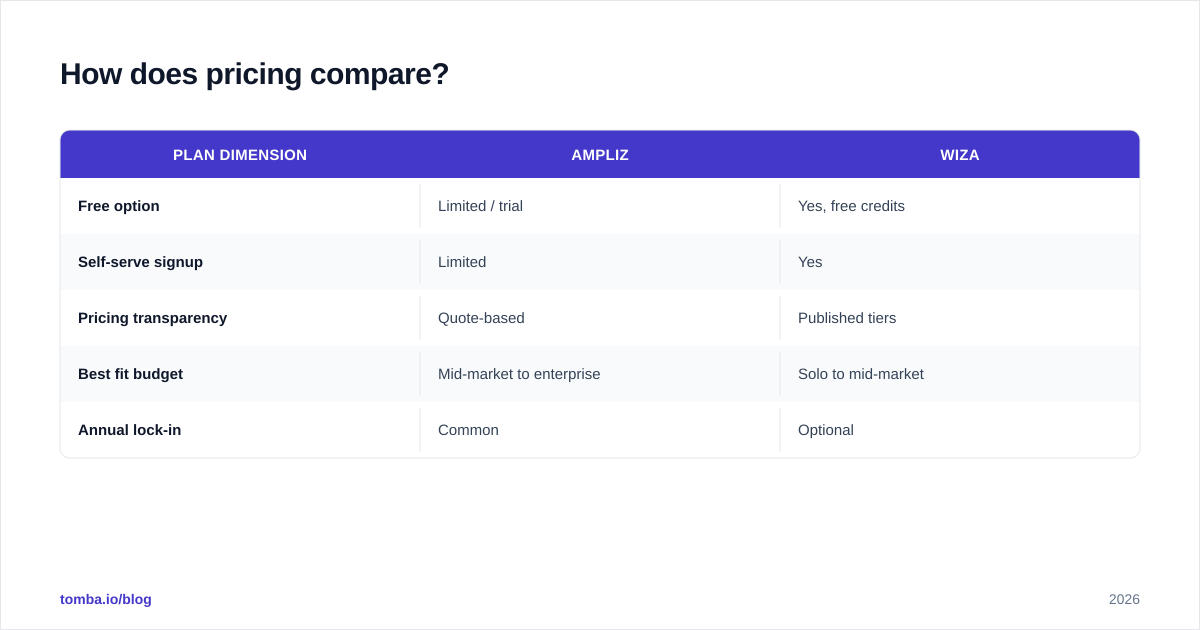
Pricing is where these two tools feel like they come from different planets.
Wiza is transparent and self-serve. You start with free credits, then move to credit packs or monthly plans that scale with how many emails and phone numbers you reveal. A solo founder or a small SDR team can sign up and be exporting within minutes, with costs they can predict per lead.
Ampliz leans enterprise. Pricing is largely quote-based, which means a sales conversation, annual commitments, and a higher floor. That's fine if you're funding a multi-rep team selling into hospitals across regions — the data depth justifies it. It's overkill if you just need a few thousand clean B2B emails a month.
| Plan dimension | Ampliz | Wiza |
|---|---|---|
| Free option | Limited / trial | Yes, free credits |
| Self-serve signup | Limited | Yes |
| Pricing transparency | Quote-based | Published tiers |
| Best fit budget | Mid-market to enterprise | Solo to mid-market |
| Annual lock-in | Common | Optional |
If predictable, published pricing matters to you, it's worth comparing both against Tomba pricing: a Free tier with 25 searches/month, Starter at $49/mo, Growth at $99/mo, and Pro at $249/mo — no sales call required to see the number.
Which one should you choose?#
Match the tool to your motion, not to the longest feature list.
Choose Ampliz if:
- You sell into healthcare, life sciences, or APAC markets.
- Account-level intelligence and firmographics matter as much as the contact.
- You're running account-based marketing and need depth per target.
- You have the budget for a quote-based, mid-market-plus platform.
Choose Wiza if:
- Your prospecting already happens inside LinkedIn Sales Navigator.
- You need fast, bulk export of verified emails and phone numbers.
- You want self-serve, pay-as-you-go pricing with no sales call.
- Your ICP is broad B2B where buyers maintain active LinkedIn profiles.
Consider a dedicated email finder if:
- Your main job is simply finding and verifying professional emails at scale.
- You want a domain search to map every contact at a target company.
- You need an email finder API to wire prospecting into your own product or workflow.
- Predictable per-search pricing beats paying for a heavy data platform.
Where a dedicated email finder fits#
Here's the honest framing most comparison posts skip: Ampliz and Wiza are doing more than email finding, and you pay for that breadth whether you use it or not. If your actual bottleneck is "I have company names and people's names, and I need their verified work emails," a focused tool is faster and cheaper.
That's the gap Tomba fills. You can find emails by name and domain, run a full bulk email finder over a list, verify everything in the same place, and enrich records through one data enrichment layer — without committing to a full intelligence platform or anchoring your data to LinkedIn's coverage.
The comparison table below shows how dedicated email-finding tools stack up on the metric that matters most for cold outreach: deliverable, verified addresses.

A practical stack many teams land on: use Wiza or Ampliz for the discovery motion that fits their vertical, then route every contact through a dedicated verifier before sending. Discovery and verification are different jobs, and treating them as one is how good lists still bounce.
Frequently asked questions#
Is Wiza or Ampliz better for healthcare sales? Ampliz, clearly. Its database is built around healthcare data — NPI numbers, specialties, hospital affiliations — that Wiza's LinkedIn-sourced model doesn't capture.
Does Wiza work without LinkedIn Sales Navigator? You can import lists and use its other features, but Wiza's core value is extracting and enriching Sales Navigator searches. Without Sales Navigator you lose most of its advantage.
Are the emails from Ampliz and Wiza pre-verified? Both include verification, and Wiza only charges credits for valid results. Even so, run a separate email verification pass — in-app checks miss catch-all and stale addresses that cause bounces.
Which is cheaper, Ampliz or Wiza? Wiza, for most small and mid-sized teams, because it's self-serve and credit-based. Ampliz is quote-based with a higher floor aimed at mid-market and enterprise buyers.
Can I just use an email finder instead? If your need is finding and verifying professional emails — not vertical intelligence or LinkedIn scraping — yes. A dedicated finder is cheaper and more transparent. You can validate that against third-party reviews on G2 before committing.
The bottom line#
Ampliz and Wiza aren't really competitors so much as tools for two different sales motions. Ampliz rewards teams that need deep, vertical-specific data and have the budget for it. Wiza rewards LinkedIn-native SDRs who want speed and self-serve pricing. Pick based on where your buyers actually live — and benchmark both honestly against published reviews on Capterra and G2 rather than vendor accuracy claims.
If, after all that, your core need is the simplest one — accurate, verified emails at a price you can read off a page — start with the Tomba Email Finder. Find emails by name, company, or domain, verify them in the same workflow, and scale through the API when you're ready. The Free tier gives you 25 searches a month to test the match rate on your own list before you spend a cent.
// get started
Find, verify and enrich your first contacts today
Start on the free plan with 25 searches a month, then scale when your team is ready.
Free plan · No credit card required · GDPR & CCPA
// about the author