Antideo vs ContactOut 2026: Data Validation vs Finder
Antideo validates and scrubs data; ContactOut finds emails and phones from LinkedIn. Here's how the two stack up in 2026 — and where a finder-first stack actually wins.
You typed "Antideo vs ContactOut" into a search bar because a colleague mentioned one and a vendor pitched the other — and now you're not sure they even do the same job. They don't, fully, and that's the most useful thing to understand before you spend a budget line on either.
This guide breaks down what each tool actually does, where they overlap, what they cost in 2026, and how to decide which one belongs in your B2B data stack. We'll keep it concrete and vendor-neutral, then point you to where a dedicated finder fits.
TL;DR#
- Antideo is a data-hygiene and fraud-prevention API: free email validation, disposable-domain detection, IP geolocation, phone validation, and spam/blocklist checks. It cleans and scores data you already have.
- ContactOut is a contact-discovery tool: it surfaces personal and work emails plus phone numbers, largely sourced from LinkedIn profiles, through a Chrome extension and search portal.
- They solve different problems. Antideo answers "is this record real and safe?"; ContactOut answers "what is this person's email?"
- For outbound prospecting, ContactOut (or a finder like Tomba) is the right category; for signup defense and list cleaning, Antideo is the right category.
- The strongest stacks pair a finder + verifier so you discover contacts and confirm deliverability before you send.
What is Antideo?#
Antideo is a developer-facing data API focused on validation and abuse prevention. Think of it as the bouncer at the door of your signup form and CRM: it doesn't bring you guests, it checks IDs and turns away the fakes.
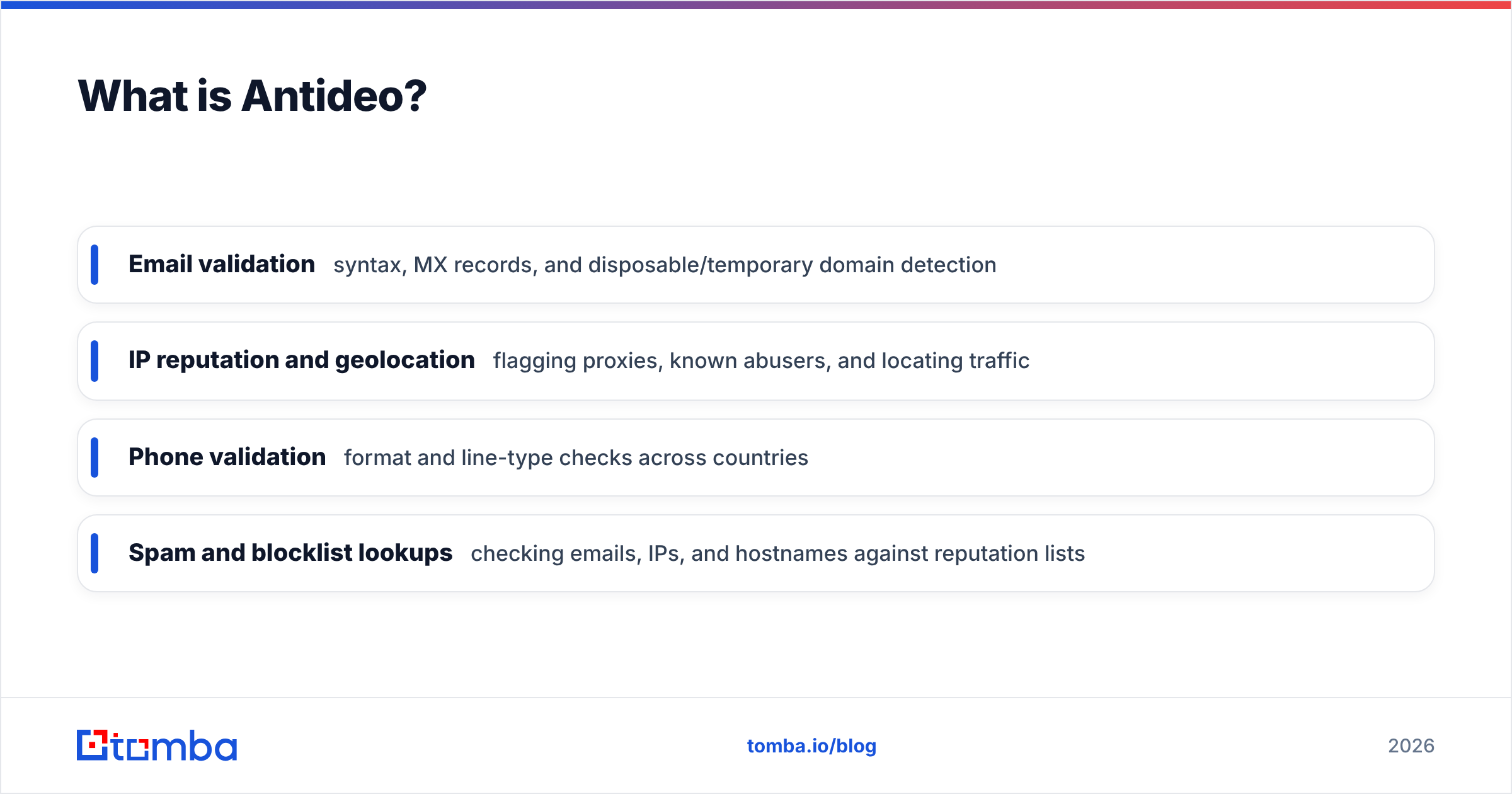
Its core endpoints cover:
- Email validation — syntax, MX records, and disposable/temporary domain detection
- IP reputation and geolocation — flagging proxies, known abusers, and locating traffic
- Phone validation — format and line-type checks across countries
- Spam and blocklist lookups — checking emails, IPs, and hostnames against reputation lists
Antideo's appeal is a generous free tier and a simple REST interface, which makes it popular with developers wiring up fraud checks on registration flows or scrubbing inbound leads. It does not find new contacts. If your CRM is empty, Antideo gives you nothing to validate.
What is ContactOut?#
ContactOut is a contact-finding platform built for recruiters and salespeople. Its identity is tied to LinkedIn: install the Chrome extension, open a profile, and ContactOut attempts to reveal that person's emails (including personal Gmail addresses) and phone numbers. It also offers a search portal and dashboard for building lists in bulk.
Where Antideo cleans data, ContactOut produces it. That makes the two tools complements far more than competitors — but because both touch "email," they end up in the same search comparisons.
ContactOut's tradeoffs are typical of LinkedIn-sourced finders: strong coverage on profiles that are active and complete, weaker coverage on under-the-radar roles, and an accuracy figure that varies by region and seniority. You can read more about how contact databases are assembled in our overview of where Tomba gets data.
Antideo vs ContactOut: how do they compare?#
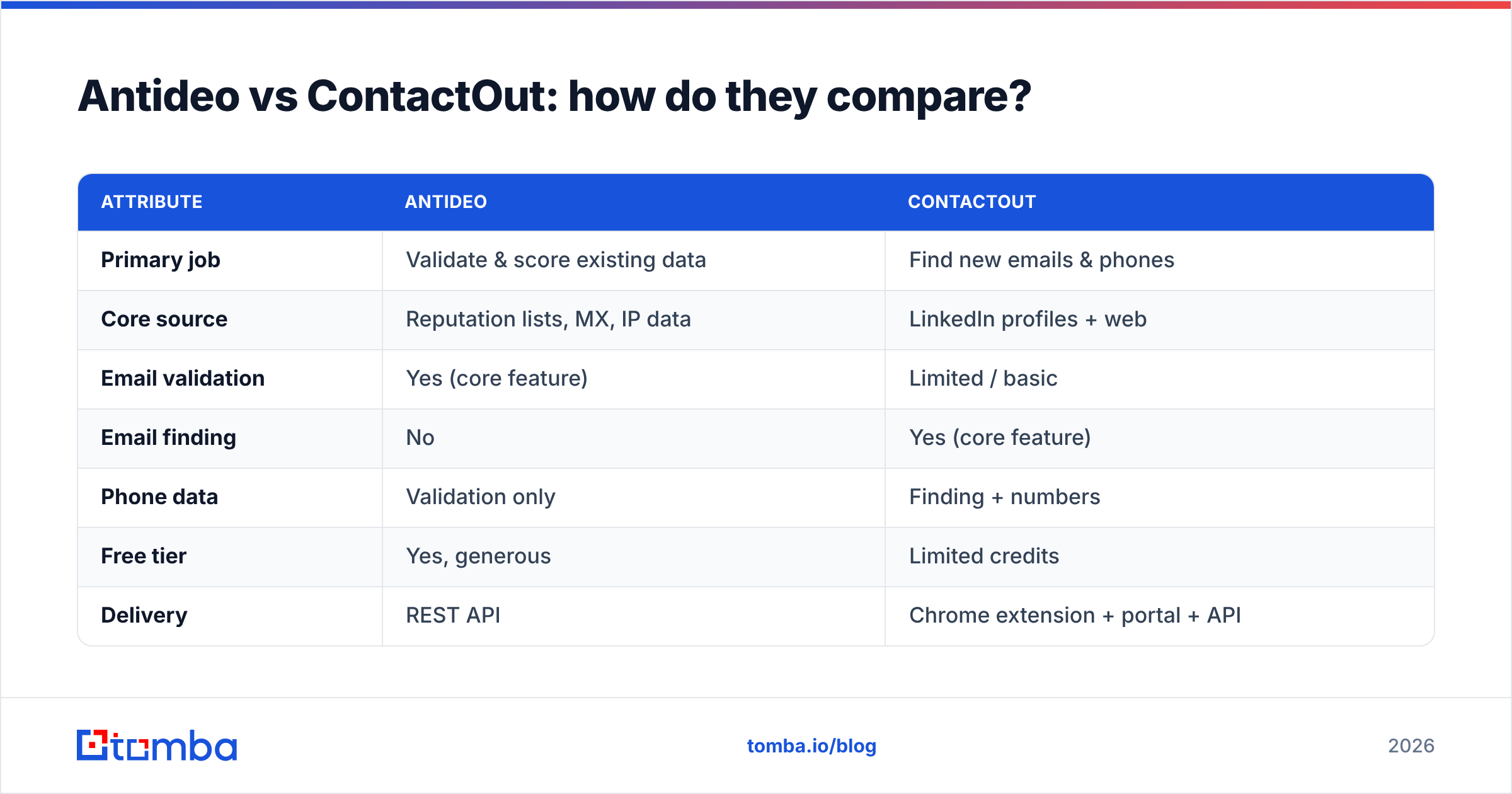
Here's the head-to-head. Note that several rows are "N/A" precisely because the tools sit in different categories — that's the point.
| Attribute | Antideo | ContactOut |
|---|---|---|
| Primary job | Validate & score existing data | Find new emails & phones |
| Core source | Reputation lists, MX, IP data | LinkedIn profiles + web |
| Email validation | Yes (core feature) | Limited / basic |
| Email finding | No | Yes (core feature) |
| Phone data | Validation only | Finding + numbers |
| Free tier | Yes, generous | Limited credits |
| Delivery | REST API | Chrome extension + portal + API |
| Best user | Developers, RevOps, fraud teams | Recruiters, SDRs |
| Fraud / abuse checks | Yes (IP, spam, blocklist) | No |
If you only remember one thing: Antideo is a verifier-and-guard; ContactOut is a finder. A finder without verification ships bad addresses; a verifier without a finder has nothing to check.

Which problem are you actually solving?#
Pick the row that sounds like your week:
- "My signup form is getting spam and fake accounts." That's Antideo's lane — disposable-email detection and IP reputation block junk at the door. ContactOut does nothing here.
- "I have 2,000 target accounts but no email addresses." That's a finder's lane — ContactOut, or a domain-first tool. Antideo can't conjure contacts.
- "I bought a list and bounce rates are killing my domain." That's verification — Antideo helps, but a purpose-built email verifier with catch-all handling usually goes further.
- "I need both — discover contacts and keep my sender reputation clean." Then you need a finder and a verifier, which is why most teams don't actually choose between these two categories. They run both.
This is the framework that matters more than any feature checklist: map the tool to the job, not the brand.
How accurate and deliverable is the data?#
Two different accuracy questions hide inside "Antideo vs ContactOut."
For Antideo, accuracy means: does it correctly flag a disposable domain, a risky IP, or an invalid mailbox? Validation APIs are generally strong on syntax and MX checks and decent on disposable detection, but no validator catches everything — catch-all domains in particular accept any address at the SMTP layer, so a "valid" result doesn't guarantee a real inbox. That's why a dedicated catch-all verifier exists as its own tool.
For ContactOut, accuracy means: is the email it surfaced the person's real, current address? LinkedIn-sourced finders shine on complete, active profiles and degrade on stale ones. Personal-email coverage is a selling point for recruiters but can raise compliance questions for cold B2B outreach, where work emails are the safer play. Always confirm consent and regional rules — the GDPR overview on Wikipedia is a reasonable starting point.
The honest takeaway: a found email is a hypothesis until it's verified. Whatever finder you use, run results through verification before they hit a sequence, or your bounce rate — and your domain reputation — pays for it.
What about pricing in 2026?#
Pricing models reflect the category gap. Antideo monetizes API volume with a free tier and pay-as-you-grow request pricing. ContactOut monetizes revealed contacts with credit-based plans, and personal/enterprise tiers gate bulk export and team seats. Both publish current numbers on their own sites — check contactout.com and antideo.com directly, since vendor pricing shifts.
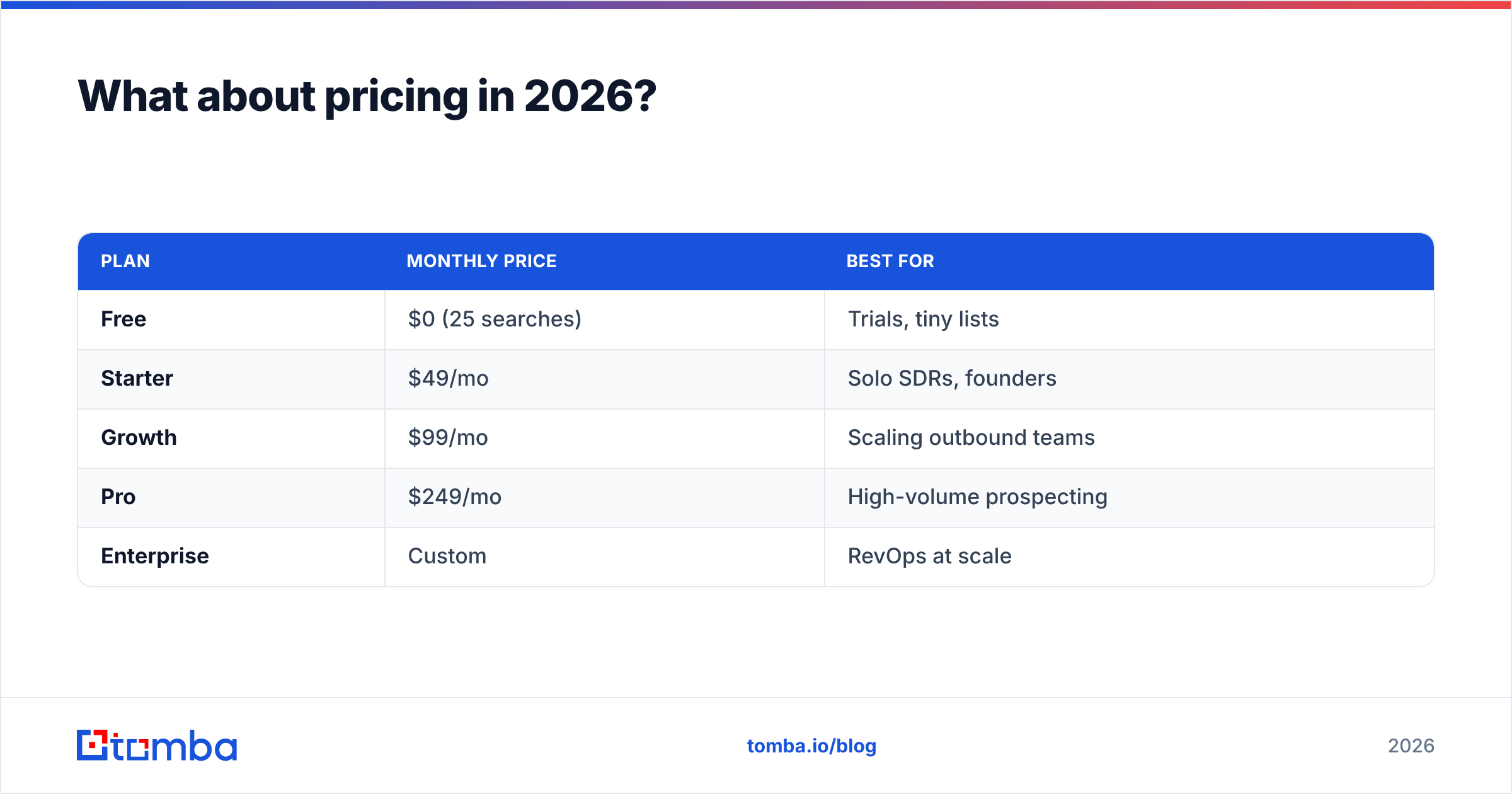
Here's how a finder-plus-verifier alternative lines up, using transparent published Tomba pricing as the reference point:
| Plan | Monthly price | Best for |
|---|---|---|
| Free | $0 (25 searches) | Trials, tiny lists |
| Starter | $49/mo | Solo SDRs, founders |
| Growth | $99/mo | Scaling outbound teams |
| Pro | $249/mo | High-volume prospecting |
| Enterprise | Custom | RevOps at scale |
Two notes worth flagging when you model cost. First, credit-based finders can look cheap per lookup but get expensive once you factor in the credits burned on contacts you never email. Second, validation APIs priced per request are great until you're checking millions of rows — at which point bulk tooling beats per-call pricing. Match the pricing model to your actual volume shape.
Can you use them together?#
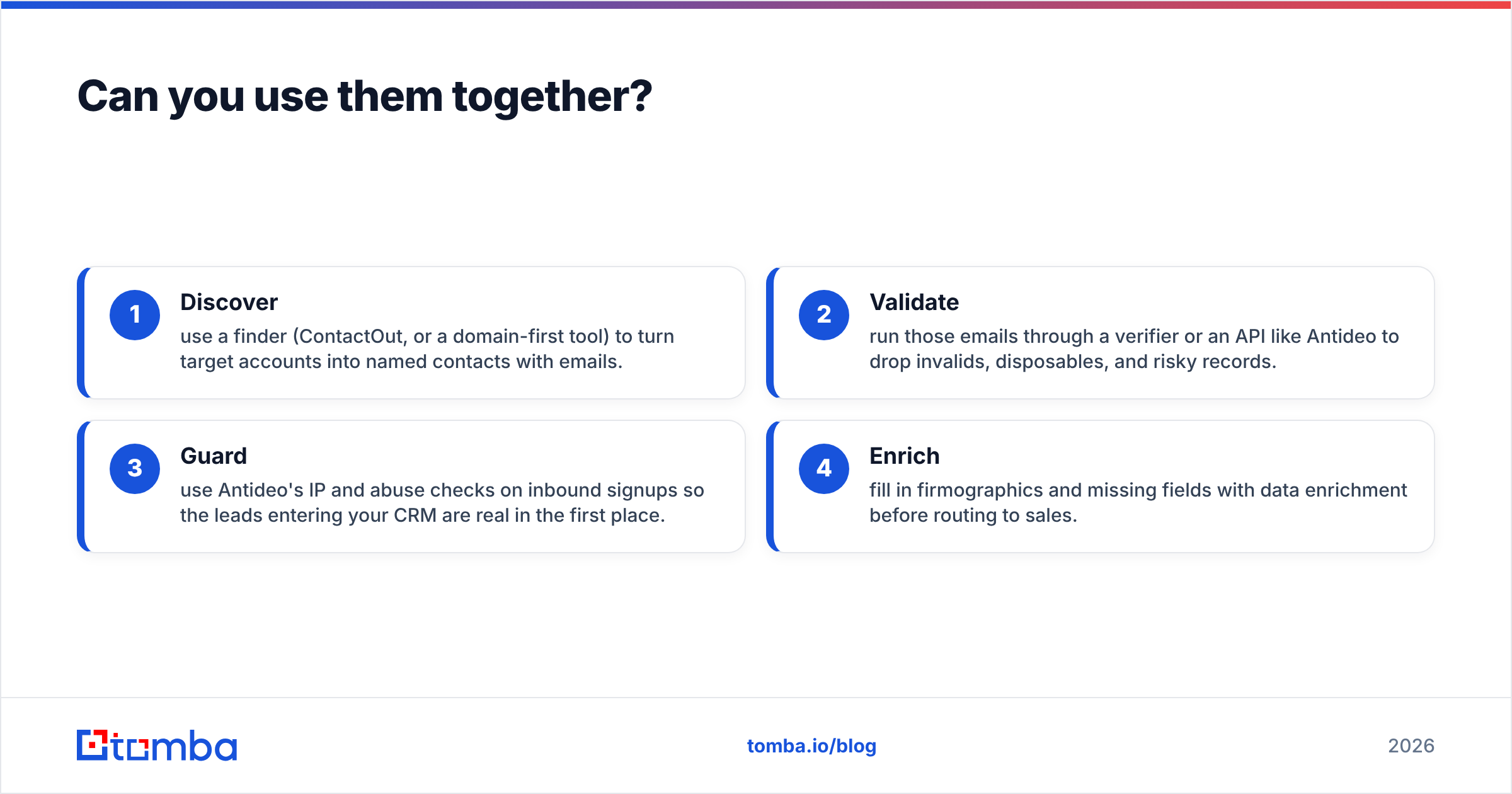
Yes, and for many teams that's the correct answer. A clean pipeline looks like this:
- Discover — use a finder (ContactOut, or a domain-first tool) to turn target accounts into named contacts with emails.
- Validate — run those emails through a verifier or an API like Antideo to drop invalids, disposables, and risky records.
- Guard — use Antideo's IP and abuse checks on inbound signups so the leads entering your CRM are real in the first place.
- Enrich — fill in firmographics and missing fields with data enrichment before routing to sales.
The mistake teams make is buying one tool and expecting it to cover the whole chain. A finder with no verification step floods your sequences with bounces; a validator with no finder is a guard standing at an empty gate.
Where does a finder-first tool like Tomba fit?#
If your central problem is discovering business emails at scale, neither a validation API nor a LinkedIn-only extension is the most direct fit. A domain-first email finder is. You give it a company domain or a name-plus-company, and it returns professional addresses with confidence scores — then verifies them in the same workflow.
That's the gap a tool like Tomba is built for. The email finder works from domains and names rather than depending on a single profile source, domain search returns every public address on a company in one query, and verification is built in rather than bolted on. For teams already living in spreadsheets or a CRM, the HubSpot integration and bulk tooling remove the copy-paste tax.
This isn't to say ContactOut or Antideo are wrong — they're well-suited to recruiting and fraud-prevention respectively. It's to say that if you came here to find B2B emails, you may be comparing two tools when what you want is a third category entirely.
Frequently asked questions#
Is Antideo a competitor to ContactOut? Not really. Antideo validates and guards data; ContactOut finds it. They overlap only on the word "email." Many teams use both at different pipeline stages.
Does ContactOut verify the emails it finds? It does basic checks, but for cold outbound you should run found addresses through a dedicated verifier — especially for catch-all domains, which validators commonly mislabel.
Is Antideo good for prospecting? No. Antideo has no contact-discovery capability. It's for cleaning and scoring records you already have, plus blocking fraudulent signups.
What's the cheapest way to find and verify B2B emails? Start on a free tier and measure cost per usable, verified contact rather than per lookup. A finder with built-in verification usually beats stitching a separate finder and validator together.
Which should I buy first? Buy for your bottleneck. Empty pipeline → finder. Bouncing list → verifier. Spammy signups → Antideo-style guard. Don't buy a category you don't have a problem in.
The bottom line#
Antideo and ContactOut keep showing up in the same comparison because both touch email, but they answer opposite questions: is this data clean and safe? versus what is this person's contact info? Choose Antideo when you're defending a signup flow or scrubbing records. Choose ContactOut when recruiters need LinkedIn-sourced contacts.
But if the job is genuinely finding business emails for outbound — and verifying them so your domain survives — a finder-first platform is the cleaner pick. Start free with the Tomba Email Finder: search by domain, name, or company, get confidence-scored results, and verify deliverability in the same workflow before a single message goes out. Map the tool to the job, and the "Antideo vs ContactOut" question mostly answers itself.
Ready to find emails that actually work?
Join 150,000+ professionals who stopped guessing and started sending. Free credits on signup — no credit card required.
Get the Tomba newsletter
Practical outbound tactics and product updates — once every two weeks.
About the author