Antideo vs Finderio (2026): Which Email Tool Wins?
Antideo validates emails, IPs, and phones through a free-leaning API. Finderio finds and verifies B2B emails at scale. Here's which one fits your workflow in 2026 — and where a third option beats both.
You found two tools with similar promises and opposite shapes. Antideo is a lightweight validation API that checks whether an email, IP, or phone number looks legitimate. Finderio (finder.io, part of the 500apps suite) is a B2B email finder that hunts down addresses and verifies them in bulk. They overlap just enough to be confusing and differ just enough that picking wrong wastes a quarter of outbound budget.
This guide breaks down antideo vs finderio on the only axes that matter: what each tool actually does, accuracy, pricing, integrations, and the use case each one fits. By the end you'll know which to pick — and where a purpose-built alternative quietly outperforms both.
TL;DR#
- Antideo is a free-leaning validation/abuse-detection API. Great for filtering signups, spotting disposable domains, and basic email syntax/MX checks. It does not find emails for you.
- Finderio is an email finder plus verifier aimed at outbound teams — domain search, bulk find, and list cleaning inside the 500apps ecosystem.
- Pick Antideo if you're a developer guarding a signup form. Pick Finderio if you're building prospecting lists and already live in 500apps.
- Accuracy and catch-all handling are where both wobble. If deliverability is the whole point, a specialist finder/verifier like Tomba usually returns cleaner data per dollar.
- Free tiers exist on all three. Test before you commit a card — the differences show up fast on real domains.
What is Antideo?#
Antideo is an API-first data validation service. Its core job is defense: stop bad inputs before they pollute your database. You hand it an email, IP address, or phone number and it returns risk signals — is this a disposable email domain, is the IP a known abuser, is the phone format valid.
Think of Antideo as a bouncer at the door of your signup form. It doesn't go out and recruit guests; it just checks IDs as they arrive. That framing matters because it tells you what Antideo is not — it is not a prospecting tool. There's no "find me the marketing director's email at acme.com" function. If you need addresses, Antideo is the wrong category entirely.
What it does well:
- Disposable/temporary email detection — flags burner domains during registration.
- IP reputation and geolocation — useful for fraud screening.
- Basic phone validation — format and line-type checks.
- Generous free access — the appeal for indie developers is a usable free tier and simple REST calls.
The trade-off: Antideo's email check is a validation check (syntax, MX, disposable status), not a deep SMTP-level deliverability verdict on whether a specific mailbox actually exists. For abuse filtering that's fine. For "will this cold email bounce," it's thin.
What is Finderio?#
Finderio (finder.io) flips the model. It's an outbound-oriented email finder and verifier bundled into the 500apps platform. Its job is offense: go get the addresses you need and confirm they're real.
Finderio's feature set centers on:
- Email finder — give it a name + company domain, get a likely business email.
- Domain/company search — pull addresses associated with a domain.
- Bulk email finder and verifier — upload a list, enrich and clean it.
- Browser extension — grab contacts while you browse.
If Antideo is the bouncer, Finderio is the recruiter and the bouncer rolled into one — it sources contacts and screens them. The catch is that Finderio is sold as part of the 500apps all-in-one bundle, so its pricing, support, and roadmap are tied to that wider suite rather than to a focused email-data product.
For teams that already pay for 500apps, that bundling is a perk. For teams that just want the best email data, it can mean paying for a platform when you needed a scalpel.
Antideo vs Finderio: head-to-head comparison#
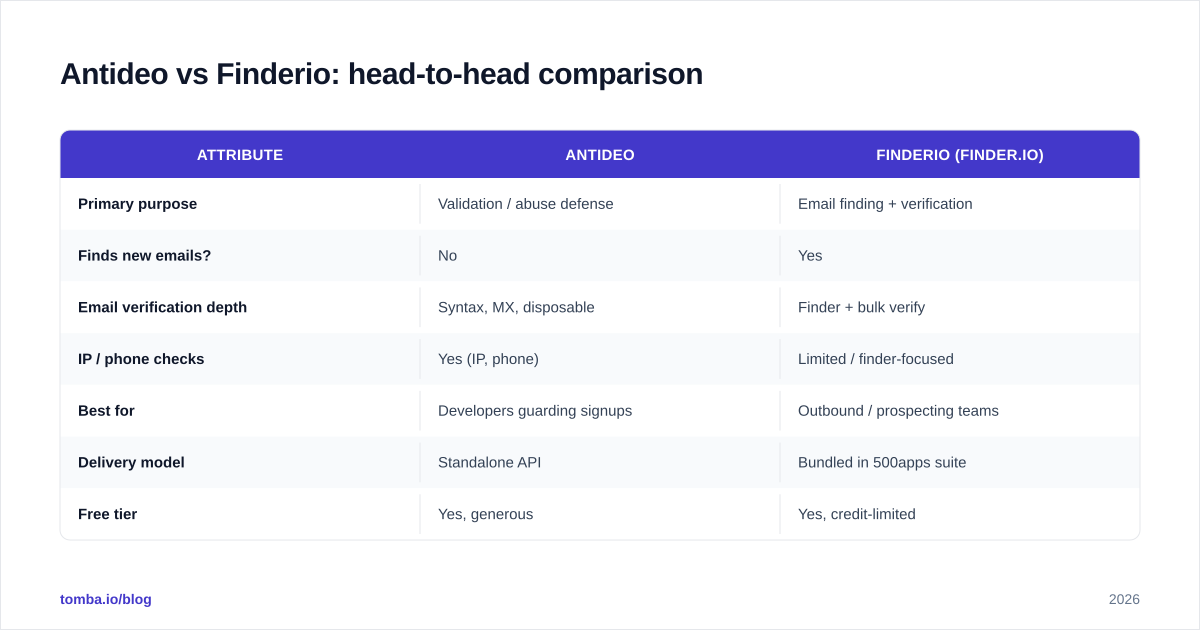
Here's the core of the antideo vs finderio decision in one view. The two tools sit in adjacent categories, so "winner" depends on the job.
| Attribute | Antideo | Finderio (finder.io) |
|---|---|---|
| Primary purpose | Validation / abuse defense | Email finding + verification |
| Finds new emails? | No | Yes |
| Email verification depth | Syntax, MX, disposable | Finder + bulk verify |
| IP / phone checks | Yes (IP, phone) | Limited / finder-focused |
| Best for | Developers guarding signups | Outbound / prospecting teams |
| Delivery model | Standalone API | Bundled in 500apps suite |
| Free tier | Yes, generous | Yes, credit-limited |
| Bulk processing | Basic | Yes, list upload |
| Browser extension | No | Yes |
| Ideal user | Engineer | SDR / marketer |
The honest read: these tools barely compete. If your problem is "junk signups," Antideo wins by default because Finderio doesn't really do abuse screening. If your problem is "I need 5,000 verified prospect emails," Finderio wins because Antideo can't find a single address. The confusion only exists because both touch the word "email."

Which one is more accurate?#
Accuracy means different things for each tool, so judge them on their own turf.
Antideo's accuracy is about flagging. Does it correctly identify a disposable domain or a risky IP? For well-known burner domains, yes. For freshly spun-up disposable domains, any list-based detector lags — Antideo included. Its email "valid" verdict is also permissive: passing MX and syntax doesn't mean the mailbox exists. So a clean Antideo result still carries bounce risk on cold sends.
Finderio's accuracy is about discovery and confirmation. Two questions: did it find the right email, and is that email deliverable? Finder tools live or die on their underlying data and SMTP verification quality. Finderio performs acceptably on common patterns (first.last@domain) but tends to struggle on catch-all domains, where a server accepts every address and verification turns into guesswork. This is the universal weak spot for finders, and it's where data depth separates leaders from the pack.

The practical move: never trust a single finder's "verified" label on a catch-all. Run found addresses through a dedicated email verifier and a catch-all finder before you load them into a sequence. The cost of a bounce — to sender reputation and deliverability — dwarfs the cost of a verification credit.

How does pricing compare?#
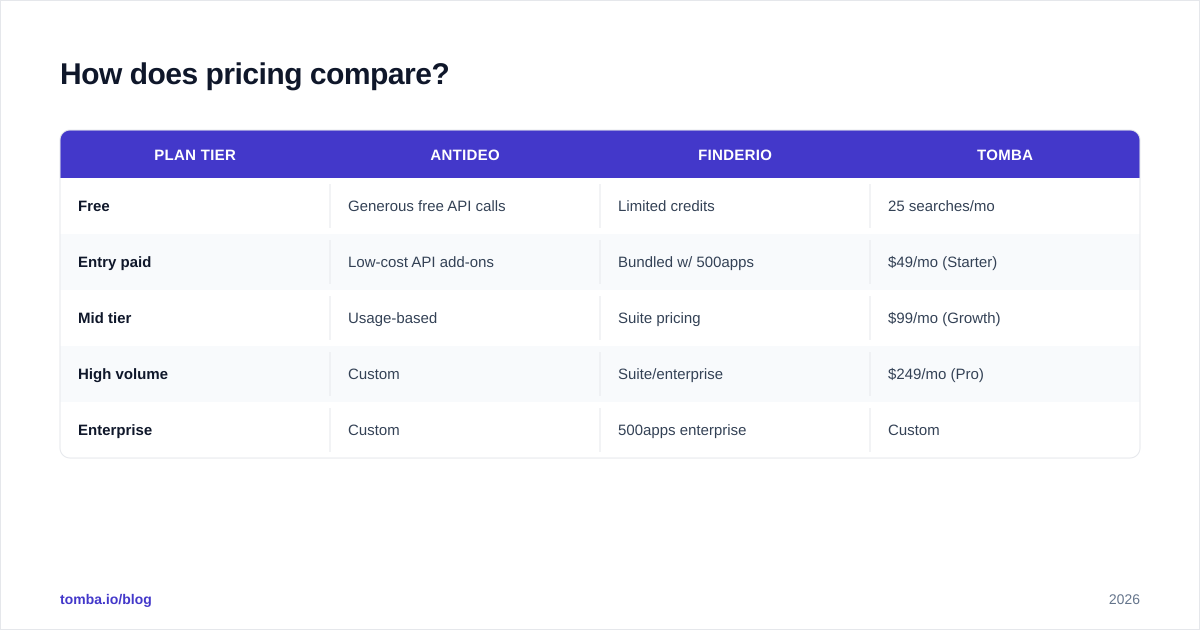
Pricing structures differ as much as the products. Antideo leans on a free/low-cost API model that rewards developers. Finderio uses a credit/subscription model inside the 500apps bundle. For context, here's how a focused specialist like Tomba slots in — its pricing is transparent and finder-first.
| Plan tier | Antideo | Finderio | Tomba |
|---|---|---|---|
| Free | Generous free API calls | Limited credits | 25 searches/mo |
| Entry paid | Low-cost API add-ons | Bundled w/ 500apps | $49/mo (Starter) |
| Mid tier | Usage-based | Suite pricing | $99/mo (Growth) |
| High volume | Custom | Suite/enterprise | $249/mo (Pro) |
| Enterprise | Custom | 500apps enterprise | Custom |
A few honest caveats on cost:
- Antideo's "cheap" is real but narrow. You're paying for validation calls, not for found contacts. If you also need a finder, you're buying a second tool anyway.
- Finderio's price is bundle-dependent. The headline number can look attractive because it's amortized across the whole 500apps suite. If you won't use the other apps, you're subsidizing software you don't touch.
- Specialists charge for what you came for. Tomba's tiers are priced around find + verify volume, so credits map directly to outbound output.
The takeaway: compare cost per usable, verified contact, not sticker price. A cheap tool that returns a 12% bounce rate is more expensive than a pricier one at 2%.
Which tool fits your use case?#
Match the tool to the job rather than the marketing.
Choose Antideo if:
- You're a developer protecting a signup, checkout, or registration flow.
- You need IP reputation or phone-format checks alongside email.
- You want a simple, low-cost API and don't need to find anyone.
- Abuse and fraud filtering — not prospecting — is the goal.
Choose Finderio if:
- You run outbound and need to build prospect lists from names + domains.
- You already pay for 500apps and want to consolidate vendors.
- You want a browser extension for ad-hoc contact grabbing.
- Bulk find-and-clean in one bundled workflow appeals to you.
Choose a specialist (see below) if:
- Deliverability is mission-critical and bounce rate is a KPI.
- You need deep domain search, catch-all handling, and enrichment in one focused product.
- You want an API and a UI and spreadsheet add-ins without buying a whole suite.
Is there a better alternative to both?#
For most outbound teams, yes — a dedicated email-finding and verification platform. The reason is focus. Antideo is a validation utility that happens to touch email; Finderio is one app inside a sprawling suite. Neither was built solely to maximize the accuracy of B2B contact data, which is exactly what a specialist optimizes for every day.
Tomba is one such option, and it's worth weighing against both:
- It finds and verifies in one place — the email finder, domain search, and email verifier share the same data layer, so found addresses get verified without a hand-off.
- Catch-all is a first-class problem — the catch-all verifier tackles the exact scenario where generic finders return false positives.
- It meets you where you work — API, Chrome extension, Google Sheets, and bulk upload, without buying a 20-app bundle.
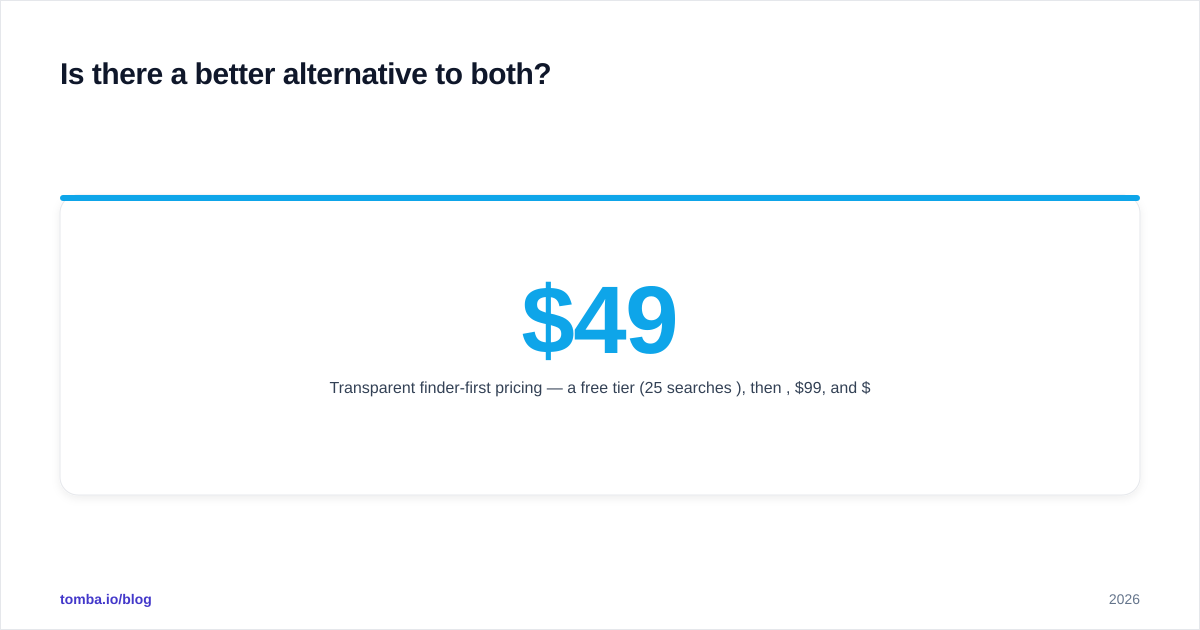
- Transparent finder-first pricing — a free tier (25 searches/mo), then $49, $99, and $249 plans that scale with output, not with apps you don't use.

None of this makes Antideo or Finderio "bad." Antideo is a genuinely useful abuse filter, and Finderio is reasonable inside 500apps. But if your single goal is to put verified, deliverable B2B emails into a sequence, a tool engineered for that — and benchmarked against peers on data sources — tends to win on the metric that pays your bills.
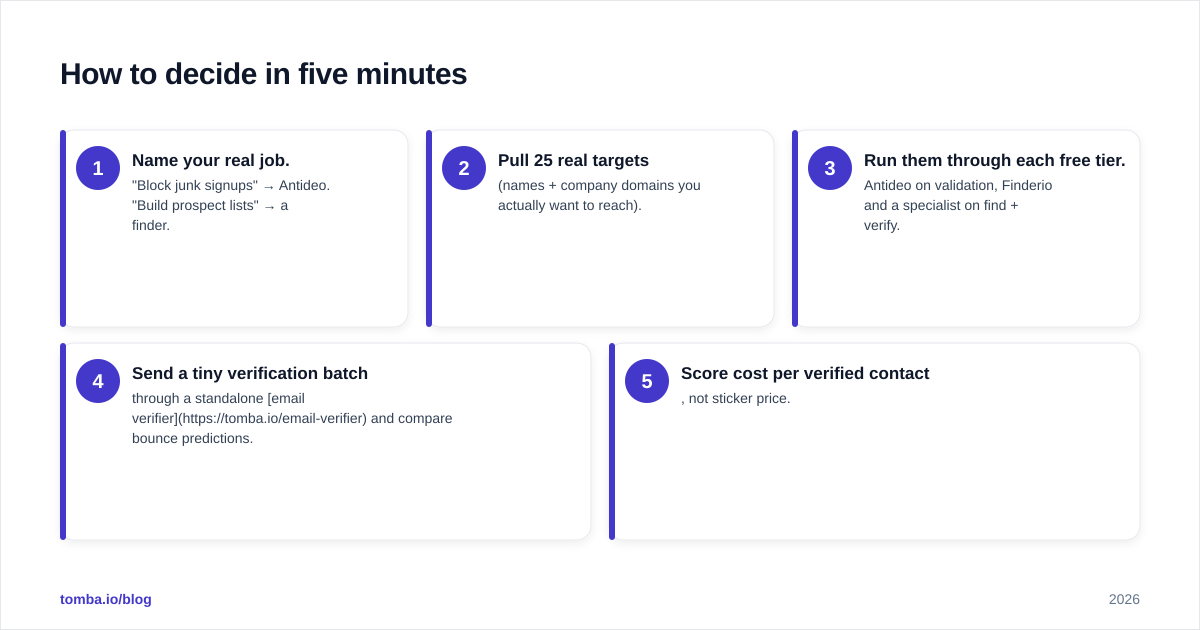
How to decide in five minutes#
Run this quick test instead of reading more reviews:
- Name your real job. "Block junk signups" → Antideo. "Build prospect lists" → a finder.
- Pull 25 real targets (names + company domains you actually want to reach).
- Run them through each free tier. Antideo on validation, Finderio and a specialist on find + verify.
- Send a tiny verification batch through a standalone email verifier and compare bounce predictions.
- Score cost per verified contact, not sticker price.
The tool with the lowest bounce risk per dollar wins. Usually that's the specialist for prospecting and Antideo for defense — and rarely the same tool for both jobs.
The bottom line#
Antideo and Finderio aren't really rivals — they're neighbors. Antideo guards the door; Finderio brings people through it. If you only remember one thing from this antideo vs finderio comparison: buy for the job, not the buzzword. Use Antideo to keep garbage out of your database, and use a real finder to fill your pipeline.
If that pipeline is the priority, start with a tool built for it. Spin up the free tier of the Tomba Email Finder, run your 25 toughest targets through it, and compare the verified output side-by-side with anything else on your shortlist. Clean, deliverable data is the cheapest growth lever you have — and the fastest to test. Cross-check the numbers on G2 (g2.com) and your own results before you commit, then scale the winner.
// get started
Find, verify and enrich your first contacts today
Start on the free plan with 25 searches a month, then scale when your team is ready.
Free plan · No credit card required · GDPR & CCPA
// about the author