Antideo vs Lusha 2026: Email Validation vs B2B Contact Data
Antideo validates emails, IPs, and phones to block fraud. Lusha finds B2B contacts to fuel pipeline. Here's which one your team actually needs in 2026 — and where a third option beats both.
Antideo and Lusha get lumped together because both touch email addresses and both sell on "data quality." That framing is wrong, and choosing on it will cost you. They solve different problems for different buyers. Picking the wrong one means you either pay for a sales database when you needed a fraud filter, or you wire a validation API into a workflow that needed a contact finder.
This guide draws the line clearly: what each tool does, where each wins, what they cost, and when neither is the right answer.
TL;DR — Antideo vs Lusha at a glance#
- Antideo is a lightweight validation and fraud-prevention API: email verification, IP reputation, phone validation, and disposable-address detection. It tells you whether a contact is risky, not who they are.
- Lusha is a B2B contact-data platform: it finds verified work emails, direct-dial phone numbers, and company firmographics for prospecting. It tells you who to contact, not whether a signup is fraud.
- They rarely compete. Antideo guards your signup form and checkout; Lusha fills your sales pipeline. The overlap is narrow (both verify emails), and neither does the other's core job well.
- Pricing models differ hard: Antideo is usage-based with a generous free API tier; Lusha is per-seat credits starting around $49/user/month with steep jumps for bulk.
- If your real need is finding and verifying outreach emails at scale, a dedicated email-finder platform like Tomba is a better fit than either — more search surface than Antideo, cheaper bulk than Lusha.
What is Antideo?#
Antideo is a fraud-prevention and data-hygiene API aimed at developers and product teams. Its core jobs are defensive: stop fake signups, block disposable emails, score IP risk, and validate phone number formatting before bad data enters your system.
The product is API-first. You call an endpoint, you get back a risk verdict. Typical checks include:
- Email validation — syntax, MX records, disposable/throwaway detection, and free-provider flags.
- IP reputation — is this address a known proxy, VPN, Tor exit, or spam source?
- Phone validation — format and basic line-type checks.
Antideo's appeal is simplicity and price. There's a free tier with a meaningful daily request allowance, and the paid plans scale on volume rather than seats. If you run a SaaS signup flow, a marketplace, or any form that attracts bots, Antideo is the kind of utility you bolt on and forget. You can read the exact endpoint behavior on the official Antideo site.
What Antideo does not do: it won't find a prospect's email from a name and company, it has no contact database, and it carries no firmographic or intent data. It's a gate, not a prospecting engine.
What is Lusha?#
Lusha is a B2B sales-intelligence platform built for prospecting. Its job is offensive: give a salesperson or marketer accurate work emails, mobile direct dials, and company data so they can reach decision-makers.
Lusha's core surfaces are:
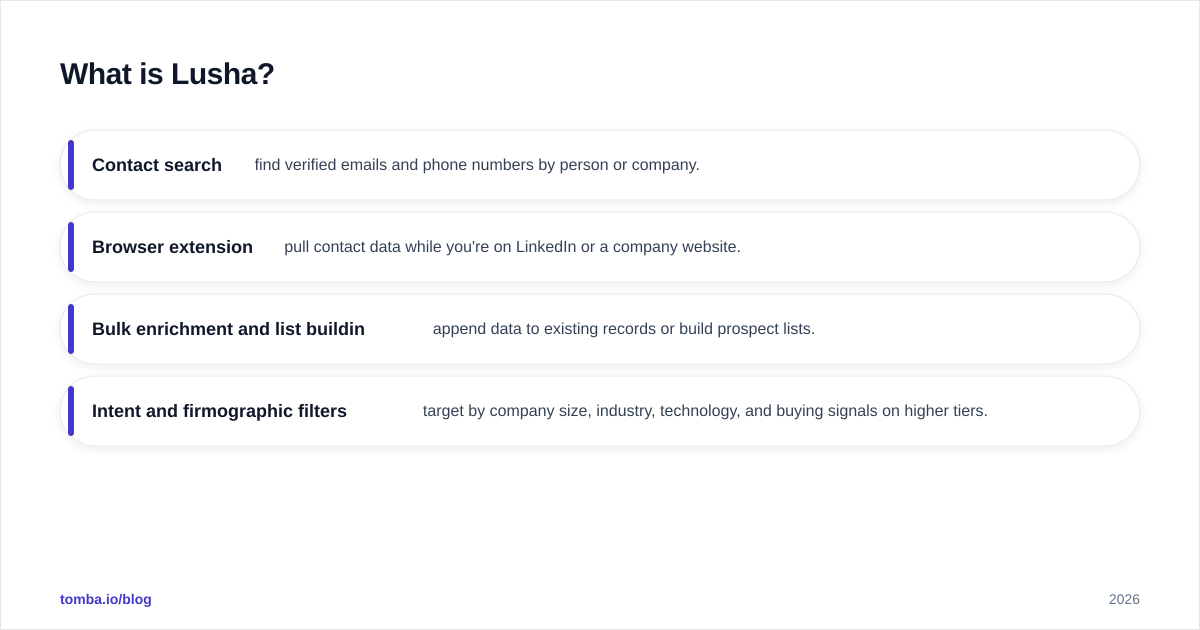
- Contact search — find verified emails and phone numbers by person or company.
- Browser extension — pull contact data while you're on LinkedIn or a company website.
- Bulk enrichment and list building — append data to existing records or build prospect lists.
- Intent and firmographic filters — target by company size, industry, technology, and buying signals on higher tiers.
Lusha is strongest on direct-dial phone numbers, which are genuinely hard to source and where it has a reputation advantage. Its data coverage skews North American and EU, and it leans on a compliance posture (GDPR/CCPA messaging) that enterprise buyers like. You can see its positioning and verified reviews on G2 and on lusha.com.
What Lusha does not do: it isn't a fraud filter. It won't tell you whether the email someone typed into your checkout is a disposable address from a bot. Pointing Lusha at a signup-abuse problem is a category error.
Antideo vs Lusha: how do they compare directly?#
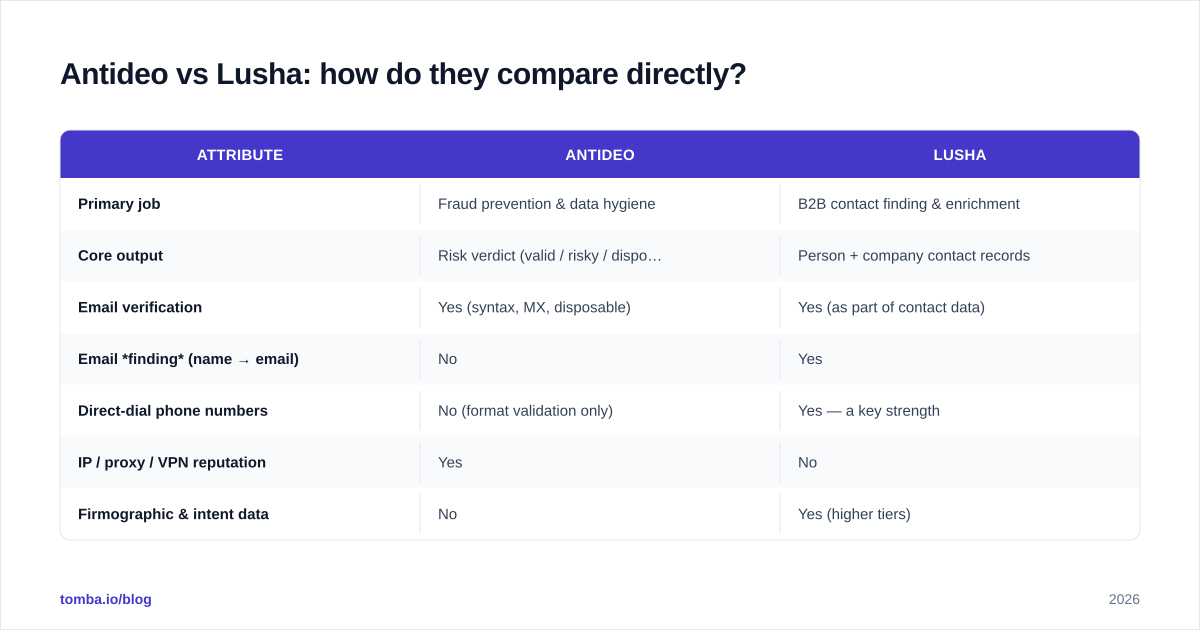
The honest comparison isn't "which is better" — it's "which problem do you have." Here's the side-by-side.
| Attribute | Antideo | Lusha |
|---|---|---|
| Primary job | Fraud prevention & data hygiene | B2B contact finding & enrichment |
| Core output | Risk verdict (valid / risky / disposable) | Person + company contact records |
| Email verification | Yes (syntax, MX, disposable) | Yes (as part of contact data) |
| Email finding (name → email) | No | Yes |
| Direct-dial phone numbers | No (format validation only) | Yes — a key strength |
| IP / proxy / VPN reputation | Yes | No |
| Firmographic & intent data | No | Yes (higher tiers) |
| Delivery model | API-first | Web app + browser extension + API |
| Pricing model | Usage / request volume | Per-seat credits |
| Free tier | Yes — daily API requests | Limited monthly credits |
| Best buyer | Developers, product/trust & safety | SDRs, AEs, demand gen |
Read that table top to bottom and the pattern is obvious: the only row where they truly overlap is "email verification," and even there they verify for different reasons. Antideo verifies to reject bad actors. Lusha verifies to confirm a prospect is reachable.
Is Antideo or Lusha better for email verification?#
For verification as a fraud gate, Antideo wins — it's cheaper, faster to integrate, and adds IP and disposable-domain signals Lusha doesn't expose. For verification as part of finding reachable prospects, Lusha's data is more useful because it's attached to a real person and a real company.
But here's the catch both miss: neither is a specialist email verifier in the deliverability sense. If your goal is to clean a cold-outreach list — catch-all detection, role-account flags, full SMTP checks, and bounce-risk scoring — you want a purpose-built tool. Antideo's checks are shallow for outreach hygiene, and Lusha's verification is a byproduct, not a configurable product.
This is exactly the gap a dedicated email verifier fills. And catch-all domains — the single biggest source of "valid but undeliverable" addresses — need a catch-all verifier that neither Antideo nor Lusha offers as a focused feature.
Which one is better for sales prospecting?#
Lusha, with no real contest. Prospecting needs three things: the ability to find a contact, accurate phone numbers, and enrichment to prioritize. Antideo provides none of those. It has no search, no database, and no firmographics.
If you're an SDR trying to book meetings, Antideo is irrelevant to your day. Lusha will surface direct dials and verified work emails, plug into your CRM, and let you build lists from LinkedIn. That's its entire reason to exist.
The real prospecting question isn't "Antideo or Lusha" — it's "Lusha or one of its many alternatives." Lusha's weak spots are price-per-credit at scale and uneven coverage outside its core regions. Teams that hit those walls often look at a Lusha-style contact source that does company-wide domain search — pulling every public email pattern for a target company in one call instead of buying contacts one credit at a time.
How do Antideo and Lusha pricing compare?#
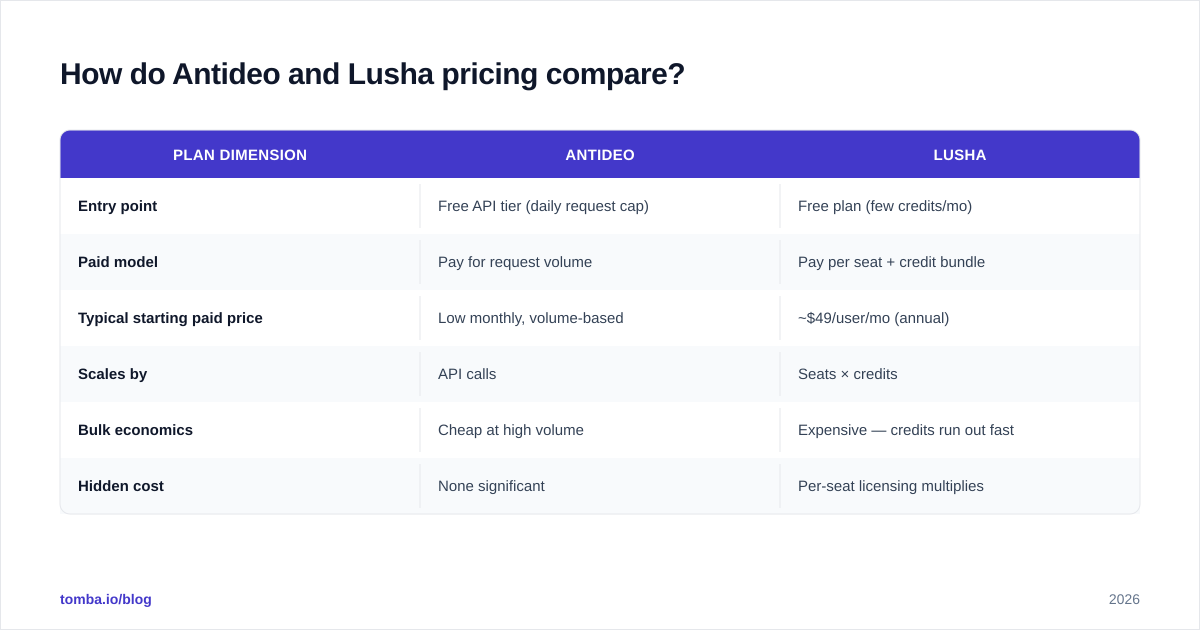
The pricing models are so different that a per-dollar comparison is almost meaningless — but the shape of the cost tells you who each tool is built for.
| Plan dimension | Antideo | Lusha |
|---|---|---|
| Entry point | Free API tier (daily request cap) | Free plan (few credits/mo) |
| Paid model | Pay for request volume | Pay per seat + credit bundle |
| Typical starting paid price | Low monthly, volume-based | ~$49/user/mo (annual) |
| Scales by | API calls | Seats × credits |
| Bulk economics | Cheap at high volume | Expensive — credits run out fast |
| Hidden cost | None significant | Per-seat licensing multiplies |
Antideo's usage model means a million validation calls is cheap. Lusha's seat model means a 10-person sales team pays 10 licenses before anyone exports a single contact, and heavy list-building burns credits fast. Neither is "expensive" in a vacuum — they're priced for opposite buyers.
If you're cost-comparing because you do high-volume email finding and verifying, look at flat-rate search credits instead. Tomba pricing runs a free tier (25 searches/month), Starter at $49/mo, Growth at $99/mo, and Pro at $249/mo — search-based, not seat-based, so adding teammates doesn't multiply the bill.

When should you use Antideo, Lusha, or neither?#
Match the tool to the job:
- Use Antideo if you're a developer or trust-and-safety team trying to stop fake signups, filter disposable emails, score IP risk, or validate phone formats at the point of entry. It's a cheap, reliable gate.
- Use Lusha if you're a sales or demand-gen team that needs direct-dial phone numbers and verified work emails for named-account prospecting, and your budget tolerates per-seat pricing.
- Use neither if your actual job is finding outreach emails at scale and verifying them for deliverability. That's a third category — email-finding-and-verification — and it's where a specialist platform beats both.
A quick decision rule:
- "I need to block bad actors" → Antideo.
- "I need direct dials for 200 named accounts" → Lusha.
- "I need 5,000 verified emails for a cold campaign" → a dedicated email finder + verifier.
That third path is the most common reason people land on an Antideo-vs-Lusha comparison in the first place — and it's the one neither tool answers well.
Where does a dedicated email-finder fit?#
Most teams searching "Antideo vs Lusha" are actually trying to solve outreach at scale: find the right person's email, confirm it won't bounce, and do it for hundreds of contacts without burning a budget. That's a finding-plus-verification problem, and it sits between Antideo's narrow fraud focus and Lusha's expensive seat model.
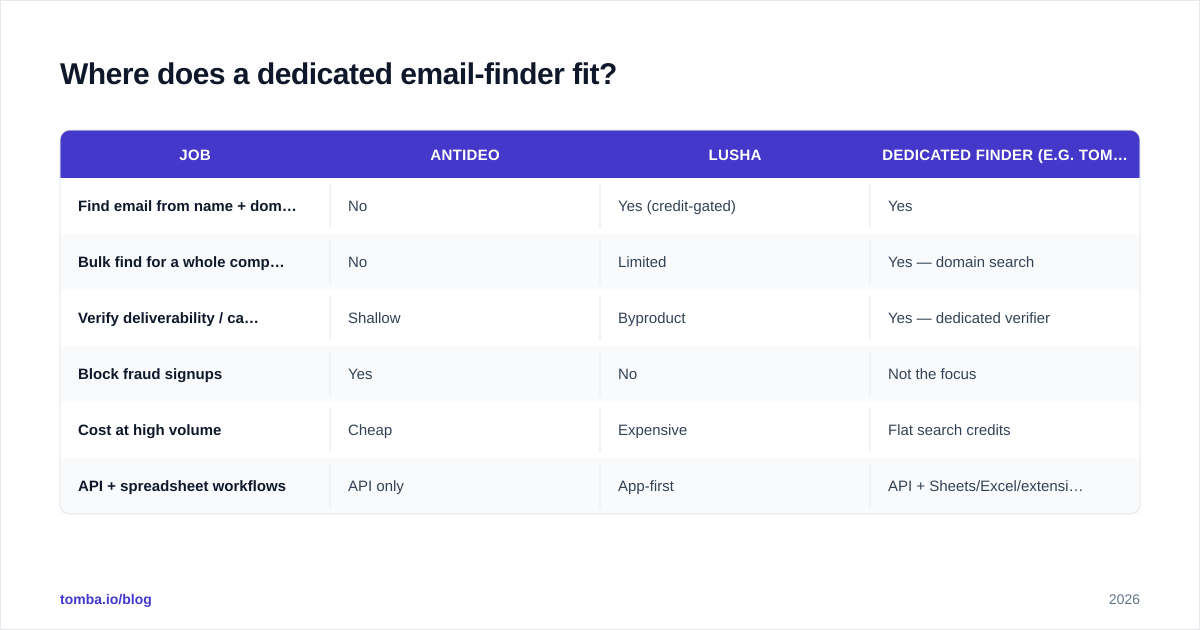
Here's how the three approaches stack up for that specific job:
| Job | Antideo | Lusha | Dedicated finder (e.g. Tomba) |
|---|---|---|---|
| Find email from name + domain | No | Yes (credit-gated) | Yes |
| Bulk find for a whole company | No | Limited | Yes — domain search |
| Verify deliverability / catch-all | Shallow | Byproduct | Yes — dedicated verifier |
| Block fraud signups | Yes | No | Not the focus |
| Cost at high volume | Cheap | Expensive | Flat search credits |
| API + spreadsheet workflows | API only | App-first | API + Sheets/Excel/extension |
A dedicated finder gives you the search surface Antideo lacks and the volume economics Lusha lacks. You can verify accuracy and provenance through transparent data sources, run bulk lead generation against a list of domains, and pull results straight into Google Sheets or your CRM. For the "5,000 verified emails for a campaign" job, that's the right shape of tool.
None of this makes Antideo or Lusha bad — it makes them specialists. Antideo is a great fraud gate. Lusha is a strong direct-dial source. They're just not email-finders, and pretending otherwise is how teams overpay.
The bottom line#
Antideo and Lusha aren't really competitors. Antideo is a defensive validation API that keeps junk out of your system. Lusha is an offensive contact database that fills your pipeline with named decision-makers. If you genuinely have a fraud problem, buy Antideo. If you genuinely have a prospecting problem and a per-seat budget, buy Lusha.
But if you came here because you need to find and verify outreach emails at scale — which is what most of these comparisons are secretly about — neither is your tool. You want a purpose-built finder with transparent data, bulk economics, and built-in verification.
That's exactly what the Tomba Email Finder is built for: find professional email addresses by domain, name, or company, verify them before you send, and do it on search-based pricing that doesn't punish you for adding teammates. Start on the free tier (25 searches/month), and only scale up when your pipeline does.
// get started
Find, verify and enrich your first contacts today
Start on the free plan with 25 searches a month, then scale when your team is ready.
Free plan · No credit card required · GDPR & CCPA
// about the author