Antideo vs Tomba 2026: Email Finder & Verifier Compared
Antideo offers free email and fraud-prevention validation APIs, while Tomba finds and verifies B2B emails at scale. Here's which one fits your prospecting stack in 2026.
You are choosing between two tools that sound similar but solve very different problems. Antideo is a lightweight validation and fraud-prevention API. Tomba is a full email finder and verifier built for B2B prospecting. Picking the wrong one means either paying for features you never use, or hitting a wall the moment you need to actually source contacts. This guide breaks down where each tool wins.
TL;DR — Antideo vs Tomba at a glance#
- Antideo is a free-first validation API: email format/disposable checks, IP reputation, phone validation, and geo lookups. It does not find new email addresses.
- Tomba is an email-finding platform: it discovers professional emails by domain or name, verifies them, and enriches contacts at scale.
- If you only need to clean a signup form or block disposable emails, Antideo's free tier is hard to beat.
- If you need to build a prospect list and confirm deliverability, Tomba is the more complete system.
- Many teams run both: Antideo at the app layer, Tomba in the sales workflow. But if you must choose one for outbound, Tomba covers more ground.
What is Antideo?#
Antideo is a developer-focused API suite for data hygiene and fraud prevention. Think of it as a bouncer at the door of your signup form: it checks whether an email looks fake, whether an IP is on a blocklist, and whether a phone number is formatted correctly before you let the record into your database.
Its core endpoints cover email validation (syntax, MX records, disposable-domain detection), IP reputation and proxy/Tor checks, phone number validation, and basic geolocation. The pitch is simplicity and a generous free quota — you can start hitting the API without a credit card, which makes it popular for hobby projects, MVPs, and lightweight backend checks. You can review the endpoints on the Antideo homepage.
What Antideo deliberately does not do is discover contact data. Give it john@example.com and it tells you if the address is plausible and non-disposable. It cannot tell you John's email when all you have is his name and company. That is the line that separates a validation tool from a finding tool.
What is Tomba?#
Tomba is a B2B email-finding and enrichment platform. Where Antideo guards the door, Tomba goes out and builds the guest list. Its email finder takes a person's name and a company domain and returns the most likely professional email, scored by confidence and backed by source citations.
Around that core sit a stack of related tools: domain search to pull every public email pattern on a company, an email verifier for SMTP-level deliverability checks, a catch-all verifier for tricky domains, a phone finder, and bulk + API access for scale. It plugs into Sheets, Excel, HubSpot, Salesforce, and Zapier so the data lands where your team already works.
In short: Antideo answers "is this email real?" Tomba answers "what is this person's email, and is it real?" That second question is the one outbound teams actually live or die on.

Antideo vs Tomba: side-by-side comparison#
Here is the honest breakdown across the attributes that matter for a buying decision.
| Attribute | Antideo | Tomba |
|---|---|---|
| Primary job | Validation & fraud prevention | Email finding & verification |
| Finds new emails | No | Yes (name + domain, domain search) |
| Email verification | Syntax, MX, disposable check | SMTP-level + catch-all verifier |
| Phone tools | Validation only | Finder + validator |
| Data enrichment | No | Yes (contact + company enrichment) |
| Free tier | Generous free API quota | 25 searches/mo |
| Entry paid plan | Low-cost API tiers | Starter $49/mo |
| Bulk processing | Limited | Bulk finder + verifier |
| Native CRM integrations | Minimal | HubSpot, Salesforce, Pipedrive,Zapier |
| Best for | Devs cleaning input data | Sales & marketing prospecting |
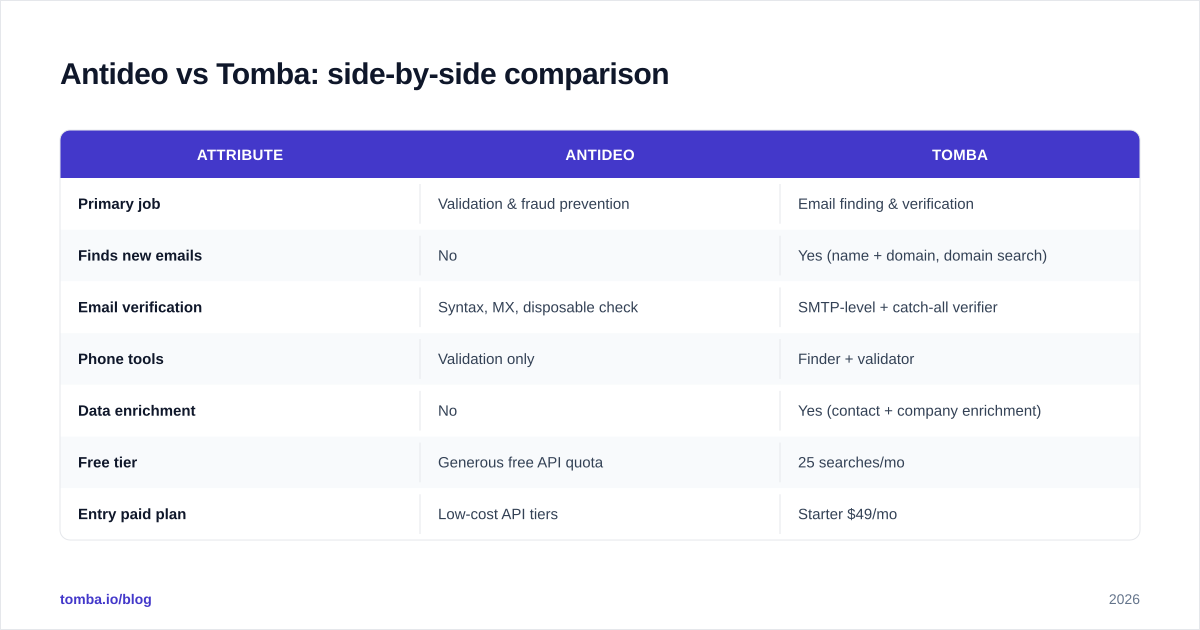
The pattern is clear: Antideo is narrow and cheap; Tomba is broad and built for revenue teams. Neither is "better" in the abstract — they are aimed at different buyers.
)
Is Antideo better than Tomba for email validation?#
For pure input validation at the app layer, Antideo is genuinely competitive — and often cheaper. If your only requirement is "reject disposable and malformed emails on signup," Antideo's free quota may cover you entirely, and you avoid pulling in a heavier platform.
But validation has tiers, and the gap widens fast as you get serious. Antideo confirms an address is well-formed and not disposable. Tomba's email verification goes further with SMTP handshakes, role-account detection, and a dedicated catch-all verifier for domains that accept everything. For cold outreach — where a 2% bounce rate can tank your sender reputation — that depth is the difference between landing in the inbox and landing on a blocklist.
So the answer is conditional: Antideo is better for cheap, high-volume form validation. Tomba is better for deliverability validation before you send cold email. They are validating for two different risks.
Which tool finds more emails?#
This isn't close, because only one of them finds emails at all. Antideo has no discovery capability — it is not in the email-finding business. Tomba is built around it.
That matters because finding is the expensive, hard part of prospecting. Anyone can check a syntax pattern. Sourcing a verified, deliverable email for a named decision-maker at a specific company requires crawling public sources, pattern inference, and verification — which is exactly what Tomba's finder and domain search do. Tomba is also transparent about where its data comes from, which is the kind of provenance serious data buyers should demand.
If your workflow ever includes the step "I have a list of names and companies but no emails," Antideo simply cannot help and Tomba is purpose-built. For a deeper look at how discovery and verification fit together, see the framework below.
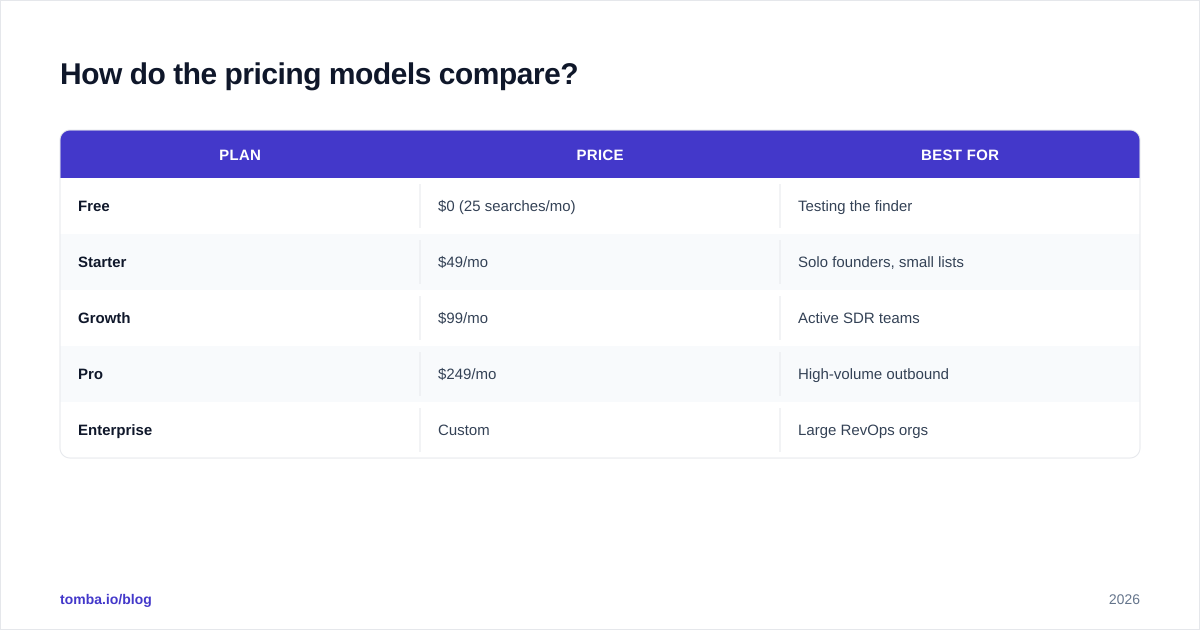
How do the pricing models compare?#
The two tools price for different buyers, so compare on value for your use case, not headline numbers.
Antideo leads with a free API quota and low-cost paid tiers aimed at developers who need occasional validation calls. It is one of the cheapest ways to add basic email hygiene to an app.
Tomba is priced for teams that source and verify contacts continuously. Full Tomba pricing runs:
| Plan | Price | Best for |
|---|---|---|
| Free | $0 (25 searches/mo) | Testing the finder |
| Starter | $49/mo | Solo founders, small lists |
| Growth | $99/mo | Active SDR teams |
| Pro | $249/mo | High-volume outbound |
| Enterprise | Custom | Large RevOps orgs |
The takeaway: if your need is "validate a trickle of signups," Antideo's free tier may cost you nothing. If your need is "find and verify thousands of B2B contacts a month," Tomba's per-result economics win because Antideo can't do the finding at any price. Don't compare a $0 validation tier against a $49 finding platform as if they're the same purchase — they aren't.
When should you use Antideo?#
Reach for Antideo when these describe you:
- You're a developer adding a guardrail to a signup or checkout form.
- You need fraud signals — IP reputation, proxy/Tor detection, disposable-email blocking — at the application layer.
- Your volume is low or bursty and the free tier covers it.
- You don't need to source contacts — you already have the emails and just want to screen them.
Antideo is a clean, focused tool. Its strength is that it does a few hygiene jobs cheaply and gets out of the way. Pairing it with a fraud check on the IP blacklist side of things is a reasonable lightweight stack for a small SaaS app.
)
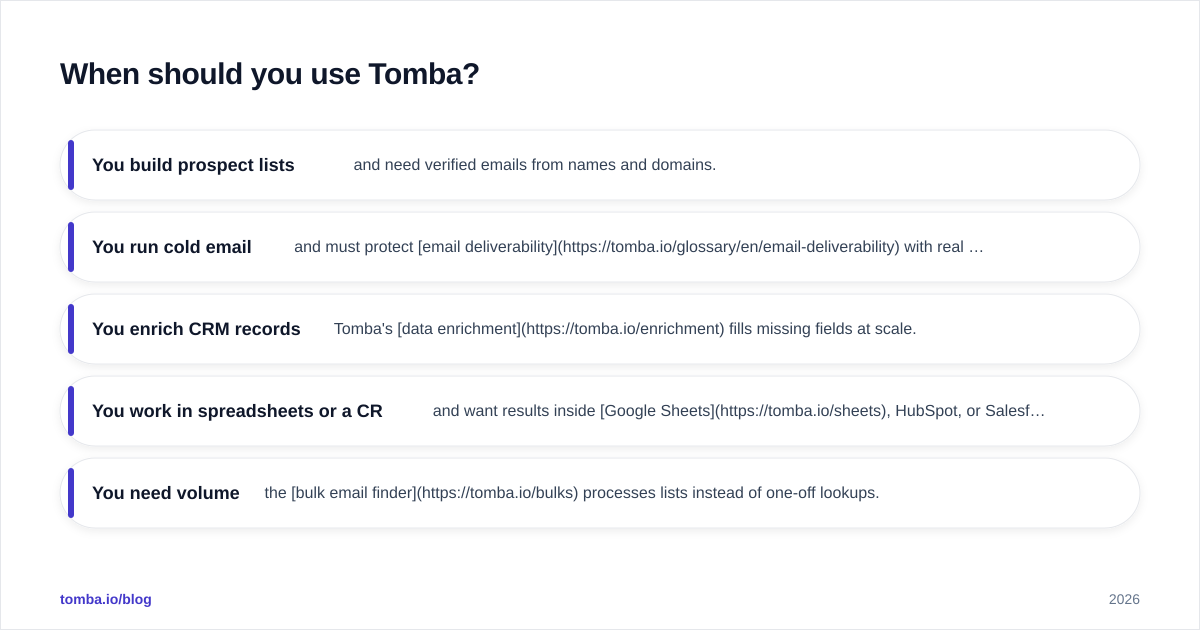
When should you use Tomba?#
Choose Tomba when your work is outbound, prospecting, or revenue-driven:
- You build prospect lists and need verified emails from names and domains.
- You run cold email and must protect email deliverability with real SMTP verification.
- You enrich CRM records — Tomba's data enrichment fills missing fields at scale.
- You work in spreadsheets or a CRM and want results inside Google Sheets, HubSpot, or Salesforce without copy-paste.
- You need volume — the bulk email finder processes lists instead of one-off lookups.
The reason Tomba fits revenue teams is that it covers the whole chain: find the contact, verify it, enrich it, and push it into your pipeline. You're not stitching together a finder, a separate verifier, and an enrichment vendor — it's one system. For teams that have outgrown manual research, that consolidation is the real value.
Can you use Antideo and Tomba together?#
Yes, and for some stacks it's the smartest setup. They don't compete head-to-head when you slot them into the right layers.
Run Antideo at the application layer — screening signups, blocking disposable addresses, flagging risky IPs in real time inside your product. Run Tomba in the go-to-market layer — sourcing and verifying the contacts your sales and marketing teams actually reach out to. One protects your database from junk input; the other fills your pipeline with qualified, deliverable leads.
The overlap is only in basic email validation, and even there they're tuned differently: Antideo for cheap real-time screening, Tomba for deliverability-grade verification before a send. If budget allows, using each for what it's best at beats forcing one tool to do both jobs poorly. You can compare Tomba against other tools in this space on the G2 reviews for email-finding software to sanity-check the fit.
The bottom line: which should you pick?#
Pick based on the job, not the brand:
- Need to validate input cheaply? Antideo. Its free API and fraud-prevention endpoints are purpose-built for app-layer hygiene.
- Need to find, verify, and enrich B2B contacts? Tomba. Antideo can't source emails, and that's the workload most sales teams are buying for.
- Building software and running outbound? Use both, one per layer.
The mistake to avoid is buying Antideo expecting it to power prospecting, or buying Tomba just to screen a low-volume signup form. They're aimed at different people solving different problems — and once you see them that way, the choice is usually obvious within five minutes of looking at your own workflow.
If your goal is outbound — building lists, confirming deliverability, and getting verified contacts into your CRM — start with the Tomba Email Finder. The free tier gives you 25 searches a month to test accuracy on your own target accounts before you commit, and the Tomba API scales the same engine into your product when you're ready. Find the right people, verify they're reachable, and spend your time selling instead of guessing at email formats.
Ready to find emails that actually work?
Join 150,000+ professionals who stopped guessing and started sending. Free credits on signup — no credit card required.
Get the Tomba newsletter
Practical outbound tactics and product updates — once every two weeks.
About the author