Antideo vs Wiza 2026: Email Verification vs Lead Finder
Antideo and Wiza solve two different problems that teams keep confusing. Here's a concrete 2026 breakdown of pricing, accuracy, data coverage, and which tool actually fits your workflow.
Antideo and Wiza get lumped into the same "email tools" bucket constantly, and that mistake costs teams money. They are not competitors in any clean sense. Antideo is a lightweight validation and fraud-signal API. Wiza is a LinkedIn-first lead finder that exports contacts with emails and phone numbers. Picking between them only makes sense once you know which job you are actually hiring a tool to do.
This breakdown compares them on what matters in 2026: data type, accuracy, pricing, integrations, and the use cases where each one wins.
TL;DR: Antideo vs Wiza at a glance#
- Antideo is a free-tier validation API for email, IP, and phone checks plus basic fraud/disposable-address detection. It does not find contacts.
- Wiza is a prospecting tool that pulls contact data out of LinkedIn and Sales Navigator, then enriches and exports it for outreach.
- They are not substitutes. Antideo verifies data you already have; Wiza sources new data you don't.
- Cost shape differs: Antideo is request-based and cheap-to-free for light use; Wiza is credit-based and priced for sales teams running volume.
- Most outbound teams need both jobs done — finding contacts and verifying them — which is why a combined platform often beats wiring two single-purpose tools together.
What is Antideo and what does it actually do?#
Antideo is an API-first validation service. You send it an email address, IP, or phone number, and it returns signals: whether the email syntax and domain are valid, whether it's a disposable/temporary address, whether an IP is flagged on blocklists, and basic phone formatting checks.
Think of Antideo like the bouncer at a club door. It doesn't go out and invite people — it just checks the IDs of whoever shows up and flags the fakes. That's genuinely useful for signup forms, fraud prevention, and cleaning a list before you send. But it is a gatekeeper, not a scout.
Antideo's appeal is its free tier and simplicity. For a developer who needs to block throwaway emails on a registration form, it's a quick drop-in. What it is not is a source of B2B contact data. If your list is empty, Antideo gives you nothing to validate.
What is Wiza and who is it for?#
Wiza sits at the opposite end of the workflow. It's a sales-prospecting tool built around LinkedIn and Sales Navigator. You run a search (or upload a list of profiles), and Wiza returns work emails, personal emails, and phone numbers, then lets you export straight to CSV or push into your CRM.
Wiza is the scout, not the bouncer. Its whole reason to exist is sourcing net-new contacts for outbound campaigns. It's used by SDRs, recruiters, and founders who live inside LinkedIn and want to turn a list of profiles into a usable outreach list in minutes.
The trade-off: Wiza is priced for that audience. It's a credit-based SaaS aimed at revenue teams, not a free utility you bolt onto a signup form. You can read more about how Wiza positions itself on their official site, and real user reviews on G2 give a sense of where it shines and where it frustrates.
Antideo vs Wiza: the core comparison table#
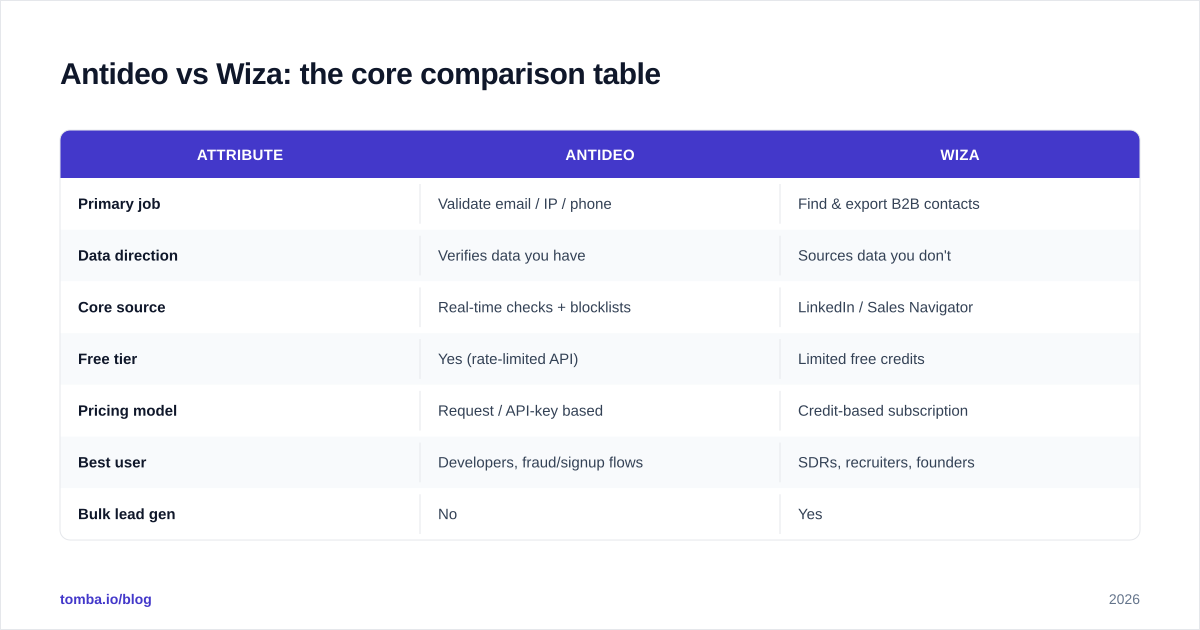
Here's the side-by-side on the attributes that decide the call.
| Attribute | Antideo | Wiza |
|---|---|---|
| Primary job | Validate email / IP / phone | Find & export B2B contacts |
| Data direction | Verifies data you have | Sources data you don't |
| Core source | Real-time checks + blocklists | LinkedIn / Sales Navigator |
| Free tier | Yes (rate-limited API) | Limited free credits |
| Pricing model | Request / API-key based | Credit-based subscription |
| Best user | Developers, fraud/signup flows | SDRs, recruiters, founders |
| Bulk lead gen | No | Yes |
| Email verification depth | Syntax, disposable, basic deliverability | Validation bundled with finding |
| CRM export | Via your own integration | Native CSV + CRM push |
The pattern is obvious once it's laid out: these tools occupy different stages of the same pipeline. Antideo cleans; Wiza collects.
Which tool is more accurate?#
Accuracy means different things for each tool, so a head-to-head number is misleading.
For Antideo, "accuracy" is about catching bad inputs — disposable domains, malformed addresses, suspicious IPs. It does this reliably for what it covers, but its checks are surface-level. It generally won't perform deep SMTP-level mailbox verification or resolve catch-all email domains, which are exactly the cases that wreck cold-email bounce rates.
For Wiza, accuracy is about whether the email and phone it hands you are correct and currently in use. Wiza validates as it finds, but LinkedIn-sourced data ages fast — people change roles, and personal emails drift. Bounce rates vary by industry and list freshness.

The honest takeaway: neither tool is a complete accuracy solution on its own. Antideo can't verify what it never found, and a finder's "verified" stamp is only as good as its verification engine. This is why serious senders run a dedicated email verifier pass before any campaign, regardless of where the contacts came from. The cost of skipping that step shows up as a damaged sender reputation, not a line item.
How does pricing compare for Antideo vs Wiza?#
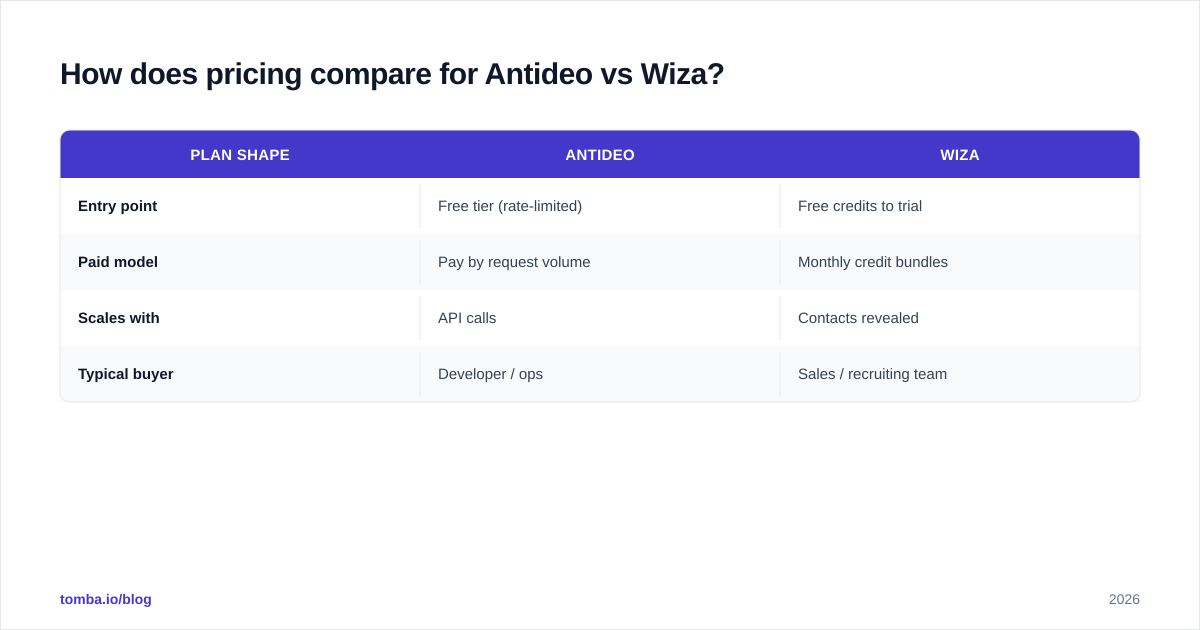
Pricing is where the "they're not the same tool" point becomes concrete.
Antideo runs on a request model with a usable free tier. For low-volume validation — a side project, a signup form, a small internal cleanup — you may never pay. Paid tiers scale with request volume and add higher rate limits. It's cheap because it's narrow.
Wiza charges for the expensive part: sourcing contact data at scale. It's a credit-based subscription, and credits are consumed as you reveal emails and phone numbers. For a team running outbound, that cost is justified by the leads it produces — but it's a real budget line, not a free utility.
| Plan shape | Antideo | Wiza |
|---|---|---|
| Entry point | Free tier (rate-limited) | Free credits to trial |
| Paid model | Pay by request volume | Monthly credit bundles |
| Scales with | API calls | Contacts revealed |
| Typical buyer | Developer / ops | Sales / recruiting team |
Comparing their prices directly is apples-to-oranges. The right question isn't "which is cheaper" — it's "what does each cost to do the specific job I need done." A free validation API saves nothing if your real bottleneck is finding contacts in the first place.
When should you choose Antideo?#
Choose Antideo when you already have data and need to clean or gate it, specifically:
- You're a developer adding disposable-email blocking to a signup or lead form.
- You need lightweight fraud and IP-reputation signals inside an app.
- Your volume is low enough that a free or cheap request-based tool covers it.
- You want a simple API without committing to a sales-data subscription.
Antideo is a great fit for that scoped, technical job. Where it falls short is the moment your goal shifts from "is this input clean?" to "go get me 500 qualified contacts." That's a different tool entirely.
When should you choose Wiza?#
Choose Wiza when finding new contacts is the actual goal:
- You prospect heavily inside LinkedIn or Sales Navigator.
- You're an SDR or recruiter who needs to turn profile lists into outreach lists fast.
- You want native export to CSV and CRM without a manual pipeline.
- Your budget supports a per-seat, credit-based prospecting tool.
Wiza earns its price for teams living in LinkedIn. The friction shows up when you operate outside LinkedIn — sourcing from company domains, author bylines, or technographic filters — or when you want finding and deep verification handled in one place instead of trusting a single bundled check.
Antideo vs Wiza vs a unified platform: which model wins?#
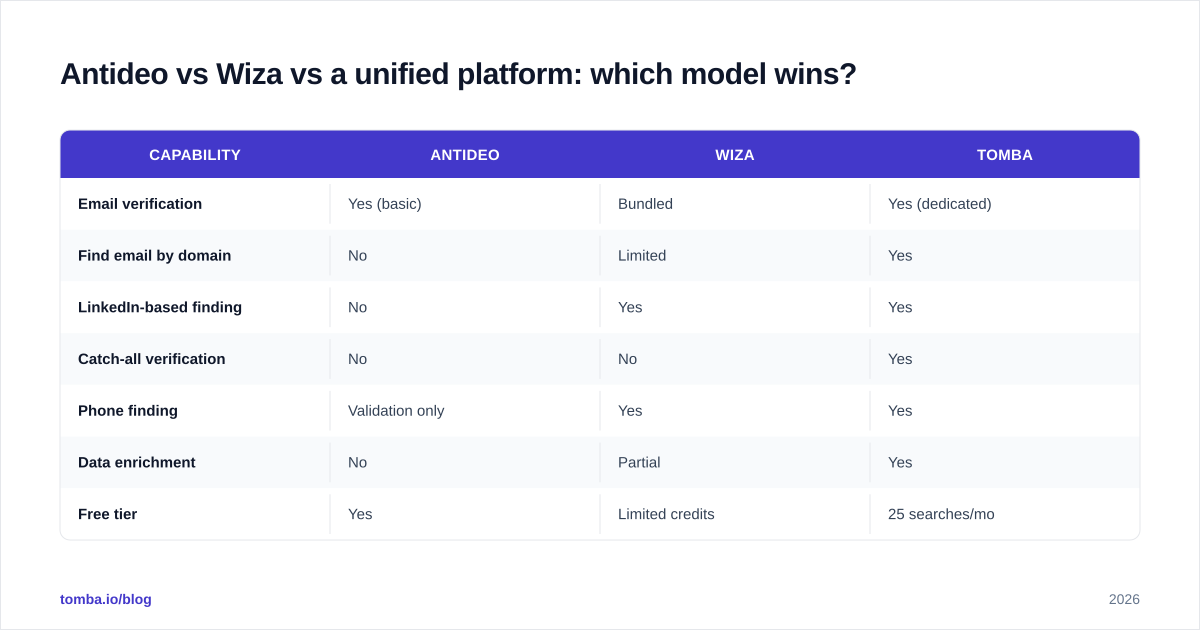
Here's the part both tools quietly expose: most outbound and RevOps teams need both jobs done — find contacts, then verify them — plus a few adjacent ones like domain search and bulk processing. Stitching a finder and a validator together with glue code and CSV exports works, but it's fragile and it doubles your vendor surface.
That's the gap a unified platform like Tomba targets. Instead of running Wiza to find and Antideo to validate, you get finding, verification, catch-all handling, and enrichment under one API and one credit pool.
| Capability | Antideo | Wiza | Tomba |
|---|---|---|---|
| Email verification | Yes (basic) | Bundled | Yes (dedicated) |
| Find email by domain | No | Limited | Yes |
| LinkedIn-based finding | No | Yes | Yes |
| Catch-all verification | No | No | Yes |
| Phone finding | Validation only | Yes | Yes |
| Data enrichment | No | Partial | Yes |
| Free tier | Yes | Limited credits | 25 searches/mo |
| Starter price | Free-ish | Subscription | $49/mo |
The data backbone matters as much as the feature checklist. Tomba publishes where its data comes from, and accuracy claims are only trustworthy when the sourcing is transparent. For full plan details, the Tomba pricing page lays out the Free (25 searches/mo), Starter ($49/mo), Growth ($99/mo), and Pro ($249/mo) tiers.

None of this means Antideo or Wiza are bad tools. It means single-purpose tools create multi-tool overhead. If your stack already has a strong finder and you just need a validation gate, Antideo is fine. If you live in LinkedIn and only need leads, Wiza is fine. The unified model wins when you're doing both at volume and don't want to babysit two billing relationships and an export script.
How do these tools fit your outbound workflow?#
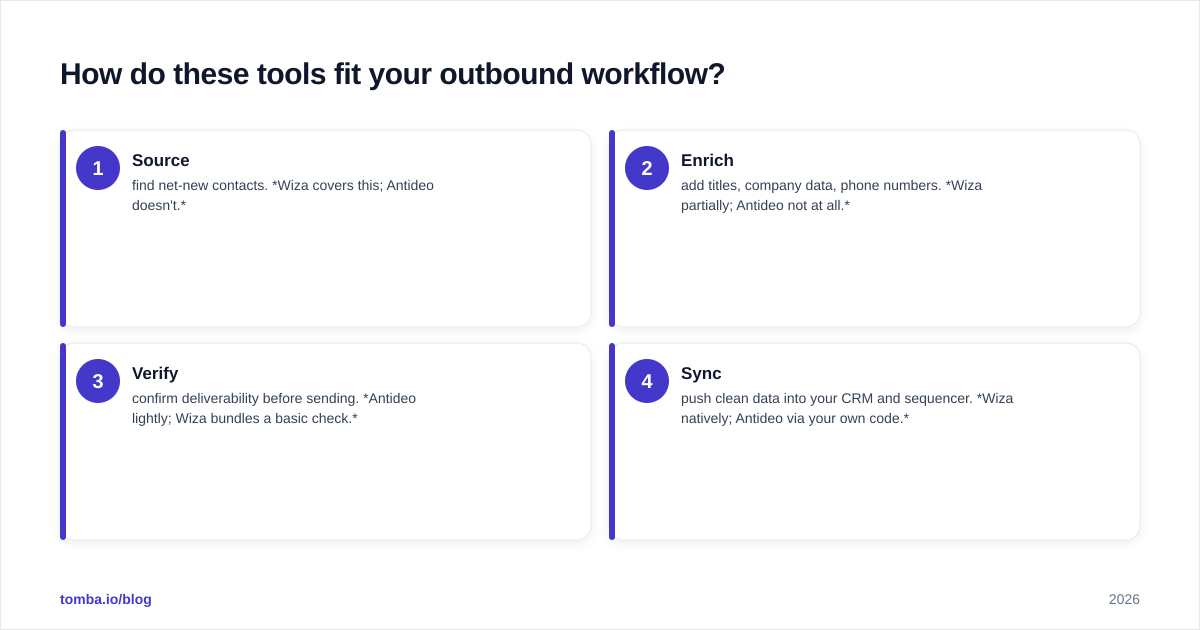
A clean outbound pipeline has four stages, and where each tool plugs in tells you what you're missing.
- Source — find net-new contacts. Wiza covers this; Antideo doesn't.
- Enrich — add titles, company data, phone numbers. Wiza partially; Antideo not at all.
- Verify — confirm deliverability before sending. Antideo lightly; Wiza bundles a basic check.
- Sync — push clean data into your CRM and sequencer. Wiza natively; Antideo via your own code.
If you map your real workflow onto those four stages, the honest answer usually isn't "Antideo or Wiza." It's "which of these stages do I still have a hole in." Tools like HubSpot's research on data decay make the case that contact data rots faster than most teams plan for — roughly a fifth of it annually — which is why the verify stage can't be an afterthought no matter which finder you use.
The verdict: Antideo vs Wiza in 2026#
There's no universal winner because they answer different questions.
- Pick Antideo if your job is validating and gating data you already collect, and you want a cheap, API-first utility.
- Pick Wiza if your job is sourcing contacts out of LinkedIn for outbound or recruiting, and you have the budget for a prospecting subscription.
- Pick a unified platform if you need both finding and serious verification — plus catch-all handling and enrichment — without running two tools and a sync script in between.
The framing mistake is treating this as a one-or-the-other fight between equals. It's a workflow question. Figure out which stage of your pipeline is actually broken, then buy the tool that fixes that stage — not the one with the loudest comparison page.
Find and verify contacts in one place with Tomba#
If your real need is both halves of the job — finding the right contacts and confirming they're deliverable before you send — skip the two-tool tax. The Tomba Email Finder locates professional emails by name, company, or domain, then runs them through dedicated verification and catch-all checks in the same workflow, with a free tier of 25 searches a month to test it on your own list. Start with the contacts you already lose to bounces, and see how many were fixable before they ever cost you a reply.
// get started
Find, verify and enrich your first contacts today
Start on the free plan with 25 searches a month, then scale when your team is ready.
Free plan · No credit card required · GDPR & CCPA
// about the author