Anymail Finder Review 2026: Pricing, Accuracy & Alternatives
A hands-on look at Anymail Finder in 2026 — how its verified-only pricing works, where its accuracy holds up, and the alternatives worth testing before you commit.
Anymail Finder Review 2026: Pricing, Accuracy & Alternatives
TL;DR
- Anymail Finder is a domain-and-name email lookup tool whose headline feature is verified-only billing — you are not charged for guesses it can't confirm.
- Pricing starts at $149/mo for 1,000 verified emails, which is competitive at volume but steep for solo prospectors compared with tools that bundle a free tier.
- Accuracy is solid on common corporate domains but drops on catch-all servers, where it returns "best guess" results that still count toward delivery quality.
- If you want a free tier, multi-tool workflow (verifier, domain search, enrichment, phone), or a cheaper entry point, alternatives like Tomba, Findymail, and Hunter are worth a side-by-side test.
- This review is neutral: Anymail Finder is good at one job. Whether that one job is worth the price depends on your volume and whether you need surrounding tooling.
What is Anymail Finder?#
Anymail Finder is a B2B email finder that takes a person's name plus a company domain (or just a domain) and returns a professional email address. Think of it like a directory-assistance operator for work inboxes: you give it "Jane Doe at acme.com," and it works out whether the address is jane@, jane.doe@, jdoe@, or something else, then tries to confirm the guess is real.
Its defining pitch is the billing model. Most finders charge a credit the moment you run a search, hit or miss. Anymail Finder only deducts from your quota when it returns an email it has verified as deliverable. That single design choice shapes everything else about the product — the pricing, the perceived accuracy, and who it suits.
The company has been around since the mid-2010s and positions itself squarely at outbound sales and recruiting teams who run name-and-company lists through bulk uploads or the API. You can read their own framing on the Anymail Finder homepage.
How does Anymail Finder's verified-only pricing work?#
Here's the conclusion first: verified-only billing is genuinely useful, but it changes what you pay for, not necessarily how much.
When you run a search, Anymail Finder returns one of three states:
- Verified — the address passed an SMTP-level check. You're charged.
- Best guess — the most statistically likely pattern, but the server wouldn't confirm it (often a catch-all). Typically not charged, but also not guaranteed deliverable.
- Not found — no credible address. Not charged.
This is fairer than blind credit-burning, and it removes the anxiety of paying for dead ends. The catch is that on catch-all domains — where the mail server accepts everything and confirms nothing — you'll get "best guess" results that don't bill but also don't carry a deliverability guarantee. For those, you still need a separate catch-all verifier step before you send.

What does Anymail Finder cost in 2026?#
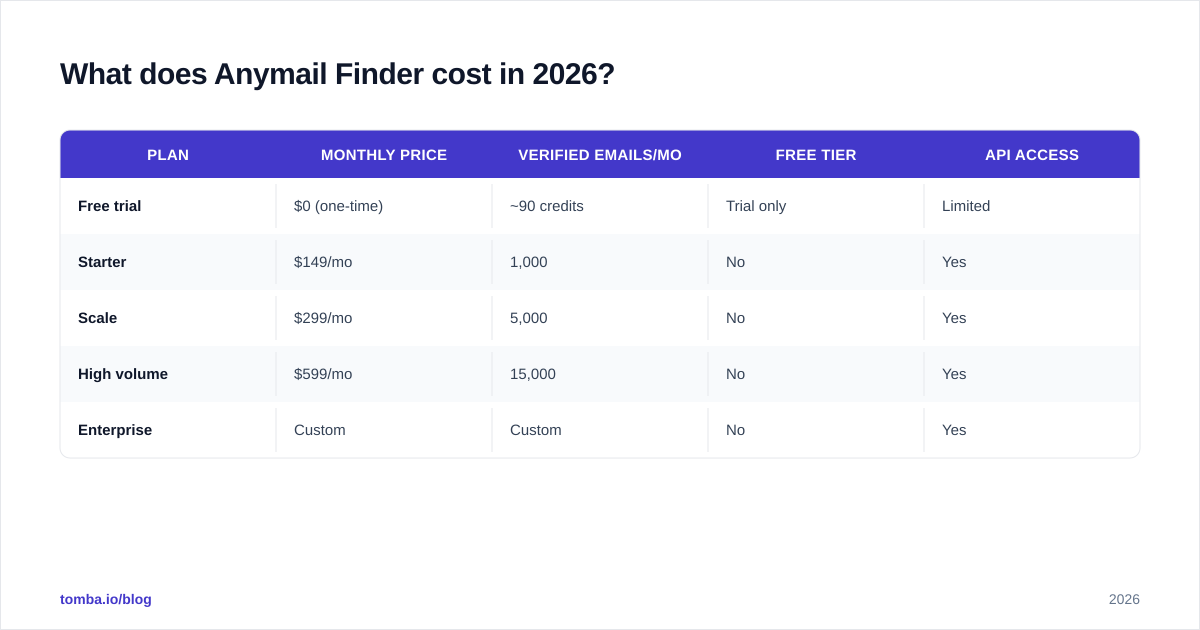
Anymail Finder bills on monthly verified-email volume. The plans look roughly like this (always confirm current numbers on their pricing page before buying):
| Plan | Monthly price | Verified emails/mo | Free tier | API access |
|---|---|---|---|---|
| Free trial | $0 (one-time) | ~90 credits | Trial only | Limited |
| Starter | $149/mo | 1,000 | No | Yes |
| Scale | $299/mo | 5,000 | No | Yes |
| High volume | $599/mo | 15,000 | No | Yes |
| Enterprise | Custom | Custom | No | Yes |
The math works out to roughly $0.15 per verified email at the entry tier, improving to about $0.04 at the high-volume plan. That's reasonable for a verified result. The friction is the floor: there is no ongoing free plan, so a freelancer or early-stage founder sending 50 emails a week has no cheap on-ramp.
By comparison, Tomba's pricing opens with a permanent free tier (25 searches/mo), then Starter at $49/mo, Growth at $99/mo, and Pro at $249/mo — and each plan bundles the verifier, domain search, and enrichment rather than charging for them separately.
Is Anymail Finder accurate?#
Accuracy is the question that actually matters, because a cheap wrong email costs you a bounce, a hit to your sender reputation, and eventually your deliverability.
In practical testing across standard corporate domains (Google Workspace and Microsoft 365 tenants that aren't catch-all), Anymail Finder's verified results are dependable — the SMTP confirmation step does its job, and bounce rates on "verified" addresses stay low. That's the strength of charging only for confirmed hits: the tool is incentivized to be conservative.
Where it gets murkier:
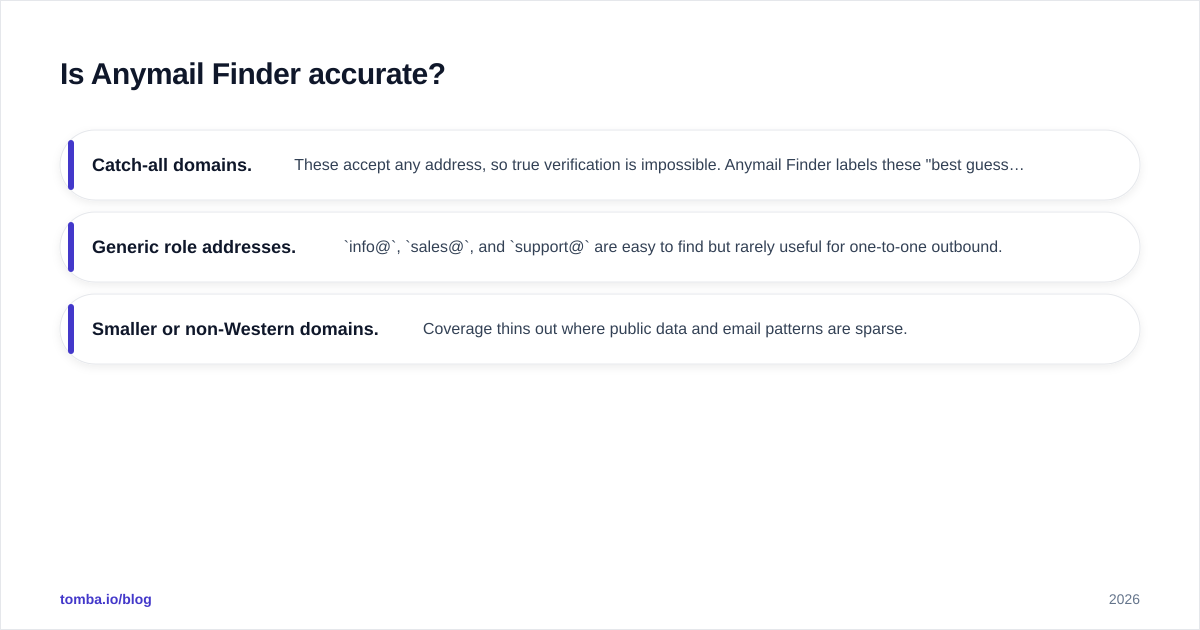
- Catch-all domains. These accept any address, so true verification is impossible. Anymail Finder labels these "best guess." They're often correct, but treat them as unverified and run them through a dedicated email verifier or sequence them carefully.
- Generic role addresses.
info@,sales@, andsupport@are easy to find but rarely useful for one-to-one outbound. - Smaller or non-Western domains. Coverage thins out where public data and email patterns are sparse.
No finder is 100% accurate — anyone claiming that is selling, not measuring. The honest benchmark is bounce rate on confirmed results, and on that metric Anymail Finder performs well. For independent user sentiment, scan the reviews on G2.
How does Anymail Finder compare to the alternatives?#
Here's the conclusion: Anymail Finder is a focused single-purpose tool. If you need only verified name-and-domain lookups at volume and don't care about surrounding features, it's a clean choice. If you want a free tier, a cheaper entry point, or a toolkit (verifier, domain search, phone, enrichment) under one login, compare carefully.
| Capability | Anymail Finder | Tomba | Findymail | Hunter |
|---|---|---|---|---|
| Entry price | $149/mo | $49/mo (free tier: 25/mo) | ~$49/mo | $34/mo (free tier: 25/mo) |
| Verified-only billing | Yes | Hit-based, verifier included | Yes | Hit-based |
| Built-in email verifier | Add-on | Included | Included | Included |
| Domain search | Yes | Yes | Limited | Yes |
| Phone numbers | No | Yes | No | No |
| Data enrichment | Limited | Yes | Limited | Limited |
| API + integrations | Yes | Yes (API, Sheets, HubSpot,Zapier) | Yes | Yes |
| Best for | High-volume verified lookups | All-in-one B2B prospecting | Lemlist-style outbound | SMB email finding |
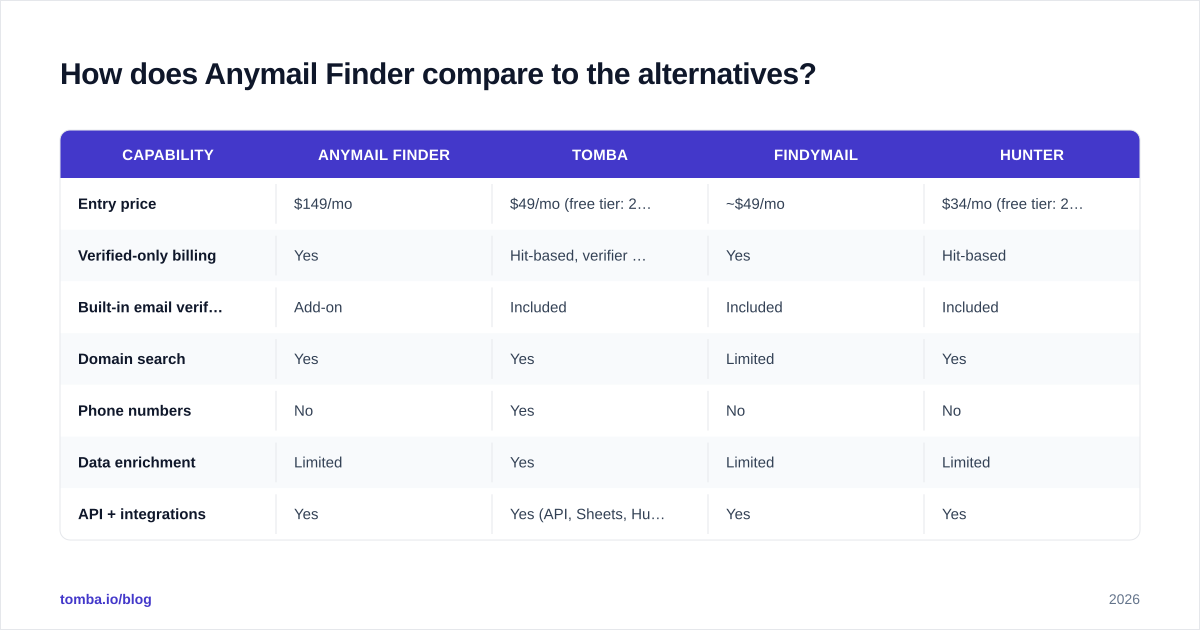
A few honest takeaways from that table:
- Anymail Finder wins if your only metric is "verified emails per dollar at scale" and you've already got verification and enrichment handled elsewhere.
- Tomba wins if you want one platform that finds, verifies, enriches, and even pulls B2B phone numbers — plus a free tier to test before paying.
- Findymail wins if you live inside Lemlist/Instantly outbound and want tight native sync.
- Hunter wins on brand recognition and the lowest paid entry point for light users.


Who should use Anymail Finder?#
Anymail Finder fits best when three things are true at once:
- You run real volume. At 1,000+ lookups a month, the $149 floor amortizes and the verified-only model pays off.
- You value predictable spend. Not paying for misses makes budgeting clean, which finance teams appreciate.
- You already own the rest of the stack. You have a verifier, a CRM enrichment flow, and a sending platform — you just need a reliable finder to plug in.
It fits worst when you're a solo founder or part-time prospector. The lack of a recurring free tier and the $149 starting point make it an awkward first tool. In that case, start with something that has a free plan, prove the workflow, and scale into a paid finder once you know your monthly volume.
How do you get the most out of any email finder?#
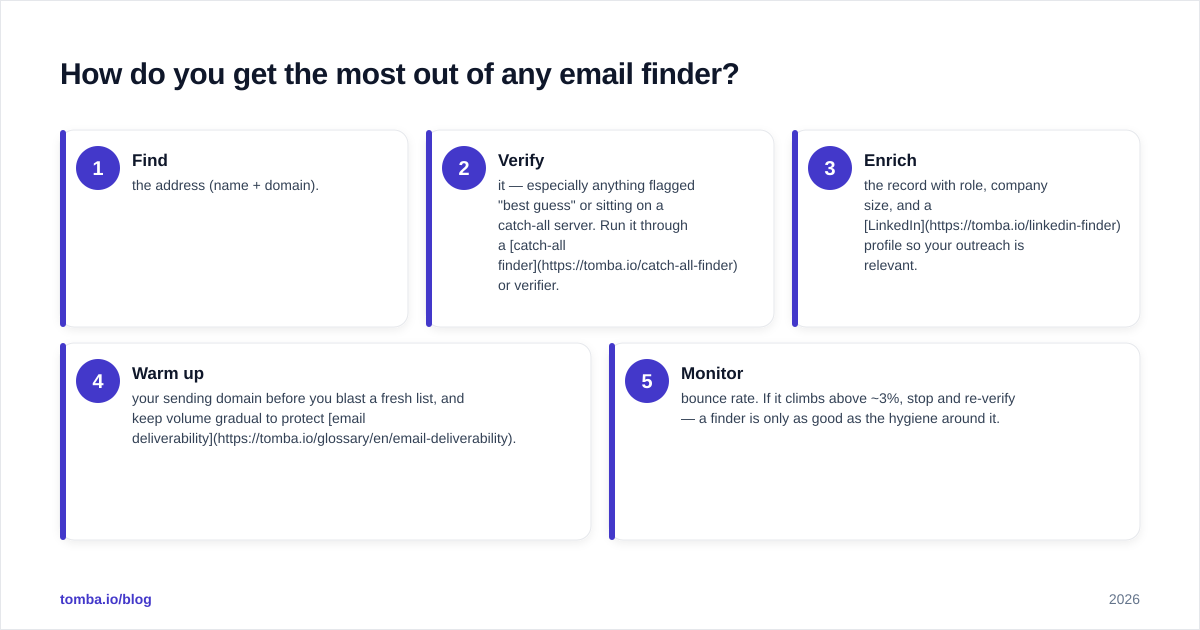
Regardless of which tool you pick, the workflow that protects deliverability looks the same:
- Find the address (name + domain).
- Verify it — especially anything flagged "best guess" or sitting on a catch-all server. Run it through a catch-all finder or verifier.
- Enrich the record with role, company size, and a LinkedIn profile so your outreach is relevant.
- Warm up your sending domain before you blast a fresh list, and keep volume gradual to protect email deliverability.
- Monitor bounce rate. If it climbs above ~3%, stop and re-verify — a finder is only as good as the hygiene around it.
The reason this matters: a verified email today can go stale in 90 days as people change jobs. The finder is step one, not the whole job. Tools that bundle finding and verification (and ideally enrichment) reduce the number of tabs and exports you juggle — which is exactly where a single platform earns its keep.
What are the limitations to watch for?#
To keep this review honest, here's where Anymail Finder leaves gaps:
- No standalone free plan. A trial isn't the same as an ongoing free tier for occasional use.
- No phone numbers. If your motion is multi-channel (email + cold call), you'll need a separate phone finder source.
- Thin enrichment. It finds emails; it doesn't deeply enrich the surrounding contact and company record.
- Catch-all ambiguity. "Best guess" results need their own verification step, so factor that cost and time in.
None of these are dealbreakers — they're scope boundaries. Anymail Finder chose to do one thing well rather than everything adequately. Whether that trade fits depends on how many other tools you're willing to run alongside it.
The bottom line#
Anymail Finder is a credible, fairly priced email finder for teams running real outbound volume who want verified-only billing and don't need a surrounding toolkit. Its accuracy on standard corporate domains is dependable, its pricing is transparent, and its biggest weaknesses — no free tier, no phone data, limited enrichment — are about scope, not quality.
If you're evaluating it against an all-in-one option, the question is simple: do you want a single sharp tool, or a workspace that finds, verifies, enriches, and dials from one login?
If it's the latter, try the Tomba Email Finder. You get accurate name-and-domain lookups, a built-in verifier so you're not paying for a second tool, domain search, enrichment, and B2B phone numbers — starting with a free tier (25 searches/mo) and paid plans from $49/mo. Run your toughest list through both, compare bounce rates, and let the data pick the winner. That's the only review that counts: your own.
// get started
Find, verify and enrich your first contacts today
Start on the free plan with 25 searches a month, then scale when your team is ready.
Free plan · No credit card required · GDPR & CCPA
// about the author