Anymail Finder Pricing, Reviews, Pros and Cons (2026)
A neutral 2026 breakdown of Anymail Finder pricing, real user reviews, and the honest pros and cons — plus how its verified-only billing stacks up against alternatives.
TL;DR
- Anymail Finder uses a "pay only for verified emails" model — you are not charged for guesses or risky catch-all results, which is its biggest selling point.
- 2026 pricing runs roughly from a free trial up to ~$49/mo (Starter) through ~$299/mo and custom Enterprise, billed by verified-email volume rather than raw searches.
- Strengths: clean UX, fair billing, solid domain search, decent accuracy on common business domains.
- Weaknesses: thinner data on catch-all domains, fewer enrichment fields, no native phone data, and credits that feel tight at scale.
- If you want broader data types (phone, social, deeper enrichment) at a similar price, alternatives like Tomba Email Finder are worth a side-by-side test before you commit.
What is Anymail Finder?#
Anymail Finder is a B2B email-finding tool that locates professional email addresses from a person's name and company, or pulls every address tied to a domain. Think of it like a phone book that only prints numbers it has already dialed and confirmed are connected — its headline promise is that you pay for verified results, not for hopeful guesses.
The product covers three core jobs: single email lookups (name + company), domain search (all emails on a company domain), and bulk processing via CSV upload or API. It is a focused tool. It does the email part well and largely leaves CRM, sequencing, and dialing to other platforms.
That focus is the lens for this whole review. If you only need accurate work emails and clean billing, Anymail Finder is a reasonable pick. If you need a wider prospecting stack, the math changes — and we will get to that.
How does Anymail Finder pricing work in 2026?#
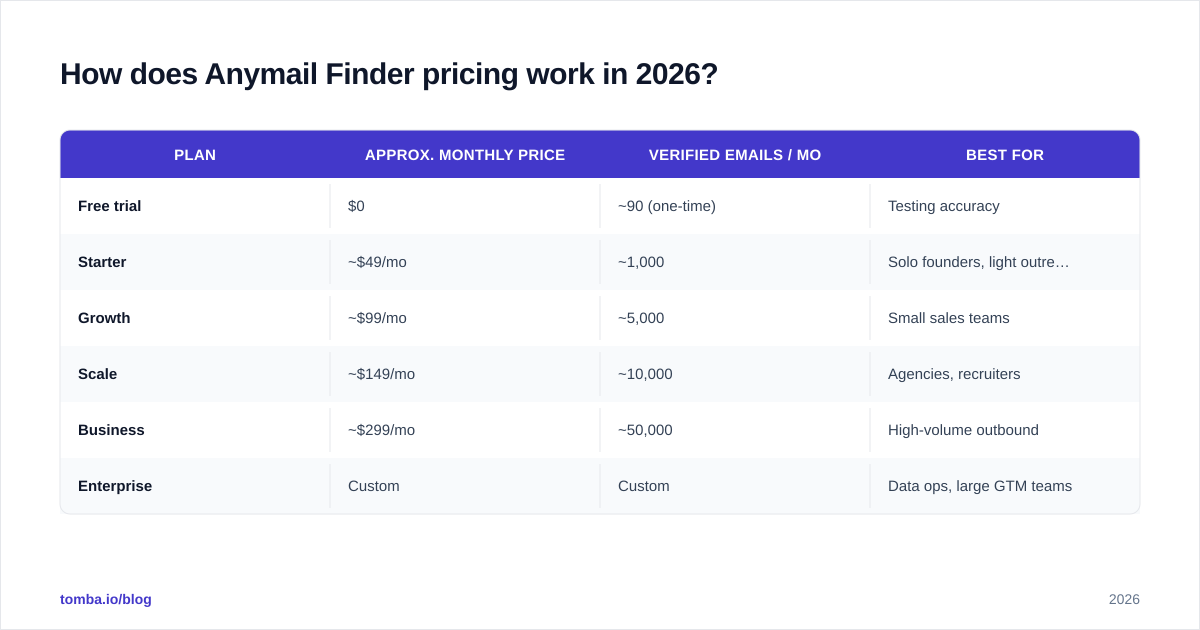
The core conclusion first: Anymail Finder bills by verified emails delivered, not by searches attempted. If the tool can only return a "risky" or unverifiable result, it typically does not consume a paid credit. That is genuinely different from search-metered tools where every lookup burns quota whether or not you get a usable address.
Representative 2026 plan structure (always confirm current numbers on the official anymailfinder.com pricing page, since vendors adjust tiers):
| Plan | Approx. monthly price | Verified emails / mo | Best for |
|---|---|---|---|
| Free trial | $0 | ~90 (one-time) | Testing accuracy |
| Starter | ~$49/mo | ~1,000 | Solo founders, light outreach |
| Growth | ~$99/mo | ~5,000 | Small sales teams |
| Scale | ~$149/mo | ~10,000 | Agencies, recruiters |
| Business | ~$299/mo | ~50,000 | High-volume outbound |
| Enterprise | Custom | Custom | Data ops, large GTM teams |
A few things matter beyond the sticker price:
- Annual billing usually cuts the effective monthly rate (commonly ~20–30%), so the headline monthly numbers are the expensive way to buy.
- Unused credits generally do not roll over, which punishes spiky, campaign-driven usage.
- API access is included across paid tiers, not gated behind a separate enterprise wall — useful if you want to wire lookups into your own workflow.
The verified-only model is the honest highlight here. You are paying for outcomes. The catch is that "verified" excludes a lot of catch-all domains, so on certain industries you will get fewer billable hits — good for your wallet, frustrating for your list size.
How accurate is Anymail Finder?#
Accuracy is the number that actually decides cost-per-meeting, so treat any single percentage with skepticism. Anymail Finder's verified-only billing creates a structural bias toward accuracy: it would rather return nothing than charge you for a bounce. In practice that means high deliverability on the emails it does return, but a lower overall hit rate on hard targets like catch-all domains and very small companies.
For email-finder tools generally, accuracy depends heavily on the domain type, the freshness of the underlying data, and how aggressively the tool guesses patterns. Independent benchmarks across the category show meaningful spread between vendors — no tool wins every domain.

The practical takeaway: run your own 100-contact accuracy test before committing to any annual plan. Pull a list you can verify (existing customers, known contacts), run it through the tool, then check results against your own email verifier or a second source. A vendor's marketing accuracy number and your real-world hit rate on your niche are rarely the same figure. If your prospects live on catch-all domains, expect Anymail Finder's billable hit rate to drop — that is the trade-off of its conservative model.
What do Anymail Finder reviews say?#
Pulling from public review sites like G2 and Capterra, the sentiment is consistent and fairly stable into 2026.
What reviewers praise:
- The verified-only billing is the most-cited positive — people feel it is fair and predictable.
- Simple, uncluttered interface with a short learning curve.
- Reliable domain search for building a list from a target account.
- Responsive support relative to the price point.
What reviewers criticize:
- Credit limits feel tight; heavy users hit caps faster than expected.
- Weaker results on catch-all and smaller-company domains.
- Limited enrichment — you get the email, but not much surrounding firmographic or social data.
- No native phone numbers, so multi-channel teams need a second tool.
The pattern is clear: reviewers who want a clean, honest email finder are happy; reviewers who expected a full prospecting platform feel it stops short. Neither group is wrong — they bought different expectations.
What are the pros and cons of Anymail Finder?#
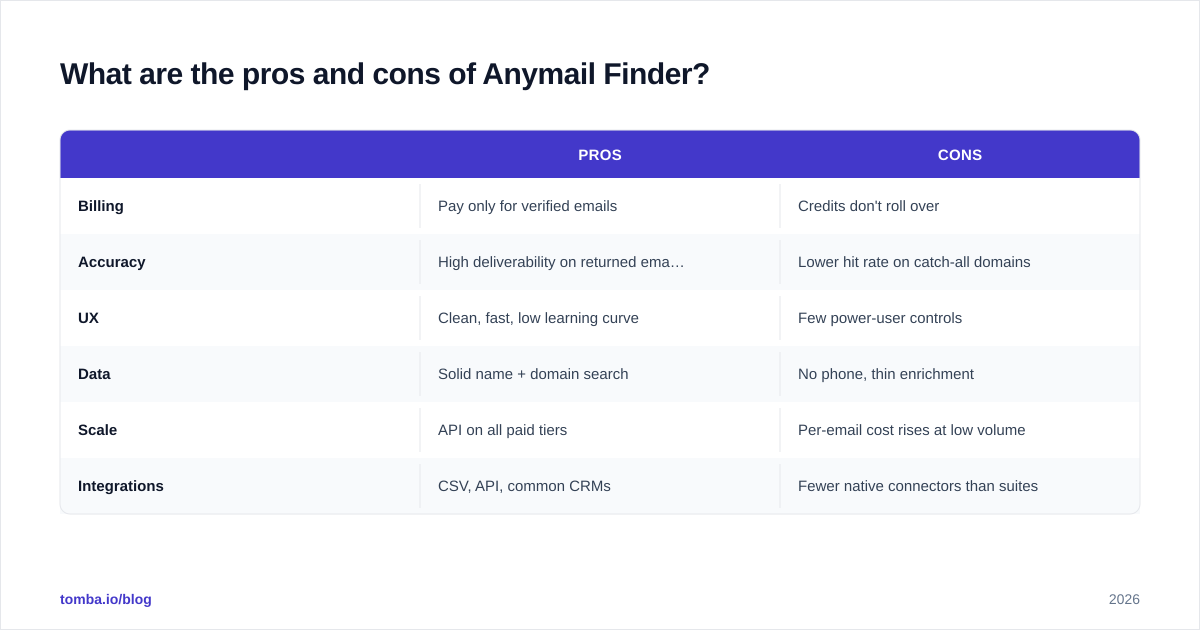
Here is the honest balance sheet.
| Pros | Cons | |
|---|---|---|
| Billing | Pay only for verified emails | Credits don't roll over |
| Accuracy | High deliverability on returned emails | Lower hit rate on catch-all domains |
| UX | Clean, fast, low learning curve | Few power-user controls |
| Data | Solid name + domain search | No phone, thin enrichment |
| Scale | API on all paid tiers | Per-email cost rises at low volume |
| Integrations | CSV, API, common CRMs | Fewer native connectors than suites |
Best fit: founders, recruiters, and small sales teams who want accurate emails with transparent billing and do not need phone numbers or deep enrichment.
Poor fit: multi-channel outbound teams, RevOps groups building enriched datasets, and anyone whose target market lives on catch-all domains.
Is Anymail Finder better than the alternatives?#
It depends on how much of your prospecting stack you want one tool to cover — that is the real fork in the road.
Anymail Finder optimizes for one thing (verified emails, fairly billed) and does it cleanly. Broader platforms trade some of that simplicity for more data types. If you only ever need emails, narrow-and-clean can beat broad-and-busy. If you are assembling complete contact records, the breadth wins.
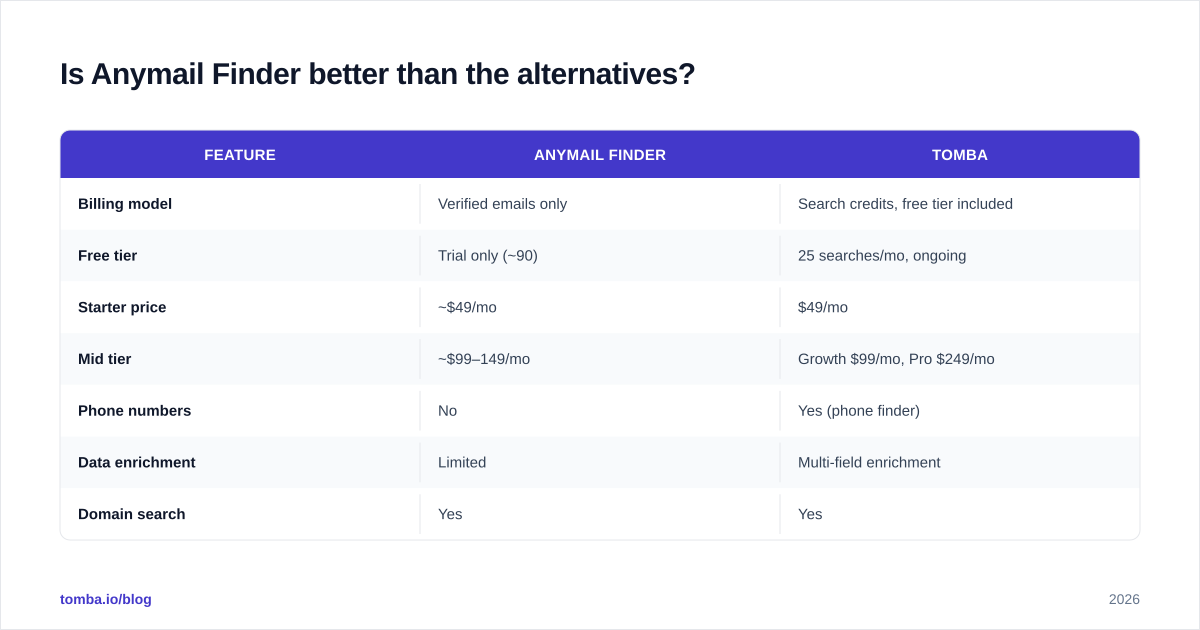
Here is how Anymail Finder compares to a broader-data option on the dimensions that usually drive the decision:
| Feature | Anymail Finder | Tomba |
|---|---|---|
| Billing model | Verified emails only | Search credits, free tier included |
| Free tier | Trial only (~90) | 25 searches/mo, ongoing |
| Starter price | ~$49/mo | $49/mo |
| Mid tier | ~$99–149/mo | Growth $99/mo, Pro $249/mo |
| Phone numbers | No | Yes (phone finder) |
| Data enrichment | Limited | Multi-field enrichment |
| Domain search | Yes | Yes |
| Catch-all handling | Conservative (often skipped) | Dedicated catch-all verifier |
| API access | Included on paid tiers | Included, plus CLI + MCP |

The honest read: Anymail Finder's verified-only billing is a real advantage if your campaigns are spiky and you hate paying for misses. But Tomba pricing lands at the same $49 entry point while adding phone data, enrichment, and an ongoing free tier — so for teams that need more than just email, the per-dollar coverage tilts toward the broader tool. For pure email accuracy on common domains, the two are closer than the feature list suggests, and your own test list should break the tie.

How should you choose between verified-only and search-based billing?#
Lead with the decision rule: choose verified-only billing when your usage is unpredictable and you cannot tolerate paying for bounces; choose search-based billing with a free tier when you do high, steady volume and want the cheapest marginal cost per lookup plus extra data types.
A simple way to think about it — verified-only is like a taxi that only charges when you actually arrive, while search-based is like a monthly transit pass: cheaper per ride if you ride a lot, wasteful if you barely leave the house.
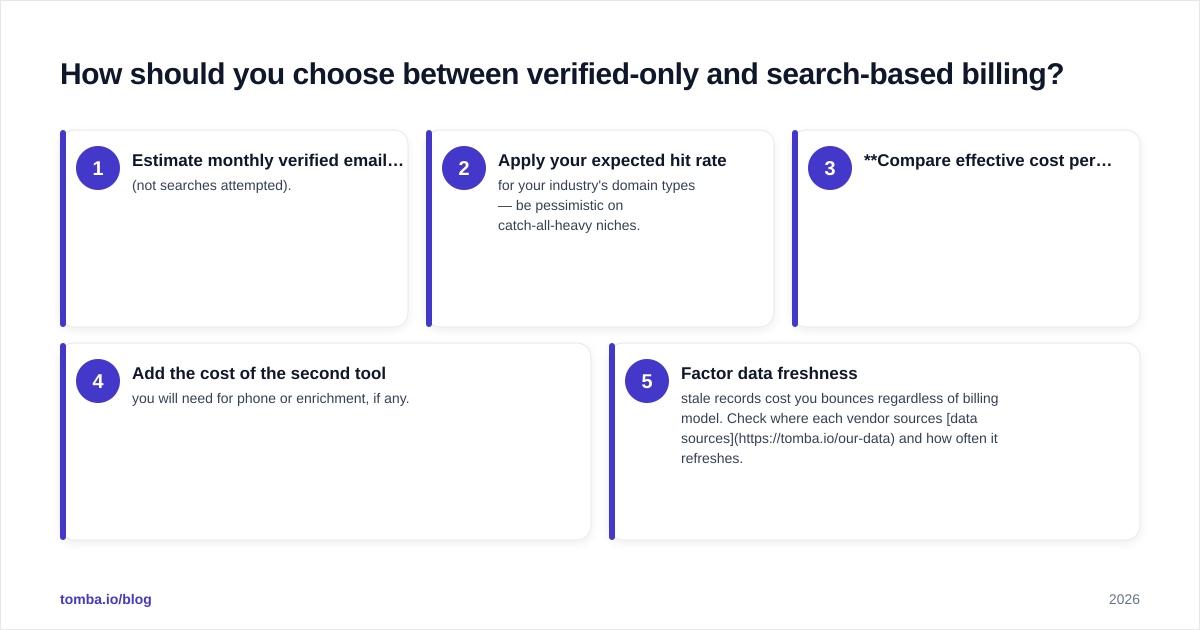
Run the math on your real numbers:
- Estimate monthly verified emails you actually need (not searches attempted).
- Apply your expected hit rate for your industry's domain types — be pessimistic on catch-all-heavy niches.
- Compare effective cost per usable email, not cost per credit.
- Add the cost of the second tool you will need for phone or enrichment, if any.
- Factor data freshness — stale records cost you bounces regardless of billing model. Check where each vendor sources data sources and how often it refreshes.
When you run that exercise honestly, a $49 plan that covers email and phone and enrichment often beats a $49 email-only plan, even a fair one — unless email is genuinely all you will ever touch.
Frequently asked questions#
Does Anymail Finder have a free plan? It offers a one-time free trial (around 90 verified emails) rather than an ongoing monthly free tier. If you want recurring free credits, you will need a tool that builds them into the model.
Does Anymail Finder charge for catch-all emails? Generally no — that is the point of verified-only billing. But it also means catch-all domains often return nothing, so your list coverage on those domains suffers.
Can I use Anymail Finder via API? Yes. API access is included across paid tiers, which makes it viable for embedding lookups into your own workflow without an Enterprise upgrade.
Is Anymail Finder GDPR-compliant? Anymail Finder positions itself as compliant with major data regulations. As with any data vendor, confirm the current terms and your own legal obligations before processing EU contacts at scale.
The bottom line#
Anymail Finder is a focused, fairly-priced email finder with an honest billing model that real users genuinely like. Its verified-only approach protects your budget and your sender reputation, and for solo founders or small teams that only need clean emails, it earns its place. The limits show up at scale and on the edges — catch-all domains, missing phone data, and thin enrichment push multi-channel teams toward a broader stack.
If you want to pressure-test that broader option, run the same 100-contact list through Tomba Email Finder — find emails by name, domain, or company, then layer in phone and enrichment from one place starting at the same $49/mo, with 25 free find email addresses searches every month to benchmark accuracy before you pay a cent. Test both on your real prospects, compare cost per usable contact, and let your own numbers — not the marketing — make the call.
// get started
Find, verify and enrich your first contacts today
Start on the free plan with 25 searches a month, then scale when your team is ready.
Free plan · No credit card required · GDPR & CCPA
// about the author