Anymail Finder vs FinalScout: Which Email Tool Wins in 2026?
Anymail Finder charges only for verified emails; FinalScout lives inside LinkedIn. We break down accuracy, pricing, and workflow fit so you pick the right one in 2026.
Choosing between Anymail Finder and FinalScout comes down to one question: do you build prospect lists from company domains, or from LinkedIn profiles? Both tools find professional email addresses, but they pull from different starting points and bill you in very different ways. This breakdown compares them on accuracy, pricing, workflow, and data coverage so you can decide which belongs in your 2026 stack — and where a third option might serve you better.
TL;DR#
- Anymail Finder only charges you for emails it can verify as deliverable. If it returns "not found" or only a guess, you pay nothing — which makes its effective accuracy close to 97% on charged results.
- FinalScout is built around LinkedIn. It scrapes profiles and Sales Navigator searches, then appends emails and even drafts outreach with an AI writer. Great if LinkedIn is your primary sourcing channel.
- Pricing models differ sharply: Anymail Finder bills per verified email; FinalScout sells monthly email-credit bundles regardless of verification confidence.
- Bulk and domain search favor Anymail Finder. In-browser LinkedIn prospecting favors FinalScout.
- If you want verified-only billing, a public API, and broader data tools under one roof, Tomba's email finder is worth testing alongside both.
What is Anymail Finder?#
Anymail Finder is a domain-and-name email finder that has built its brand on a single promise: you only pay for emails it can confirm are deliverable. You feed it a person's name plus a company domain, or just a domain for a full company search, and it returns either a verified address or nothing chargeable. Guessed or risky results don't burn credits.
That billing model shapes everything. Because the company eats the cost of every unverified guess, it has a strong incentive to verify aggressively rather than pad your results with "pattern-based" emails that bounce. For teams that have been burned by tools reporting 95% accuracy on paper and 60% in the inbox, this alignment matters.
Anymail Finder also offers bulk CSV upload, a domain search that lists everyone it knows at a company, a REST API, and integrations through Zapier. You can read more about how the broader category handles verification confidence in our guide to the email verifier workflow.
What is FinalScout?#
FinalScout approaches the same problem from the LinkedIn side. Its core surface is a Chrome extension and web app that sit on top of LinkedIn and Sales Navigator. You run a search — or open a single profile — and FinalScout extracts the person's professional email, claiming high deliverability backed by its "EmailAI" engine. It then layers on an AI email writer (originally ChatGPT-powered) that drafts personalized outreach from the scraped profile data.
This makes FinalScout less of a pure lookup utility and more of a prospect-to-message pipeline. If your reps live inside LinkedIn all day, the appeal is obvious: find the person, get the email, draft the note, export — without leaving the tab. The tradeoff is that your sourcing is anchored to what LinkedIn surfaces, and your billing is tied to monthly credit tiers rather than verified results.
For a sense of where LinkedIn-native finding fits a wider outbound motion, see how a dedicated LinkedIn finder complements domain-based search rather than replacing it.
How do Anymail Finder and FinalScout compare on accuracy?#
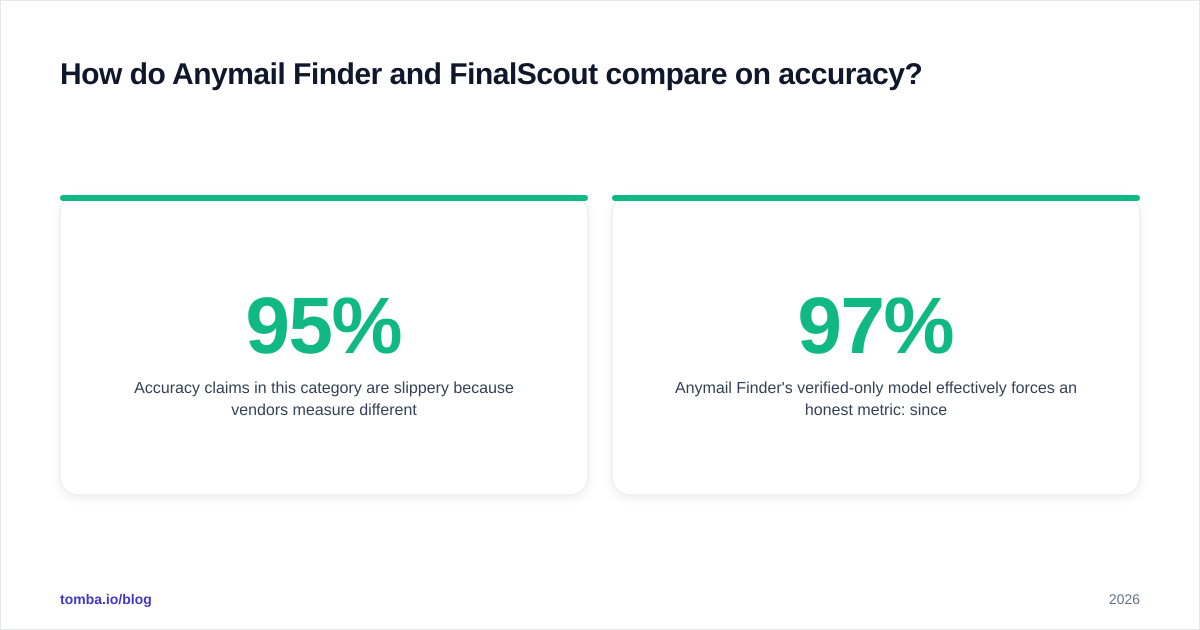
Accuracy claims in this category are slippery because vendors measure different things. "95% accuracy" can mean 95% of returned emails are valid, or 95% of attempts succeed — wildly different numbers.
Anymail Finder's verified-only model effectively forces an honest metric: since unverified results aren't charged, the accuracy you experience is the accuracy of the emails you actually pay for, which the company positions near 97%. FinalScout reports high deliverability too, but because credits are consumed on returns regardless of verification depth, your real-world hit rate depends more on whether the LinkedIn profile had a discoverable corporate email in the first place.
The honest takeaway: neither tool is magic, and any single source will miss contacts the other finds. Run a small paid test batch of 50–100 known contacts through each before committing budget. For the methodology behind trustworthy benchmarks, our breakdown of data sources and accuracy explains what to actually measure.


Anymail Finder vs FinalScout: feature and pricing comparison#
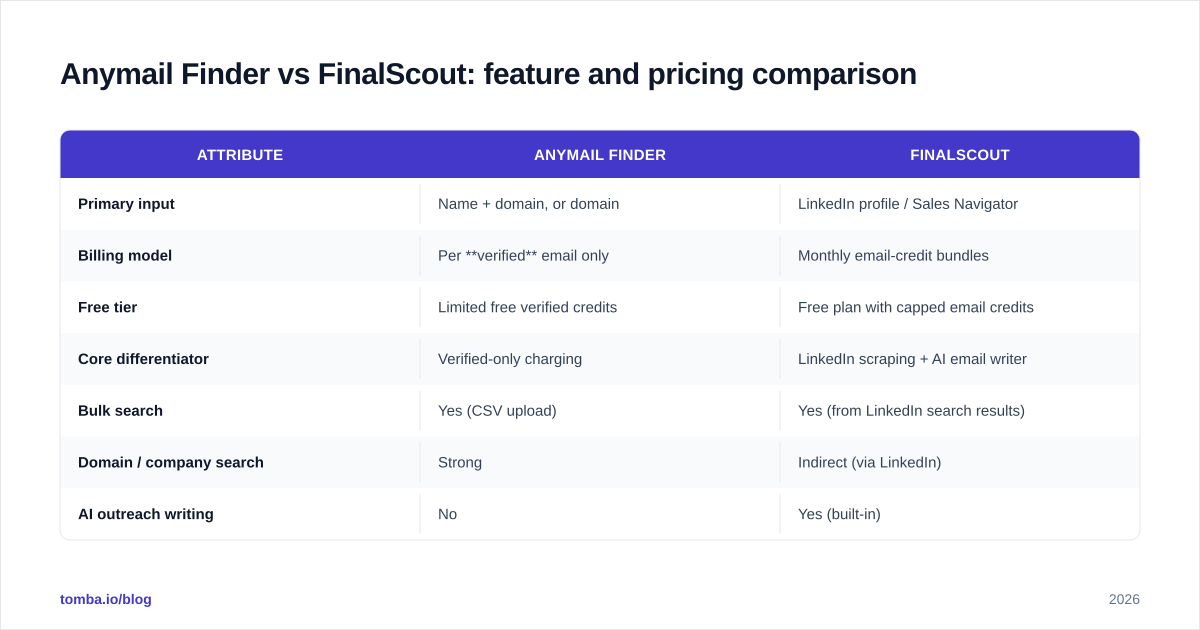
The clearest way to separate these two is side by side. Prices below reflect publicly listed entry tiers at the time of writing; always confirm current numbers on each vendor's pricing page, since credit bundles shift often.
| Attribute | Anymail Finder | FinalScout |
|---|---|---|
| Primary input | Name + domain, or domain | LinkedIn profile / Sales Navigator |
| Billing model | Per verified email only | Monthly email-credit bundles |
| Free tier | Limited free verified credits | Free plan with capped email credits |
| Core differentiator | Verified-only charging | LinkedIn scraping + AI email writer |
| Bulk search | Yes (CSV upload) | Yes (from LinkedIn search results) |
| Domain / company search | Strong | Indirect (via LinkedIn) |
| AI outreach writing | No | Yes (built-in) |
| Public REST API | Yes | Limited |
| Best for | Domain-led list building, RevOps | LinkedIn-led SDR prospecting |
A few things to read into this table. FinalScout's AI writer is a genuine differentiator if you want sourcing and copy in one motion. Anymail Finder's API and verified-only billing make it easier to plug into automated pipelines where you cannot afford to pay for bounces. If your team is split across both motions, you may end up wanting a tool that does domain search, LinkedIn lookup, and bulk under one subscription — which is where comparing against a third platform pays off.
Which tool fits which workflow?#
Pick Anymail Finder if your lists start from companies. You have a target account list, you need every relevant contact at those domains, and you want to guarantee you're not paying for guesses. Its bulk email finder style workflow and API suit RevOps and growth teams running programmatic enrichment. The verified-only model also makes budget forecasting clean: spend maps directly to usable contacts.
Pick FinalScout if your reps source from LinkedIn first. They build a Sales Navigator search, want emails appended in-browser, and value drafting first-touch messages without context-switching. For a high-volume SDR who thinks in LinkedIn searches rather than domain lists, that single-tab flow is a real time saver.
Consider a broader platform if you need both motions plus verification, phone numbers, and enrichment. Single-channel tools force you to stitch together a stack; a consolidated provider reduces credit waste and reconciliation overhead.

Where does Tomba fit in this comparison?#
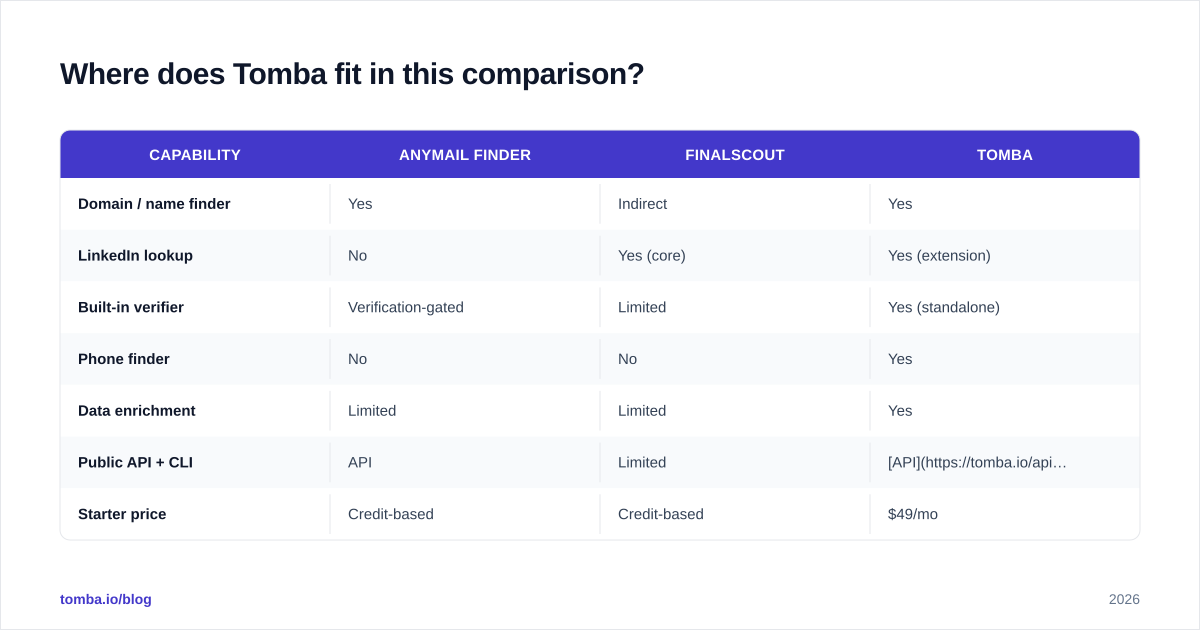
Tomba overlaps both tools but is built to cover the whole funnel rather than one channel. Its email finder takes name-plus-domain like Anymail Finder, while domain search returns every known contact at a company. A built-in email verifier and a catch-all verifier handle the deliverability checks that determine whether your finds are worth sending to.
| Capability | Anymail Finder | FinalScout | Tomba |
|---|---|---|---|
| Domain / name finder | Yes | Indirect | Yes |
| LinkedIn lookup | No | Yes (core) | Yes (extension) |
| Built-in verifier | Verification-gated | Limited | Yes (standalone) |
| Phone finder | No | No | Yes |
| Data enrichment | Limited | Limited | Yes |
| Public API + CLI | API | Limited | API + CLI |
| Starter price | Credit-based | Credit-based | $49/mo |
Tomba's published pricing runs a Free tier (25 searches/month), Starter at $49/mo, Growth at $99/mo, Pro at $249/mo, and custom Enterprise. The point isn't that Tomba wins every cell — it's that if you find yourself wanting Anymail Finder's verified domain search and FinalScout's LinkedIn reach, a single platform with both plus enrichment can be cheaper than running two subscriptions.

How should you evaluate email finders before buying?#
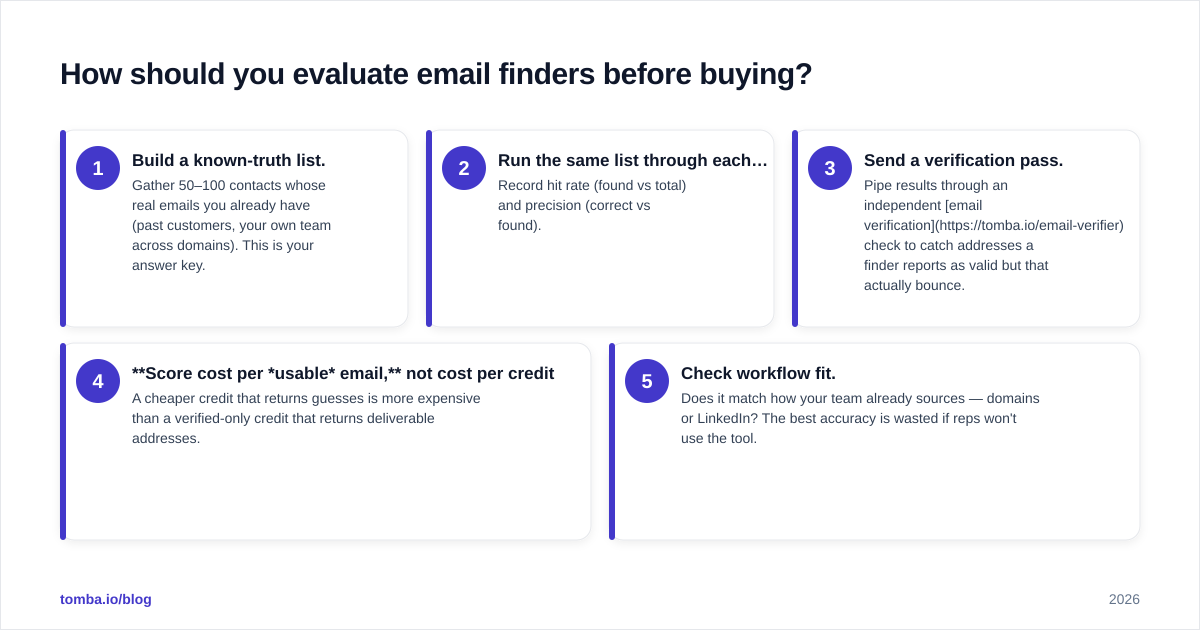
Don't trust marketing accuracy numbers — test. Here's a practical evaluation sequence that works for any tool in this category:
- Build a known-truth list. Gather 50–100 contacts whose real emails you already have (past customers, your own team across domains). This is your answer key.
- Run the same list through each tool's free or trial tier. Record hit rate (found vs total) and precision (correct vs found).
- Send a verification pass. Pipe results through an independent email verification check to catch addresses a finder reports as valid but that actually bounce.
- Score cost per usable email, not cost per credit. A cheaper credit that returns guesses is more expensive than a verified-only credit that returns deliverable addresses.
- Check workflow fit. Does it match how your team already sources — domains or LinkedIn? The best accuracy is wasted if reps won't use the tool.
This is also where billing models become decisive. Anymail Finder's verified-only charging makes step 4 trivial: cost per usable email is your bill. With credit-bundle tools like FinalScout, you have to back out the unusable returns yourself. For a deeper reference on the terminology, the B2B glossary covers concepts like catch-all domains and sender reputation that affect every score above.
One more factor people forget: data freshness. People change jobs constantly, and an email that verified six months ago may now be dead. Whatever you choose, favor tools that re-verify at lookup time rather than serving stale cached records — a point worth raising directly with each vendor's support team.
Is Anymail Finder or FinalScout better for cold outreach in 2026?#
For cold outreach specifically, the deciding factor is deliverability of the addresses you collect, because a high bounce rate damages your sender reputation and torpedoes the whole campaign. On that axis, Anymail Finder's verified-only model has a structural edge: you start with cleaner data. FinalScout's strength is upstream — it gets you in front of more LinkedIn-sourced prospects faster, and its AI writer accelerates the first draft, but you should still pass its output through a verifier before sending at volume.
In practice many teams use both: FinalScout to harvest from LinkedIn, then a verifier to clean the list before it touches a sending tool. If that two-step dance sounds like overhead, that's exactly the gap a consolidated finder-plus-verifier platform closes.
Neither tool replaces the fundamentals of outbound — good targeting, a relevant offer, and warm sending infrastructure. They simply determine how accurate and how plentiful your raw contact data is. Pick based on where your prospects come from, validate with a real test batch, and measure cost per usable email rather than per credit.
The bottom line#
Anymail Finder and FinalScout solve adjacent problems: one bills you only for verified domain-and-name finds, the other turns LinkedIn into an email-and-outreach pipeline. Choose Anymail Finder for domain-led, API-driven list building where you refuse to pay for guesses. Choose FinalScout when LinkedIn is your sourcing engine and you want copy drafted in the same flow.
If you'd rather not pick a lane — and want domain search, LinkedIn lookup, bulk processing, verification, and enrichment under one roof — start a free test with Tomba's Email Finder. Run your known-truth list through it alongside both tools above, score cost per usable email, and let the data pick your winner. The Free tier gives you 25 searches to benchmark before you spend a dollar.
// get started
Find, verify and enrich your first contacts today
Start on the free plan with 25 searches a month, then scale when your team is ready.
Free plan · No credit card required · GDPR & CCPA
// about the author