Anymail Finder vs Generect (2026): Which Tool Wins?
Anymail Finder and Generect both promise verified B2B contacts, but they solve different problems. Here's a head-to-head on accuracy, pricing, and fit for 2026.
TL;DR
- Anymail Finder is a focused email-finder built around a "only pay for verified emails" promise — simple, search-led, good for SDRs who just need addresses.
- Generect is a broader B2B lead-generation engine — it builds lists, finds emails and phone numbers, and leans into LinkedIn-driven prospecting.
- If you mostly need accurate emails on demand, Anymail Finder is leaner. If you need whole lead lists with enrichment, Generect does more in one place.
- Neither is the cheapest path to scale. For verified emails plus domain search, verification, and enrichment under one API, Tomba is worth pricing out.
- Read the section below before committing — the right pick depends on whether you buy addresses or audiences.
What are Anymail Finder and Generect?#
Short answer: Anymail Finder is an email finder; Generect is a lead-generation platform that happens to find emails.
Anymail Finder (anymailfinder.com) does one job and markets it hard — turning a name plus a company (or a domain) into a deliverable email address. Its signature pitch is that you're only charged for emails it can verify as valid, which removes the "I paid for a bounce" frustration that plagues this category. It's the kind of tool an SDR keeps in a browser tab.
Generect (generect.com) sits a layer up. It's built for teams that want to generate lists — define an ICP, pull matching companies and people, and walk away with emails and phone numbers attached. Think of it less as a lookup box and more as a list-building machine with a LinkedIn-heavy data spine.
The everyday analogy: Anymail Finder is a locksmith who cuts you the one key you asked for and guarantees it turns. Generect is a hardware store that sells you the keys, the locks, and a map of the neighborhood. Both useful — but you walk in for different reasons.
How do they compare at a glance?#
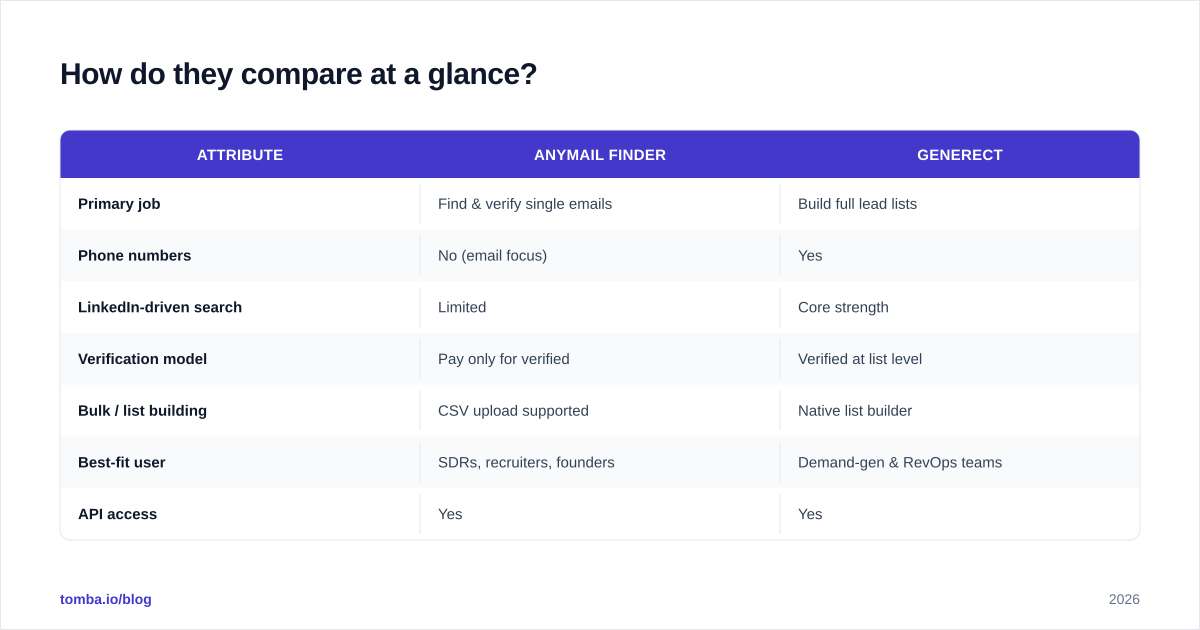
Here's the head-to-head on the attributes that actually change your workflow.
| Attribute | Anymail Finder | Generect |
|---|---|---|
| Primary job | Find & verify single emails | Build full lead lists |
| Phone numbers | No (email focus) | Yes |
| LinkedIn-driven search | Limited | Core strength |
| Verification model | Pay only for verified | Verified at list level |
| Bulk / list building | CSV upload supported | Native list builder |
| Best-fit user | SDRs, recruiters, founders | Demand-gen & RevOps teams |
| API access | Yes | Yes |
| Free trial | Limited free searches | Trial / demo-led |
Two honest caveats before you treat any row as gospel. First, both vendors iterate their pricing and limits often, so confirm live numbers on their sites. Second, "accuracy" claims in this category are notoriously self-reported — which is exactly why you should test on your domains before scaling spend.

Which has better data accuracy?#
Conclusion first: Anymail Finder optimizes for not charging you for bad emails, while Generect optimizes for coverage across a defined audience. Those are different definitions of "accurate."
Anymail Finder's verified-only billing is a genuine trust mechanism. If the tool can't confirm an address, you don't pay — so its incentive is aligned with deliverability. The trade-off is coverage: strict verification means some contacts come back "not found," and you fill those gaps elsewhere.
Generect's accuracy story is tied to its LinkedIn-anchored data. When your ICP maps cleanly to LinkedIn profiles, match rates are strong and you get richer attributes (title, company size, role). When your targets are thin on LinkedIn — trades, local businesses, certain regions — coverage drops.
The category-wide truth is that no provider is uniformly "most accurate." Accuracy varies by region, company size, and how fresh the underlying data is. That's why independent verification matters more than any vendor's headline percentage.

A practical rule: whatever tool you pick, run found addresses through an email verifier before a send. Even verified-at-source data decays — people change jobs, domains migrate, mailboxes get deactivated. A second verification pass is cheap insurance against a damaged sender reputation.
How does pricing compare?#
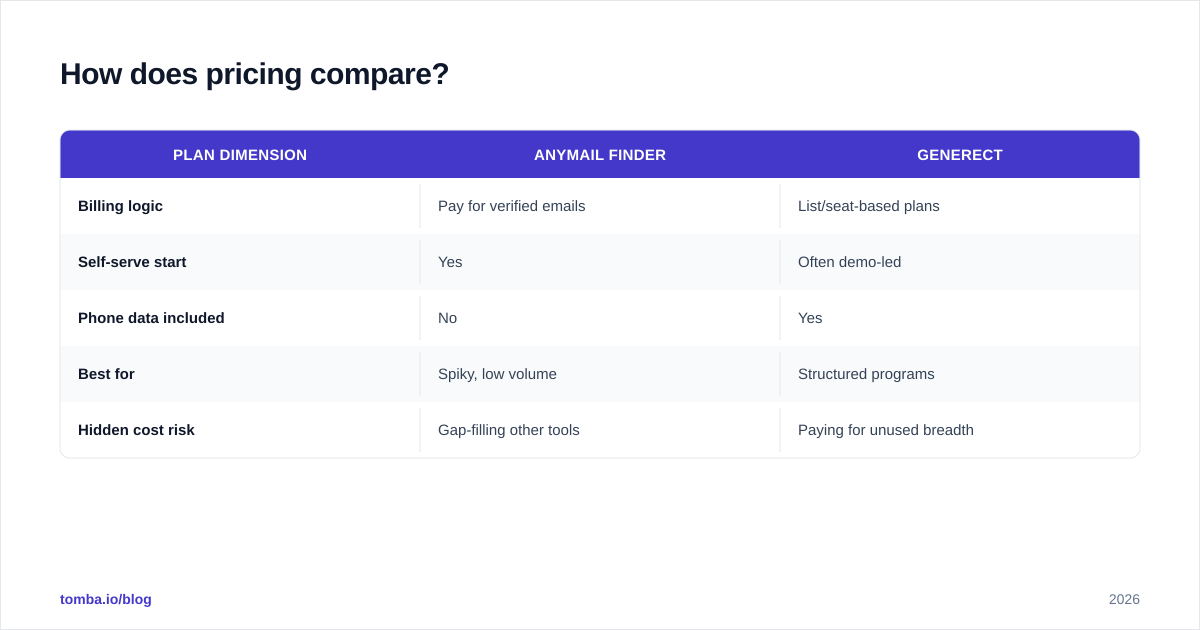
Conclusion: Anymail Finder's verified-only model is friendlier for low, spiky volume; Generect's list-centric pricing favors teams running structured demand-gen programs. Neither publishes the kind of flat, public tier ladder that makes apples-to-apples easy.
Anymail Finder charges around credits/verified emails, with the "only pay for what's verified" angle reducing waste. That's attractive if your usage is bursty — a recruiter sourcing for one role, a founder doing manual outreach.
Generect leans toward plans sized to list-building throughput, often with a demo or sales-assisted motion for larger seats. That fits a RevOps team standing up a repeatable pipeline, less so a solo user who wants self-serve and a card on file.
| Plan dimension | Anymail Finder | Generect |
|---|---|---|
| Billing logic | Pay for verified emails | List/seat-based plans |
| Self-serve start | Yes | Often demo-led |
| Phone data included | No | Yes |
| Best for | Spiky, low volume | Structured programs |
| Hidden cost risk | Gap-filling other tools | Paying for unused breadth |
If you want a public, predictable ladder to benchmark both against, Tomba pricing runs Free (25 searches/mo), Starter at $49/mo, Growth at $99/mo, and Pro at $249/mo — with email finder, verifier, domain search, and enrichment in the same account rather than billed as separate products.
When should you choose Anymail Finder?#
Pick Anymail Finder when your need is narrow and deliverability-first.
It's the right call if you:
- Mostly look up emails one or a few at a time and hate paying for bounces.
- Are a recruiter, founder, or solo SDR who wants a fast browser-tab tool.
- Already have your target list and just need addresses appended.
- Value the verified-only billing as a guardrail more than raw coverage.
It's the wrong call if you need phone numbers, want to build the target list from scratch, or rely heavily on LinkedIn-based prospecting. Those are jobs Anymail Finder simply isn't shaped for.
When should you choose Generect?#
Pick Generect when the job starts before you have a list.
It fits if you:
- Need to generate audiences from an ICP, not just append to one you own.
- Want emails and phone numbers together for multi-channel sequences.
- Run LinkedIn-centric prospecting and want that as a first-class input.
- Have a team and a process — RevOps or demand-gen — rather than ad-hoc lookups.
It's the wrong call if you're a light user who'd be paying for breadth you never touch, or if you want a fully self-serve, swipe-a-card experience without talking to sales.

What's the best alternative to both?#
If you're comparing these two, you're really asking a bigger question: do I want a single, accurate data layer instead of stitching point tools together? That's where a consolidated platform earns its keep.
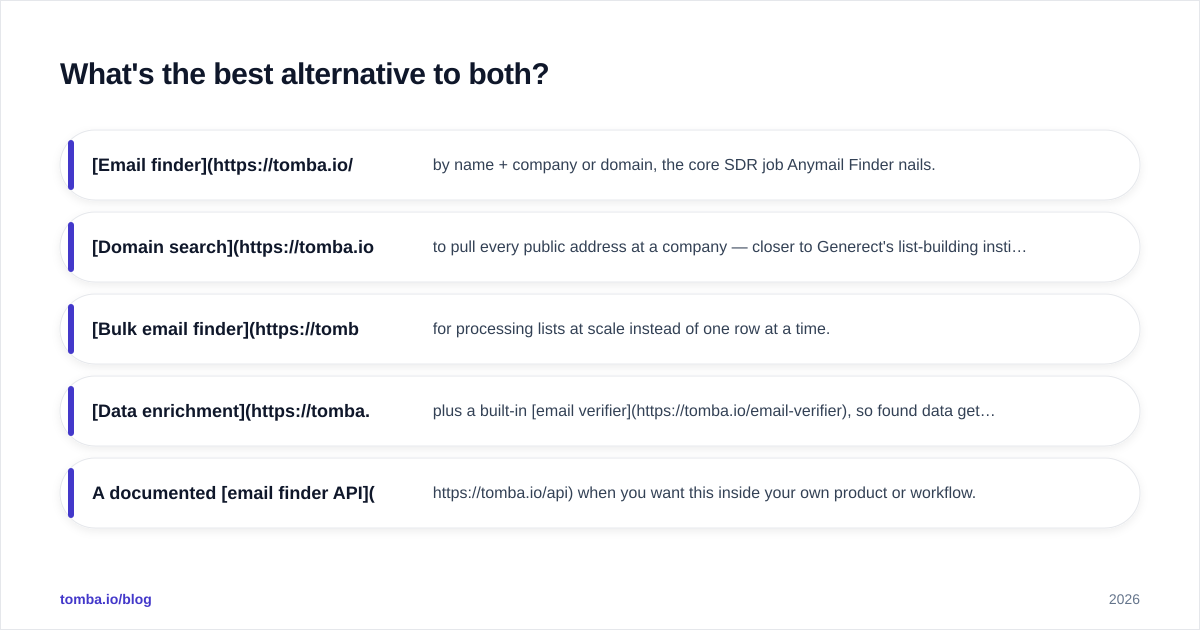
Tomba covers the overlap between Anymail Finder and Generect and then extends it:
- Email finder by name + company or domain, the core SDR job Anymail Finder nails.
- Domain search to pull every public address at a company — closer to Generect's list-building instinct.
- Bulk email finder for processing lists at scale instead of one row at a time.
- Data enrichment plus a built-in email verifier, so found data gets validated in the same pass.
- A documented email finder API when you want this inside your own product or workflow.
The point isn't that Tomba is automatically "better" — it's that buying addresses (Anymail Finder) and buying audiences (Generect) as two separate line items often costs more and creates data-sync headaches. One source with transparent, published pricing removes a category of operational pain.

For deeper proof, check independent reviews on G2 before you commit — buyer reviews surface the coverage and support realities that vendor pages won't.
How do you actually decide?#
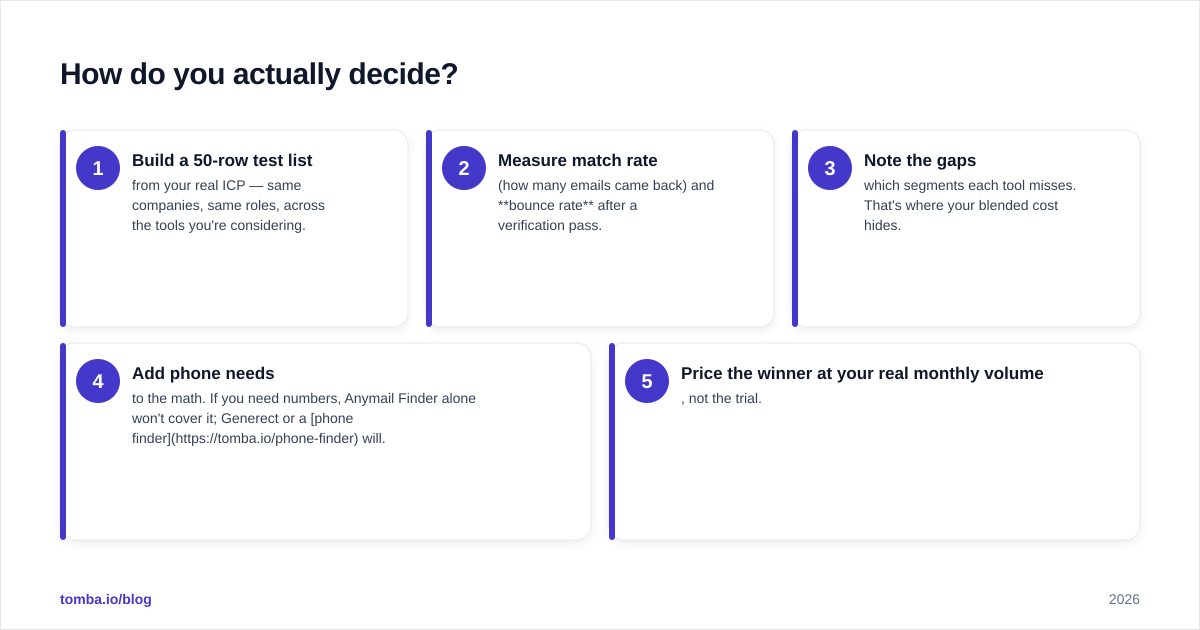
Run a 30-minute bake-off instead of trusting any comparison post, including this one.
- Build a 50-row test list from your real ICP — same companies, same roles, across the tools you're considering.
- Measure match rate (how many emails came back) and bounce rate after a verification pass.
- Note the gaps — which segments each tool misses. That's where your blended cost hides.
- Add phone needs to the math. If you need numbers, Anymail Finder alone won't cover it; Generect or a phone finder will.
- Price the winner at your real monthly volume, not the trial.
Decision shortcut:
- Need verified emails, low volume, self-serve → Anymail Finder.
- Need lists + phones + LinkedIn prospecting in one place → Generect.
- Need accurate emails plus domain search, verification, and enrichment under one transparent price → evaluate Tomba alongside both.
The bottom line#
Anymail Finder and Generect aren't really rivals — they're tools for two different moments in the same funnel. Anymail Finder wins the "give me this person's email, verified" moment. Generect wins the "build me an audience with emails and phones" moment. Choose based on which moment dominates your week, not on which feature list looks longer.
And if you'd rather not run two subscriptions to cover both, start with the Tomba Email Finder free tier — 25 searches a month, no card — and test accuracy on your own domains. Found addresses run through the email verifier in the same account, with domain search and enrichment when you're ready to scale. Buy the data layer once, verify everything, and keep your sender reputation intact.
// get started
Find, verify and enrich your first contacts today
Start on the free plan with 25 searches a month, then scale when your team is ready.
Free plan · No credit card required · GDPR & CCPA
// about the author