Anymail Finder vs Hunter: 2026 Email Finder Comparison
Anymail Finder and Hunter both promise verified B2B emails — but they bill differently and miss different leads. Here's the head-to-head on accuracy, price, and workflow fit.
Choosing between Anymail Finder and Hunter usually comes down to one question you can't answer from a pricing page: which tool actually returns the email of the person you're trying to reach, and how much does each verified contact really cost? Both are credible, widely used email finders. They just optimize for different things — and that difference shows up in your bounce rate, not your invoice.
TL;DR — Anymail Finder vs Hunter at a glance#
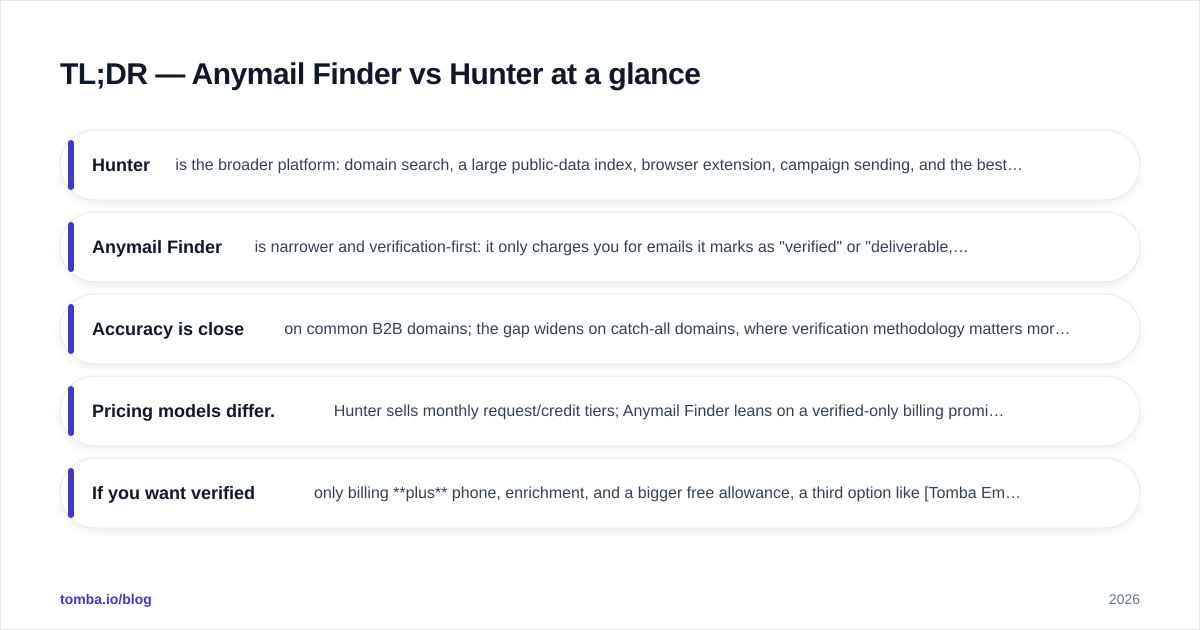
- Hunter is the broader platform: domain search, a large public-data index, browser extension, campaign sending, and the best free tier of the two. Best if you want a do-everything email finder with light outreach built in.
- Anymail Finder is narrower and verification-first: it only charges you for emails it marks as "verified" or "deliverable," which keeps wasted credits low on tough domains.
- Accuracy is close on common B2B domains; the gap widens on catch-all domains, where verification methodology matters more than raw database size.
- Pricing models differ. Hunter sells monthly request/credit tiers; Anymail Finder leans on a verified-only billing promise. Cost per usable lead is the number that actually matters.
- If you want verified-only billing plus phone, enrichment, and a bigger free allowance, a third option like Tomba Email Finder is worth pricing alongside both.
What do Anymail Finder and Hunter actually do?#
Both tools solve the same core job: you have a name and a company (or just a domain), and you need a reliable work email. Under the hood they combine three techniques — crawling public sources, applying known company email patterns, and verifying candidates against mail servers via SMTP checks.
Where they diverge is philosophy. Hunter built its reputation on domain search — type a domain and get every email pattern and public address it has indexed, with confidence scores. It's a discovery engine first. Anymail Finder built its reputation on a billing promise: you pay for verified results, not guesses. That single design choice colors everything from their API responses to how predictable your monthly spend is.
Think of it like two grocery stores. Hunter is the giant supermarket — enormous selection, you'll find almost anything, but you do the quality-checking at the shelf. Anymail Finder is the curated grocer — smaller floor, but what's on the shelf has already passed inspection. Neither is "better" in the abstract; it depends on whether your bottleneck is finding contacts or trusting them.
How accurate is each email finder?#
Accuracy is the only metric that survives contact with a real campaign, and it's also the most abused word in this category. A tool claiming "97% accuracy" usually means of the emails we returned, 97% were valid — which says nothing about how many contacts it failed to find at all. You have to watch two numbers together: hit rate (did it find anything?) and deliverability (was it real?).

On standard corporate domains with clear patterns (first.last@company.com), Hunter and Anymail Finder land within a few points of each other. The interesting divergence is on catch-all domains — servers configured to accept mail to any address, which defeats naive SMTP verification. Here, Anymail Finder's verification-first stance tends to be more conservative: it would rather mark a result "risky" than bill you for a guess. Hunter will often surface the address with a lower confidence score and leave the call to you.
That conservatism is a feature or a bug depending on your workflow. If you send high volumes and protect your sender reputation obsessively, conservative-but-clean wins. If you're doing low-volume, high-value outreach where one extra contact is worth a manual check, Hunter's "show me everything" approach surfaces leads the stricter tool quietly drops.

A practical tip regardless of which you pick: never trust a finder's verdict as final. Run found addresses through a dedicated email verifier before a big send, and treat catch-all results as a separate, lower-priority segment. The finders disagree most exactly where bounces hide.
Anymail Finder vs Hunter: feature and pricing comparison#
Here's the side-by-side. Prices and limits shift, so confirm on each vendor's pricing page before you buy — but the shape of each offer is stable.
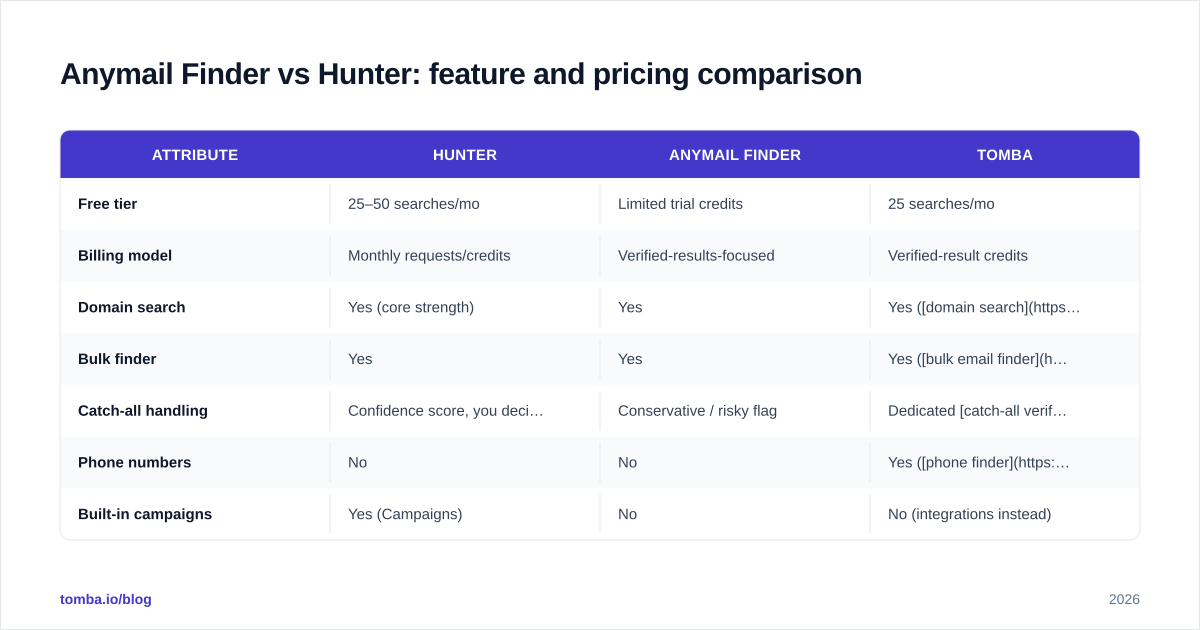
| Attribute | Hunter | Anymail Finder | Tomba |
|---|---|---|---|
| Free tier | 25–50 searches/mo | Limited trial credits | 25 searches/mo |
| Billing model | Monthly requests/credits | Verified-results-focused | Verified-result credits |
| Domain search | Yes (core strength) | Yes | Yes (domain search) |
| Bulk finder | Yes | Yes | Yes (bulk email finder) |
| Catch-all handling | Confidence score, you decide | Conservative / risky flag | Dedicated catch-all verifier |
| Phone numbers | No | No | Yes (phone finder) |
| Built-in campaigns | Yes (Campaigns) | No | No (integrations instead) |
| API | Yes | Yes | Yes (email finder API) |
| Starter paid price | ~$49/mo tier | Per-plan, verified focus | $49/mo (Tomba pricing) |
A few honest caveats on this table. Hunter's "Campaigns" feature is genuinely useful if you want to find and send from one place, but it's a light sender, not a replacement for a dedicated cold-email platform. Anymail Finder's verified-only billing reads great on paper; in practice it can mean lower raw find counts because the tool withholds anything it can't stand behind. Whether that's thrift or lost pipeline depends on how you'd have used the borderline contacts.
For the full picture on how vendors source contacts — and why two tools return different answers for the same person — it's worth understanding where the data comes from before you anchor on any single accuracy claim.
Which is better for bulk lead generation?#
Bulk is where the billing model stops being a footnote and becomes the whole story.
Say you upload 5,000 prospects. With a requests/credits model like Hunter's, you're effectively paying to ask, whether or not the answer is useful. Your job is to keep your input list clean so you don't burn credits on dead domains. With verified-only billing, you mostly pay for answers — the no-result and risky rows cost you little or nothing, which makes cost-per-usable-lead more predictable on messy lists.
But predictable isn't automatically cheaper. Run the actual math for your lists:
- Take a representative sample of 200–500 real prospects.
- Run them through each tool's bulk finder on a trial or low tier.
- Count verified hits only — discard risky/guessed rows.
- Divide total spend by verified hits. That's your true cost per lead.
Teams routinely find the "cheaper" sticker price loses this test because its hit rate on their specific industry is lower. A logistics ABM list and a SaaS-founder list behave nothing alike. The only benchmark that matters is the one you run on your own data.
If your bulk workflow also needs phone numbers or firmographic fields appended, note that neither Hunter nor Anymail Finder is built for that — you'd bolt on a separate data enrichment step. A tool that finds, verifies, and enriches in one pass can collapse three line items into one, which changes the cost comparison entirely.
What about the comparison everyone references?#
When you search around, you'll see the same broad email-finder benchmarks cited again and again. They're a useful sanity check, but read them critically.

Most public comparisons share three blind spots. First, they test on a generic prospect list that may look nothing like your market. Second, they report find rate or deliverability but rarely both in the same column, which lets a tool look great by being either reckless or timid. Third, they go stale — a vendor that led in 2024 may have lost ground by 2026 as data partnerships changed. Treat any chart, including the ones above, as a starting hypothesis you confirm with a trial, not a verdict.
For deeper definitions of the terms these benchmarks throw around — verification, catch-all, response rate — Tomba's B2B glossary is a neutral reference that doesn't assume you already speak the jargon. And if you want the independent crowd view, real-user reviews on G2 and Capterra are more honest about support and billing surprises than any vendor page.
When should you pick Hunter?#
Pick Hunter when:
- You want one tool that finds emails and sends light campaigns without adding a sequencer.
- Domain-level discovery is your main motion — you start from a company and want every pattern and public address it has.
- You value a generous free tier to test before committing, and you're comfortable doing your own verification pass on borderline results.
- Your team already uses Hunter's browser extension and you want to keep prospecting inside one familiar surface.
Hunter is the safer default for generalists. Its breadth, free allowance, and discovery-first design make it forgiving when you don't yet know exactly what your outreach motion looks like. The documentation and the public homepage at hunter.io are clear about what each tier includes, which reduces nasty surprises.
When should you pick Anymail Finder?#
Pick Anymail Finder when:
- Billing predictability matters more than maximum find count — you want to pay for verified results and minimize wasted credits on guesses.
- You run higher-volume sends and you're protective of email deliverability, so a conservative "risky" flag is a feature, not a frustration.
- You don't need built-in sending and already have a cold-email stack — you just want a clean finder feeding it.
- Your prospect lists are messy and full of dead domains, where a verified-only model shines on cost-per-usable-lead.
Anymail Finder rewards teams who know their motion and want a focused, predictable finder rather than a Swiss-army platform. Its narrower scope is the point.
Is there a better-fit alternative to both?#
Often, yes — especially if your real requirement spans more than email. Hunter and Anymail Finder are both excellent at the email-finder job and stop roughly at its edges. If your workflow also needs phone numbers, richer enrichment, catch-all handling as a first-class feature, or a finder that drops straight into your CRM and spreadsheets, you'll end up stitching multiple tools together.
That's the gap Tomba Email Finder is built to close. It pairs verified-result credits with a catch-all verifier, a phone finder, native data enrichment, and direct connectors for HubSpot, Google Sheets, and Zapier — so find, verify, and enrich happen in one pass instead of three subscriptions. The free tier (25 searches/month) and a $49/mo Starter plan make it cheap to benchmark against the two tools above on your own list. Run the cost-per-verified-lead test from earlier across all three; let your data, not the marketing, pick the winner.
The bottom line on Anymail Finder vs Hunter#
There's no universal winner — there's a winner for your list and your motion. Choose Hunter if you want breadth, a strong free tier, and light sending in one place. Choose Anymail Finder if you want verified-only billing and conservative results that protect your sender reputation. And before you commit to either, run a 200–500 contact bake-off and compare cost per verified lead — that single number will settle the argument faster than any review.
When you're ready to run that test, start with the free tier of Tomba's email finder alongside both contenders. Same list, same day, three columns of verified hits — then sign up for whichever one actually fills your pipeline cheapest.
// get started
Find, verify and enrich your first contacts today
Start on the free plan with 25 searches a month, then scale when your team is ready.
Free plan · No credit card required · GDPR & CCPA
// about the author