Anymail Finder vs Jet Leads Pro: 2026 Accuracy & Price
A neutral 2026 breakdown of Anymail Finder vs Jet Leads Pro — accuracy, pricing models, bulk workflows, and which email finder fits your outbound stack.
Choosing between two email finders usually comes down to three boring questions: how often the addresses bounce, how the billing punishes (or protects) you, and whether the bulk tooling can keep up with your list. This is a side-by-side of Anymail Finder vs Jet Leads Pro built around those questions — with Tomba added as a reference point so you can see where each tool lands on the spectrum.
TL;DR#
- Anymail Finder leans on a "pay only for verified emails" model, which protects your budget when a domain has thin data but makes per-find cost less predictable on large pulls.
- Jet Leads Pro bundles email finding into a broader lead-gen workflow, so it appeals more to teams that want list-building plus contact data in one seat — accuracy varies more by industry.
- On raw email finder accuracy, both clear the usable bar for common B2B domains; gaps widen on catch-all domains and smaller companies.
- If predictable flat pricing and a deep verifier matter most, a third option like Tomba (Free tier, then $49/mo) is worth pricing against both.
- Pick based on workflow: single-seat verified finds (Anymail Finder), all-in-one prospecting (Jet Leads Pro), or finder + verifier + API depth at a flat rate (Tomba).
What is Anymail Finder?#
Anymail Finder is a focused email finder built around one promise: you are only charged for results it can verify. You feed it a name plus a domain, or a domain on its own, and it returns either a "verified" address or nothing. That billing model is the product's identity — it shifts the risk of bad data partly onto the vendor.
The trade-off is that "verified" is doing a lot of work. On clean corporate domains with published MX records and standard formats (first.last@), Anymail Finder is reliable. On catch-all domains — where the mail server accepts everything — its conservative stance means it often returns nothing rather than a risky guess. That is good for your bounce rate and frustrating for your coverage.
You can read their own description of the model on the Anymail Finder homepage, and cross-check user sentiment on G2 before committing.
What is Jet Leads Pro?#
Jet Leads Pro positions itself less as a single-purpose finder and more as a prospecting suite: build a list, pull contact details, and push them downstream. Email finding is one feature inside that flow rather than the whole product.
For teams that currently bounce between a list-builder, a finder, and a CRM exporter, that consolidation is the pitch. The cost is focus — an all-in-one tool spreads engineering across many features, so the raw finder rarely matches a specialist's depth on edge cases like sub-brands, regional domains, or recently-changed naming conventions. If your ICP is concentrated in well-known mid-market and enterprise companies, that gap may never bite you. If you sell into the long tail of small businesses, it will.

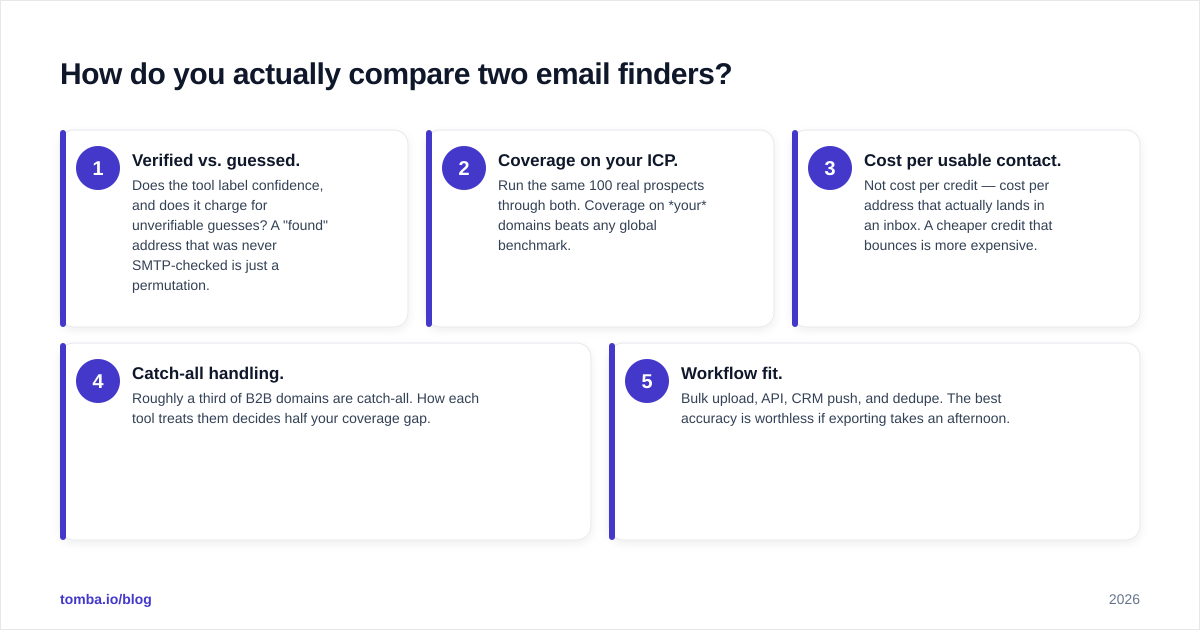
How do you actually compare two email finders?#
Tool marketing pages all claim 95%+ accuracy, so ignore the headline number and test the dimensions that change your results. Use this framework when you trial Anymail Finder vs Jet Leads Pro (or any pair).
- Verified vs. guessed. Does the tool label confidence, and does it charge for unverifiable guesses? A "found" address that was never SMTP-checked is just a permutation.
- Coverage on your ICP. Run the same 100 real prospects through both. Coverage on your domains beats any global benchmark.
- Cost per usable contact. Not cost per credit — cost per address that actually lands in an inbox. A cheaper credit that bounces is more expensive.
- Catch-all handling. Roughly a third of B2B domains are catch-all. How each tool treats them decides half your coverage gap.
- Workflow fit. Bulk upload, API, CRM push, and dedupe. The best accuracy is worthless if exporting takes an afternoon.

Anymail Finder vs Jet Leads Pro vs Tomba: the comparison table#
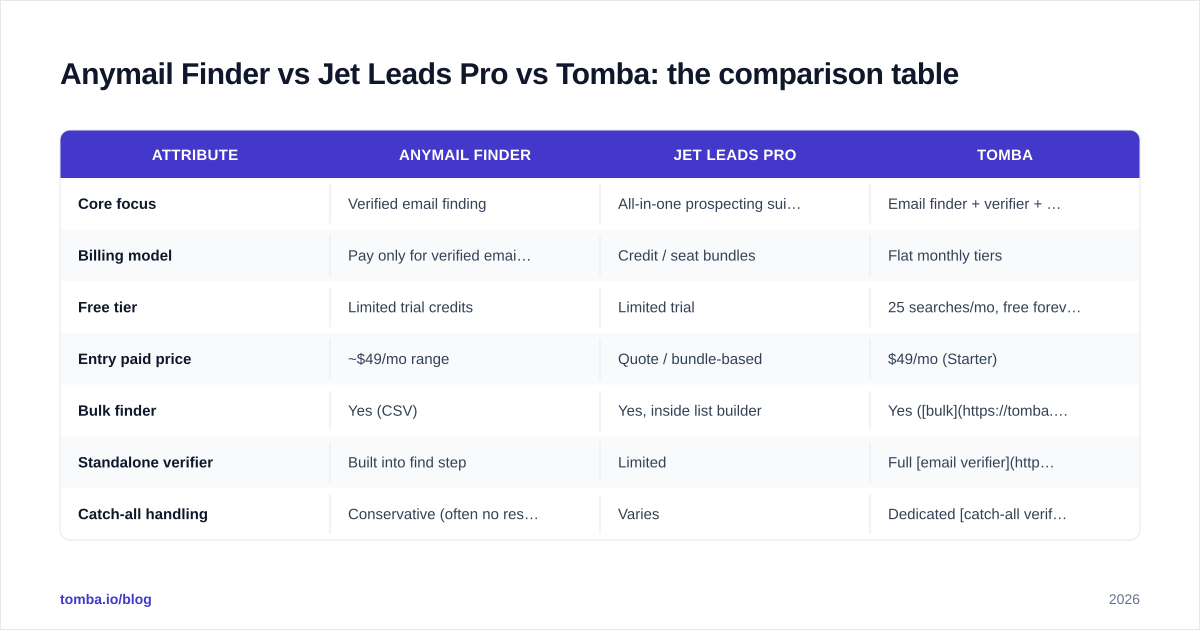
Figures below reflect each tool's published model as of 2026. Where a vendor only quotes "contact sales," treat the cell as directional and confirm in a trial.
| Attribute | Anymail Finder | Jet Leads Pro | Tomba |
|---|---|---|---|
| Core focus | Verified email finding | All-in-one prospecting suite | Email finder + verifier + enrichment |
| Billing model | Pay only for verified emails | Credit / seat bundles | Flat monthly tiers |
| Free tier | Limited trial credits | Limited trial | 25 searches/mo, free forever |
| Entry paid price | ~$49/mo range | Quote / bundle-based | $49/mo (Starter) |
| Bulk finder | Yes (CSV) | Yes, inside list builder | Yes (bulk) |
| Standalone verifier | Built into find step | Limited | Full email verifier |
| Catch-all handling | Conservative (often no result) | Varies | Dedicated catch-all verifier |
| API | Yes | Yes | Yes (Tomba API) |
| Best for | Low-bounce single-seat finding | Teams wanting list + contacts | Predictable cost + verification depth |
The pattern: Anymail Finder optimizes for not paying for junk, Jet Leads Pro optimizes for one workflow, and a flat-rate finder optimizes for predictable spend with a real verifier attached. Compare against Tomba pricing directly so the cost-per-usable-contact math is apples-to-apples.
Which one is more accurate?#
Conclusion first: on standard corporate domains, the accuracy difference is small enough that workflow and price should decide. The gap only matters at the edges.
Anymail Finder's pay-for-verified model structurally pushes accuracy up because the vendor eats the cost of unverifiable results — they are motivated to return nothing rather than a maybe. That keeps your bounce rate low but suppresses coverage on harder domains.
Jet Leads Pro, as a suite, tends to surface more candidate addresses (helpful for coverage) but leans on you to verify them before sending. If you already run a verification step, that is fine. If you blast straight from the finder, your bounce rate will be higher than with a verified-only tool.
A practical move regardless of which you pick: run found addresses through a dedicated email verification pass before a campaign. Even an accurate finder benefits, and it neutralizes the coverage-vs-bounce trade-off entirely. For more on why bounces tank your sender health, see this primer on email deliverability.

How does the pricing really compare?#
The honest answer: the two tools price for different buyers, so the sticker numbers mislead.
Anymail Finder's "only pay for verified" model is genuinely friendly when your target list is full of small or obscure domains — you are not billed for the 40% it can't confirm. The downside is unpredictability: a great month (lots of verified hits) costs more than a lean month, which complicates budgeting for high-volume teams.
Jet Leads Pro's bundle pricing is predictable per seat but you pay for the whole suite whether or not you use the list-builder and CRM features. If you only want emails, you are subsidizing capabilities you ignore.
This is where a flat-tier finder changes the calculus. A plan like Tomba's $49/mo Starter gives you a fixed number of searches plus verification in one number you can forecast — and the Free tier's 25 searches lets you benchmark accuracy on your own list before paying anyone.

What does the workflow look like day to day?#
Accuracy gets the headlines; workflow decides whether the tool survives in your stack past month one.
- Single-rep, targeted outreach. You research accounts, find a handful of decision-makers, and send personalized notes. Anymail Finder's verified-only finds shine here — low volume, low tolerance for bounces. Pair it with a domain search when you need every contact at one company.
- List-led prospecting. You start from a segment ("Series B SaaS, 50–200 staff") and build outward. Jet Leads Pro's suite model fits this because list-building and enrichment live together.
- High-volume, cost-controlled. You enrich thousands of rows monthly and need a flat bill plus a bulk email finder and a verifier. This is where a flat-rate specialist with a strong API usually wins, because per-verified pricing gets expensive at scale and suite bundles get bloated.
Whatever you choose, wire the finder into your CRM rather than exporting CSVs by hand. Native integrations (HubSpot, Pipedrive, Sheets) remove the step where good data goes to die in a downloads folder.

When should you pick each tool?#
Pick Anymail Finder if your priority is the lowest possible bounce rate at modest volume, you sell into a mix of large and obscure domains, and you'd rather pay nothing for a miss than pay a little for a maybe. The verified-only billing is a real form of risk transfer.
Pick Jet Leads Pro if you want list-building, contact data, and export in one seat, your ICP skews toward well-known companies where coverage is easy, and you already run your own verification step before sending.
Pick a flat-rate specialist (like Tomba) if you want predictable monthly cost, a built-in email verifier and catch-all verifier rather than a bolt-on, and an API plus CRM integrations for volume. The free tier means you can A/B it against the other two on your own list this week.
How do I run a fair test before buying?#
Don't trust any vendor's benchmark — including the ones in this post. Run your own 30-minute bake-off:
- Take 100 real prospects you already know, ideally a mix of big and small domains.
- Run the identical list through each finder's bulk upload.
- Verify all outputs through one neutral email verifier so the scoring is consistent.
- Score each tool on coverage (how many returned an address), validity (how many passed verification), and cost-per-valid-contact.
- Sanity-check the workflow: time the export-to-CRM step for each.
The winner is the one with the lowest cost per valid contact and the workflow you'll actually keep using — not the one with the prettiest accuracy claim.
The bottom line#
There is no universal winner in Anymail Finder vs Jet Leads Pro — there's a winner for your list. Anymail Finder protects you from paying for junk; Jet Leads Pro consolidates prospecting; and a flat-rate specialist keeps spend predictable while bundling verification. The framework above turns the choice from a vibe into a number.
If you want to benchmark both against a finder that includes verification, catch-all detection, and a developer-friendly API at a flat price, start with the Tomba Email Finder. The Free tier gives you 25 searches a month to run the exact bake-off described above — find addresses by name, domain, or company, verify them in the same tool, and see your real cost per usable contact before you commit a budget to anyone.
// get started
Find, verify and enrich your first contacts today
Start on the free plan with 25 searches a month, then scale when your team is ready.
Free plan · No credit card required · GDPR & CCPA
// about the author