Anymail Finder vs Kaspr: Accuracy, Pricing & 2026 Verdict
Anymail Finder vs Kaspr, tested head-to-head for 2026: accuracy, phone data, pricing models, and which contact tool actually fits your outreach motion.
Anymail Finder vs Kaspr: Which Contact Tool Wins in 2026?
Picking between Anymail Finder and Kaspr usually comes down to one question you haven't asked yet: do you need clean email addresses at scale, or do you live inside LinkedIn and need a phone number before lunch? The two tools look similar on a pricing page and behave very differently in a real workflow.
This is a neutral, hands-on comparison. We'll cover data accuracy, phone coverage, pricing models, LinkedIn workflows, compliance, and the spots where a third option makes more sense than either.
TL;DR#
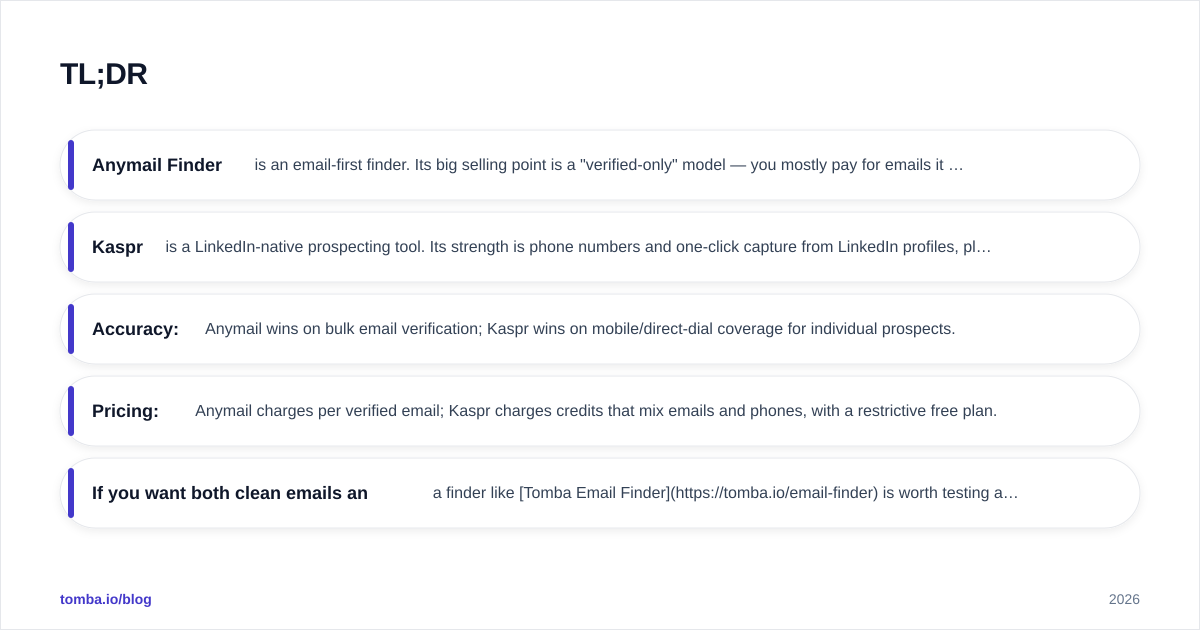
- Anymail Finder is an email-first finder. Its big selling point is a "verified-only" model — you mostly pay for emails it can confirm, which keeps bounce rates low.
- Kaspr is a LinkedIn-native prospecting tool. Its strength is phone numbers and one-click capture from LinkedIn profiles, plus a lightweight CRM layer.
- Accuracy: Anymail wins on bulk email verification; Kaspr wins on mobile/direct-dial coverage for individual prospects.
- Pricing: Anymail charges per verified email; Kaspr charges credits that mix emails and phones, with a restrictive free plan.
- If you want both clean emails and phones from one balanced platform, a finder like Tomba Email Finder is worth testing alongside them.
What is Anymail Finder?#
Anymail Finder is a B2B email finder that resolves a person's work email from their name and company domain, or pulls every address on a domain in bulk. Its defining feature is the "only pay for verified emails" promise: results are bucketed as verified, risky, or not found, and the billing model leans on the verified tier.
That matters because deliverability is the whole game. A tool that hands you 1,000 guesses with a 30% bounce rate can torch your sender reputation faster than it builds pipeline. Anymail's design optimizes for the opposite outcome — fewer results, but the ones you get are safer to mail.
Where it's weak: Anymail is email-only. There's no phone data, no LinkedIn capture, no CRM, and limited enrichment beyond the address itself. It assumes you already have a list of names and companies and just need addresses.
You can read more about how the vendor positions itself on the Anymail Finder homepage.
What is Kaspr?#
Kaspr is a LinkedIn-first prospecting tool, owned by Cognism. You install a Chrome extension, open a LinkedIn profile (or a Sales Navigator search, or even a group), and Kaspr reveals emails and — its headline feature — phone numbers, including mobile direct dials.
Kaspr is less of a pure finder and more of a lightweight workflow tool. It includes a basic contact manager, list building, tasks, and integrations into CRMs and sequencers. For SDRs who run cold-calling motions and prospect one profile at a time, that flow is fast and genuinely useful.
Where it's weak: Kaspr's value collapses outside the LinkedIn context. Bulk domain search isn't its strength, the free plan is heavily gated (you earn credits by inviting colleagues and connecting your own data), and phone coverage — while strong in EMEA — is uneven by region. Email verification is also lighter than a dedicated verifier.
The vendor's own positioning lives on the Kaspr homepage.

Anymail Finder vs Kaspr: the core difference#
The cleanest way to frame it: Anymail Finder is a list-cleaning email engine; Kaspr is a LinkedIn-to-phone capture tool. They overlap on "give me a contact's email," but they're built for different motions.
- If your outreach is email-led and volume-heavy (cold email campaigns, bulk lists, CSV uploads), Anymail's verified-only model fits.
- If your outreach is call-led and account-by-account (SDR dials, social selling, LinkedIn outreach), Kaspr's phone data and capture flow fit.

How accurate is each tool?#
Accuracy is two separate questions: email accuracy (does it bounce?) and phone accuracy (does the right person pick up?).
Email accuracy. Anymail Finder generally has the edge here because verification is the product. Its "verified" bucket is conservative — it would rather return "not found" than hand you a risky address. Kaspr surfaces emails too, but verification is a secondary feature layered onto a capture tool, so you'll want to run results through a dedicated email verifier before a big send.
Phone accuracy. Kaspr is the clear winner — Anymail simply doesn't offer phone numbers. Kaspr's mobile coverage is strongest in Europe and decent in North America, though hit rates drop for smaller companies and non-English markets.
The honest takeaway: don't trust any single vendor's self-reported accuracy number. Test each on 50 contacts from your ICU before committing.

Accuracy also depends heavily on where the data comes from. Tools that blend public web crawling with SMTP-level verification (the approach Tomba documents in its data sources overview) tend to hold up better on catch-all domains than tools relying mostly on a static contributed database.
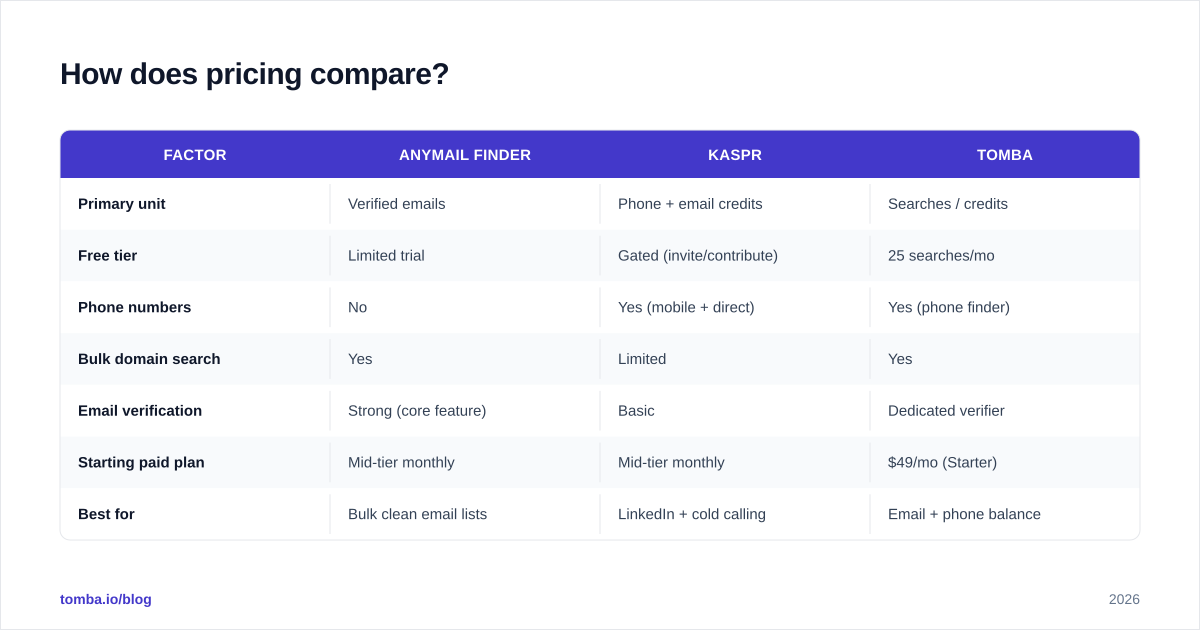
How does pricing compare?#
This is where the two diverge most, because they bill on different units.
Anymail Finder bills primarily on verified emails — you're not charged for "not found" results on most plans, which is a meaningful protection against paying for garbage. Kaspr bills on credits, where phone and email reveals draw from credit pools, and its free tier is unlocked through referrals and data contribution rather than being freely usable.
| Factor | Anymail Finder | Kaspr | Tomba |
|---|---|---|---|
| Primary unit | Verified emails | Phone + email credits | Searches / credits |
| Free tier | Limited trial | Gated (invite/contribute) | 25 searches/mo |
| Phone numbers | No | Yes (mobile + direct) | Yes (phone finder) |
| Bulk domain search | Yes | Limited | Yes |
| Email verification | Strong (core feature) | Basic | Dedicated verifier |
| Starting paid plan | Mid-tier monthly | Mid-tier monthly | $49/mo (Starter) |
| Best for | Bulk clean email lists | LinkedIn + cold calling | Email + phone balance |
Prices change often, so confirm current numbers on each vendor's site and on third-party review hubs like G2. For reference, Tomba's published plans run Free (25 searches/mo), Starter $49/mo, Growth $99/mo, and Pro $249/mo — see full Tomba pricing for credit allocations.
Which tool fits your workflow?#
Match the tool to the motion, not the marketing.
Choose Anymail Finder if:
- Your primary channel is cold email at volume.
- You already have target names and companies and just need addresses.
- You care most about keeping bounce rates low and protecting email deliverability.
- You don't need phone numbers or a CRM layer.
Choose Kaspr if:
- Your SDRs prospect inside LinkedIn and Sales Navigator daily.
- Phone-led outreach (cold calling, multi-channel) is core.
- You want one-click capture and a lightweight list/task manager.
- Your territory is EMEA-heavy, where Kaspr's phone coverage is strongest.
Consider a third option if:
- You need clean emails and phones from one balanced tool.
- You want bulk + single-lookup + verification + enrichment without stitching two subscriptions together.
What about LinkedIn workflows specifically?#
If LinkedIn is your prospecting surface, Kaspr is built for you and Anymail is not. Kaspr's extension reads the profile in front of you and reveals contact data without leaving the page — that's a real time saver for reps running 80 profiles a day.
That said, you're not locked into Kaspr for LinkedIn. A LinkedIn finder can resolve work emails from LinkedIn profiles too, and pairing it with a phone finder reproduces much of Kaspr's value while keeping email accuracy higher. The trade-off is workflow polish: Kaspr's in-profile capture is smoother than a multi-tool stack for high-velocity SDRs.
What about compliance and data sourcing?#
Both tools operate in a space governed by GDPR and CCPA, and how a vendor sources data matters for your legal exposure.
Kaspr, as part of Cognism, leans on a large contributed and licensed database with documented compliance processes — a plus for EMEA teams that need defensible sourcing. Anymail Finder's model is more about live verification than a stored database, which changes the compliance profile but doesn't remove your obligations as the sender.
Whichever you choose, you're the data controller for your outreach. Maintain opt-out handling, honor deletion requests, and keep your suppression lists current. No vendor offloads that responsibility from you.
Pros and cons at a glance#
Anymail Finder
- Pros: verified-only billing, low bounce rates, strong bulk email, simple model.
- Cons: no phone data, no LinkedIn capture, minimal enrichment, email-only scope.
Kaspr
- Pros: excellent phone/mobile data, fast LinkedIn capture, built-in light CRM, EMEA strength.
- Cons: gated free tier, credit model gets pricey, weaker bulk search, lighter email verification.
Is there a better alternative to both?#
For many teams, yes — if your real need is "accurate emails and phones from one tool without juggling two bills." That's the gap a unified platform fills.
Tomba combines email finding, a dedicated email verifier, domain search, data enrichment, and phone lookup under one set of credits. You get Anymail-style verification rigor and Kaspr-style multi-data-point coverage without splitting your stack. For bulk work, the bulk email finder handles CSV uploads, and the Tomba API wires results straight into your CRM.

It isn't a silver bullet — Kaspr's in-LinkedIn capture flow is still slicker for pure SDR-on-LinkedIn motions, and a single-purpose verifier may edge out any all-rounder on the narrowest verification task. But for the common "I need both, accurately, affordably" case, a balanced finder beats forcing an email-only or LinkedIn-only tool to do a job it wasn't built for.
Final verdict#
Conclusion first: pick Anymail Finder for clean bulk email, pick Kaspr for LinkedIn-led calling, and test a unified tool if you need both.
- Email-led, volume-heavy, deliverability-obsessed → Anymail Finder.
- LinkedIn-native, phone-first, SDR dialing → Kaspr.
- Want emails and phones, plus verification and enrichment, from one balanced platform → run a side-by-side trial.
Run all three on the same 50 prospects from your actual target market. Compare verified-email hit rate, phone match rate, and cost per usable contact. The winner on your data is the only benchmark that matters.
Ready to see where you land? Start free with the Tomba Email Finder — 25 searches a month, built-in verification, and phone lookup included, so you can benchmark it head-to-head against Anymail Finder and Kaspr before you commit a budget to either.
// get started
Find, verify and enrich your first contacts today
Start on the free plan with 25 searches a month, then scale when your team is ready.
Free plan · No credit card required · GDPR & CCPA
// about the author