Anymail Finder vs Lead411: Which Email Tool Wins in 2026
Anymail Finder verifies emails on a credit model; Lead411 is a full B2B database with intent data. Here is which one fits your outreach budget in 2026.
Anymail Finder vs Lead411: Which Email Tool Wins in 2026
Choosing between Anymail Finder and Lead411 is really a choice between two different jobs. One is a focused email finder that charges you only for verified results. The other is a full B2B sales intelligence platform with contact records, company data, and buyer intent signals baked in. They overlap just enough to confuse a buyer comparing them side by side — and they diverge enough that picking the wrong one wastes both money and pipeline.
This breakdown cuts through the marketing copy so you can match the tool to your actual workflow.
TL;DR#
- Anymail Finder is a lightweight email-finding tool. You pay for verified emails only, making it predictable for teams that already know who they want to reach.
- Lead411 is a sales intelligence database. It sells contact lists, direct dials, and intent data — closer to
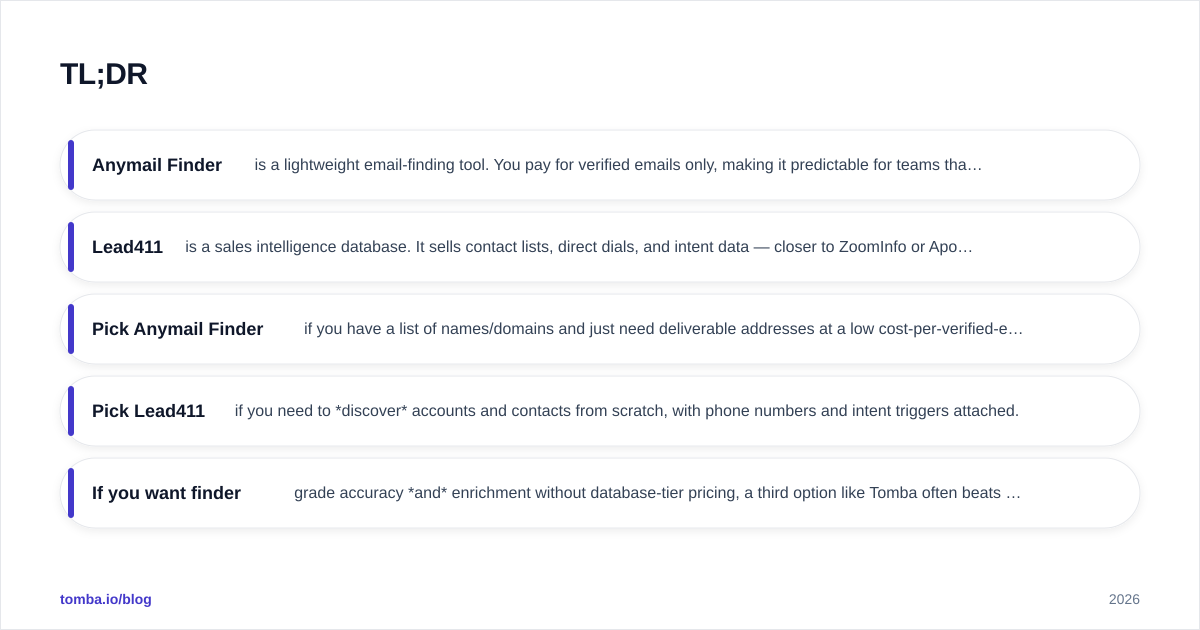
ZoomInfo or Apollo than to a pure finder.
- Pick Anymail Finder if you have a list of names/domains and just need deliverable addresses at a low cost-per-verified-email.
- Pick Lead411 if you need to discover accounts and contacts from scratch, with phone numbers and intent triggers attached.
- If you want finder-grade accuracy and enrichment without database-tier pricing, a third option like Tomba often beats both on cost-per-result.
What is Anymail Finder?#
Anymail Finder is a single-purpose email finder. You give it a full name and a company domain (or just a domain for a role-based search), and it returns a business email address with a verification status attached. Its core promise is simple: you are only charged when it returns an email it can mark as "verified."
That billing model is the whole pitch. For teams running targeted outbound — where you already have a target account list and the names of the people you want to reach — paying per valid email keeps spend tied directly to usable output. There is no sprawling database to license, no per-seat sales contract, and no minimum annual commitment on the entry tiers.
What it does not do is help you build a target list in the first place. It won't surface "all VPs of Marketing at SaaS companies in Austin." You bring the names; it finds the inbox. That is a feature for some buyers and a dealbreaker for others.
What is Lead411?#
Lead411 is a B2B data provider and sales intelligence platform. Instead of resolving a single email at a time, it gives you searchable access to a contact and company database, complete with verified emails, direct-dial phone numbers, technographics, and buyer intent data powered by growth signals (funding rounds, hiring spikes, new executives).
In practice, Lead411 competes with ZoomInfo, Apollo, and Seamless.AI — the "find net-new accounts and contacts at scale" category. You can build lists by filtering on industry, title, headcount, revenue, and intent triggers, then export those contacts straight into your CRM or sequencer. Its G2 profile consistently positions it as a database-and-intent tool rather than a lookup utility.
That power comes with a different cost structure: annual contracts, export caps tied to your plan, and pricing that starts well above a hobbyist email finder. You are buying a data subscription, not a pay-as-you-go credit pack.
Anymail Finder vs Lead411: How do they compare?#
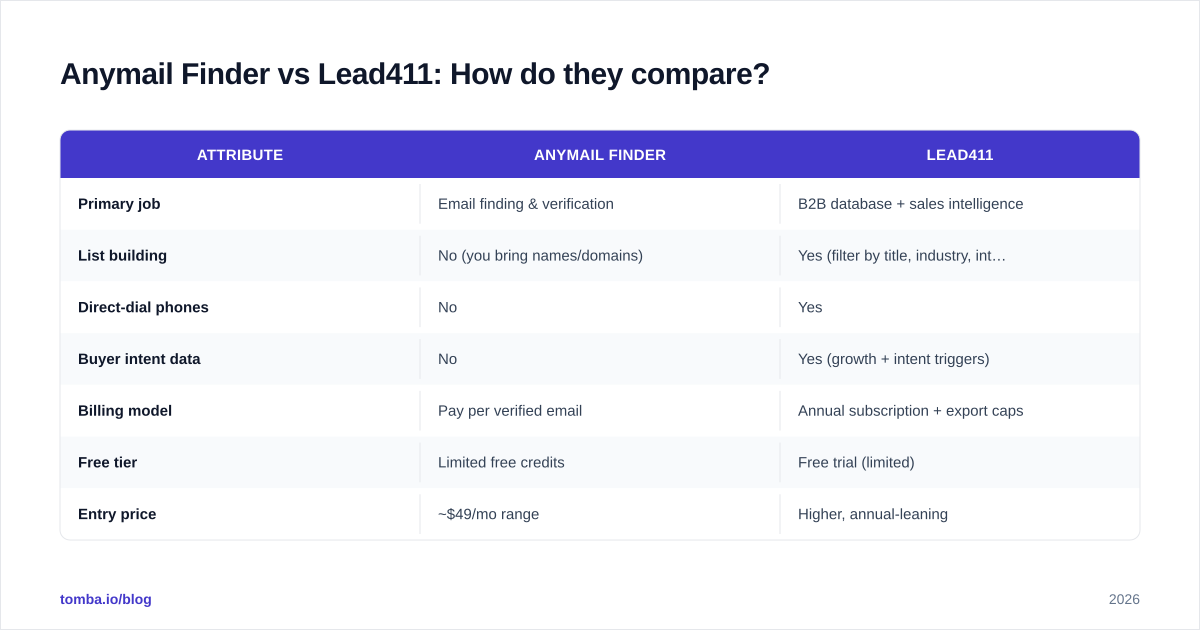
The fastest way to see the gap is attribute by attribute. These two tools are not really in the same category, and the table makes that obvious.
| Attribute | Anymail Finder | Lead411 |
|---|---|---|
| Primary job | Email finding & verification | B2B database + sales intelligence |
| List building | No (you bring names/domains) | Yes (filter by title, industry, intent) |
| Direct-dial phones | No | Yes |
| Buyer intent data | No | Yes (growth + intent triggers) |
| Billing model | Pay per verified email | Annual subscription + export caps |
| Free tier | Limited free credits | Free trial (limited) |
| Entry price | ~$49/mo range | Higher, annual-leaning |
| Best for | Targeted, known-contact outreach | Net-new account discovery |
| CRM/sequencer export | Yes | Yes |
| Learning curve | Low | Moderate |
The headline: Anymail Finder is a scalpel, Lead411 is a Swiss Army knife. If your problem is "I have 800 names and need their emails," the scalpel is faster and cheaper. If your problem is "I need to find 800 names that fit my ICP," you need the knife.

Which one is more accurate?#
Accuracy means different things for each tool, so compare them on the right axis.
For Anymail Finder, accuracy is its entire reason to exist. Because you only pay for verified results, the tool is incentivized to be conservative — it would rather return "not found" than charge you for a risky guess. That tends to produce a clean list with a low bounce rate, though it also means harder-to-find contacts (catch-all domains, role accounts) sometimes come back empty. If catch-all domains are a recurring blocker for you, pairing any finder with a dedicated catch-all verifier closes that gap.
For Lead411, accuracy is about database freshness. A large B2B database is only as good as its last refresh cycle, and stale records — people who changed jobs six months ago — are the perennial weakness of every database-first vendor, Lead411 included. Lead411 leans on human verification and intent signals to keep records current, but no database is immune to decay. The trade-off: you get coverage and discovery that a finder can't match, at the cost of occasional stale rows you'll want to re-verify before sending.
A practical rule: whichever tool you use, run exports through an email verifier before a cold campaign. Database freshness and finder confidence both degrade between the moment data is stored and the moment you hit send.
Which is better for cold email deliverability?#
Deliverability starts with list quality, and the two tools protect it differently.
Anymail Finder's pay-for-verified model is structurally good for deliverability: a conservative finder naturally screens out the risky addresses that drive bounces and spam complaints. A low bounce rate protects your sender reputation, which is the single biggest lever on whether your emails land in the inbox.
Lead411 gives you more contacts, but volume is a double-edged sword. Exporting 5,000 records and blasting them is the fastest way to torch a domain. If you go the database route, you must verify aggressively and warm up properly before scaling send volume. The discovery power is real, but it shifts the deliverability burden onto your process.
Either way, treat your finder/database as step one and your sending hygiene as step two. Neither tool fixes a cold domain or a missing SPF record on its own.
How does pricing actually compare?#
This is where the two diverge hardest, and where buyers most often misjudge cost.
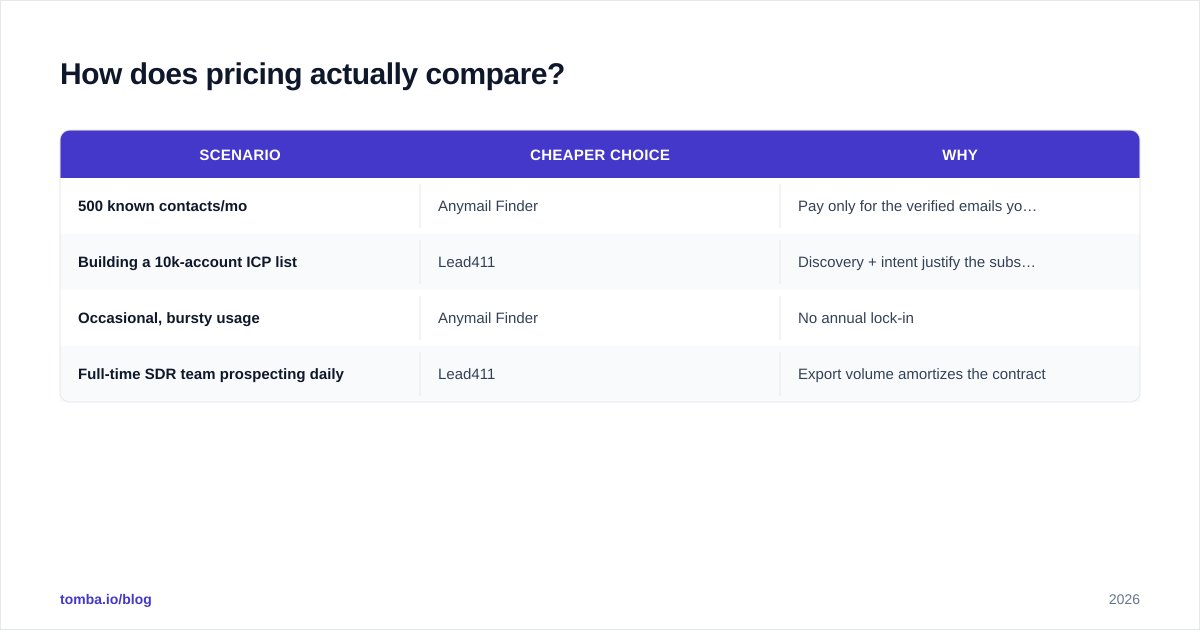
Anymail Finder prices on volume of verified emails. Because you aren't charged for misses, your effective cost-per-usable-contact is transparent: budget maps directly to results. For a team sending a few thousand targeted emails a month, this stays affordable and easy to forecast.
Lead411 prices as a subscription with export limits, and contracts often lean annual. You are paying for access to the database and intent data, not for individual emails. That makes the per-contact math fuzzier — a heavy user who maxes out exports gets a great rate, while a light user who only needs a few hundred contacts a month overpays badly for capacity they never touch.
| Scenario | Cheaper choice | Why |
|---|---|---|
| 500 known contacts/mo | Anymail Finder | Pay only for the verified emails you need |
| Building a 10k-account ICP list | Lead411 | Discovery + intent justify the subscription |
| Occasional, bursty usage | Anymail Finder | No annual lock-in |
| Full-time SDR team prospecting daily | Lead411 | Export volume amortizes the contract |
Compare both against Tomba pricing before you commit — a finder with a free tier (25 searches/mo), a $49/mo Starter, and a $99/mo Growth plan often undercuts a database subscription while still covering enrichment and bulk needs.

Who should choose Anymail Finder?#
Choose Anymail Finder if most of these describe you:
- You already know who you want to reach and just need their email.
- You run targeted, account-based outreach rather than spray-and-pray volume.
- You want spend tied directly to verified output, with no annual contract.
- You don't need phone numbers or intent data — email is the channel.
- You value a low learning curve and a tool you can hand to a new rep in five minutes.
It's the right pick for founders, small sales teams, recruiters, and agencies whose target lists come from somewhere else (events, LinkedIn research, referrals) and who just need the missing email addresses filled in.
Who should choose Lead411?#
Choose Lead411 if:
- You need to discover net-new accounts and contacts that match an ICP.
- Direct-dial phone numbers matter for your motion (you're calling, not just emailing).
- Buyer intent data — knowing who is in-market right now — would change how you prioritize.
- You have a full-time prospecting team that will use the export volume.
- You can justify an annual data subscription against pipeline targets.
It's built for SDR teams, demand-gen orgs, and revenue teams running structured outbound at scale, where the bottleneck is finding the right accounts, not resolving a known person's inbox.
Is there a better middle-ground option?#
Yes — and it's worth naming, because the Anymail-vs-Lead411 framing creates a false binary. You can get finder-grade verification and enrichment without paying database-subscription rates.
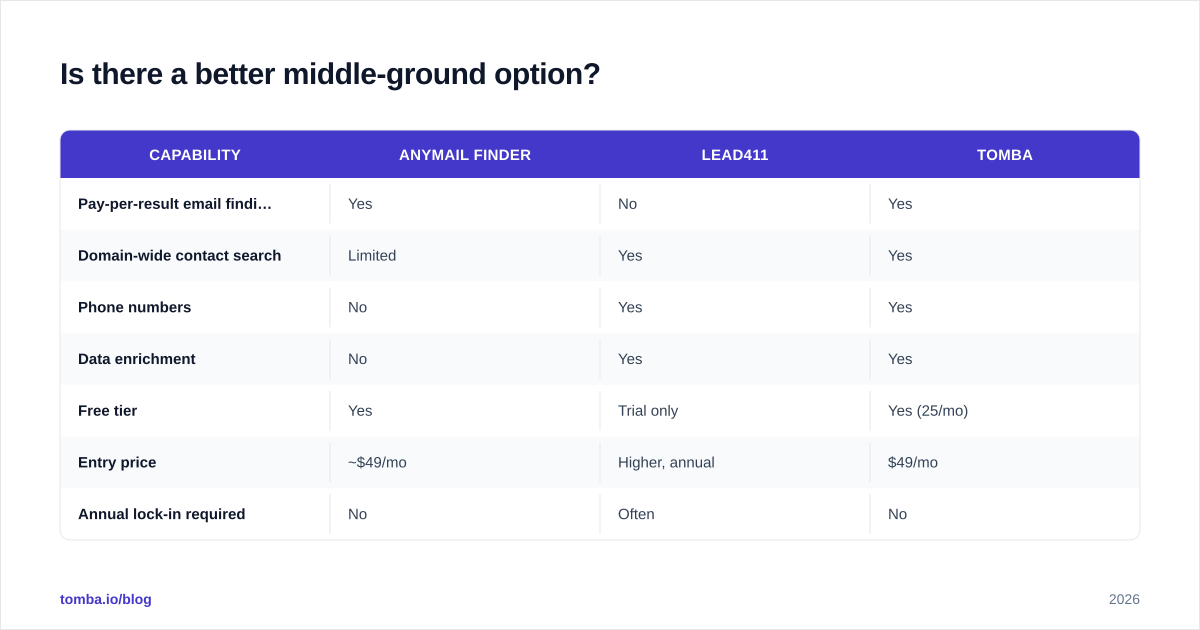
Tomba sits in that middle. It gives you a pure email finder with a pay-as-you-grow credit model like Anymail Finder, but layers on domain search (find every contact at a company), data enrichment, a phone finder, and bulk processing — the discovery features that usually force you up into Lead411's price tier.
| Capability | Anymail Finder | Lead411 | Tomba |
|---|---|---|---|
| Pay-per-result email finding | Yes | No | Yes |
| Domain-wide contact search | Limited | Yes | Yes |
| Phone numbers | No | Yes | Yes |
| Data enrichment | No | Yes | Yes |
| Free tier | Yes | Trial only | Yes (25/mo) |
| Entry price | ~$49/mo | Higher, annual | $49/mo |
| Annual lock-in required | No | Often | No |
The point isn't that one tool wins every category — it's that "focused finder vs. full database" leaves a gap, and a finder-plus-enrichment tool fills it for teams that want both without the enterprise contract.
What should you actually do next?#
Conclusion first: match the tool to the bottleneck, not to the feature list.
- If your bottleneck is "I have names but no emails," a focused finder wins on speed and cost. Anymail Finder or Tomba both solve this; compare their free tiers and per-result economics.
- If your bottleneck is "I don't know who to reach yet," you need discovery and intent — that's Lead411's territory, and a pure finder won't get you there.
- If you want both without an annual database contract, test a finder that includes enrichment and domain search before defaulting to the heavier platform.
Run a small head-to-head on your own ICP. Pull 50 target contacts, find their emails in each tool, verify the results, and measure the bounce rate plus the true cost-per-usable-contact. Real numbers from your own list beat any comparison table — including this one.
For external benchmarks while you evaluate, vendor-neutral review sites like G2 and Capterra collect real user feedback on data accuracy and support quality for both categories.

The bottom line#
Anymail Finder and Lead411 aren't really competitors — they're tools for different stages of the same funnel. Anymail Finder resolves emails for contacts you've already identified, cheaply and on a pay-for-results basis. Lead411 helps you discover those contacts in the first place, with phones and intent data attached, at subscription pricing. Buy the finder when you have the names; buy the database when you don't.
If you want the accuracy and pay-as-you-grow economics of a finder, but with the domain search, enrichment, and bulk tools that usually push you toward a pricey database, start with the Tomba Email Finder. The free tier gives you 25 searches a month to test it against your own list — verify the results, check the bounce rate, and let the numbers decide before you sign anything.
// get started
Find, verify and enrich your first contacts today
Start on the free plan with 25 searches a month, then scale when your team is ready.
Free plan · No credit card required · GDPR & CCPA
// about the author