Anymail Finder vs SignalHire 2026: Accuracy & Price Compared
Anymail Finder vs SignalHire compared on accuracy, pricing, phone data, and bulk workflows for 2026 — plus where a third option beats both on cost-per-valid-lead.
Choosing between Anymail Finder and SignalHire usually comes down to one question your finance team will ask later: did you pay for data, or did you pay for valid data? Both tools find business contacts, but they bill differently, source differently, and win in different scenarios.
This is a neutral breakdown of how the two stack up in 2026 — accuracy, pricing logic, phone coverage, bulk workflows, and integrations — so you can match the tool to your actual outbound motion instead of the marketing page.
TL;DR — Anymail Finder vs SignalHire#
- Anymail Finder charges only for verified emails. If a result is "guessed" or unverifiable, you don't spend a credit. That makes cost-per-valid-email predictable, but it's email-only — no phone numbers.
- SignalHire is a full contact platform: emails and phone numbers, plus a browser extension built for LinkedIn prospecting and ATS-style recruiting workflows.
- Accuracy is comparable on common B2B domains; gaps show up on catch-all domains and smaller companies, where verification logic matters more than database size.
- Pricing models differ in kind, not just price — Anymail bills per verified result, SignalHire bills per credit (email reveal = 1, phone = separate), which changes your math at scale.
- If you want verified emails plus phone data plus a generous free tier and an API, a third option like Tomba is worth pricing alongside both.
What is Anymail Finder?#
Anymail Finder is an email-finding tool focused on one promise: you only pay when it returns an email it can verify. Feed it a name and a company (or a domain), and it returns either a verified address or nothing — and "nothing" is free.
That model is the whole pitch. For teams burned by tools that charge a credit for a "best guess" that bounces, Anymail's pay-for-verified approach removes the guessing tax. It offers single search, bulk CSV upload, and an API, and it leans into deliverability — the company positions itself around low bounce rates rather than the biggest database.
The trade-off: it's email-first. There are no phone numbers, no intent data, and no deep firmographic enrichment. It does one job and bills honestly for it.
What is SignalHire?#
SignalHire is a contact-discovery platform that returns emails and phone numbers, with a browser extension designed to pull contacts straight from LinkedIn, LinkedIn Recruiter, and other profile pages. It's popular with recruiters as much as sales teams, because phone coverage and people-search matter as much as email in those workflows.
SignalHire runs on a credit system: revealing a contact consumes credits, and phone-number reveals are priced into that model. It also offers bulk processing and an API, plus light enrichment fields (job title, company, location). Where Anymail is a scalpel, SignalHire is a multi-tool — broader coverage, more data types, and a correspondingly different cost structure.
How do Anymail Finder and SignalHire compare at a glance?#
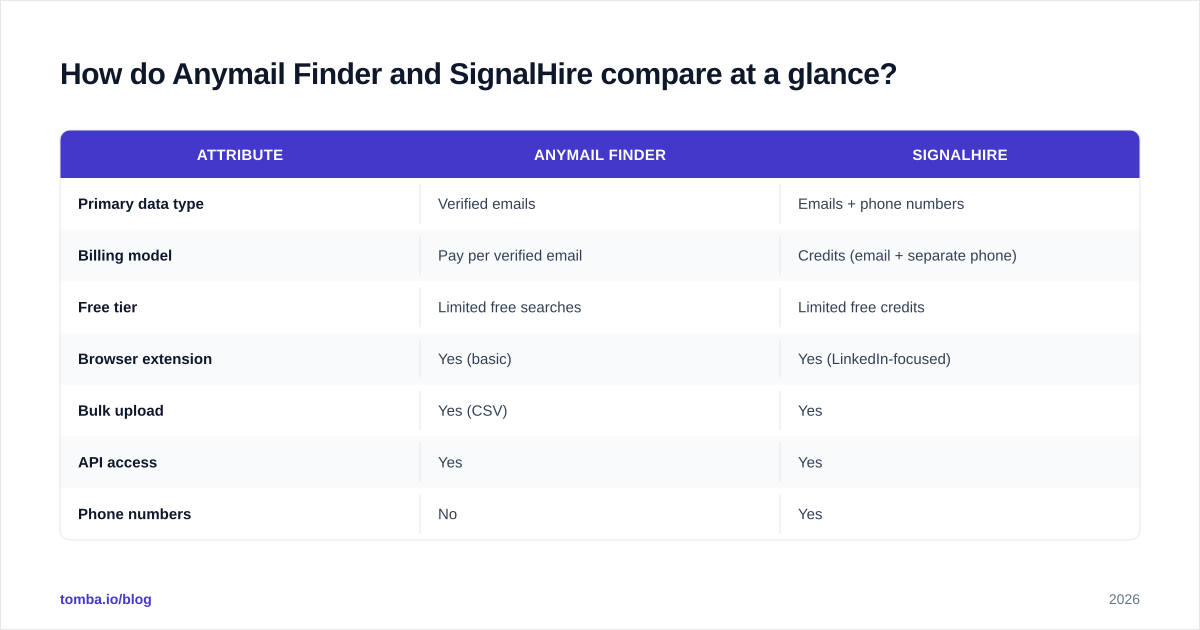
| Attribute | Anymail Finder | SignalHire |
|---|---|---|
| Primary data type | Verified emails | Emails + phone numbers |
| Billing model | Pay per verified email | Credits (email + separate phone) |
| Free tier | Limited free searches | Limited free credits |
| Browser extension | Yes (basic) | Yes (LinkedIn-focused) |
| Bulk upload | Yes (CSV) | Yes |
| API access | Yes | Yes |
| Phone numbers | No | Yes |
| Best-fit user | Cold-email teams, deliverability-first | Recruiters, multichannel SDRs |
| Catch-all handling | Returns as unverifiable (no charge) | Returns, accuracy varies |
The headline: these tools aren't really competing for the same job. Anymail is optimized for email deliverability and cost control. SignalHire is optimized for contact breadth and multichannel outreach. Your decision is less "which is better" and more "which job am I hiring it for."
Is Anymail Finder more accurate than SignalHire?#
Accuracy is close on the cases that matter most — known mid-to-large B2B domains with standard email patterns — and it diverges at the edges.
Anymail's verify-before-charge model means the addresses it does return tend to clear SMTP checks, which keeps bounce rates low. The cost is coverage: on catch-all domains (where the mail server accepts everything, so SMTP verification can't confirm a specific mailbox), Anymail will often hand back nothing rather than a maybe. That protects your sender reputation but shrinks your usable list.
SignalHire leans the other way. Its larger people-graph surfaces more contacts, including phone numbers Anymail simply doesn't have — but a broader net pulls in more stale or unverifiable rows, so you'll want to run results through an email verifier before sending at volume.

A practical rule: if a bounced email costs you more than a missed contact (cold email at scale, fragile domain reputation), bias toward the verify-first tool. If a missed contact costs you more than a bounce (recruiting a scarce candidate, ABM into named accounts), bias toward the broader-coverage tool and verify afterward.
)
Neither approach is "wrong." They're tuned for different failure costs. What you can't do is assume database size equals accuracy — verification logic and freshness move the needle more than raw row count, especially on the long tail of smaller companies where both tools thin out.
How does pricing actually work for each?#
This is where the comparison gets real, because the two billing philosophies behave very differently as you scale.
Anymail Finder — pay per verified email. You're charged only when a verified address is returned. Unverifiable results and catch-alls don't consume your allowance. Your cost-per-valid-email is therefore stable and predictable, which is a genuine advantage for budgeting cold-email campaigns.
SignalHire — credits. Each contact reveal spends credits, and phone-number data factors into the credit math separately from email. You get more types of data per lookup, but you can also spend credits on contacts whose email you can't ultimately use, so effective cost-per-valid-email depends on your verification step.
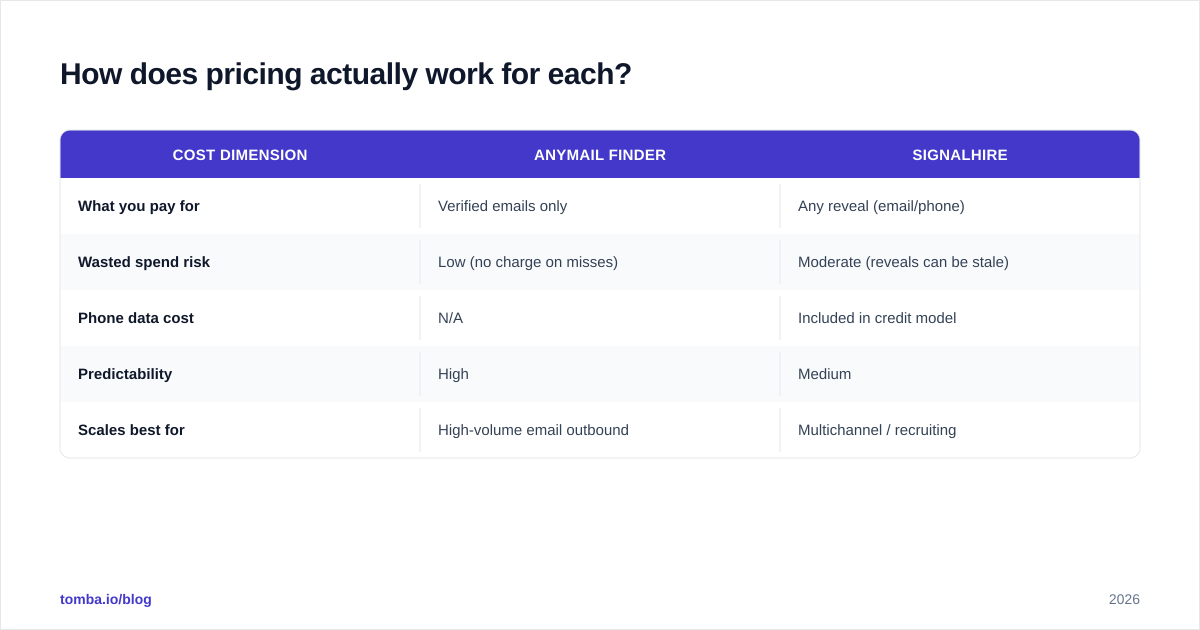
| Cost dimension | Anymail Finder | SignalHire |
|---|---|---|
| What you pay for | Verified emails only | Any reveal (email/phone) |
| Wasted spend risk | Low (no charge on misses) | Moderate (reveals can be stale) |
| Phone data cost | N/A | Included in credit model |
| Predictability | High | Medium |
| Scales best for | High-volume email outbound | Multichannel / recruiting |
For a like-for-like email campaign, Anymail's model usually produces a cleaner cost-per-valid-lead. For a workflow that needs phones and people-search, SignalHire's bundle can be cheaper than buying email and phone tools separately. Run your own numbers against your real hit rate — the "cheaper" tool flips depending on how many catch-all and dead contacts your target market contains.
Which tool fits which team?#
Pick Anymail Finder if: you run cold email at volume, you guard domain reputation closely, and you want billing you can forecast. The verify-first model is its own kind of QA gate. If email is 90% of your outbound, the missing phone data won't hurt.
Pick SignalHire if: you're a recruiter or a multichannel SDR who lives in LinkedIn and needs phone numbers in the same motion. The extension-driven, reveal-on-profile workflow is faster for one-at-a-time sourcing, and phone coverage is a real differentiator versus an email-only tool.
Consider a third option if: you want both verified emails and phones, plus a B2B database, domain search, and an API under one predictable plan. That's the gap a platform like Tomba targets — and it's worth pricing before you commit.
)
How do they handle bulk and API workflows?#
Both support bulk and both expose an API, but the experience diverges with list size and team maturity.
Anymail's bulk flow is straightforward CSV in, verified emails out — and because misses are free, a messy input list isn't a budget bomb. That's friendly for ops teams running large, imperfect lists scraped from multiple sources.
SignalHire's bulk and API shine when you need enriched, multi-field records (email + phone + title) rather than just an address, which suits CRM-population and recruiting pipelines. If you're pushing contacts into a system of record, the extra fields save a second enrichment pass.
If your bulk needs are heavy, look at how each tool dedupes and how it reports per-row status. A bulk email finder that returns a clear verified/risky/invalid flag per row saves hours of manual cleanup versus one that returns a flat list you still have to validate. Whichever tool you choose, send the output through email verification before a cold campaign — even verify-first tools benefit from a fresh check at send time, since data decays roughly 2–3% per month.
What about integrations and the day-to-day workflow?#
For sales and recruiting teams, the integration story often decides adoption more than raw accuracy.
- SignalHire is built around its LinkedIn extension; the natural workflow is browse-a-profile, reveal, push to your tool. It connects to common CRMs and ATS systems, which matters for recruiting teams.
- Anymail Finder is more API-and-bulk oriented — you'll likely wire it into a sequencer or your own scripts rather than work profile-by-profile.
Neither replaces a CRM or a sequencer. They feed the top of your funnel, so the question is how cleanly they hand off. If your stack centers on HubSpot, Salesforce, or a sequencer like Instantly, confirm the native connectors and webhook support before you buy — a missing integration becomes a Zapier tax you pay forever. Tomba, by comparison, publishes connectors across HubSpot, Salesforce, Pipedrive, and Google Sheets, plus a documented email finder API if you'd rather build the handoff yourself.
Anymail Finder vs SignalHire vs Tomba — a fuller picture#
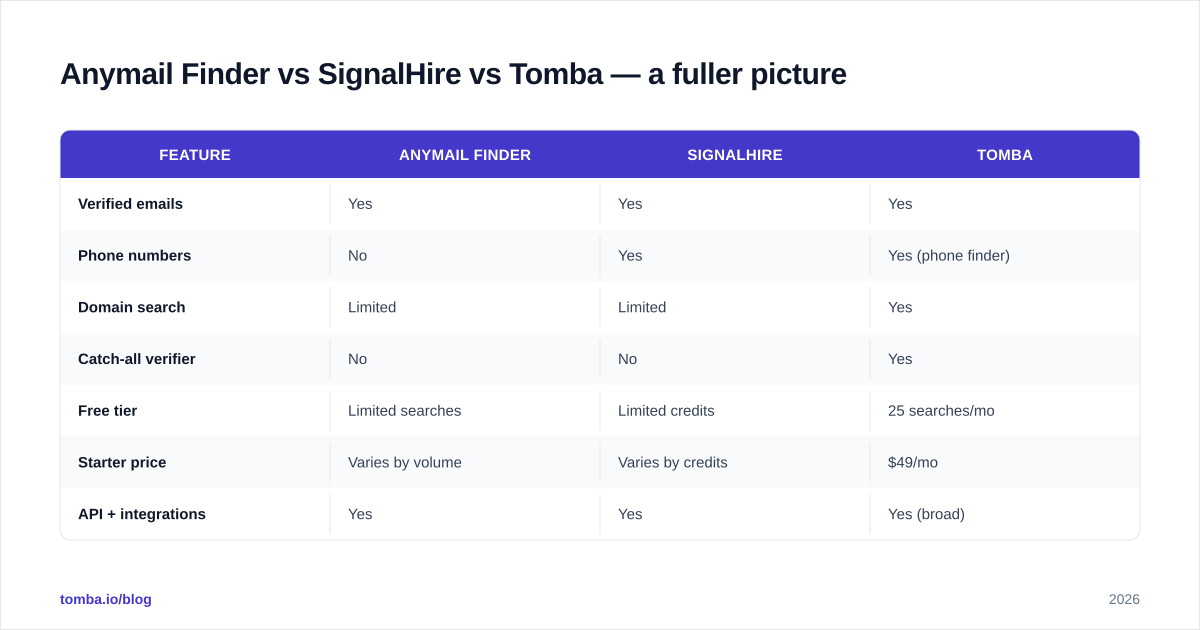
Because most teams are really choosing between "email-only and cheap to verify" and "broad and multichannel," it helps to see a verified-email-plus-phone platform in the same table.
| Feature | Anymail Finder | SignalHire | Tomba |
|---|---|---|---|
| Verified emails | Yes | Yes | Yes |
| Phone numbers | No | Yes | Yes (phone finder) |
| Domain search | Limited | Limited | Yes |
| Catch-all verifier | No | No | Yes |
| Free tier | Limited searches | Limited credits | 25 searches/mo |
| Starter price | Varies by volume | Varies by credits | $49/mo |
| API + integrations | Yes | Yes | Yes (broad) |
| Data enrichment | Light | Moderate | Yes |
The point isn't that one tool dominates — it's that the Anymail-vs-SignalHire choice frames the market as a binary (cheap-and-verified or broad-and-multichannel) when platforms now offer both. If you're already evaluating two tools, evaluating a third costs you one more free-tier test and can save a line item.

For deeper context on how providers source and refresh their data — the real driver of accuracy — see Tomba's note on where the data comes from, and for independent reviews, cross-check user ratings on G2 and Capterra rather than relying on any vendor's own benchmark, including this one.
How should you run a fair test before buying?#
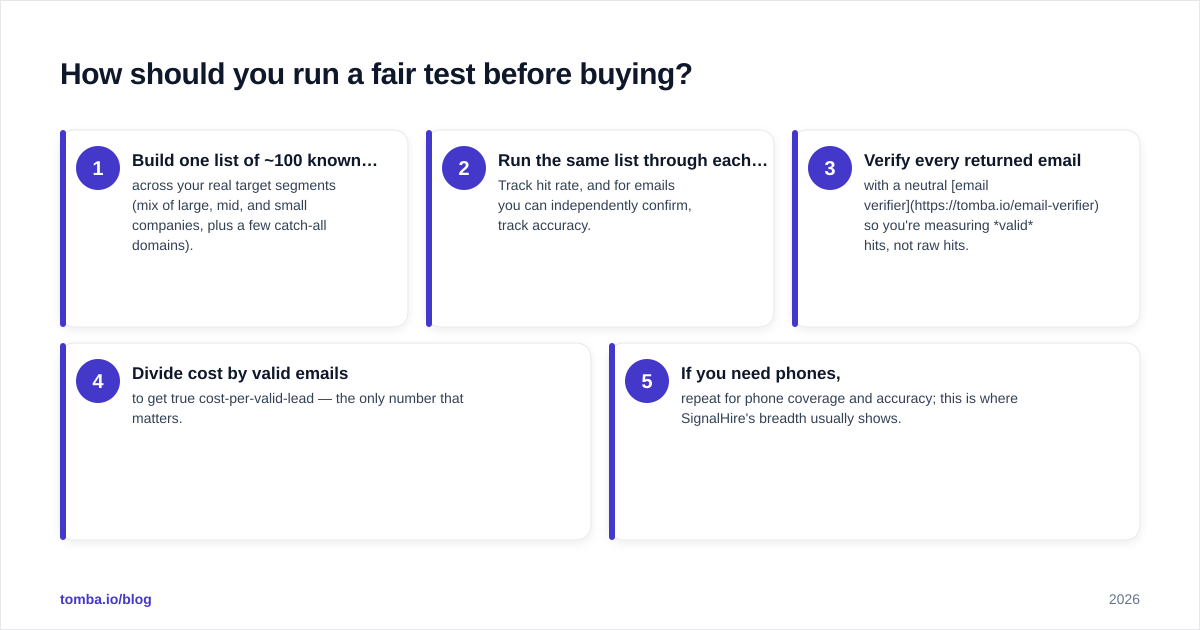
Don't trust any comparison post — including this one — over your own data. Run a controlled bake-off:
- Build one list of ~100 known contacts across your real target segments (mix of large, mid, and small companies, plus a few catch-all domains).
- Run the same list through each tool. Track hit rate, and for emails you can independently confirm, track accuracy.
- Verify every returned email with a neutral email verifier so you're measuring valid hits, not raw hits.
- Divide cost by valid emails to get true cost-per-valid-lead — the only number that matters.
- If you need phones, repeat for phone coverage and accuracy; this is where SignalHire's breadth usually shows.
This 30-minute test will tell you more than any feature grid. The "winner" routinely flips by industry, company size, and geography — what works for a US SaaS list fails on a European manufacturing list, and vice versa.
Final verdict and recommendation#
There's no universal winner — there's a right tool for your failure cost. Choose Anymail Finder when predictable, verify-first email economics matter most and you don't need phones. Choose SignalHire when you need emails and phone numbers in a LinkedIn-native, recruiter-friendly workflow and you're willing to verify on the back end.
But if your honest answer is "I want verified emails, phone numbers, domain search, catch-all handling, and an API without stitching three subscriptions together," price a unified platform before you commit. Start free with the Tomba Email Finder — the free tier gives you 25 searches a month to benchmark accuracy against both tools on your own list, and paid plans begin at $49/mo with phone, enrichment, and bulk built in. Run the bake-off above, divide cost by valid leads, and let your own data pick the winner.
// get started
Find, verify and enrich your first contacts today
Start on the free plan with 25 searches a month, then scale when your team is ready.
Free plan · No credit card required · GDPR & CCPA
// about the author