Anymail Finder vs UpLead (2026): Accuracy, Pricing & Verdict
Anymail Finder bills only verified emails; UpLead sells a full B2B database with phones and intent. Here's which one actually fits your prospecting workflow in 2026.
TL;DR
- Anymail Finder is a focused email-finder that only charges for verified, deliverable addresses — great if your single goal is clean emails at predictable cost.
- UpLead is a full B2B database (140M+ contacts) with emails, direct dials, technographics, and intent data — better if you need to build lists, not just enrich names you already have.
- On raw email accuracy they're close; the real decision is single-purpose finder vs all-in-one prospecting database.
- Anymail Finder's verified-only billing protects your sender reputation; UpLead's 95% accuracy guarantee credits bad records back.
- If you want finder-grade accuracy plus verification, domain search, and an API without database-tier pricing, Tomba is the third option worth testing before you commit.
What are Anymail Finder and UpLead?#
Quick answer: they solve overlapping problems from opposite ends. Anymail Finder starts from a name and a company and returns one verified email — you only pay when it's deliverable. UpLead starts from a search filter ("VP Marketing, SaaS, 50–200 employees, US") and hands you a list of contacts complete with emails, phone numbers, and firmographic detail.
That difference shapes everything downstream: how you build lists, what you pay, and how clean your outbound stays. One is a precision tool; the other is a data warehouse you query.
Think of it like finding a single phone number. Anymail Finder is calling directory assistance for one verified number. UpLead is buying the whole phone book filtered to the neighborhood you care about. Both get you numbers — but the workflow, the cost model, and the failure modes are completely different.

How do Anymail Finder and UpLead actually work?#
Anymail Finder runs a name-and-domain lookup, generates likely permutations, then SMTP-verifies each candidate before returning a result. Its headline feature is billing: you are not charged for unverified or guessed emails. If it can't confirm deliverability, you keep your credit. For teams that live or die by bounce rate, that's a meaningful guardrail.
UpLead works the other way around. You filter its database by 50+ attributes — industry, title, location, tech stack, revenue, headcount — and export matching contacts. Every record is verified in real time at export, and UpLead backs a 95% data-accuracy guarantee: if a record bounces, you get the credit back. It also layers on intent data and direct-dial phone numbers, which a pure email finder simply doesn't carry.
The practical consequence: with Anymail Finder you bring the list of people and it fills in emails. With UpLead you don't have a list yet — the tool is the list. If you already export prospects from LinkedIn Sales Navigator or a scraper, a finder fits. If you're staring at a blank spreadsheet, a database fits.

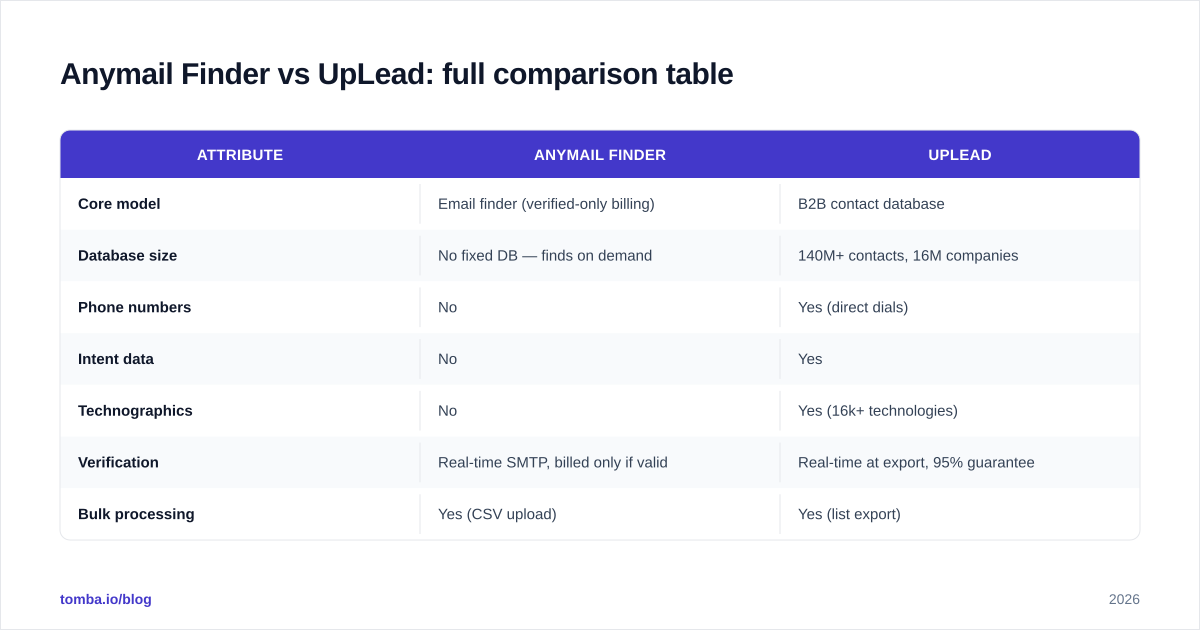
Anymail Finder vs UpLead: full comparison table#
| Attribute | Anymail Finder | UpLead |
|---|---|---|
| Core model | Email finder (verified-only billing) | B2B contact database |
| Database size | No fixed DB — finds on demand | 140M+ contacts, 16M companies |
| Phone numbers | No | Yes (direct dials) |
| Intent data | No | Yes |
| Technographics | No | Yes (16k+ technologies) |
| Verification | Real-time SMTP, billed only if valid | Real-time at export, 95% guarantee |
| Bulk processing | Yes (CSV upload) | Yes (list export) |
| API access | Yes | Yes |
| Entry price | ~$49/mo (≈1,000 verified) | ~$99/mo (≈170 credits) |
| Free trial | Limited free credits | 5 free credits |
| Best for | Enriching names you already have | Building net-new prospect lists |
Prices and credit allotments shift; confirm current tiers on each vendor's pricing page before you buy. The shape of the trade-off, though, is stable: Anymail Finder optimizes cost-per-verified-email, UpLead optimizes breadth-per-record.
Is Anymail Finder more accurate than UpLead?#
Conclusion first: on a head-to-head email-only test they land within a few points of each other, and which one "wins" depends on your target geography and seniority more than on the brand.
Anymail Finder's edge is structural — because it refuses to bill you for guesses, the emails you actually pay for are the verified ones, so your effective accuracy on charged records is very high. UpLead's edge is coverage — its database often has a record where a finder comes up empty, especially for enterprise titles, and the 95% guarantee gives you recourse when one bounces.
A neutral way to read it: Anymail Finder protects you from paying for bad data; UpLead protects you from missing data. Neither fully replaces a dedicated verification pass before a big send. Whichever you pick, run your final list through an email verifier and a catch-all verifier so catch-all domains don't quietly inflate your bounce rate.

For deeper background on why verification matters before any campaign, the glossary entry on email deliverability is a useful primer — bounce rate is one of the fastest ways to wreck a young sending domain.
How do the pricing models differ?#
The pricing philosophies are as different as the products.
Anymail Finder charges per verified email. A plan around $49/mo gets you roughly a thousand confirmed addresses, and crucially, failed lookups roll back. If your monthly volume is spiky — 200 names this week, 2,000 next — that pay-for-results model is forgiving. You never burn budget on permutations that don't resolve.
UpLead charges per credit, where one credit unlocks one full contact record (email + phone + firmographics). At roughly $99/mo for ~170 credits, the per-record cost is higher because you're buying far more than an email. That's fair value if you use the phone numbers and intent signals — and poor value if all you wanted was an email address.
A simple decision rule: divide what you'll pay by the data fields you'll actually act on. If the only field you'll use is the email, a finder is almost always cheaper per usable record. If your reps work the phones and you trigger sequences off intent, UpLead's bundle starts to justify itself.

Which one fits which team?#
Use this framework to place yourself before you start a trial:
Pick Anymail Finder if:
- You already source prospects (Sales Nav, scrapers, event lists) and only need emails filled in.
- Bounce control and predictable cost-per-email are non-negotiable.
- You don't need phone numbers or intent data.
- Your volume is irregular and you want unused credits to survive.
Pick UpLead if:
- You're building lists from scratch and need rich filtering.
- Your motion is multi-channel — cold email and cold calling.
- Technographics or intent data drive your targeting.
- You'll genuinely use the non-email fields you're paying for.
Consider a third option if neither end of the spectrum fits cleanly — which is more common than vendor marketing admits. Plenty of teams want finder-grade accuracy and verification and domain-level discovery without paying database-tier per-record prices.
Where does Tomba fit between them?#
Straight answer: Tomba sits in the gap — finder accuracy and a verification stack, without the all-database price tag.
Like Anymail Finder, Tomba's core is a precise email finder that resolves a name and domain to a deliverable address. But it ships with the surrounding toolkit UpLead users expect: domain search to pull every public email at a company, bulk processing for list-scale work, native data enrichment, and a documented email finder API for embedding lookups into your own systems.
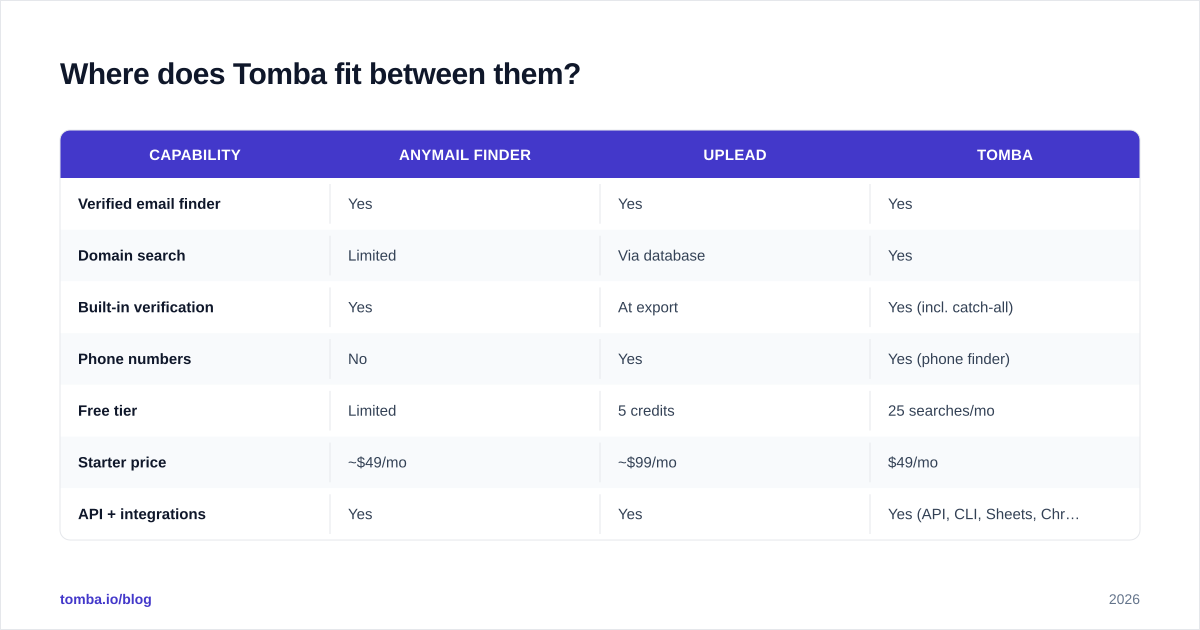
Here's how the three line up on the dimensions that usually decide it:
| Capability | Anymail Finder | UpLead | Tomba |
|---|---|---|---|
| Verified email finder | Yes | Yes | Yes |
| Domain search | Limited | Via database | Yes |
| Built-in verification | Yes | At export | Yes (incl. catch-all) |
| Phone numbers | No | Yes | Yes (phone finder) |
| Free tier | Limited | 5 credits | 25 searches/mo |
| Starter price | ~$49/mo | ~$99/mo | $49/mo |
| API + integrations | Yes | Yes | Yes (API, CLI, Sheets, Chrome) |
Tomba's pricing runs Free (25 searches/mo), Starter $49/mo, Growth $99/mo, Pro $249/mo, and Enterprise custom — so you can start at finder cost and scale into domain-wide and enrichment work without re-platforming. Independent reviews on G2 are a sensible cross-check before you trust any single vendor's own benchmark, including this one.
What's the verdict?#
There's no universal winner — there's a winner for your motion.
Choose Anymail Finder when email is the whole job and you want billing that punishes guesswork, not your budget. Choose UpLead when you're building net-new lists and your team works phones and intent, not just inboxes. The mistake is buying a database when you needed a finder, or a finder when you needed a database — that's where teams overspend or under-cover.
If you want the precision of a finder, the verification depth of a dedicated checker, and domain search and enrichment in one place — without jumping to database-tier per-record pricing — start with the Tomba Email Finder. Run the same 50 names through Anymail Finder, UpLead, and Tomba's free tier, compare verified hit rate and cost per usable record, and let your own data pick the winner. That's a more honest test than any comparison post, including this one.
// get started
Find, verify and enrich your first contacts today
Start on the free plan with 25 searches a month, then scale when your team is ready.
Free plan · No credit card required · GDPR & CCPA
// about the author