Anymail Finder vs Wiza 2026: Which Email Finder Wins?
Anymail Finder bills only for verified emails; Wiza scrapes LinkedIn at scale. We compare accuracy, pricing, and workflows to find which email finder fits your team in 2026.
TL;DR
- Anymail Finder wins on cost control: you only pay for emails it verifies as deliverable, which protects your bounce rate and your budget.
- Wiza wins on LinkedIn scale: it pulls contacts and emails straight from LinkedIn and Sales Navigator searches, exporting whole lists in minutes.
- Pick Anymail Finder if your inputs are names + domains and you care most about deliverability. Pick Wiza if LinkedIn is your prospecting engine.
- Neither tool is the cheapest verified-data option at scale — credit-based finders like Tomba often land more emails per dollar with a free tier to test first.
- Accuracy claims from both vendors are marketing numbers; always re-verify a sample before a big send.
What is Anymail Finder?#
Anymail Finder is a B2B email-finding tool built around one promise: you only get charged for emails it can confirm are deliverable. Feed it a full name and a company domain (or just a domain for a role-based search), and it returns either a "verified" email or nothing. That billing model is the whole pitch — if it can't validate the address, it doesn't burn your quota.
It works through a web app, a Chrome extension, a bulk CSV uploader, and an API. The verified-only stance makes it popular with smaller outbound teams who got burned by tools that charge for guesses and tank their sender reputation. If you want a primer on why that matters, see our guide to email deliverability.
The trade-off: because it refuses to return unverifiable addresses, Anymail Finder's hit rate on hard-to-reach domains (especially catch-all servers) can feel low. You protect deliverability at the cost of coverage.
What is Wiza?#
Wiza is a LinkedIn-first prospecting tool. Its core move is turning a LinkedIn or Sales Navigator search into an exportable list of contacts complete with emails and phone numbers. You run a search, install the extension, and Wiza scrapes the result set, enriches each profile, and hands you a CSV or a CRM push.
That makes Wiza less of a "type a name, get an email" utility and more of a list-building machine for people who live inside LinkedIn. If your ICP is defined by LinkedIn filters — title, headcount, geography, industry — Wiza converts that filter into a contact list faster than manual lookup ever could. It's frequently evaluated next to other scrapers; see how teams weigh a Wiza alternative when LinkedIn limits or pricing bite.
The trade-off: you're dependent on LinkedIn data and LinkedIn's rate limits, and email verification quality varies because the source is profile-scraped rather than domain-pattern-validated.
Anymail Finder vs Wiza: how do they compare?#
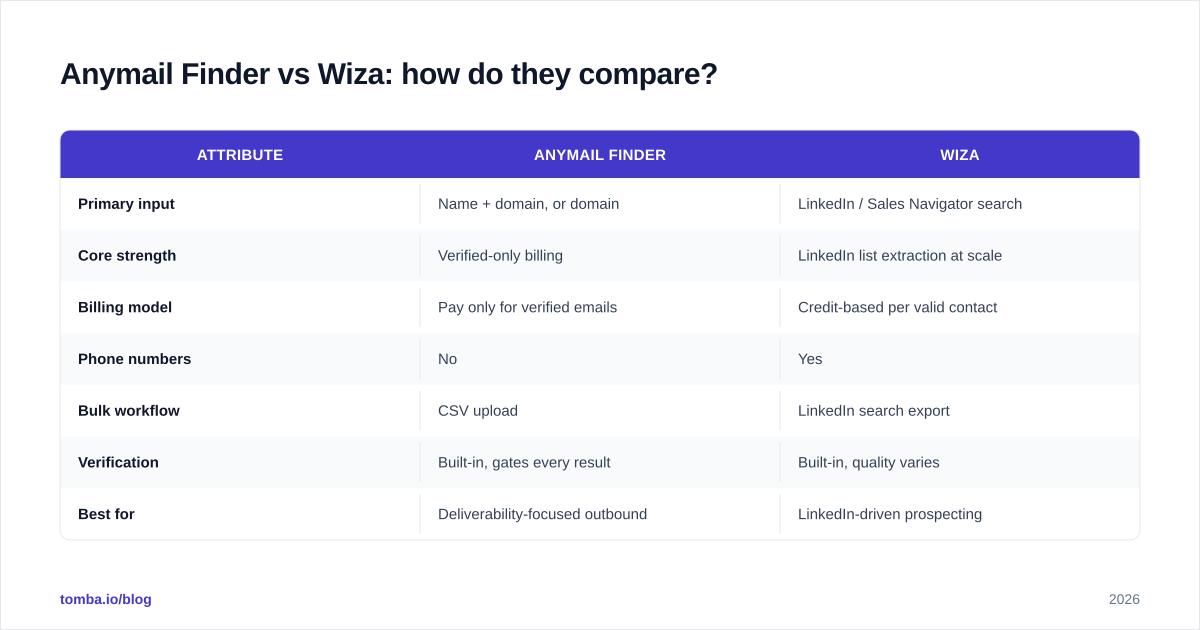
Here's the head-to-head on the attributes that actually change your outcomes.
| Attribute | Anymail Finder | Wiza |
|---|---|---|
| Primary input | Name + domain, or domain | LinkedIn / Sales Navigator search |
| Core strength | Verified-only billing | LinkedIn list extraction at scale |
| Billing model | Pay only for verified emails | Credit-based per valid contact |
| Phone numbers | No | Yes |
| Bulk workflow | CSV upload | LinkedIn search export |
| Verification | Built-in, gates every result | Built-in, quality varies |
| Best for | Deliverability-focused outbound | LinkedIn-driven prospecting |
| Free option | Limited free searches | Limited free credits |
| API | Yes | Yes |
The short version: these tools start from opposite ends. Anymail Finder starts from a known person at a known company and proves the email is real. Wiza starts from a LinkedIn audience and converts it into contacts. You can force either tool to do the other job, but each is clearly built for its lane.

Which one is more accurate?#
Conclusion first: Anymail Finder is more conservative, Wiza is more generous, and neither published number should be trusted without your own test.
Anymail Finder's accuracy is structurally high on the emails it returns because it withholds anything it can't verify. That's a selection effect, not magic — you see fewer addresses, but the ones you see bounce less. For cold outbound where a 3% bounce rate can get your domain throttled, that conservatism is a feature.
Wiza's accuracy depends on how fresh the scraped LinkedIn profile is and whether the person's work email follows a discoverable pattern. Personal-email returns are common, which is great for some plays and useless for others. Wiza verifies before export, but profile-sourced data drifts as people change jobs.
The honest move with any finder is to run a sample of 50–100 contacts, send through an independent email verifier, and measure the real deliverable rate yourself. Vendor accuracy pages are marketing. Your bounce log is truth.
Let me fix that — here's the meme:
)
How does pricing compare?#
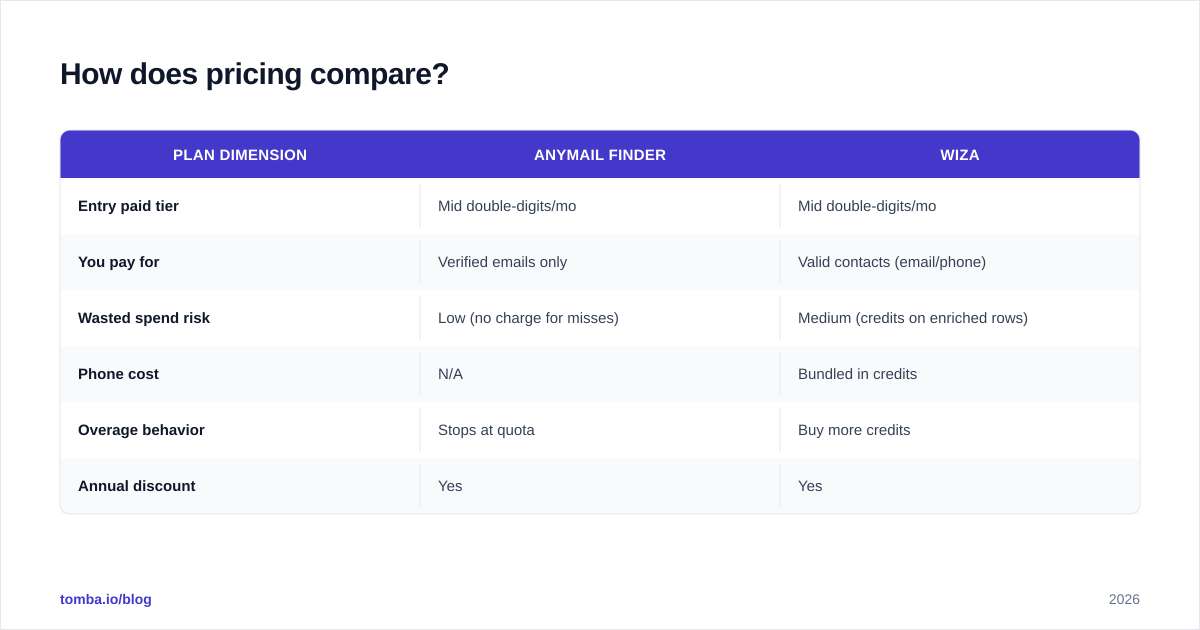
Both tools move you up tiers as volume grows, but the unit of payment differs, and that's where budgets surprise people.
| Plan dimension | Anymail Finder | Wiza |
|---|---|---|
| Entry paid tier | Mid double-digits/mo | Mid double-digits/mo |
| You pay for | Verified emails only | Valid contacts (email/phone) |
| Wasted spend risk | Low (no charge for misses) | Medium (credits on enriched rows) |
| Phone cost | N/A | Bundled in credits |
| Overage behavior | Stops at quota | Buy more credits |
| Annual discount | Yes | Yes |
Anymail Finder's verified-only model is genuinely budget-friendly when your target domains are clean corporate domains. On catch-all-heavy lists, you'll burn through searches that return nothing — protecting you from bad data but also slowing you down.
Wiza's credit model rewards LinkedIn-native workflows but can get expensive once you're pulling thousands of contacts a month, especially if a chunk of returned emails are personal addresses you can't use for B2B.
If raw cost-per-verified-email is your deciding factor, compare both against a transparent credit finder. Tomba pricing runs a free tier (25 searches/mo), Starter at $49/mo, Growth at $99/mo, and Pro at $249/mo — with the email finder, verifier, and domain search bundled rather than billed as separate products.
When should you choose Anymail Finder?#
Choose Anymail Finder when:
- Your inputs are reliably name + company domain. You already know who you're targeting; you just need the address.
- Deliverability is non-negotiable. You're protecting a warmed domain and a sub-3% bounce target.
- You want predictable billing with no charges for misses.
- You don't need phone numbers.
It's a sharp tool for account-based outbound where rep researchers build target lists by hand and need each address verified before it touches the sequence. The verified-only gate does the QA for you.
Where it frustrates: large unknown-audience prospecting. If you don't already have names, Anymail Finder isn't a discovery engine — it's a confirmation engine.
When should you choose Wiza?#
Choose Wiza when:
- LinkedIn is your prospecting source of record. You build audiences with Sales Navigator filters and want them as contact lists.
- You need phone numbers alongside emails.
- You value speed of list-building over per-email cost discipline.
- Your team is comfortable operating inside LinkedIn's rate limits and terms.
Wiza shines for SDR teams whose entire motion is "find a LinkedIn segment, export it, sequence it." It collapses hours of manual profile-to-email work into a single export. For LinkedIn-specific extraction comparisons, our LinkedIn finder breakdown covers the trade-offs of profile-sourced data.
Where it frustrates: deliverability purists. Profile-scraped data ages, personal emails sneak in, and LinkedIn dependency is a single point of failure if your account gets limited.
)
Is there a better alternative to both?#
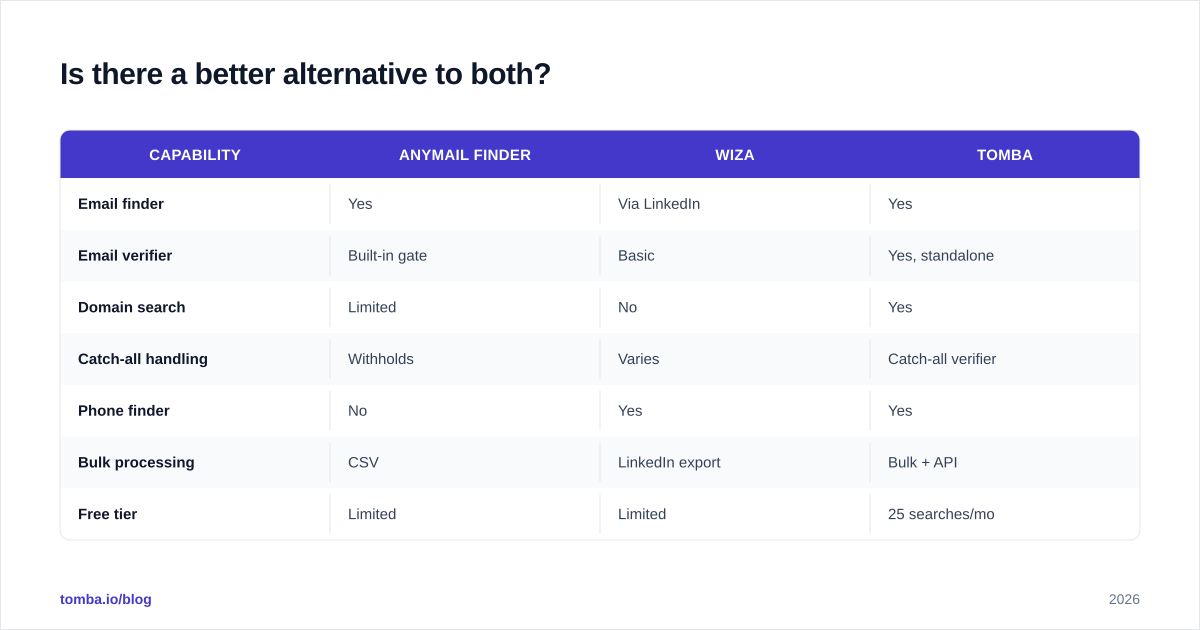
Maybe — depends on what you're optimizing for. Anymail Finder and Wiza each over-index on one strength (verification rigor, LinkedIn scale) while leaving gaps elsewhere. A consolidated platform can close those gaps if you'd rather not run two subscriptions.
| Capability | Anymail Finder | Wiza | Tomba |
|---|---|---|---|
| Email finder | Yes | Via LinkedIn | Yes |
| Email verifier | Built-in gate | Basic | Yes, standalone |
| Domain search | Limited | No | Yes |
| Catch-all handling | Withholds | Varies | Catch-all verifier |
| Phone finder | No | Yes | Yes |
| Bulk processing | CSV | LinkedIn export | Bulk + API |
| Free tier | Limited | Limited | 25 searches/mo |
| Starter price | ~mid $$/mo | ~mid $$/mo | $49/mo |
The reason to consider consolidation: running Anymail Finder for verification and Wiza for LinkedIn lists means two bills, two data formats, and two accuracy profiles to reconcile. A single platform with domain search, bulk finding, and a dedicated catch-all verifier handles the workflows both tools split between them.
That said, no tool is universally best. If your motion is purely LinkedIn extraction with phone numbers, Wiza's specialization is hard to beat. If it's purely verifying known contacts, Anymail Finder's gate is elegant. The consolidation case is strongest for teams doing both.

How do you actually test which one is right?#
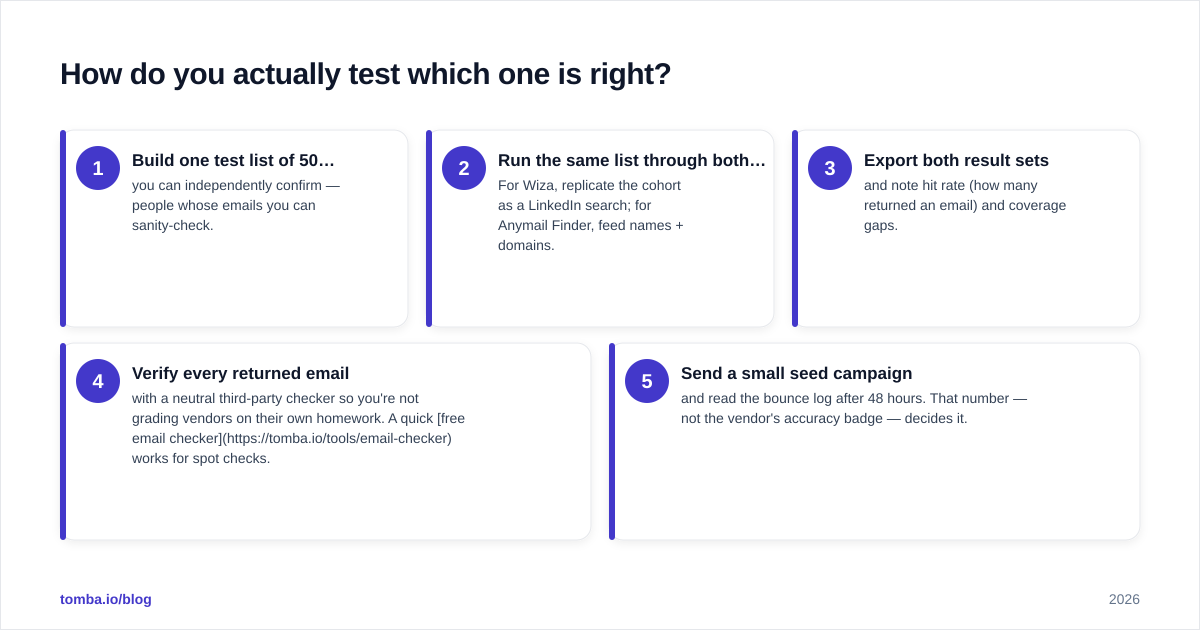
Don't decide on a pricing page. Run a 30-minute bake-off.
- Build one test list of 50 contacts you can independently confirm — people whose emails you can sanity-check.
- Run the same list through both tools. For Wiza, replicate the cohort as a LinkedIn search; for Anymail Finder, feed names + domains.
- Export both result sets and note hit rate (how many returned an email) and coverage gaps.
- Verify every returned email with a neutral third-party checker so you're not grading vendors on their own homework. A quick free email checker works for spot checks.
- Send a small seed campaign and read the bounce log after 48 hours. That number — not the vendor's accuracy badge — decides it.
This process surfaces the thing comparison articles can't: how each tool performs on your specific domains and ICP. A tool that's 95% accurate on tech startups may be 60% on regional manufacturers.
What about compliance and data sourcing?#
Both tools sit in a regulated space, and you should know where their data comes from before you scale. Email-finding and LinkedIn scraping carry different risk profiles — GDPR, CCPA, and LinkedIn's own terms of service all apply depending on how you use the data.
Wiza's LinkedIn-sourced approach has drawn the most scrutiny because automated LinkedIn extraction operates in a gray zone relative to the platform's terms. Anymail Finder's pattern-and-verify approach to public business domains is more conventional, but you're still responsible for a lawful basis to contact people. Review independent vendor reviews on G2 before committing, and check each vendor's documented sourcing. For background on responsible data practices, HubSpot's guide to GDPR for sales teams is a reasonable starting point, and the Wikipedia overview of the GDPR covers the legal fundamentals.
The practical rule: whichever tool you pick, document where each contact came from and honor opt-outs. Transparency about data sources should be a selection criterion, not an afterthought.
Final verdict: Anymail Finder vs Wiza#
Conclusion first: it's a workflow decision, not a quality ranking.
- Anymail Finder is the better pick if you already know your targets and your top priority is keeping bounce rates low. The verified-only billing is a genuine deliverability safeguard.
- Wiza is the better pick if LinkedIn is where you find prospects and you need phone numbers plus fast list exports.
- If you're doing both — discovering audiences and verifying known contacts — running two tools gets expensive and messy fast, and a consolidated platform usually wins on total cost and data consistency.
Whatever you choose, test before you commit and re-verify before you send. Marketing accuracy numbers are not your bounce log.
If you want a single platform that finds, verifies, and enriches without splitting your budget across two subscriptions, start with the Tomba Email Finder. The free tier gives you 25 searches a month to run the exact bake-off above — find emails by name or domain, verify them in the same workflow, and check the real deliverable rate before you ever pay. Compare it against your Anymail Finder and Wiza results, then let your bounce log pick the winner.
// get started
Find, verify and enrich your first contacts today
Start on the free plan with 25 searches a month, then scale when your team is ready.
Free plan · No credit card required · GDPR & CCPA
// about the author