Anymail Finder vs Zintlr: Which Email Finder Wins in 2026?
A hands-on, no-fluff breakdown of Anymail Finder vs Zintlr — accuracy, pricing, data depth, and which one actually deserves your budget in 2026.
Choosing between Anymail Finder and Zintlr usually comes down to one question: do you want a focused email-finding engine, or an all-in-one intelligence platform that happens to find emails? The two tools sit in the same category but solve the job differently, and picking the wrong one wastes budget and burns your sender reputation on bad data.
This breakdown compares Anymail Finder vs Zintlr on the things that actually move pipeline — verified-email accuracy, pricing per usable contact, data depth, and workflow fit — then shows where a third option may beat both.
TL;DR — Anymail Finder vs Zintlr at a glance#
- Anymail Finder is a lean, verification-first email finder. It only charges you for verified results, which makes cost predictable for cold outreach teams.
- Zintlr is a broader sales-intelligence platform — emails plus phone numbers, personality insights ("Zint" profiles), and prospecting databases — so it does more, but the email layer is not its sole focus.
- Accuracy: Anymail Finder edges Zintlr on pure email validity; Zintlr wins on breadth of contact data per lead.
- Pricing: Anymail Finder bills on verified emails only; Zintlr bundles credits across data types, which can be cheaper or pricier depending on how much non-email data you use.
- Best overall value: if email deliverability is the priority, a dedicated finder-plus-verifier stack (covered below) often beats both on cost-per-inbox.
What is Anymail Finder?#
Anymail Finder is a single-purpose email finder built around one promise: you only pay for emails it can verify. You feed it a name and a company domain (or just a domain for role-based discovery), and it returns addresses tagged as "verified" or "not found." Unverified guesses don't drain your quota.
That billing model is the whole pitch. For teams running cold email at scale, a low bounce rate protects your sender reputation, and Anymail Finder's refusal to charge for risky guesses keeps your list clean by default. The trade-off is scope: it finds and verifies emails, and that's mostly it. No phone numbers, no buyer intent, no personality profiling.

What is Zintlr?#
Zintlr is a sales-intelligence platform that wraps email finding inside a larger toolkit. Alongside contact discovery it offers phone numbers, a B2B prospecting database, and its signature "Zint" personality and behavioral insights designed to help reps tailor outreach to how a prospect thinks.
If your team wants one login for prospecting, enrichment, and persona research, Zintlr's surface area is attractive. The cost is focus: when a vendor spreads engineering across emails, phones, and personality data, the email-validation layer rarely matches a tool that does nothing else. You're buying breadth, and breadth has a quality ceiling on any single data type.
How do you actually compare an email finder?#
Before the head-to-head, anchor on the metrics that predict outreach results. Most buyers fixate on "database size," which is the least useful number — a billion stale records is worse than ten million fresh, verified ones.
Use this four-part framework:
- Verified accuracy — what percentage of returned emails actually deliver? This is the only number that protects deliverability.
- Coverage — how often does the tool find anything for a given prospect? A high-accuracy tool that finds 30% of your list still leaves 70% of pipeline on the table.
- Cost per verified email — not headline price. Divide monthly cost by emails you can actually send to.
- Workflow fit — does it slot into your CRM, browser, and bulk process without manual CSV gymnastics?
Run both Anymail Finder and Zintlr through this lens and the differences get concrete fast.
Anymail Finder vs Zintlr: side-by-side comparison#
| Attribute | Anymail Finder | Zintlr |
|---|---|---|
| Primary focus | Email finding + verification | Sales intelligence (email, phone, personality) |
| Billing model | Verified emails only | Bundled credits across data types |
| Phone numbers | No | Yes |
| Buyer/persona insights | No | Yes ("Zint" profiles) |
| Bulk processing | Yes (CSV upload) | Yes |
| Best for | Cold email teams, deliverability-first | Multi-channel reps wanting one platform |
| Verification depth | Strong (core feature) | Moderate (one of many features) |
| Free trial / tier | Limited free searches | Limited free tier |
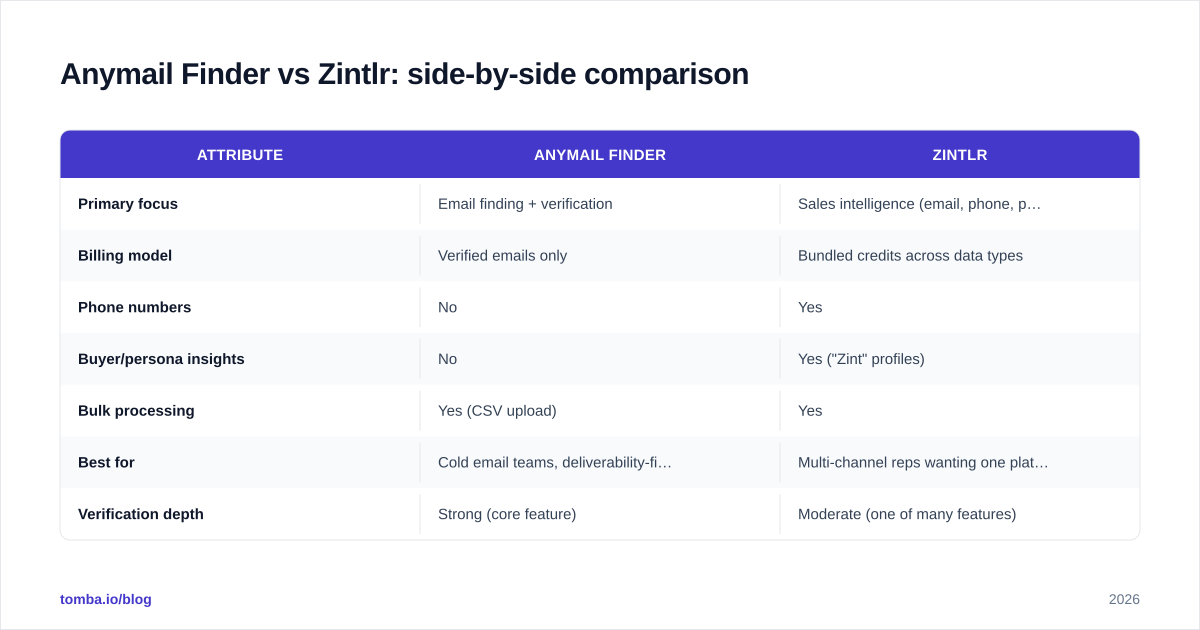
The pattern is clear: Anymail Finder optimizes for one job, Zintlr optimizes for coverage across jobs. Neither is "better" in the abstract — it depends on whether your bottleneck is email quality or contact breadth.
Is Anymail Finder more accurate than Zintlr?#
For pure email validity, Anymail Finder generally has the edge — because verification is its entire reason to exist, not a checkbox feature. When a vendor's revenue depends on the "only pay for verified" promise, the verification pipeline gets the most engineering attention.
Zintlr returns more data points per lead (phone, persona, social), but the email layer competes for roadmap priority with everything else the platform does. In practice that means Zintlr may surface an email where Anymail Finder finds none, but you should run those Zintlr results through a dedicated email verifier before sending, especially for catch-all domains where SMTP checks are unreliable.
A useful rule: any email finder's "valid" tag is only as trustworthy as its handling of catch-all servers. If you send to a lot of corporate domains, confirm how each tool flags catch-alls — guessing wrong there is a top cause of silent bounces. Independent reviews on G2 are a good sanity check on real-world accuracy claims from either vendor.
How does pricing compare?#
Pricing is where the two models diverge most, and where "cheaper" depends entirely on your usage mix.
| Plan dimension | Anymail Finder | Zintlr |
|---|---|---|
| Pricing basis | Verified emails per month | Credit bundles (mixed data) |
| Predictability | High — no charge for misses | Variable — credits spend across types |
| Best when you need | Only emails | Emails + phones + insights |
| Hidden cost risk | Low | Credits drained by non-email lookups |
| Annual discount | Yes | Yes |
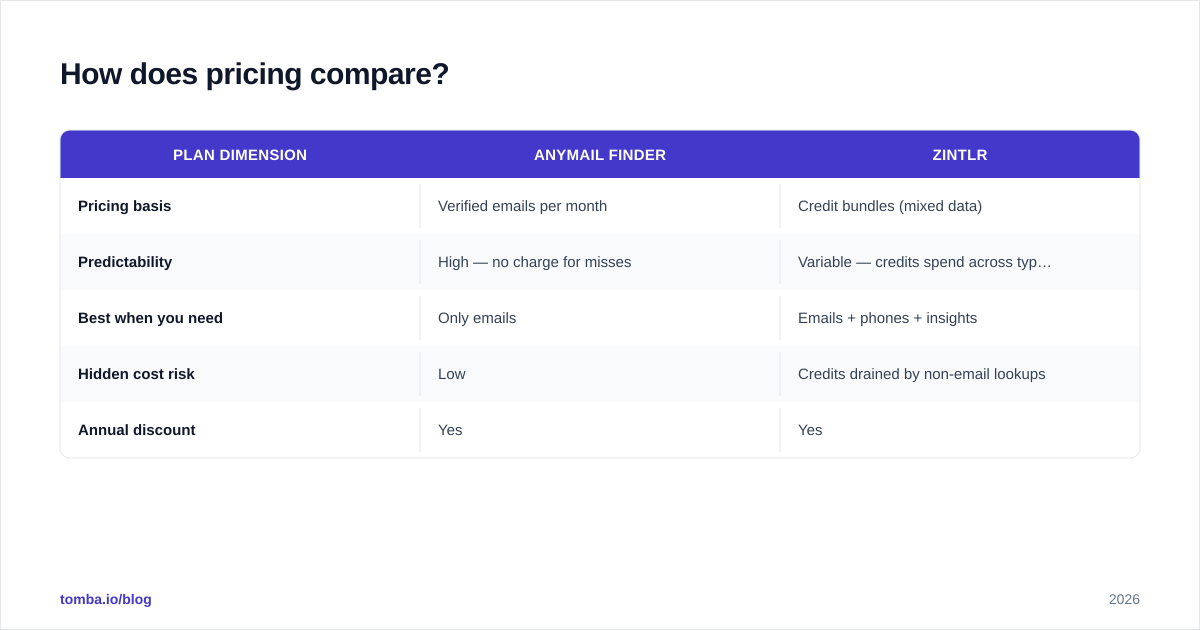
Anymail Finder's verified-only billing makes per-email cost easy to forecast. Zintlr can be more economical if you genuinely use the phone and persona data — but if you only want emails, you may pay for capabilities you never touch. Always model cost on verified emails you'll actually send to, not on credits or list size. For a transparent benchmark of where finder pricing typically lands, compare against published Tomba pricing tiers as a reference point.
Which one should you choose?#
Choose Anymail Finder if:
- Cold email is your primary channel and deliverability is non-negotiable.
- You want dead-simple, predictable billing tied to verified results.
- You don't need phone numbers or persona data cluttering the workflow.
Choose Zintlr if:
- You run multi-channel outreach (email + phone + social) and want one tool.
- Persona and behavioral insights genuinely change how your reps write.
- You'll actually use the broader database, not just the email finder.
The honest answer for many teams is "neither, fully." Anymail Finder is narrow; Zintlr is broad but thins out its email quality. That gap is exactly where a focused finder-plus-enrichment stack competes.
Where does Tomba fit in this comparison?#
Tomba sits between the two: a verification-first email finder like Anymail Finder, but with the surrounding data tools
Zintlr buyers want — without forcing you onto a sprawling all-in-one.
The core is the email finder backed by a domain search for company-wide discovery, a standalone email verifier (including proper catch-all handling), a phone finder for multi-channel reps, and a bulk email finder for list-scale work. So you get Anymail Finder's deliverability discipline and Zintlr's breadth, in one stack you only expand when you need to.
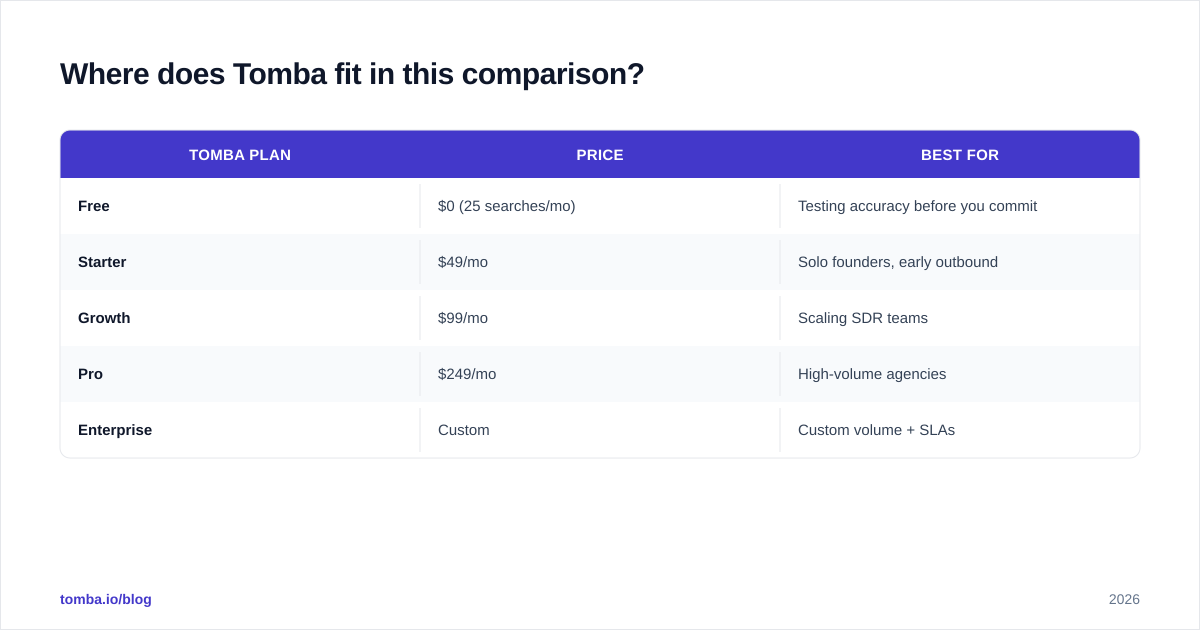
Transparent, published pricing makes cost-per-verified-email easy to compare:
| Tomba plan | Price | Best for |
|---|---|---|
| Free | $0 (25 searches/mo) | Testing accuracy before you commit |
| Starter | $49/mo | Solo founders, early outbound |
| Growth | $99/mo | Scaling SDR teams |
| Pro | $249/mo | High-volume agencies |
| Enterprise | Custom | Custom volume + SLAs |
The Free tier matters here: you can validate accuracy on your own list before spending a dollar, which neither headline-price comparison can give you. You can also wire results straight into your CRM via native HubSpot integration or automate flows through the Tomba API.

How to test all three before committing#
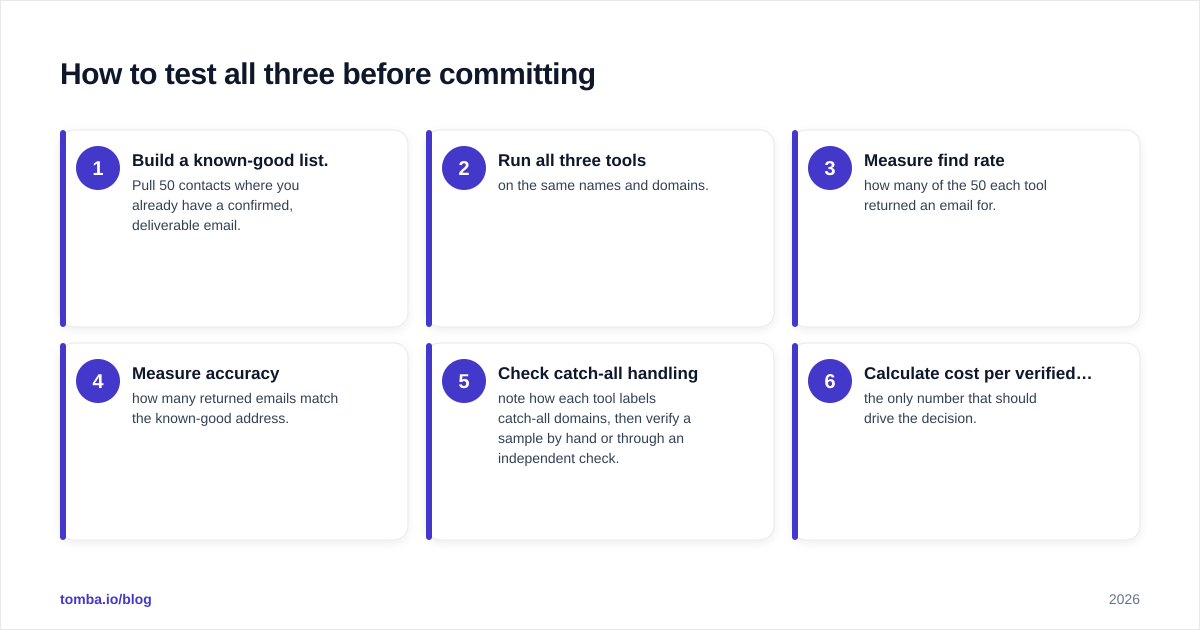
Don't take any vendor's accuracy claim — including this one — at face value. Run a controlled bake-off:
- Build a known-good list. Pull 50 contacts where you already have a confirmed, deliverable email.
- Run all three tools on the same names and domains.
- Measure find rate — how many of the 50 each tool returned an email for.
- Measure accuracy — how many returned emails match the known-good address.
- Check catch-all handling — note how each tool labels catch-all domains, then verify a sample by hand or through an independent check.
- Calculate cost per verified match — the only number that should drive the decision.
This thirty-minute test beats every review article, because it uses your market and your domains. Tools that look great on a vendor's benchmark often slip on niche industries or non-US data, and the bake-off catches that before you've committed budget. For a deeper methodology, vendor documentation and category research on sites like HubSpot's sales blog cover outreach data hygiene in detail.
The bottom line#
Anymail Finder wins on email purity and billing simplicity. Zintlr wins on breadth if you'll use the phone and persona layers. But if your real goal is the most verified emails per dollar — with the option to add phones, enrichment, and bulk processing as you grow — start with a dedicated, verification-first finder.
Run the Tomba Email Finder free tier against the same list you'd test Anymail Finder and Zintlr on. Twenty-five searches is enough to see the find rate and accuracy on your own domains, and you'll know within an afternoon which tool actually deserves your outreach budget in 2026.
// get started
Find, verify and enrich your first contacts today
Start on the free plan with 25 searches a month, then scale when your team is ready.
Free plan · No credit card required · GDPR & CCPA
// about the author