ApexVerify Pricing, Reviews, Pros and Cons (2026 Review)
A neutral, hands-on breakdown of ApexVerify pricing, real user reviews, and the honest pros and cons—plus how it compares to alternatives for accurate B2B email verification.
TL;DR
- This is an honest, hands-on look at ApexVerify pricing and reviews. ApexVerify is a data-verification tool for teams that want to clean lists and confirm contacts before outreach. Pricing is credit-based. It scales from a small free trial up to custom enterprise quotes.
- The value question is simple. Does it cut your bounce rate enough to protect sender reputation without costing more than the deals it saves?
- Reviews are broadly positive on accuracy and UI. The recurring complaints are credit burn on catch-all domains, thin docs, and limited native integrations.
- If you only need verification, ApexVerify is fine. If you need finding and verifying in one workflow, a combined platform like Tomba is usually cheaper per qualified contact.
- Use the buyer's framework below to score ApexVerify against your real volume before you commit to an annual plan.
What is ApexVerify?#
ApexVerify is a contact-verification tool. You feed it email addresses or a list. It then tells you which ones are deliverable, which will bounce, which are risky catch-all domains, and which are invalid. The pitch is the same one every verifier makes: protect your sender reputation, lower bounce rates, and stop wasting send volume on dead addresses.
That pitch matters because bounce rate can wreck an outbound program fast. Mailbox providers read a high bounce rate as a bad signal. It tells them you're mailing a purchased or stale list, so they throttle you or push you to spam. A good verifier is insurance against that. For background on how the mechanics work, the email verification overview on Wikipedia is a neutral primer.
Where ApexVerify sits in the market is the more interesting question. It competes with single-purpose verifiers (ZeroBounce, NeverBounce, Bouncer) and with all-in-one platforms that find and verify contacts. That distinction drives the entire pricing conversation, so keep it in mind.
The framework above is the lens we'll use for the rest of this review. Four axes decide whether any verifier earns its line item: real-world accuracy, cost per verified contact (not per credit), how it fits your existing stack, and whether it handles the messy edge cases—catch-all domains, role accounts, and greylisting—without quietly draining your balance.
How much does ApexVerify cost?#
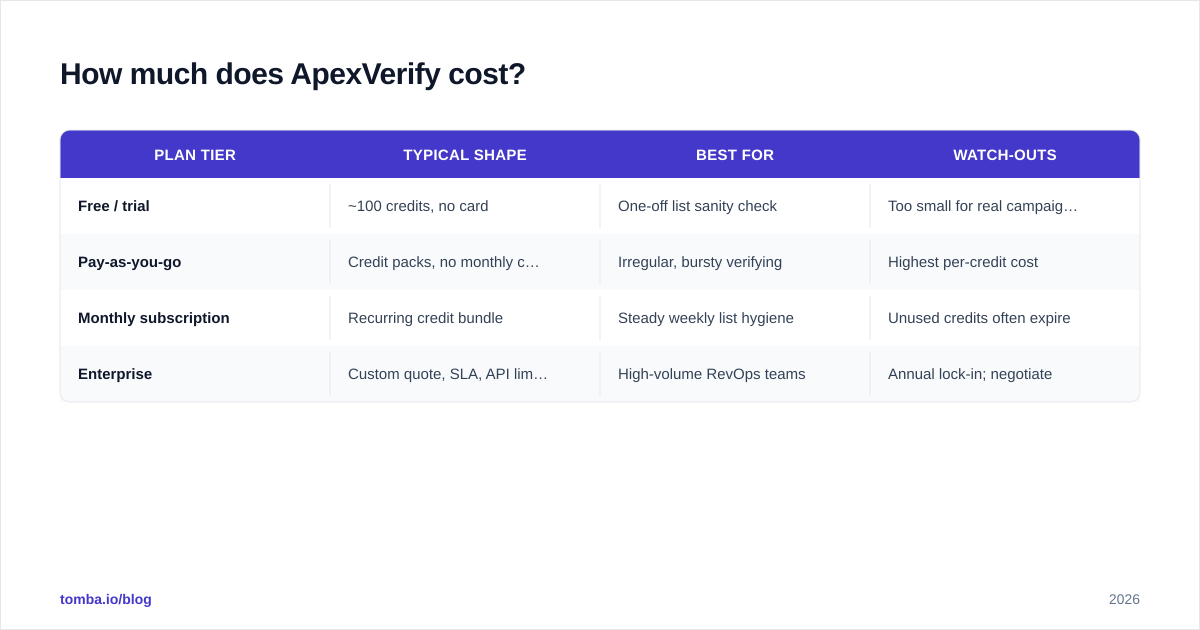
ApexVerify uses volume-based pricing. You buy credits, and one credit covers one verification. You can buy them as a monthly subscription or as pay-as-you-go packs. A small free allotment lets you test accuracy before you pay. Higher tiers lower the per-credit cost and unlock bulk processing, API access, and priority support. The top tier is a custom enterprise quote.
Verifier vendors change their packaging often. Treat the figures below as representative tiers, not a contract. Always confirm the live numbers on the vendor's own page before you buy. The structure, not the exact cent, is what you're evaluating.
| Plan tier | Typical shape | Best for | Watch-outs |
|---|---|---|---|
| Free / trial | ~100 credits, no card | One-off list sanity check | Too small for real campaigns |
| Pay-as-you-go | Credit packs, no monthly commit | Irregular, bursty verifying | Highest per-credit cost |
| Monthly subscription | Recurring credit bundle | Steady weekly list hygiene | Unused credits often expire |
| Enterprise | Custom quote, SLA, API limits | High-volume RevOps teams | Annual lock-in; negotiate |
The number that actually matters is cost per verified contact. That's where catch-all domains distort the math. Many verifiers (ApexVerify included, per user reports) still spend a credit to return an "accept-all / unknown" verdict on catch-all domains. So you pay full price for a result you can't fully trust. If a real slice of your list sits on catch-all domains, your effective cost per usable answer climbs fast. A dedicated catch-all verifier is the only honest way to resolve those, and not every tool offers one.
Compare any quote against transparent, published rates like Tomba pricing. That way you benchmark real cost-per-outcome, not a discounted headline credit rate.
What do ApexVerify reviews say?#
Reviews cluster into a consistent pattern, which is the most useful thing about them. Before you trust any single star rating, cross-check the vendor across independent directories like G2 and Capterra. Reviewers there are verified, and complaints aren't filtered.
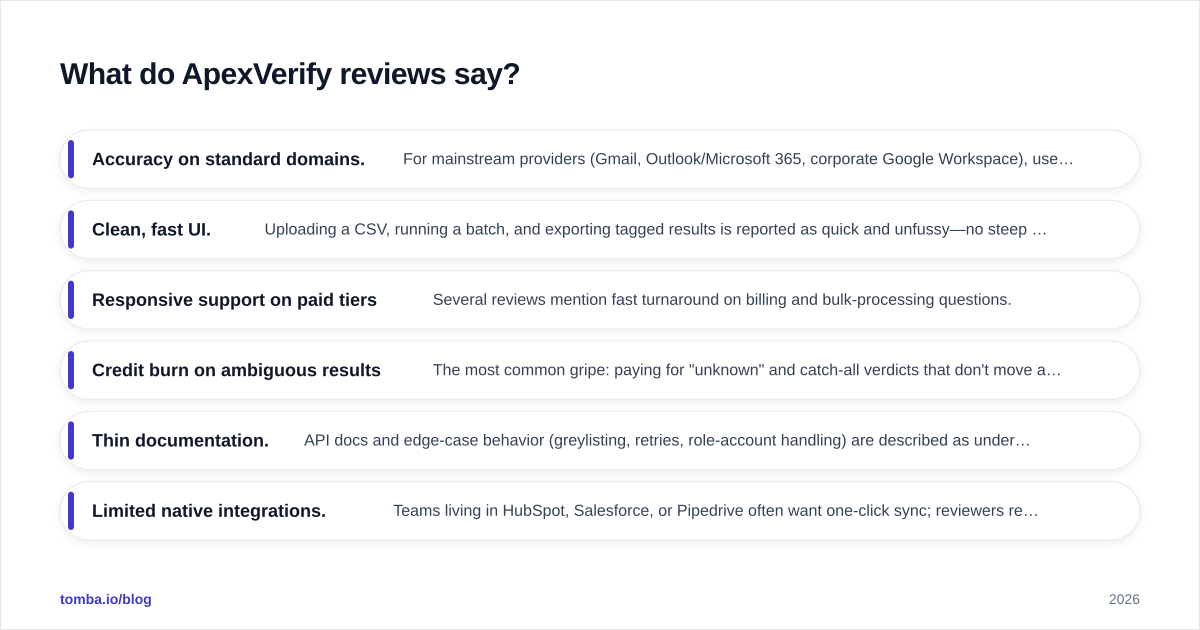
What reviewers praise:
- Accuracy on standard domains. For mainstream providers (Gmail, Outlook/Microsoft 365, corporate Google Workspace), users report bounce rates dropping into low single digits after cleaning. That's the core job, and it does it.
- Clean, fast UI. Uploading a CSV, running a batch, and exporting tagged results is reported as quick and unfussy—no steep learning curve.
- Responsive support on paid tiers. Several reviews mention fast turnaround on billing and bulk-processing questions.
What reviewers complain about:
- Credit burn on ambiguous results. The most common gripe: paying for "unknown" and catch-all verdicts that don't move a contact into a confidently-sendable bucket.
- Thin documentation. API docs and edge-case behavior (greylisting, retries, role-account handling) are described as under-explained.
- Limited native integrations. Teams living in HubSpot, Salesforce, or Pipedrive often want one-click sync; reviewers report leaning on CSV exports or building their own glue.
- No finding capability. Reviewers running outbound note they still need a separate tool to find the addresses ApexVerify only validates—two subscriptions for one workflow.
Read reviews for pattern, not verdict. A scattered one-star about a billing surprise matters less than the same integration complaint surfacing across a dozen accounts.
What are the pros and cons of ApexVerify?#
Here's the honest balance sheet.
Pros
- Solid deliverability accuracy on standard mailbox providers.
- Low-friction bulk upload and export workflow.
- Free trial credits to test before paying.
- Volume discounts that make sense for steady, predictable cleaning.
Cons
- Credits consumed on catch-all/unknown results you can't fully act on.
- Verification only—no email finding, so it's half a stack.
- Limited native CRM integrations; expect CSV plumbing.
- Documentation gaps around edge-case behavior.
- Unused monthly credits typically expire, penalizing bursty usage.
The diagram above is the real strategic point. A verification-only tool sits in the middle of your pipeline. You still need a source feeding it addresses and a destination consuming the clean ones. Every seam between those tools is a place credits, time, and data quality leak. The fewer hops, the lower your true cost. That's the lens for the comparison next.
How does ApexVerify compare to alternatives?#
The fair comparison isn't "which verifier is most accurate." Most reputable ones land within a few points of each other on standard domains. The fair comparison is total workflow cost: finding, verifying, and handling catch-alls without stitching three subscriptions together.
| Feature | ApexVerify | ZeroBounce | Tomba |
|---|---|---|---|
| Free tier | ~100 credits | 100/mo | 25 searches/mo |
| Starting paid plan | Credit packs | ~$18/mo | $49/mo Starter |
| Email verification | Yes | Yes | Yes |
| Email finder | No | Limited | Yes (core product) |
| Catch-all handling | Charges credit | Scoring only | Dedicated verifier |
| Bulk processing | Yes | Yes | Yes |
| Domain search | No | No | Yes |
| Native CRM integrations | Limited | Some | HubSpot, Salesforce, Pipedrive |
| API access | Paid tiers | Yes | Yes |
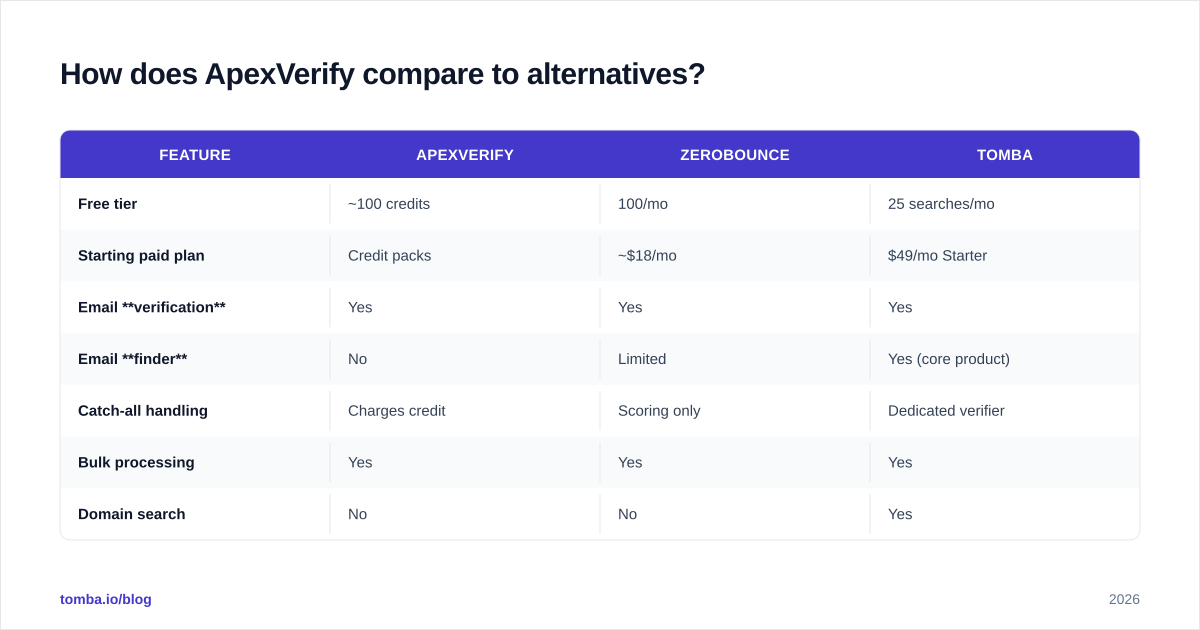
The pattern is clear. As a pure verifier, ApexVerify is competitive with ZeroBounce and fine for teams that already have a separate sourcing tool. But if your real job is building outbound lists, a combined platform collapses two or three line items into one. With Tomba you find email addresses by name or domain, run email verification on the results, resolve catch-all domains separately, and push everything through a bulk email finder workflow—without exporting a CSV between every step.

That doesn't make ApexVerify a bad product. It makes it a component. If you've already standardized on a sourcing tool and just need a clean verification layer, a focused verifier is a reasonable buy. The mistake is paying for a verification-only tool while also paying for a finder when one platform could do both at a lower blended cost per qualified contact.
ApexVerify pricing and reviews: is it worth it in 2026?#
Weigh the ApexVerify pricing and reviews against one specific buyer. That buyer has a steady, predictable volume of already-sourced addresses. They need a reliable hygiene pass. They don't lean heavily on catch-all domains, and they're fine with CSV-based workflows. For that profile, ApexVerify does its job, and the volume discounts make the unit economics work.
It's the wrong buy if any of these are true:
- You're still finding contacts and don't want a second subscription for that.
- A large share of your prospects sit on catch-all domains (common in enterprise and EU markets).
- You live inside a CRM and want sync, not exports.
- Your volume is bursty—a few big pushes a quarter—where expiring monthly credits punish you.
Score it honestly against the four-axis framework from earlier. Run the free credits on a real, representative slice of your list. Include catch-all and role accounts on purpose. Then calculate cost per confidently sendable contact, not per credit. That single number cuts through every marketing claim.
How should you evaluate any email verifier?#
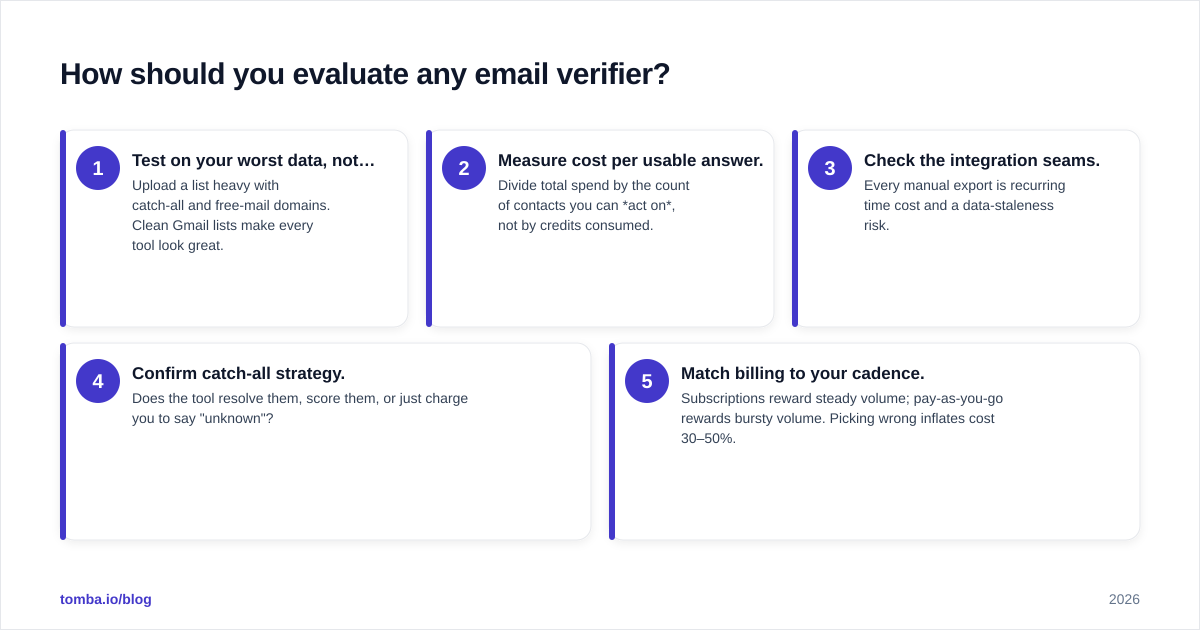
Use this quick checklist before committing to an annual plan on ApexVerify or anything else:
- Test on your worst data, not your best. Upload a list heavy with catch-all and free-mail domains. Clean Gmail lists make every tool look great.
- Measure cost per usable answer. Divide total spend by the count of contacts you can act on, not by credits consumed.
- Check the integration seams. Every manual export is recurring time cost and a data-staleness risk.
- Confirm catch-all strategy. Does the tool resolve them, score them, or just charge you to say "unknown"?
- Match billing to your cadence. Subscriptions reward steady volume; pay-as-you-go rewards bursty volume. Picking wrong inflates cost 30–50%.
A verifier is reputation insurance. It's worth paying for, but only at a price that reflects the outcomes it actually protects. For more on the downstream stakes, see the primer on email deliverability and why bounce rate feeds directly into sender reputation.
The bottom line#
That's the short version of ApexVerify pricing and reviews: a competent, accurate verifier with a clean workflow and sensible volume pricing. It's held back by credit burn on ambiguous results, limited integrations, and the structural fact that it only does half the job. As a verification component, it earns its place. As a standalone answer to "how do I build clean outbound lists," it leaves you assembling a stack.
If you'd rather find, verify, and enrich contacts in one place instead of paying for a sourcing tool and a verifier separately, start with the Tomba Email Finder. Find professional email addresses by name, domain, or company, validate them on the spot, and resolve catch-alls before a single message goes out—so your list is clean the moment it's built, not after a second tool and a second invoice. The free tier gives you 25 searches a month to benchmark accuracy against whatever you're using today, and the transparent Tomba plans let you scale from solo prospecting to full RevOps volume without surprise credit math.
Ready to find emails that actually work?
Join 150,000+ professionals who stopped guessing and started sending. Free credits on signup — no credit card required.
Get the Tomba newsletter
Practical outbound tactics and product updates — once every two weeks.
About the author