Apexverify vs Salesql 2026: Best Email Finder Tool
ApexVerify focuses on AI email verification; SalesQL pulls contacts from LinkedIn. Here's how they compare on accuracy, pricing, and real-world outbound use in 2026.
ApexVerify and SalesQL solve two different halves of the same problem. One cleans your list so emails actually land; the other scrapes contacts off LinkedIn so you have a list in the first place. Picking between them without understanding that split is how teams end up paying for two tools that overlap by 20% and miss 80% of what they needed.
This breakdown compares both on accuracy, pricing, data coverage, and where each one quietly fails — then shows where a combined finder-plus-verifier platform beats running either alone.
TL;DR — Apexverify vs Salesql at a glance#
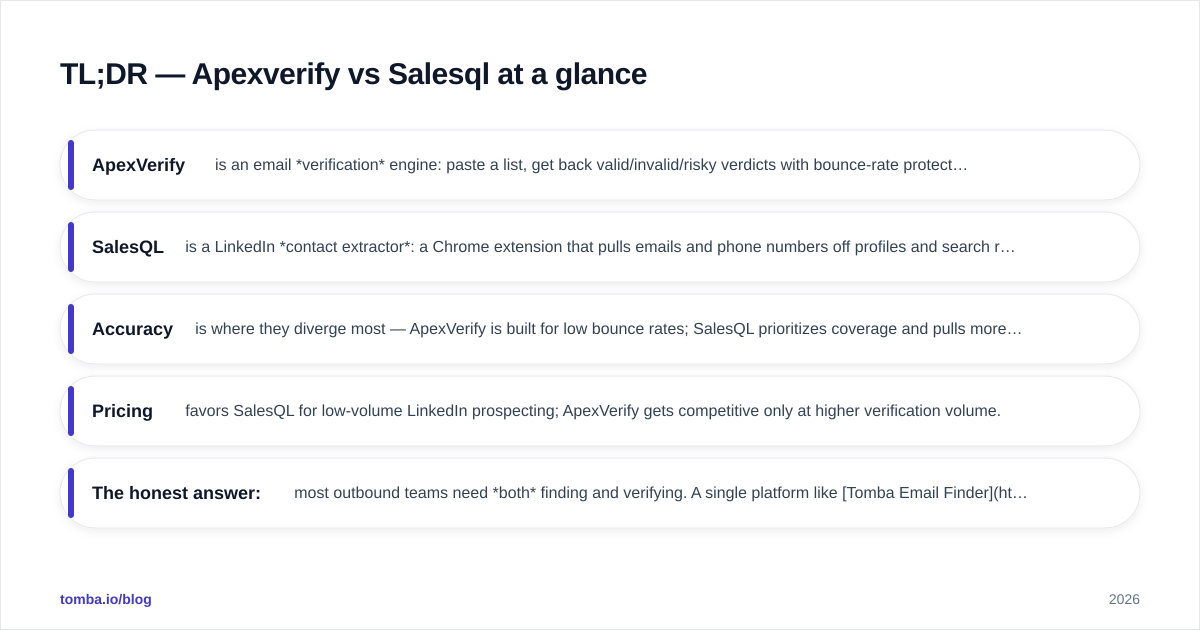
- ApexVerify is an email verification engine: paste a list, get back valid/invalid/risky verdicts with bounce-rate protection. It does not find new contacts.
- SalesQL is a LinkedIn contact extractor: a Chrome extension that pulls emails and phone numbers off profiles and search results. Its verification layer is thin.
- Accuracy is where they diverge most — ApexVerify is built for low bounce rates; SalesQL prioritizes coverage and pulls more guessed addresses.
- Pricing favors SalesQL for low-volume LinkedIn prospecting; ApexVerify gets competitive only at higher verification volume.
- The honest answer: most outbound teams need both finding and verifying. A single platform like Tomba Email Finder covers the workflow end to end instead of stitching two narrow tools together.
What is ApexVerify and who is it for?#
ApexVerify is an email verification service. You feed it a list of addresses — exported from a CRM, a scrape, or a webform — and it runs syntax checks, MX record lookups, SMTP handshakes, and catch-all detection to label each address as deliverable, undeliverable, or risky.
The target user is anyone whose bounce rate is hurting sender reputation. If you send cold email at volume, a list with 8% invalid addresses will tank your inbox placement fast. Verification tools like ApexVerify exist to get that number under 2% before you hit send. Mailbox providers treat bounce rate as a core trust signal, which is why this category exists at all — see Google's own Postmaster Tools guidance on what triggers throttling.
What ApexVerify does not do: discover contacts. It is a filter, not a faucet. Give it nothing and it returns nothing.
What is SalesQL and who is it for?#
SalesQL is a LinkedIn-first contact finder delivered as a browser extension. You open a profile or a Sales Navigator search, click the SalesQL button, and it returns personal and work emails plus phone numbers. It can extract in bulk across a search page, which makes it popular with SDRs building lists from LinkedIn directly.
The target user is the LinkedIn-native prospector who lives in Sales Navigator and wants contact details without leaving the tab. You can read more about its positioning on the official SalesQL site.
The catch: SalesQL's strength is coverage, not precision. It surfaces a lot of addresses, including plausible guesses that haven't been deliverability-tested. That's great for volume and dangerous for sender reputation if you skip a verification step. SalesQL does flag email confidence levels, but it is not a dedicated verification engine the way ApexVerify is.
Apexverify vs Salesql: the core comparison#
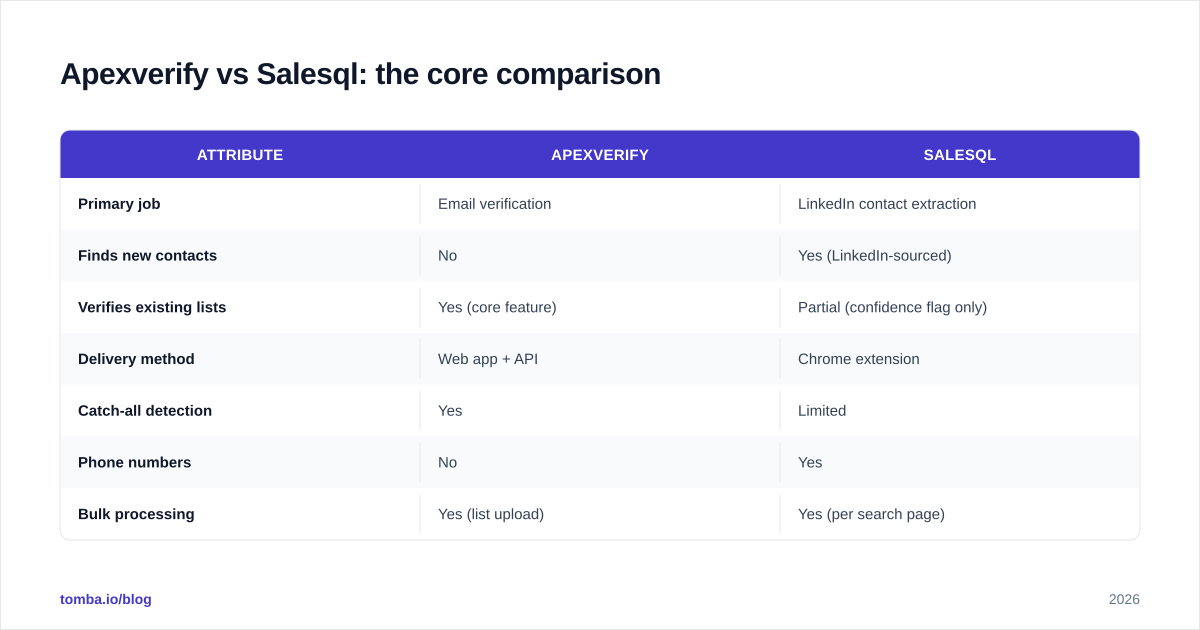
Here is the head-to-head on the attributes that actually change your numbers.
| Attribute | ApexVerify | SalesQL |
|---|---|---|
| Primary job | Email verification | LinkedIn contact extraction |
| Finds new contacts | No | Yes (LinkedIn-sourced) |
| Verifies existing lists | Yes (core feature) | Partial (confidence flag only) |
| Delivery method | Web app + API | Chrome extension |
| Catch-all detection | Yes | Limited |
| Phone numbers | No | Yes |
| Bulk processing | Yes (list upload) | Yes (per search page) |
| Best for | Cleaning lists pre-send | Building lists from LinkedIn |
| Reputation risk if used alone | Low | Moderate (unverified guesses) |
The table makes the real story obvious: these aren't competitors, they're two stages of one pipeline. SalesQL fills the top (sourcing); ApexVerify guards the bottom (deliverability). Using only one leaves a hole.

Which tool is more accurate?#
Accuracy depends on which kind of accuracy you mean — and the two tools optimize for opposite ones.
ApexVerify optimizes for precision: when it says an address is valid, it should land. That's measured by bounce rate, and a good verifier keeps real-world bounces under 2%. The trade-off is that strict verifiers mark ambiguous catch-all domains as "risky" rather than guessing, so you lose some reachable contacts to caution.
SalesQL optimizes for recall: it wants to return an address for as many profiles as possible. More coverage means more guessed-pattern emails (firstname.lastname@domain) that were never SMTP-tested. Some land; some bounce. For a LinkedIn list of 500 people, that difference is the gap between a clean send and a deliverability incident.
If you only buy one and you're sending cold email, accuracy-for-deliverability matters more than raw coverage — a bigger list of bounces is worse than a smaller list that inboxes. This is exactly why mature stacks pair a finder with a dedicated email verifier instead of trusting source-time guesses.

How do they price out in 2026?#
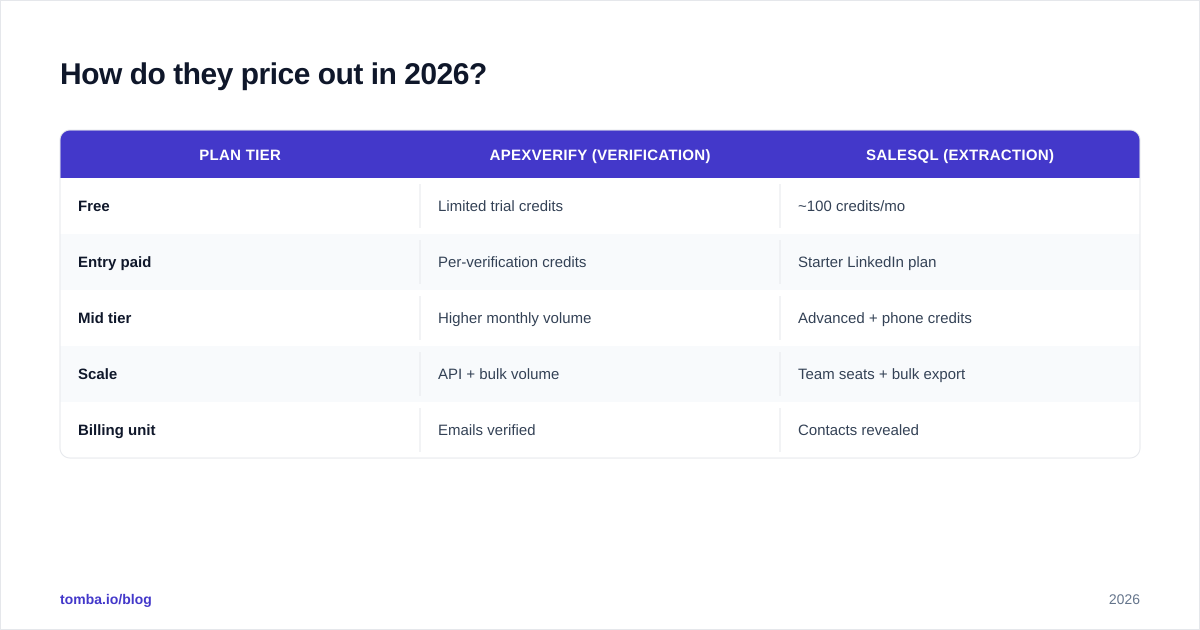
Both run credit-based subscriptions, but they meter different things — SalesQL meters contacts extracted, ApexVerify meters addresses verified. That makes a direct dollar comparison misleading unless you map it to your actual workflow.
| Plan tier | ApexVerify (verification) | SalesQL (extraction) |
|---|---|---|
| Free | Limited trial credits | ~100 credits/mo |
| Entry paid | Per-verification credits | Starter LinkedIn plan |
| Mid tier | Higher monthly volume | Advanced + phone credits |
| Scale | API + bulk volume | Team seats + bulk export |
| Billing unit | Emails verified | Contacts revealed |
The practical takeaway: if you're a solo SDR pulling a few hundred LinkedIn contacts a month, SalesQL's low entry plan is cheap. If you're verifying tens of thousands of addresses from mixed sources, a dedicated verifier — or a combined platform — is more cost-efficient per address. Always check the live Tomba pricing and each vendor's current page before committing, since credit definitions shift.
What does each tool miss?#
The blind spots are the whole reason this comparison matters.
ApexVerify's blind spot is sourcing. It assumes you already have a list. If your problem is "I have 40 target accounts and no contact emails," ApexVerify can't help until you've found those emails some other way.
SalesQL's blind spots are non-LinkedIn data and verification depth. It's tethered to LinkedIn profiles, so contacts who aren't active on LinkedIn — or who restrict their profile — fall outside its reach. And because it leans on pattern guessing, the confidence flag is not a substitute for a real SMTP-level check.
Neither tool covers the full motion: find by company domain when you don't have a name, verify catch-all domains properly, enrich with firmographics, and export clean. That gap is where domain-based search shines — pulling every public address on a company's domain search regardless of whether each person is on LinkedIn.

Apexverify vs Salesql vs an all-in-one platform#
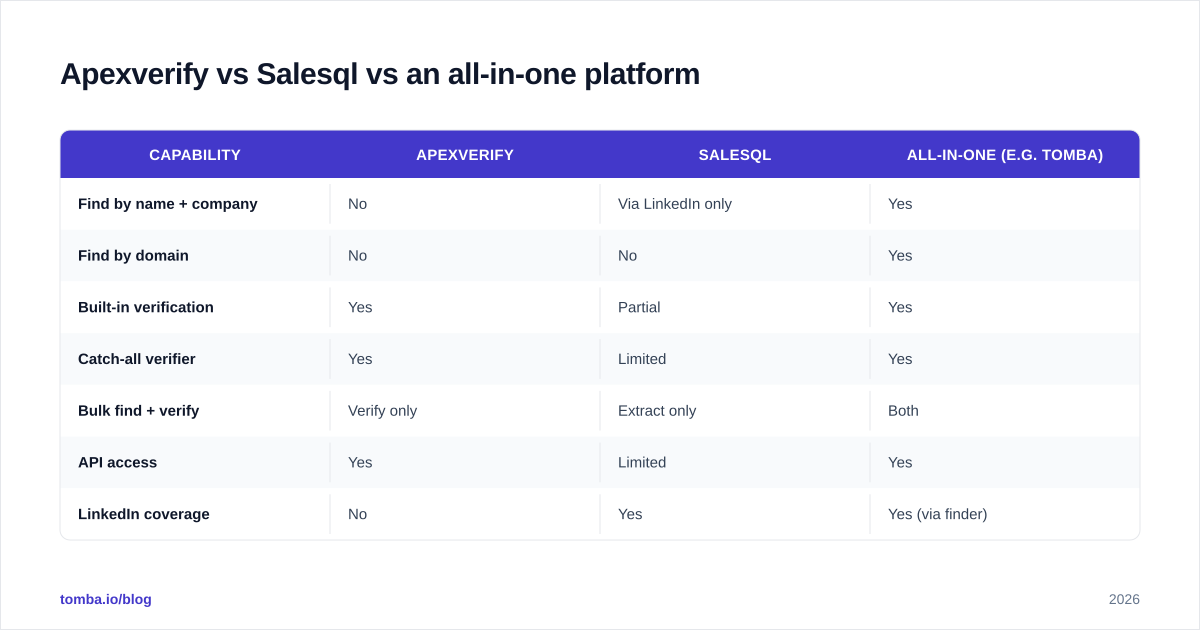
Most teams discover that running a narrow extractor and a narrow verifier side by side costs more time than it saves: two logins, two credit pools, two CSV round-trips, and a manual hand-off between them every time.
An all-in-one finder-plus-verifier collapses that into one step. Here's how the categories stack up.
| Capability | ApexVerify | SalesQL | All-in-one (e.g. Tomba) |
|---|---|---|---|
| Find by name + company | No | Via LinkedIn only | Yes |
| Find by domain | No | No | Yes |
| Built-in verification | Yes | Partial | Yes |
| Catch-all verifier | Yes | Limited | Yes |
| Bulk find + verify | Verify only | Extract only | Both |
| API access | Yes | Limited | Yes |
| LinkedIn coverage | No | Yes | Yes (via finder) |
| Single workflow | No | No | Yes |
The point isn't that ApexVerify or SalesQL is bad — each is good at its one job. It's that the one-job design forces you to assemble the pipeline yourself. A consolidated platform handles find → verify → enrich → export without the hand-offs. For teams scaling outbound, that consolidation is the difference between a repeatable system and a brittle stack of browser tabs.

How to choose between Apexverify and Salesql#
Run your decision through three quick questions:
- Do you already have a list, or do you need to build one? Have a list and just need it clean → lean ApexVerify. Need to build from LinkedIn → lean SalesQL.
- Where does your data live? If your prospects are LinkedIn-active, SalesQL's coverage is strong. If you target whole companies by domain or work from account lists, neither narrow tool fits well.
- How much does deliverability cost you? If a bounce spike would damage a warmed sending domain, verification can't be optional — and a source-time confidence flag isn't enough.
If your honest answers are "I need to both find and verify, across LinkedIn and domains, at volume" — that's the all-in-one case. You can wire it into your CRM through native integrations so found-and-verified contacts flow straight into sequences instead of sitting in a spreadsheet.
For a deeper look at how vendors source their records, the methodology behind data accuracy is worth reading before you trust any provider's "valid" label — and independent reviews on G2 help sanity-check vendor claims.
Frequently asked questions#
Is ApexVerify a competitor to SalesQL? Not directly. ApexVerify verifies emails you already have; SalesQL finds new ones on LinkedIn. They overlap only slightly, which is why many teams use both — or replace both with a single find-and-verify platform.
Can SalesQL replace a dedicated verifier? Not reliably for cold email at volume. Its confidence flag helps, but it isn't a full SMTP-level verification engine, so you risk higher bounces if you skip a real verification pass.
Which is better for cold email deliverability? Verification-first wins. A smaller, verified list inboxes better than a large list of unverified LinkedIn guesses. Pair sourcing with a true verifier no matter which finder you use.
The bottom line#
ApexVerify and SalesQL each do one thing well — verification and LinkedIn extraction, respectively — but neither covers the full find-and-verify motion that outbound actually requires. If you only ever clean lists, ApexVerify is fine. If you only ever scrape LinkedIn, SalesQL is fine. The moment you need both, you're maintaining two tools and a manual bridge between them.
That's the case for consolidating. Tomba Email Finder finds professional emails by name, company, or domain — then verifies them in the same workflow, so contacts arrive deliverable instead of "probably right." Start on the free tier (25 searches/month), scale into the $49/mo Starter plan when your pipeline grows, and stop paying two vendors to do one job. Find, verify, and export — without leaving a single dashboard.
// get started
Find, verify and enrich your first contacts today
Start on the free plan with 25 searches a month, then scale when your team is ready.
Free plan · No credit card required · GDPR & CCPA
// about the author