Apexverify vs SignalHire 2026: Which Data Tool Wins?
Apexverify verifies emails; SignalHire finds emails and phone numbers. Here's a head-to-head on accuracy, coverage, pricing, and which one your outbound stack actually needs in 2026.
Choosing between Apexverify and SignalHire usually means you are solving two different problems and trying to do it with one budget line. One tool is built to tell you whether an email address is safe to send to. The other is built to hand you the email address and a phone number in the first place. Knowing which job you actually need done is the whole decision.
TL;DR#
- Apexverify is positioned as an email verification and data-hygiene layer — its job is to scrub lists, kill bounces, and protect sender reputation before you hit send.
- SignalHire is a contact-discovery platform — it surfaces emails, direct-dial phone numbers, and social profiles, with a Chrome extension built for LinkedIn prospecting.
- They are complements more often than competitors: you find with one and verify with the other.
- If you must pick one and your pipeline is starving for new contacts, prospecting (SignalHire-style) wins. If your bounce rate is wrecking deliverability, verification (Apexverify-style) wins.
- A combined finder-plus-verifier like Tomba Email Finder often replaces both line items at a lower blended cost.
What is Apexverify and what is SignalHire?#
The fastest way to misjudge this comparison is to assume both tools live in the same lane. They don't.
Apexverify sits in the email verification category. Verification tools check syntax, confirm the domain has valid MX records, ping the mailbox over SMTP, and flag risky signals — disposable domains, role accounts (info@, sales@), spam traps, and catch-all servers that accept everything. The output is a verdict per address: deliverable, risky, or undeliverable. You feed it a list you already have; it gives you a cleaner list back. Think of it as a bouncer at the door checking IDs, not the promoter filling the room.
SignalHire lives in contact discovery. You start from a person or a company — often a LinkedIn profile — and SignalHire returns work emails, personal emails, direct phone numbers, and social links. Its Chrome extension is the core of the product: you browse a profile, click, and the contact card populates. It is the promoter filling the room, not the bouncer.
That difference drives everything below. Comparing their "accuracy" head-to-head is partly apples-to-oranges, because they are accurate about different things. Apexverify is accurate about whether an address will bounce. SignalHire is accurate about whether it found the right person's real contact details.
How do Apexverify and SignalHire actually differ?#
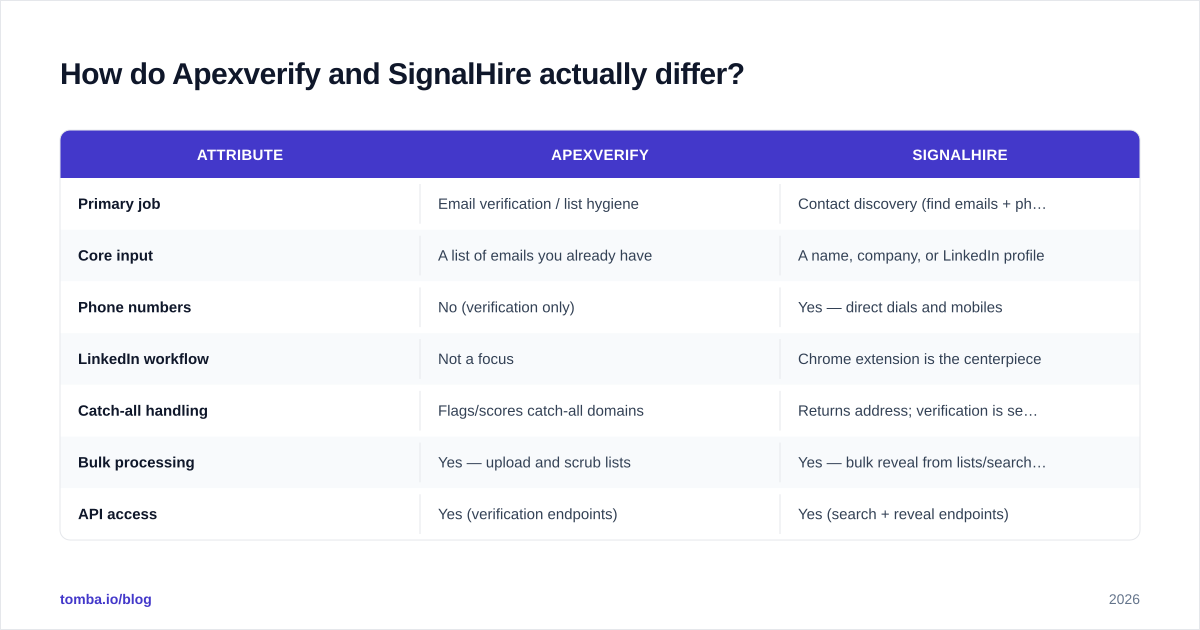
Here is the practical split across the attributes that change how a sales or RevOps team works day to day.
| Attribute | Apexverify | SignalHire |
|---|---|---|
| Primary job | Email verification / list hygiene | Contact discovery (find emails + phones) |
| Core input | A list of emails you already have | A name, company, or LinkedIn profile |
| Phone numbers | No (verification only) | Yes — direct dials and mobiles |
| LinkedIn workflow | Not a focus | Chrome extension is the centerpiece |
| Catch-all handling | Flags/scores catch-all domains | Returns address; verification is secondary |
| Bulk processing | Yes — upload and scrub lists | Yes — bulk reveal from lists/searches |
| API access | Yes (verification endpoints) | Yes (search + reveal endpoints) |
| Best for | Protecting deliverability before send | Filling pipeline with net-new contacts |
| Weakness | Won't find a single new contact | Found emails still need verifying |
The asymmetry is the headline. SignalHire can hand you a thousand new prospects but won't guarantee every address is safe to mail. Apexverify can guarantee your list is clean but can't add a single name to it. Neither one is a complete outbound data stack on its own.

Which one is more accurate?#
Accuracy is the word every vendor claims and few define, so define it before you trust a number.
For a verifier like Apexverify, accuracy means: of the addresses it marked "deliverable," how many actually delivered? And of the ones it killed, how many would have genuinely bounced? The failure mode that hurts is a false "valid" on an address that bounces — that one slips through and damages your sender reputation. Good verifiers publish bounce rates under 2-3% on cleaned lists, and the honest ones admit catch-all domains are the hard case nobody fully solves. When a server accepts all mail, SMTP can't confirm a specific mailbox exists, so any verifier — Apexverify included — is making a probabilistic guess. This is exactly where a dedicated catch-all verifier earns its keep.
For a finder like SignalHire, accuracy means: of the contacts it returned, how many were the right person at the right company with a currently-working address and number? Phone data is where finders diverge sharply — direct dials go stale fast as people change roles, so coverage and freshness matter more than a single headline percentage.
The uncomfortable truth: a contact SignalHire "found" and a contact Apexverify "verified" are two different quality checks, and you want both. An address can be real (SignalHire found the right person) and still bounce (the mailbox was deactivated last week). Only verification catches that second failure. If you only run a finder, your bounce rate tells the story a few days later — and by then your domain has already taken the hit.

What about pricing?#
Pricing in this category is credit-based and changes often, so treat any figure as a starting point and confirm on the vendor's own page before you commit budget.
SignalHire sells credits where one reveal (email + phone for a profile) consumes credit. Plans scale by monthly credit volume, with bulk and API tiers for teams running high reveal counts. The model rewards predictable monthly prospecting volume and punishes spiky usage, since unused credits typically don't roll far.
Apexverify, as a verification tool, prices per verified email — usually in bulk packs or monthly allowances. Verification credits are cheaper per unit than discovery credits because the work is lighter (no data sourcing, just checking). That's the normal pattern across the category: finding a contact costs more than checking one.
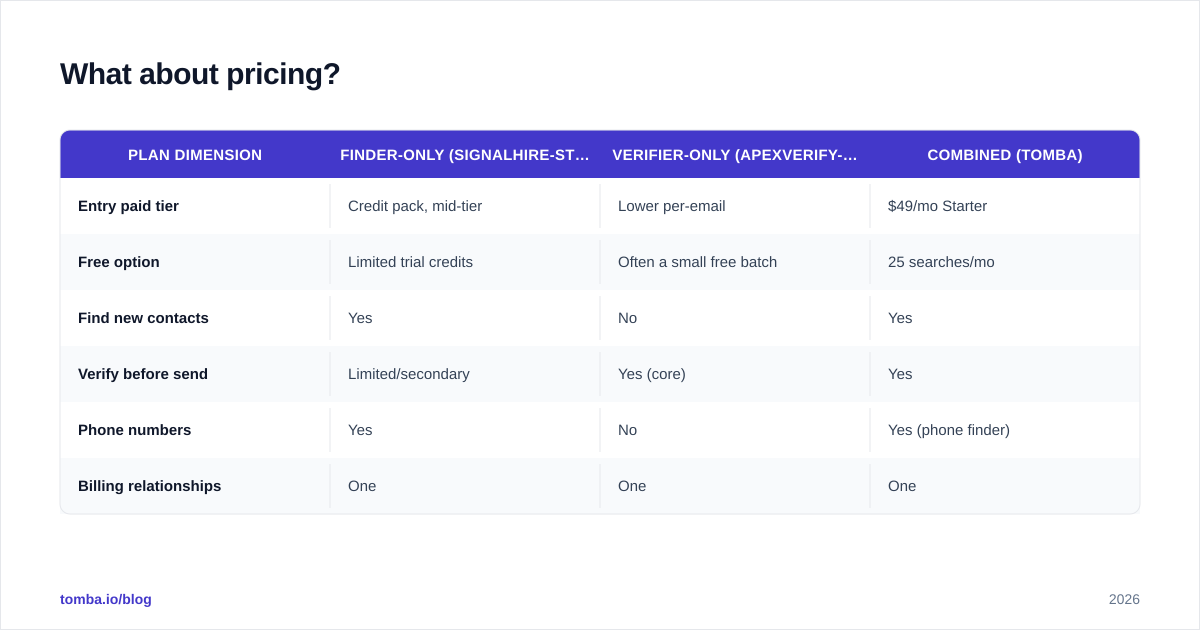
The mistake teams make is buying two separate credit pools that don't talk to each other. You pay SignalHire to find 5,000 contacts, then pay a verifier to check the same 5,000, and you're now managing two dashboards, two invoices, and two APIs. A consolidated platform avoids the double-spend. Compare the math against transparent Tomba pricing — Free (25 searches/mo), Starter at $49/mo, Growth at $99/mo, and Pro at $249/mo — where finding and verifying draw from one balance.
| Plan dimension | Finder-only (SignalHire-style) | Verifier-only (Apexverify-style) | Combined (Tomba) |
|---|---|---|---|
| Entry paid tier | Credit pack, mid-tier | Lower per-email | $49/mo Starter |
| Free option | Limited trial credits | Often a small free batch | 25 searches/mo |
| Find new contacts | Yes | No | Yes |
| Verify before send | Limited/secondary | Yes (core) | Yes |
| Phone numbers | Yes | No | Yes (phone finder) |
| Billing relationships | One | One | One |
Is SignalHire better than Apexverify for cold outbound?#
For generating cold outbound volume, yes — but with an asterisk.
SignalHire's strength is the top of the funnel. If your reps live in LinkedIn Sales Navigator and need to turn a saved search into a list of dialable, mailable contacts, a reveal-and-export tool is the right shape. The Chrome extension keeps reps in their workflow instead of bouncing between tabs, and direct-dial coverage makes it viable for teams that still cold call. If you want a deeper look at the category, G2's contact data software grid is a reasonable neutral starting point for cross-shopping.
The asterisk: revealed addresses are not verified addresses. Sending a freshly scraped list straight into your sequencer is how good domains go bad. You still need a verification pass — whether that's Apexverify, a built-in verifier, or a standalone email verifier — before the first send. Skipping it trades short-term speed for long-term email deliverability damage, and that trade almost never pays off.
So the honest framing isn't "SignalHire beats Apexverify for outbound." It's "SignalHire handles the half of outbound Apexverify can't, and vice versa."
When should you choose Apexverify instead?#
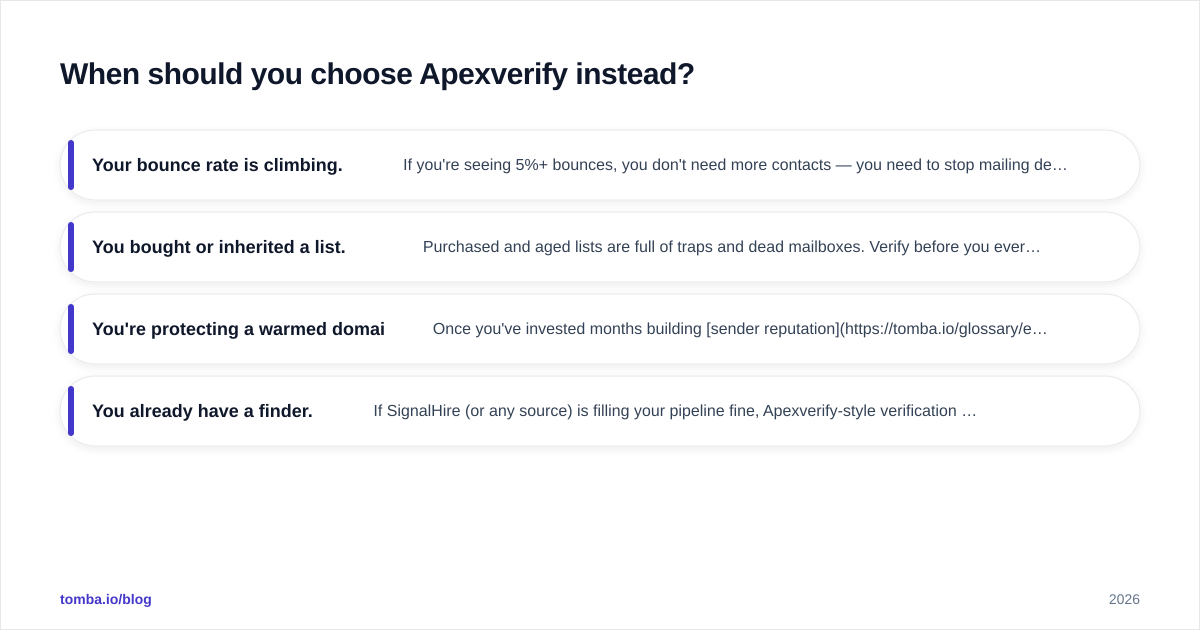
Choose verification-first when your problem is quality, not quantity.
- Your bounce rate is climbing. If you're seeing 5%+ bounces, you don't need more contacts — you need to stop mailing dead ones. A verifier is the immediate fix.
- You bought or inherited a list. Purchased and aged lists are full of traps and dead mailboxes. Verify before you ever load them into a sending tool.
- You're protecting a warmed domain. Once you've invested months building sender reputation, a single bad blast can undo it. Verification is cheap insurance.
- You already have a finder. If SignalHire (or any source) is filling your pipeline fine, Apexverify-style verification is the missing back half, not a replacement.
What Apexverify will not do is grow your list. If your reps are out of people to contact, a verifier sharpens an empty quiver. That's a discovery problem, and you'll need a domain search or finder to solve it.
Can one tool replace both?#
Often, yes — and that's the strategic argument worth sitting with.
The reason teams run two tools is historical: finders and verifiers grew up as separate products. But the workflow is sequential and tightly coupled — find an address, immediately verify it, then send — so platforms increasingly bundle both. A consolidated tool gives you one credit pool, one API, and a guarantee that every found address is checked in the same pass, instead of two systems you have to wire together yourself.
This is where a platform like Tomba competes against the Apexverify-plus-SignalHire combination directly. Tomba's email finder sources addresses by name and domain, the built-in email verifier checks them before export, the phone finder covers the direct-dial use case SignalHire is known for, and data enrichment fills in the rest of the contact record. One vendor, one bill, one Tomba API — instead of stitching a finder and a verifier together with brittle integrations.
The case for keeping them separate is best-of-breed: if one tool is meaningfully better at its single job and you have the budget and ops maturity to run both, specialization can win. But for most teams under most budgets, the integration tax of two tools outweighs the marginal accuracy gain.
Apexverify vs SignalHire: the verdict#
The clean conclusion: these aren't really rivals, they're two halves of one job. SignalHire finds contacts and phone numbers; Apexverify keeps the addresses you send to clean. Run a finder without a verifier and your bounce rate climbs. Run a verifier without a finder and your pipeline runs dry.
If you're forced to start with one, start with whichever problem is bleeding. Empty pipeline → discovery (SignalHire-style). Climbing bounces → verification (Apexverify-style). Then add the other half before the gap costs you.
And if you'd rather not run two tools, two invoices, and two APIs to cover one workflow, that's the strongest argument for a consolidated platform.
Try a combined finder and verifier#
If this comparison left you planning to buy a finder and a verifier, pause and price the alternative first. Tomba gives you contact discovery and verification in a single platform: find professional email addresses by name, domain, or company with the Tomba Email Finder, verify them in the same workflow, pull direct phone numbers, and enrich the record — all from one balance starting on a free tier of 25 searches a month. Spin up a free account, run your next list through it end to end, and see whether you still need two separate line items.
// get started
Find, verify and enrich your first contacts today
Start on the free plan with 25 searches a month, then scale when your team is ready.
Free plan · No credit card required · GDPR & CCPA
// about the author