Apexverify vs Tomba (2026): Email Finder & Verifier Compared
Choosing between Apexverify and Tomba? We break down accuracy, pricing, features, and real workflows so you can pick the right B2B email tool for 2026.
TL;DR
- Apexverify is built primarily as an email verification engine — it cleans and validates lists you already have.
- Tomba is a full email finding + verification platform: domain search, email finder, verifier, catch-all checks, phone finder, and enrichment in one stack.
- If your only job is scrubbing an existing list, a verify-only tool can be enough. If you need to source new contacts and keep them clean, Tomba removes a step.
- On price, Tomba's plans start at a free tier (25 searches/mo) and a $49/mo Starter, with verification bundled in — not sold as a separate product.
- Pick Apexverify for narrow list hygiene; pick Tomba when prospecting, finding, and verifying need to live in the same place.
Who are Apexverify and Tomba?#
The short version: Apexverify focuses on validating emails, while Tomba both finds and validates them. That single difference shapes almost every decision below.
Apexverify positions itself as an email verification service. You feed it a list — exported from a CRM, a scraped sheet, a webinar signup form — and it tells you which addresses are deliverable, which are risky, and which will bounce. That is a real, valuable job. Bounce rates above 2–3% start hurting your sender reputation, and a good verifier is cheap insurance.
Tomba covers that same verification job but starts a step earlier. Before you have a list to clean, you usually have to build one. Tomba's email finder and domain search generate verified contacts from a company domain, a person's name, or a bulk upload — then run them through the same verification layer Apexverify specializes in.
So the honest framing is not "which tool is better" but "how much of the workflow do you want one tool to own?"
What does each tool actually do?#
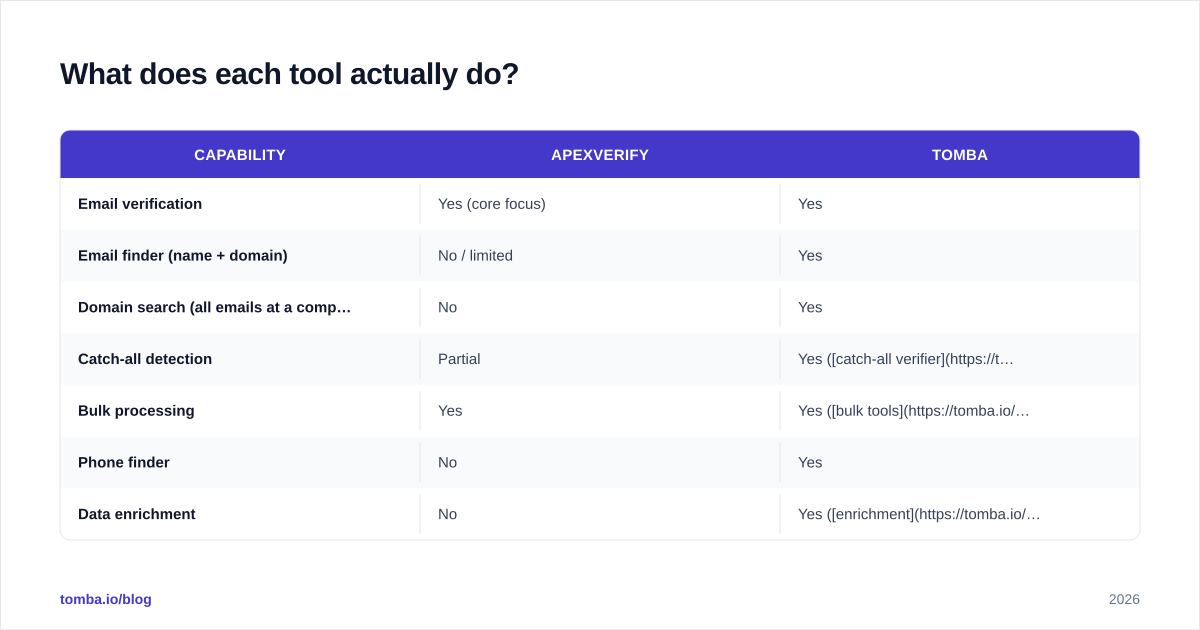
Here is the feature split at a glance. Verification is table stakes for both; the gap is everything that happens before verification.
| Capability | Apexverify | Tomba |
|---|---|---|
| Email verification | Yes (core focus) | Yes |
| Email finder (name + domain) | No / limited | Yes |
| Domain search (all emails at a company) | No | Yes |
| Catch-all detection | Partial | Yes (catch-all verifier) |
| Bulk processing | Yes | Yes (bulk tools) |
| Phone finder | No | Yes |
| Data enrichment | No | Yes (enrichment) |
| API access | Yes | Yes (Tomba API) |
| Free tier | Limited trial credits | 25 searches/mo, ongoing |
| Chrome extension | Varies | Yes |
The pattern is clear: Apexverify is a deep, single-purpose tool. Tomba is a wider platform where verification is one module among several. Neither approach is wrong — a specialist verifier can be excellent at the one thing it does, and a suite can save you from stitching three subscriptions together.

How accurate is each one?#
Accuracy is the metric that actually matters, and it splits into two questions: can the tool find the right address, and can it confirm the address is live?
Apexverify only answers the second question. Its verification works the way most reputable verifiers do — syntax checks, MX record lookups, SMTP handshakes, role-account and disposable-domain flags, and catch-all detection. If your input list is clean and well-sourced, a focused verifier will give you a tight, reliable read on deliverability.
Tomba answers both. The email finder returns a confidence score with each result, backed by the sources it used (see where Tomba gets its data), and then the email verifier confirms deliverability before you ever load the contact into a sequence. The practical effect: fewer addresses die between "found" and "sent."
One nuance worth calling out is catch-all domains. A catch-all server accepts mail for every address at a domain, so a naive verifier marks everything "valid" — including addresses that route straight to a black hole. Tomba's dedicated catch-all finder applies extra logic to score these instead of rubber-stamping them. If a meaningful share of your targets sit on Google Workspace or Microsoft 365 catch-all setups, this difference is not academic — it is the difference between a 4% and a 12% bounce rate.
For an independent read on either tool, check verified user reviews on G2 rather than trusting any vendor's own headline numbers — including ours.

Apexverify vs Tomba: pricing compared#
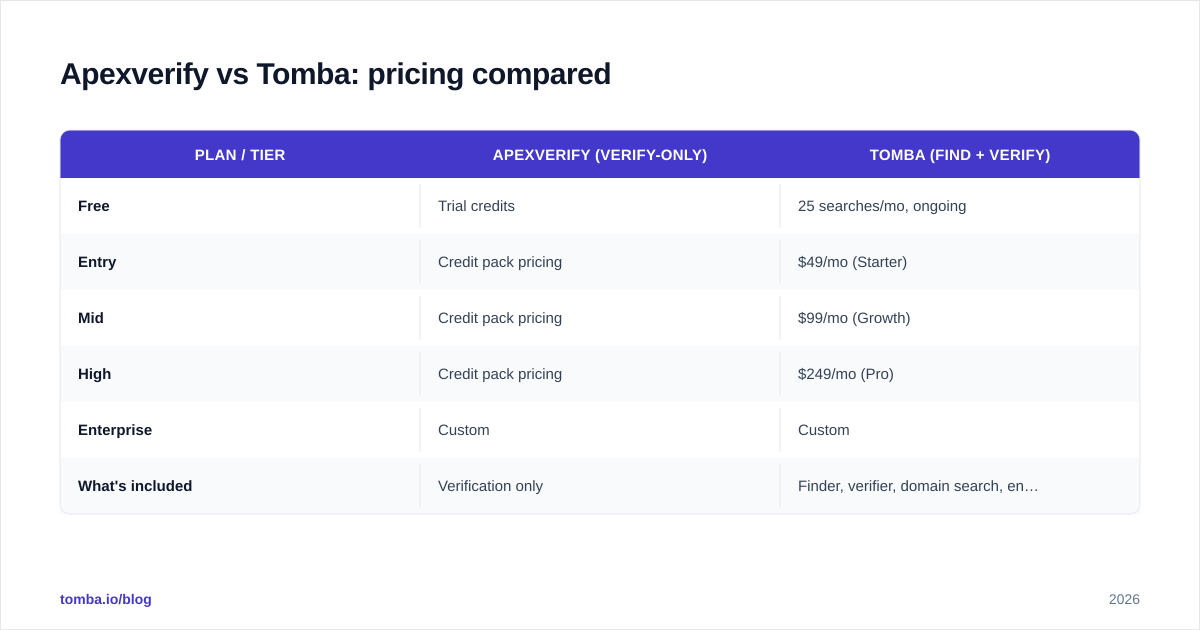
Pricing is where the "specialist vs suite" choice gets concrete. Verify-only tools usually sell credits by the validation. Tomba bundles finding and verification into a single search-credit model, which changes the math once you account for the tool you'd otherwise buy to source contacts.
| Plan / tier | Apexverify (verify-only) | Tomba (find + verify) |
|---|---|---|
| Free | Trial credits | 25 searches/mo, ongoing |
| Entry | Credit pack pricing | $49/mo (Starter) |
| Mid | Credit pack pricing | $99/mo (Growth) |
| High | Credit pack pricing | $249/mo (Pro) |
| Enterprise | Custom | Custom |
| What's included | Verification only | Finder, verifier, domain search, enrichment |
Two honest caveats. First, Apexverify's exact list pricing changes, so confirm current numbers on their site before you commit — don't quote a blog. Second, a verify-only tool can genuinely be cheaper if verification is the only thing you'll ever do. The cost comparison only tips toward Tomba when you'd otherwise pay separately for an email finder and a verifier. In that case, the bundled Tomba pricing usually wins on total spend.
Which workflow does each tool fit?#
Match the tool to the shape of your work, not to a feature checklist. Three common scenarios:
1. You bought or inherited a big list. Your job is hygiene — strip the bounces before your next send. A focused verifier (Apexverify) or Tomba's email verifier both handle this cleanly. If verification is genuinely all you'll do this quarter, the specialist is a reasonable, lower-cost call.
2. You're building outbound from scratch. You have a list of target companies, not contacts. Here a verify-only tool leaves you stuck — there's nothing to verify yet. Tomba's domain search pulls every public address at a company, the finder pinpoints the specific decision-maker, and verification runs inline. One tool, one workflow.
3. You run continuous, mixed prospecting. You're enriching inbound leads, finding net-new contacts, and cleaning your CRM weekly. This is where a suite earns its keep: data enrichment, bulk processing, and a single API mean you're not exporting CSVs between three vendors. Fewer handoffs, fewer integration bugs.
If you're evaluating broader platforms too, vendor-neutral directories like Capterra are useful for seeing where each tool clusters by use case and company size.
What are the trade-offs and limitations?#
No tool is free of them. Being straight about the downsides:
Apexverify trade-offs
- No native contact sourcing — you must bring your own list.
- You'll likely pair it with a separate finder, meaning two bills and two integrations.
- Catch-all handling depends on the depth of its verification logic; test it on your own domains.
Tomba trade-offs
- A suite has more surface area than you may need. If you only verify, you're paying for finder features you won't touch.
- Search-credit models reward planning — burning credits on low-value lookups wastes budget faster than a flat verification-per-credit model.
- Like every finder, accuracy varies by region and industry; thinly-documented companies yield fewer confident matches. (No vendor is immune to this — treat any "98% accuracy" claim, ours included, as a ceiling, not a guarantee.)
A fair summary: Apexverify's limitation is scope; Tomba's is that its scope can exceed a narrow need. Choose based on which problem you actually have.
Is Tomba a good Apexverify alternative?#
For most B2B teams that both source and clean contacts, yes — because it collapses two tools into one. If you're currently running a finder plus Apexverify for verification, consolidating onto Tomba removes an integration and a separate invoice while keeping the verification quality you rely on.
But be honest with yourself about the workflow. If you will only ever verify lists that arrive from elsewhere — say marketing hands you event lists and you never prospect — a dedicated verifier is a perfectly rational choice, and switching to a suite buys you features you won't open. The strongest case for Tomba is breadth: you need to find, verify, enrich, and occasionally pull phone numbers without leaving one dashboard.
If you want to compare against other tools in the category before deciding, Tomba maintains head-to-head pages like its ZeroBounce alternative and Clearout alternative breakdowns that map closely to the same verify-vs-suite question.
Frequently asked questions#
Does Tomba verify emails as well as a dedicated verifier? Yes. Tomba runs syntax, MX, SMTP, role, disposable, and catch-all checks — the same core checks a standalone verifier performs — and exposes them through both the UI and the verification API.
Can Apexverify find new email addresses? Not as a core feature. Apexverify is built to validate addresses you already have. Sourcing net-new contacts is where you'd reach for a finder like Tomba.
What's the cheapest way to start with Tomba? The free tier gives you 25 searches a month with no time limit, so you can test finding and verification on your own domains before paying.
Which has better catch-all handling? Tomba ships a dedicated catch-all verifier that scores catch-all addresses rather than blanket-accepting them. Verify-only tools vary here, so test both on a domain you know.
The bottom line#
Buy the specialist if you only verify; buy the suite if you also find. Apexverify is a credible, focused verification tool — if list hygiene is your single job, it does that job. Tomba wins when finding and verifying need to live together, which for most outbound and RevOps teams is the real day-to-day.
Ready to source and clean contacts in one place? Start with the Tomba Email Finder — find verified professional emails by name, domain, or company, with verification built in, on a free tier that lets you test the accuracy on your own prospects before you spend a dollar.
Ready to find emails that actually work?
Join 150,000+ professionals who stopped guessing and started sending. Free credits on signup — no credit card required.
Get the Tomba newsletter
Practical outbound tactics and product updates — once every two weeks.
About the author