Append An Email: The 2026 Guide to Email Appending
Email appending fills the gaps in your CRM by matching known contact details to verified email addresses. Here's how it works, what it costs, and how to keep it compliant in 2026.
TL;DR
- To "append an email" means matching a record you already own — a name, company, phone, or postal address — to a verified business email address pulled from a data provider.
- Done right, email appending recovers dormant contacts and lifts the reachable share of your CRM by 20-40% without buying a cold list.
- Match rate and verification quality matter more than raw database size; a 90% match with stale addresses is worse than a 55% match that's SMTP-verified.
- Compliance is non-negotiable: appended B2B data still falls under GDPR, CAN-SPAM, and CASL, so document your lawful basis before you send.
- Tools like the Tomba Email Finder and bulk email finder handle appending at scale with verification baked in.
What does it mean to append an email?#
Appending an email is the process of taking a contact record you already hold — but which is missing an email address — and filling that gap with a verified address sourced from a data provider.
Think of it like a library re-shelving lost catalog cards. The book (your customer) is still on the shelf, but the index card that tells you where to find them has gone missing. Email appending re-creates that card by cross-referencing what you do know (the person's name, employer, or phone number) against a large index of professional contact data, then writing the recovered email back into your system.
Technically, the process matches an input key — most often first name + last name + company domain — against a reference database, returns the best-fit email, and (in a good workflow) verifies that address is deliverable before it touches your CRM. The output is an enriched record you can actually contact.
There are two common flavors:
- B2B email append — matches business professionals to their work email using company domain logic. This is the version that matters for sales and marketing teams, and the one this guide focuses on.
- Consumer (B2C) email append — matches individuals to personal addresses using postal/CRM identifiers. It carries heavier privacy and accuracy risk and is increasingly restricted.
Why would you append an email instead of buying a list?#
Appending beats buying because you keep your existing, consented relationships intact instead of cold-emailing strangers.
When you buy a list, every record is a stranger and your domain reputation pays for it. When you append, you're enriching contacts who already exist in your funnel — past trial users, event leads, customers who churned, or accounts your sales team logged with a phone number but no email. The relationship context survives; you're just restoring the channel.
Common triggers for an append project:
- CRM decay. B2B contact data degrades roughly 22-30% per year as people change jobs. Appending refreshes the addresses that have gone stale.
- Channel expansion. You have a list of accounts and phone numbers from a call campaign and want to add email as a touch.
- Form gaps. Webinar or gated-content forms that captured name and company but not a work email.
- Post-acquisition merges. Two CRMs combine and half the records are missing fields.
The economics are favorable too. Reactivating a known contact converts at a far higher rate than a cold purchased lead, and you avoid the deliverability tax of blasting an unverified list. If you want the deeper rationale on data hygiene, our note on data accuracy and sources covers where reliable B2B data actually comes from.
How does the email appending process work?#
The append pipeline has five stages, and skipping any one of them is where teams get burned.
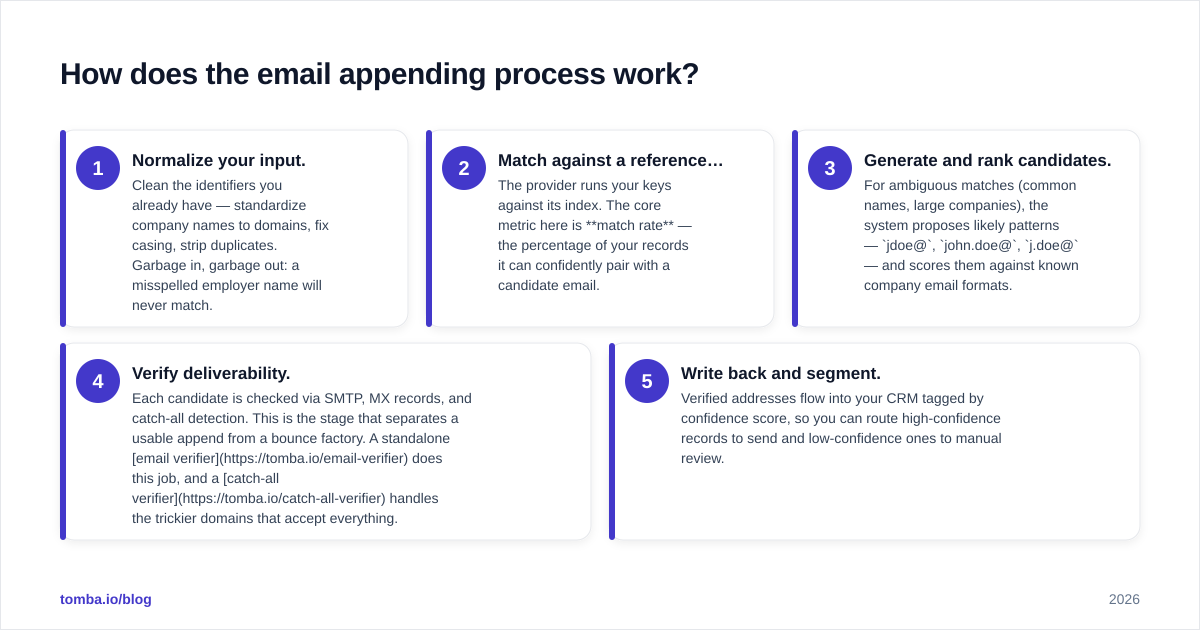
- Normalize your input. Clean the identifiers you already have — standardize company names to domains, fix casing, strip duplicates. Garbage in, garbage out: a misspelled employer name will never match.
- Match against a reference database. The provider runs your keys against its index. The core metric here is match rate — the percentage of your records it can confidently pair with a candidate email.
- Generate and rank candidates. For ambiguous matches (common names, large companies), the system proposes likely patterns —
jdoe@,john.doe@,j.doe@— and scores them against known company email formats. - Verify deliverability. Each candidate is checked via SMTP, MX records, and catch-all detection. This is the stage that separates a usable append from a bounce factory. A standalone email verifier does this job, and a catch-all verifier handles the trickier domains that accept everything.
- Write back and segment. Verified addresses flow into your CRM tagged by confidence score, so you can route high-confidence records to send and low-confidence ones to manual review.
The single biggest mistake is treating steps 2 and 4 as the same thing. Matching tells you an address probably exists; verification tells you it will actually receive mail. You need both.
What's the difference between email appending and an email finder?#
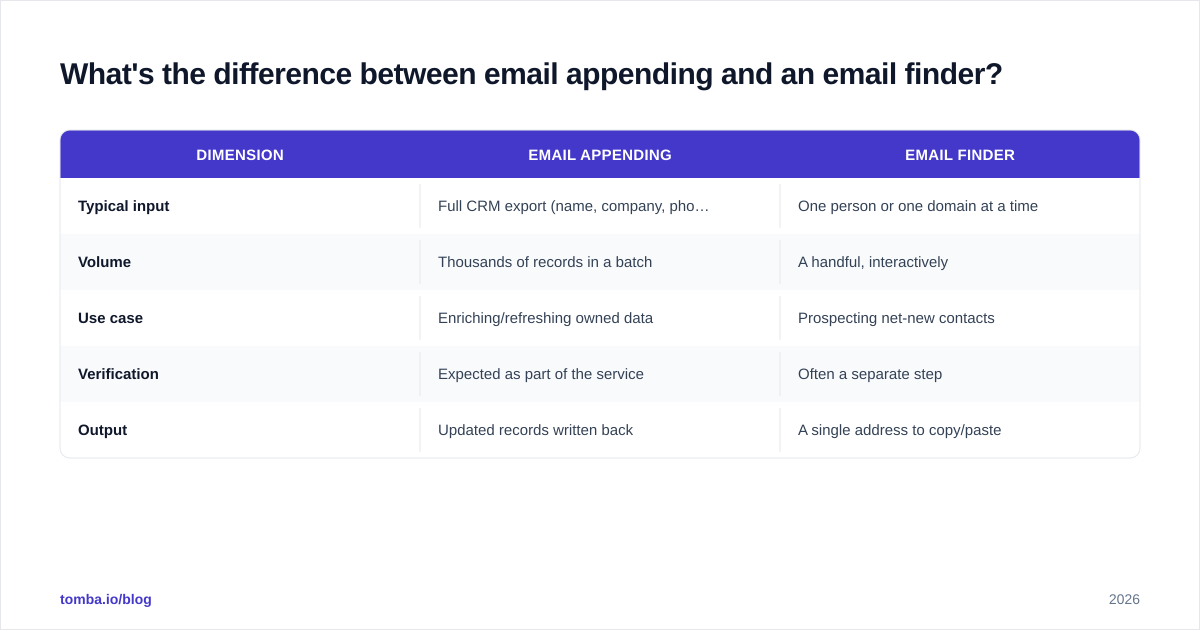
They overlap heavily — the distinction is batch versus single, and known-contact versus discovery.
| Dimension | Email appending | Email finder |
|---|---|---|
| Typical input | Full CRM export (name, company, phone) | One person or one domain at a time |
| Volume | Thousands of records in a batch | A handful, interactively |
| Use case | Enriching/refreshing owned data | Prospecting net-new contacts |
| Verification | Expected as part of the service | Often a separate step |
| Output | Updated records written back | A single address to copy/paste |
In practice, a modern platform does both with the same underlying data. You'd use a domain search to discover everyone at a target company, an email finder for one-off lookups, and a bulk append job to refresh ten thousand existing rows overnight. The engine is shared; the interface and batch size differ.
How do you choose an email appending service in 2026?#
Pick on match rate and verification quality together — never one in isolation — then weigh coverage, compliance, and price.
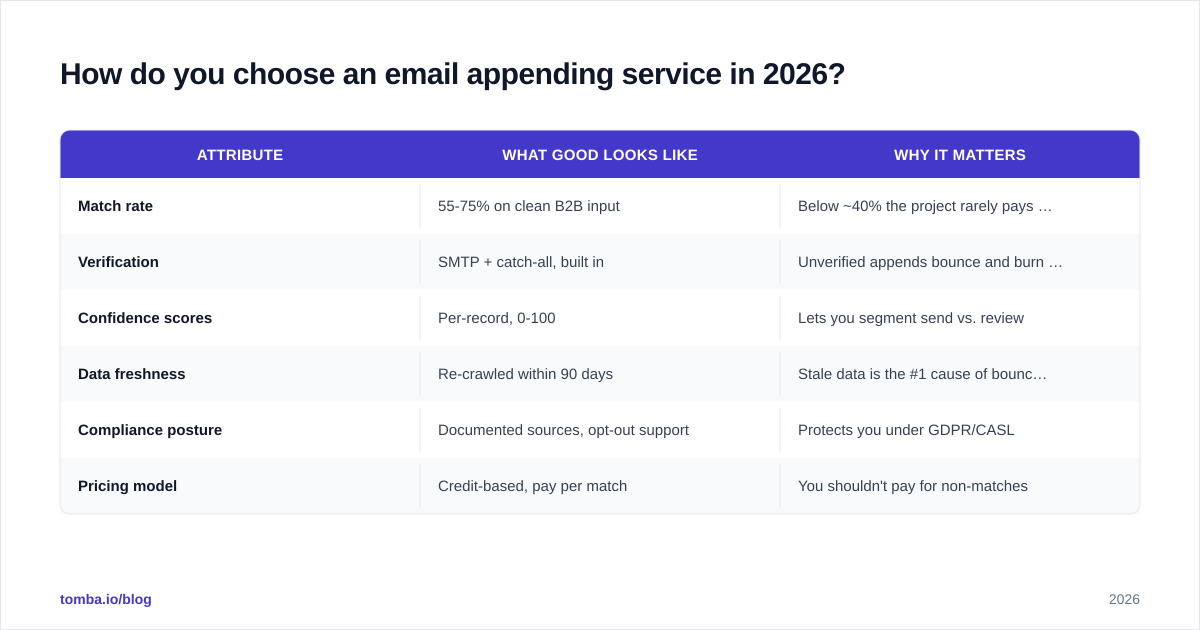
Here's how the main options compare on the attributes that decide whether an append project succeeds:
| Attribute | What good looks like | Why it matters |
|---|---|---|
| Match rate | 55-75% on clean B2B input | Below ~40% the project rarely pays off |
| Verification | SMTP + catch-all, built in | Unverified appends bounce and burn your domain |
| Confidence scores | Per-record, 0-100 | Lets you segment send vs. review |
| Data freshness | Re-crawled within 90 days | Stale data is the #1 cause of bounces |
| Compliance posture | Documented sources, opt-out support | Protects you under GDPR/CASL |
| Pricing model | Credit-based, pay per match | You shouldn't pay for non-matches |
A few buyer's notes:
- Don't be seduced by database size. "700 million contacts" is a marketing number. A smaller, fresher, verified index will out-perform a giant stale one on the only metric that counts: deliverable matches.
- Test before you commit. Run a sample of 500 known-good records through any vendor and measure how many appended addresses actually deliver. Reputable review sites like G2 and Capterra are useful for shortlisting, but your own sample test is the real benchmark.
- Check the pricing model. Paying per record processed (rather than per successful match) means subsidizing the vendor's misses. Transparent, credit-based pricing — Tomba runs a free tier at 25 searches/mo, then Starter at $49/mo and Growth at $99/mo — lets you model cost against expected match rate.
Is appended email data accurate enough to send to?#
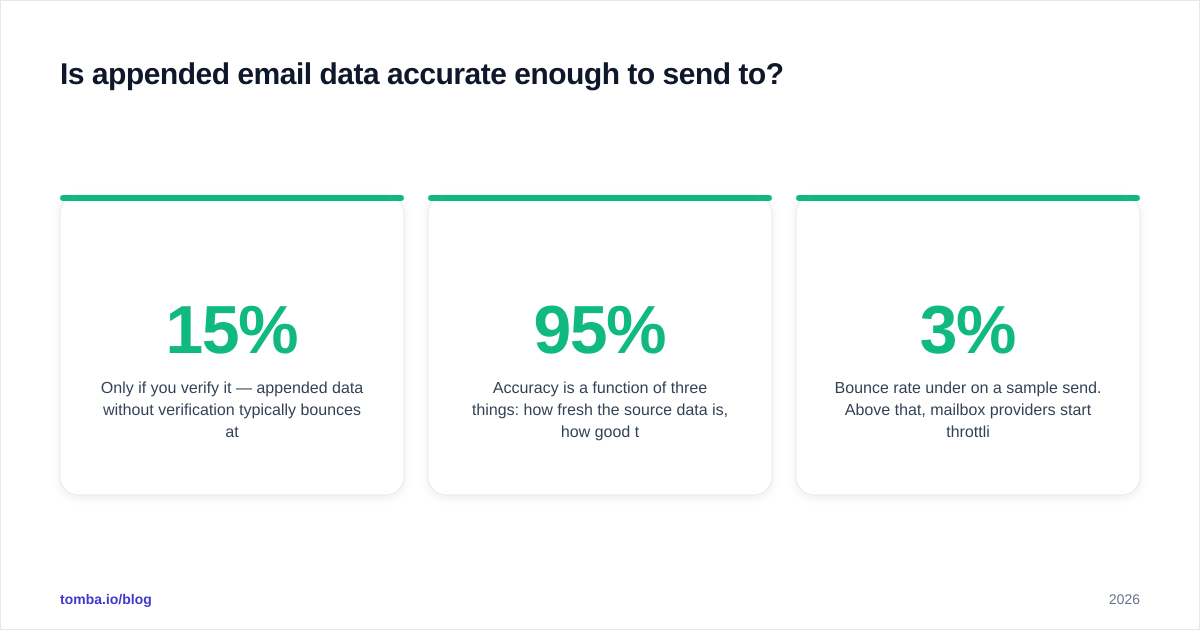
Only if you verify it — appended data without verification typically bounces at 8-15%, which is enough to damage your sender reputation.
Accuracy is a function of three things: how fresh the source data is, how good the matching logic is, and whether the address was verified at the moment of append (not six months earlier). The append providers that publish honest numbers tend to land around 90-95% deliverability after verification, and well below that without it.
A practical bar before you press send:
- Bounce rate under 3% on a sample send. Above that, mailbox providers start throttling you.
- Catch-all addresses flagged, not assumed. Catch-all domains accept everything at the SMTP layer, so they need a dedicated catch-all finder to estimate real validity rather than a naive "valid" stamp.
- Spam-trap screening. Appended records occasionally include recycled traps. A verification layer that screens for them keeps you off blocklists.
If your appended list bounces hard on the first send, stop, re-verify, and warm up gradually rather than pushing through — sender reputation is far harder to rebuild than it is to protect.
Is email appending legal and compliant?#
Yes, B2B email appending is legal in most markets, but it is regulated — and "legal to obtain" is not the same as "legal to email."
The data and the outreach are governed separately:
- United States (CAN-SPAM). B2B email is permitted without prior opt-in, provided every message has accurate headers, a valid physical address, and a working unsubscribe. Appending itself is allowed.
- EU/UK (GDPR). You need a lawful basis — usually legitimate interest for B2B — and you must be able to document it. Appending personal data triggers transparency obligations; the official GDPR text is worth reading before a large EU append.
- Canada (CASL). Stricter. CASL generally requires consent, with limited B2B exemptions. Appending to send cold mail into Canada is risky without a clear exemption.
Three rules that keep append projects clean:
- Document your lawful basis per segment before you append, not after.
- Honor opt-outs across systems — a contact who unsubscribed must stay suppressed even after a re-append.
- Use reputable, transparent sources. Vendors that won't tell you where their data comes from are a liability. Understanding where the data originates is part of your due diligence, not the vendor's marketing.
This is general guidance, not legal advice — loop in counsel for any large or cross-border program.
How do you run a bulk append at scale?#
Run it as a staged batch job: clean, append, verify, segment by confidence, then send only the top tier first.
For anything beyond a few hundred records, the workflow is:
- Export and dedupe your source records. Remove rows with no usable match key.
- Submit a bulk job. A bulk email finder accepts a CSV of names and companies and returns appended, verified addresses with confidence scores.
- Segment the output. High-confidence verified addresses go to your primary sequence; medium-confidence go to a slower warm-up track; low-confidence go to manual review or get discarded.
- Pipe it into your stack. Native integrations push enriched records straight into HubSpot, Salesforce, or Pipedrive so reps work from refreshed data without a manual import. Developers can wire the same logic into their own pipeline with the Tomba API.
- Monitor the first send closely. Watch bounce and complaint rates on the initial batch before scaling the volume.
Automating this turns appending from a once-a-year cleanup chore into a continuous hygiene loop — every new lead with a missing email gets enriched on entry.
Append your email data the right way#
If your CRM is full of half-complete records — names without emails, accounts without contacts, churned users you can no longer reach — appending is the fastest way to make that data usable again without buying a cold list. The two things that decide success are match rate and verification, and they have to travel together.
Start with a sample. Run a few hundred of your known records through the Tomba Email Finder, measure how many appended addresses actually deliver, and scale from there. With built-in verification, per-record confidence scoring, and a free tier to test on, it's a low-risk way to find out exactly how much of your dormant database you can bring back to life — before you commit a credit to the full job.
// get started
Find, verify and enrich your first contacts today
Start on the free plan with 25 searches a month, then scale when your team is ready.
Free plan · No credit card required · GDPR & CCPA
// about the author