Arcade Pricing, Reviews, Pros and Cons: 2026 Buyer Guide
A no-fluff breakdown of Arcade's pricing tiers, real user reviews, and the honest pros and cons before you commit budget to interactive demo software in 2026.

Arcade is one of the most-used interactive demo tools in B2B, but its pricing model and its limits are widely misunderstood before teams sign up. This guide weighs Arcade's pricing, reviews, pros and cons so you can decide whether it earns a line item in your 2026 stack — or whether a cheaper, simpler workflow does the same job.
TL;DR#
- What it is: Arcade (arcade.software) is a no-code tool for building clickable, interactive product demos and embedding them in websites, emails, and sales sequences.
- Pricing: A genuinely usable Free plan, a Pro tier around $32/seat/mo (annual), a Growth tier in the $42–$45/seat/mo range, and custom Enterprise pricing. Costs scale by seat, not by demo volume.
- Reviews: Strong G2/Capterra ratings (~4.7/5) for ease of use and polish; recurring complaints about per-seat cost, branding limits on lower tiers, and analytics depth.
- Best for: PLG SaaS, marketing teams, and sales engineers who need polished demos fast without a developer.
- Watch-outs: Per-seat pricing punishes large teams, and demo personalization is thinner than dedicated sales-demo platforms.
What is Arcade and what problem does it solve?#
Arcade is screen-capture software with a twist. Instead of recording a flat video like Loom, it captures a sequence of screenshots and DOM states, then stitches them into a clickable walkthrough a viewer drives at their own pace. Think of it as the difference between a guided museum tour on a fixed schedule and a self-guided one where you linger on what interests you.
That format matters because B2B buyers increasingly want to evaluate a product before talking to sales. An interactive demo lets a prospect click through your onboarding, your dashboard, or a single feature without a sandbox account, a sales call, or a 12-minute video. You embed the Arcade in a landing page, a cold email, a LinkedIn outreach message, or a follow-up, and it works on desktop and mobile.
The core jobs Arcade does well:
- Product marketing: Replace static screenshots on a homepage with a live, clickable hero demo.
- Sales enablement: Send a tailored walkthrough as a follow-up instead of a recap email.
- Onboarding and support: Show, don't tell, for setup-heavy features.
- Social proof: Drop demos into launch posts and changelogs.
If your buyers never self-serve and every deal runs through a live call, the value drops. Arcade shines when asynchronous, self-paced evaluation is part of the funnel.
How much does Arcade cost in 2026?#
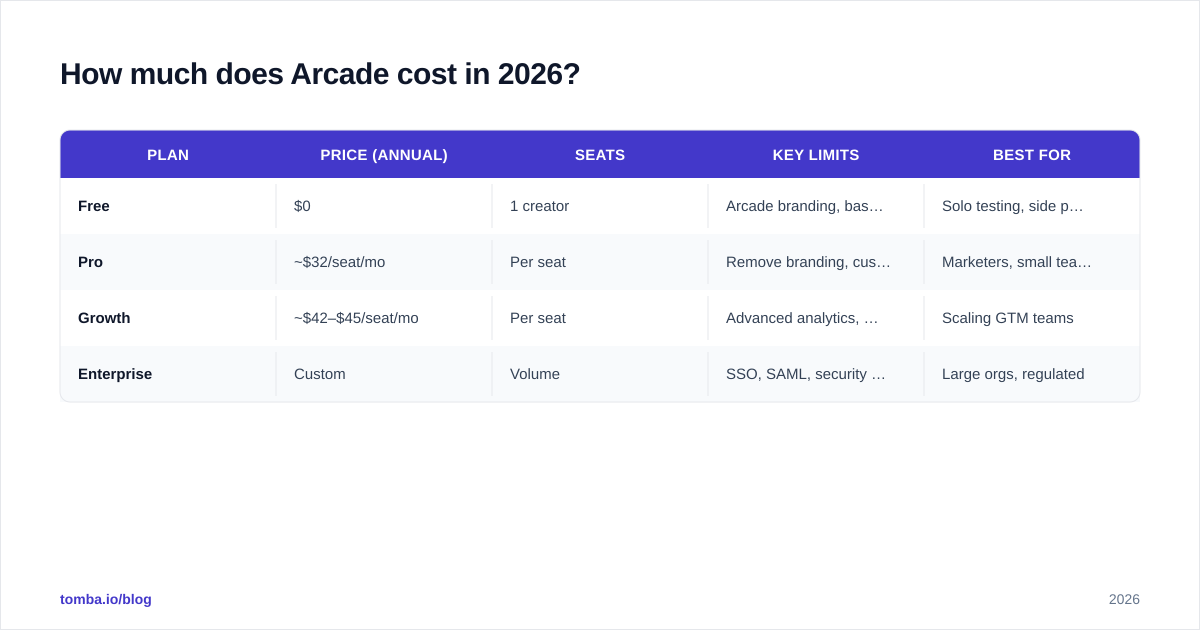
Arcade prices per seat (creator), billed monthly or annually, with viewing always free and unlimited. There is no charge for how many people watch your demos — only for how many people build them. The published structure for 2026 looks like this.
| Plan | Price (annual) | Seats | Key limits | Best for |
|---|---|---|---|---|
| Free | $0 | 1 creator | Arcade branding, basic analytics, limited Arcades | Solo testing, side projects |
| Pro | ~$32/seat/mo | Per seat | Remove branding, custom CTAs, video capture, integrations | Marketers, small teams |
| Growth | ~$42–$45/seat/mo | Per seat | Advanced analytics, team management, sandbox/HTML editing | Scaling GTM teams |
| Enterprise | Custom | Volume | SSO, SAML, security review, dedicated support, SLAs | Large orgs, regulated |
A few things the pricing page does not shout about:
- The Free plan is real, not a trial. You can publish demos forever, but they carry an Arcade watermark and you lose advanced analytics and team features. For a solo founder validating a landing page, it is genuinely enough to start.
- Branding removal lives behind Pro. If a visible "Made with Arcade" badge is a dealbreaker for your brand, budget for at least Pro from day one.
- Per-seat math compounds fast. Five creators on Growth is roughly $210–$225/mo. Ten creators pushes you toward Enterprise conversations whether or not you need SSO.
- Annual vs monthly gap is steep. Monthly billing can run 25–40% higher per seat, so the headline numbers above assume annual commitment.
Always confirm the live numbers on the official Arcade pricing page before you forecast — interactive-demo vendors reprice tiers more often than most SaaS.
What do Arcade reviews actually say?#
Across G2 and Capterra, Arcade holds ratings around 4.7 out of 5 from hundreds of reviews. The sentiment is consistent enough to summarize honestly.
What reviewers consistently praise:
- Speed to first demo. Most users publish a polished walkthrough within their first hour. The Chrome extension captures flows as you click.
- Output quality. The demos look clean, on-brand, and modern — a frequent reason teams switch off raw screen recordings.
- Editing flexibility. You can blur sensitive data, swap text, add hotspots and CTAs, and even edit captured HTML on higher tiers.
- Embed-anywhere reach. Website, email, Notion, sales tools — the embed just works.
What reviewers consistently criticize:
- Per-seat cost at scale. The single most common complaint. Teams that want many occasional creators resent paying full seats.
- Analytics depth. Engagement data exists, but power users want richer funnels, per-step drop-off, and CRM-grade attribution.
- Branding gates. The watermark on Free and feature gating between Pro and Growth frustrate budget-conscious buyers.
- Personalization ceiling. For 1:1 sales demos tailored per account, dedicated demo platforms (Navattic, Storylane, Reprise) sometimes go deeper.

The pattern is clear: people love using Arcade and wince at the invoice once the team grows. That tradeoff — delightful product, seat-based bill — is the central decision.
What are the pros and cons of Arcade?#
Here is the balanced view, the heart of any "arcade pricing reviews pros and cons" decision.
Pros#
- No-code and genuinely fast. Non-technical teammates ship demos without engineering help.
- Professional output by default. Hard to make an ugly Arcade; the defaults are tasteful.
- Free tier that ships to production. Rare among demo tools — you can validate before paying.
- Strong integrations. HubSpot, Salesforce, and analytics platforms connect cleanly, similar in spirit to how a HubSpot integration keeps lead data flowing.
- Async-first. Perfect for self-serve funnels and follow-ups where a live call is not scheduled.
Cons#
- Seat-based pricing scales poorly for large or occasional-creator teams.
- Analytics are good, not deep — expect to supplement with your own tracking.
- Branding and key features gated behind Pro/Growth.
- Limited deep personalization versus enterprise sales-demo specialists.
- Capture maintenance. When your product UI changes, demos can go stale and need recapturing.
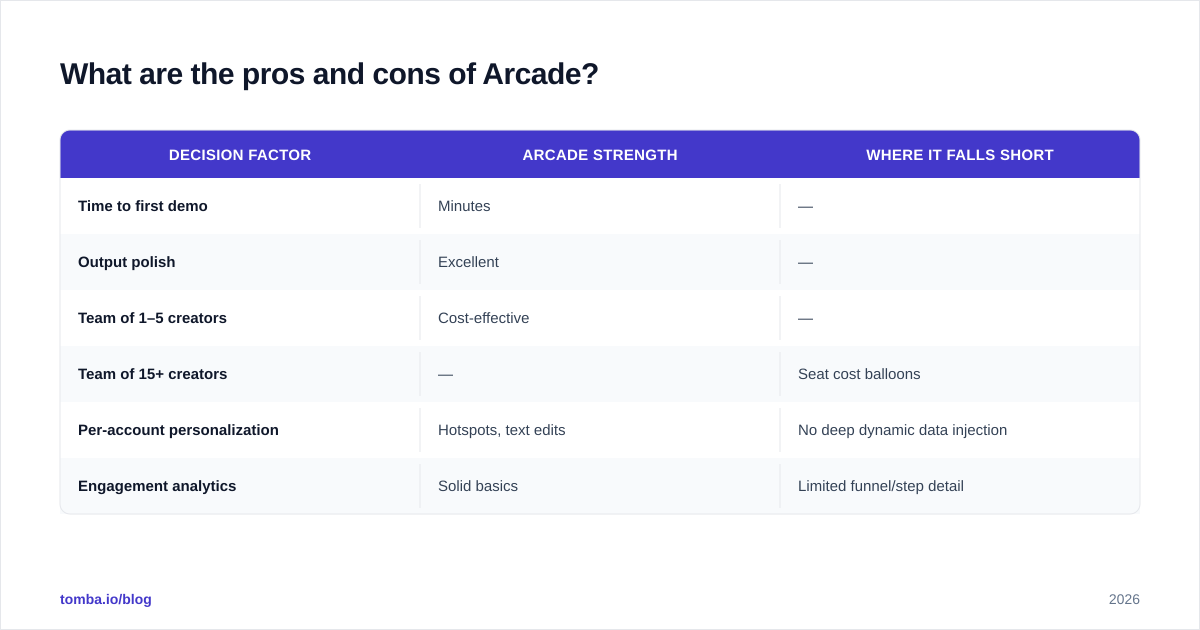
| Decision factor | Arcade strength | Where it falls short |
|---|---|---|
| Time to first demo | Minutes | — |
| Output polish | Excellent | — |
| Team of 1–5 creators | Cost-effective | — |
| Team of 15+ creators | — | Seat cost balloons |
| Per-account personalization | Hotspots, text edits | No deep dynamic data injection |
| Engagement analytics | Solid basics | Limited funnel/step detail |
Who should use Arcade, and who should skip it?#
Use Arcade if you run a product-led SaaS, a marketing team that wants clickable hero demos, or a small sales-engineering crew sending tailored walkthroughs. If a handful of people create demos and thousands view them, the seat model works in your favor.
Think twice if you need dozens of occasional creators, account-by-account dynamic personalization, or demo analytics wired tightly into pipeline reporting. At that scale, either negotiate Enterprise hard or evaluate specialists.

A practical middle path many teams miss: an interactive demo only converts if it reaches the right person in the first place. A beautiful Arcade embedded in a cold email is wasted if the email bounces or lands in spam. That is why demo tooling and accurate contact data are complementary, not competing, line items — more on that in the next section.
How does Arcade fit into the rest of your GTM stack?#
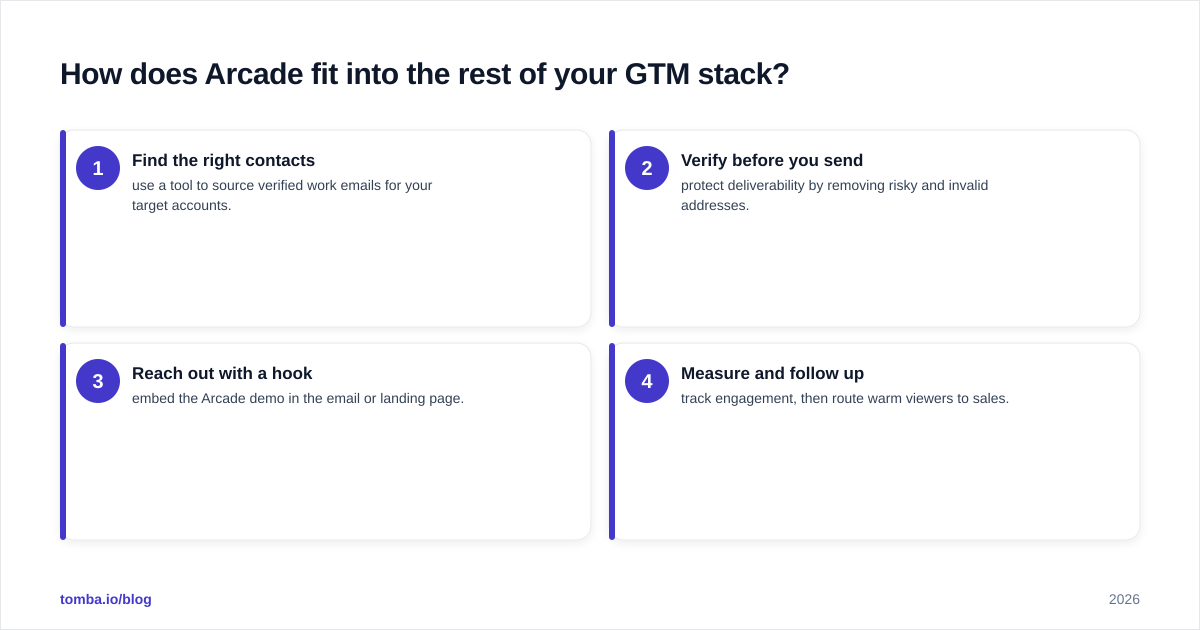
Arcade is a top-of-funnel and mid-funnel asset generator. It does not find buyers, score them, or keep your sender reputation clean. Treat it as one layer in a stack that looks roughly like this:
- Find the right contacts — use a tool to source verified work emails for your target accounts.
- Verify before you send — protect deliverability by removing risky and invalid addresses.
- Reach out with a hook — embed the Arcade demo in the email or landing page.
- Measure and follow up — track engagement, then route warm viewers to sales.
Steps 1 and 2 are where contact-data quality decides whether the demo is ever seen. If you are pairing Arcade with cold outbound, an accurate email finder and a strict email verifier do more for conversion than any amount of demo polish, because they keep your messages out of spam folders and in front of real people. You can also enrich those contacts with firmographic data so each Arcade you send is targeted, not sprayed — the same logic behind solid data enrichment before any campaign.
For teams comparing total stack cost, it is worth lining Arcade's per-seat bill up against your data tooling. Where Arcade charges per creator, a contact-data platform like Tomba charges by search volume — see Tomba pricing for how that scales differently from seat-based models.
Is Arcade worth it in 2026?#
For most product-led and marketing teams, yes — provided you stay in the 1–8 creator range and the per-seat cost stays comfortable. The product is mature, the output is excellent, and the free tier removes the risk of trying it. The honest caveat is the one every review echoes: seat-based pricing turns from fair to frustrating as your creator count climbs, and the analytics may push you to supplement with other tools.
Before committing, do three things:
- Build two real demos on the Free plan. Judge the workflow with your actual product, not a sandbox.
- Model the 12-month seat cost at your expected team size, monthly and annual.
- Check the analytics export against what your RevOps team actually needs for revenue operations reporting.
If the demo workflow saves your team hours and the seat math holds, Arcade earns its place. If the bill scales faster than the value, a lighter capture tool plus disciplined targeting may win.
Make every demo land in the right inbox#
A polished Arcade is only as good as the prospect who opens it. Before you spend on more creator seats, make sure your outreach reaches verified, real decision-makers — start with the Tomba Email Finder to source and validate the contacts who should see your demos. Pair accurate data with a great interactive demo, and your pipeline does more with the same budget. Find the right people first, then let Arcade do the convincing.
// get started
Find, verify and enrich your first contacts today
Start on the free plan with 25 searches a month, then scale when your team is ready.
Free plan · No credit card required · GDPR & CCPA
// about the author