Archetype Data vs Contactout: 2026 B2B Data Tool Compared
Archetype Data vs Contactout, broken down on accuracy, coverage, pricing, and workflow fit so you can pick the right B2B contact data tool in 2026.
Choosing between Archetype Data and Contactout comes down to a single question: do you need depth of contact data on people you already know about, or breadth across an entire market you have not mapped yet? They look similar on a feature grid, but they solve different halves of the prospecting problem.
TL;DR#
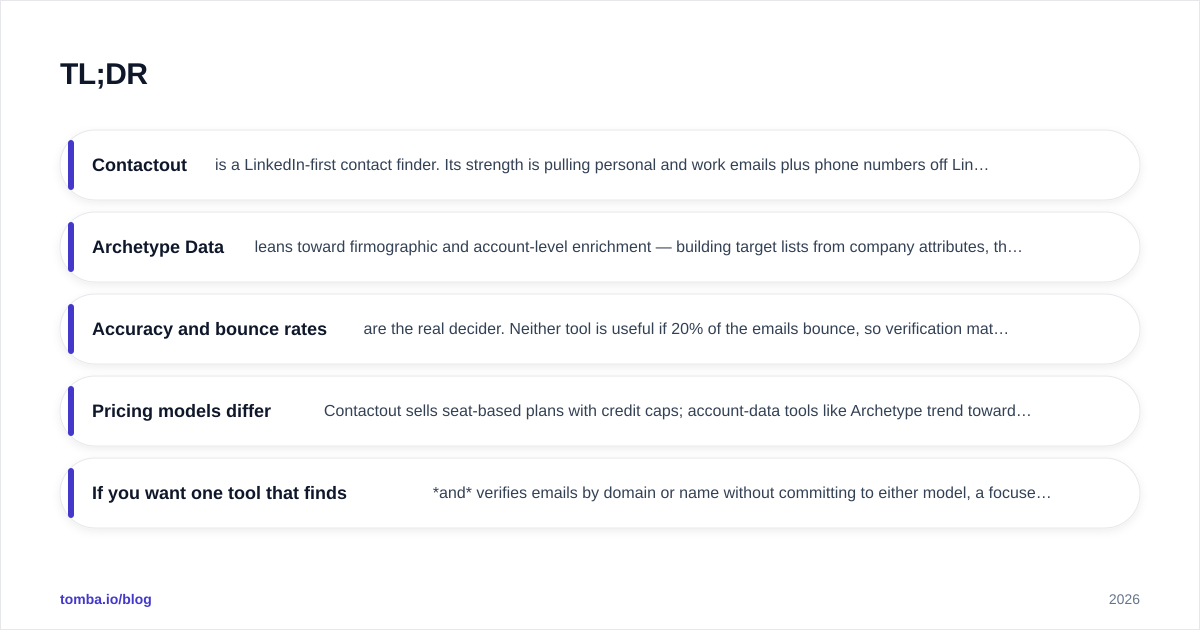
- Contactout is a LinkedIn-first contact finder. Its strength is pulling personal and work emails plus phone numbers off LinkedIn profiles via a Chrome extension and recruiter-friendly search.
- Archetype Data leans toward firmographic and account-level enrichment — building target lists from company attributes, then attaching contacts — rather than profile-by-profile lookup.
- Accuracy and bounce rates are the real decider. Neither tool is useful if 20% of the emails bounce, so verification matters more than raw record counts.
- Pricing models differ: Contactout sells seat-based plans with credit caps; account-data tools like Archetype trend toward usage or contract pricing that scales with list volume.
- If you want one tool that finds and verifies emails by domain or name without committing to either model, a focused email finder like Tomba is the cheaper control group — and a fairer baseline to benchmark both against.
What is Archetype Data?#
Archetype Data positions itself as an account-and-contact intelligence layer. The workflow starts with the company: you define an ideal customer profile using firmographic filters — industry, headcount, tech stack, region — and the platform returns matching accounts, then surfaces contacts inside them. That makes it closer in spirit to a sales-intelligence database than to a single-purpose email scraper.
The advantage of an account-first model is coverage of markets you have not researched. You are not limited to people already in your LinkedIn network or to profiles you have manually opened. The trade-off is that account-level data ages fast: headcount, funding, and role changes drift, and contact records attached to stale accounts inherit that drift.
If you have never formalised your firmographic criteria, it is worth reading how B2B data and intelligence feeds the rest of the funnel before you commit budget to any account database.
What is Contactout?#
Contactout is built around LinkedIn. Its best-known surface is a browser extension that, while you view a profile, reveals candidate work and personal email addresses plus phone numbers. It also offers a search portal and bulk export for recruiters and sales teams who live inside LinkedIn Recruiter or Sales Navigator.
Contactout's reputation is strongest in recruiting, where personal email addresses matter because candidates change jobs and work inboxes go dead. For B2B sales, that same personal-email coverage can be a double-edged sword: a personal Gmail address may reach a prospect, but it is rarely the right channel for a professional cold pitch, and it raises deliverability and compliance questions.
How do Archetype Data and Contactout compare head to head?#
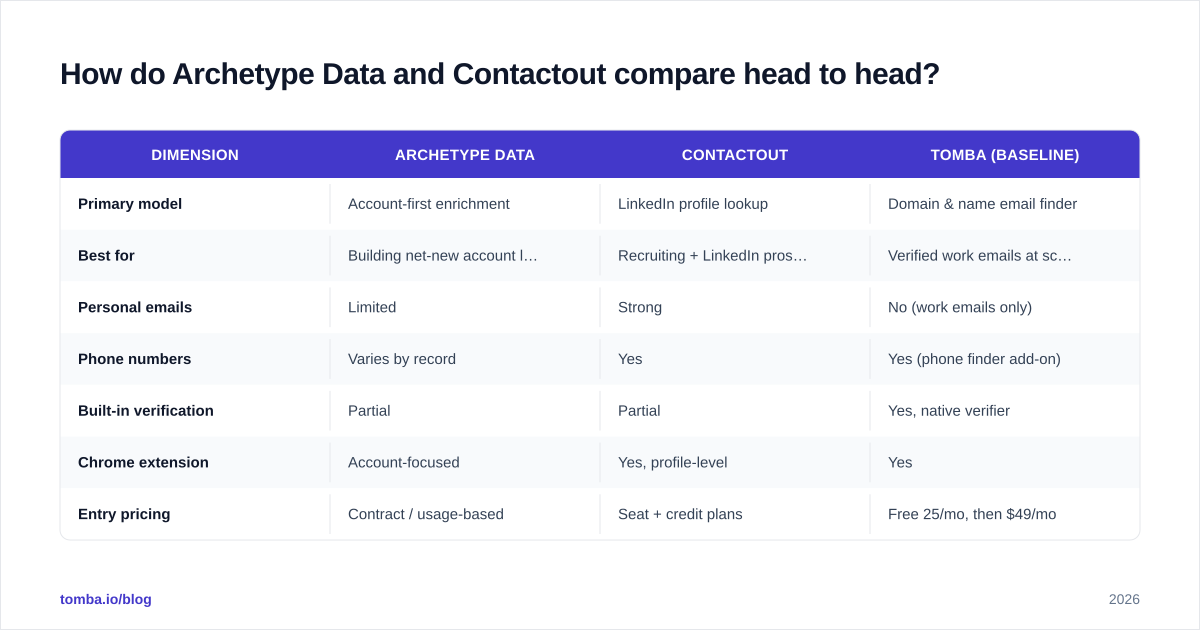
The cleanest way to see the difference is attribute by attribute. The table below maps the dimensions that actually change a buying decision — not the marketing checklist.
| Dimension | Archetype Data | Contactout | Tomba (baseline) |
|---|---|---|---|
| Primary model | Account-first enrichment | LinkedIn profile lookup | Domain & name email finder |
| Best for | Building net-new account lists | Recruiting + LinkedIn prospecting | Verified work emails at scale |
| Personal emails | Limited | Strong | No (work emails only) |
| Phone numbers | Varies by record | Yes | Yes (phone finder add-on) |
| Built-in verification | Partial | Partial | Yes, native verifier |
| Chrome extension | Account-focused | Yes, profile-level | Yes |
| Entry pricing | Contract / usage-based | Seat + credit plans | Free 25/mo, then $49/mo |
| API access | Yes | Yes | Yes |
A feature grid only takes you so far. The number that separates a useful tool from an expensive one is bounce rate, and that is worth its own section.

Which one is more accurate?#
Accuracy is where most contact-data tools quietly lose money for you. A platform can advertise hundreds of millions of records, but if the email it hands you is a guess derived from a name pattern and never validated against a mail server, you pay twice: once for the credit, and again in sender reputation when it bounces.
Two practical questions cut through vendor claims:
- Is each email verified at the time of export, or was it verified once at ingestion months ago? Records decay roughly 2–3% per month as people change jobs. A "verified" stamp from last year is not verified today.
- Does the tool distinguish catch-all domains from confirmed mailboxes? Catch-all servers accept everything, so a naive checker marks them "valid" when they may bounce. A real email verifier reports catch-all status separately instead of hiding it.
Contactout's accuracy is generally strong on LinkedIn-sourced records because it cross-references multiple sources before surfacing an address. Archetype Data's accuracy depends on how fresh its account graph is — strong for recently-updated companies, weaker on long-tail accounts. Whichever you choose, run a sample of 100 exports through an independent checker before trusting the headline number. Industry review sites like G2 and Capterra collect bounce-rate complaints that vendor pages never show.
)
How does pricing compare?#
Pricing is where the two tools diverge most, because their models are structurally different.
Contactout uses seat-based plans layered with monthly credit caps. That suits a recruiter or SDR who works a steady volume from a single seat. Costs spike when you add seats or burn through credits mid-month, and personal-email reveals often cost more credits than work emails.
Archetype Data, like most account-intelligence platforms, trends toward annual contracts or usage tiers sized to your list volume. That can be efficient at scale but creates a high floor — you are often quoted before you see a price, and small teams subsidise enterprise feature sets they will not use.
For comparison, a dedicated finder like Tomba's pricing is transparent and volume-light: a free tier of 25 searches per month, then $49/mo Starter, $99/mo Growth, $249/mo Pro, and custom Enterprise. The point is not that cheaper always wins — it is that you should benchmark both contenders against a known, published price before signing anything.
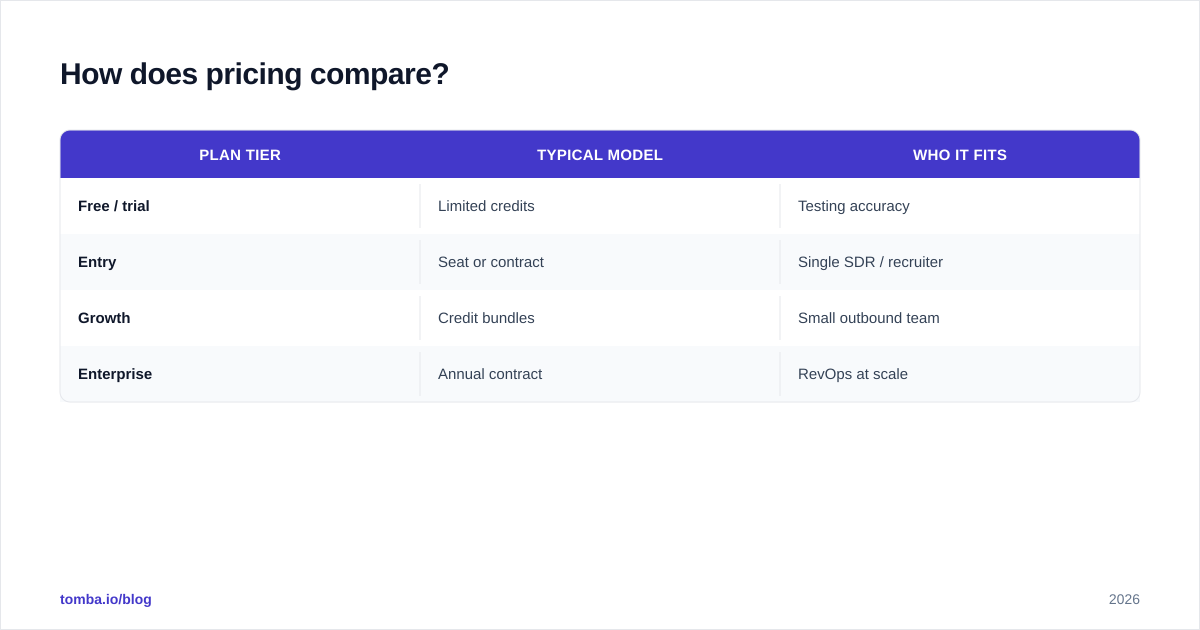
| Plan tier | Typical model | Who it fits |
|---|---|---|
| Free / trial | Limited credits | Testing accuracy |
| Entry | Seat or contract | Single SDR / recruiter |
| Growth | Credit bundles | Small outbound team |
| Enterprise | Annual contract | RevOps at scale |
When should you pick each tool?#
The decision is workflow-shaped, not feature-shaped.
Pick Contactout if your team lives inside LinkedIn, you recruit or sell to individuals whose personal contact details matter, and you value profile-level reveal over list building. The extension workflow is its moat.
Pick Archetype Data if you are running account-based motions, need to discover net-new companies that fit a firmographic profile, and want contacts attached to accounts rather than the other way around. The account graph is its moat.
Pick a focused email finder if your real bottleneck is "I have a domain or a name and need a verified work email," and you do not want to pay for a recruiting feature set or an enterprise account graph to get it. Tools like domain search return every public email pattern at a company without seat lock-in.
)
What about deliverability and compliance?#
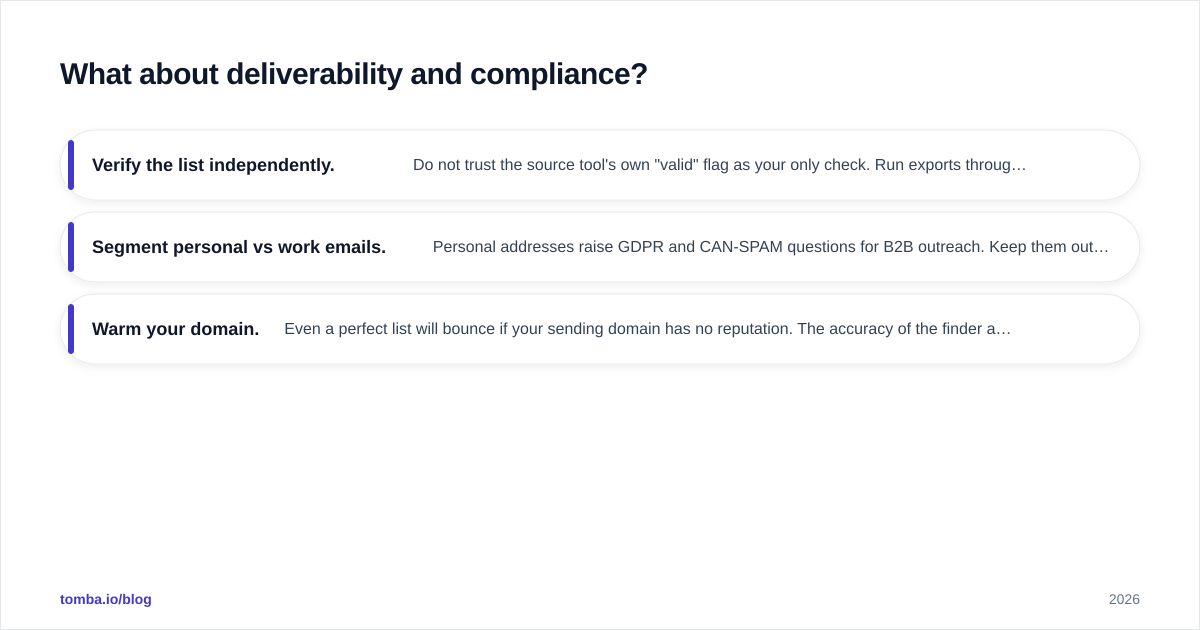
Both tools can hand you addresses that technically resolve but should never receive a cold email. Personal Gmail addresses, role inboxes (info@, sales@), and catch-all domains all carry deliverability or legal risk depending on your jurisdiction. Before you load any export into a sequencer:
- Verify the list independently. Do not trust the source tool's own "valid" flag as your only check. Run exports through a separate verifier and drop anything marked risky or catch-all.
- Segment personal vs work emails. Personal addresses raise GDPR and CAN-SPAM questions for B2B outreach. Keep them out of automated sequences unless you have a clear basis.
- Warm your domain. Even a perfect list will bounce if your sending domain has no reputation. The accuracy of the finder and the health of your sender both matter.
This is the unglamorous half of prospecting, and it is where most of the ROI difference between tools actually lives. A 95%-accurate list run through a 70%-deliverability domain performs worse than a smaller, verified list sent from a warmed inbox.
Can you use them together?#
Yes, and many teams do. A common pattern: use an account-first tool like Archetype Data to discover and prioritise target companies, use Contactout to pull individual decision-makers when you are deep in LinkedIn, then run everything through a single verification layer before it touches your CRM. The verification step is the connective tissue — it normalises quality across two sources that grade themselves differently.
You can automate that middle step with a bulk email finder and verifier so the hand-off between discovery and outreach does not depend on manual CSV cleanup. The goal is one trusted quality bar, regardless of where a record originated.
The bottom line#
Archetype Data and Contactout are not really competitors so much as two answers to two different questions. Archetype answers "which accounts should I go after?" Contactout answers "how do I reach this specific person I found on LinkedIn?" If you only need verified work emails from a domain or a name — the most common B2B prospecting task — both are heavier and pricier than the job requires.
That is the gap a focused tool fills. Tomba's Email Finder finds professional email addresses by domain, name, or company, verifies them natively, and flags catch-all domains instead of hiding them — starting free with 25 searches a month and scaling to $49/mo without seat lock-in or an enterprise contract. Run your shortlist of Archetype Data and Contactout exports against it, compare the bounce rates yourself, and let the deliverability data pick the winner. Start free at tomba.io/email-finder.
// get started
Find, verify and enrich your first contacts today
Start on the free plan with 25 searches a month, then scale when your team is ready.
Free plan · No credit card required · GDPR & CCPA
// about the author