Archetype Data vs Leadsforge: B2B Data Compared (2026)
Archetype Data vs Leadsforge, compared on data accuracy, coverage, pricing, and workflow fit so you can pick the right B2B data engine in 2026.
TL;DR
- Archetype Data leans into intent signals and account-level enrichment, making it strong for ABM teams that want to score and prioritize accounts before reps ever reach out.
- Leadsforge is built around fast contact discovery and list-building, favoring SDR teams that need volume and a quick path from search to outreach.
- Neither tool is a clean winner on data accuracy — both rely on aggregated sources, and both should be paired with a dedicated email verifier before you send.
- On price, Leadsforge tends to undercut Archetype Data at the entry level, while Archetype Data charges more for its intent and firmographic depth.
- If your real bottleneck is finding and verifying work emails at scale, a focused tool like Tomba often beats bolting a second seat onto either platform.
What are Archetype Data and Leadsforge?#
Short answer: they solve overlapping problems from opposite ends. Archetype Data is an account-intelligence and enrichment platform — think firmographics, technographics, and buyer-intent signals layered on top of a company database. Leadsforge is a contact-discovery and list-building tool — you search for people who match a persona, pull their contact details, and push them into outreach.
The confusion is understandable. Both promise "better B2B data," both sit in the same crowded category as Apollo, Clearbit, and ZoomInfo, and both will happily sell you a seat for prospecting. But the shape of the data they're best at is different, and that difference should drive your choice more than any feature checklist.
Here's the everyday analogy: Archetype Data is like a scout who tells you which neighborhoods are worth knocking on doors in. Leadsforge is like a phone book that hands you the doors. You usually need both jobs done — the question is which one is your current bottleneck.
How do Archetype Data and Leadsforge compare on features?#
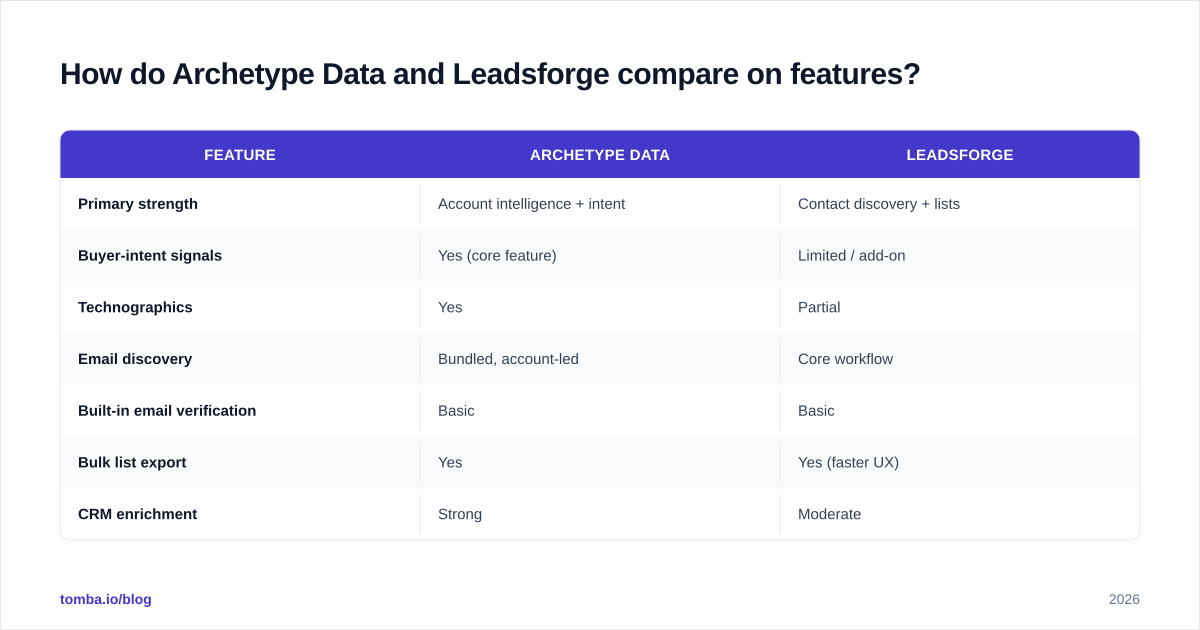
The cleanest way to decide is to put the attributes that actually move pipeline side by side. Below is a practical comparison based on how each tool positions itself and how teams typically use them.
| Feature | Archetype Data | Leadsforge |
|---|---|---|
| Primary strength | Account intelligence + intent | Contact discovery + lists |
| Buyer-intent signals | Yes (core feature) | Limited / add-on |
| Technographics | Yes | Partial |
| Email discovery | Bundled, account-led | Core workflow |
| Built-in email verification | Basic | Basic |
| Bulk list export | Yes | Yes (faster UX) |
| CRM enrichment | Strong | Moderate |
| Entry pricing | Higher | Lower |
| Best-fit team | ABM / marketing ops | SDR / outbound |
Two takeaways. First, if buyer intent and account scoring are non-negotiable, Archetype Data is the more natural home, and you'll pay for it. Second, if you mostly need to turn a target list into outreach-ready contacts quickly, Leadsforge's workflow is leaner and cheaper to start.
What neither row tells you is reliability over time. Aggregated B2B data decays fast — people change jobs, companies rebrand, domains migrate. That decay is why your "winner" here matters less than your verification habit, a point we'll come back to.

Is Archetype Data more accurate than Leadsforge?#
Honest answer: it depends on the field, and you should trust neither vendor's headline accuracy number without testing.
Account-level data (industry, employee count, tech stack) tends to be more stable, and Archetype Data invests heavily there, so it usually feels more accurate for firmographics and technographics. Contact-level data (direct email, mobile, current title) is where both tools wobble, because that data ages in weeks, not years. Leadsforge refreshes contacts aggressively, but "fresh" is not the same as "verified."
The methodology that actually matters is how the data was sourced and last confirmed. Independent reviews on platforms like G2 and Capterra consistently show that every aggregator in this category — Archetype Data and Leadsforge included — loses meaningful accuracy on email and phone fields between refresh cycles. That's not a knock on either tool; it's the physics of B2B data.
The practical fix is to treat any platform's contact export as a candidate list, then run it through real-time verification. Tomba's data sources and SMTP-level checks exist precisely for this gap: confirm the mailbox is live before a rep wastes a touch on it. Bouncing into spam traps because you trusted a stale record will hurt your sender reputation far more than a smaller, cleaner list ever would.
How do their pricing models compare?#
Pricing is where the two tools separate most clearly, and where buyers get surprised.
Archetype Data prices for depth: intent data, account scoring, and enrichment volume push entry tiers higher, and costs scale with the number of tracked accounts and signal access. Leadsforge prices for access: lower entry cost, credit- or seat-based contact pulls, and cheaper to pilot with a single SDR.
A few patterns worth budgeting for:
- Credit overages. Both models can spike when a team ramps export volume mid-quarter. Read the overage rate, not just the base tier.
- Verification is usually extra. Built-in checks are basic on both; serious senders add a dedicated verifier, which is a separate line item.
- Intent is the premium. If you don't actually operationalize intent signals, you may be paying Archetype Data's premium for a feature your reps ignore.
For comparison, a focused email-discovery stack is priced differently. Tomba's tiers run a free plan at 25 searches per month, Starter at $49/mo, Growth at $99/mo, Pro at $249/mo, and Enterprise custom — full Tomba pricing is public. The point isn't that one number beats another; it's that you should map each tool's cost to the job you're actually buying it for instead of the longest feature list.
Which tool fits which team?#
Decide by your bottleneck, not by the demo.
Choose Archetype Data if:
- You run account-based marketing and need intent + firmographics to prioritize.
- Your CRM enrichment is messy and you want one source feeding clean account records.
- Marketing ops, not just SDRs, will use the data daily.
Choose Leadsforge if:
- Your reps need outreach-ready contact lists fast.
- You're cost-sensitive and want a low-friction pilot.
- Volume of discovered contacts matters more than deep account scoring.
Consider a dedicated finder + verifier (like Tomba) if:
- Your real gap is getting accurate work emails, not account intelligence.
- You already have a CRM or ABM tool and just need a clean contact layer feeding it.
- Deliverability is suffering and you need verification baked into the workflow.
That third path is more common than vendors admit. Plenty of teams buy a heavyweight platform to solve what is fundamentally an email-finding-and-verification problem. If that's you, a domain search plus bulk email finder workflow can replace the part of Archetype Data or Leadsforge you were actually using, at a fraction of the cost.
What about integrations and workflow fit?#
A data tool is only as good as the systems it feeds. Both Archetype Data and Leadsforge offer CRM and outreach connectors, but check the depth, not just the logo wall.
Ask three questions before signing:
- Does it sync both ways? One-way exports create stale duplicates fast. Two-way sync with your CRM keeps records current.
- Can it enrich on demand via API? Batch exports are fine for campaigns, but real-time enrichment at form-fill or lead-creation is what keeps a database healthy.
- Does it fit where your reps already work? A browser extension or spreadsheet add-in beats a separate dashboard nobody opens.
This is an area where a focused tool can quietly win. Tomba ships a documented email finder API, native HubSpot integration, a Salesforce integration, plus Sheets, Excel, and Zapier paths — so the verification layer lives inside the workflow your team already uses rather than as a fourth tab.
The broader principle: don't evaluate Archetype Data vs Leadsforge in isolation. Evaluate the whole loop — discover, verify, enrich, sync, send — and pick the combination that closes the loop with the fewest manual handoffs. A great account-intelligence tool that dumps unverified emails into a CRM still produces bounces.
How should you test them before buying?#
Run a real bake-off; never trust the sales deck's accuracy claim. Here's a lightweight protocol that takes about a day.
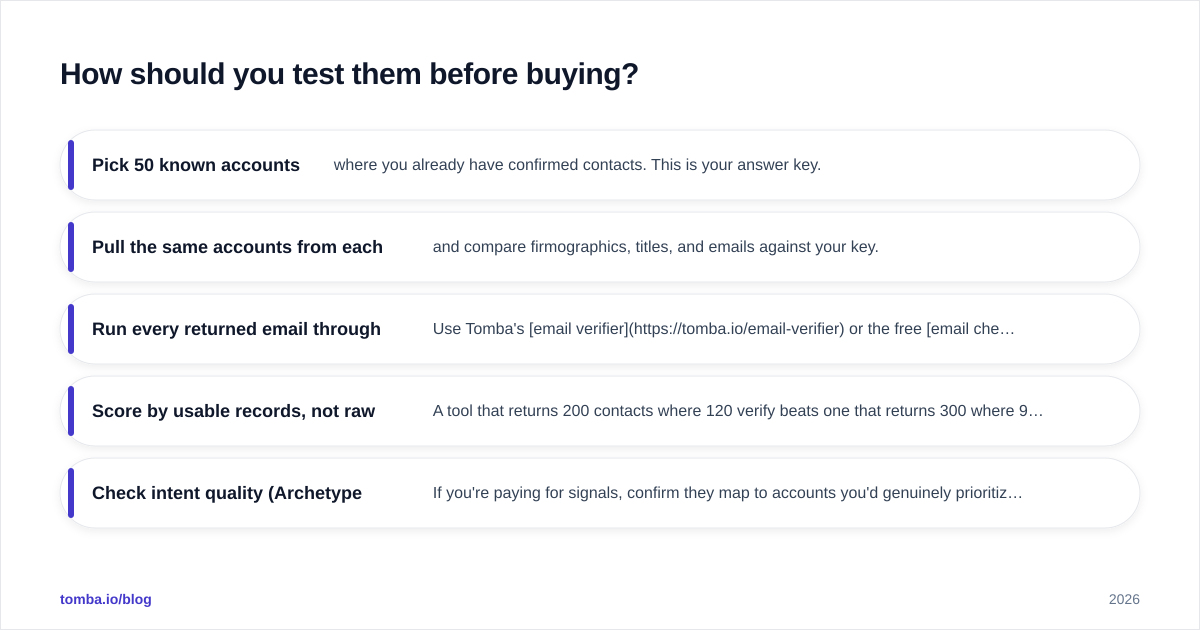
- Pick 50 known accounts where you already have confirmed contacts. This is your answer key.
- Pull the same accounts from each tool and compare firmographics, titles, and emails against your key.
- Run every returned email through a verifier. Use Tomba's email verifier or the free email checker to measure how many "valid" records actually pass SMTP checks.
- Score by usable records, not raw records. A tool that returns 200 contacts where 120 verify beats one that returns 300 where 90 verify.
- Check intent quality (Archetype Data). If you're paying for signals, confirm they map to accounts you'd genuinely prioritize.
This single exercise tells you more than any review roundup, because it measures the tools against your market, your ICP, and your deliverability bar. Vendor accuracy is an average; yours is what you actually pay for.
The bottom line#
Archetype Data and Leadsforge are good at different jobs: Archetype Data for account intelligence and intent, Leadsforge for fast contact discovery on a tighter budget. Pick based on your bottleneck, run a 50-account bake-off, and — whichever you choose — never skip verification, because every aggregator in this space decays.
If, after that test, you realize the part you actually needed was accurate, verified work emails feeding your existing stack, start with the Tomba Email Finder. Pair it with the built-in verifier and you get the discover-and-confirm loop most teams are really shopping for — without paying enterprise prices for features your reps won't touch. Try it free with 25 searches and run it against the same 50 accounts you tested everything else on; let the verified-record count make the call.
// get started
Find, verify and enrich your first contacts today
Start on the free plan with 25 searches a month, then scale when your team is ready.
Free plan · No credit card required · GDPR & CCPA
// about the author