Arounddeal vs Bounceremove: Best B2B Email Tool in 2026?
Arounddeal finds B2B contacts; Bounceremove cleans your lists. We compare accuracy, pricing, and use cases so you know which tool you actually need in 2026 — and where one platform beats running both.
Arounddeal and Bounceremove get lumped together in "best email tools" lists, but they do almost opposite jobs. Arounddeal finds contact data — emails, phones, company firmographics. Bounceremove cleans the data you already have by removing bounces. Picking between them without understanding that split is how teams end up paying for two tools when one would do, or buying a verifier when they actually needed a finder.
This comparison breaks down what each tool is, where it wins, what it costs, and which workflow each one fits in 2026.
TL;DR#
- Arounddeal is a B2B prospecting and contact-data platform: email finder, phone numbers, company search, and a Chrome extension for LinkedIn. Use it to build lists.
- Bounceremove is an email verification / list-cleaning service: it removes invalid, risky, and bounce-prone addresses. Use it to protect deliverability.
- They are complementary, not direct competitors — most teams that pick "one" actually need the function the other provides.
- If you want both jobs handled by a single API and dashboard, an all-in-one platform like Tomba covers finding and verification without stitching two vendors together.
- Pricing scales very differently: finders bill on search credits, verifiers bill on volume of addresses checked. Match the billing model to your actual workflow.
What is Arounddeal?#
Arounddeal is a B2B sales-intelligence platform aimed at outbound teams. Its core promise is contact discovery: give it a name, company, or LinkedIn profile, and it returns a work email, direct dial, and firmographic context (title, company size, industry). It ships a browser extension so reps can pull contacts straight from LinkedIn and company sites, plus a searchable database for list building. You can read more about its positioning on the Arounddeal homepage and user reviews on G2.
In practice, Arounddeal competes with the prospecting side of tools like Apollo, RocketReach, and Lusha. It is a finder first. Verification exists as a secondary feature — it will tell you whether a discovered email looks valid — but the product is built to source net-new contacts, not to scrub a 200,000-row list you imported from somewhere else.
The strength: it shortens the path from "I know the company" to "I have a reachable human." The limitation: like every database-driven finder, coverage and freshness vary by region and seniority, and you pay per credit whether the contact converts or not.
What is Bounceremove?#
Bounceremove is an email verification tool. You upload a list — exports from a CRM, a webinar signup sheet, a scraped file — and it flags and removes addresses that will bounce: invalid syntax, dead mailboxes, disposable domains, spam traps, and known complainers. The output is a cleaned list you can safely send to.
Bounceremove does not find new contacts. Its entire job starts after you already have email addresses. That makes it a deliverability tool, not a prospecting tool. Its closest comparisons are ZeroBounce, NeverBounce, and Bouncer rather than Arounddeal.
Why this matters: sending to unverified lists tanks your sender reputation and gets your domain throttled or blacklisted. A verifier like Bounceremove is insurance for the lists you've built — including lists a finder produced.

Arounddeal vs Bounceremove: how do they actually differ?#
The cleanest way to see it: Arounddeal answers "who do I email?" and Bounceremove answers "will this email land?" One creates data, the other validates it.
That diagram is the whole decision in one picture. If your bottleneck is not having enough contacts, you need the finder. If your bottleneck is high bounce rates and inbox placement problems, you need the verifier. Confusing the two is the single most common mistake in tool selection.
Comparison table: Arounddeal vs Bounceremove#
| Attribute | Arounddeal | Bounceremove |
|---|---|---|
| Primary job | Find B2B contacts (email, phone, firmographics) | Clean lists / remove bounces |
| Category | Sales intelligence / email finder | Email verification |
| Net-new contact discovery | Yes | No |
| List verification | Basic / secondary | Yes — core feature |
| Chrome / LinkedIn extension | Yes | No |
| Phone numbers | Yes | No |
| Typical billing model | Search/export credits | Per-email verified |
| Best for | Building prospecting lists | Protecting deliverability |
| Replaces | Apollo, RocketReach, Lusha | ZeroBounce, NeverBounce, Bouncer |
| Works without the other | Partially (sends without verification = risk) | No (needs a list first) |
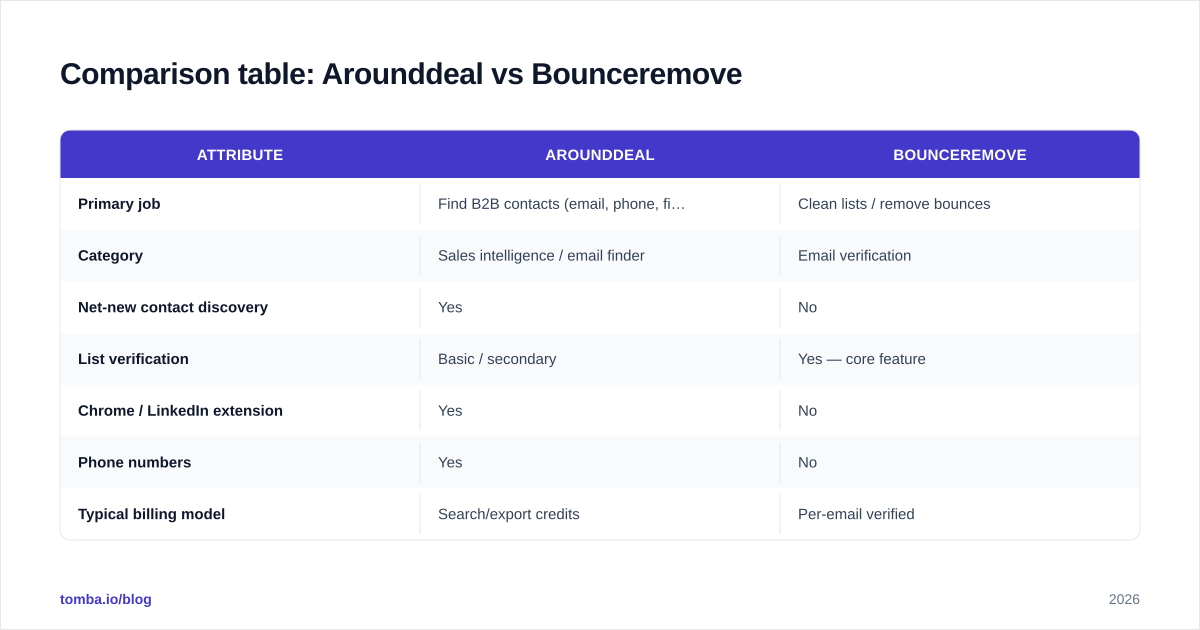
The "works without the other" row is the punchline: neither tool is a complete outbound stack on its own. Run Arounddeal alone and you ship unverified lists. Run Bounceremove alone and you have nothing to clean until another tool feeds it.

Which one is more accurate?#
Accuracy means different things for each tool, so compare them on their own terms.
For Arounddeal, accuracy is discovery accuracy: of the contacts it returns, how many are real, current, and reachable? Finders are judged on coverage (does it have the contact at all?) and freshness (is the email still active?). Database tools degrade as people change jobs, so a finder that doesn't re-verify at the moment of lookup will hand you stale addresses.
For Bounceremove, accuracy is verification accuracy: of the addresses it marks valid, how many actually accept mail, and how few good addresses does it wrongly reject? The hard cases are catch-all domains — servers that accept everything at the SMTP layer, so a naive checker can't confirm a specific mailbox exists. How a verifier handles catch-alls separates the serious tools from the rest.
The trap: a finder's "valid" claim and a verifier's "valid" claim are not the same guarantee. A finder telling you an email is formatted correctly is weaker than a verifier doing a live SMTP check. This is exactly why a finder-plus-verifier pipeline beats either alone — the finder's output should pass through real email verification before it touches your sequencer.

How does pricing compare?#
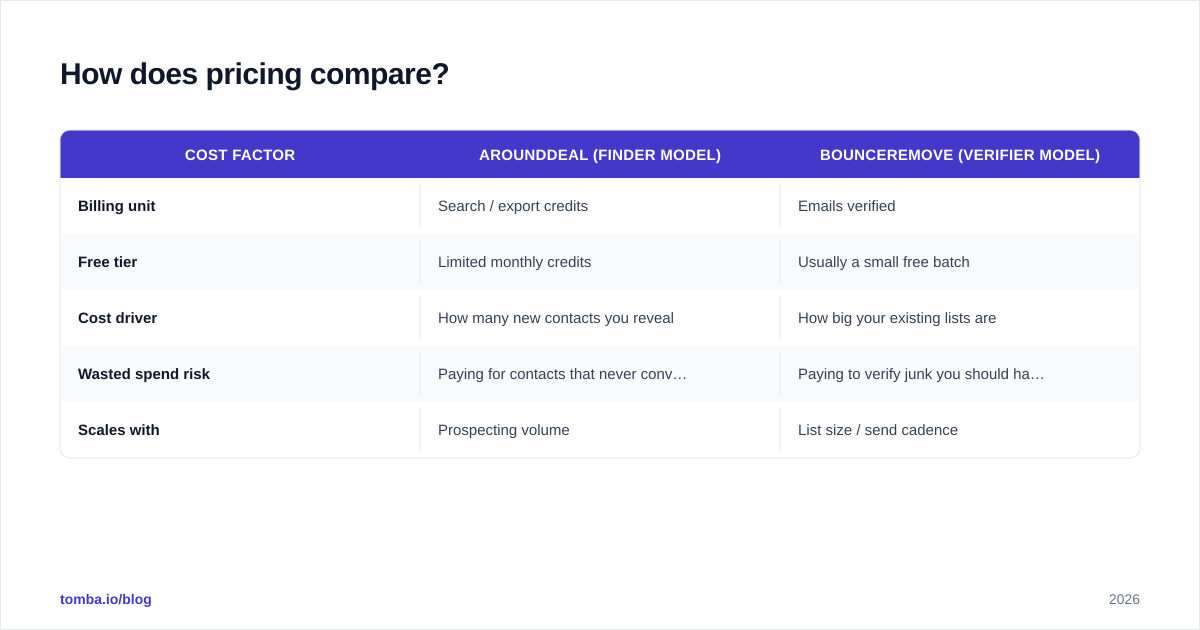
You can't compare a finder and a verifier on a single price number, because they bill on different units. Finders charge per search/export credit — you spend a credit to reveal a contact. Verifiers charge per email checked — you spend volume to validate a list you already have.
| Cost factor | Arounddeal (finder model) | Bounceremove (verifier model) |
|---|---|---|
| Billing unit | Search / export credits | Emails verified |
| Free tier | Limited monthly credits | Usually a small free batch |
| Cost driver | How many new contacts you reveal | How big your existing lists are |
| Wasted spend risk | Paying for contacts that never convert | Paying to verify junk you should have filtered |
| Scales with | Prospecting volume | List size / send cadence |
Always check current rates on each vendor's own page and cross-reference reviews on Capterra — pricing in this category changes often and tiered credit packs hide the real per-unit cost.
For comparison, an all-in-one approach prices both jobs together. Tomba's pricing runs a Free tier (25 searches/month), Starter at $49/month, Growth at $99/month, and Pro at $249/month, with finding and verification drawing from the same plan. If you'd otherwise pay two vendors — one finder, one verifier — a combined plan is usually cheaper than the sum and far less work to reconcile.
When should you choose Arounddeal?#
Choose a finder like Arounddeal when your problem is pipeline volume:
- You're starting outbound from scratch and need to build target lists.
- Your reps live in LinkedIn and want to pull contacts inline with a browser extension.
- You need direct-dial phone numbers alongside emails for a multi-channel cadence.
- You want firmographic filters (industry, headcount, geography) to segment outreach.
In all of these, the constraint is "not enough of the right contacts." A verifier does nothing for you here — there's no list to clean yet.
When should you choose Bounceremove?#
Choose a verifier like Bounceremove when your problem is deliverability:
- Your bounce rate is climbing and mailbox providers are throttling you.
- You inherited or bought a list of unknown quality and need to scrub it before sending.
- You collect emails through forms, events, or scraping and want a gate before they enter your sequencer.
- You're protecting a warmed-up domain and refuse to risk it on unverified sends.
Here the constraint is "my data is dirty," and a finder won't fix it. You already have the addresses; you need to know which ones are safe. Strong email deliverability starts with not sending to dead mailboxes, and that's exactly Bounceremove's lane.

Can you just use one tool for both jobs?#
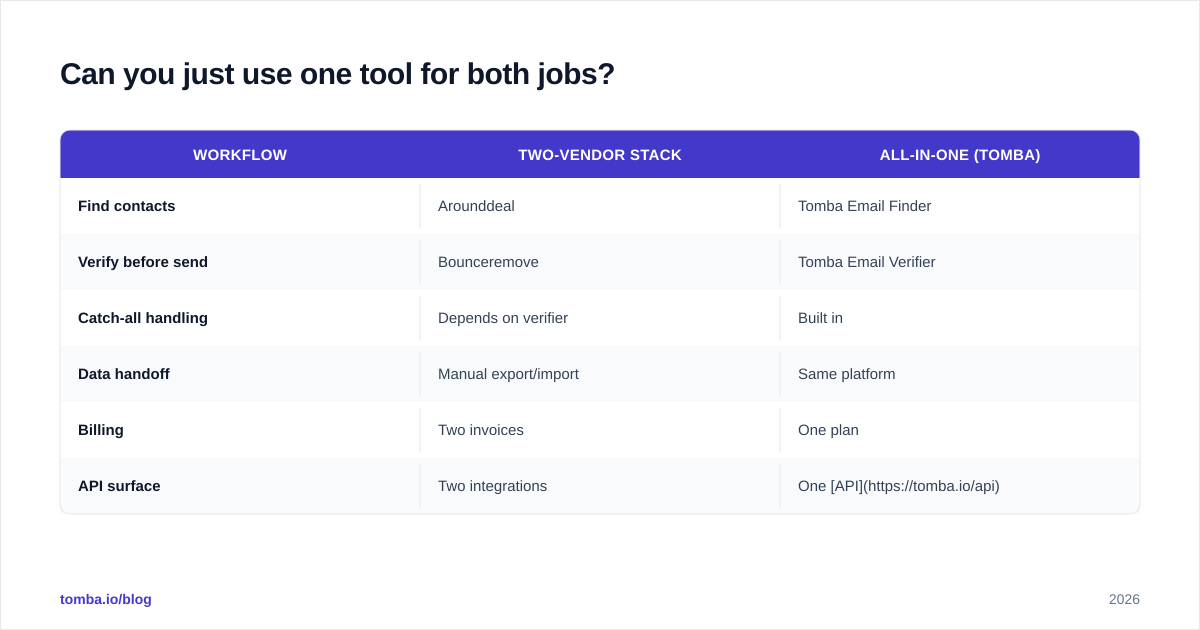
Yes — and for most teams that's the smarter buy. The find-then-verify workflow is so common that running it across two vendors creates friction: two logins, two APIs, two invoices, and a manual export-import step between them where data goes stale.
A combined platform collapses that. With Tomba you can run domain search to discover contacts at a company, find specific work emails, then verify them in the same place — and do it in volume with the bulk email finder when you're processing thousands of rows. The output of discovery flows straight into verification without leaving the tool.
| Workflow | Two-vendor stack | All-in-one (Tomba) |
|---|---|---|
| Find contacts | Arounddeal | Tomba Email Finder |
| Verify before send | Bounceremove | Tomba Email Verifier |
| Catch-all handling | Depends on verifier | Built in |
| Data handoff | Manual export/import | Same platform |
| Billing | Two invoices | One plan |
| API surface | Two integrations | One API |
This isn't to say Arounddeal and Bounceremove are bad at their jobs — they're focused tools that do one thing. The question is whether your stack benefits from two specialists or one generalist that covers the full find-and-verify loop. For lean teams and most outbound motions, fewer moving parts wins.
What's the verdict for 2026?#
There is no single winner because they're not really competing — they're two halves of the same pipeline.
- Need to build lists? Arounddeal (or any solid finder) is the right category.
- Need to clean lists? Bounceremove (or any solid verifier) is the right category.
- Need both, and want to skip the integration tax? Use a platform that does finding and verification together.
The wrong move is buying one and assuming it does the other's job. A finder that "checks format" is not a verifier. A verifier that cleans your list cannot find you new contacts. Map the tool to your actual bottleneck and the choice makes itself.
Get finding and verification in one place#
If your real need is the full loop — discover the right B2B contacts and confirm they're deliverable before you hit send — start with the Tomba Email Finder. You get accurate email discovery by name, domain, or company, built-in verification (including catch-all handling), bulk processing, and a single API, all on one plan starting free at 25 searches a month. Skip the two-vendor stitch-up: build clean, send-ready lists from one dashboard and protect your sender reputation from the first email.
Ready to find emails that actually work?
Join 150,000+ professionals who stopped guessing and started sending. Free credits on signup — no credit card required.
Get the Tomba newsletter
Practical outbound tactics and product updates — once every two weeks.
About the author