Arounddeal vs Contactout: 2026 B2B Data Tool Comparison
Arounddeal vs Contactout compared on accuracy, pricing, LinkedIn coverage, and verification. See which B2B contact-data tool fits your outbound stack in 2026 — and where a finder-plus-verifier combo beats both.
Choosing between Arounddeal and Contactout usually comes down to one question: do you live inside LinkedIn, or do you need a broader prospecting database with intent signals baked in? Both tools promise verified B2B emails and direct dials, but they solve slightly different problems — and neither is a clean replacement for a dedicated finder-and-verifier workflow.
This comparison breaks down accuracy, pricing, data coverage, and the real-world workflows each tool is built for, so you can pick the right one without burning a free trial to find out.
TL;DR — Arounddeal vs Contactout in one screen#
- Contactout is a LinkedIn-first email and phone finder. Its Chrome extension and recruiter-grade database make it strong for finding personal and work emails of individuals you already see on LinkedIn.
- Arounddeal is a broader B2B prospecting platform — contact search, company data, intent signals, and a Chrome extension — aimed at sales teams building lists from scratch.
- Accuracy is comparable on common work emails, but both degrade on catch-all domains and smaller companies. Neither verifies in real time as aggressively as a standalone email verifier.
- Pricing favors Contactout for individual recruiters and Arounddeal for small sales teams; both get expensive at scale.
- Best move for most teams: pair a high-accuracy email finder with a verifier so you're not paying per-credit for data you can't trust.
What is Arounddeal?#
Arounddeal is a B2B data platform that bundles contact discovery, company profiles, buying-intent signals, and a browser extension into one subscription. Think of it as a lighter, cheaper take on the "all-in-one prospecting database" category that Apollo and ZoomInfo dominate.
You search by job title, industry, location, company size, or technology used, then export contacts with work emails and phone numbers. The Chrome extension surfaces contact details on LinkedIn and company websites, which is where most users actually spend their time.
Arounddeal's pitch is breadth: you start with a blank list and build a targeted account map without leaving the tool. That makes it useful for outbound teams who don't already have a list of named prospects.
What is Contactout?#
Contactout is a LinkedIn-first contact finder built originally for recruiters and now used heavily by sales. Its core strength is pulling personal email addresses and mobile numbers — not just work emails — for people you find on LinkedIn or GitHub.
The product centers on a Chrome extension that overlays contact details directly on LinkedIn profiles, plus a searchable database and an AI search feature for natural-language queries. Because recruiting workflows depend on reaching candidates who aren't checking a corporate inbox, Contactout invests heavily in personal-email coverage that most B2B tools skip.
If your motion is "I see a person on LinkedIn, get me their email," Contactout is purpose-built for that single job.
Arounddeal vs Contactout: side-by-side comparison#
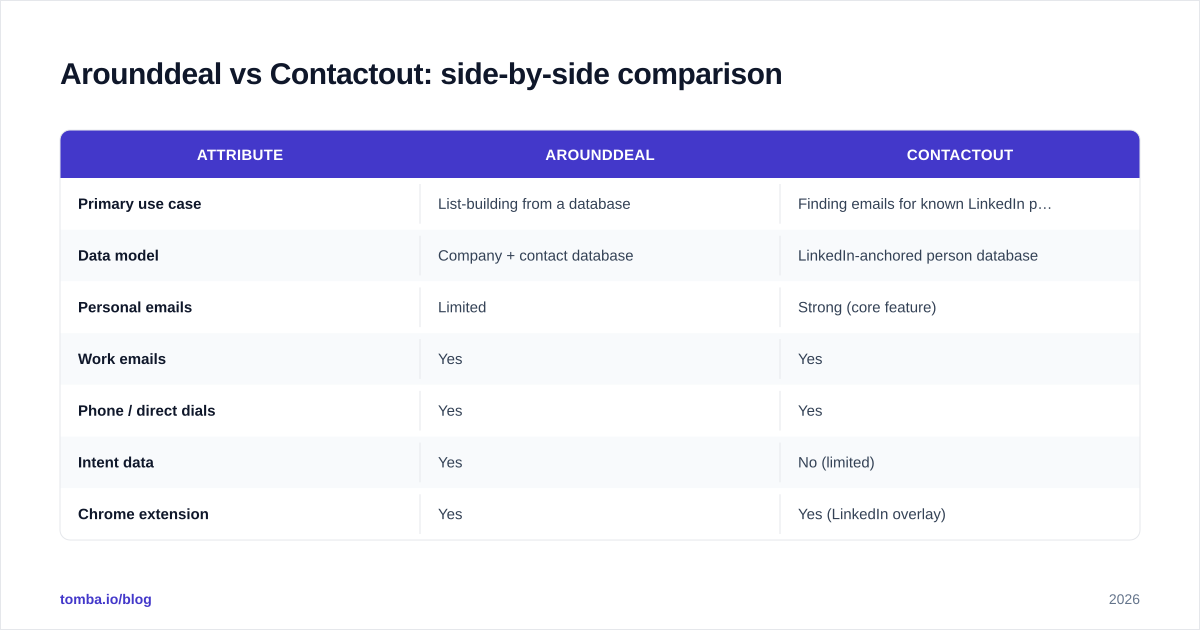
Here's the head-to-head on the attributes that actually change your buying decision.
| Attribute | Arounddeal | Contactout |
|---|---|---|
| Primary use case | List-building from a database | Finding emails for known LinkedIn profiles |
| Data model | Company + contact database | LinkedIn-anchored person database |
| Personal emails | Limited | Strong (core feature) |
| Work emails | Yes | Yes |
| Phone / direct dials | Yes | Yes |
| Intent data | Yes | No (limited) |
| Chrome extension | Yes | Yes (LinkedIn overlay) |
| Real-time verification | Partial | Partial |
| Best for | SMB sales teams | Recruiters, AE prospecting |
| Free plan | Limited credits | Limited credits |
| Entry paid tier | ~$59/mo range | ~$49/mo range |
Pricing for both tools shifts often and gates key features (like phone numbers or bulk export) behind higher tiers, so always confirm current numbers on their sites before committing. You can compare both against a transparent baseline on the Tomba pricing page.
Which tool has better email accuracy?#
Accuracy is close on the easy cases and diverges on the hard ones. For a senior employee at a mid-to-large company with a standard first.last@company.com pattern, both tools return the right address most of the time. The gap shows up with three scenarios:
- Catch-all domains. When a mail server accepts every address, neither tool can confirm deliverability without an SMTP-level check. This is where a dedicated catch-all verifier earns its keep — it probes deliverability instead of guessing.
- Small companies and startups. Sparse data means more pattern-guessing and more bounces.
- Personal vs work email. Contactout wins on personal emails; Arounddeal is more reliable for corporate addresses tied to company records.

The honest takeaway: published accuracy percentages from any vendor are best-case lab numbers. Your real bounce rate depends on your target segment. The only way to protect your sender reputation is to verify before you send — regardless of which finder produced the address. Independent reviews on G2 show both tools cluster in the same "good but verify anyway" band.
)
Is Arounddeal or Contactout better for LinkedIn prospecting?#
Contactout for individuals, Arounddeal for accounts.
If your workflow is profile-by-profile — you're scrolling LinkedIn Sales Navigator, spotting decision-makers, and grabbing their email one at a time — Contactout's overlay is faster and its personal-email coverage is unmatched in this pair. Recruiters especially benefit because candidates often respond from personal inboxes.
If your workflow is list-first — "give me all VP Engineering at 200–1,000-person fintech companies in the EU" — Arounddeal's filters and intent layer build that list more efficiently. You're working at the account level, not the individual level.
Many teams run both motions, which is why a lot of users end up paying for two tools. A cheaper path is to combine LinkedIn sourcing with a dedicated LinkedIn finder and feed the results into one verification pipeline.
How do the pricing models compare?#
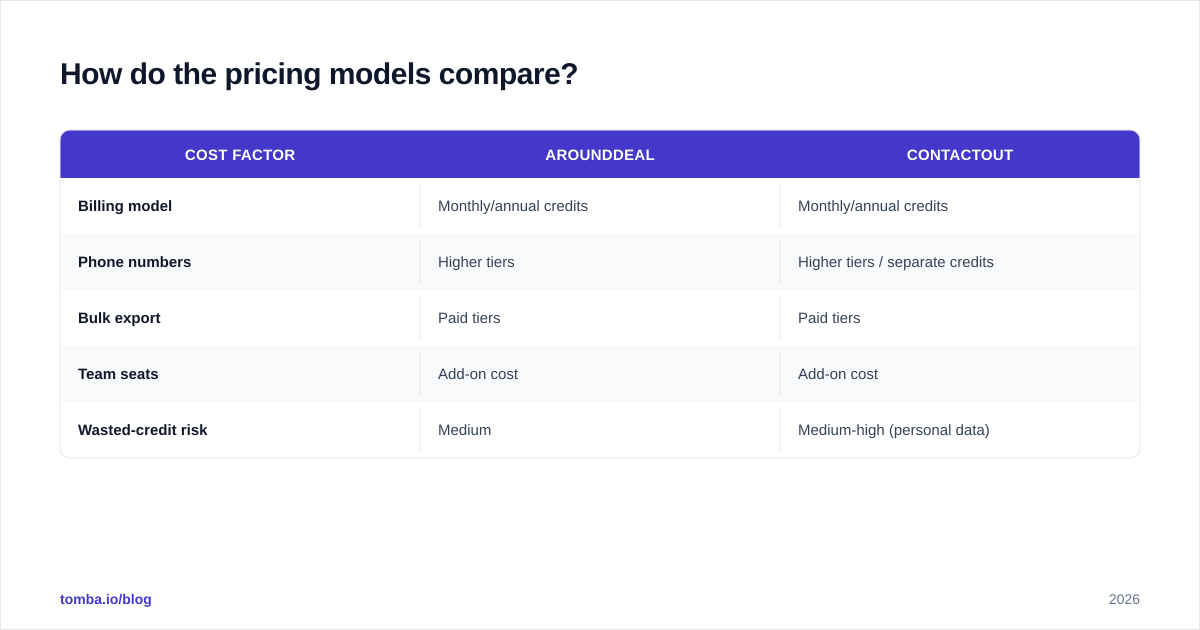
Both tools sell credits, and credits are where budgets quietly explode. A "200 contacts/month" plan sounds generous until you realize you'll burn half of them on bounced or unverifiable records.
| Cost factor | Arounddeal | Contactout |
|---|---|---|
| Billing model | Monthly/annual credits | Monthly/annual credits |
| Phone numbers | Higher tiers | Higher tiers / separate credits |
| Bulk export | Paid tiers | Paid tiers |
| Team seats | Add-on cost | Add-on cost |
| Wasted-credit risk | Medium | Medium-high (personal data) |
The hidden cost in both models is credit waste on bad data. If 15% of pulled emails bounce, your effective price per usable contact is far higher than the sticker rate. This is the strongest argument for verifying separately: a bulk email finder paired with verification converts more of every credit into a deliverable address.
When should you choose a dedicated email finder instead?#
Choose a standalone finder-plus-verifier stack when deliverability is the metric you're judged on — i.e., almost any cold outbound or RevOps team. Arounddeal and Contactout are convenient because they bundle discovery and contact data, but bundling means you inherit whatever verification quality the vendor decided was "good enough."
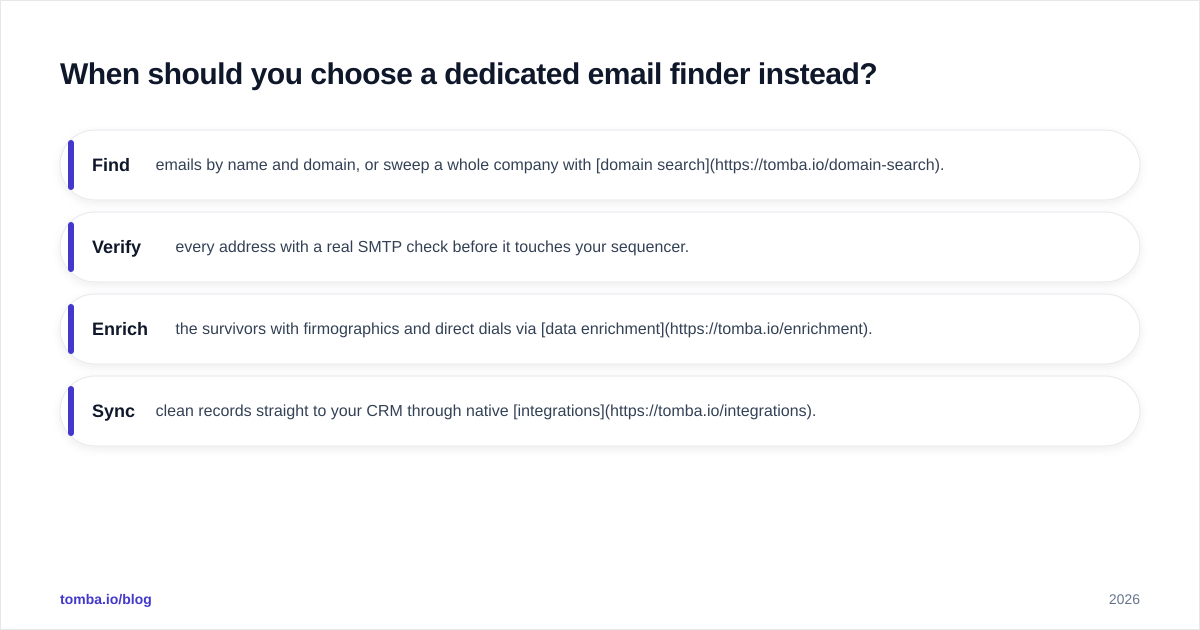
A purpose-built workflow looks like this:
- Find emails by name and domain, or sweep a whole company with domain search.
- Verify every address with a real SMTP check before it touches your sequencer.
- Enrich the survivors with firmographics and direct dials via data enrichment.
- Sync clean records straight to your CRM through native integrations.
This separates "data discovery" from "data quality" so you control each lever. It's also typically cheaper at volume than a database subscription, because you're not paying for a giant static dataset you only partially use.
)
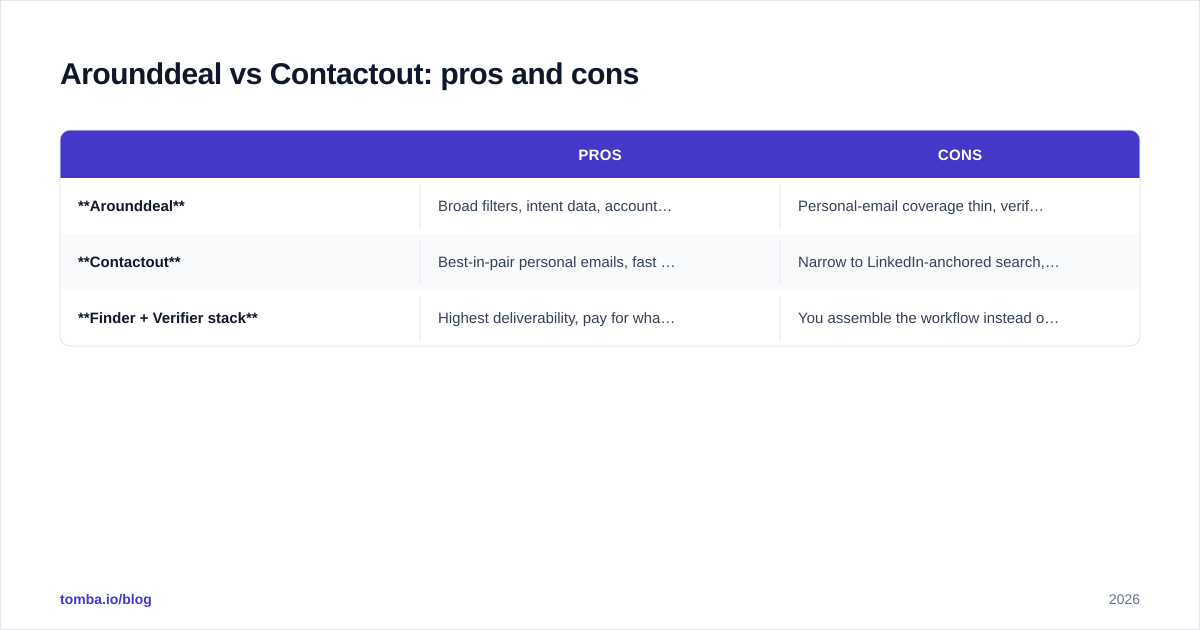
Arounddeal vs Contactout: pros and cons#
| Pros | Cons | |
|---|---|---|
| Arounddeal | Broad filters, intent data, account-level list-building, fair SMB pricing | Personal-email coverage thin, verification not its core strength |
| Contactout | Best-in-pair personal emails, fast LinkedIn overlay, recruiter-grade | Narrow to LinkedIn-anchored search, weak intent data, personal data raises compliance questions |
| Finder + Verifier stack | Highest deliverability, pay for what you use, CRM-native, API access | You assemble the workflow instead of buying one bundle |
A note on compliance: tools that surface personal emails and mobile numbers — Contactout's specialty — carry more GDPR and CCPA exposure than work-contact tools. Make sure your legal basis for outreach is solid; resources from HubSpot and your own counsel are worth reviewing before you scale personal-data outreach.
Which one should you actually buy?#
- Pick Contactout if you're a recruiter or an AE whose whole day is LinkedIn, and personal emails matter to you.
- Pick Arounddeal if you're an SMB sales team that needs to build targeted account lists with intent signals and a tight budget.
- Pick a dedicated finder + verifier if your job is judged on reply rates and deliverability, you send at volume, or you want one clean pipeline into your CRM instead of exporting CSVs from a database tool.
For most outbound teams, the third option is the one that survives contact with a real send. The discovery tools are fine front-ends; the verification layer is what keeps your domain off blocklists. You can read more on where contact data comes from and how it's scored on Tomba's data sources page.
Final verdict#
Arounddeal and Contactout aren't really competitors so much as two answers to two different questions. Arounddeal answers "who should I target?" Contactout answers "how do I reach this specific person?" If you only need one, let your workflow — account-led or person-led — decide.
But if your real goal is emails that land in the inbox, don't outsource verification to whichever tool happened to find the address. Run discovery wherever it's convenient, then push everything through a verifier you trust.
That's exactly what the Tomba Email Finder is built for: find professional emails by name, company, or domain, verify them with a genuine SMTP check, and sync clean, deliverable contacts to your stack via API — without paying database prices for data you can't use. Start on the free tier (25 searches/month), then scale to the Starter plan at $49/mo when you're ready to send for real.
// get started
Find, verify and enrich your first contacts today
Start on the free plan with 25 searches a month, then scale when your team is ready.
Free plan · No credit card required · GDPR & CCPA
// about the author