AtData vs ContactOut 2026: Which B2B Data Tool Wins?
AtData vs ContactOut compared on accuracy, coverage, pricing, and use cases — plus where a finder like Tomba fits your 2026 prospecting stack.
You are comparing two tools that solve different halves of the same problem. AtData (formerly TowerData) is an email intelligence and validation platform built for marketers who already own large email lists. ContactOut is a contact finder that pulls emails and phone numbers off LinkedIn profiles for recruiters and sales reps. Calling them direct competitors is like comparing a water-treatment plant to a well-drilling rig — both deal in "data," but they do opposite jobs.
This guide breaks down what each does, where each wins, what they cost, and how to decide. It also covers the gap neither one fully fills: cleanly finding verified business emails at the point of prospecting.
TL;DR#
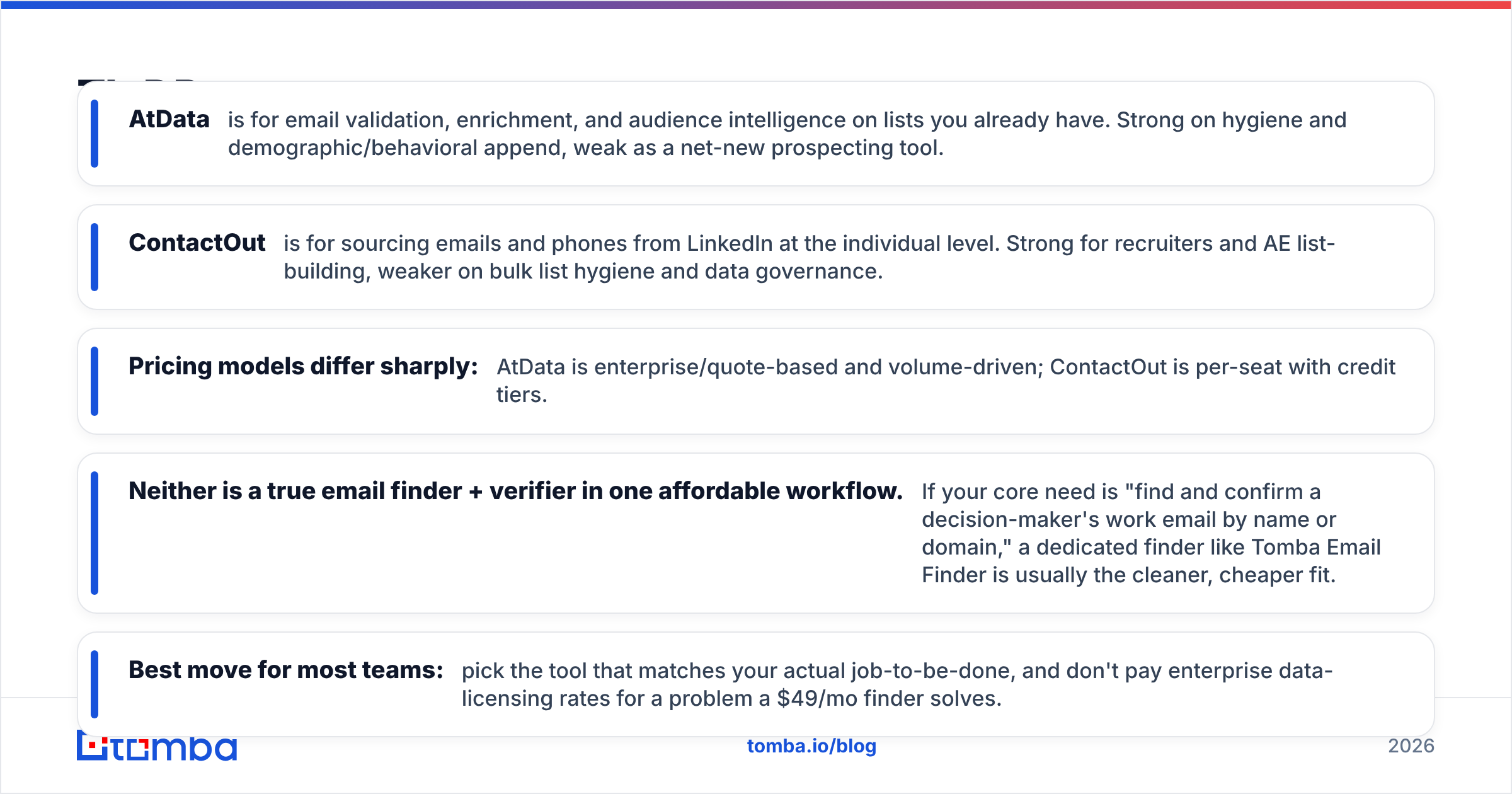
- AtData is for email validation, enrichment, and audience intelligence on lists you already have. Strong on hygiene and demographic/behavioral append, weak as a net-new prospecting tool.
- ContactOut is for sourcing emails and phones from LinkedIn at the individual level. Strong for recruiters and AE list-building, weaker on bulk list hygiene and data governance.
- Pricing models differ sharply: AtData is enterprise/quote-based and volume-driven; ContactOut is per-seat with credit tiers.
- Neither is a true email finder + verifier in one affordable workflow. If your core need is "find and confirm a decision-maker's work email by name or domain," a dedicated finder like Tomba Email Finder is usually the cleaner, cheaper fit.
- Best move for most teams: pick the tool that matches your actual job-to-be-done, and don't pay enterprise data-licensing rates for a problem a $49/mo finder solves.
What is AtData?#
AtData is a long-standing email-centric data company (you may know it as TowerData or FreshAddress). Its product line centers on three things: email validation (is this address deliverable, risky, or a trap), email intelligence (demographics, interests, and engagement signals tied to an address), and identity/enrichment APIs that append data to records you already hold.
The typical AtData buyer is an enterprise marketing or data team running large campaigns. They have a CRM or ESP full of email addresses and want to reduce bounce rates, score audiences, and append attributes before a send. AtData shines at scale hygiene — processing millions of records through real-time and batch validation — and at fraud/risk scoring during signup flows.
What AtData is not built for: handing it a name and a company and getting back a verified work email. It assumes you already have the email. That is the core distinction in any honest atdata vs contactout discussion.
What is ContactOut?#
ContactOut is a contact-discovery tool whose center of gravity is LinkedIn. Install the Chrome extension, open a profile, and ContactOut surfaces personal and work emails plus phone numbers. It also offers a search portal and an API for programmatic lookups, and it markets a large database of professional profiles.
The typical ContactOut buyer is a recruiter or an SDR/AE who lives in LinkedIn Sales Navigator or Recruiter and needs to move from "I found the person" to "I can email or call the person" without leaving the browser. It is a prospecting and sourcing tool first.
What ContactOut is weaker at: large-scale list hygiene, demographic enrichment beyond contact fields, and the kind of compliance-grade data governance that enterprise marketing teams demand. It finds contacts; it does not deep-clean and score a 5-million-row marketing database the way AtData does.
AtData vs ContactOut: how do they compare head to head?#
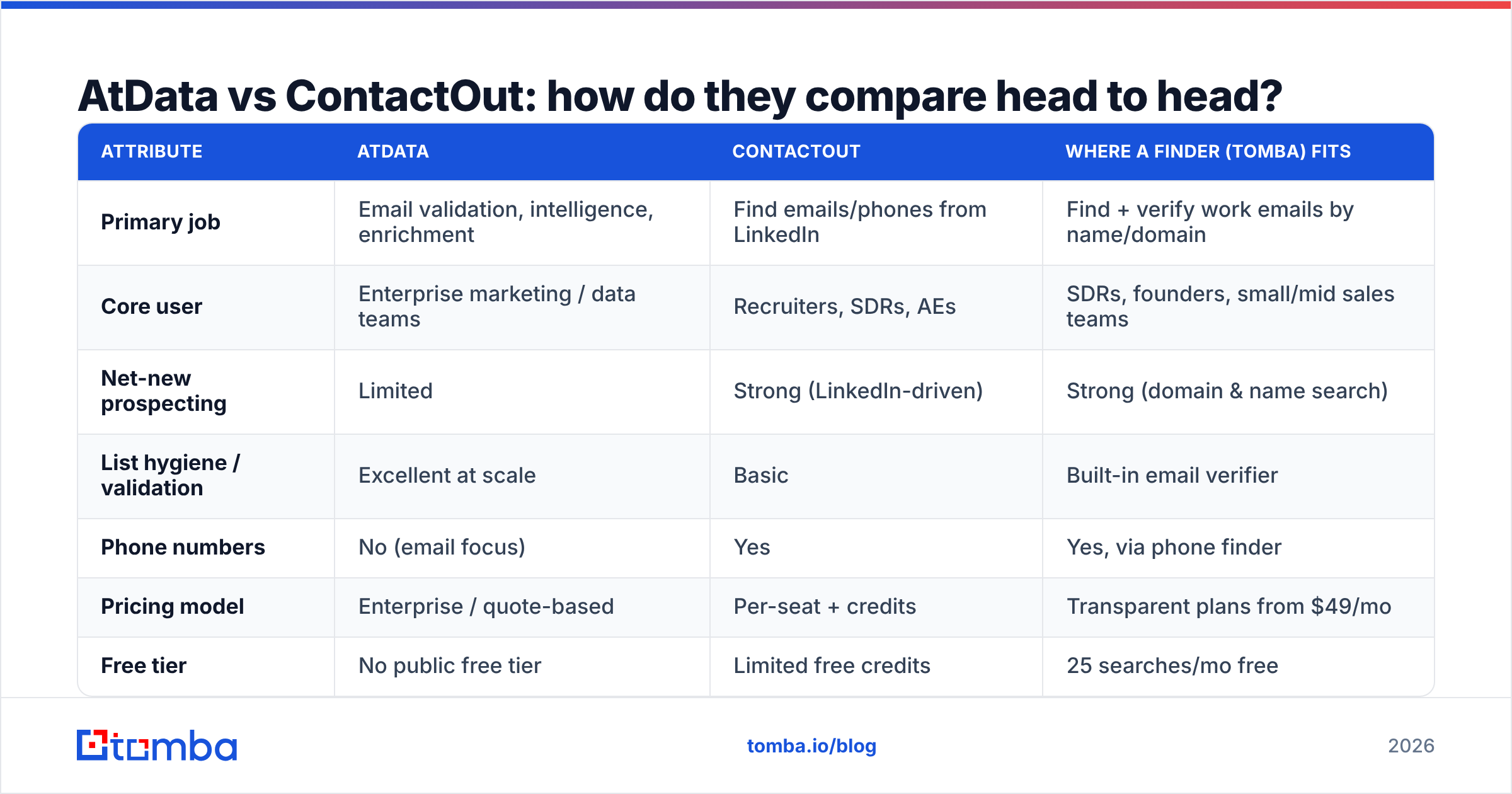
Here is the side-by-side. Read it as "different jobs," not "one is strictly better."
| Attribute | AtData | ContactOut | Where a finder (Tomba) fits |
|---|---|---|---|
| Primary job | Email validation, intelligence, enrichment | Find emails/phones from LinkedIn | Find + verify work emails by name/domain |
| Core user | Enterprise marketing / data teams | Recruiters, SDRs, AEs | SDRs, founders, small/mid sales teams |
| Net-new prospecting | Limited | Strong (LinkedIn-driven) | Strong (domain & name search) |
| List hygiene / validation | Excellent at scale | Basic | Built-in email verifier |
| Phone numbers | No (email focus) | Yes | Yes, via phone finder |
| Pricing model | Enterprise / quote-based | Per-seat + credits | Transparent plans from $49/mo |
| Free tier | No public free tier | Limited free credits | 25 searches/mo free |
| Best for | Cleaning & enriching owned lists | LinkedIn sourcing | Affordable find-and-verify at scale |
The honest summary: if your problem is "my owned email list is dirty and under-enriched," AtData wins. If your problem is "I found someone on LinkedIn and need their contact info," ContactOut wins. If your problem is "I need to build verified outbound lists by company and role without enterprise pricing," a dedicated finder usually beats both.
)
Which one is more accurate?#
Accuracy depends on what you are measuring, and the two tools measure different things.
AtData's accuracy claim is about deliverability and risk — its validation engine has deep historical data on which addresses bounce, complain, or signal fraud. For pure "will this email land," enterprise validation vendors like AtData are reliable, and that reputation is reflected in third-party reviews on G2. If you are protecting sender reputation on a big ESP, that matters.
ContactOut's accuracy claim is about match rate and freshness — how often it returns a working email/phone for a given LinkedIn profile. Match rates for LinkedIn-sourced tools vary a lot by region and seniority; coverage is strongest for US tech professionals and thinner for some international or non-technical roles.
The catch nobody markets loudly: a contact finder can return an email it has not freshly validated, and a validation tool can validate an email you never had a way to find. That is why mature outbound stacks separate the two steps — find, then verify — and why combining them in one workflow matters. A tool that does both, like Tomba, runs a verification pass on every result, which is what you actually want before hitting send. For the mechanics of why verification matters, see email deliverability.

How does pricing compare?#
This is where the two tools diverge most, and where buyers get surprised.
AtData does not publish simple self-serve pricing. It is sold as enterprise data services — quote-based, volume-driven, often with annual commitments. That model fits a company validating millions of records, but it is overkill (and over-budget) for a five-person sales team that needs a few thousand verified emails a month.
ContactOut uses a per-seat model with credit tiers and a limited free allowance, plus higher tiers for teams and API access. It is more accessible than AtData for individual recruiters and reps, but credit ceilings and per-seat costs add up quickly as a team scales.
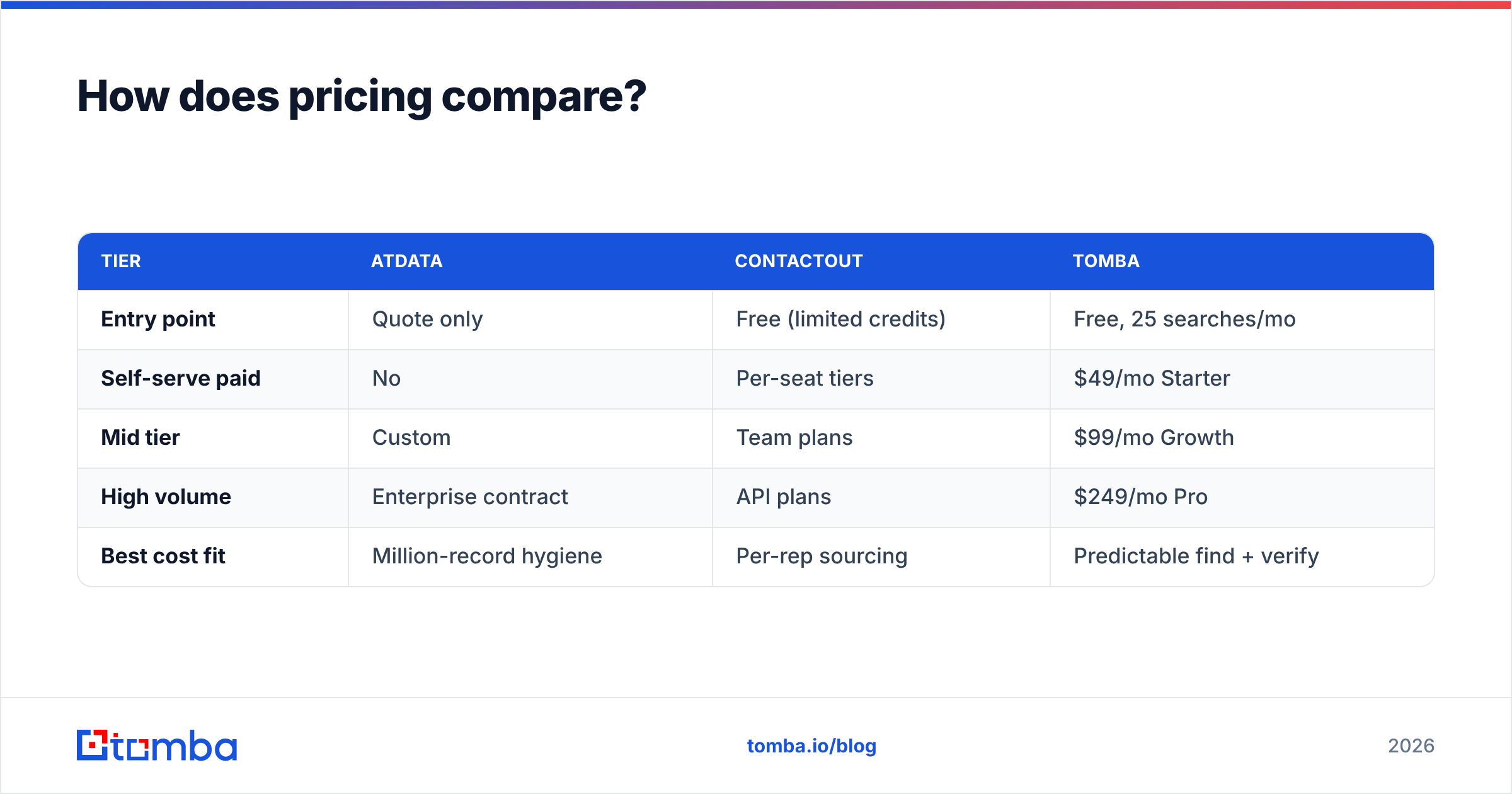
For comparison, a dedicated finder publishes flat, predictable tiers. Tomba's pricing runs Free (25 searches/mo), Starter at $49/mo, Growth at $99/mo, Pro at $249/mo, and custom Enterprise — no quote calls required to start. Here is the rough shape:
| Tier | AtData | ContactOut | Tomba |
|---|---|---|---|
| Entry point | Quote only | Free (limited credits) | Free, 25 searches/mo |
| Self-serve paid | No | Per-seat tiers | $49/mo Starter |
| Mid tier | Custom | Team plans | $99/mo Growth |
| High volume | Enterprise contract | API plans | $249/mo Pro |
| Best cost fit | Million-record hygiene | Per-rep sourcing | Predictable find + verify |
If transparent, low-commitment pricing is a deal-breaker, that alone narrows the field fast.
When should you choose AtData?#
Pick AtData when:
- You already own a large email database (hundreds of thousands to millions of records) and need ongoing hygiene to protect deliverability.
- You run high-volume ESP campaigns and bounce rates directly threaten your sender reputation.
- You need demographic and behavioral enrichment appended to known addresses for segmentation.
- You require fraud/risk scoring at signup to block disposable or malicious emails in real time.
- You have an enterprise budget and a data team to integrate the APIs.
AtData is a poor choice if you are trying to generate new prospects from scratch. It enriches what you have; it does not build your list.
When should you choose ContactOut?#
Pick ContactOut when:
- Your sourcing workflow lives inside LinkedIn — recruiting, or AE/SDR prospecting through Sales Navigator.
- You need phone numbers alongside emails for multichannel outreach or cold calling.
- You want a browser-native experience: open a profile, grab the contact, move on.
- You are an individual or small team that can work within per-seat credit limits.
ContactOut is a weaker choice if you need to validate and enrich a giant owned list, or if your prospecting is domain-first ("get me everyone in marketing at these 200 companies") rather than profile-by-profile. For LinkedIn-specific extraction at lower cost, also weigh a LinkedIn finder and the broader ContactOut alternative options.
)
Where does a dedicated email finder fit?#
Most teams asking "AtData or ContactOut?" actually have a third need that neither nails cleanly: find a verified business email by name or by company domain, at a transparent price, with verification built in.
That is the job a dedicated finder is designed for. With a tool like Tomba you can:
- Run domain search to pull every discoverable email pattern and contact at a target company.
- Use the email finder to resolve a specific person's work email from name + company.
- Push lists through the bulk email finder and have each result verified automatically.
- Enrich records through data enrichment and connect everything via the Tomba API or native integrations with HubSpot, Salesforce, Pipedrive, and Sheets.
This is not "better than AtData at hygiene" or "better than ContactOut at LinkedIn scraping." It is a better fit for the most common B2B job — building accurate, verified outbound lists without enterprise contracts or per-seat credit anxiety.

How do you actually decide?#
Run your need through three questions:
- Do you already have the emails? If yes and the list is large and dirty, AtData. If no, you need a finder or ContactOut, not a validator.
- Is your sourcing LinkedIn-first or domain-first? Profile-by-profile inside LinkedIn leans ContactOut. "Everyone in role X at these companies" leans a domain-search finder.
- What's your budget model? Enterprise contract tolerance → AtData. Per-seat sourcing → ContactOut. Transparent flat tiers with a real free plan → a finder like Tomba.
A quick reality check on the "all-in-one platform" temptation: paying enterprise data-licensing rates to solve a $49/mo find-and-verify problem is the most common overspend in outbound tooling. Match the tool to the job.
| Your situation | Best pick |
|---|---|
| Million-record list, bad deliverability | AtData |
| Recruiting/sourcing inside LinkedIn + phones | ContactOut |
| Domain-first list building, verified, low cost | Tomba |
| Mixed: find new + verify before send | Tomba (find + verify in one) |
| Real-time signup fraud scoring at scale | AtData |
What about combining tools?#
Plenty of teams run two of these together, and that is often the right call. A common stack: use a finder to build and verify outbound lists (domain search + verification), then push qualified, engaged contacts into an enrichment/validation layer only if you later operate at list sizes where enterprise hygiene pays for itself. Recruiters might pair ContactOut for LinkedIn phone numbers with a finder for domain-wide email discovery.
The point is that "AtData vs ContactOut" is often a false binary. The real question is which two layers your motion needs — discovery, verification, enrichment — and which single tool covers the most of them at a price you can defend. For most B2B sales teams, the discovery + verification layer is where the daily work happens, and that is exactly where a focused finder earns its keep. If you want to sanity-check accuracy claims before committing, read up on Tomba's data sources and how match-and-verify works.
Final verdict: AtData vs ContactOut#
Conclusion first: choose AtData if your problem is cleaning and enriching email lists you already own at enterprise scale; choose ContactOut if your problem is sourcing emails and phones from LinkedIn profile by profile. They rarely compete for the same dollar because they solve opposite halves of the data problem.
But if your actual job — like most B2B teams — is finding verified work emails by name or domain at a predictable price, neither one is the most efficient fit. That is the lane a dedicated finder owns.
Start with the Tomba Email Finder — find professional emails by domain, name, or company, with verification built into every result and a free tier (25 searches/mo) so you can test accuracy on your own target accounts before paying a cent. If it covers the job, you skip both the enterprise quote call and the per-seat credit math. Compare it on your real list, not on a vendor's marketing page — that is the only benchmark that counts.
// get started
Find, verify and enrich your first contacts today
Start on the free plan with 25 searches a month, then scale when your team is ready.
Free plan · No credit card required · GDPR & CCPA
Get the Tomba newsletter
Product and data updates
// about the author