AtData vs LeadGibbon 2026: B2B Data & Email Tools Compared
AtData and LeadGibbon solve different B2B data problems—one validates and enriches email, the other finds leads. Here's how they compare on accuracy, pricing, and fit, and when a dedicated email finder wins.
Choosing between AtData and LeadGibbon trips up a lot of teams because the two tools barely overlap. One is an email intelligence and validation platform built for marketers protecting deliverability. The other is a lightweight lead database for sales reps who want contact lists fast. Picking the wrong one means paying for data you can't use.
This guide breaks down what each tool actually does, where they win, what they cost, and when a dedicated email finder beats both.
TL;DR#
- AtData (formerly TowerData) is an email validation, hygiene, and enrichment platform aimed at marketing and data teams who need clean, deliverable lists at scale.
- LeadGibbon is a B2B lead database and email finder built for SDRs who want quick contact exports, often paired with LinkedIn workflows.
- They solve different problems: AtData cleans and enriches email you already have; LeadGibbon finds new leads.
- Neither is a true best-in-class email finder. If sourcing verified addresses by name or domain is the core job, a focused tool like the Tomba Email Finder usually beats both on accuracy-per-dollar.
- Pick AtData for deliverability and enrichment, LeadGibbon for cheap list building, and a dedicated finder when accuracy and verification matter most.
What is AtData?#
AtData is an email-centric data company that has been in the validation and intelligence space for over two decades. Its core products cover email verification, fraud and risk scoring, demographic and behavioral enrichment, and list hygiene. Marketing teams use it to scrub large databases before campaigns so bounces stay low and sender reputation stays intact.
The platform leans heavily toward email quality rather than email discovery. You bring AtData a list, and it tells you which addresses are valid, risky, or dead, then layers on attributes like name, location, and engagement signals. That makes it a natural fit for enterprises running high-volume email programs where a few percentage points of bounce rate translate into real revenue and inbox-placement consequences.
You can read more about its positioning on the AtData homepage, and cross-check user sentiment on G2.
What is LeadGibbon?#
LeadGibbon is a B2B prospecting tool. It pairs a searchable contact database with a Chrome extension and email-finding features, so a sales rep can build a targeted list—by title, industry, company size, or location—and export verified business emails to a spreadsheet or CRM.
Where AtData assumes you already have data, LeadGibbon assumes you have none and need to generate it. Its audience is outbound sales: SDRs, founders, and small agencies who want a fast, affordable way to fill the top of the funnel without an enterprise data contract.
The tradeoff is depth. LeadGibbon's database and enrichment attributes are narrower than a full sales-intelligence suite, and its verification is lighter than a dedicated email verifier. For low-cost list building it's fine; for surgical accuracy it can leave gaps.

How do AtData and LeadGibbon differ at the core?#
The cleanest way to understand these tools is by the job they do in your data lifecycle. Here's where each one sits:
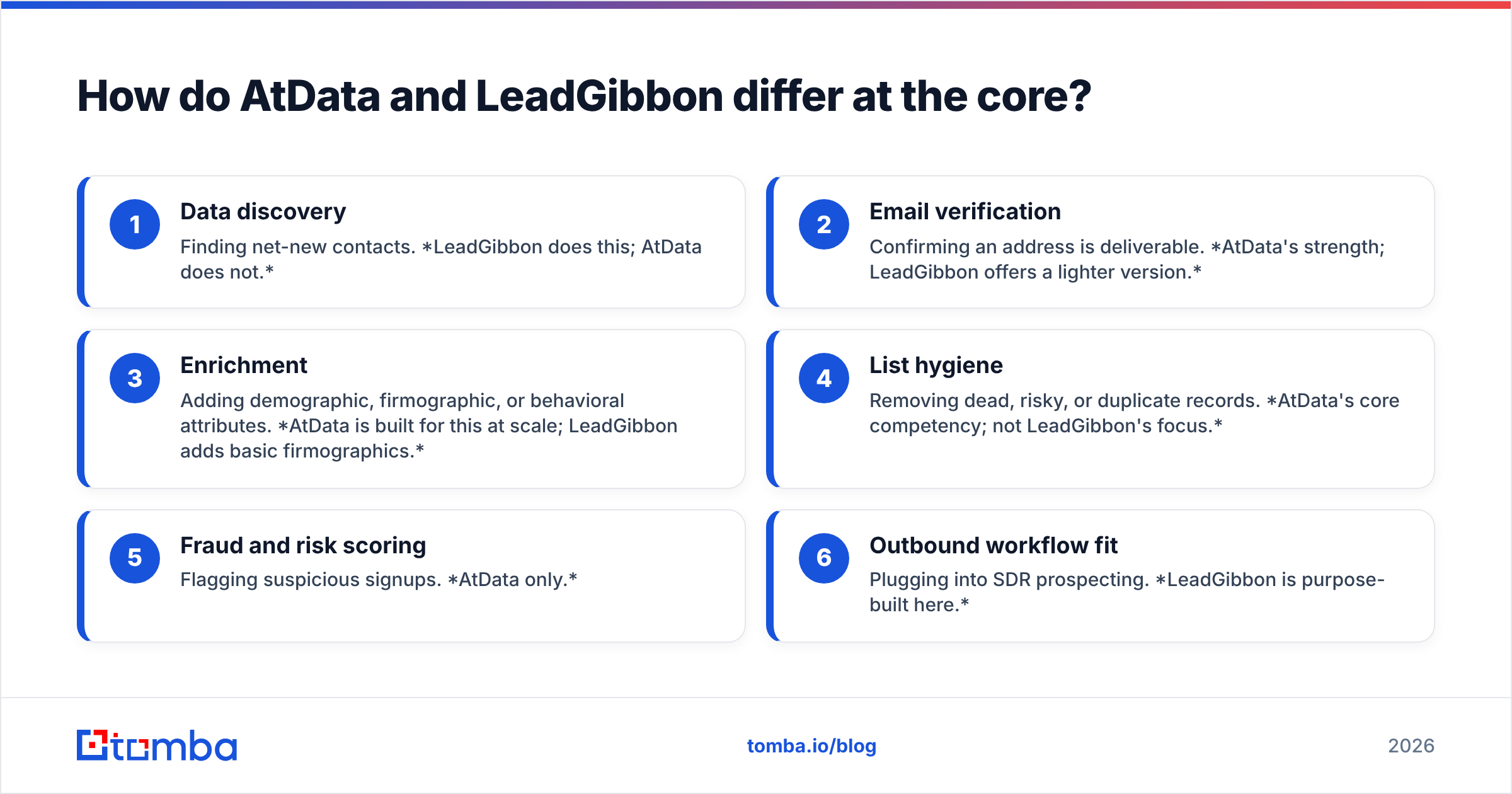
- Data discovery — Finding net-new contacts. LeadGibbon does this; AtData does not.
- Email verification — Confirming an address is deliverable. AtData's strength; LeadGibbon offers a lighter version.
- Enrichment — Adding demographic, firmographic, or behavioral attributes. AtData is built for this at scale; LeadGibbon adds basic firmographics.
- List hygiene — Removing dead, risky, or duplicate records. AtData's core competency; not LeadGibbon's focus.
- Fraud and risk scoring — Flagging suspicious signups. AtData only.
- Outbound workflow fit — Plugging into SDR prospecting. LeadGibbon is purpose-built here.
Read that list again and the picture is obvious: these aren't competitors so much as tools for opposite ends of the pipeline. The real question is which end your problem lives on—and whether either tool is the best option for that end.
AtData vs LeadGibbon: side-by-side comparison#
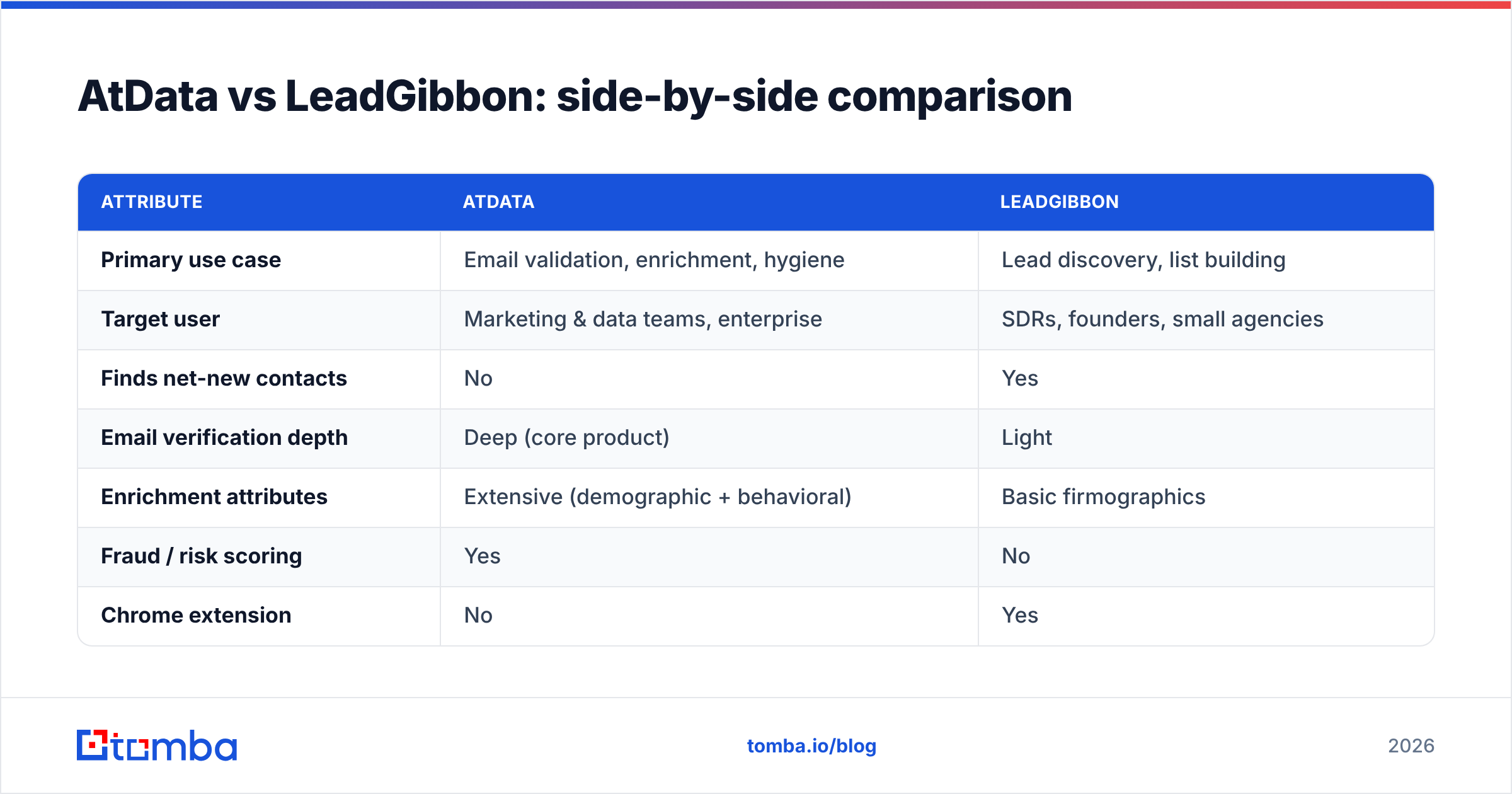
| Attribute | AtData | LeadGibbon |
|---|---|---|
| Primary use case | Email validation, enrichment, hygiene | Lead discovery, list building |
| Target user | Marketing & data teams, enterprise | SDRs, founders, small agencies |
| Finds net-new contacts | No | Yes |
| Email verification depth | Deep (core product) | Light |
| Enrichment attributes | Extensive (demographic + behavioral) | Basic firmographics |
| Fraud / risk scoring | Yes | No |
| Chrome extension | No | Yes |
| Pricing model | Custom / volume-based | Subscription, mid-range |
| Free tier | No | Limited trial |
| Best fit | High-volume email programs | Fast outbound prospecting |
The split is stark. If your KPI is inbox placement and database health, AtData. If your KPI is "how many qualified leads did I export this week," LeadGibbon. Almost no team needs both as primary tools—but many teams realize they actually need a third category: a high-accuracy email finder that does discovery and verification in one pass.
Which tool is more accurate?#
Accuracy depends on what you're measuring. AtData wins on verification accuracy—telling you whether an address you already have is real. LeadGibbon competes on discovery accuracy—whether the email it surfaces for a prospect is correct and current.
The catch is that LeadGibbon's discovery accuracy is its weakest published metric, and AtData simply doesn't do discovery. So if your workflow is "I have a name and a company, get me the right email," neither tool is optimized for that exact job. That's the gap dedicated email finders are built to fill, and it's worth benchmarking accuracy head-to-head before committing budget.

Independent accuracy tests consistently show that purpose-built finders with multi-source validation outperform both general lead databases and verification-only platforms when the task is sourcing a specific person's email. The reason is structural: a finder cross-references public sources, company domain search patterns, and live SMTP checks in one motion, while a database tool can only return what's already stored—stale or not. You can see how data sourcing affects this in Tomba's data sources breakdown.
How do they compare on pricing?#
Pricing is where the two diverge most, and where buyer confusion usually starts.
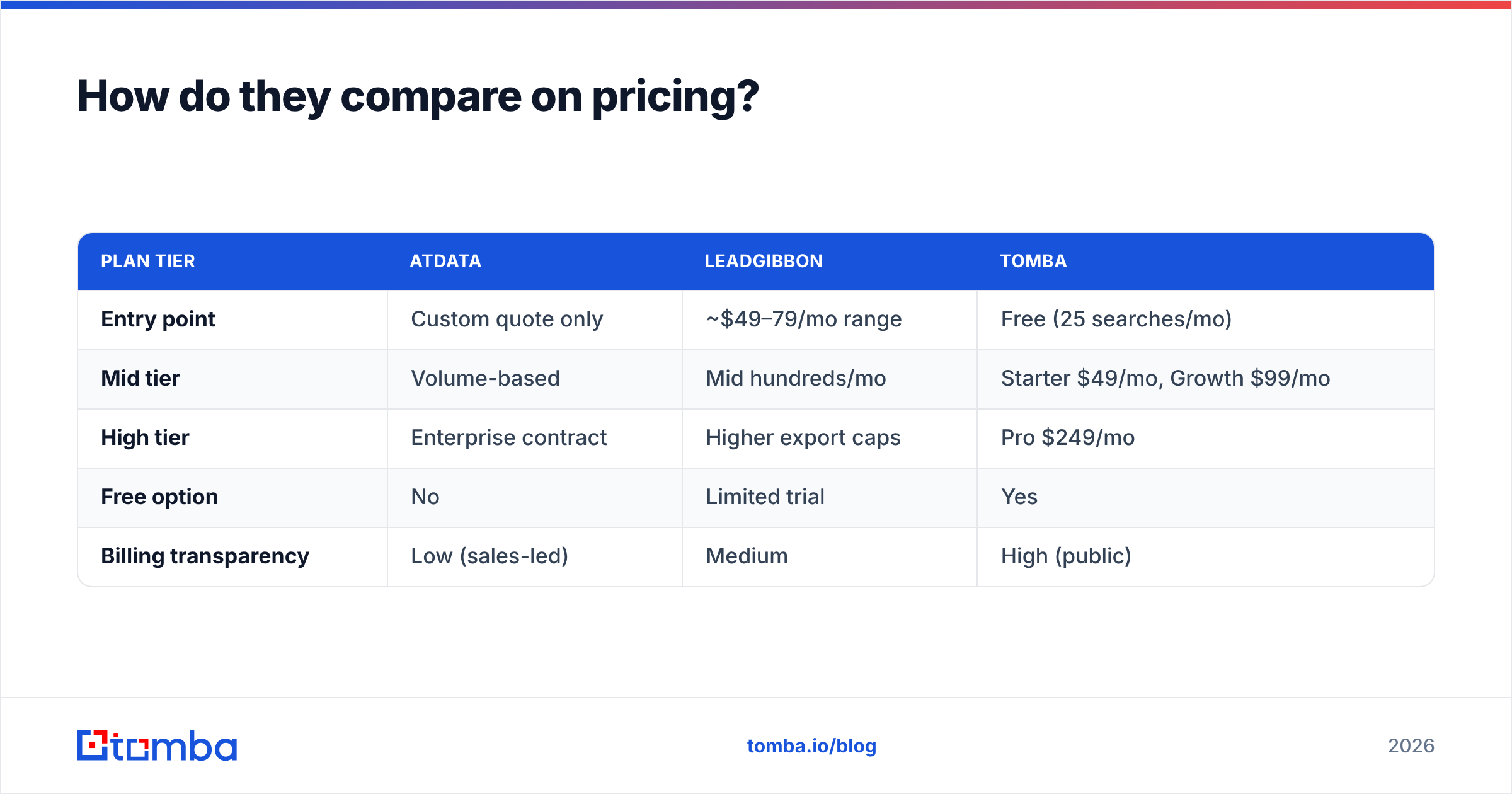
| Plan tier | AtData | LeadGibbon | Tomba |
|---|---|---|---|
| Entry point | Custom quote only | ~$49–79/mo range | Free (25 searches/mo) |
| Mid tier | Volume-based | Mid hundreds/mo | Starter $49/mo, Growth $99/mo |
| High tier | Enterprise contract | Higher export caps | Pro $249/mo |
| Free option | No | Limited trial | Yes |
| Billing transparency | Low (sales-led) | Medium | High (public) |
AtData is sales-led and enterprise-priced—expect a call before a number. That's fine if you're scrubbing millions of records, but it's a barrier for small teams. LeadGibbon is more transparent and affordable but caps exports, so heavy users hit limits. For teams that want predictable, public pricing with a real free tier, it's worth comparing both against Tomba pricing before signing anything.

When should you use AtData?#
Choose AtData when:
- You run high-volume email marketing and bounce rates directly threaten deliverability.
- You need deep enrichment—appending demographic, behavioral, or engagement data to an existing database.
- Fraud and risk scoring at signup matters to your business (fintech, marketplaces, subscriptions).
- You have budget and scale to justify an enterprise data contract.
AtData is overkill for a five-person sales team and underpowered for net-new prospecting. It's a marketing-ops and data-team tool, full stop.
When should you use LeadGibbon?#
Choose LeadGibbon when:
- You're an SDR or founder who needs leads fast and cheap.
- Your workflow is LinkedIn-and-spreadsheet based and you want a quick export.
- You don't need deep enrichment or fraud scoring—just name, title, company, email.
- You want a lower-commitment subscription without an enterprise sales cycle.
LeadGibbon's ceiling is depth and accuracy. It's a solid entry-level list builder, but teams that scale outbound usually outgrow it and need a finder with stronger verification and an API.
Is there a better alternative to both?#
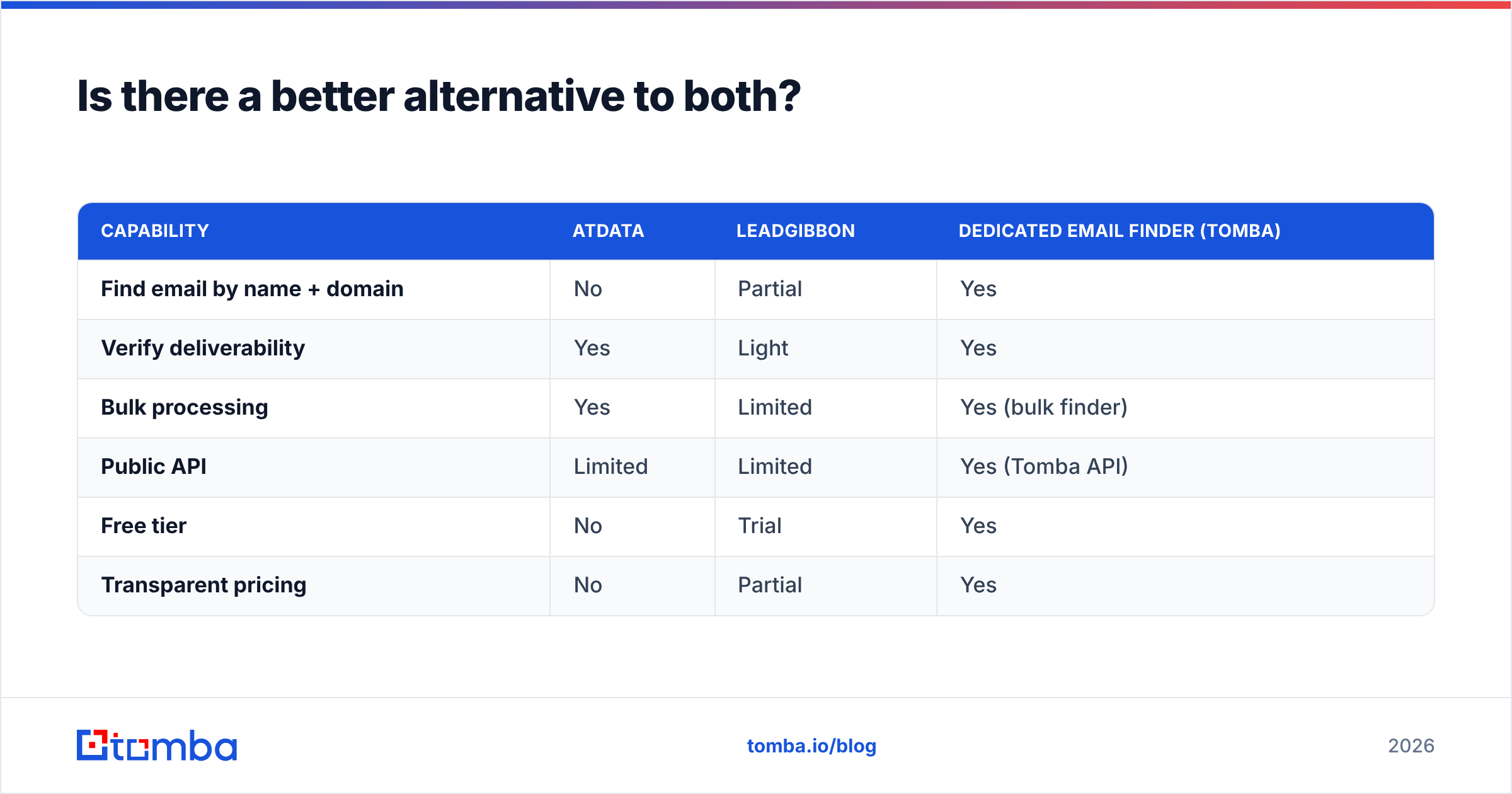
For most teams whose real job is finding verified B2B emails, yes. The category AtData and LeadGibbon each half-serve—accurate email discovery plus verification—is exactly what a dedicated email finder does end to end.
Here's how that third option stacks up against the two:
| Capability | AtData | LeadGibbon | Dedicated email finder (Tomba) |
|---|---|---|---|
| Find email by name + domain | No | Partial | Yes |
| Verify deliverability | Yes | Light | Yes |
| Bulk processing | Yes | Limited | Yes (bulk finder) |
| Public API | Limited | Limited | Yes (Tomba API) |
| Free tier | No | Trial | Yes |
| Transparent pricing | No | Partial | Yes |
The advantage of a finder-first tool is that discovery and verification happen together, so you don't export a list from one vendor and pay a second vendor to clean it. You search by domain or name, get a confidence-scored email, and verify it in the same call. For outbound teams, that collapses two line items into one and removes the accuracy gap that sits between a lead database and a hygiene platform.
This is also why "AtData vs LeadGibbon" is often the wrong question. The right one is: do I need to clean data, build lists, or find verified emails? If it's the third—and for most growing sales teams it is—a focused finder beats a partial fit from either vendor.
How do you decide in five minutes?#
Run this quick decision check against your actual workflow:
- Do you already have a large list that's bouncing? → AtData (validation + hygiene).
- Do you need cheap, fast lead lists and nothing fancy? → LeadGibbon.
- Do you need the right email for a specific person or domain? → A dedicated email finder.
- Do you need enrichment on existing CRM records? → AtData, or a finder with data enrichment.
- Do you want a public API and predictable pricing? → A finder with a transparent plan, not an enterprise contract.
If you answered "the right email for a specific person" or "API and predictable pricing," you've outgrown the AtData-vs-LeadGibbon framing. You can compare verification and enrichment options directly on independent review sites like Capterra before you commit.
Final verdict#
AtData and LeadGibbon are both good at their jobs—just very different jobs. AtData is a deliverability and enrichment platform for marketing and data teams operating at scale. LeadGibbon is an affordable lead-list builder for sales reps who want speed over depth. Neither is a strong email finder, and that's the use case that trips up most buyers comparing the two.
If your core need is finding accurate, verified B2B emails by name or domain—and verifying them in the same workflow—skip the false choice and use a purpose-built tool. The Tomba Email Finder starts free with 25 searches a month, scales to a $49/mo Starter plan, and pairs discovery with built-in verification, bulk processing, and a developer-friendly API. Try it on your next prospect list and compare the hit rate yourself before you sign any enterprise contract.
// get started
Find, verify and enrich your first contacts today
Start on the free plan with 25 searches a month, then scale when your team is ready.
Free plan · No credit card required · GDPR & CCPA
// about the author