AtData vs LeadRocks 2026: Which B2B Data Tool Wins?
AtData sells email intelligence and validation at enterprise scale; LeadRocks sells a cheap LinkedIn contact database. Here's which one actually fits your pipeline in 2026 — and where a verification-first stack beats both.
You're comparing AtData vs LeadRocks because they sound like they do the same thing — give you B2B contact data — but they sit at opposite ends of the market. One is an enterprise email-intelligence platform with two decades of validation history. The other is a budget LinkedIn-scraped database with lifetime deals. Picking wrong wastes either your budget or your sender reputation.
This breakdown cuts through the positioning so you can match the right tool to your actual workflow — and shows where a verification-first stack quietly outperforms both.
TL;DR#
- AtData (formerly TowerData) is an enterprise email-intelligence and validation API — strong on hygiene, fraud signals, and demographic enrichment, priced for high-volume programs.
- LeadRocks is a low-cost B2B contact database (~100M records) built around LinkedIn data, sold with lifetime/credit deals — good for cheap list-building, weaker on freshness and verification.
- They barely overlap: AtData cleans and enriches emails you already collect; LeadRocks helps you find new contacts.
- Neither pairs real-time finding with rigorous verification in one affordable workflow — which is exactly the gap a tool like Tomba fills.
- If deliverability matters more than raw record count, lead with verification, not volume.
What is AtData?#
AtData is an email-focused data company that's been operating since the early 2000s (you may remember it as TowerData or Rapleaf). Its core pitch is email intelligence: take an email address and tell you whether it's valid, how risky it is, how active the inbox is, and what demographic or firmographic data attaches to it.
Think of AtData as a forensics lab for email. You hand it an address and it returns a dossier — validity, fraud probability, engagement recency, and appended attributes. Marketers use it to scrub large lists before sending; fraud teams use its risk scores at signup.
Technically it's an API-first platform. That means you're expected to have engineering resources or a martech stack that can call endpoints, not a salesperson clicking around a dashboard. Pricing is quote-based and oriented toward volume commitments, which tells you the target customer: mid-market to enterprise programs sending millions of emails.

What AtData does not do well is net-new prospecting. It's not where you go to build a list of CFOs at Series B SaaS companies from scratch. It assumes you already have emails and want them cleaned, scored, and enriched.
What is LeadRocks?#
LeadRocks is a B2B contact database aimed at the opposite buyer: solo founders, agencies, and small sales teams who want cheap access to a lot of contacts fast. It advertises a database in the range of 100M+ B2B contacts, sourced heavily from LinkedIn profiles, with emails and phone numbers attached.
If AtData is a forensics lab, LeadRocks is a bulk wholesaler. You search by title, company, industry, or location, and export contacts in bulk. Its defining feature is pricing: LeadRocks built its reputation on lifetime deals and credit packs sold through platforms like AppSumo, so the upfront cost is dramatically lower than a typical seat-based sales-intelligence subscription.
The tradeoff is what you'd expect from a low-cost scraped database: data freshness and verification are inconsistent. LinkedIn-sourced records go stale as people change jobs, and bulk-exported emails frequently include catch-all or guessed addresses that need separate verification before you send. LeadRocks does include some verification, but it isn't the rigorous, multi-signal validation that an email-intelligence specialist runs.
So the honest framing isn't "which is better" — it's "which problem are you solving." Finding contacts and validating contacts are different jobs.

AtData vs LeadRocks: full comparison#
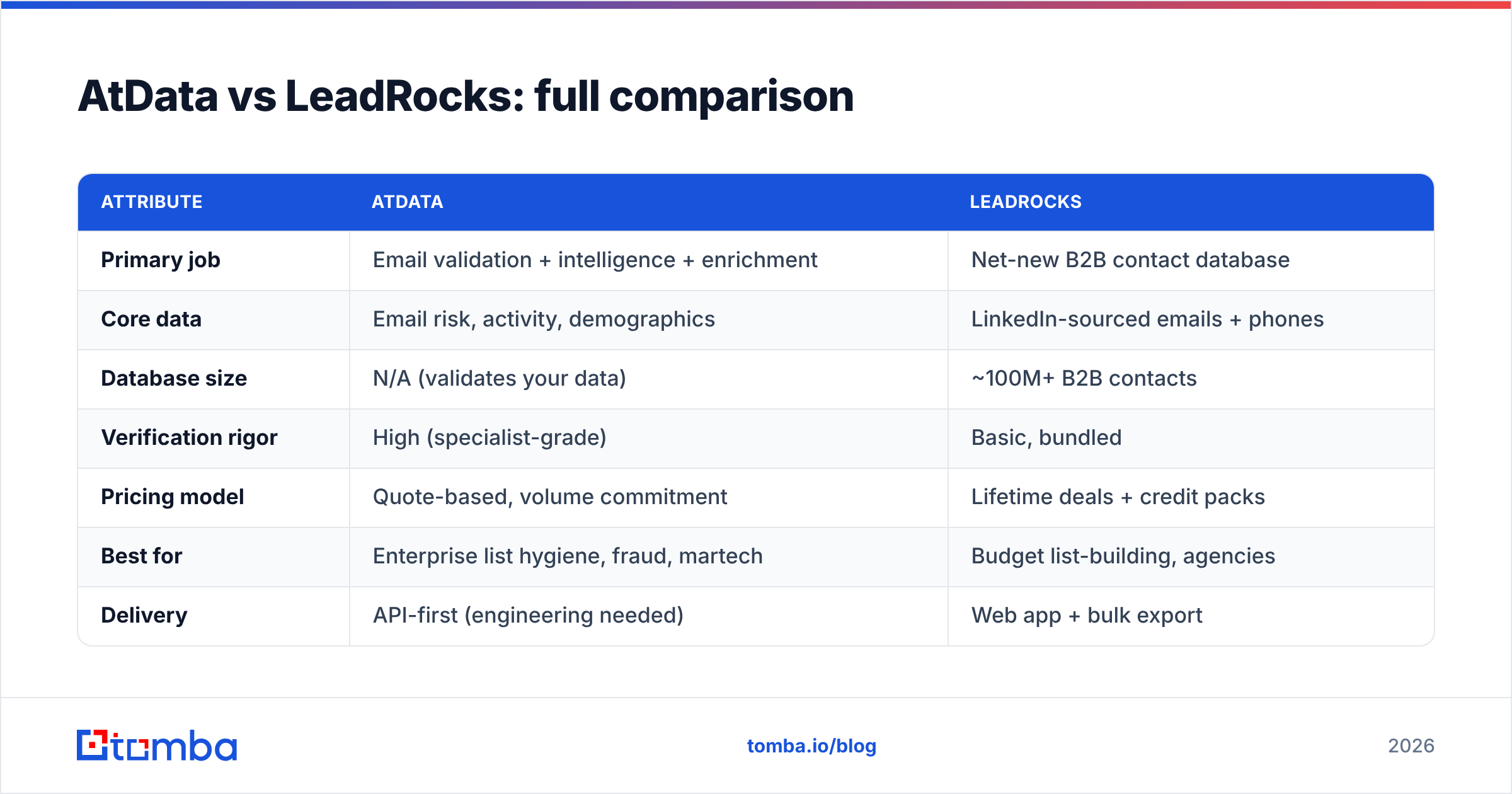
Here's the head-to-head on the attributes that actually change your results.
| Attribute | AtData | LeadRocks |
|---|---|---|
| Primary job | Email validation + intelligence + enrichment | Net-new B2B contact database |
| Core data | Email risk, activity, demographics | LinkedIn-sourced emails + phones |
| Database size | N/A (validates your data) | ~100M+ B2B contacts |
| Verification rigor | High (specialist-grade) | Basic, bundled |
| Pricing model | Quote-based, volume commitment | Lifetime deals + credit packs |
| Best for | Enterprise list hygiene, fraud, martech | Budget list-building, agencies |
| Delivery | API-first (engineering needed) | Web app + bulk export |
| Net-new prospecting | No | Yes |
| Real-time finding | No | Partial |
| Learning curve | High | Low |
The pattern is clear: AtData wins on data quality and depth but demands budget and engineering; LeadRocks wins on cost and accessibility but trades away freshness and verification rigor. Neither is a complete prospecting-plus-deliverability solution on its own.
Which one should you choose?#
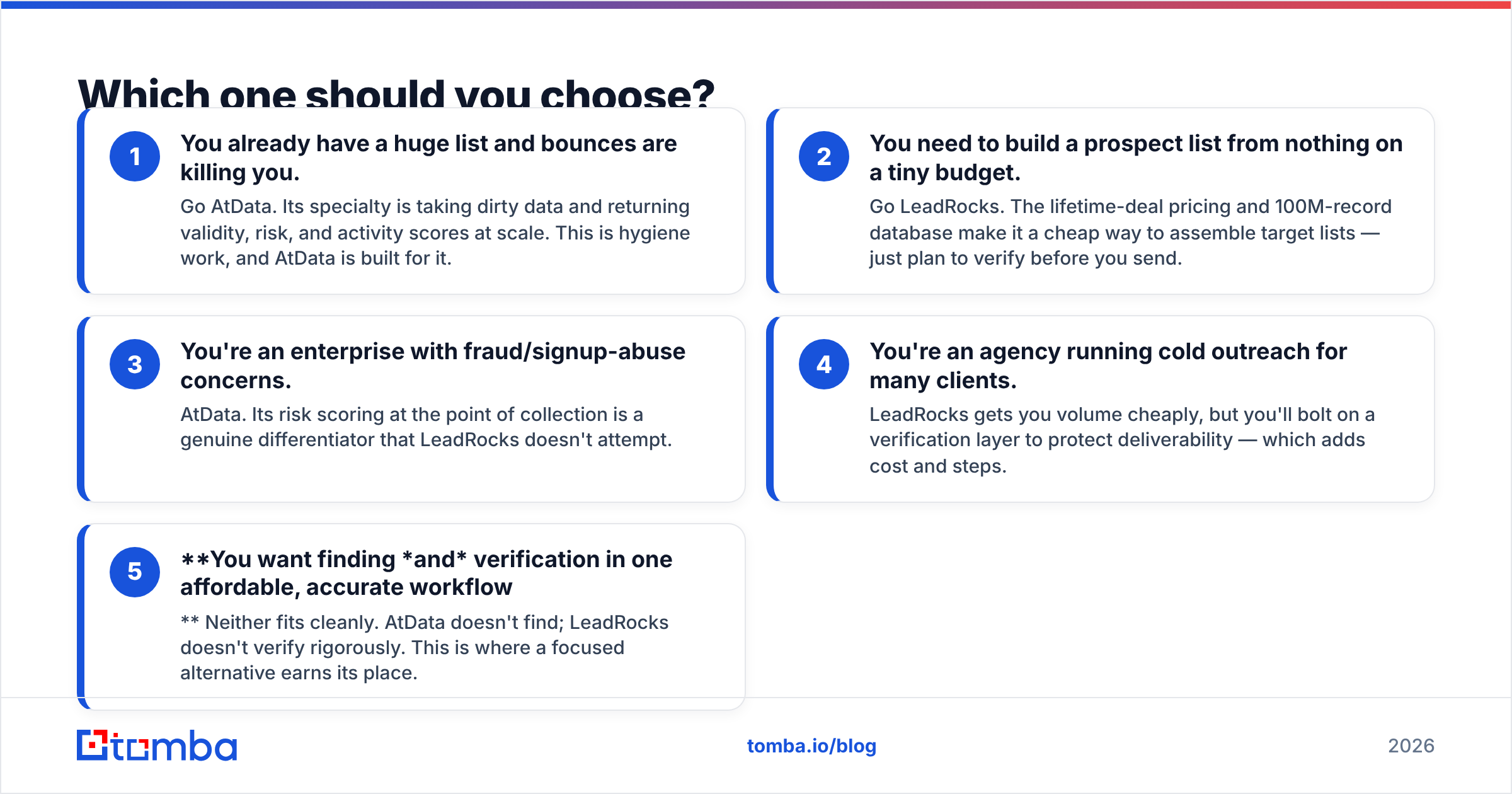
Match the tool to the bottleneck you're actually facing. Here's the decision in five concrete scenarios.
You already have a huge list and bounces are killing you. Go AtData. Its specialty is taking dirty data and returning validity, risk, and activity scores at scale. This is hygiene work, and AtData is built for it.
You need to build a prospect list from nothing on a tiny budget. Go LeadRocks. The lifetime-deal pricing and 100M-record database make it a cheap way to assemble target lists — just plan to verify before you send.
You're an enterprise with fraud/signup-abuse concerns. AtData. Its risk scoring at the point of collection is a genuine differentiator that LeadRocks doesn't attempt.
You're an agency running cold outreach for many clients. LeadRocks gets you volume cheaply, but you'll bolt on a verification layer to protect deliverability — which adds cost and steps.
You want finding and verification in one affordable, accurate workflow. Neither fits cleanly. AtData doesn't find; LeadRocks doesn't verify rigorously. This is where a focused alternative earns its place.

Where does a verification-first tool fit?#
The gap between these two products is the most interesting part of the comparison. AtData is verification without finding. LeadRocks is finding without rigorous verification. Most teams need both, in one place, without an enterprise contract or a stale lifetime database.
That's the lane Tomba is built for. The email finder returns professional addresses by name, company, or domain in real time — so you're working from current data, not a scrape that may be years old. Every result can run through the email verifier, which checks syntax, MX records, and SMTP response, plus a dedicated catch-all verifier for domains that accept everything. Then data enrichment appends the firmographic context AtData users want — without a six-figure commitment.
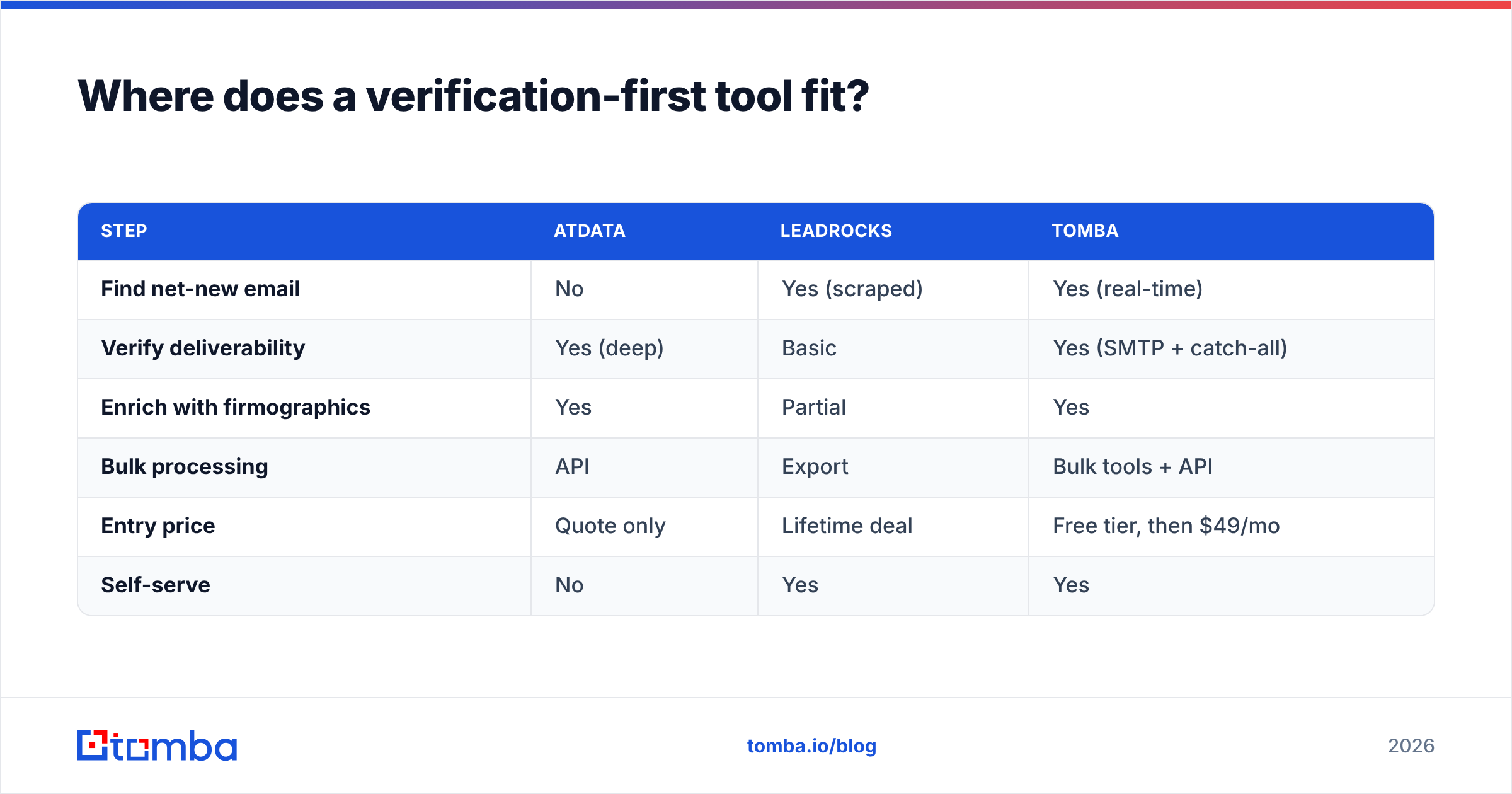
Here's how the three approaches stack up on the workflow that matters: getting a verified, send-ready contact.
| Step | AtData | LeadRocks | Tomba |
|---|---|---|---|
| Find net-new email | No | Yes (scraped) | Yes (real-time) |
| Verify deliverability | Yes (deep) | Basic | Yes (SMTP + catch-all) |
| Enrich with firmographics | Yes | Partial | Yes |
| Bulk processing | API | Export | Bulk tools + API |
| Entry price | Quote only | Lifetime deal | Free tier, then $49/mo |
| Self-serve | No | Yes | Yes |
The point isn't that one tool replaces an enterprise validation platform feature-for-feature. It's that for the typical sales or marketing team, a single workflow that finds a current email, verifies it before you send, and enriches it covers 90% of the job that you'd otherwise split across two very different vendors.
How do pricing models compare?#
Pricing is where these tools telegraph who they're for.
- AtData uses quote-based, volume-committed pricing. There's no public self-serve tier. If you have to ask, you're probably not the target buyer — and onboarding involves a sales conversation and likely an annual commitment.
- LeadRocks leans on lifetime deals and credit packs. The appeal is obvious: pay once (or cheaply), keep access. The catch is that a static database doesn't refresh itself, so "lifetime" data slowly decays in accuracy.
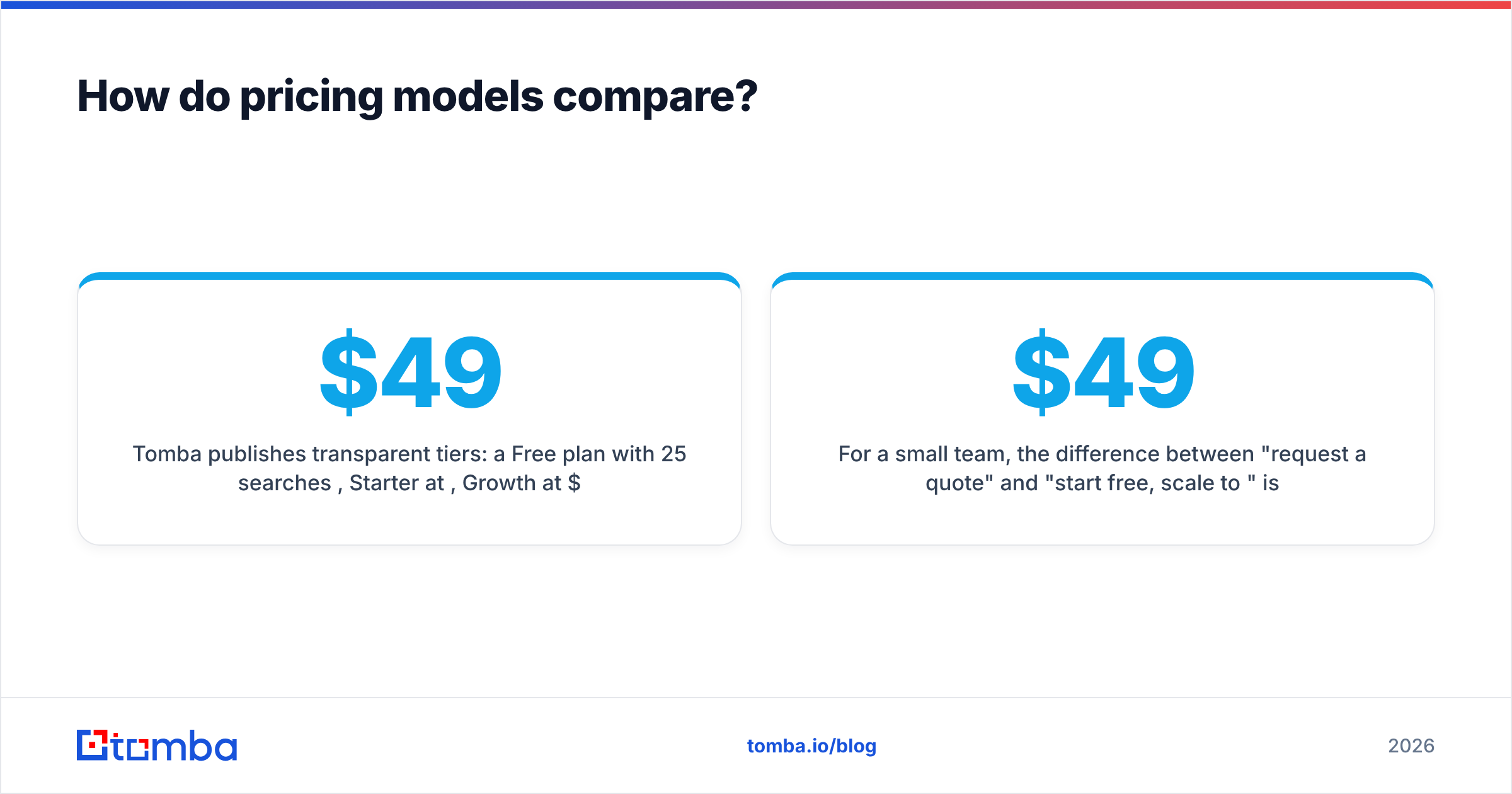
- Tomba publishes transparent tiers: a Free plan with 25 searches/month, Starter at $49/mo, Growth at $99/mo, and Pro at $249/mo, with Enterprise custom. You can see full Tomba pricing without a sales call, and credits cover both finding and verification.
For a small team, the difference between "request a quote" and "start free, scale to $49" is the difference between a procurement cycle and starting today. For an enterprise with compliance and volume needs, AtData's model makes more sense. Be honest with yourself about which org you're actually in.
What about data accuracy and deliverability?#
Accuracy is the whole ballgame, because a cheap contact that bounces costs you more than an expensive one that lands — bounces erode sender reputation and drag down email deliverability for every future campaign.
AtData's strength is precisely here: multi-signal validation and activity scoring are its core product, and independent reviews on G2 reflect that hygiene-first reputation. LeadRocks' weakness is also here: scraped LinkedIn data plus bundled verification means a meaningful share of exported emails are catch-all or outdated, so you carry verification cost downstream whether you planned to or not.
The takeaway for deliverability-conscious teams: never send straight off a bulk export. Whatever you use to find contacts, run them through real verification before the first send. A finder-plus-verifier workflow does this in one motion; a database-only tool forces you to add a second vendor to do it safely.
Verdict: AtData vs LeadRocks#
AtData wins if you're an enterprise that already collects emails and needs specialist-grade validation, fraud scoring, and enrichment, and you have the budget and engineering to operate an API platform.
LeadRocks wins if you're a budget-conscious founder or agency who needs to assemble target lists cheaply and you're prepared to verify before sending.
But most teams sit between those poles — they need to find current contacts and verify them and enrich them, without an enterprise contract or a decaying static database. That combination is what Tomba's Email Finder delivers: real-time discovery by name, company, or domain, SMTP-level verification including catch-all handling, and firmographic enrichment, all on a transparent plan that starts free and scales to $49/mo. Start with the free tier, test it against a sample of your hardest-to-reach prospects, and let bounce rates pick the winner.
// get started
Find, verify and enrich your first contacts today
Start on the free plan with 25 searches a month, then scale when your team is ready.
Free plan · No credit card required · GDPR & CCPA
// about the author