AtData vs Lusha 2026: B2B Data & Email Accuracy Compared
AtData and Lusha solve different halves of the B2B data problem. Here's an honest 2026 breakdown of accuracy, coverage, pricing, and which one your team should actually pay for.
AtData vs Lusha: Which B2B Data Provider Wins in 2026?
Picking between AtData and Lusha is less a head-to-head and more a fork in the road. They sit in the same broad "B2B data" bucket, but they were built to solve different problems. Choosing wrong means you either pay for prospecting muscle you never use, or for email-hygiene depth that doesn't fill your pipeline.
This guide breaks down what each tool actually does, where the data comes from, how pricing works, and which use cases each one wins — without pretending one product is a drop-in replacement for the other.
TL;DR#
- AtData is an email intelligence and verification platform. It validates, scores, and enriches email addresses you already have. It is not a prospecting tool for finding net-new contacts.
- Lusha is a B2B prospecting database. It surfaces net-new emails and direct-dial phone numbers, mostly via a Chrome extension on LinkedIn and company sites.
- They overlap less than the "vs" suggests. AtData cleans and enriches; Lusha discovers. Many teams need a discovery tool plus a verification layer, not one or the other.
- Pricing models differ sharply. AtData leans volume/contract-based for enterprise email programs; Lusha sells per-seat credit plans aimed at individual reps and small teams.
- If your real need is "find and verify business emails affordably," a dedicated email finder with built-in verification — like Tomba's email finder — often beats buying either platform on its own.
What is AtData?#
AtData (formerly TowerData) is an email-centric data company. Its core job is taking email addresses and telling you everything about them: are they real, are they risky, who is behind them, and how engaged that person is likely to be.
The platform's strengths cluster around email hygiene and identity. You feed it a list — say, 200,000 signups or a CRM export — and AtData returns validation results, fraud/risk scores, demographic and firmographic enrichment, and activity signals. Marketers use it to protect sender reputation and improve email deliverability before a big send.
What AtData is not: a place to go find brand-new prospects you've never heard of. It works on data you already possess. You can read more about its positioning on the official AtData site.
What is Lusha?#
Lusha is a B2B prospecting and contact database. Its bread and butter is the Chrome extension: you open a LinkedIn profile or a company website, click the Lusha icon, and it reveals work emails and direct-dial phone numbers for that person or company.
Lusha is built for sales reps and SDRs who need to build outbound lists fast. It also offers bulk enrichment, intent data, and CRM integrations, but the center of gravity is net-new contact discovery — especially phone numbers, which Lusha markets heavily. You can see its current feature set on the Lusha homepage.
What Lusha is not: a deep email-validation engine. It verifies contacts to a degree, but list hygiene at scale and email risk scoring are not its specialty.

How do AtData and Lusha actually differ?#
The cleanest way to understand the split is by the job each one does in your funnel. Here are the core distinctions:
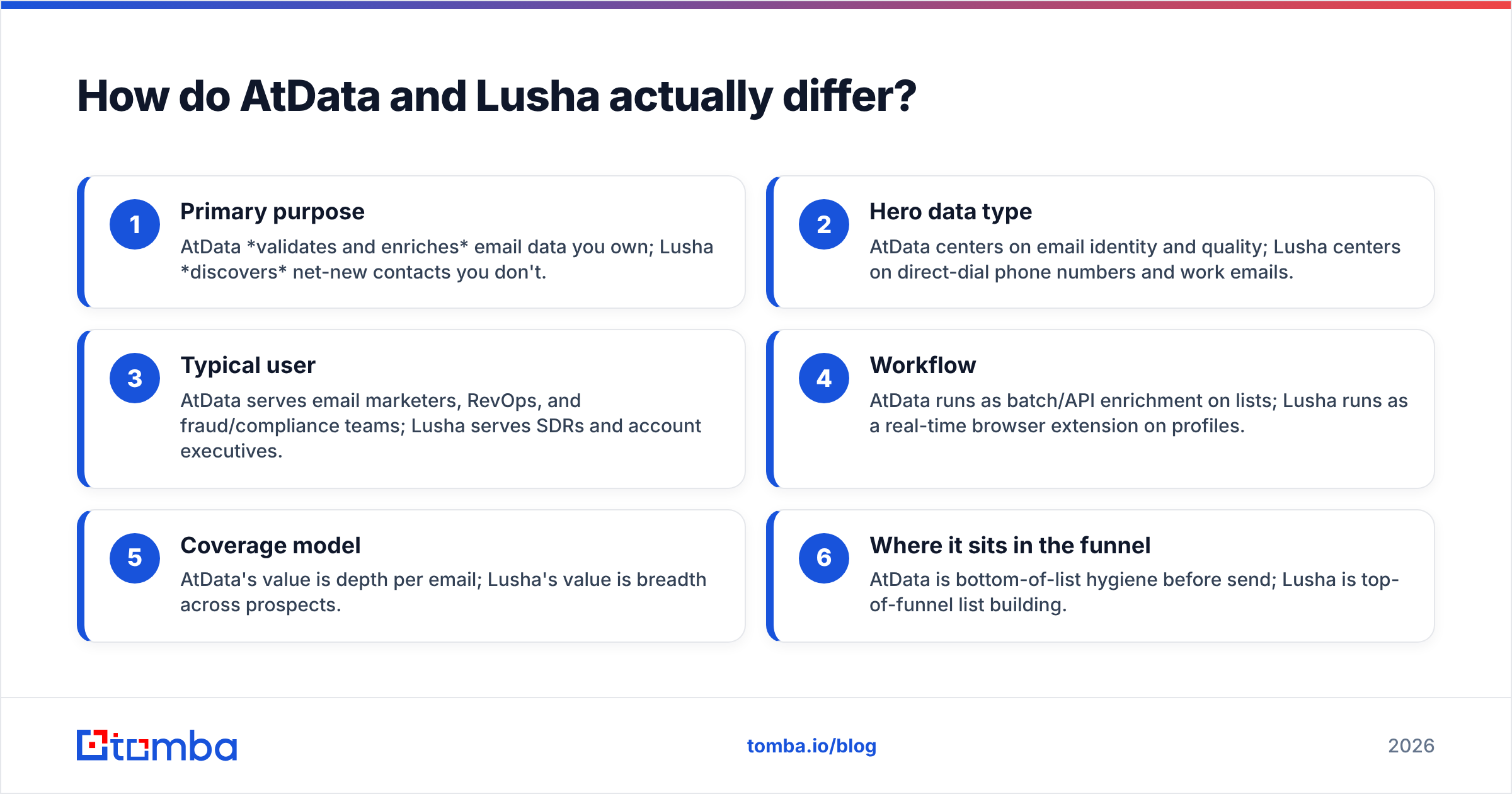
- Primary purpose — AtData validates and enriches email data you own; Lusha discovers net-new contacts you don't.
- Hero data type — AtData centers on email identity and quality; Lusha centers on direct-dial phone numbers and work emails.
- Typical user — AtData serves email marketers, RevOps, and fraud/compliance teams; Lusha serves SDRs and account executives.
- Workflow — AtData runs as batch/API enrichment on lists; Lusha runs as a real-time browser extension on profiles.
- Coverage model — AtData's value is depth per email; Lusha's value is breadth across prospects.
- Where it sits in the funnel — AtData is bottom-of-list hygiene before send; Lusha is top-of-funnel list building.
If you read those six and realize you need both behaviors, that's the honest answer — and it's exactly why a combined find-and-verify tool is worth considering instead.
AtData vs Lusha: side-by-side comparison#
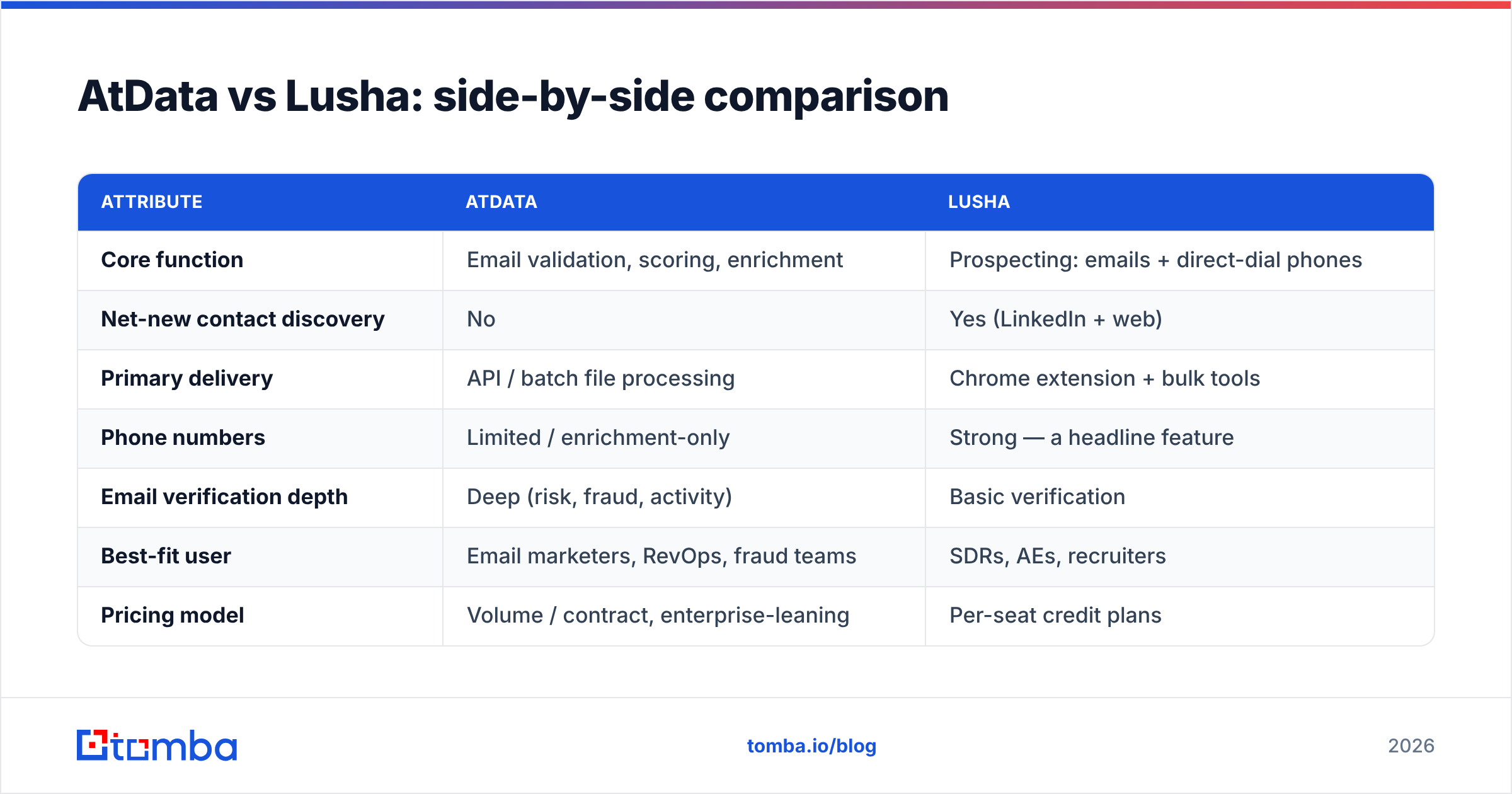
| Attribute | AtData | Lusha |
|---|---|---|
| Core function | Email validation, scoring, enrichment | Prospecting: emails + direct-dial phones |
| Net-new contact discovery | No | Yes (LinkedIn + web) |
| Primary delivery | API / batch file processing | Chrome extension + bulk tools |
| Phone numbers | Limited / enrichment-only | Strong — a headline feature |
| Email verification depth | Deep (risk, fraud, activity) | Basic verification |
| Best-fit user | Email marketers, RevOps, fraud teams | SDRs, AEs, recruiters |
| Pricing model | Volume / contract, enterprise-leaning | Per-seat credit plans |
| Free option | Limited trial | Free tier (capped credits) |
| Compliance focus | High (email risk, fraud) | GDPR/CCPA-aware, prospecting-first |
The pattern is clear: these tools are complements far more than substitutes. The "winner" depends entirely on whether your gap is quality (AtData) or quantity of new contacts (Lusha).
Which one is more accurate?#
Accuracy means different things for each tool, so a single score is misleading.
For AtData, accuracy is about validation correctness and enrichment depth — does it correctly flag dead, risky, or fraudulent addresses, and is the appended data right? This is where AtData genuinely shines, because email quality is its entire reason for existing.
For Lusha, accuracy is about whether the discovered email and phone number actually reach a live person. Lusha's phone data is well-regarded, but like every prospecting database, freshness varies by region, seniority, and how recently the record was sourced. Independent reviews on G2 consistently show prospecting databases trading blows on coverage and accuracy depending on the target market.

The practical takeaway: even a strong prospecting tool benefits from a dedicated verification pass before you hit send. Discovery and verification are separate disciplines, and bolting a real email verifier onto your prospecting output is how serious teams keep bounce rates low.
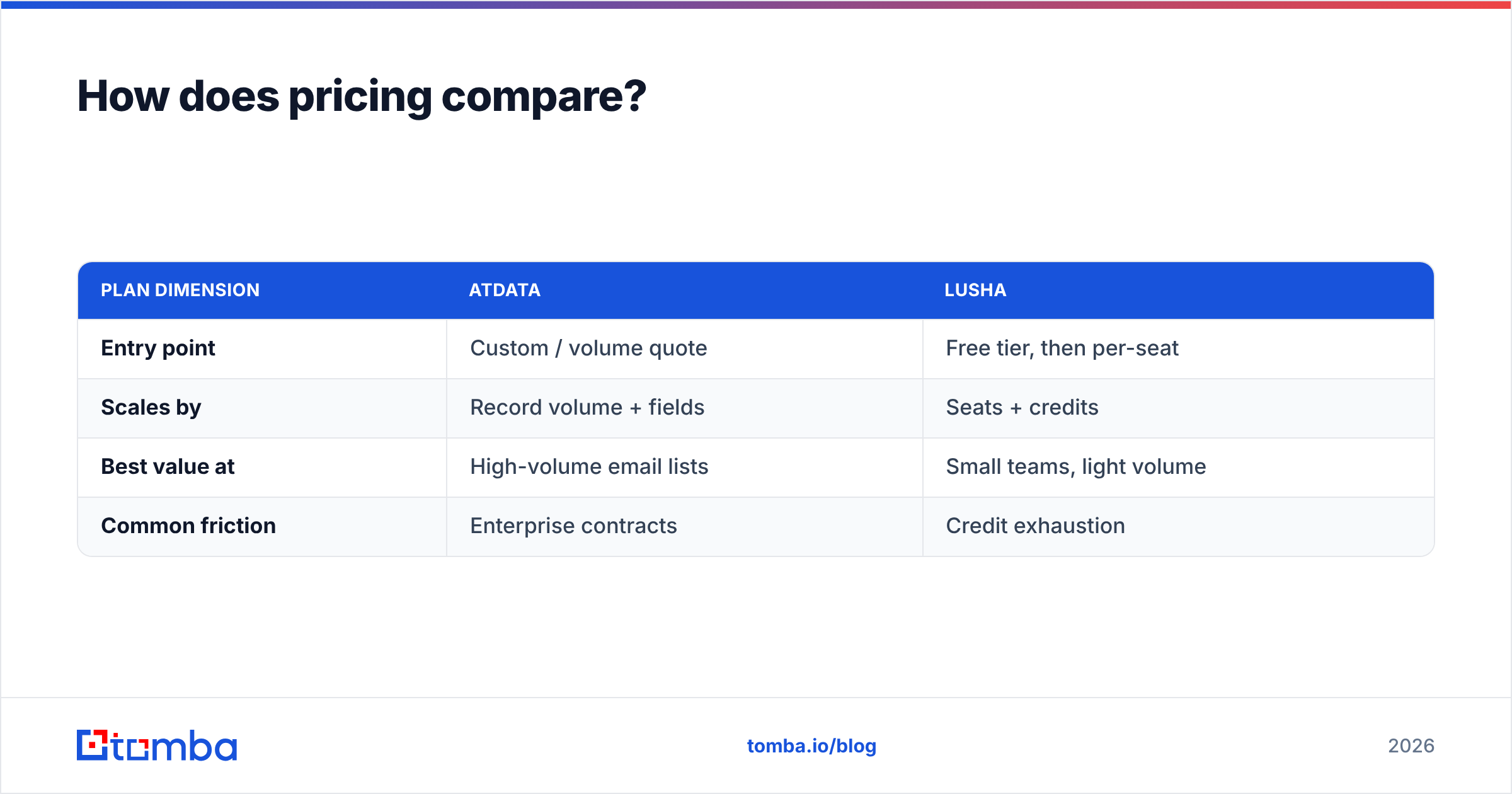
How does pricing compare?#
This is where many buyers get surprised.
AtData uses volume- and contract-based pricing geared toward email programs processing large lists. It is rarely a casual, swipe-a-card purchase — pricing typically scales with record volume and the enrichment fields you turn on. That makes it cost-effective for high-volume email senders and a poor fit for a single rep wanting a few hundred contacts.
Lusha sells per-seat plans with monthly credit allowances, plus a free tier with limited credits. The model is friendlier to individuals and small teams, but credits get consumed quickly during heavy prospecting, and per-seat costs add up across a growing sales org. The classic complaint is the "credit cap" wall mid-month.
| Plan dimension | AtData | Lusha |
|---|---|---|
| Entry point | Custom / volume quote | Free tier, then per-seat |
| Scales by | Record volume + fields | Seats + credits |
| Best value at | High-volume email lists | Small teams, light volume |
| Common friction | Enterprise contracts | Credit exhaustion |
If predictable cost-per-contact matters to you, it's worth comparing both against transparent, search-based pricing. Tomba's plans are public — a free tier of 25 searches per month, Starter at $49/mo, Growth at $99/mo, and Pro at $249/mo — with the full breakdown on the Tomba pricing page.
When should you choose AtData?#
Pick AtData when your problem is data quality, not data discovery. Specifically:
- You run high-volume email marketing and need to protect sender reputation before large sends.
- You have a big CRM or signup database that needs validation, de-risking, and enrichment.
- Fraud prevention and email risk scoring are part of your compliance or onboarding flow.
- You already have contacts and want to know more about them, not find new ones.
AtData is overkill — and the wrong tool — if you're a rep trying to build a fresh outbound list from scratch.
When should you choose Lusha?#
Pick Lusha when your problem is finding net-new people quickly, especially when you need phone numbers:
- You're an SDR or AE prospecting on LinkedIn and want emails and direct dials in two clicks.
- Cold calling is core to your motion, and phone coverage is a priority.
- You want a low-friction Chrome extension your reps will actually adopt.
- Your team is small enough that per-seat credit pricing still pencils out.
Lusha is the wrong tool if your real need is scrubbing a million-record list or scoring email risk at scale.
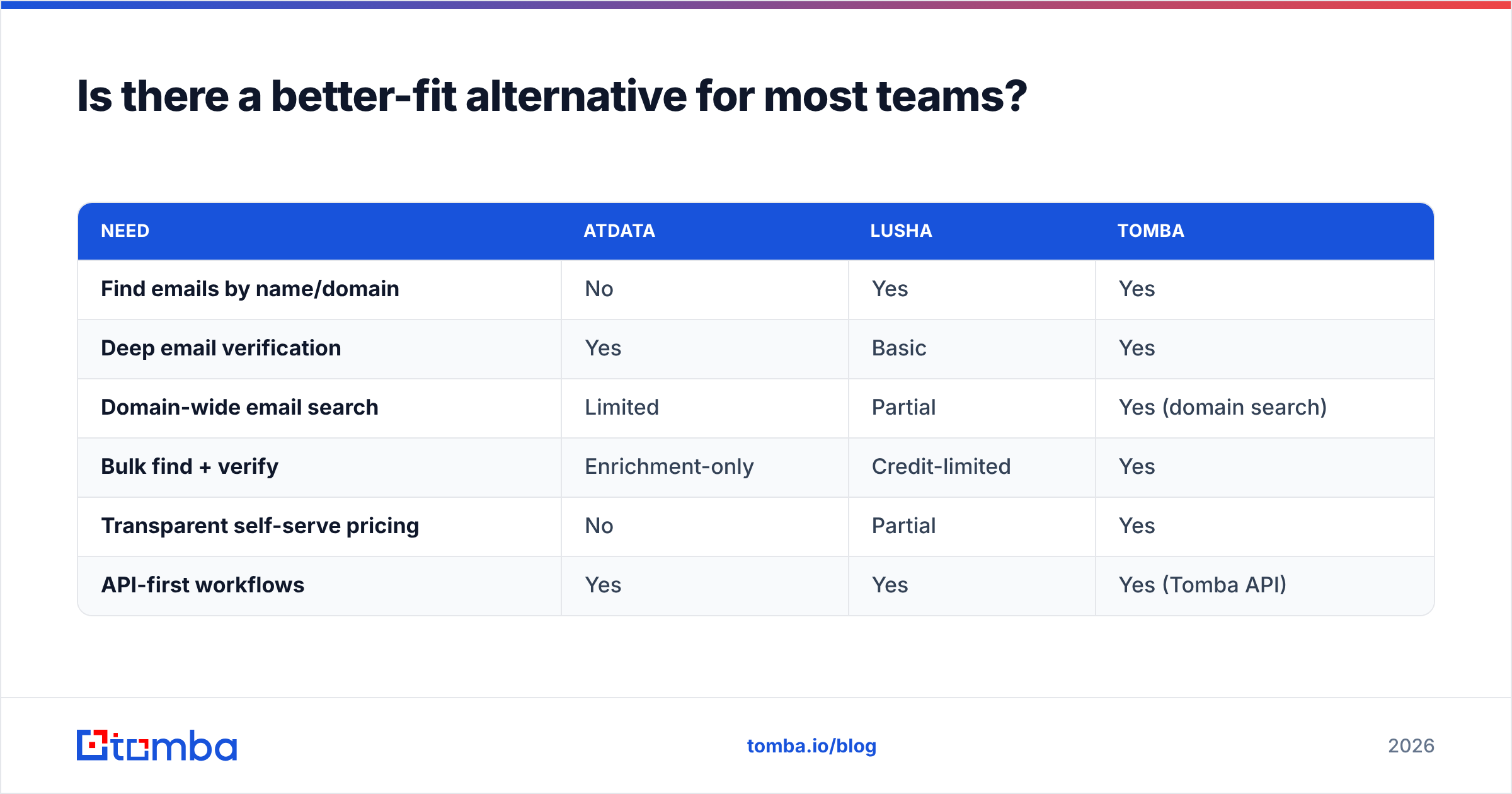
Is there a better-fit alternative for most teams?#
For a large share of buyers, the honest answer is that neither extreme fits — and that's the gap a focused email finder fills.
Most teams don't need AtData's enterprise-grade fraud scoring or Lusha's per-seat phone emphasis. They need to find accurate business emails by name or domain, verify them, and push them into a CRM without a contract negotiation or a mid-month credit wall. That's a narrower, cheaper, more controllable job.
Here's how a dedicated email-finding stack maps against the two:
| Need | AtData | Lusha | Tomba |
|---|---|---|---|
| Find emails by name/domain | No | Yes | Yes |
| Deep email verification | Yes | Basic | Yes |
| Domain-wide email search | Limited | Partial | Yes (domain search) |
| Bulk find + verify | Enrichment-only | Credit-limited | Yes |
| Transparent self-serve pricing | No | Partial | Yes |
| API-first workflows | Yes | Yes | Yes (Tomba API) |
Tomba leans into the find-and-verify core: you can search a company's domain search, confirm addresses with the built-in email verifier, and enrich records through the same workflow — all on public pricing. Where Tomba is honestly not the answer: if your single biggest need is bulk direct-dial phone coverage for heavy cold calling, a phone-first database like Lusha will out-cover it, though Tomba does offer a phone finder for B2B numbers.
How to decide in under five minutes#
Run this quick test:
- Do you mostly need to find people you don't have yet? → Lean Lusha (or a dedicated email finder).
- Do you mostly need to clean and score email you already own? → Lean AtData.
- Do you need accurate emails by name/domain at a predictable price? → A focused email finder is usually the smarter buy.
- Is direct-dial phone volume your #1 priority? → Lusha keeps the edge.
- Do you want one workflow for find + verify + enrich? → Consolidate on an email-finder platform and skip paying two vendors.
The mistake to avoid is buying a heavyweight platform to do a lightweight job — or assuming a prospecting extension will keep your list clean. Match the tool to the actual gap in your funnel.
The bottom line#
AtData and Lusha aren't really rivals; they're specialists. AtData is the email-quality engine for teams who already have data and need it trustworthy. Lusha is the prospecting extension for reps who need new contacts and phone numbers fast. The "versus" only matters once you've named your real problem.
If that problem is the common one — finding verified business emails by name or domain, affordably, without contracts or credit cliffs — start with a tool built for exactly that. Try the Tomba Email Finder: free to test with 25 searches a month, transparent paid plans from $49/mo, and built-in verification so the emails you find are ones that actually land. Find the contacts, confirm they're real, and move on with your pipeline.
// get started
Find, verify and enrich your first contacts today
Start on the free plan with 25 searches a month, then scale when your team is ready.
Free plan · No credit card required · GDPR & CCPA
// about the author