Atompark Software Pricing, Reviews, Pros and Cons (2026)
An honest 2026 breakdown of Atompark Software pricing, real user reviews, and the pros and cons of its email and SMS marketing tools — plus where it falls short for B2B outbound.
Atompark Software is one of the oldest names in bulk email and SMS marketing, but "oldest" cuts both ways. If you are evaluating it in 2026, you need to know what you actually pay, what real users complain about, and whether a desktop-era mass-mailer still fits a modern B2B outbound stack. This review answers all three without the marketing gloss.
TL;DR#
- Atompark Software sells a family of products — Atomic Mail Sender, Atomic Email Studio, Atomic Email Hunter, and the ePochta SMS/email platform — mostly on a one-time license or credit model rather than a clean monthly SaaS subscription.
- Pricing ranges from roughly $20 for small utilities to $300+ for studio bundles, plus per-message SMS credits; expect add-on costs for verification and dedicated support.
- Pros: low long-term cost via perpetual licenses, an all-in-one desktop toolkit, and a built-in email extractor.
- Cons: dated UX, deliverability risk from desktop SMTP sending, thin native CRM integrations, and Windows-centric tooling.
- For B2B prospecting, pair or replace it with a verified-data tool. Atompark finds and blasts; it does not give you accurate, compliant contact data at scale.
What is Atompark Software?#
Atompark Software is a Ukraine-founded vendor (operating since the early 2000s) that builds desktop and web tools for email marketing, SMS marketing, and email address harvesting. Think of it less as a single product and more as a hardware-store aisle: you buy the individual tool you need rather than one unified subscription.
The lineup most buyers evaluate looks like this:
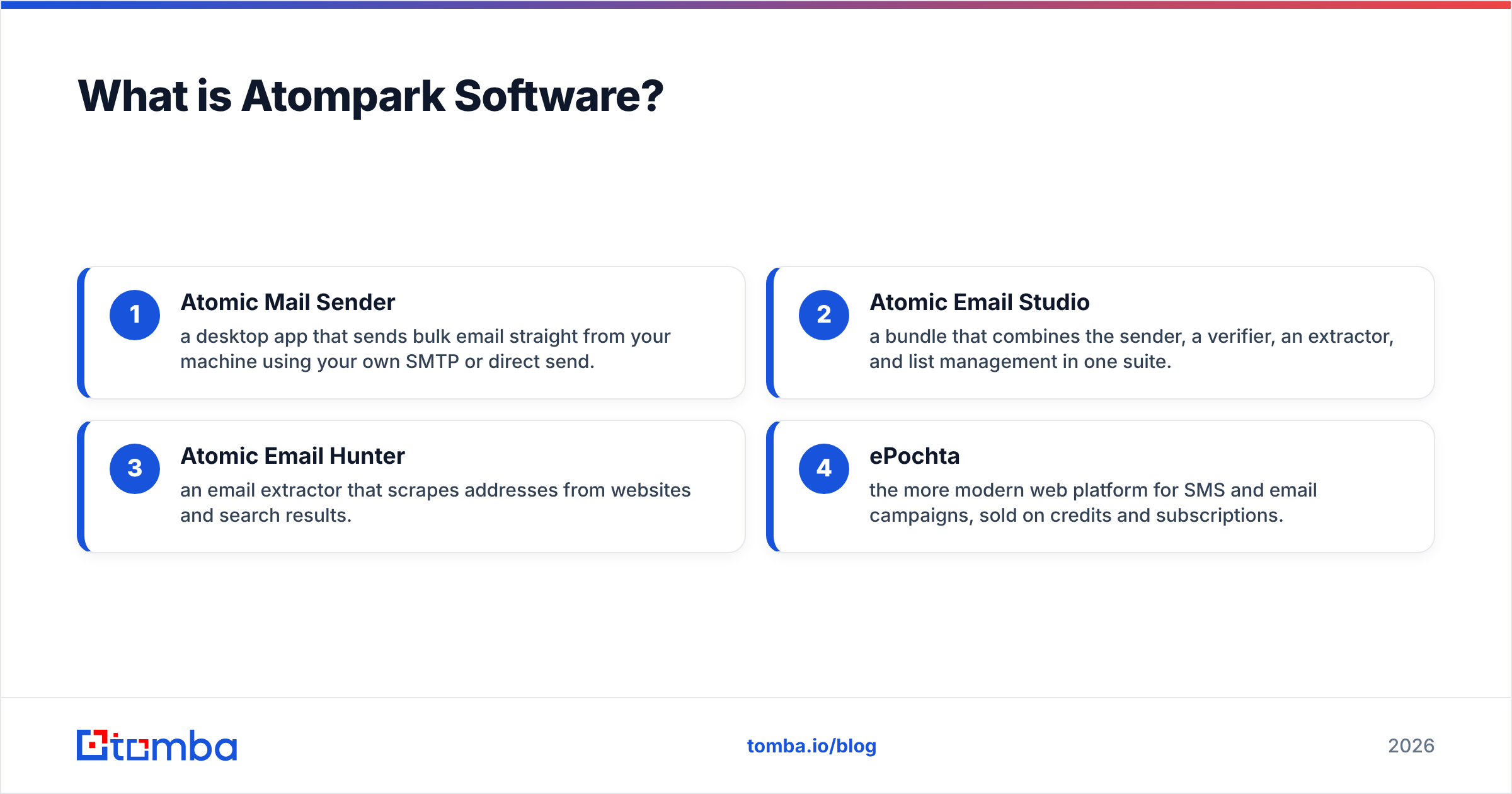
- Atomic Mail Sender — a desktop app that sends bulk email straight from your machine using your own SMTP or direct send.
- Atomic Email Studio — a bundle that combines the sender, a verifier, an extractor, and list management in one suite.
- Atomic Email Hunter — an email extractor that scrapes addresses from websites and search results.
- ePochta — the more modern web platform for SMS and email campaigns, sold on credits and subscriptions.
This split matters because it shapes everything about Atompark Software pricing. You are rarely paying one number; you are assembling a basket.

How much does Atompark Software cost in 2026?#
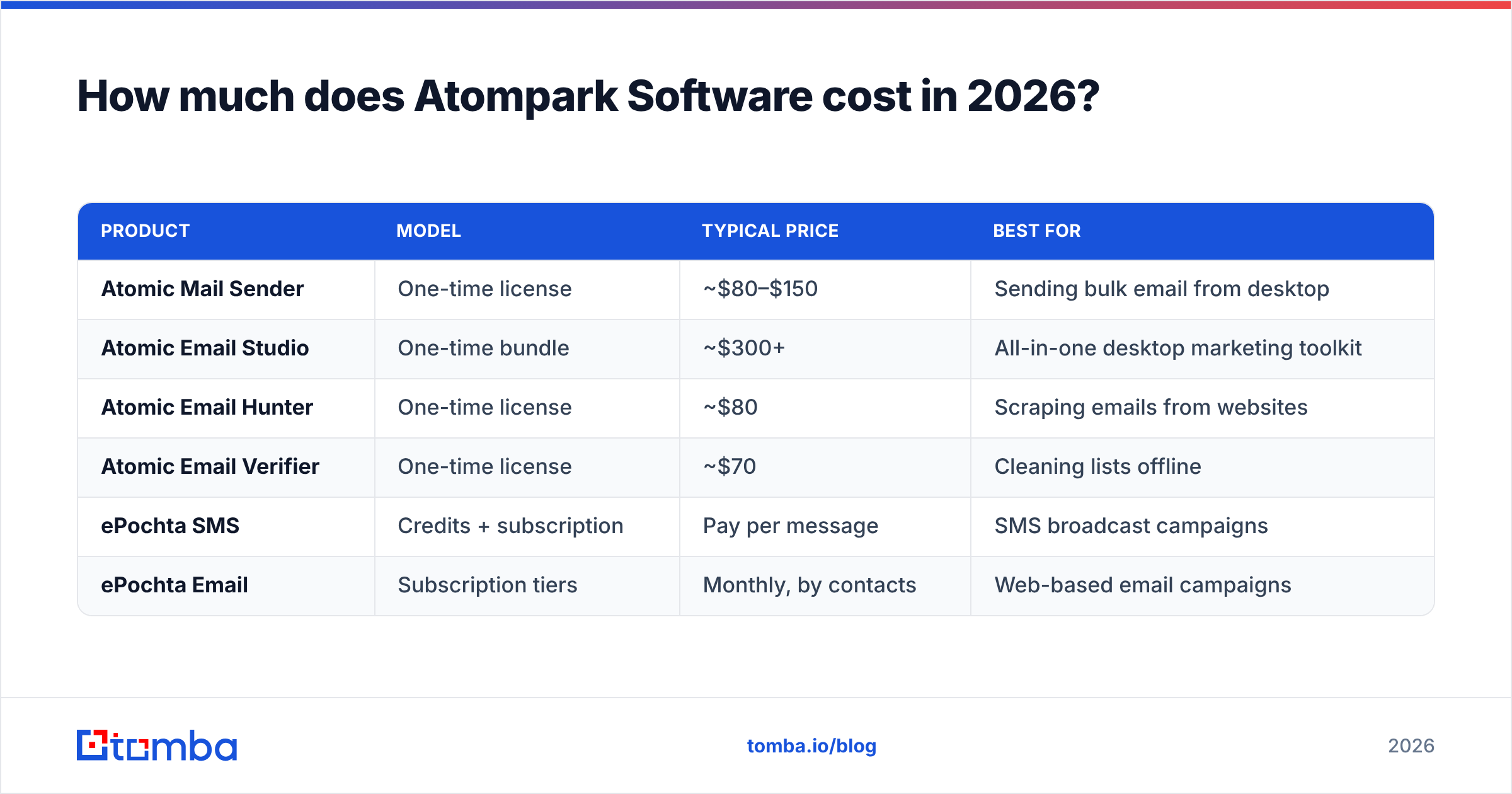
Short answer: most Atomic-branded tools use a one-time perpetual license (often with a year of free updates), while ePochta uses recurring subscriptions and SMS credits. That makes the headline numbers look cheap, but the total cost of ownership depends on updates, verification volume, and message credits.
Here is a representative breakdown. Treat these as ballpark figures — Atompark runs frequent discounts and prices shift by region, so confirm on the official Atompark site before buying.
| Product | Model | Typical price | Best for |
|---|---|---|---|
| Atomic Mail Sender | One-time license | ~$80–$150 | Sending bulk email from desktop |
| Atomic Email Studio | One-time bundle | ~$300+ | All-in-one desktop marketing toolkit |
| Atomic Email Hunter | One-time license | ~$80 | Scraping emails from websites |
| Atomic Email Verifier | One-time license | ~$70 | Cleaning lists offline |
| ePochta SMS | Credits + subscription | Pay per message | SMS broadcast campaigns |
| ePochta Email | Subscription tiers | Monthly, by contacts | Web-based email campaigns |
A few cost realities that the price page underplays:
- Updates expire. A perpetual license usually includes one year of updates; after that you may pay to stay current.
- Verification is separate. List cleaning is often its own tool or credit pool, not bundled into the sender.
- SMS is metered. ePochta SMS pricing depends on destination country and volume, so a "cheap" campaign to one region can be expensive to another.
For teams used to predictable monthly SaaS, this fragmented model is the single biggest adjustment. Compare it to something like transparent Tomba pricing, where a Free tier (25 searches/mo), Starter at $49/mo, and Growth at $99/mo cover finding and verifying in one place.
What do Atompark Software reviews say?#
Aggregated feedback from G2 and Capterra paints a consistent picture: people who want a cheap, self-hosted bulk sender are satisfied, while people who expect modern SaaS polish and high inbox rates are frustrated.
Common themes from real reviews:
What users praise
- Low, predictable lifetime cost compared with subscription email platforms.
- The all-in-one desktop suite — extract, verify, and send without juggling vendors.
- Genuinely useful for one-off or low-frequency campaigns where you do not want a recurring bill.
What users criticize
- The interface feels like software from a decade ago; onboarding is clunky.
- Deliverability is inconsistent because you are responsible for your own sending reputation.
- Support response times and documentation lag behind subscription competitors.
- Windows-first design leaves Mac and Linux users stranded or running virtual machines.
The verifier and extractor get the most polarized reviews. They work, but accuracy depends heavily on the freshness of the source data — and scraped data ages fast.
What are the pros and cons of Atompark Software?#
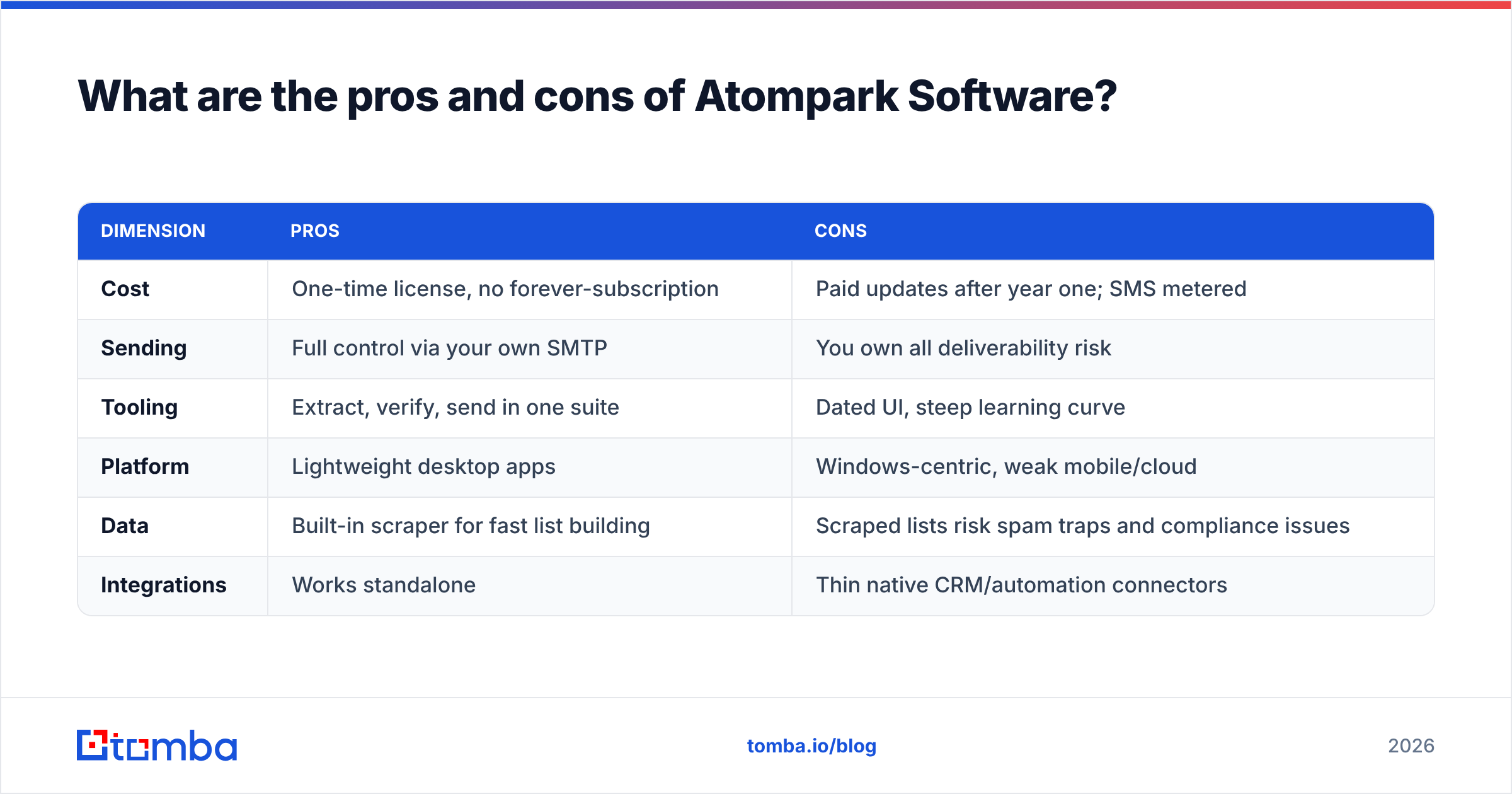
Here is the honest balance sheet. No tool is all upside, and Atompark's trade-offs are unusually stark because of its desktop-first heritage.
| Dimension | Pros | Cons |
|---|---|---|
| Cost | One-time license, no forever-subscription | Paid updates after year one; SMS metered |
| Sending | Full control via your own SMTP | You own all deliverability risk |
| Tooling | Extract, verify, send in one suite | Dated UI, steep learning curve |
| Platform | Lightweight desktop apps | Windows-centric, weak mobile/cloud |
| Data | Built-in scraper for fast list building | Scraped lists risk spam traps and compliance issues |
| Integrations | Works standalone | Thin native CRM/automation connectors |
The deliverability catch#
The biggest hidden cost is not on any price page: sender reputation. When you send bulk email from a desktop app over your own SMTP, you inherit every consequence of a bad list. Hit enough spam traps and your domain reputation tanks, which hurts every email you send afterward — including legitimate sales replies.
This is where scraping-plus-blasting gets dangerous. Harvested addresses are exactly the kind of stale, unverified data that triggers bounces and complaints. If you go this route, you must clean aggressively. A dedicated email verifier and an understanding of email deliverability are not optional extras — they are the difference between landing in the inbox and burning your domain.

Is Atompark Software good for B2B outbound in 2026?#
Mixed. It is a competent broadcast tool and a weak prospecting tool, and modern B2B outbound is mostly prospecting.
Atompark answers "how do I send to a list I already have?" It does not answer "how do I build an accurate, targeted list of decision-makers with verified emails and phone numbers?" The Email Hunter scrapes, but scraping is a blunt instrument: you get whatever addresses appear on a page, not the specific buyer persona you want, and you get no confidence score on whether those addresses are still live.
For real outbound you need three things Atompark only partly delivers:
- Targeted discovery — find the right people at the right companies, not just any email on a domain.
- Verification at the point of capture — know an address is valid before it enters your sequence.
- Enrichment and routing — push clean contacts into your CRM and sequencing tools automatically.
Atompark covers a slice of step one and a slice of step two, all on the desktop, with little of step three. That gap is exactly where a focused data tool earns its place in the stack.
How does Atompark Software compare to a modern data-first stack?#
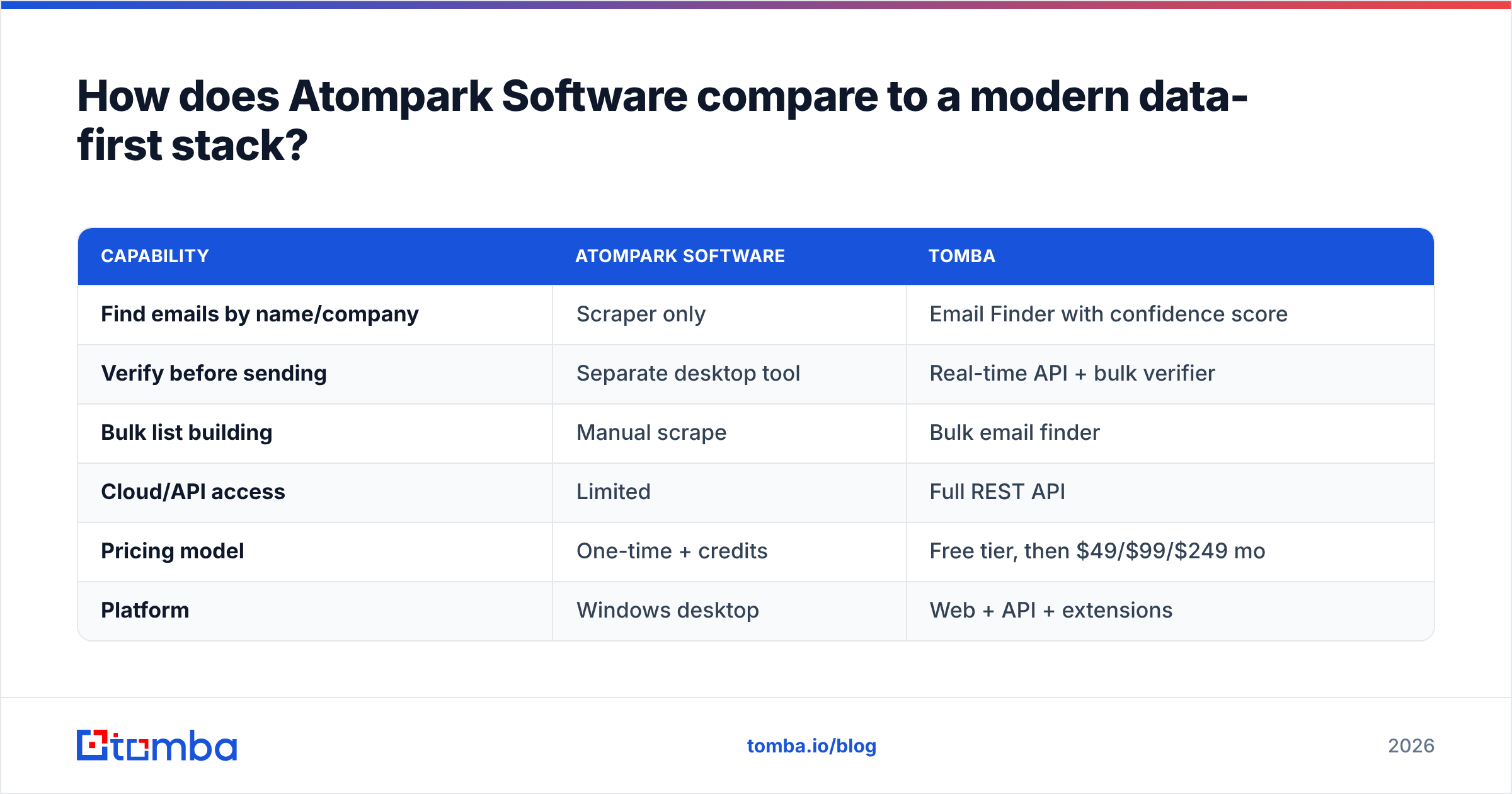
The cleanest way to see the difference is to separate "sending" from "sourcing." Atompark is strong-ish at sending and weak at sourcing accurate data. A platform like Tomba is built for sourcing — finding and verifying business emails, then handing them to whatever sender you prefer.
| Capability | Atompark Software | Tomba |
|---|---|---|
| Find emails by name/company | Scraper only | Email Finder with confidence score |
| Verify before sending | Separate desktop tool | Real-time API + bulk verifier |
| Bulk list building | Manual scrape | Bulk email finder |
| Cloud/API access | Limited | Full REST API |
| Pricing model | One-time + credits | Free tier, then $49/$99/$249 mo |
| Platform | Windows desktop | Web + API + extensions |
The point is not that one replaces the other entirely. If you genuinely need a cheap perpetual desktop sender, Atompark still fills that niche. But the data feeding that sender should come from a source built for accuracy and compliance, not a scraper. Feed a great sender bad data and you get great delivery of email nobody asked for.
What are the best Atompark Software alternatives?#
Your alternative depends on which Atompark job you are replacing.
- Replacing the scraper / email finder: use a verified email-finding platform. This is where data accuracy and a real confidence score matter most.
- Replacing the verifier: use a dedicated cloud verifier that handles catch-all and role accounts properly.
- Replacing the sender: modern cold-email senders (Instantly, Saleshandy, and similar) handle warmup and rotation that a desktop app cannot.
- Replacing the SMS side (ePochta): mainstream SMS APIs offer better deliverability reporting and global routing.
For the sourcing layer — the part that determines whether your campaigns even have a chance — most B2B teams in 2026 want a tool that finds, verifies, and enriches in one flow with an API. That is the gap Atompark never closed, and it is the most important one for revenue.
Frequently asked questions#
Is Atompark Software free? No, but it offers trial versions of most Atomic tools with sending or extraction limits. The ePochta platform has limited free credits to test SMS and email sending.
Does Atompark work on Mac? The Atomic desktop suite is Windows-first. Mac users typically run it through a virtual machine or use the web-based ePochta instead.
Is Atompark Software good for cold email? It can send cold email, but you carry all the deliverability risk because you send from your own SMTP. Without disciplined list verification and warmup, cold campaigns from a desktop sender often land in spam.
Is scraping emails with Atompark legal? Scraping public addresses is a legal gray area and is restricted under regulations like GDPR and CAN-SPAM depending on how you use the data. Always confirm consent and lawful basis before emailing scraped contacts.
The bottom line#
Atompark Software is a capable, budget-friendly relic: a one-time-purchase desktop toolkit that still serves marketers who want to own their sending and avoid subscriptions. The pricing is genuinely low over time, and the all-in-one Atomic suite is convenient. But the dated UX, Windows lock-in, self-managed deliverability, and — most importantly — its reliance on scraped data make it a poor foundation for serious B2B outbound in 2026.
If your real problem is finding accurate, verified contacts for decision-makers and pushing them into your campaigns, start with the data layer, not the sender. Try the Tomba Email Finder to source professional emails by name, company, or domain — each returned with a confidence score and verification — then send with whatever tool you already trust. Clean data is the cheapest deliverability insurance you will ever buy, and it is the one thing a scraper-and-blaster can never give you.
Ready to find emails that actually work?
Join 150,000+ professionals who stopped guessing and started sending. Free credits on signup — no credit card required.
Get the Tomba newsletter
Practical outbound tactics and product updates — once every two weeks.
About the author