Atompark Software vs GetProspect: Full 2026 Comparison
GetProspect is a cloud email finder; Atompark is a desktop email marketing suite. Here's how they compare on features, pricing, and accuracy in 2026 — and when a dedicated finder beats both.
TL;DR
- Different categories, not direct rivals. Atompark Software is a desktop-installed email marketing and extraction suite (Atomic Mail Sender, Atomic Email Hunter, Atomic Email Studio). GetProspect is a cloud-based B2B email finder and lead-generation platform.
- Atompark wins if you want one-time-purchase desktop software for sending bulk campaigns and scraping public pages.
- GetProspect wins if you want a modern, browser-based email finder with a LinkedIn extension, verification, and a contact database.
- Pricing models clash: Atompark leans on perpetual licenses; GetProspect runs monthly subscriptions with a free tier.
- Neither is purpose-built for high-accuracy prospecting at scale — a dedicated finder like Tomba often beats both on verified-email quality and API access.
What are Atompark Software and GetProspect?#
Here is the short version: these two products solve different problems, and most "Atompark Software vs GetProspect" searches really come down to "do I need a desktop email-marketing toolkit or a cloud email finder?"
Atompark Software is a long-running vendor (active since the early 2000s) that sells a family of Windows desktop applications. Think of it like a Swiss Army knife you install on your machine: Atomic Mail Sender for bulk sending, Atomic Email Hunter for extracting addresses from web pages, Atomic Email Studio as an all-in-one bundle, and Atomic Email Verifier for list cleaning. Most of these are sold as perpetual licenses — you pay once and own the version.
GetProspect is a cloud SaaS platform focused on B2B lead generation. Its core is an email finder that returns business addresses from a name and company or a domain, paired with a LinkedIn Chrome extension, bulk lookups, built-in verification, and a lightweight CRM. You log in through a browser, your credits live in the cloud, and your team shares one workspace.
The analogy that helps: Atompark is a power drill you keep in the garage, while GetProspect is a rented workshop you access online. Both can put a hole in the wall, but the workflow, cost structure, and maintenance are completely different.
How do Atompark Software and GetProspect differ at a glance?#
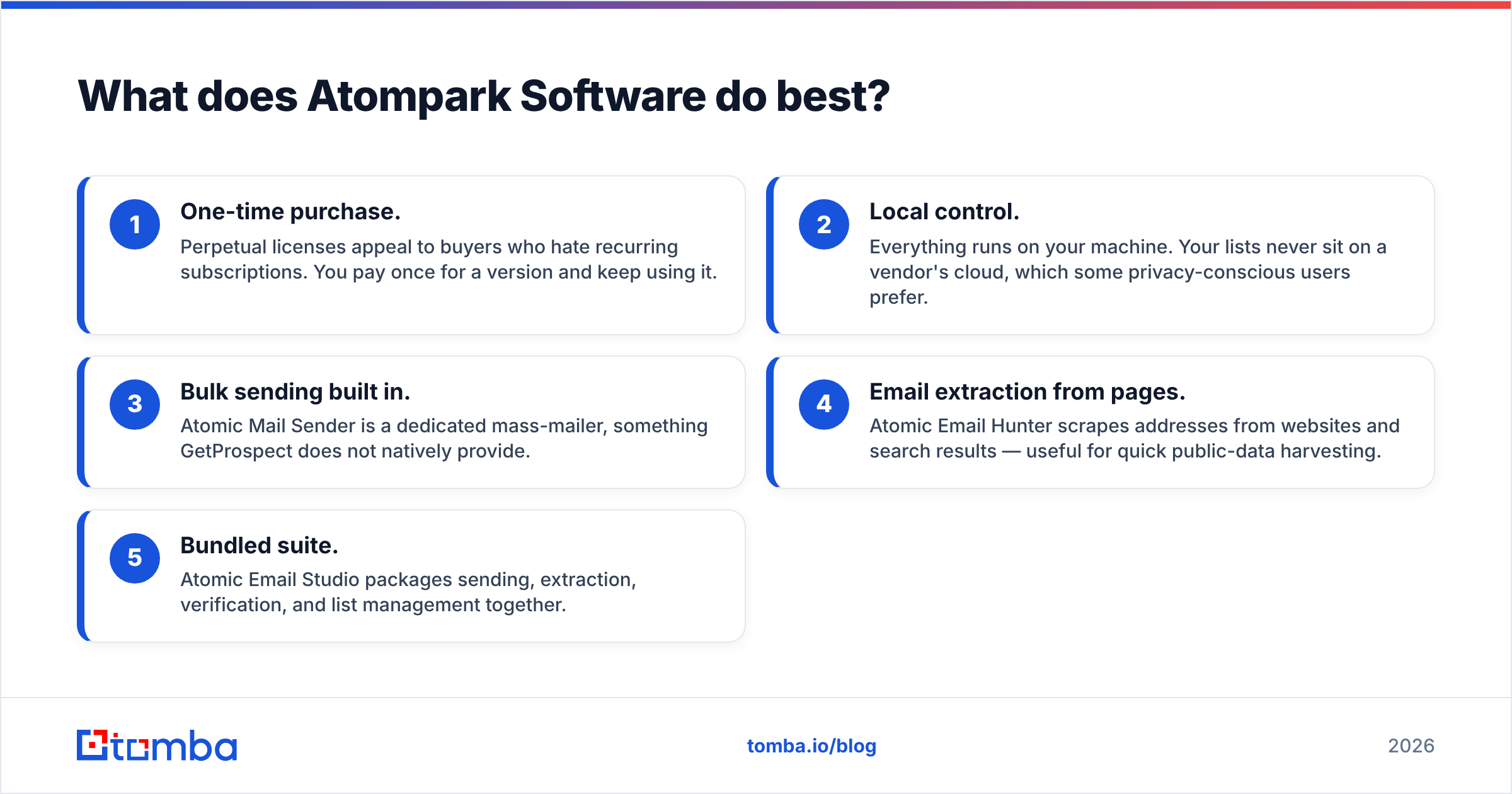
Before pricing and accuracy, it helps to map the core attributes side by side. This is the structured comparison most buyers are looking for.
| Attribute | Atompark Software | GetProspect |
|---|---|---|
| Product type | Desktop apps (Windows) | Cloud SaaS (browser) |
| Primary use | Bulk email sending + extraction | B2B email finding + lead gen |
| Pricing model | Mostly one-time license | Monthly/annual subscription |
| Free option | Trial versions | Free plan (limited emails) |
| LinkedIn extension | No native finder | Yes |
| Built-in verification | Atomic Email Verifier (separate) | Included |
| Contact database | No | Yes (B2B records) |
| API access | Limited | Yes |
| Team collaboration | Per-seat installs | Shared cloud workspace |
| Best for | Solo marketers, agencies on Windows | Modern B2B sales/SDR teams |
A few takeaways jump out. GetProspect is built around the prospecting workflow that sales teams actually run today — find on LinkedIn, verify, push to CRM. Atompark is built around the older marketing motion of building a list, loading a sender, and blasting a campaign from your own machine.

That desktop model is not automatically bad. It just changes who the tool fits.
What does Atompark Software do best?#
Atompark's strengths cluster around ownership and sending. If your priorities match the list below, it earns a serious look.
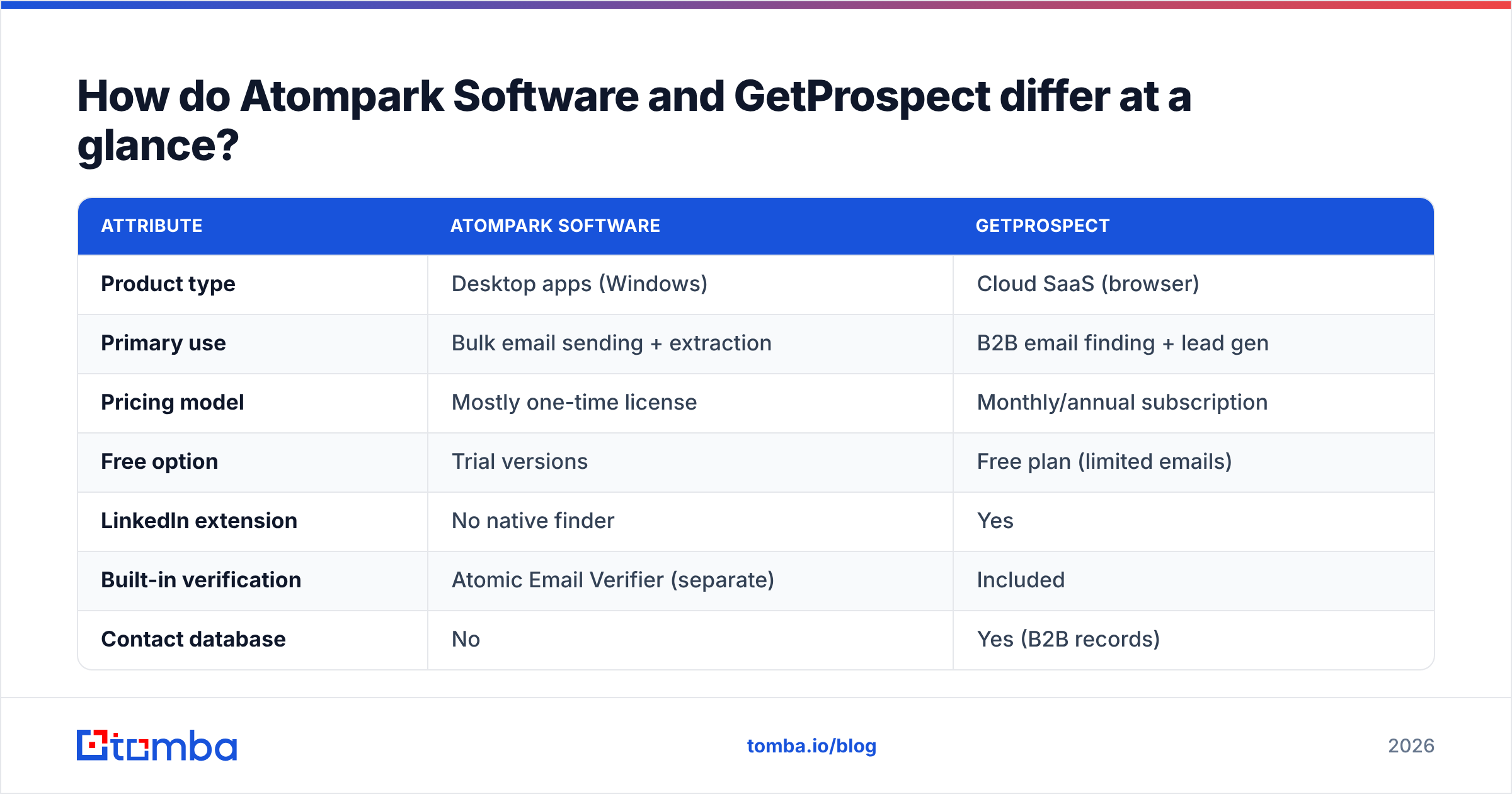
- One-time purchase. Perpetual licenses appeal to buyers who hate recurring subscriptions. You pay once for a version and keep using it.
- Local control. Everything runs on your machine. Your lists never sit on a vendor's cloud, which some privacy-conscious users prefer.
- Bulk sending built in. Atomic Mail Sender is a dedicated mass-mailer, something GetProspect does not natively provide.
- Email extraction from pages. Atomic Email Hunter scrapes addresses from websites and search results — useful for quick public-data harvesting.
- Bundled suite. Atomic Email Studio packages sending, extraction, verification, and list management together.
The honest caveat: desktop bulk-sending from your own IP and a self-built list is a fast way to torch your sender reputation and land in spam. Modern email deliverability depends on authenticated domains, warmed inboxes, and clean opt-in lists — not raw send volume. Atompark gives you the throttle; it does not give you the guardrails.
What does GetProspect do best?#
GetProspect is the more modern prospecting engine of the two. Its advantages line up with how SDR and growth teams work in 2026.
- LinkedIn-first finding. The Chrome extension pulls emails as you browse profiles and search results, which is where most B2B prospecting starts.
- Built-in verification. Found addresses are checked before you spend a send on them, reducing bounces.
- Bulk email finder. Upload a CSV of names and companies and get addresses back in batch.
- Contact database. A searchable pool of B2B records lets you build lists by title, industry, or company size.
- Integrations and API. Push results to your CRM or pull them programmatically.
GetProspect's weaknesses are the usual SaaS trade-offs: credits expire, accuracy varies by region and seniority, and costs scale with volume. Its database is also smaller and less transparent than the largest data vendors, so coverage on niche or non-US contacts can thin out.
How accurate is the data — and why does it matter?#
Accuracy is the single metric that decides whether a finder is worth paying for. A cheap tool that returns 60% deliverable emails is more expensive than a pricier tool at 95%, because every bad address costs you a bounce, a reputation hit, and a wasted sequence slot.

Atompark's Email Hunter extracts whatever is publicly visible, with no confidence score and no real-time verification at the point of capture — you have to run the separate Verifier afterward. GetProspect verifies inline, which is a meaningful step up, but its accuracy still depends on how fresh its underlying records are.
This is where method matters. Tools that combine multiple data sources with SMTP-level checking tend to outperform single-source scrapers. If accuracy is your top concern, look closely at how each vendor sources and validates data — Tomba publishes its data sources openly, and pairs finding with a dedicated email verifier so addresses are scored before they reach your sequence. Always verify before you send, regardless of which tool you choose.
How do Atompark Software and GetProspect pricing compare?#
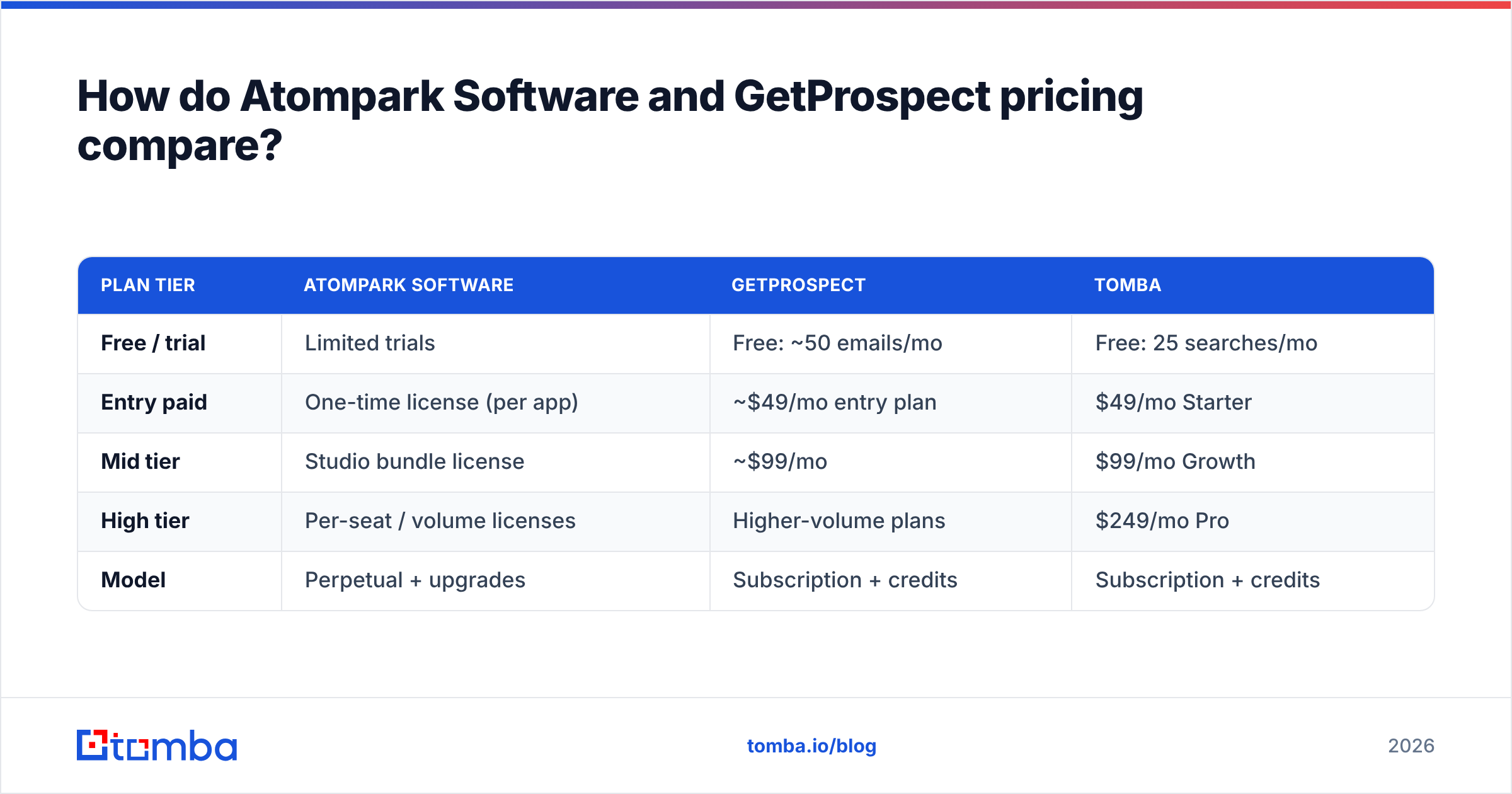
The pricing models are not comparable apples-to-apples, which is exactly why buyers get confused. One sells software; the other sells access and credits.

| Plan tier | Atompark Software | GetProspect | Tomba |
|---|---|---|---|
| Free / trial | Limited trials | Free: ~50 emails/mo | Free: 25 searches/mo |
| Entry paid | One-time license (per app) | ~$49/mo entry plan | $49/mo Starter |
| Mid tier | Studio bundle license | ~$99/mo | $99/mo Growth |
| High tier | Per-seat / volume licenses | Higher-volume plans | $249/mo Pro |
| Model | Perpetual + upgrades | Subscription + credits | Subscription + credits |
Pricing changes often, so confirm current numbers on each vendor's site before you buy. The structural difference is what matters: Atompark's one-time fee looks cheaper over years if you never upgrade and never need cloud collaboration, while GetProspect's subscription includes ongoing data refreshes, verification, and infrastructure you do not maintain yourself.
For teams comparing finder economics directly, Tomba's published pricing lines up with GetProspect's subscription tiers (Starter at $49/mo, Growth at $99/mo, Pro at $249/mo) and includes the same credit-based finding-plus-verification model.
Which should you choose for B2B prospecting?#
Choose based on the job, not the brand. Here is the decision shortcut.
- Pick Atompark if you run Windows-based email marketing, want to own software outright, and your workflow is "build a list, load a sender, send a campaign" — and you accept the deliverability risk of self-hosted bulk sending.
- Pick GetProspect if you are an SDR, founder, or growth marketer who prospects on LinkedIn, needs verified emails on demand, and wants a cloud workspace your team shares.
- Pick a dedicated finder if accuracy, API access, and clean integrations are non-negotiable — neither Atompark nor GetProspect is optimized purely for high-volume, high-accuracy email finding.

For most modern outbound teams, the old "scrape and blast" motion that Atompark represents is the wrong starting point. Targeted finding plus verification plus authenticated sending wins on reply rate and protects your domain.
Is there a better alternative to both?#
If your real goal is verified B2B emails at scale, a purpose-built finder usually beats a desktop suite or a general lead-gen SaaS. That is the gap Tomba fills.
Where Atompark stops at extraction and GetProspect bundles finding into a broader lead-gen product, Tomba focuses on the finding-and-verifying core and exposes it everywhere you work:
- Finder + verifier in one pipeline — search, then validate, before you spend a send.
- Domain search to pull every public address pattern for a company at once.
- Bulk email finder for CSV-scale list building.
- A real Tomba API plus CLI, Chrome extension, Sheets, and Excel add-ons for teams that automate.
- Transparent data sourcing and catch-all handling for tricky domains.
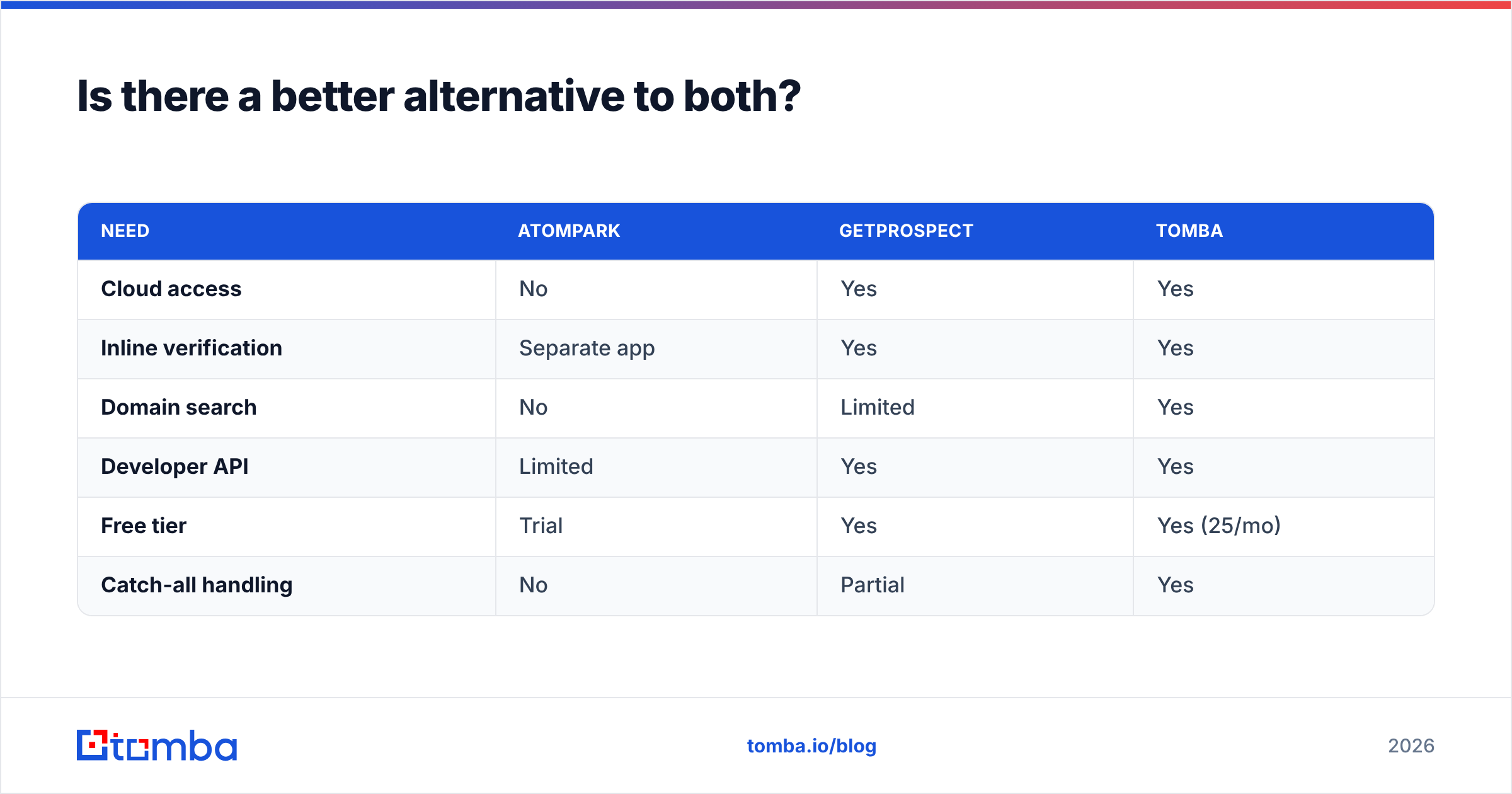
| Need | Atompark | GetProspect | Tomba |
|---|---|---|---|
| Cloud access | No | Yes | Yes |
| Inline verification | Separate app | Yes | Yes |
| Domain search | No | Limited | Yes |
| Developer API | Limited | Yes | Yes |
| Free tier | Trial | Yes | Yes (25/mo) |
| Catch-all handling | No | Partial | Yes |
It is fair to say each tool has a lane: Atompark for desktop-owned sending, GetProspect for LinkedIn-driven lead gen, Tomba for accuracy-first finding and verification. Many teams run a finder like Tomba for data quality and a sender like a modern ESP for deliverability, rather than asking one desktop suite to do both badly.
Frequently asked questions#
Is Atompark Software the same as an email finder like GetProspect? No. Atompark's Atomic Email Hunter extracts publicly visible addresses, but the suite is built around bulk sending and list management. GetProspect is a dedicated email finder with verification and a LinkedIn extension.
Which is cheaper, Atompark or GetProspect? It depends on time horizon. Atompark's one-time license can be cheaper over several years if you never need cloud features. GetProspect's subscription is cheaper to start and includes ongoing data and verification. Compare total cost over your real usage period.
Can I use either tool for cold email at scale? You can find or extract addresses with both, but neither solves deliverability. You still need authenticated domains, warmed inboxes, and clean lists. Self-hosted bulk sending (Atompark's model) is the riskiest path for your sender reputation.
Do I still need a verifier? Yes. GetProspect verifies inline; Atompark requires its separate Verifier. Whatever you use, validate addresses with a dedicated email verifier before sending to protect your bounce rate.
The bottom line#
Atompark Software and GetProspect are not really competitors — they are answers to different questions. Atompark is a desktop email-marketing and extraction suite you own; GetProspect is a cloud email finder and lead-gen platform you subscribe to. If your priority is owning sending software, Atompark fits. If your priority is modern LinkedIn-driven prospecting, GetProspect fits.
But if your priority is the thing both tools touch and neither perfects — accurate, verified B2B email addresses delivered through an API and your everyday tools — start with a dedicated finder. Try the Tomba Email Finder free (25 searches a month, no card), run the same test lookups you would in Atompark or GetProspect, and compare verified-email quality side by side before you commit a budget. Find the right people, verify them, then send — in that order.
Ready to find emails that actually work?
Join 150,000+ professionals who stopped guessing and started sending. Free credits on signup — no credit card required.
Get the Tomba newsletter
Practical outbound tactics and product updates — once every two weeks.
About the author