Atompark Software vs Leadsrush: 2026 Lead-Gen Showdown
A neutral, hands-on breakdown of Atompark Software vs Leadsrush in 2026 — features, accuracy, pricing, and which lead tool actually fits your outbound stack.
Choosing between Atompark Software and Leadsrush usually comes down to one question: do you want a desktop suite that does a bit of everything, or a focused lead-scraping app that pumps out contact lists fast? Both have loyal users, both have been around longer than most "AI SDR" startups, and both leave gaps that modern outbound teams feel immediately.
This is a neutral, practitioner-level comparison — what each tool does well, where it breaks, and how the numbers stack up in 2026.
TL;DR#
- Atompark Software is a desktop-first suite (Atomic Email Studio, Mail Sender, Email Hunter) aimed at people who want to extract, manage, and blast email lists from one Windows machine.
- Leadsrush is a lighter, scraping-led lead generation app focused on pulling business contacts from search engines, maps, and directories.
- Accuracy is the real differentiator — both rely heavily on scraping, so list quality swings wildly by source, and neither verifies at the SMTP depth a deliverability-conscious team needs.
- Pricing models differ sharply: Atompark leans on one-time desktop licenses, Leadsrush on subscription credits. Total cost depends entirely on volume.
- If your priority is verified, API-deliverable B2B email data rather than raw scraped lists, a cloud finder like Tomba will likely beat both on accuracy and integration.
What are Atompark Software and Leadsrush?#
Atompark Software is a long-running vendor of Windows desktop email tools. Its best-known products are Atomic Email Studio (an all-in-one bundle), Atomic Mail Sender (bulk sending), and Atomic Email Hunter (email extraction from websites and search results). The pitch is ownership: you buy the software, install it locally, and your lists never touch a third-party cloud.
Leadsrush is a lead generation app built around scraping public sources — Google, Google Maps, Yellow Pages-style directories, and social profiles — to assemble contact lists with names, emails, phone numbers, and company details. It's positioned for agencies, local-business marketers, and solo founders who want volume quickly without a CRM-grade data contract.
The two overlap in the middle: both extract business emails. They diverge on philosophy. Atompark is a toolbox you own; Leadsrush is a list machine you rent.

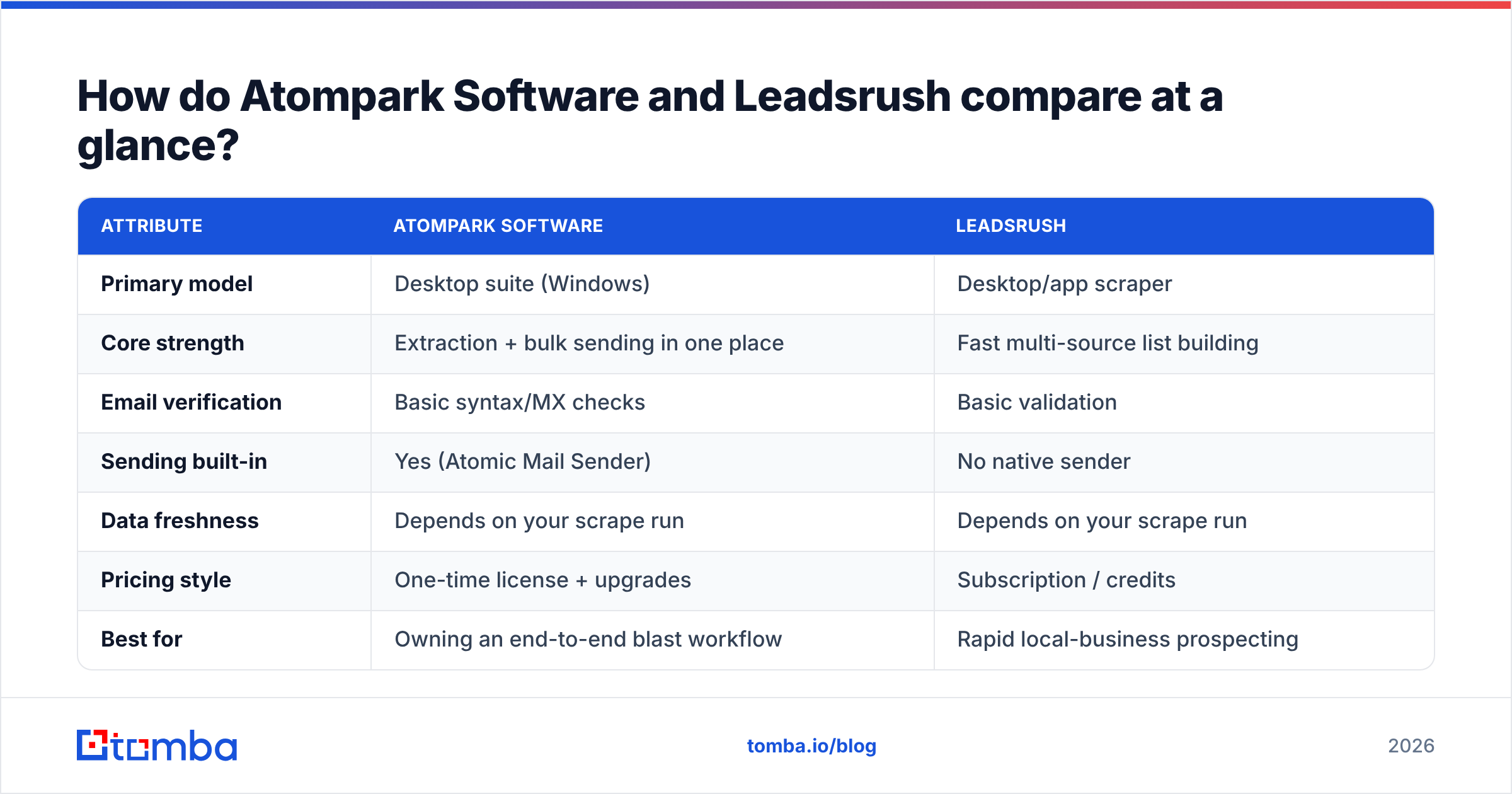
How do Atompark Software and Leadsrush compare at a glance?#
Here's the fastest way to see where each tool sits before we go deeper.
| Attribute | Atompark Software | Leadsrush |
|---|---|---|
| Primary model | Desktop suite (Windows) | Desktop/app scraper |
| Core strength | Extraction + bulk sending in one place | Fast multi-source list building |
| Email verification | Basic syntax/MX checks | Basic validation |
| Sending built-in | Yes (Atomic Mail Sender) | No native sender |
| Data freshness | Depends on your scrape run | Depends on your scrape run |
| Pricing style | One-time license + upgrades | Subscription / credits |
| Best for | Owning an end-to-end blast workflow | Rapid local-business prospecting |
| API access | Limited | Limited |
What capabilities actually matter when comparing these tools?#
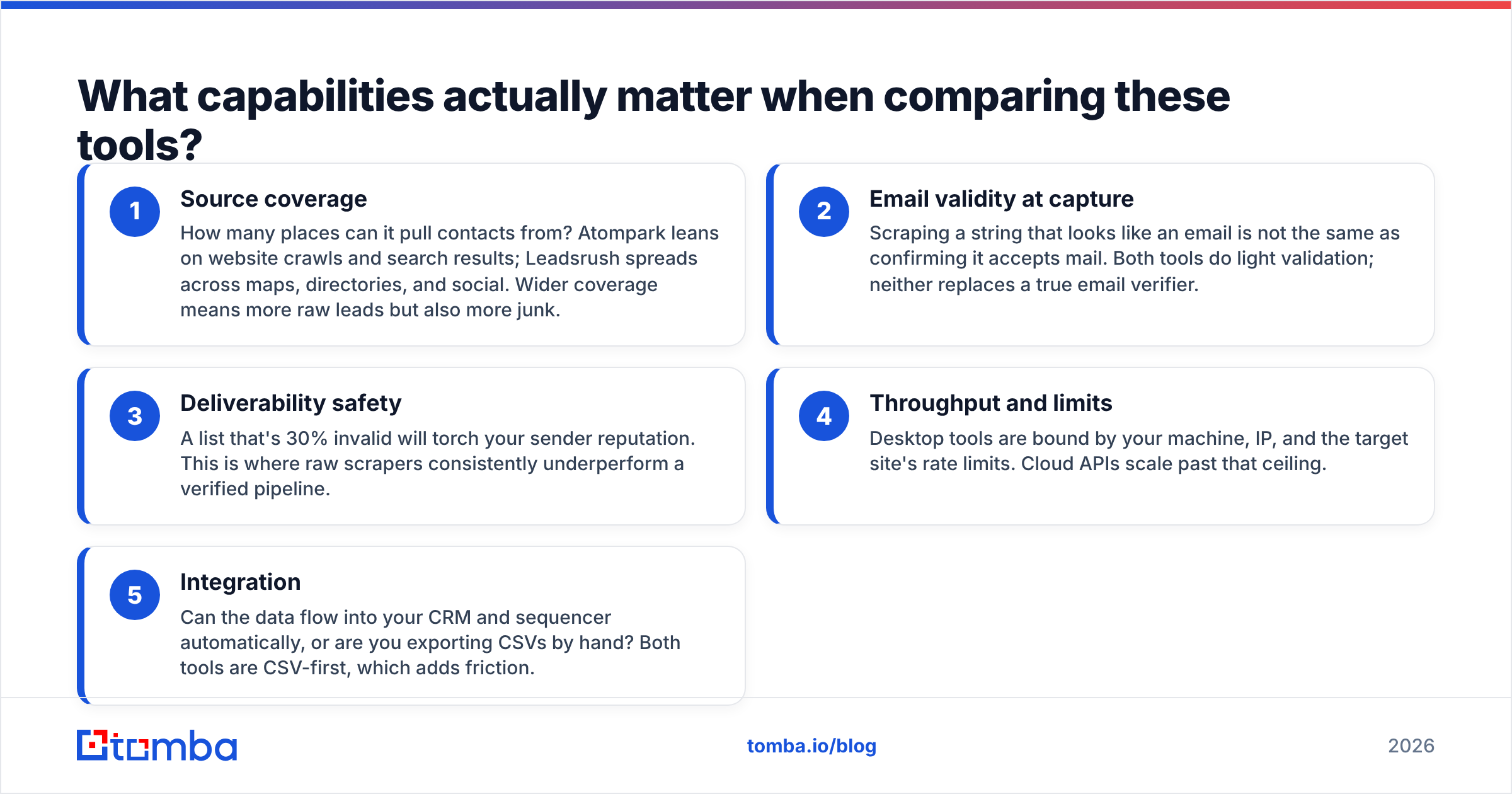
When teams email me about an Atompark-versus-Leadsrush decision, the same five factors decide it every time. Score each tool against these before you buy:
- Source coverage — How many places can it pull contacts from? Atompark leans on website crawls and search results; Leadsrush spreads across maps, directories, and social. Wider coverage means more raw leads but also more junk.
- Email validity at capture — Scraping a string that looks like an email is not the same as confirming it accepts mail. Both tools do light validation; neither replaces a true email verifier.
- Deliverability safety — A list that's 30% invalid will torch your sender reputation. This is where raw scrapers consistently underperform a verified pipeline.
- Throughput and limits — Desktop tools are bound by your machine, IP, and the target site's rate limits. Cloud APIs scale past that ceiling.
- Integration — Can the data flow into your CRM and sequencer automatically, or are you exporting CSVs by hand? Both tools are CSV-first, which adds friction.
Keep those five in mind — they map directly to the sections below.
How accurate is each tool's email data?#
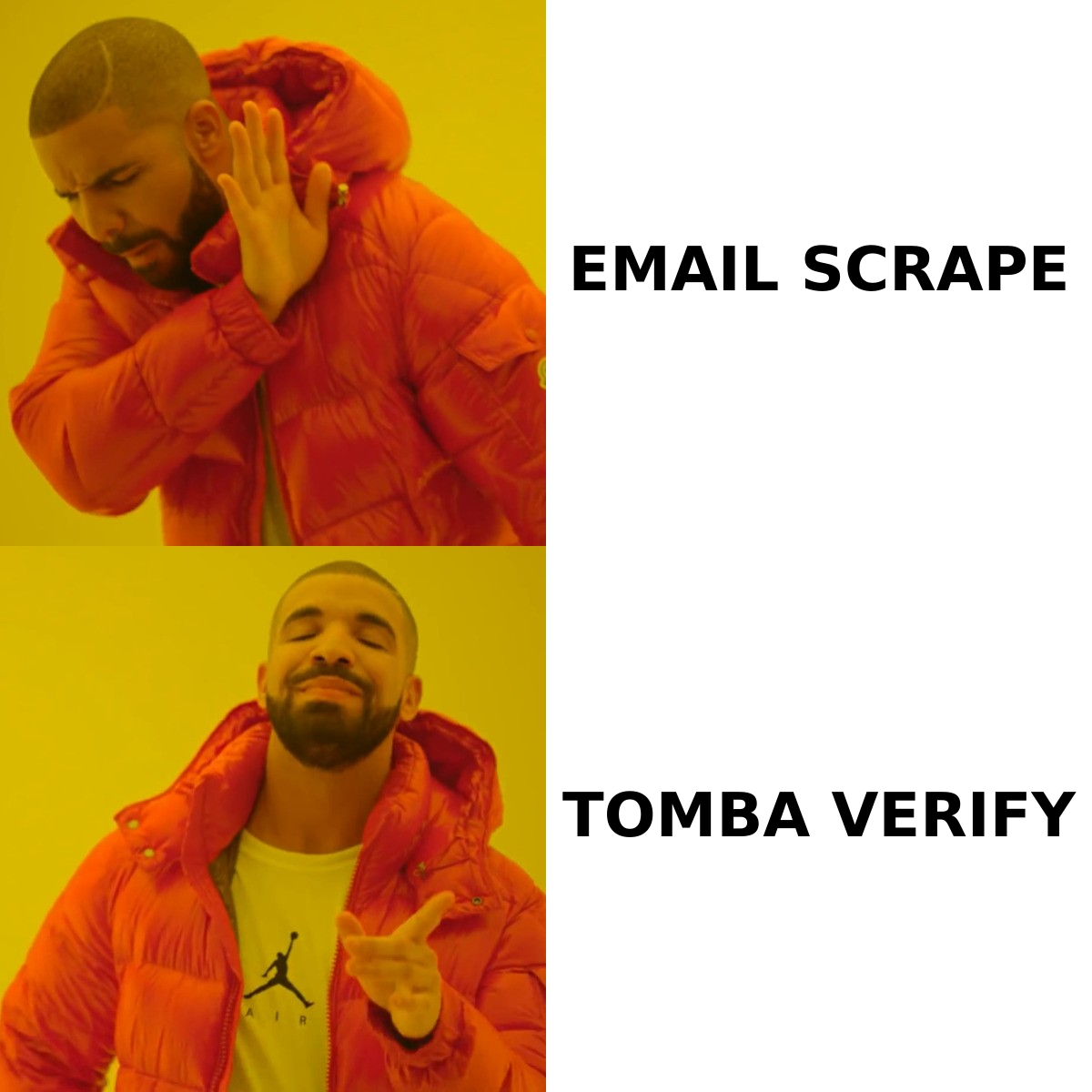
Accuracy is the headline issue, and it's where scraping-based tools show their age. Both Atompark's Email Hunter and Leadsrush gather addresses that appear on public pages. That's useful for surfacing candidates, but a published string can be a role inbox (info@, sales@), a stale address, a spam trap, or a catch-all domain that accepts everything and confirms nothing.

Neither tool performs deep SMTP verification with catch-all detection by default, so the "valid" label you see is closer to "syntactically plausible" than "this mailbox will accept your message." For low-stakes local outreach that may be fine. For cold campaigns where bounce rate decides whether you land in the inbox, it's a real liability. If you run lists from either tool, treat verification as a mandatory second step — run them through a dedicated email verification pass and a catch-all verifier before you send a single message.
A practical rule: assume any scraped list is 20–40% unusable until proven otherwise. Budget for that, or your email deliverability will pay for it.
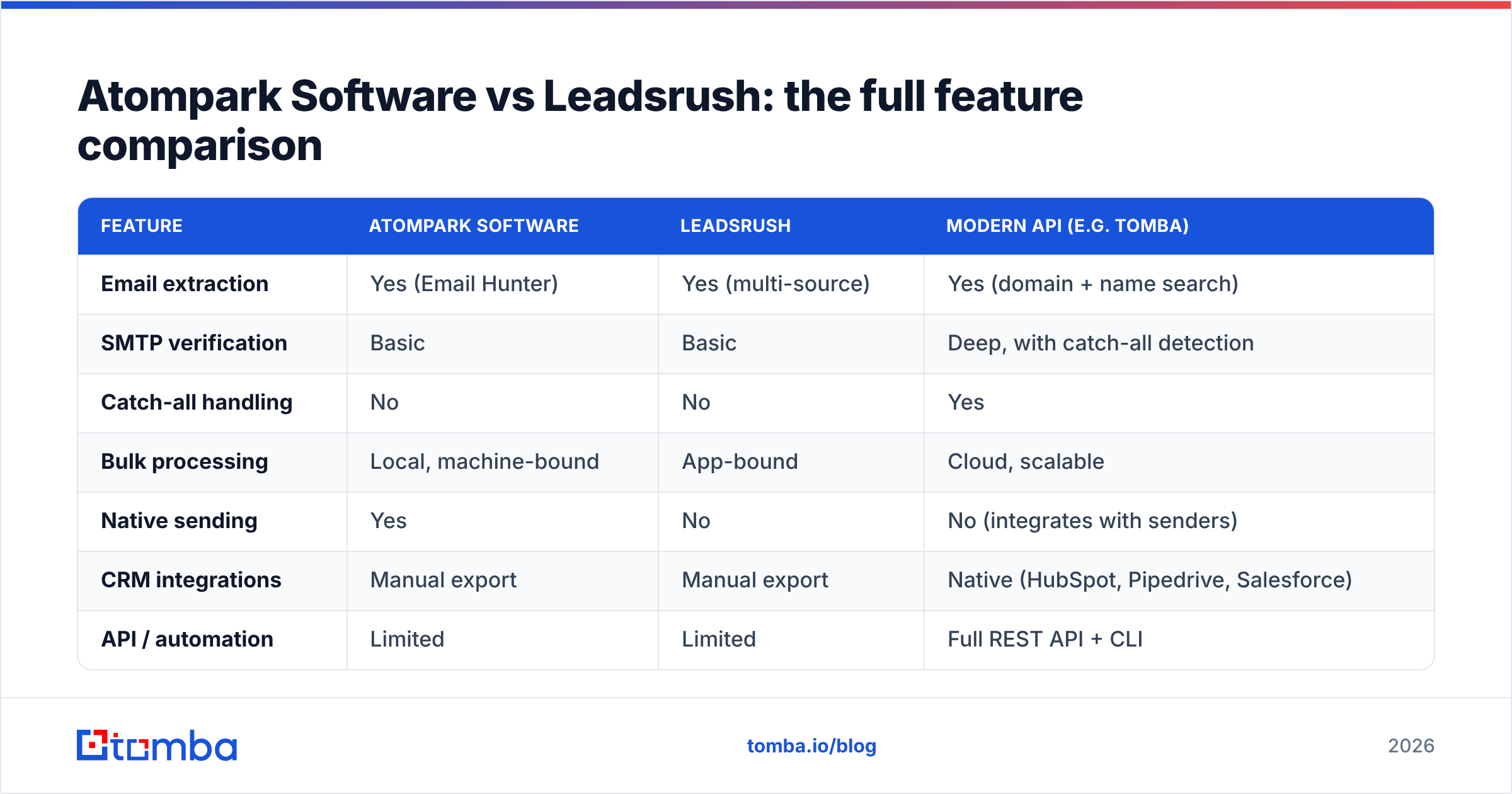
Atompark Software vs Leadsrush: the full feature comparison#

Now the detailed side-by-side, including a modern API column so you can see what a verified pipeline adds.
| Feature | Atompark Software | Leadsrush | Modern API (e.g. Tomba) |
|---|---|---|---|
| Email extraction | Yes (Email Hunter) | Yes (multi-source) | Yes (domain + name search) |
| SMTP verification | Basic | Basic | Deep, with catch-all detection |
| Catch-all handling | No | No | Yes |
| Bulk processing | Local, machine-bound | App-bound | Cloud, scalable |
| Native sending | Yes | No | No (integrates with senders) |
| CRM integrations | Manual export | Manual export | Native (HubSpot, Pipedrive, Salesforce) |
| API / automation | Limited | Limited | Full REST API + CLI |
| Phone data | Limited | Yes | Yes (phone finder) |
| Free tier | Trial | Trial | 25 free searches/mo |
| Maintenance | You update the app | Vendor app | Always current, hosted |
The pattern is consistent: the legacy tools win on ownership and bundled sending, while a hosted finder wins on verification depth, scale, and automation. Which matters more depends on what you're optimizing for.
How do Atompark and Leadsrush price their products?#
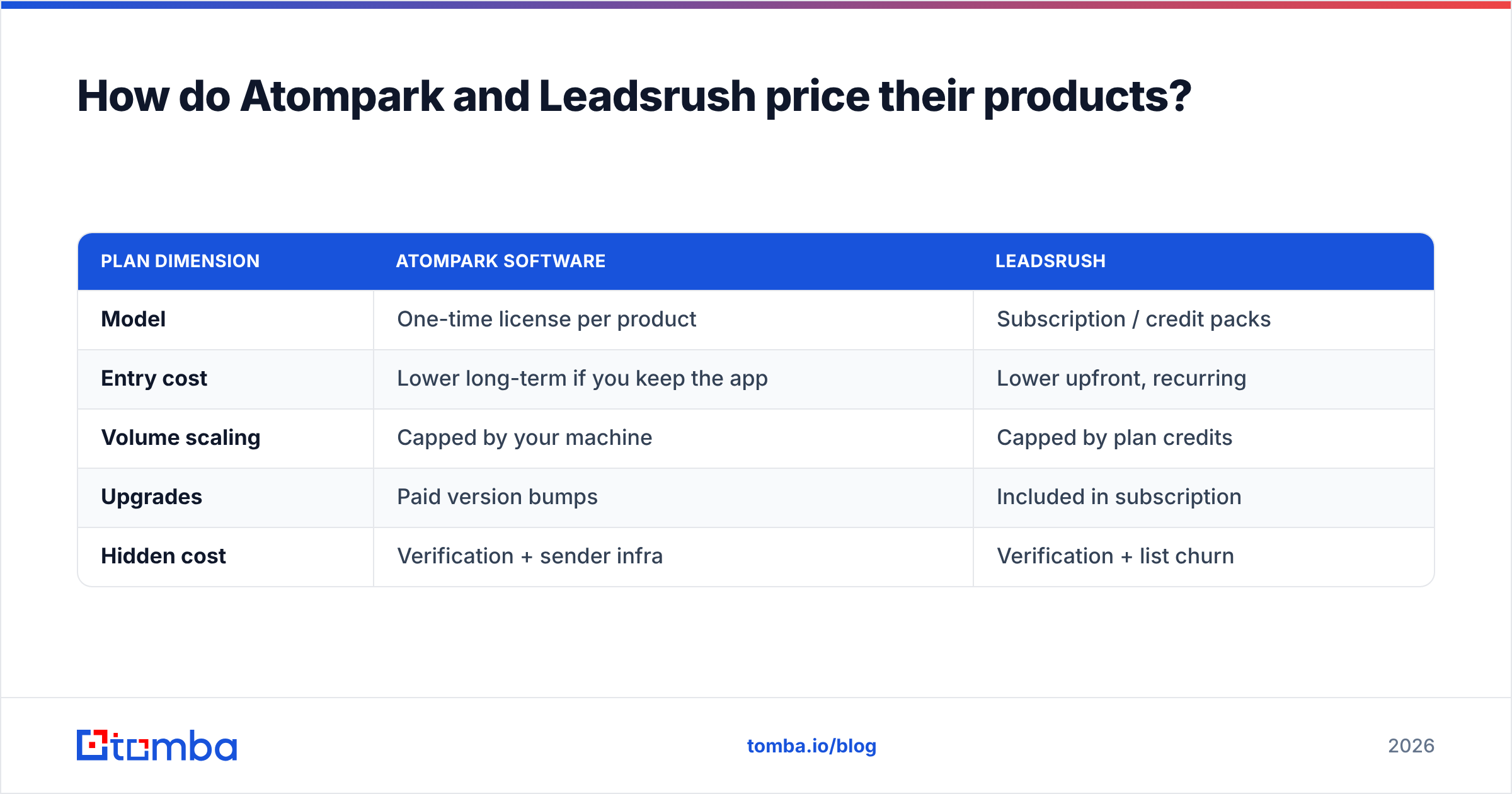
Pricing is where these two diverge the most, and it changes the math depending on volume.
| Plan dimension | Atompark Software | Leadsrush |
|---|---|---|
| Model | One-time license per product | Subscription / credit packs |
| Entry cost | Lower long-term if you keep the app | Lower upfront, recurring |
| Volume scaling | Capped by your machine | Capped by plan credits |
| Upgrades | Paid version bumps | Included in subscription |
| Hidden cost | Verification + sender infra | Verification + list churn |
Atompark's one-time license appeals to anyone who hates subscriptions and plans to run the same workflow for years. Leadsrush's subscription suits people who want fresh scrapes monthly and don't want to babysit desktop software. Neither price includes the real cost of cleaning the data — verification, suppression management, and the deliverability hit from bad sends. Factor that in before you compare sticker prices.
For reference, a verified cloud finder like Tomba runs a free tier (25 searches/mo) and paid plans from $49/mo (Starter) up through $99/mo (Growth) and $249/mo (Pro) — see the full Tomba pricing for credit details. The trade is straightforward: you give up "owning the app" in exchange for verified data and an API.
Which tool should you choose?#
Pick based on the job, not the brand.
Choose Atompark Software if you want a single Windows toolbox that extracts, manages, and sends email from one place, you prefer a one-time purchase, and your campaigns are tolerant of some list noise. It's a reasonable fit for solo operators and small shops that value local control over data.
Choose Leadsrush if your core need is fast, broad prospecting for local and SMB targets — maps, directories, and social — and you'll plug the output into a separate sender. It's the better pure list-builder of the two.
Choose a modern email finder API if deliverability and integration are non-negotiable: you're running cold campaigns at scale, you need verified addresses, and you want data flowing into your CRM and sequencer without CSV gymnastics. This is where teams graduate from scraping tools.
There's also a hybrid path that a lot of teams land on: use a scraper to discover companies and domains, then use a finder-plus-verifier to turn those domains into clean, deliverable contacts. That combination gets you the breadth of scraping with the precision of verification.
Where does a modern email finder fit alongside these tools?#
If your outbound depends on landing in the inbox, the verification gap in both Atompark and Leadsrush is the thing to solve. A cloud finder closes it in three ways.
First, domain-level discovery: point a domain search at a company and get the known addresses plus the email pattern, so you can construct the right contact even when it isn't published anywhere. Second, verification built into the pipeline: every candidate runs through SMTP checks and catch-all detection, so "valid" actually means deliverable. Third, scale without a desktop bottleneck: a bulk email finder and REST API process thousands of rows without tying up a Windows machine or tripping a target site's rate limits.
That's the structural advantage. Scraping tools find strings; a verified finder confirms mailboxes and hands them to your stack ready to use. For cold outreach in 2026, that difference is the campaign.
Frequently asked questions#
Is Atompark Software better than Leadsrush? Neither is universally better. Atompark wins if you want bundled sending and a one-time license; Leadsrush wins for broad, fast local-business scraping. Both share the same weakness — shallow verification — so plan to clean their output.
Do these tools verify emails? Only lightly. Expect syntax and MX-level checks, not deep SMTP or catch-all verification. Run any list through a dedicated verifier before sending to protect your sender reputation.
Can I use scraped lists for cold email safely? Only after verification and proper warmup. Unverified scraped lists are the fastest way to high bounce rates and blacklisting. Verify, suppress invalids, and ramp volume gradually.
What's the better alternative for verified B2B data? A cloud email finder with built-in verification and an API. It trades software ownership for data accuracy, scale, and native CRM/sequencer integration.
The bottom line#
Atompark Software and Leadsrush are competent legacy tools that solve the discovery half of prospecting. What they don't solve is deliverability — and in 2026 that's the half that decides whether your outreach works. If you're optimizing for verified, inbox-ready B2B contacts that flow straight into your CRM, skip the CSV-and-clean cycle and start with a finder built for accuracy.
Try the Tomba Email Finder free — 25 searches a month, no card — and compare the bounce rates against your last scraped list. If verified data wins, you'll know exactly which tool to retire. Explore the broader data sources behind it, or wire it into your workflow with the Tomba API and see the difference in your next campaign. You can also benchmark options on G2 and review Atompark's own product lineup at atompark.com before deciding.
// get started
Find, verify and enrich your first contacts today
Start on the free plan with 25 searches a month, then scale when your team is ready.
Free plan · No credit card required · GDPR & CCPA
// about the author