Augment Pricing, Reviews, Pros and Cons: 2026 Buyer's Guide
A neutral 2026 breakdown of Augment's pricing tiers, real user reviews, and the honest pros and cons before you commit budget or seats to it.

Augment markets itself as an AI assistant that understands your whole codebase and your team's context, not just the file in front of you. That promise sells, but the invoice is where most buyers get surprised. This guide cuts through the marketing and lays out the real Augment pricing reviews pros and cons picture for 2026 so you can decide before a single seat hits your card.
TL;DR#
- Augment uses per-seat, usage-influenced pricing — a free tier to test, a paid developer plan in the ~$50/seat/month range, and a custom Enterprise tier. Costs scale with team size and request volume, not a flat fee.
- Reviews are strongly positive on context quality (codebase awareness, agentic edits) and mixed on cost predictability as usage grows.
- Best fit: mid-size to large engineering teams working in big, messy monorepos who will actually use the deep-context features.
- Worst fit: solo builders, light users, or teams that only need autocomplete — the premium is hard to justify there.
- For revenue and GTM teams reading this to vet a dev-tooling spend: the contact-data side of your stack (finding and verifying buyer emails) is a separate, cheaper problem that tools like Tomba Email Finder solve at a flat rate.
What is Augment and who is it for?#
Augment is an AI coding platform built around one core idea: an assistant is only as good as the context it can see. Think of a new senior engineer joining your team. A generic AI autocomplete is like that engineer guessing based on the single file open on their screen. Augment is more like the engineer who spent a week reading your entire repo, your past pull requests, and your internal conventions before writing a line. Technically, it indexes your whole codebase and feeds that context into completions, chat, and agentic multi-file edits.
That positioning matters for pricing. You are not paying for "AI autocomplete." You are paying for context retrieval at scale, and that is the lens for judging whether the cost is fair.
The typical buyer falls into three camps:
- Platform and staff engineers evaluating a team-wide rollout across a large monorepo.
- Engineering managers comparing Augment against GitHub Copilot, Cursor, and Windsurf on a per-seat budget.
- RevOps and procurement reviewers who own the tooling spend and need the pros and cons in plain language before approving seats.
If you are in that third camp and arrived here from a sales-tooling search, the honest answer is that Augment is a developer tool, not a prospecting or data enrichment tool — keep that distinction in mind as you read the cost breakdown.

How much does Augment cost in 2026?#
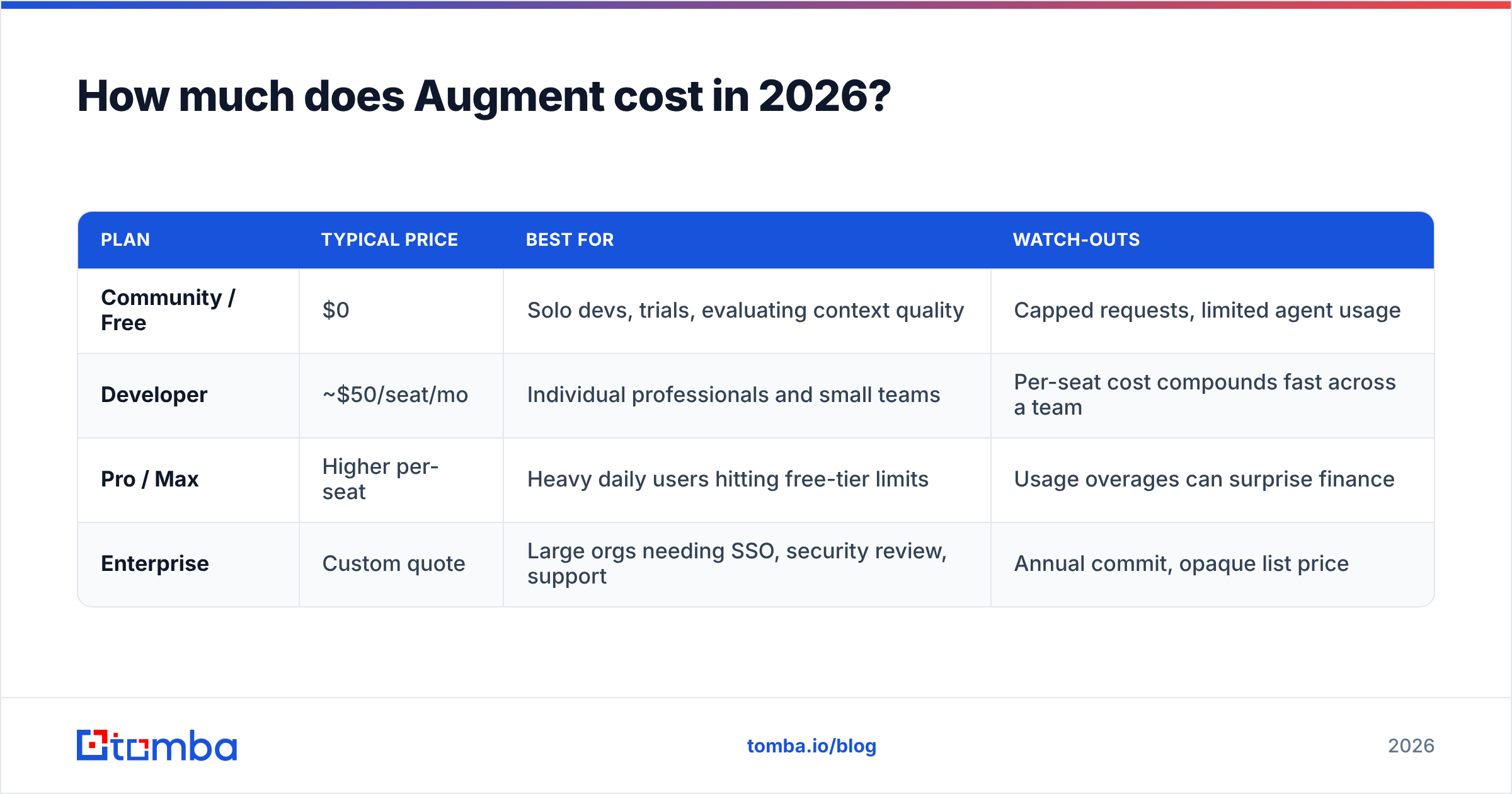
Augment's pricing follows the now-standard AI-tool ladder: a free entry point, a flat per-seat paid plan, and a custom Enterprise contract. The wrinkle is that usage (messages, agent runs, and context-heavy requests) influences what you actually pay or how quickly you hit limits, so the sticker price and the real bill can diverge.
Pricing for these tools changes often, so confirm current numbers on the official Augment site before you budget. As a planning reference for 2026, the tiers map out roughly like this:
| Plan | Typical price | Best for | Watch-outs |
|---|---|---|---|
| Community / Free | $0 | Solo devs, trials, evaluating context quality | Capped requests, limited agent usage |
| Developer | ~$50/seat/mo | Individual professionals and small teams | Per-seat cost compounds fast across a team |
| Pro / Max | Higher per-seat | Heavy daily users hitting free-tier limits | Usage overages can surprise finance |
| Enterprise | Custom quote | Large orgs needing SSO, security review, support | Annual commit, opaque list price |
Three things shape your real cost:
- Seat count. Per-seat pricing is clean for forecasting but punishing at scale. Ten seats at ~$50 is $500/month; one hundred seats is $60,000/year before any Enterprise uplift.
- Usage intensity. Agentic, multi-file edits and large-context chats consume far more compute than tab completion. Teams that lean into the headline features burn allowance faster.
- Plan friction. Hitting a ceiling mid-sprint pushes you to upgrade, which is exactly when negotiating leverage is lowest.
The pattern is familiar from the broader sales- and dev-tool market: a friendly entry price, then per-seat math that quietly becomes a five- or six-figure line item. It is the same reason buyers scrutinize Tomba pricing and every other recurring SaaS cost — the monthly number is small; the annual, fully-loaded number is what gets approved or rejected.
What do Augment reviews actually say?#
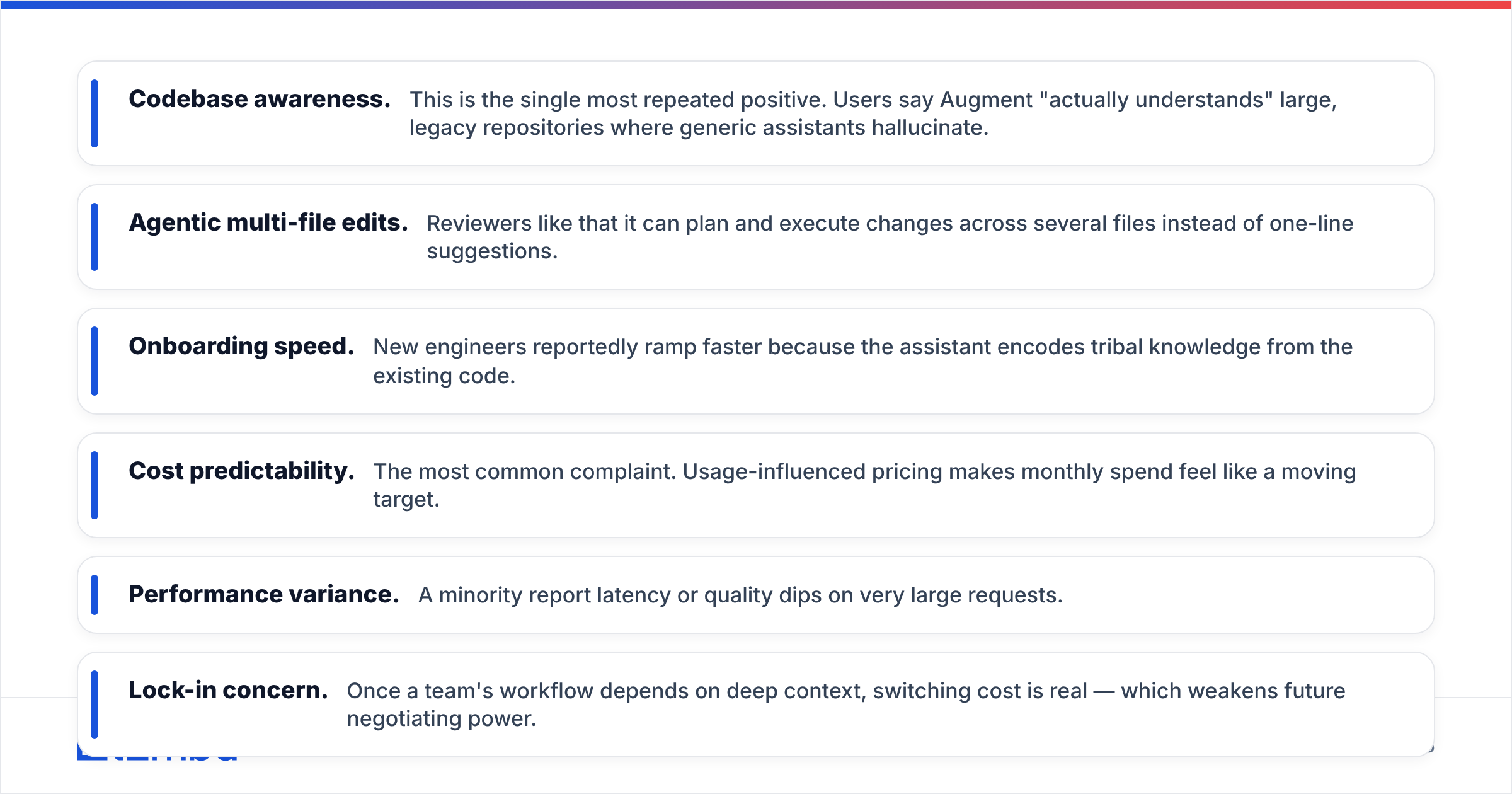
Pull the public reviews on G2 and Capterra and a clear split emerges. Praise clusters around capability. Complaints cluster around cost and consistency.
What reviewers consistently praise:
- Codebase awareness. This is the single most repeated positive. Users say Augment "actually understands" large, legacy repositories where generic assistants hallucinate.
- Agentic multi-file edits. Reviewers like that it can plan and execute changes across several files instead of one-line suggestions.
- Onboarding speed. New engineers reportedly ramp faster because the assistant encodes tribal knowledge from the existing code.
What reviewers consistently criticize:
- Cost predictability. The most common complaint. Usage-influenced pricing makes monthly spend feel like a moving target.
- Performance variance. A minority report latency or quality dips on very large requests.
- Lock-in concern. Once a team's workflow depends on deep context, switching cost is real — which weakens future negotiating power.
A useful rule when reading any AI-tool reviews: weight the criticism about billing and limits more heavily than the criticism about a single bad output. Output quality improves with every model release; pricing structure rarely gets more generous after you have signed.
Augment pros and cons: the honest list#
Here is the balanced scorecard most buyers actually want.
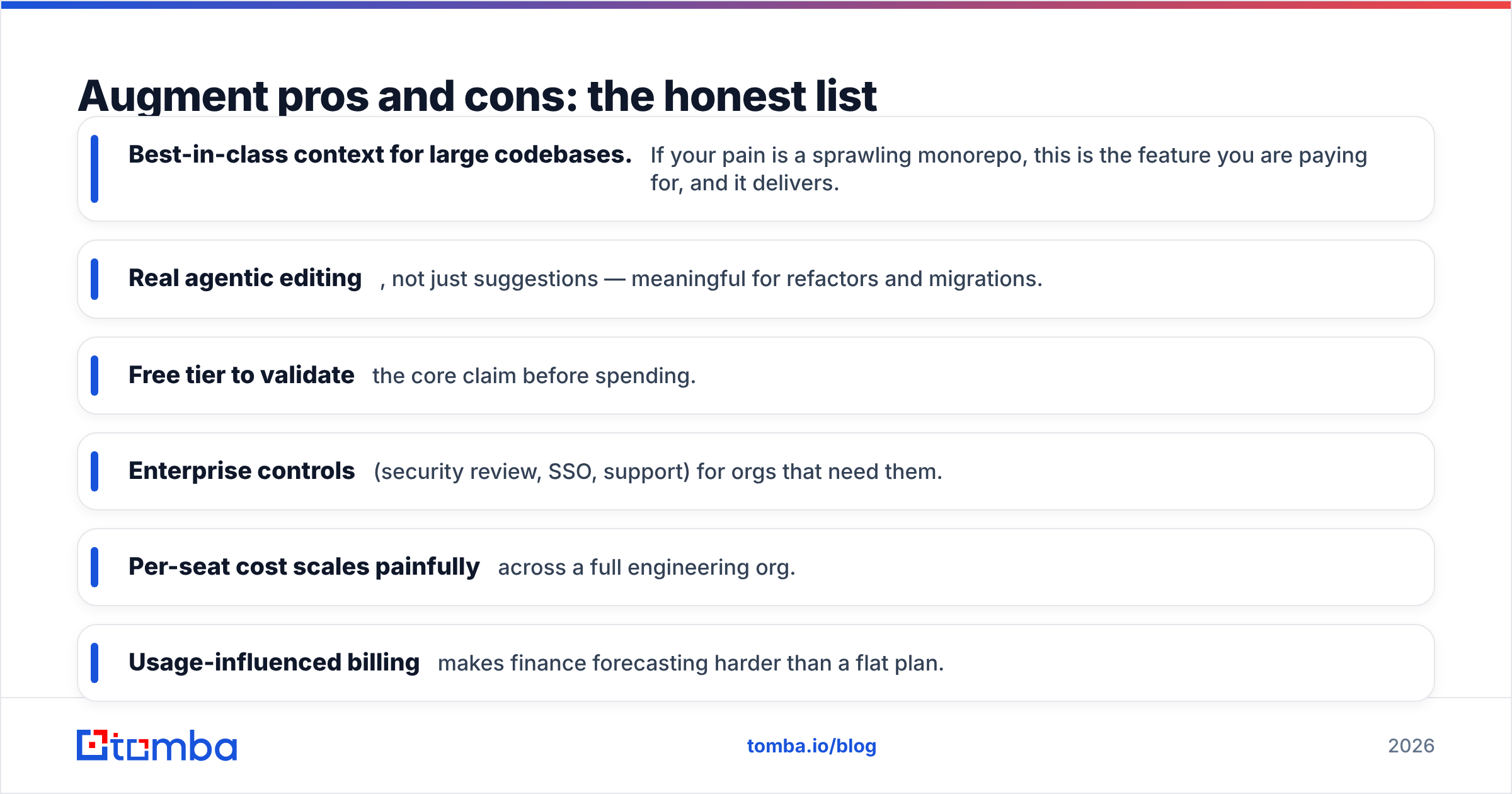
Pros
- Best-in-class context for large codebases. If your pain is a sprawling monorepo, this is the feature you are paying for, and it delivers.
- Real agentic editing, not just suggestions — meaningful for refactors and migrations.
- Free tier to validate the core claim before spending.
- Enterprise controls (security review, SSO, support) for orgs that need them.
Cons
- Per-seat cost scales painfully across a full engineering org.
- Usage-influenced billing makes finance forecasting harder than a flat plan.
- Overkill for light users who only need autocomplete or occasional help.
- Switching cost grows the more your team depends on its context layer.
The decision usually comes down to one question: will your team actually use the deep-context, agentic features every day? If yes, the premium is defensible. If your team mostly wants smart autocomplete, you are paying a context tax you will not redeem.

How does Augment compare to the alternatives?#
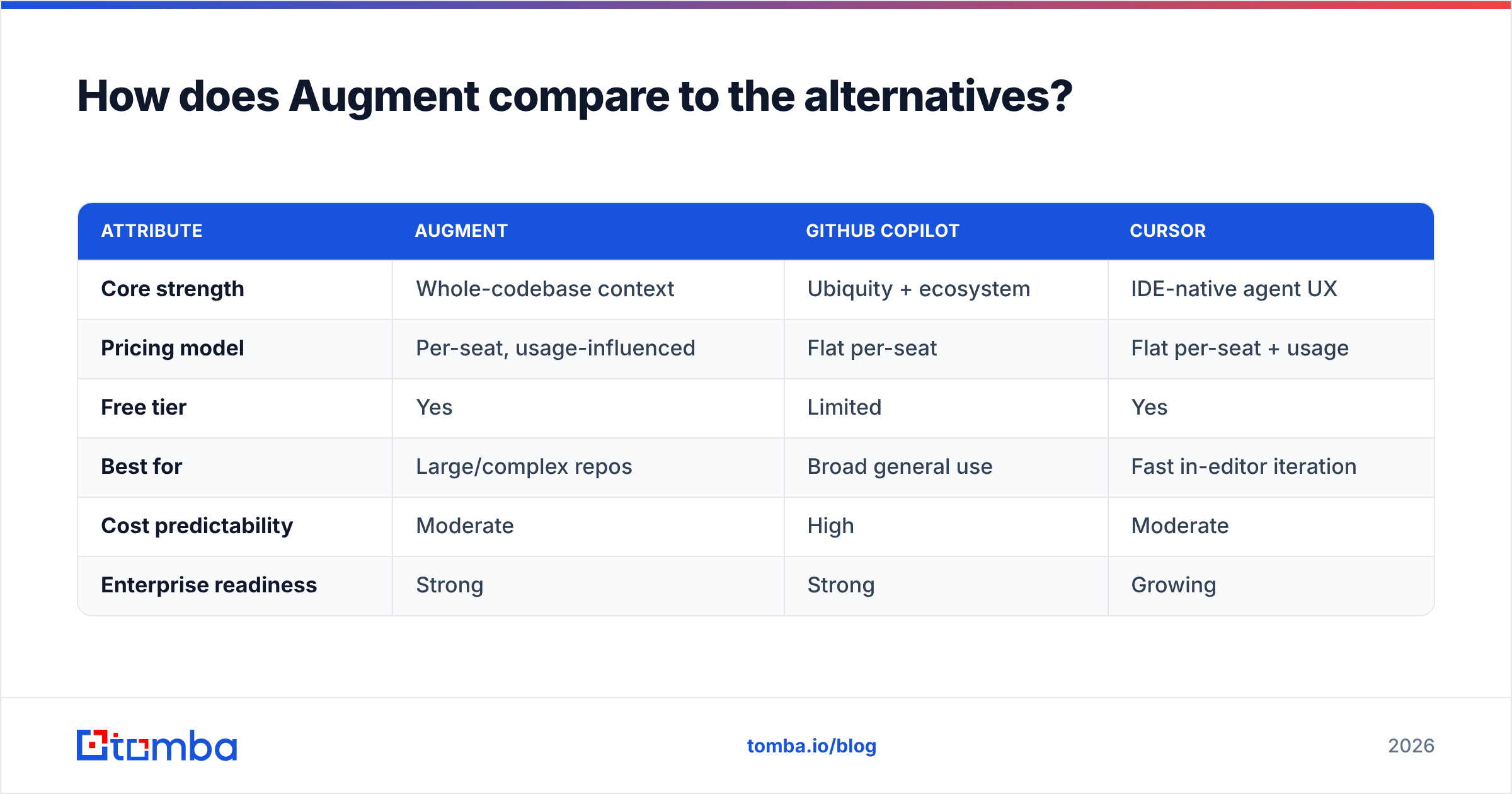
No tool should be evaluated alone. Here is how Augment stacks against the usual shortlist on the attributes that drive the buying decision.
| Attribute | Augment | GitHub Copilot | Cursor |
|---|---|---|---|
| Core strength | Whole-codebase context | Ubiquity + ecosystem | IDE-native agent UX |
| Pricing model | Per-seat, usage-influenced | Flat per-seat | Flat per-seat + usage |
| Free tier | Yes | Limited | Yes |
| Best for | Large/complex repos | Broad general use | Fast in-editor iteration |
| Cost predictability | Moderate | High | Moderate |
| Enterprise readiness | Strong | Strong | Growing |
The takeaway: Augment wins on context depth, Copilot wins on predictability and reach, and Cursor wins on in-editor flow. Pick the axis that matters most to your team and the choice gets easy. If "never surprise finance" is your top priority, a flat-rate competitor may beat Augment on total cost of ownership even if it loses on raw capability.
Is Augment worth the price?#
Yes — for the specific buyer it was built for, and no for everyone else. That is the conclusion, and the reasoning follows.
Augment is worth it when all of these are true:
- You work in a large, complex codebase where context is the actual bottleneck.
- Your team will use the agentic features daily, not occasionally.
- You can model the per-seat cost at full headcount and still see positive ROI in saved engineering hours.
Augment is hard to justify when:
- You are a solo developer or small team with simple repos.
- You mostly want autocomplete, which cheaper or flat-rate tools cover.
- Your finance team cannot tolerate variable monthly spend.
A practical move: run the free tier on your single ugliest repository for two weeks. If the context quality visibly outperforms what your current tool does on that repo, the upgrade is probably worth it. If it feels marginal, the premium is not for you.
Where does contact data fit into all this?#
If you landed here as a RevOps, sales, or GTM reviewer vetting Augment as a line item, one clarification saves you a wrong purchase: Augment will not help you find or verify a buyer's email address. It is a coding assistant. Prospecting accuracy is a different category with a different — and far lower — price point.
That distinction matters because the two budgets get confused surprisingly often in procurement reviews. Developer tooling and go-to-market data tooling are separate spends with separate ROI math. For the GTM side, the question is not "context depth" but "how many valid, deliverable contacts can I get per dollar," which is where a focused email finder and email verifier earn their keep.
Frequently asked questions#
Does Augment have a free plan? Yes. There is a free Community tier with capped requests and limited agent usage — enough to test the core context claim before paying.
Why is Augment pricing called "usage-influenced"? Because heavier features (agentic multi-file edits, large-context chats) consume more compute and allowance than simple completions, so two teams on the same plan can have very different real costs.
Is Augment better than Copilot? On large-codebase context, most reviewers say yes. On cost predictability and ecosystem breadth, Copilot often wins. The right answer depends on which axis your team values.
Can Augment find or verify email addresses for sales outreach? No. It is a developer coding tool. For finding and verifying B2B contacts, use a dedicated platform built for that — see the CTA below.
The bottom line#
Augment is a strong, premium AI coding assistant whose value is real for teams drowning in large, complex codebases — and questionable for everyone paying for capability they will not use. Judge it on daily feature usage and fully-loaded per-seat cost, weight the billing criticism in reviews, and run the free tier before you commit.
And if your real goal was never faster code but more pipeline, point your budget at the problem that actually moves revenue: accurate, deliverable contact data. Tomba Email Finder finds professional email addresses by name, domain, or company — with verification built in and flat, predictable pricing starting free at 25 searches/month and $49/mo on Starter. No per-seat surprises, no usage anxiety. Start free, scale when the pipeline does, and check the full Tomba pricing before you compare it to anything else.
// get started
Find, verify and enrich your first contacts today
Start on the free plan with 25 searches a month, then scale when your team is ready.
Free plan · No credit card required · GDPR & CCPA
// about the author