Autobound Pricing, Reviews, Pros and Cons (2026 Guide)
A no-spin 2026 breakdown of Autobound's pricing tiers, real user reviews, and the honest pros and cons before you add another AI writer to your stack.
Autobound promises to write hyper-personalized sales emails in seconds. The pitch is seductive, but the questions that actually decide budget are dull: what does it cost, what do real users say, and where does it fall down? This guide answers all three without the marketing gloss.
TL;DR — Is Autobound worth it in 2026?#
- What it is: Autobound is an AI sales-writing tool that generates personalized cold emails and sequences using "insights" (news, job changes, podcasts, tech stack) scraped about each prospect.
- Pricing: A free tier exists, paid plans run roughly from the high-$50s per user/month up to custom Enterprise. Annual billing and per-seat math change the real number fast.
- Best for: SDR teams that already have clean contact data and want to speed up the writing step, not the finding step.
- Biggest catch: Autobound personalizes messages — it does not find or verify the email addresses you send them to. Garbage contact data still means bounced campaigns.
- Verdict: A solid writing accelerator, but it sits on top of your data layer. Pair it with an accurate email finder or the personalization lands in nobody's inbox.
What is Autobound and what does it actually do?#
Autobound is an AI content engine for outbound sales. You connect it to your CRM or sequencer, point it at a prospect, and it drafts an email built around real-time signals it pulls about that person and their company.
Think of it like a research intern who reads every press release, LinkedIn post, and 10-K overnight and hands you a tailored opener by morning. The intern is fast and tireless — but they only draft the letter. They do not look up the recipient's mailing address, and they do not check whether the address still exists.
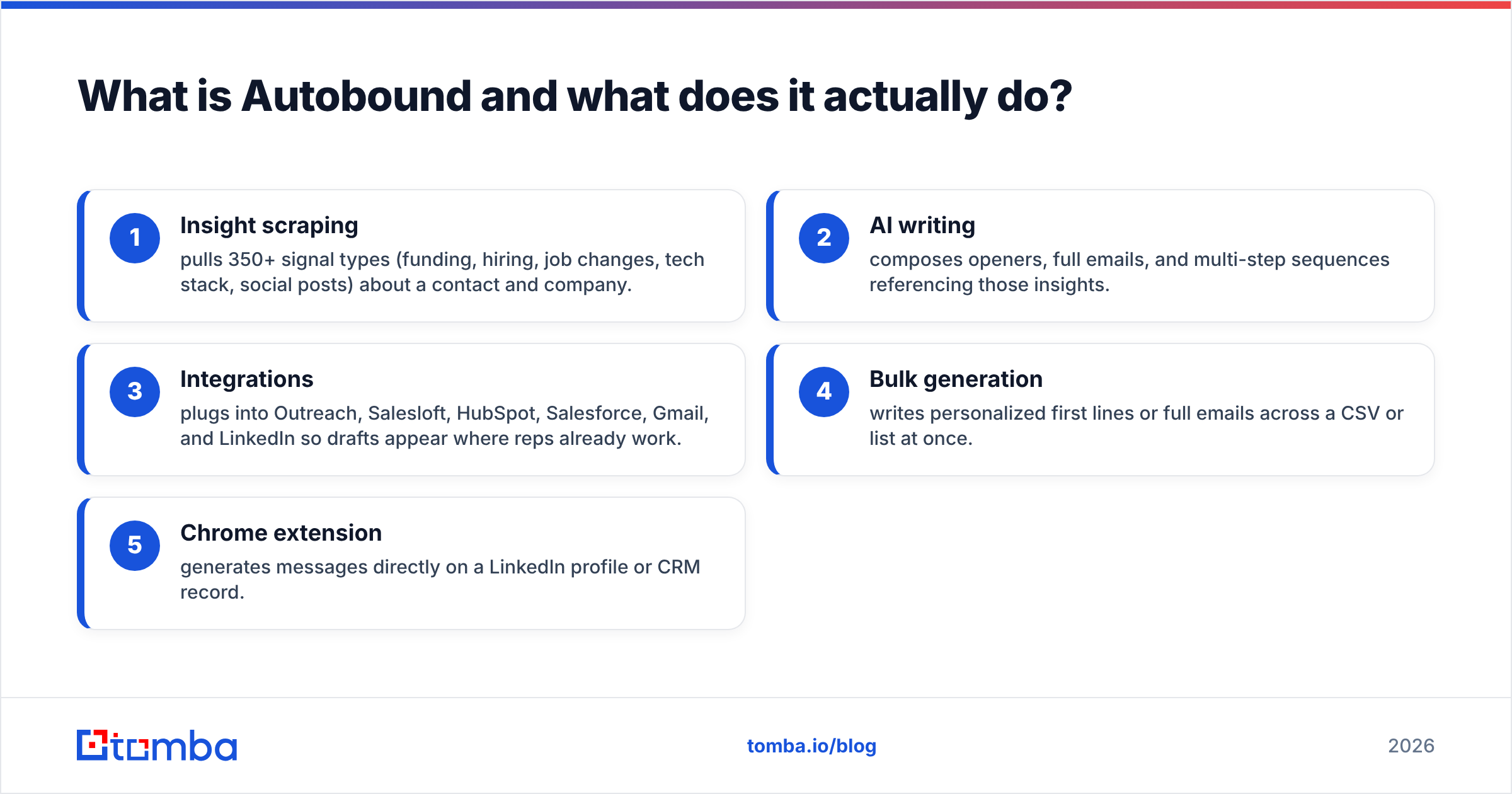
Autobound's core building blocks break down into a short, concrete list:
- Insight scraping — pulls 350+ signal types (funding, hiring, job changes, tech stack, social posts) about a contact and company.
- AI writing — composes openers, full emails, and multi-step sequences referencing those insights.
- Integrations — plugs into Outreach, Salesloft, HubSpot, Salesforce, Gmail, and LinkedIn so drafts appear where reps already work.
- Bulk generation — writes personalized first lines or full emails across a CSV or list at once.
- Chrome extension — generates messages directly on a LinkedIn profile or CRM record.
Notice what is missing from that list: contact discovery and verification. Autobound assumes you already know who you're emailing and that the address is valid. That gap is the single most important thing to understand before you compare it to anything else.
How much does Autobound cost? (Pricing breakdown)#
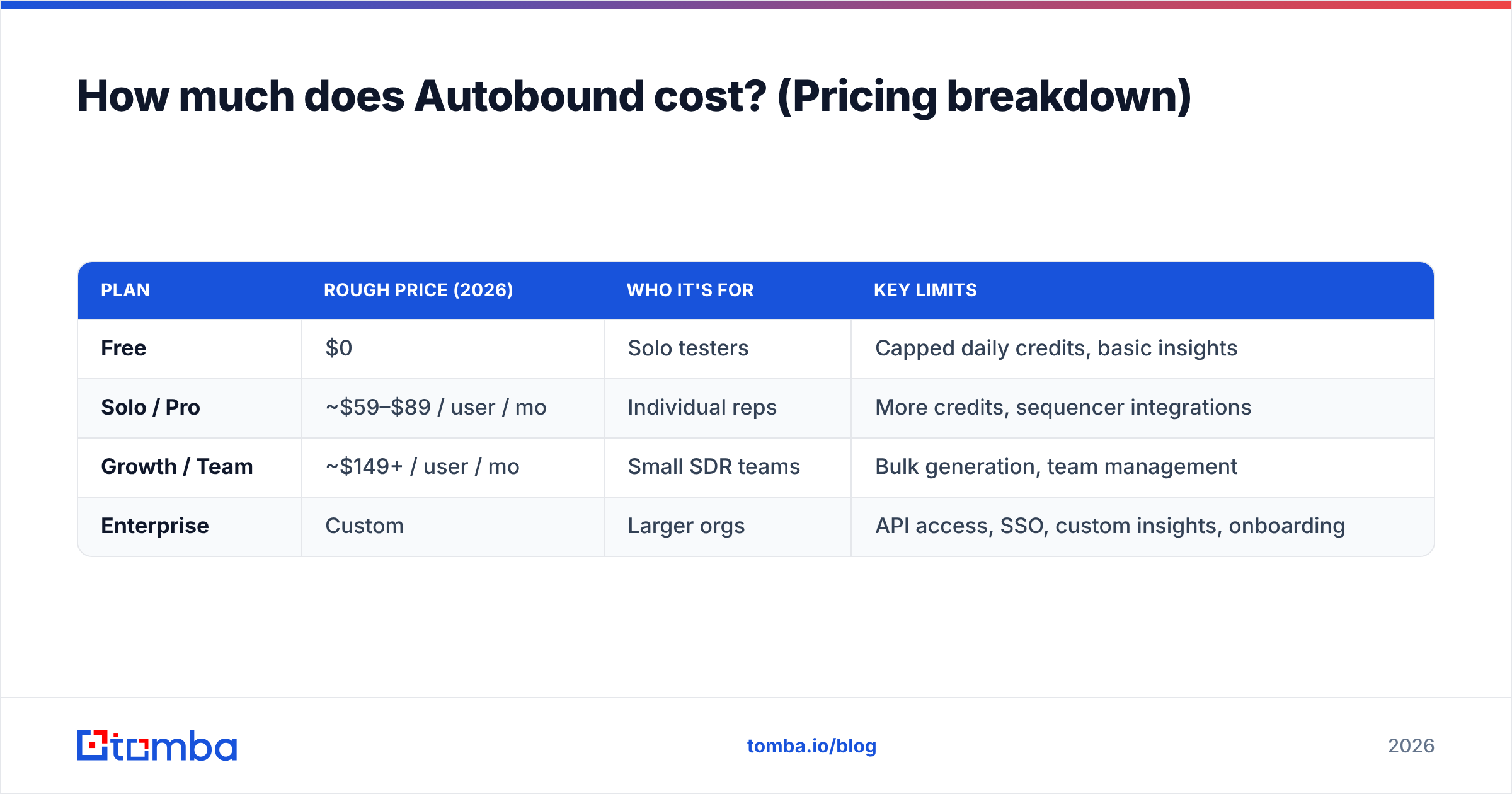
Autobound's published pricing has shifted more than once, and seat-based math makes the sticker price misleading. The structure below reflects the 2026 plan shape — always confirm current numbers on the official Autobound pricing page before you commit, because tiers and credit limits change.
| Plan | Rough price (2026) | Who it's for | Key limits |
|---|---|---|---|
| Free | $0 | Solo testers | Capped daily credits, basic insights |
| Solo / Pro | ~$59–$89 / user / mo | Individual reps | More credits, sequencer integrations |
| Growth / Team | ~$149+ / user / mo | Small SDR teams | Bulk generation, team management |
| Enterprise | Custom | Larger orgs | API access, SSO, custom insights, onboarding |
A few things to watch on the invoice:
- Per-seat pricing scales fast. A "$59" plan is $590/month across a 10-rep team — before you've paid for your sequencer, data, and CRM.
- Credits are the real currency. Generation volume is metered. Heavy bulk users hit ceilings and get upsold to the next tier.
- Annual lock-in. The advertised monthly rate usually assumes annual prepayment; month-to-month is higher.
- It does not replace your data spend. Budget for contact data separately — Autobound is additive, not a substitute.
If you're building a budget, model Autobound as a line item on top of your prospecting stack, not a replacement for it. Compare that against your existing Tomba pricing to see where the writing layer and the data layer each sit.
What do Autobound reviews say?#
Pulling from public review sites like G2 and user discussions, the sentiment is consistent and fairly easy to summarize.
What reviewers praise:
- Speed. The most repeated compliment. Reps who hated writing first lines now produce them in seconds.
- Insight depth. When the scraped signals are accurate, the personalization genuinely feels human and relevant.
- Integrations. Living inside Outreach, Salesloft, and HubSpot means low workflow friction.
What reviewers complain about:
- Generic or "off" output. When insights are thin, the AI invents filler that reads like every other AI email — the opposite of personalized.
- Credit limits and price creep. Several reviewers mention hitting caps faster than expected and feeling pushed toward upgrades.
- Insight accuracy misses. Occasionally references a stale job title, the wrong company, or an irrelevant news item — which can embarrass you in front of a prospect.
- It still needs good data in. Multiple users note the obvious-in-hindsight point: a perfect email to a wrong or dead address is worthless.
That last theme is worth dwelling on. Review after review circles back to the same root cause — the quality of what goes in determines the quality of what comes out. Autobound is a multiplier, and a multiplier applied to bad data multiplies the waste.
What are the pros and cons of Autobound?#
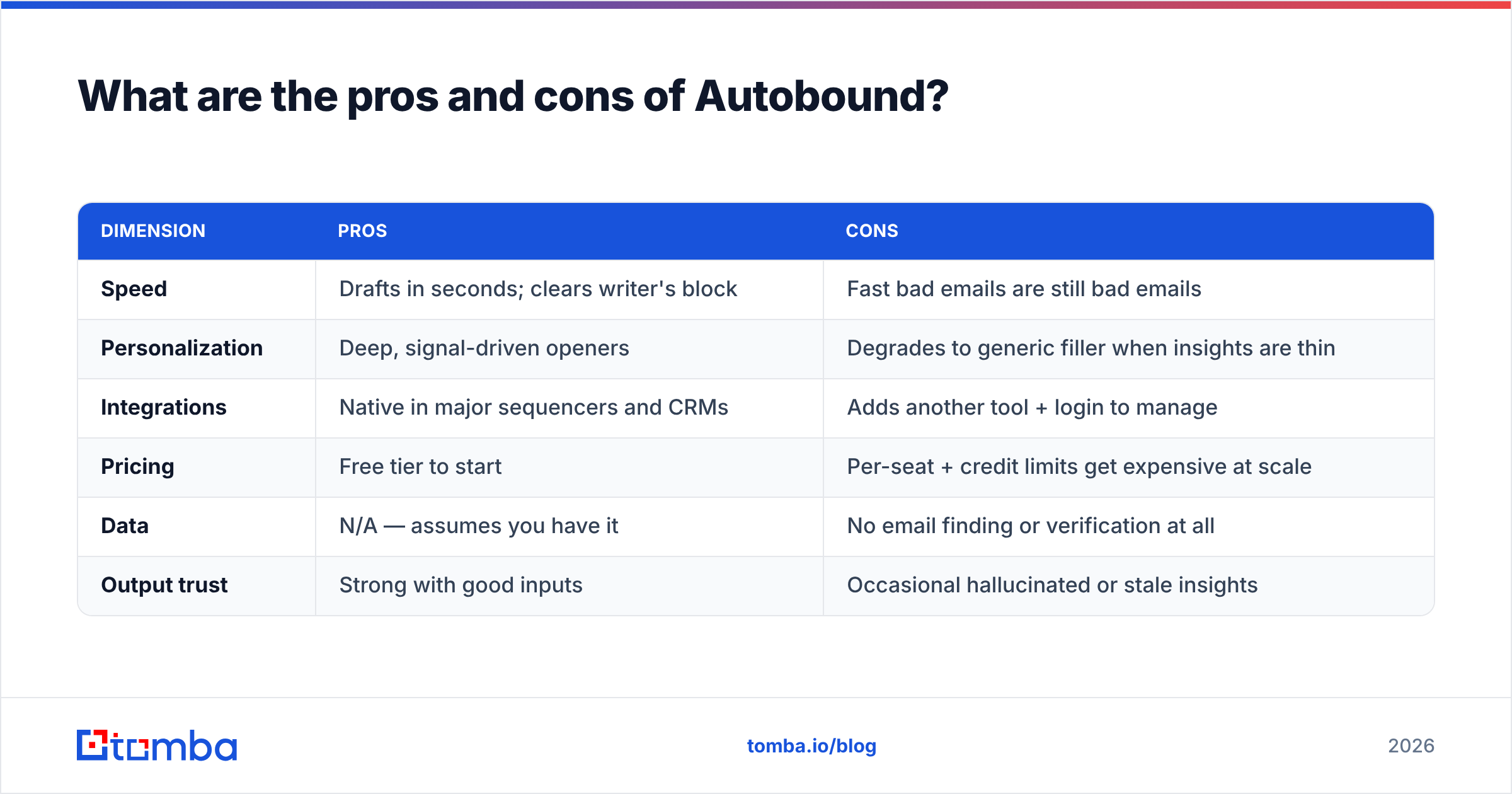
Here's the balanced scorecard, the part most "autobound pricing reviews pros and cons" searches are actually after.
| Dimension | Pros | Cons |
|---|---|---|
| Speed | Drafts in seconds; clears writer's block | Fast bad emails are still bad emails |
| Personalization | Deep, signal-driven openers | Degrades to generic filler when insights are thin |
| Integrations | Native in major sequencers and CRMs | Adds another tool + login to manage |
| Pricing | Free tier to start | Per-seat + credit limits get expensive at scale |
| Data | N/A — assumes you have it | No email finding or verification at all |
| Output trust | Strong with good inputs | Occasional hallucinated or stale insights |
The honest summary: Autobound is very good at the one job it claims — turning research signals into readable, personalized copy quickly. It is not a prospecting platform, a database, or a deliverability tool. Buy it for what it is, and don't expect it to fix problems upstream of the writing step.

Is Autobound enough on its own, or do you need a data layer?#
Autobound is not enough on its own — and that's by design, not a flaw.
Picture a world-class chef (Autobound) handed rotten ingredients (bad contact data). The plating will be gorgeous and the meal still inedible. The chef isn't the problem; the supply chain is. Outbound works the same way. Personalization sits at the end of a pipeline that starts with finding the right person and confirming you can actually reach them.
A complete outbound stack has three layers, and Autobound only owns one:
- Find — discover the right contacts and their professional emails (data layer).
- Verify — confirm those addresses are deliverable so you protect sender reputation and avoid bounces (verification layer).
- Personalize & send — write the message and run the sequence (Autobound's layer).
Skip layer one or two and Autobound's output goes to bounced or wrong inboxes. This is where a tool like Tomba complements it rather than competes. Use domain search to pull the right contacts at a target account, run them through an email verifier to strip the dead addresses, then let Autobound personalize what remains. The chef finally gets fresh ingredients.
How does Autobound compare to alternatives and complements?#
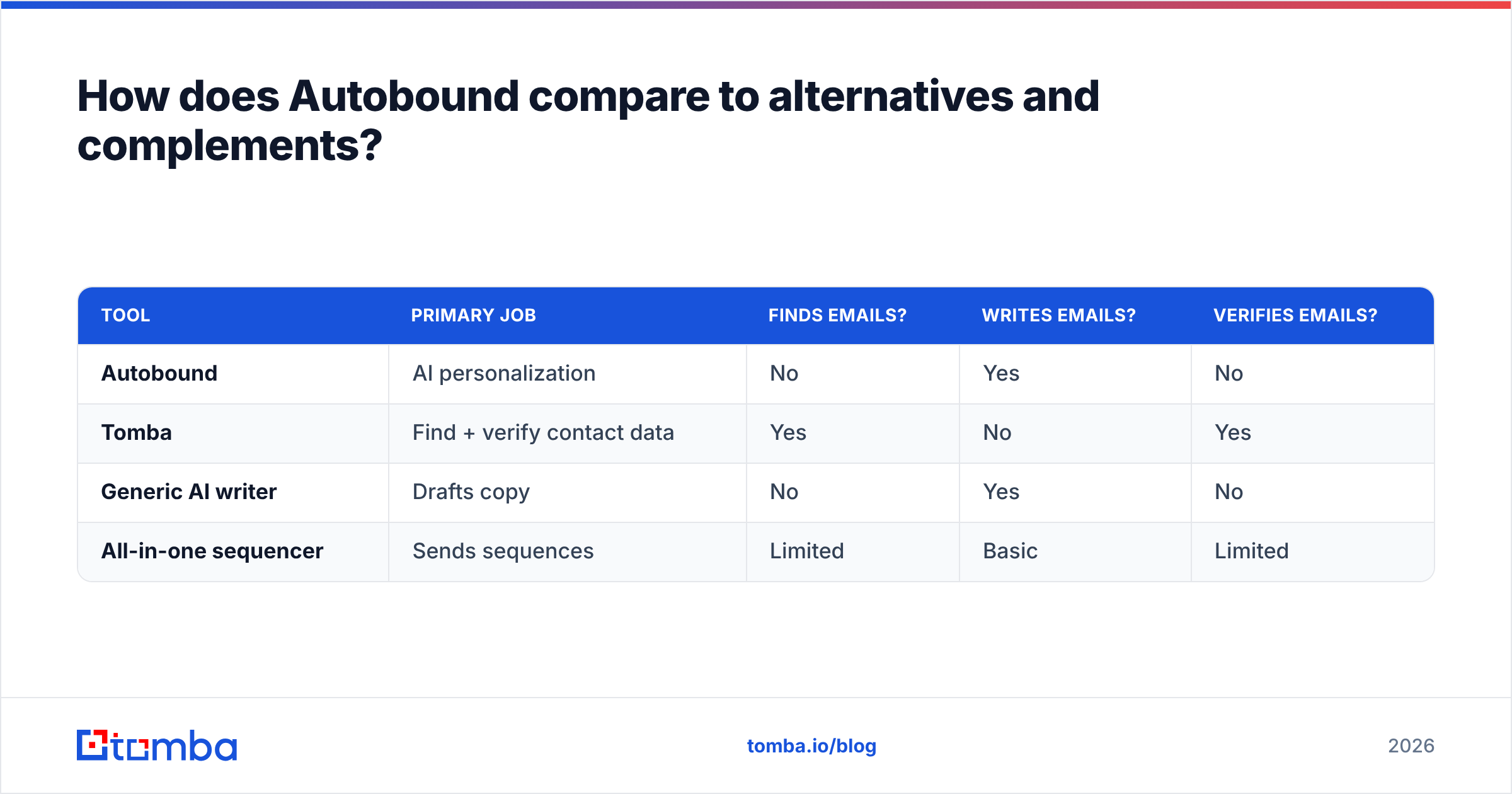
It helps to separate competitors (other AI writers) from complements (the data layer Autobound depends on). They solve different problems, and conflating them is how teams overspend.
| Tool | Primary job | Finds emails? | Writes emails? | Verifies emails? |
|---|---|---|---|---|
| Autobound | AI personalization | No | Yes | No |
| Tomba | Find + verify contact data | Yes | No | Yes |
| Generic AI writer | Drafts copy | No | Yes | No |
| All-in-one sequencer | Sends sequences | Limited | Basic | Limited |
The takeaway: Autobound and a data provider are not rivals — they're partners. Many teams pay for Autobound, then discover their bounce rate is killing campaigns because nobody owns the find-and-verify step. Fixing that with reliable data enrichment and verification often improves results more than any tweak to the copy itself.
If your real frustration is contact coverage rather than copy, you may be shopping in the wrong category entirely. In that case, compare dedicated finders — and only add an AI writer once your data is trustworthy. Autobound is a great second hire, a risky first one.
Who should buy Autobound — and who shouldn't?#
Buy Autobound if:
- You have a clean, verified contact list and reps are bottlenecked on writing, not finding.
- You live in Outreach, Salesloft, or HubSpot and want personalization inline.
- You send enough volume that saving minutes per email compounds into real hours.
Hold off if:
- Your bounce rate is already high — fix data and deliverability first.
- You're a solo founder or tiny team where per-seat AI pricing outweighs the time saved.
- You expected it to find contacts. It won't; that's a different tool.
Final verdict and the smarter stack#
Autobound earns its place as an AI writing accelerator: fast, well-integrated, and genuinely good when fed strong signals. The fair criticism in nearly every review — price creep, credit caps, and the occasional off-base insight — is real but manageable. The deeper truth is structural: Autobound only works as well as the data underneath it.
So before you debate Autobound's tiers, make sure the foundation is solid. Find the right people with the Tomba Email Finder, confirm every address is deliverable so your sequences actually land, and then let an AI writer do what it does best. Start free with 25 searches a month, build a verified list you can trust, and watch every downstream tool — Autobound included — perform better because the inputs finally deserve the output. Personalization is the finish line; accurate data is how you get to the race.
FAQ#
Does Autobound have a free plan? Yes. Autobound offers a free tier with capped daily credits and basic insights, useful for testing the writing quality before paying per seat.
Does Autobound find email addresses? No. Autobound personalizes messages but does not discover or verify email addresses. Pair it with a dedicated finder and verifier for that.
Is Autobound worth the price? For teams bottlenecked on writing with already-clean data, yes. For teams with coverage or bounce problems, fix the data layer first — Autobound won't solve it.
What's the best alternative if I mainly need contacts? If your gap is finding and verifying emails rather than writing them, a data-first platform like Tomba addresses the root problem; an AI writer addresses the symptom.
// get started
Find, verify and enrich your first contacts today
Start on the free plan with 25 searches a month, then scale when your team is ready.
Free plan · No credit card required · GDPR & CCPA
// about the author