Automated Email Follow Up Software in 2026: Buyer's Guide
Most replies come from follow-ups, not first sends. Here's how automated email follow up software works in 2026, what to look for, and how to pick the right tool.
You send a cold email. No reply. You move on. That single decision is why most outbound pipelines leak — because 80% of replies land after the first message, and the rep who stops at one touch never sees them. Automated email follow up software exists to close that gap without turning your day into a calendar of manual reminders.
This guide explains what the category actually does in 2026, which features separate a real follow-up engine from a glorified scheduler, and how to choose a tool that protects your sender reputation instead of torching it.
TL;DR#
- Follow-ups drive the majority of replies. Single-touch outreach wastes most of the leads you already paid to source.
- "Automated follow up" means conditional sequencing, not just delayed sends — the software watches for opens, clicks, and replies, then branches accordingly.
- Deliverability features matter more than send volume. Reply detection, sending limits, and warmup keep you out of spam.
- Clean data is the prerequisite. Automation amplifies whatever list you feed it — bad emails mean bounces at scale, which destroys sender reputation.
- The right tool depends on motion: SDR-heavy teams need sequencing depth; founders need simplicity; high-volume senders need inbox rotation.
What is automated email follow up software?#
Automated email follow up software sends a pre-planned series of messages to a contact and stops, branches, or escalates based on how that contact behaves. Think of it like a thermostat for your outreach: you set the target, and the system keeps adjusting the next action instead of forcing you to check the temperature every hour.
A first send is one touch. A follow-up sequence is a rules engine. The difference is conditional logic — the software knows the difference between "no reply yet," "opened twice but silent," and "replied," and it routes each contact down a different path.
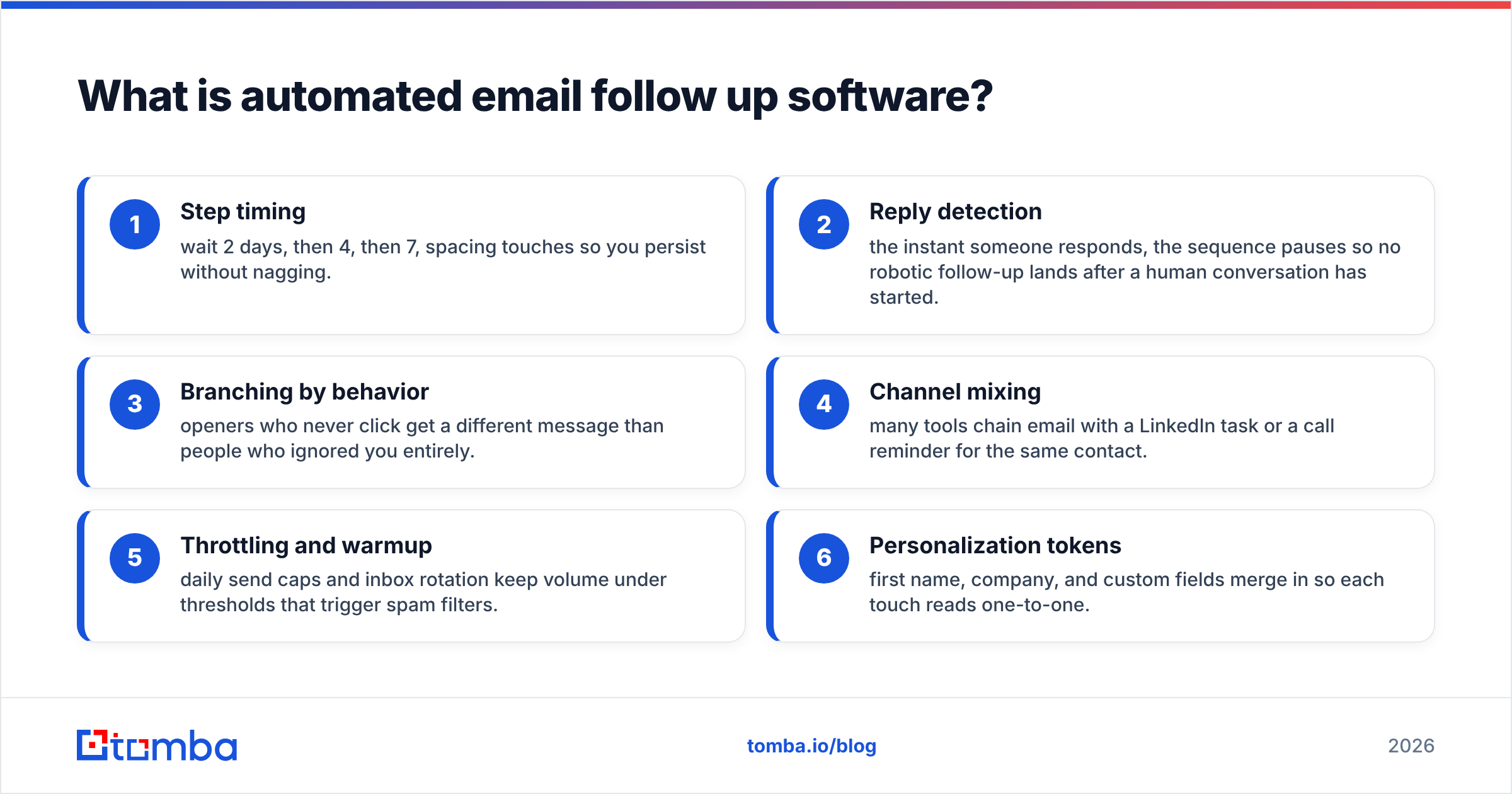
Here's what a typical engine handles for you:
- Step timing — wait 2 days, then 4, then 7, spacing touches so you persist without nagging.
- Reply detection — the instant someone responds, the sequence pauses so no robotic follow-up lands after a human conversation has started.
- Branching by behavior — openers who never click get a different message than people who ignored you entirely.
- Channel mixing — many tools chain email with a LinkedIn task or a call reminder for the same contact.
- Throttling and warmup — daily send caps and inbox rotation keep volume under thresholds that trigger spam filters.
- Personalization tokens — first name, company, and custom fields merge in so each touch reads one-to-one.
Why do follow-ups matter more than the first email?#
Because attention is a probability game, and one roll of the dice isn't enough. Your prospect was in a meeting, your subject line got buried, or your timing was wrong — none of which means "no." Persistence across 4–6 touches turns a single weak signal into multiple chances to be seen.
The economics are blunt. You already spent money sourcing the contact, writing the copy, and warming the inbox. Stopping after one send means you paid full price for a fraction of the outcome. Automated follow-up is the cheapest pipeline you'll ever add because the cost was already sunk.
There's a second, quieter reason: consistency. Humans forget. A rep juggling 300 open threads will miss follow-ups on the exact accounts that mattered most. Software never forgets and never plays favorites — it follows up on the cold lead with the same discipline as the warm one. For more on how this ties into broader sales automation, the principle is the same: remove the human bottleneck from anything repeatable.
What features separate good follow-up software from bad?#
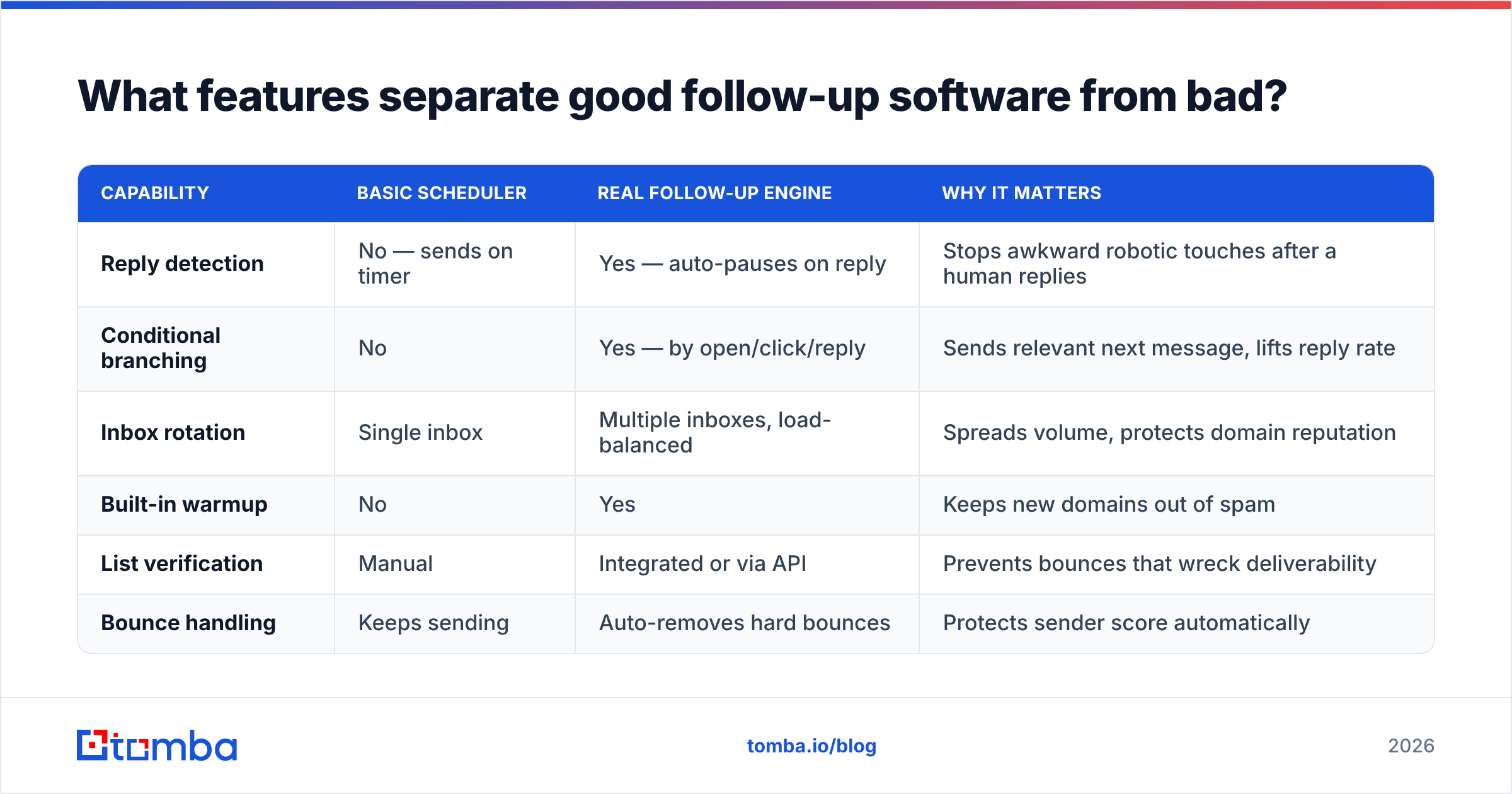
Not all "automation" is equal. A tool that blasts the same five emails on a fixed timer regardless of behavior is a liability — it'll keep emailing people who already replied and keep hammering dead inboxes until you get blacklisted. Here's how the categories stack up.
| Capability | Basic scheduler | Real follow-up engine | Why it matters |
|---|---|---|---|
| Reply detection | No — sends on timer | Yes — auto-pauses on reply | Stops awkward robotic touches after a human replies |
| Conditional branching | No | Yes — by open/click/reply | Sends relevant next message, lifts reply rate |
| Inbox rotation | Single inbox | Multiple inboxes, load-balanced | Spreads volume, protects domain reputation |
| Built-in warmup | No | Yes | Keeps new domains out of spam |
| List verification | Manual | Integrated or via API | Prevents bounces that wreck deliverability |
| Bounce handling | Keeps sending | Auto-removes hard bounces | Protects sender score automatically |
The single most underrated feature is reply detection paired with bounce handling. A sequence that keeps firing at a bounced address is actively damaging your domain. A sequence that keeps firing after someone replied makes you look like a bot. Both are reputation killers, and both are solved by software that reads signals instead of just counting days.
The second underrated feature is deliverability tooling. You can have the best copy in the world, but if your follow-ups land in spam, none of it matters. Look for tools with sending limits, warmup, and integration with an email verifier so you're only sending to addresses that actually exist. If you want to sanity-check your domain setup before you scale, run an SPF record check and confirm your authentication is clean.
How do you choose the right follow-up tool for your team?#
Match the tool to your motion, not to the longest feature list. A 50-rep SDR org and a solo founder need opposite things, and buying the wrong category wastes money and time.
- Solo founder / small team — prioritize simplicity and a generous free tier. You want to write a sequence in ten minutes and not babysit it. Inbox rotation is overkill at low volume.
- Dedicated SDR team — prioritize sequencing depth, A/B testing, CRM sync, and analytics. You're optimizing reply rates across hundreds of threads, so branching logic and reporting earn their keep.
- High-volume agency / lead gen — prioritize multi-inbox rotation, warmup, and per-domain sending caps. Your bottleneck is deliverability at scale, full stop.
- Account-based / low-volume, high-value — prioritize personalization tokens and multichannel steps over raw send volume. You're sending fewer, better touches.
Whatever bucket you're in, two things are non-negotiable: clean data going in and reply detection while running. Skip either and automation becomes an accelerant for problems instead of pipeline.
How does data quality affect automated follow-ups?#
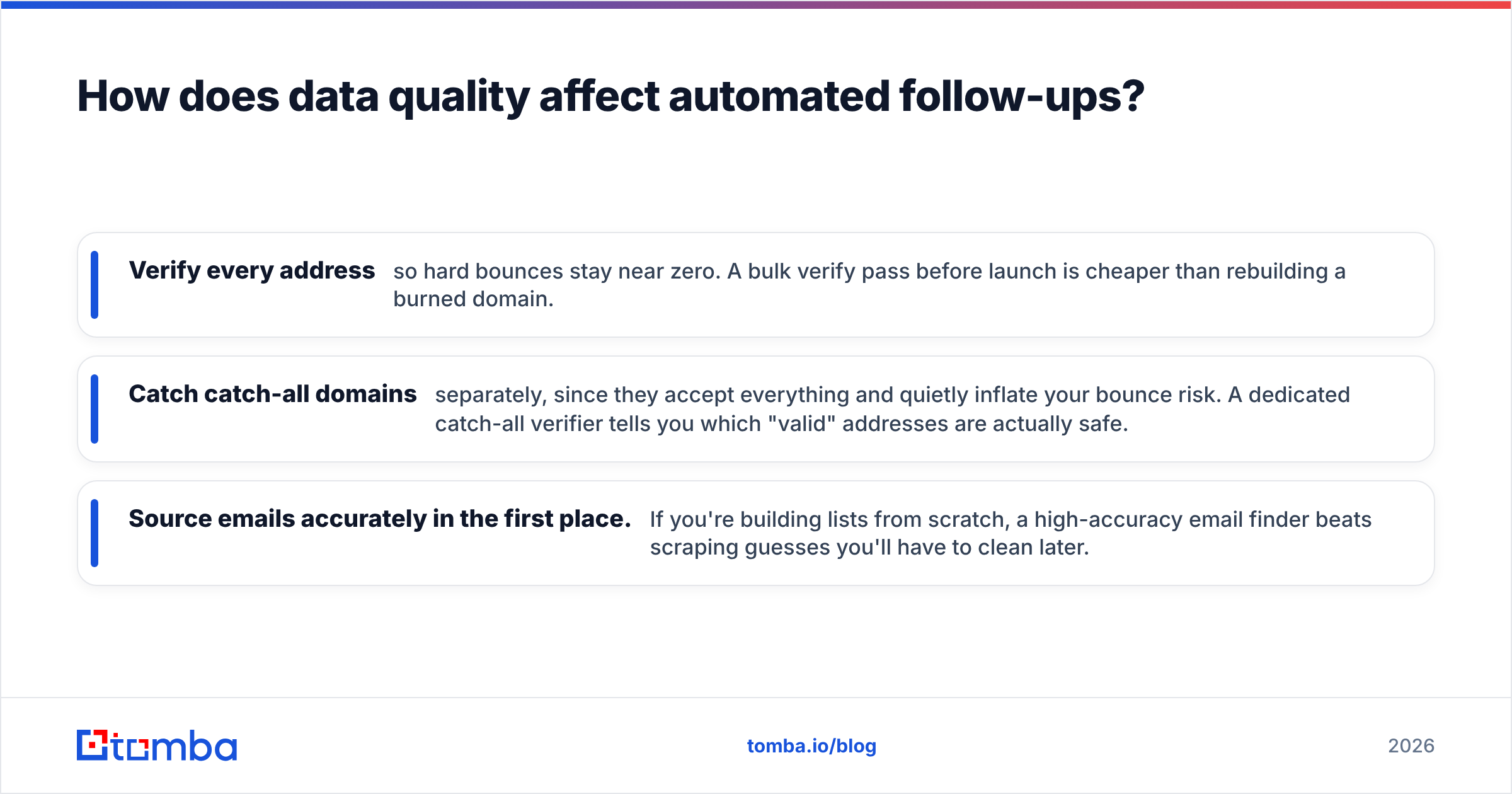
Automation multiplies whatever you feed it — including garbage. Send a sequence to a list that's 20% invalid, and you don't get a 20% problem; you get a cascading reputation problem, because every hard bounce signals to mailbox providers that you're a careless or spammy sender.
The fix is upstream, not downstream. Before a single follow-up fires, your list should be verified and deduplicated. That means:
- Verify every address so hard bounces stay near zero. A bulk verify pass before launch is cheaper than rebuilding a burned domain.
- Catch catch-all domains separately, since they accept everything and quietly inflate your bounce risk. A dedicated catch-all verifier tells you which "valid" addresses are actually safe.
- Source emails accurately in the first place. If you're building lists from scratch, a high-accuracy email finder beats scraping guesses you'll have to clean later.
This is where the front end of your stack and the follow-up engine connect. Tools like Tomba sit at the data layer — finding and verifying the contacts — and many follow-up platforms pull that data in via API or a CRM sync. Garbage in is the most common reason "the software didn't work." It usually did; the list didn't.
According to deliverability guidance published by providers like HubSpot and validated by review sites such as G2, list hygiene and authentication are consistently the two biggest levers on inbox placement — ahead of copy, ahead of timing. You can write a perfect sequence, but it has to arrive first.
How many follow-ups should an automated sequence send?#
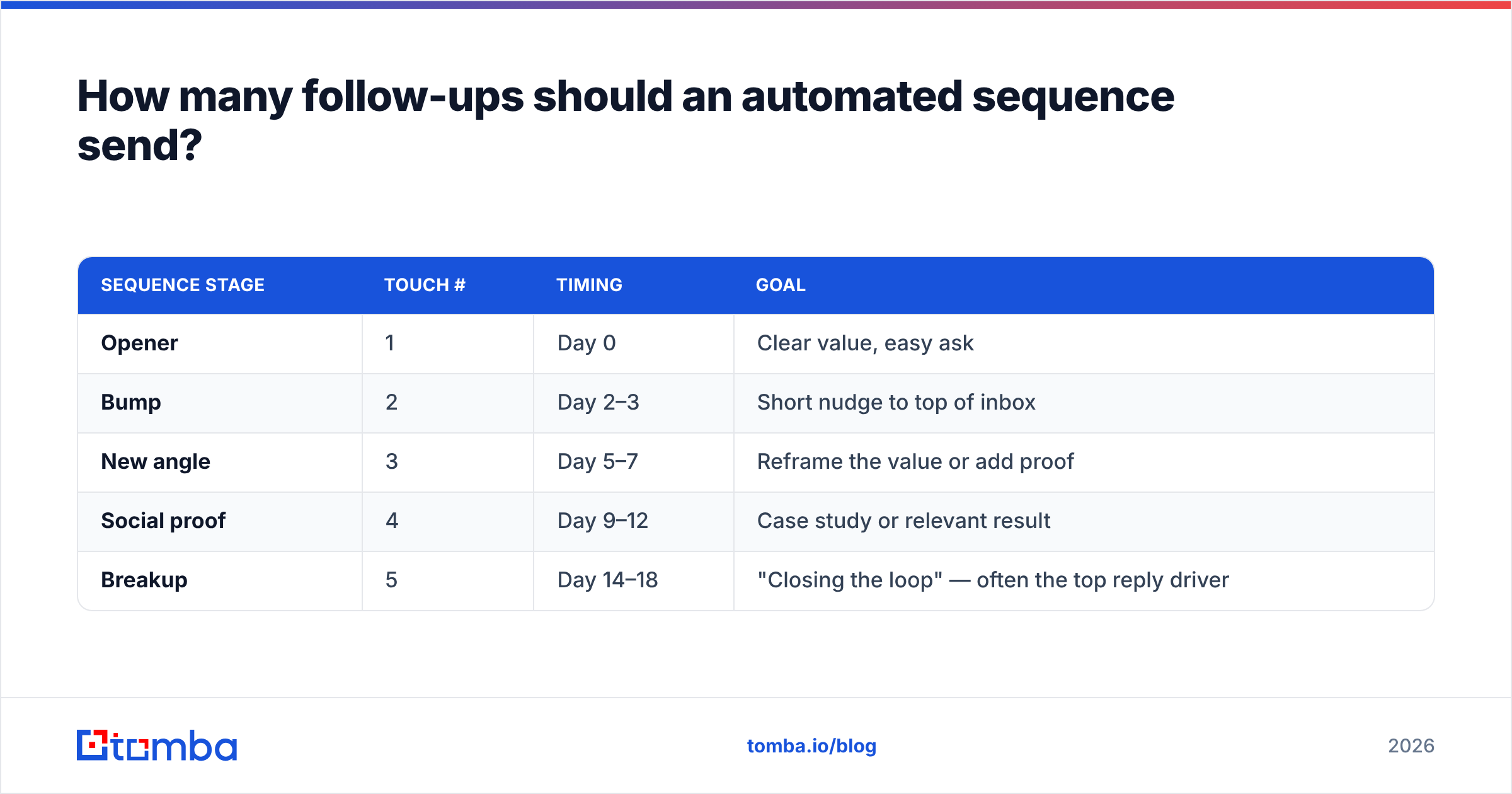
Four to six touches over two to three weeks is the workhorse range for cold outreach. Fewer and you leave replies on the table; more and you start annoying people and inviting spam complaints. The exact number depends on your audience, but the shape is consistent.
| Sequence stage | Touch # | Timing | Goal |
|---|---|---|---|
| Opener | 1 | Day 0 | Clear value, easy ask |
| Bump | 2 | Day 2–3 | Short nudge to top of inbox |
| New angle | 3 | Day 5–7 | Reframe the value or add proof |
| Social proof | 4 | Day 9–12 | Case study or relevant result |
| Breakup | 5 | Day 14–18 | "Closing the loop" — often the top reply driver |
The "breakup" email — the one where you politely say you'll stop reaching out — is famously one of the highest-reply messages in any sequence, because loss aversion does the work. Good software lets you set this up once and reuse it across campaigns. If you need a starting point for the copy, grab a set of proven cold email templates and adapt the tokens to your audience.
A note on cadence: respect the spacing. Software makes it trivial to send daily, but stacking touches too tightly reads as desperation and spikes complaint rates. The timing column above isn't decoration — it's the difference between persistent and irritating.
Does automated follow-up software hurt deliverability?#
It can — if you run it carelessly. It protects deliverability if you run it correctly. The technology is neutral; the configuration decides the outcome.
The risks are concentrated in three places: sending too fast from a cold domain, never verifying your list, and ignoring bounce signals. Mitigate all three and automation actually improves your standing, because consistent volume from a warmed, authenticated domain to verified addresses is exactly the pattern mailbox providers reward.
Practical guardrails:
- Warm up new domains for 2–4 weeks before sending real campaigns. Don't go from zero to 200 sends a day.
- Cap daily volume per inbox (40–50 cold sends is a common ceiling) and rotate inboxes if you need more.
- Verify before every launch and let the tool auto-remove hard bounces mid-sequence.
- Authenticate your domain — SPF, DKIM, DMARC — and confirm it with a checker before you scale.
Get those right and your follow-up engine becomes a reputation asset. Skip them and no amount of clever copy will save you from the spam folder.
The bottom line#
Automated email follow up software is the highest-leverage upgrade most outbound teams aren't fully using. The first email gets the credit; the follow-ups get the replies. Buy for your motion, insist on reply detection and bounce handling, and never let automation run on a dirty list.
That last point is where most "it didn't work" stories actually start. Before you scale any sequence, make sure the contacts going in are real and reachable. Tomba's Email Finder finds professional email addresses by name, company, or domain and pairs with built-in verification so your follow-up engine fires at inboxes that exist — not guesses that bounce. Start on the free tier (25 searches/month), then move to the Starter plan at $49/mo when you scale; see full Tomba pricing for details. Clean data first, automation second — that's the order that turns follow-ups into pipeline.
// get started
Find, verify and enrich your first contacts today
Start on the free plan with 25 searches a month, then scale when your team is ready.
Free plan · No credit card required · GDPR & CCPA
// about the author