How to Build an Automated Email Funnel That Converts in 2026
An automated email funnel turns one-time signups into pipeline on autopilot. Here's the stage-by-stage blueprint, the tools, and the metrics that actually move revenue.
TL;DR
- An automated email funnel is a sequence of triggered emails that moves a contact from first touch to closed deal without you hitting send each time.
- The four stages that matter: capture, nurture, convert, retain — each with its own trigger logic and success metric.
- Clean, verified contact data is the single biggest lever on funnel performance; a great sequence sent to dead addresses still fails.
- Segmentation and behavioral triggers beat broadcast blasts by a wide margin on reply and conversion rates.
- You can assemble a working funnel from a data source, an ESP or sequencer, and a CRM — no enterprise budget required.
What is an automated email funnel?#
An automated email funnel is a set of emails that fire automatically based on who a contact is and what they do. Think of it like a smart elevator instead of a staircase: once someone steps in at the lobby (a signup, a demo request, a cold reply), the system carries them to the right floor — education, offer, onboarding — without you carrying them up by hand.
Technically, it's a series of conditional sends governed by triggers (time delays, link clicks, page visits, replies) and filters (job title, company size, plan tier). The "funnel" framing matters: more people enter at the top than exit at the bottom, and your job is to reduce the drop-off between each stage.
The difference between a funnel and a plain newsletter is intent. A newsletter goes to everyone on the same day. A funnel reacts to the individual — a contact who opened your pricing page gets a different next email than one who ghosted after the welcome message.
Why do most automated email funnels fail?#
Most funnels don't fail because the copy is bad. They fail for three boring, fixable reasons:
- Dirty data at the top. If 20% of your captured emails bounce, your sender reputation tanks and the other 80% land in spam. Garbage in, no pipeline out.
- No segmentation. One sequence for "everyone" speaks to no one. A VP of Sales and a junior SDR have different problems; sending them the same five emails wastes both.
- Time-based triggers only. Sending email #2 exactly 48 hours later — regardless of whether the person opened email #1 — ignores the signal that should drive the next move.
Fixing the data problem first gives you the largest return. Before a single email enters your sequence, run your list through an email verifier to strip invalid and risky addresses. According to HubSpot's research on email marketing, list hygiene and segmentation consistently rank among the top drivers of engagement — and they're entirely within your control.
What are the stages of an automated email funnel?#
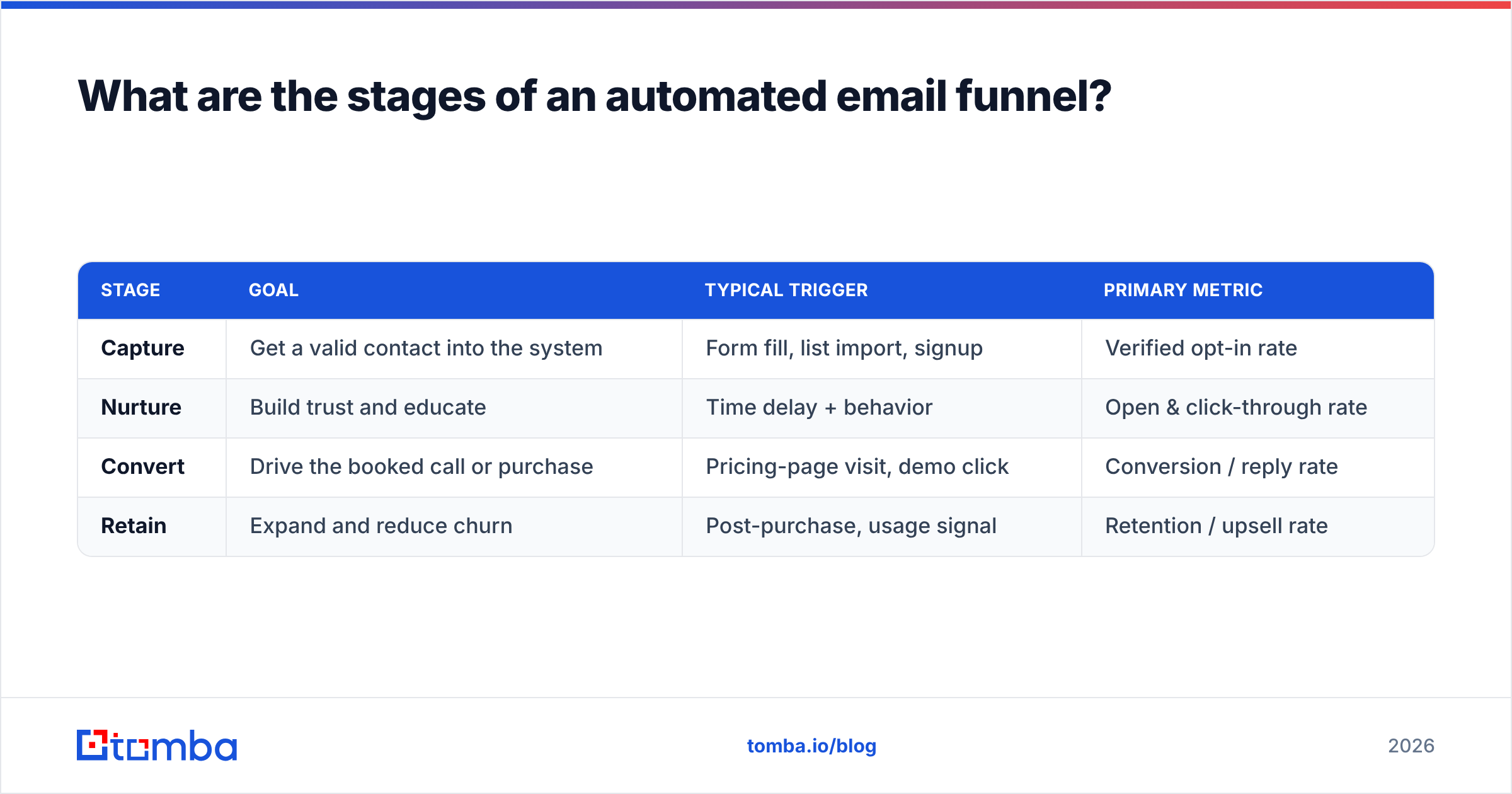
Every effective funnel maps to four stages. Each stage has a job, a trigger, and a metric you watch.
| Stage | Goal | Typical trigger | Primary metric |
|---|---|---|---|
| Capture | Get a valid contact into the system | Form fill, list import, signup | Verified opt-in rate |
| Nurture | Build trust and educate | Time delay + behavior | Open & click-through rate |
| Convert | Drive the booked call or purchase | Pricing-page visit, demo click | Conversion / reply rate |
| Retain | Expand and reduce churn | Post-purchase, usage signal | Retention / upsell rate |
Capture is where data quality is set for the entire funnel. Whether you collect emails from a form or build a prospect list, verify them at entry.
Nurture is where you earn the right to pitch. Three to five value-first emails — a useful guide, a relevant case study, a teardown — work better than an immediate hard sell.
Convert is the ask. This stage should be triggered by intent signals, not the calendar. Someone who visited your pricing page twice is ready for a different email than someone who only opened a blog digest.
Retain is the stage most teams skip and shouldn't. The cheapest revenue you'll ever book is expansion from existing customers.
How do you build the data layer for an automated email funnel?#
Start with the layer everyone underestimates: where the contacts come from. A funnel is only as good as the addresses you feed it.
For inbound funnels, contacts arrive through forms — but you still need to verify and enrich them. For outbound funnels, you build the list yourself. That's where a reliable email finder earns its keep: give it a name and a company domain, and it returns the verified professional email so your sequence starts on a real inbox.
When you're targeting whole accounts, domain search returns every discoverable email at a company, which you can then filter to the right roles. And before any of it enters your ESP, data enrichment fills in job title, seniority, and company size — the exact fields your segmentation depends on.
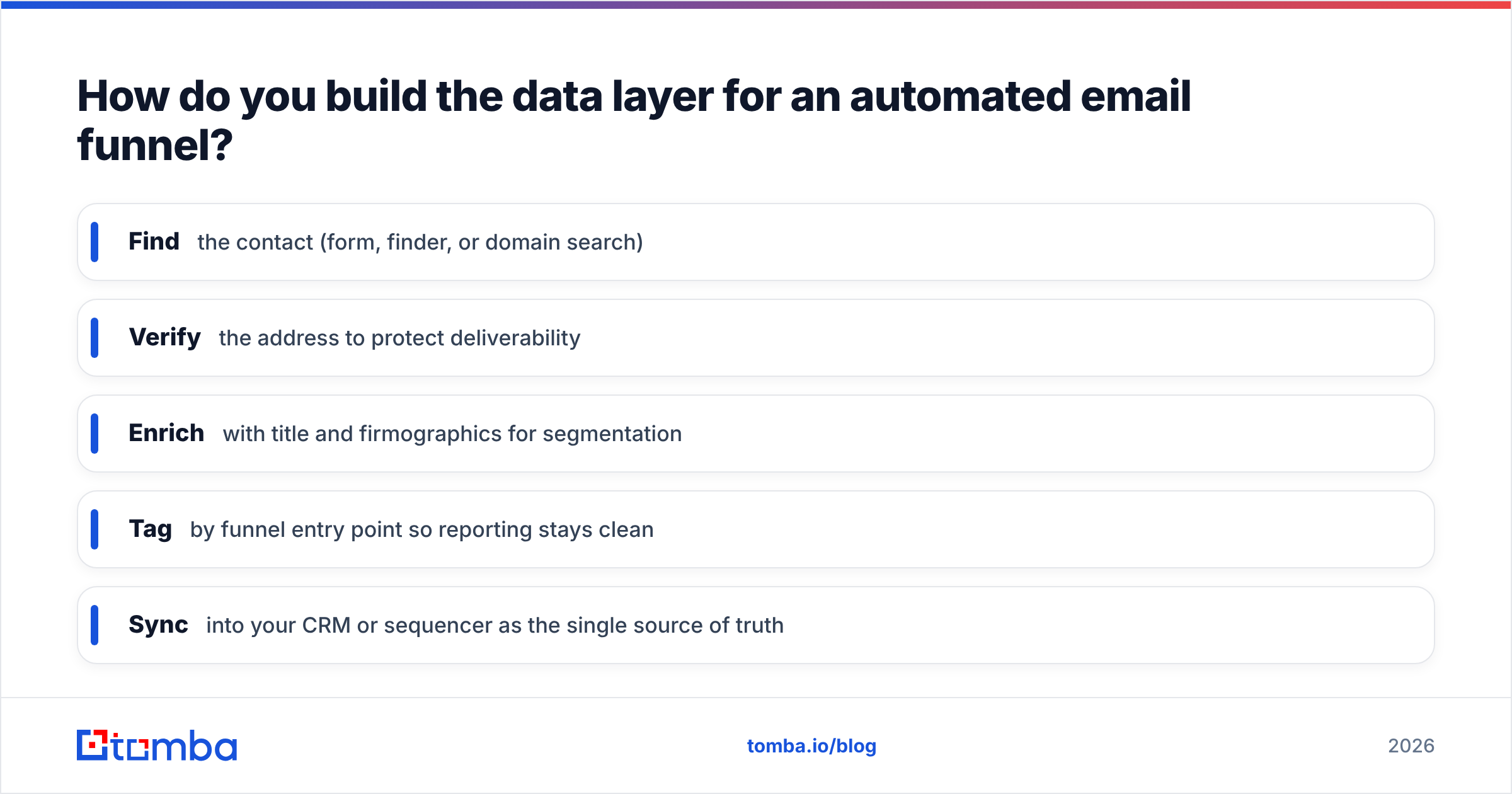
A practical capture-to-send checklist:
- Find the contact (form, finder, or domain search)
- Verify the address to protect deliverability
- Enrich with title and firmographics for segmentation
- Tag by funnel entry point so reporting stays clean
- Sync into your CRM or sequencer as the single source of truth
Skip any of these and the cracks show up two stages later as a high bounce rate or a flat conversion number you can't explain.
Which tools do you need to run an automated email funnel?#
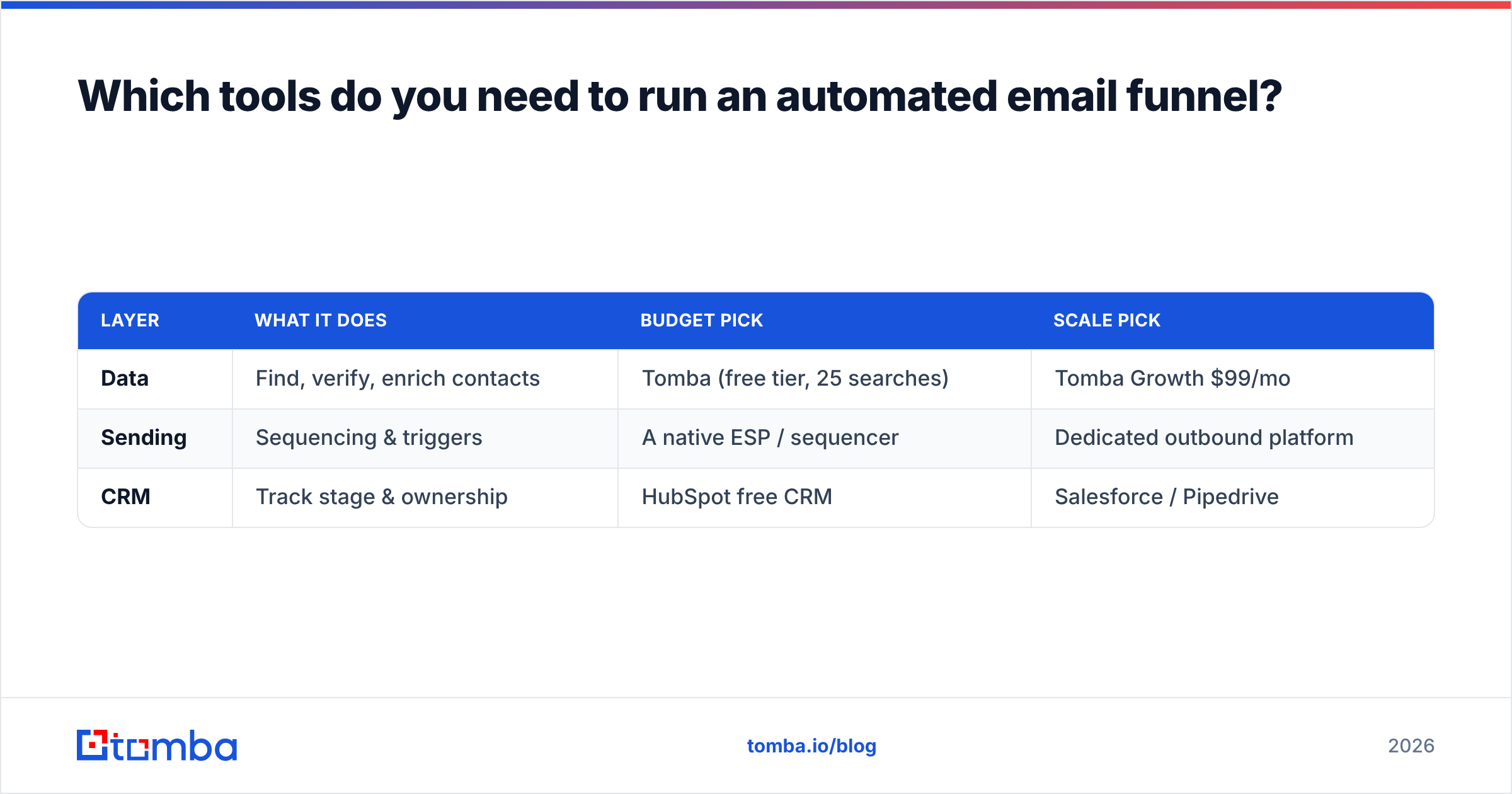
You need three layers, and they can be three tools or three features of one platform. Here's how the common options compare.
| Layer | What it does | Budget pick | Scale pick |
|---|---|---|---|
| Data | Find, verify, enrich contacts | Tomba (free tier, 25 searches) | Tomba Growth $99/mo |
| Sending | Sequencing & triggers | A native ESP / sequencer | Dedicated outbound platform |
| CRM | Track stage & ownership | HubSpot free CRM | Salesforce / Pipedrive |
For the data layer specifically, Tomba pricing starts free at 25 searches per month, with Starter at $49/mo and Growth at $99/mo — enough to feed a serious funnel without an enterprise contract. You can compare options on a third-party marketplace like G2 before committing.
For sending, your choice depends on motion. Marketing-led nurture funnels live well inside an ESP. Sales-led outbound funnels need a sequencer with reply detection and step-level conditions. Either way, the sending tool is downstream of your data quality — it can't rescue a bad list.
For the CRM, the only hard requirement is that it becomes the system of record for funnel stage, so reporting isn't scattered across tools.
How do behavioral triggers improve funnel conversion?#
Behavioral triggers turn a static drip into a conversation. Instead of "send email #3 on day 4," you say "if they clicked the case-study link, send the demo offer; if they didn't, send a different angle."
The highest-impact triggers to wire up first:
- Link click — signals topic interest; branch the next email toward that topic.
- Page visit (especially pricing) — strong buying intent; accelerate to the offer.
- Reply detection — pull the contact out of automation and hand to a human immediately.
- No-open after N days — switch subject-line style or sending time rather than repeating.
This is the heart of sales automation: the system does the routing so your team only touches the contacts showing real intent. A funnel without behavioral branching is just a slower newsletter.
One caution: more branches isn't always better. Start with two or three high-signal triggers, measure, and add complexity only when the data justifies it. Over-engineered funnels are hard to debug and harder to improve.
What metrics tell you the funnel is working?#
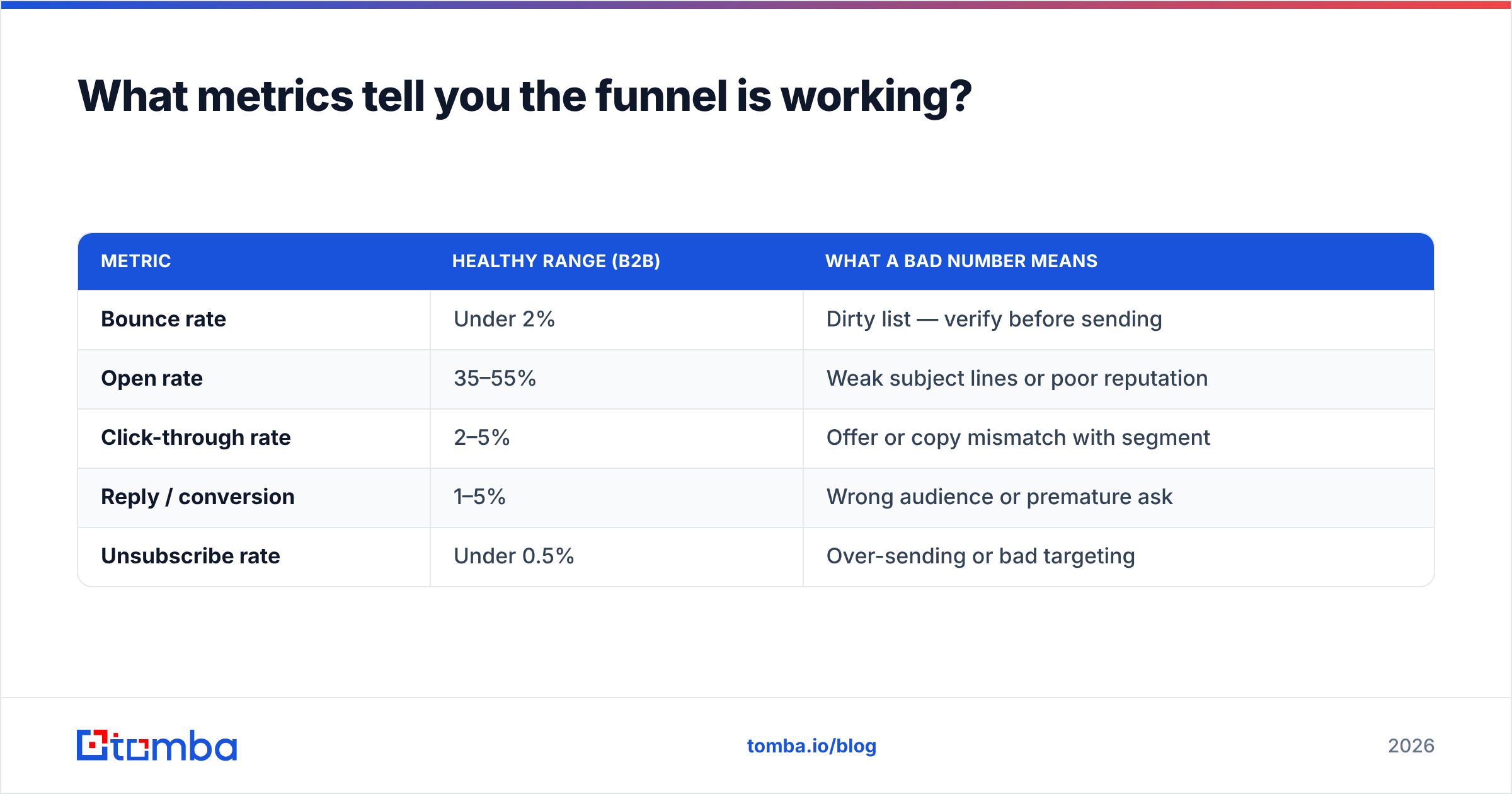
Watch metrics per stage, not just the headline conversion number. A single funnel-wide "conversion rate" hides where you're actually leaking.
| Metric | Healthy range (B2B) | What a bad number means |
|---|---|---|
| Bounce rate | Under 2% | Dirty list — verify before sending |
| Open rate | 35–55% | Weak subject lines or poor reputation |
| Click-through rate | 2–5% | Offer or copy mismatch with segment |
| Reply / conversion | 1–5% | Wrong audience or premature ask |
| Unsubscribe rate | Under 0.5% | Over-sending or bad targeting |
Bounce rate is your early-warning system. If it climbs above 2–3%, stop and clean the list — every subsequent send is damaging your domain reputation. This is exactly why the data layer comes first.
Track these weekly, isolate the worst-performing stage, and fix one thing at a time. Funnels improve through iteration, not through a single perfect launch.
How do you scale an automated email funnel without burning your domain?#
Scaling breaks funnels when volume outruns hygiene. Three guardrails keep you safe:
- Verify in bulk before every major send. When you import hundreds or thousands of contacts at once, run them through bulk verification so a single bad import doesn't poison the whole sequence.
- Warm up sending volume gradually. Don't jump from 50 to 5,000 emails a day. Ramp over weeks so mailbox providers learn your pattern.
- Segment harder as you grow. The bigger your list, the more a one-size message underperforms. Split by industry, role, and behavior.
The pattern is simple: data quality scales the funnel, volume without quality scales the damage. Teams that win at scale treat verification as a recurring step, not a one-time cleanup.
Frequently asked questions#
How long should an automated email funnel be? For nurture, three to seven emails over two to three weeks is a sensible default. For outbound, four to six steps. Length matters less than relevance — stop when the contact converts or clearly disengages.
Can I run a funnel without a CRM? You can start with just a data source and a sequencer, but you'll outgrow it fast. A CRM keeps funnel stage and ownership in one place once more than one person touches the pipeline.
What's the single biggest mistake? Sending to unverified addresses. It's the cheapest mistake to prevent and the most expensive to ignore, because it quietly destroys deliverability for your entire program.
Build your funnel on data you can trust#
A clever sequence built on a dirty list is a fast way to land in spam. The teams whose funnels actually convert start one step earlier — with verified, enriched contacts entering at the top.
That's where Tomba Email Finder fits your stack: find professional email addresses by name, company, or domain, verify them on the spot, and feed your automated email funnel real inboxes instead of bounces. Start free with 25 searches a month, then scale to Starter at $49/mo or Growth at $99/mo as your funnel grows. Build the data layer right, and every email downstream works harder.
// get started
Find, verify and enrich your first contacts today
Start on the free plan with 25 searches a month, then scale when your team is ready.
Free plan · No credit card required · GDPR & CCPA
// about the author