Automated Lead Response in 2026: The Speed-to-Lead Playbook
Leads go cold in minutes, not hours. Here's how automated lead response cuts your reply time to seconds, who the tools are, and what to wire up first.
TL;DR
- Speed wins deals. Inbound leads contacted within 5 minutes are far more likely to convert than those contacted an hour later — and most teams still take hours or days.
- Automated lead response is the system that detects a new lead, enriches it, routes it, and sends the first reply (email, SMS, or chat) without a human in the loop.
- The stack has four moving parts: capture, enrichment, routing, and the first touch. Skip enrichment and your "instant" reply is generic and ignorable.
- Tools range from all-in-one CRMs (HubSpot, Salesforce) to focused routing and instant-reply engines — pick based on where your leads already live.
- Enriching the lead before you reply is the difference between "Thanks for your interest" and a personalized message that books the meeting. That's where a data layer like Tomba fits.
What is automated lead response?#
Automated lead response is the practice of replying to a new inbound lead the moment it arrives, using software instead of a person to handle detection, data lookup, routing, and the first message.
Think of it like a restaurant host. When someone walks in, a good host greets them in seconds, checks the reservation book, and walks them to the right table — they don't make the guest stand at the door for an hour. Automated lead response is that host for your pipeline: the second a form is submitted or a demo is requested, the system acknowledges the person, figures out who they are, and hands them to the right rep with context attached.
Technically, it's an event-driven workflow. A trigger fires (form fill, chatbot conversation, pricing-page visit), data is appended to the raw submission, rules decide who owns the lead, and a templated-but-personalized first touch goes out — often within seconds.
Why does response time matter this much?#
Because the value of a lead decays fast. The often-cited Lead Response Management research found that the odds of qualifying a lead drop sharply after the first five minutes, and keep falling by the hour. HubSpot's own sales data echoes the same pattern: the first vendor to respond usually wins the conversation.
Here's the uncomfortable math most teams live with:
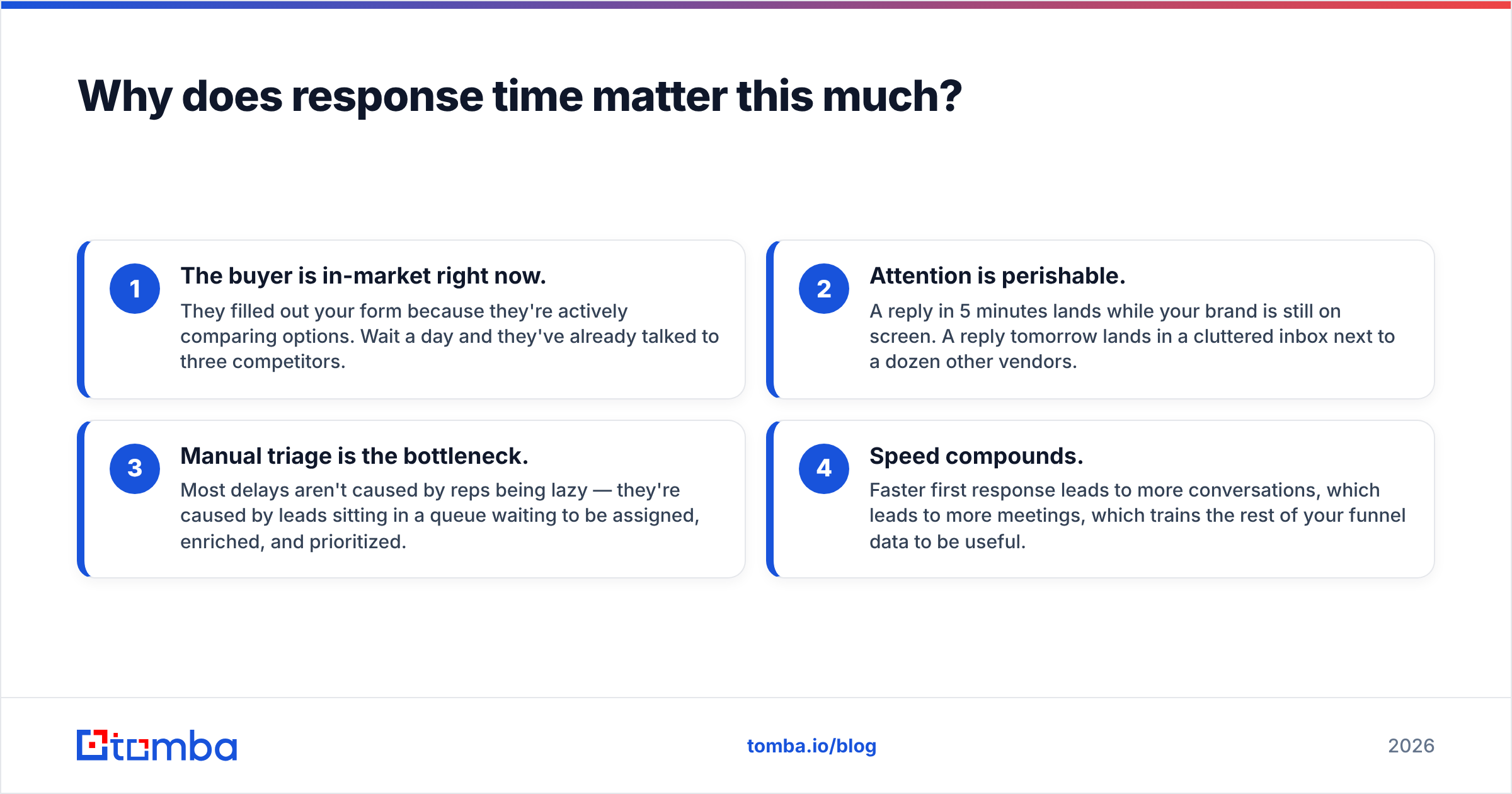
- The buyer is in-market right now. They filled out your form because they're actively comparing options. Wait a day and they've already talked to three competitors.
- Attention is perishable. A reply in 5 minutes lands while your brand is still on screen. A reply tomorrow lands in a cluttered inbox next to a dozen other vendors.
- Manual triage is the bottleneck. Most delays aren't caused by reps being lazy — they're caused by leads sitting in a queue waiting to be assigned, enriched, and prioritized.
- Speed compounds. Faster first response leads to more conversations, which leads to more meetings, which trains the rest of your funnel data to be useful.

If you want to go deeper on the metric itself, see how response rate connects to reply speed — the two move together.
What are the parts of an automated lead response system?#
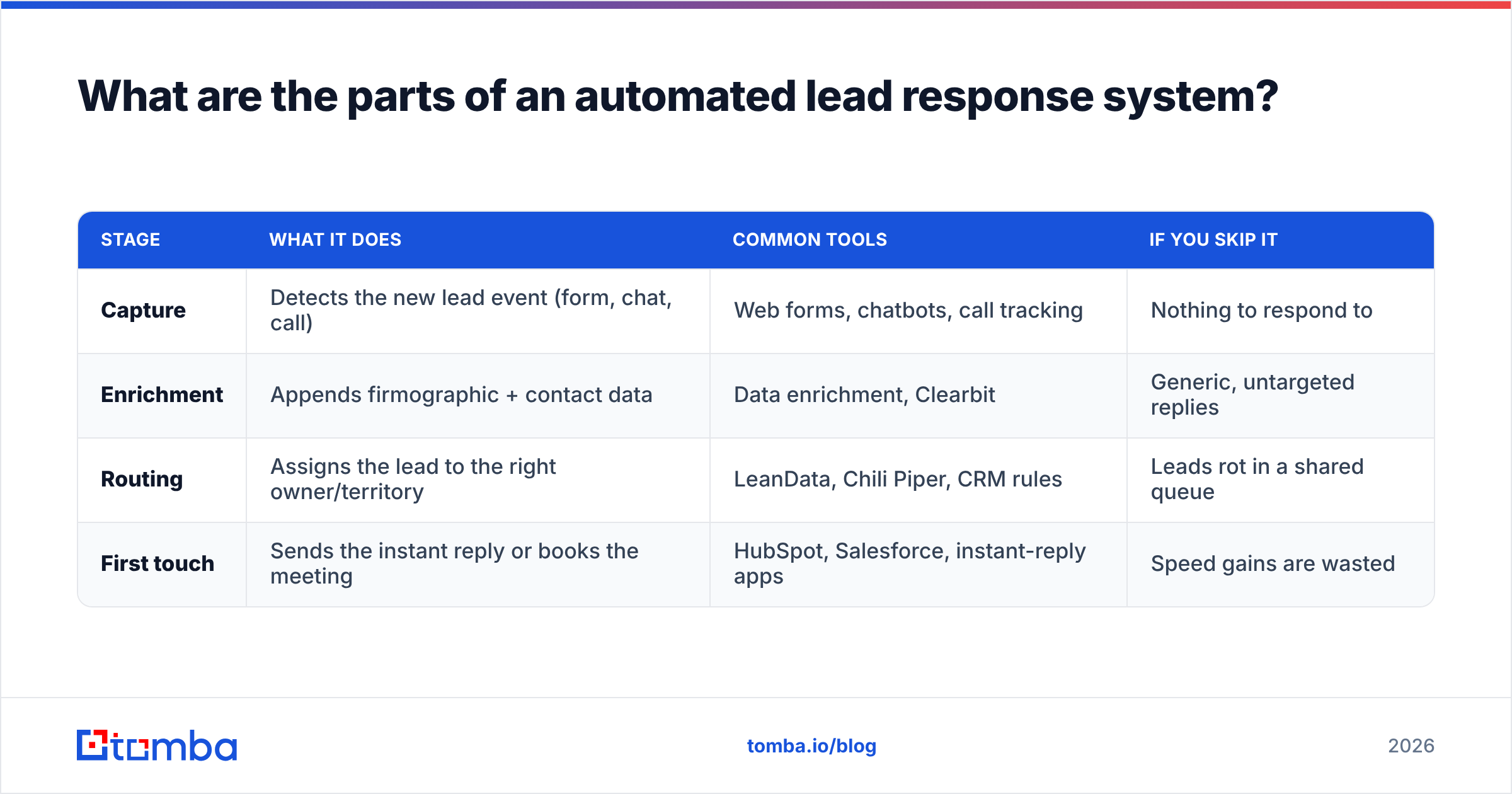
A working system has four stages. Most teams nail one or two and wonder why automation didn't move the needle. You need all four.
| Stage | What it does | Common tools | If you skip it |
|---|---|---|---|
| Capture | Detects the new lead event (form, chat, call) | Web forms, chatbots, call tracking | Nothing to respond to |
| Enrichment | Appends firmographic + contact data | Data enrichment, Clearbit | Generic, untargeted replies |
| Routing | Assigns the lead to the right owner/territory | LeanData, Chili Piper, CRM rules | Leads rot in a shared queue |
| First touch | Sends the instant reply or books the meeting | HubSpot, Salesforce, instant-reply apps | Speed gains are wasted |
The stage everyone underrates is enrichment. A form often gives you nothing but an email and a name. Without enrichment, your "instant" automated reply is a hollow "Thanks for reaching out!" — which converts about as well as silence. With enrichment, the same reply can reference the prospect's company, role, and likely use case, because you've already resolved the email to a real person and company profile before the message sends.
That's also where a B2B database and an email finder earn their keep: when a lead submits a personal Gmail or a partial form, enrichment fills the gaps so routing and personalization still work.
Which automated lead response tools should you compare in 2026?#
There's no single "best" tool — there's a best fit for where your leads already live and how complex your routing is. Here's an honest comparison of the main categories.
| Tool / type | Best for | Starting price | Built-in enrichment | Instant scheduling |
|---|---|---|---|---|
| HubSpot (Sales Hub) | SMB to mid-market, all-in-one | Free CRM; paid from ~$20/seat | Limited (add-ons) | Yes (Meetings) |
| Salesforce + flow | Enterprise, complex routing | From ~$25/user/mo | Via AppExchange | Add-on |
| Chili Piper | Instant inbound booking | ~$22.50/user/mo | No (integrates) | Yes (core feature) |
| Tomba (data layer) | Enrichment + email/phone lookup | Free 25 searches; Starter $49/mo | Yes (core) | No (feeds your tools) |
| **DIY ( |
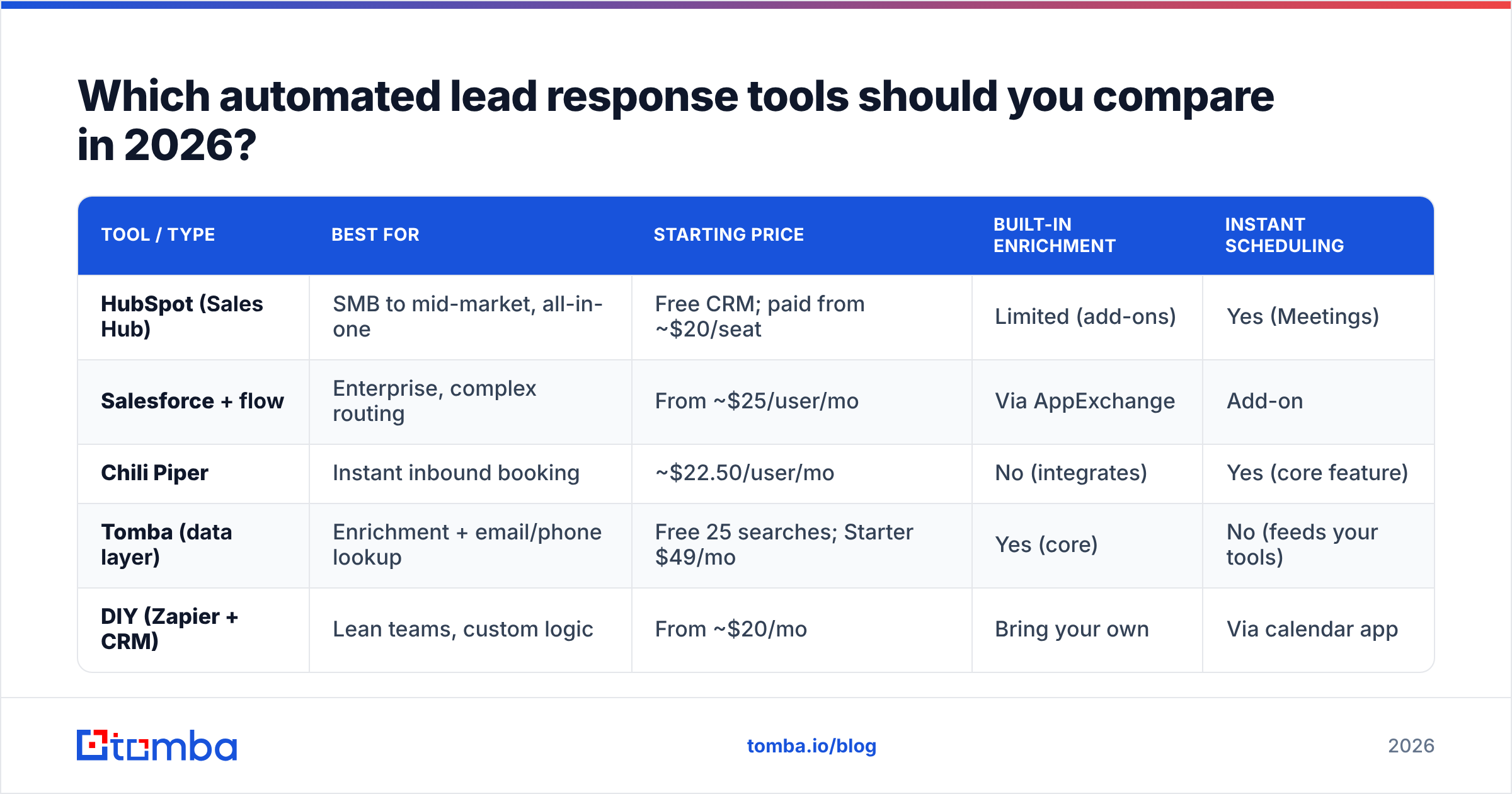
Zapier + CRM)** | Lean teams, custom logic | From ~$20/mo | Bring your own | Via calendar app |
A few honest notes:
- HubSpot and Salesforce are platforms, not point solutions. They handle capture, routing, and first touch well, but their native enrichment is thin — you'll usually bolt on a data source.
- Chili Piper is excellent at one thing: turning a form fill into a booked meeting in the same session. It doesn't enrich or find missing contact data on its own.
- Tomba isn't a workflow engine — it's the data layer underneath one. It resolves and verifies contact data so the rest of the stack personalizes accurately. You wire it in via the Tomba API or a no-code connector.
- The DIY route (Zapier or Make plus your CRM) is underrated for small teams. You lose polish but gain total control, and you can add enrichment as a single step in the Zap.

For platform shoppers, third-party review sites like G2 are useful for cutting through vendor marketing — filter by company size and use case, not just star rating.
How do you build an automated lead response workflow?#
Here's a concrete, vendor-neutral blueprint you can implement this quarter. It assumes you have a CRM and a form; everything else is wiring.
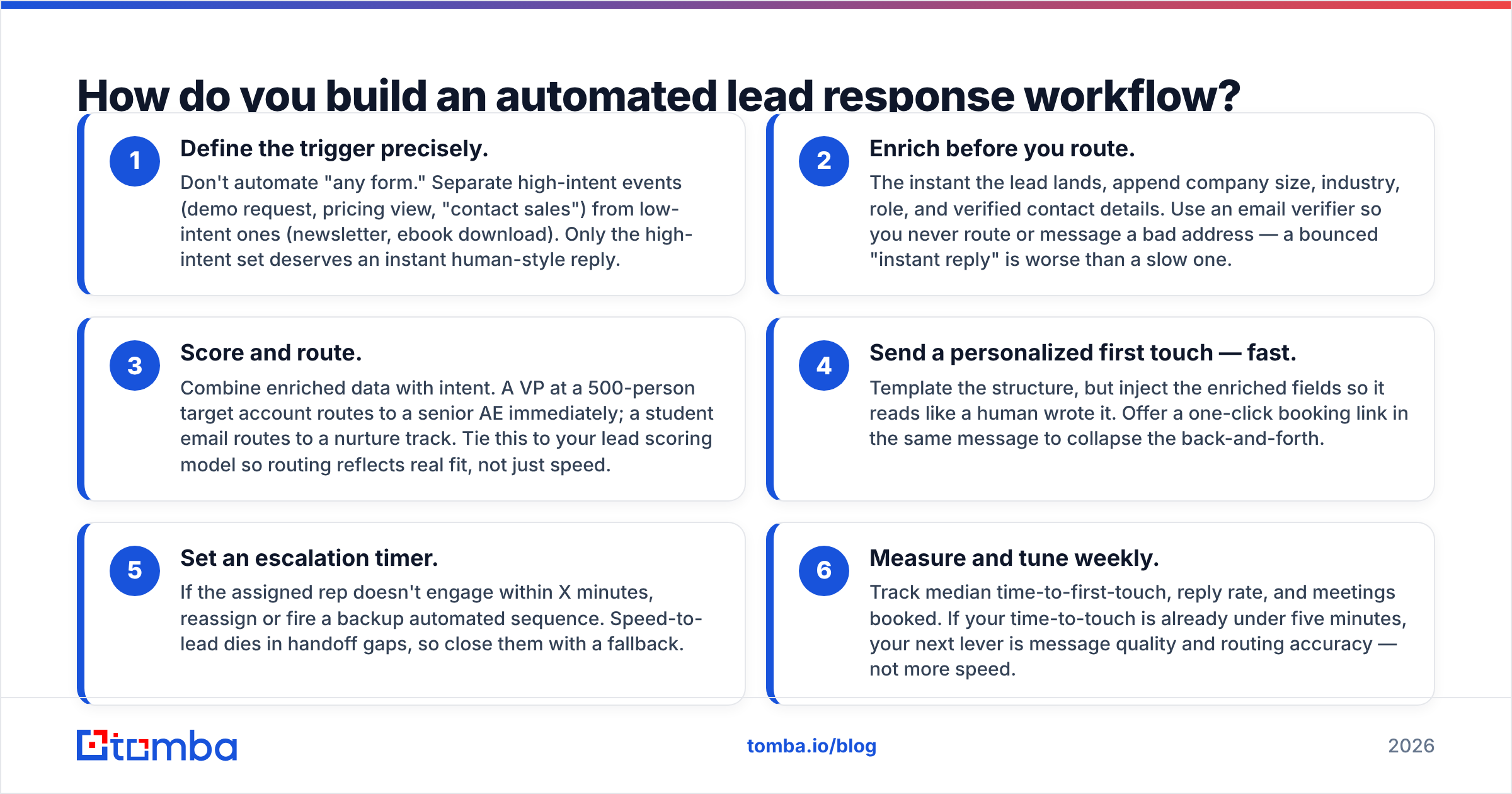
- Define the trigger precisely. Don't automate "any form." Separate high-intent events (demo request, pricing view, "contact sales") from low-intent ones (newsletter, ebook download). Only the high-intent set deserves an instant human-style reply.
- Enrich before you route. The instant the lead lands, append company size, industry, role, and verified contact details. Use an email verifier so you never route or message a bad address — a bounced "instant reply" is worse than a slow one.
- Score and route. Combine enriched data with intent. A VP at a 500-person target account routes to a senior AE immediately; a student email routes to a nurture track. Tie this to your lead scoring model so routing reflects real fit, not just speed.
- Send a personalized first touch — fast. Template the structure, but inject the enriched fields so it reads like a human wrote it. Offer a one-click booking link in the same message to collapse the back-and-forth.
- Set an escalation timer. If the assigned rep doesn't engage within X minutes, reassign or fire a backup automated sequence. Speed-to-lead dies in handoff gaps, so close them with a fallback.
- Measure and tune weekly. Track median time-to-first-touch, reply rate, and meetings booked. If your time-to-touch is already under five minutes, your next lever is message quality and routing accuracy — not more speed.
The order matters. Teams that route before enriching end up personalizing with garbage data or skipping personalization entirely. Enrich first, then everything downstream gets smarter.
Does automation make replies feel robotic?#
Only if you skip the data layer. A robotic reply isn't caused by automation — it's caused by automating with no context.
The "Thanks for your interest, a rep will be in touch" auto-responder feels robotic because it knows nothing about the person. Compare two automated messages that both send in under 60 seconds:
- No enrichment: "Hi there, thanks for reaching out! Someone will contact you soon."
- With enrichment: "Hi Dana — saw you're heading RevOps at Northwind. Teams your size usually ask us about CRM routing first; I grabbed a slot Thursday if that's useful: [link]."
Both are automated. Only one converts. The difference is entirely the data appended in the half-second before the message rendered. This is why pairing a workflow tool with a real enrichment source — and verifying every address with an email verifier — beats buying a bigger automation platform and feeding it thin data.
If your inbound volume is high and your forms are short, the highest-leverage upgrade isn't a new CRM. It's a reliable way to turn a name and a half-filled form into a complete, verified contact record before the reply goes out.
What metrics prove your automated lead response is working?#
Track these four, weekly, and you'll know in a month whether the system is paying off:
- Median time-to-first-touch — the headline metric. Target under five minutes for high-intent leads.
- Speed-to-lead distribution — averages lie; look at the slow tail. One lead answered in two days drags real revenue.
- Reply / engagement rate — proves your automated first touch is actually read, not just sent fast.
- Meetings booked per 100 leads — the only number finance cares about. Speed and personalization should both push this up.
If time-to-touch drops but meetings don't, your bottleneck moved downstream to message quality or routing — fix that, not your speed.
The bottom line#
Automated lead response is no longer a nice-to-have; it's the difference between catching a buyer while they're in-market and emailing a ghost two days later. The teams that win aren't just fast — they're fast and informed, because they enrich and verify every lead before the first reply leaves the building.
You don't need to rip out your CRM to get there. Start by adding a clean data layer to whatever workflow you already run. Tomba's Email Finder resolves names and partial form fills into verified, ready-to-message contacts — so your instant replies are personalized, your routing is accurate, and your "5-minute response" actually books meetings instead of bouncing. Plug it in through the Tomba API or a no-code connector, start free with 25 searches, and turn speed-to-lead from a slogan into a number on your dashboard.
// get started
Find, verify and enrich your first contacts today
Start on the free plan with 25 searches a month, then scale when your team is ready.
Free plan · No credit card required · GDPR & CCPA
// about the author