What Is an Automated Sales Assistant? The 2026 Guide
An automated sales assistant handles the busywork that eats your reps' day — research, data entry, follow-ups. Here's how they work, what to buy, and how to feed one good data in 2026.
TL;DR
- An automated sales assistant is software that takes over the repetitive parts of selling — research, data entry, scheduling, follow-up reminders, and first-touch outreach — so reps spend more time talking to buyers.
- The best ones don't just automate steps; they enrich your records with accurate contact data, score leads, and surface the next action automatically.
- Pricing ranges from free starter tools to $250+/month per-seat platforms. The deciding factor is rarely the workflow engine — it's the quality of the underlying data.
- A sales assistant with stale or unverified contacts automates failure faster. Feed it verified emails and phone numbers and it pays for itself.
- This guide breaks down what these tools do, how to compare them, and how to wire in clean data using an email finder and data enrichment.
What is an automated sales assistant?#
An automated sales assistant is a software layer that does the administrative grind of selling for you. Think of it like a sous-chef in a busy kitchen: the head chef (your rep) still designs the dish and plates it, but the sous-chef preps the vegetables, measures portions, and keeps the station clean so the chef never breaks flow. Technically, it's a mix of workflow automation, AI text generation, and data services that sit on top of (or inside) your CRM.
The category covers a spectrum. On the light end, it's a Chrome extension that logs emails to your CRM automatically. On the heavy end, it's an AI agent that researches an account, drafts a personalized opener, books the meeting, and updates the pipeline stage — all without a rep clicking anything.
What ties them together is a simple promise: reps should sell, and everything that isn't selling should be automated. Studies referenced by HubSpot and others consistently show sales reps spend only about a third of their day actually selling. The rest goes to research, data entry, and internal admin. That gap is the entire reason this category exists.
What does an automated sales assistant actually do?#
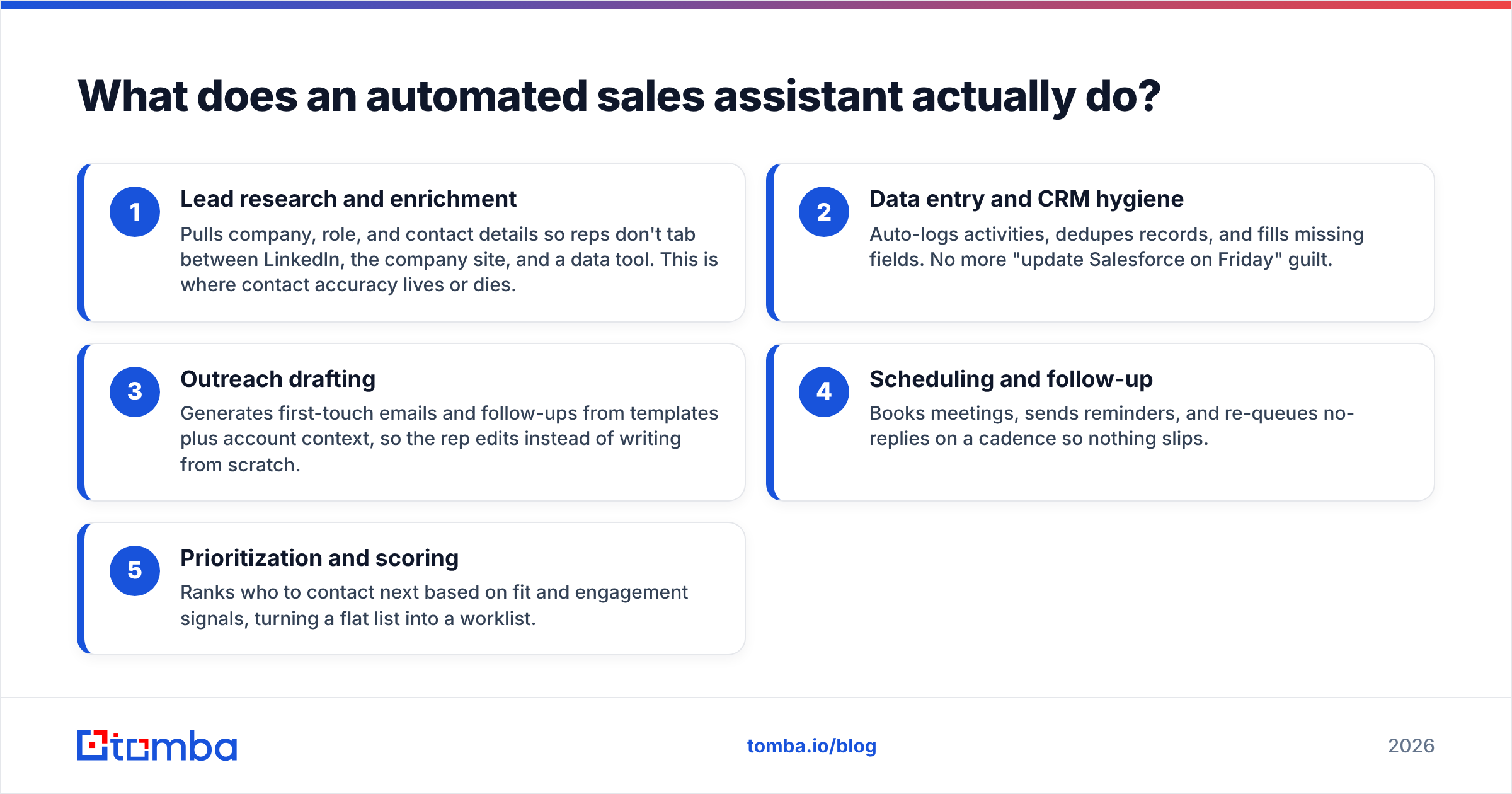
The features cluster into five jobs. A strong assistant covers most of them; a weak one slaps "AI" on a single workflow.
- Lead research and enrichment — Pulls company, role, and contact details so reps don't tab between LinkedIn, the company site, and a data tool. This is where contact accuracy lives or dies.
- Data entry and CRM hygiene — Auto-logs activities, dedupes records, and fills missing fields. No more "update Salesforce on Friday" guilt.
- Outreach drafting — Generates first-touch emails and follow-ups from templates plus account context, so the rep edits instead of writing from scratch.
- Scheduling and follow-up — Books meetings, sends reminders, and re-queues no-replies on a cadence so nothing slips.
- Prioritization and scoring — Ranks who to contact next based on fit and engagement signals, turning a flat list into a worklist.
The unglamorous truth: jobs 2 through 5 are only as good as job 1. An assistant that drafts a flawless email to a bounced address is automating a dead end. That's why the data layer — verified emails, valid phone numbers, enriched firmographics — is the part you should scrutinize hardest before you fall for the demo.
Is an AI sales assistant different from sales automation?#
Yes, though the line blurs. Classic sales automation follows fixed rules: "if a lead opens the email twice, create a task." It's deterministic and predictable. An AI sales assistant adds a reasoning layer — it can read an account, decide what's relevant, and generate language that didn't exist in a template.
The practical difference is adaptability. Rule-based automation breaks when reality doesn't match the rule. An AI assistant degrades more gracefully because it interprets context. The tradeoff is control: AI output needs review, especially for outreach copy, because a confidently wrong email damages your domain reputation and your brand.
Most 2026 platforms combine both: deterministic plumbing (logging, scheduling, routing) plus AI for the judgment-heavy parts (research summaries, message drafts, next-best-action). When you evaluate a tool, separate these two layers in your head. The plumbing is commoditized. The AI quality and the data feeding it are where products genuinely differ.
How do you compare automated sales assistant tools?#
Don't start with the feature checklist — every vendor's checklist looks identical. Start with three questions: Where does the contact data come from? How does it price as you scale? And how deeply does it sit inside the tools your reps already live in?
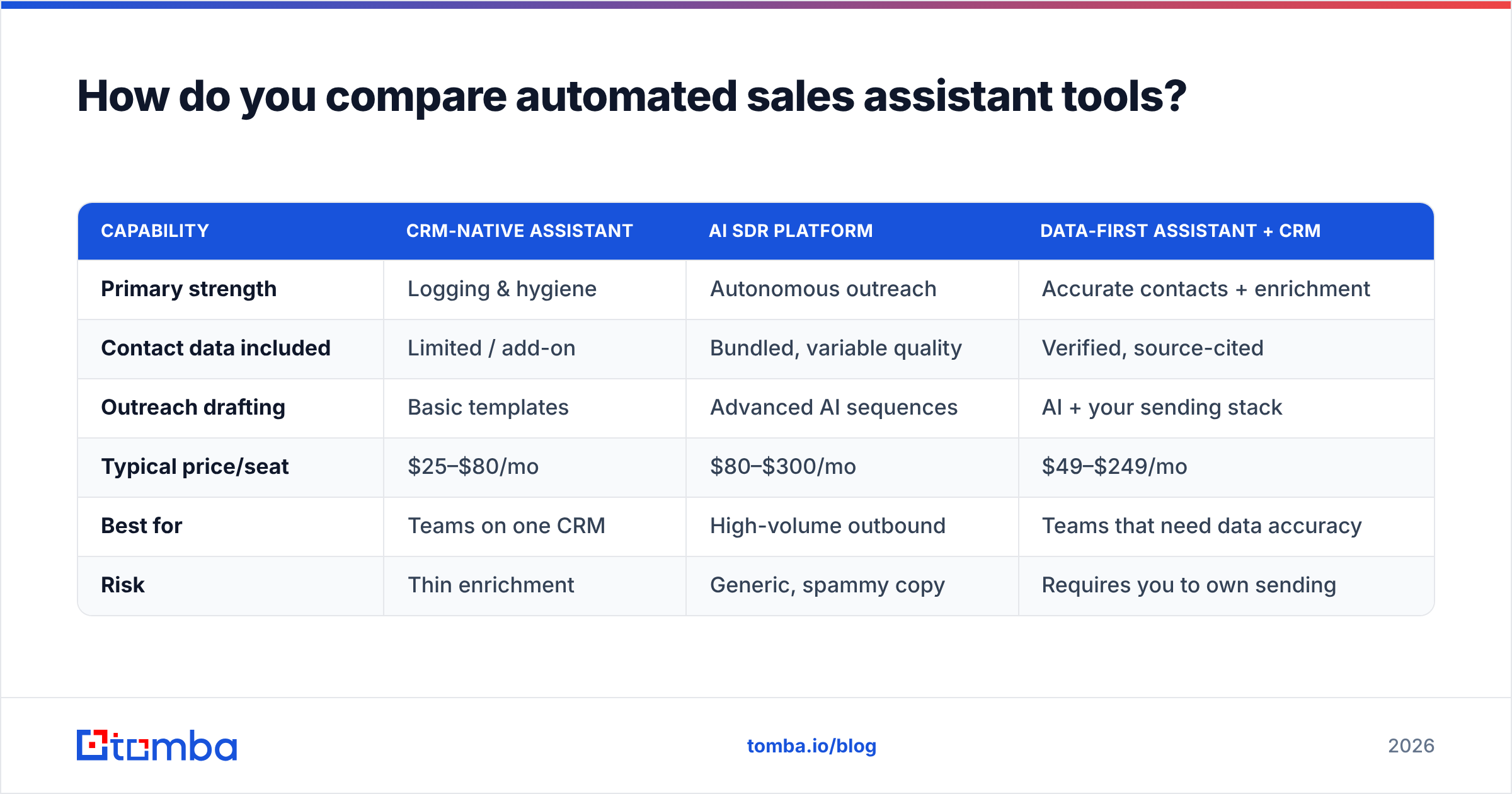
Here's a side-by-side of the tool types you'll encounter, not specific brands, so you can place any vendor on the map:
| Capability | CRM-native assistant | AI SDR platform | Data-first assistant + CRM |
|---|---|---|---|
| Primary strength | Logging & hygiene | Autonomous outreach | Accurate contacts + enrichment |
| Contact data included | Limited / add-on | Bundled, variable quality | Verified, source-cited |
| Outreach drafting | Basic templates | Advanced AI sequences | AI + your sending stack |
| Typical price/seat | $25–$80/mo | $80–$300/mo | $49–$249/mo |
| Best for | Teams on one CRM | High-volume outbound | Teams that need data accuracy |
| Risk | Thin enrichment | Generic, spammy copy | Requires you to own sending |
The pattern most teams miss: an "all-in-one" AI SDR that bundles its own contact database often ships lower-accuracy data than a focused data provider, because data is a side business for them. Bundled convenience can quietly cap your reply rates. Pairing a best-in-class data source with your own assistant frequently beats a do-everything box.
What should an automated sales assistant cost in 2026?#
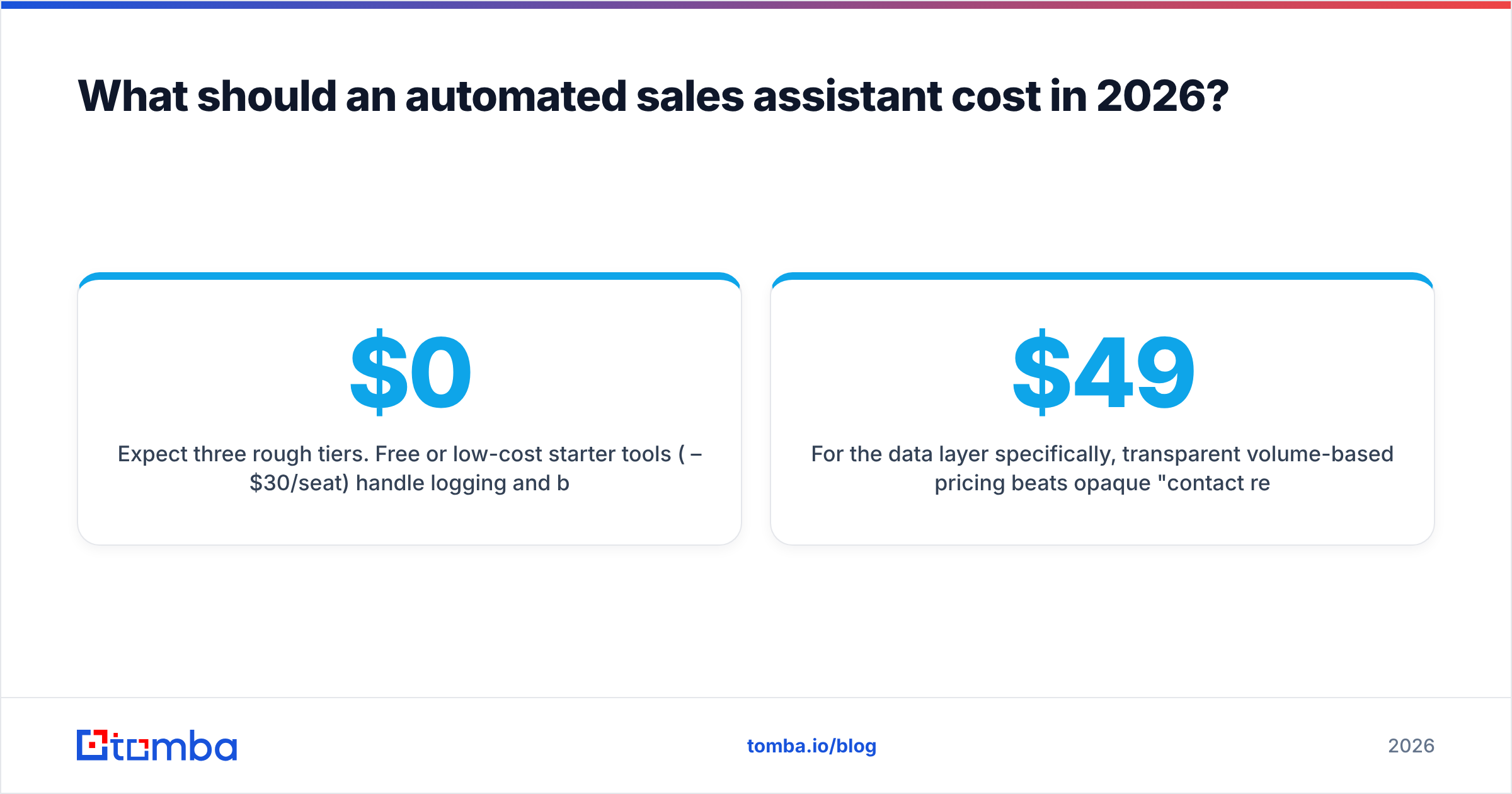
Expect three rough tiers. Free or low-cost starter tools ($0–$30/seat) handle logging and basic templates — fine for solo founders. Mid-market assistants ($49–$120/seat) add enrichment, scoring, and AI drafting. Enterprise AI SDR platforms ($150–$300+/seat) promise autonomous prospecting but lock you into their data and sending.
A cost trap worth naming: per-credit data charges. Many assistants bill separately every time they look up or verify a contact. At scale, that line item can dwarf the seat price. Always model your monthly contact volume against credit costs before signing.
For the data layer specifically, transparent volume-based pricing beats opaque "contact reveal" credits. As a reference point, Tomba pricing runs a free tier at 25 searches/month, Starter at $49/month, Growth at $99/month, and Pro at $249/month — so you can attach verified-email and enrichment volume to your assistant without per-reveal surprises. Whatever you choose, separate the workflow cost from the data cost on your spreadsheet. They scale differently, and conflating them is how budgets blow up in Q3.
What makes an automated sales assistant actually work?#
Clean, verified contact data. That's the unglamorous answer, and it's the one that decides ROI.
Run the math. If your assistant sends 1,000 emails a month and 25% of the addresses are bad, you've burned a quarter of your volume, spiked your bounce rate, and started eroding your sender reputation — which then drags down deliverability on the good addresses too. The automation didn't fail; the fuel was contaminated. According to deliverability guidance echoed across vendors like Salesforce and review sites like G2, list hygiene is the single biggest controllable factor in cold-outreach performance.
So before you let any assistant send on your behalf, build a data pipeline:
- Find the right contacts with a reliable email finder and pull whole org charts via domain search.
- Verify every address with an email verifier so bounces never reach the assistant's send queue.
- Enrich thin records — title, company size, phone — through data enrichment so personalization tokens aren't blank.
- Handle catch-alls deliberately with a catch-all verifier instead of guessing.
Wire this in once and the assistant's drafting, scheduling, and scoring all improve at the same time, because every downstream step is operating on real, reachable people. You can connect the data layer to most assistants through the Tomba API or native CRM integrations, so enrichment happens automatically the moment a lead enters the pipeline.
How do you roll one out without breaking your pipeline?#
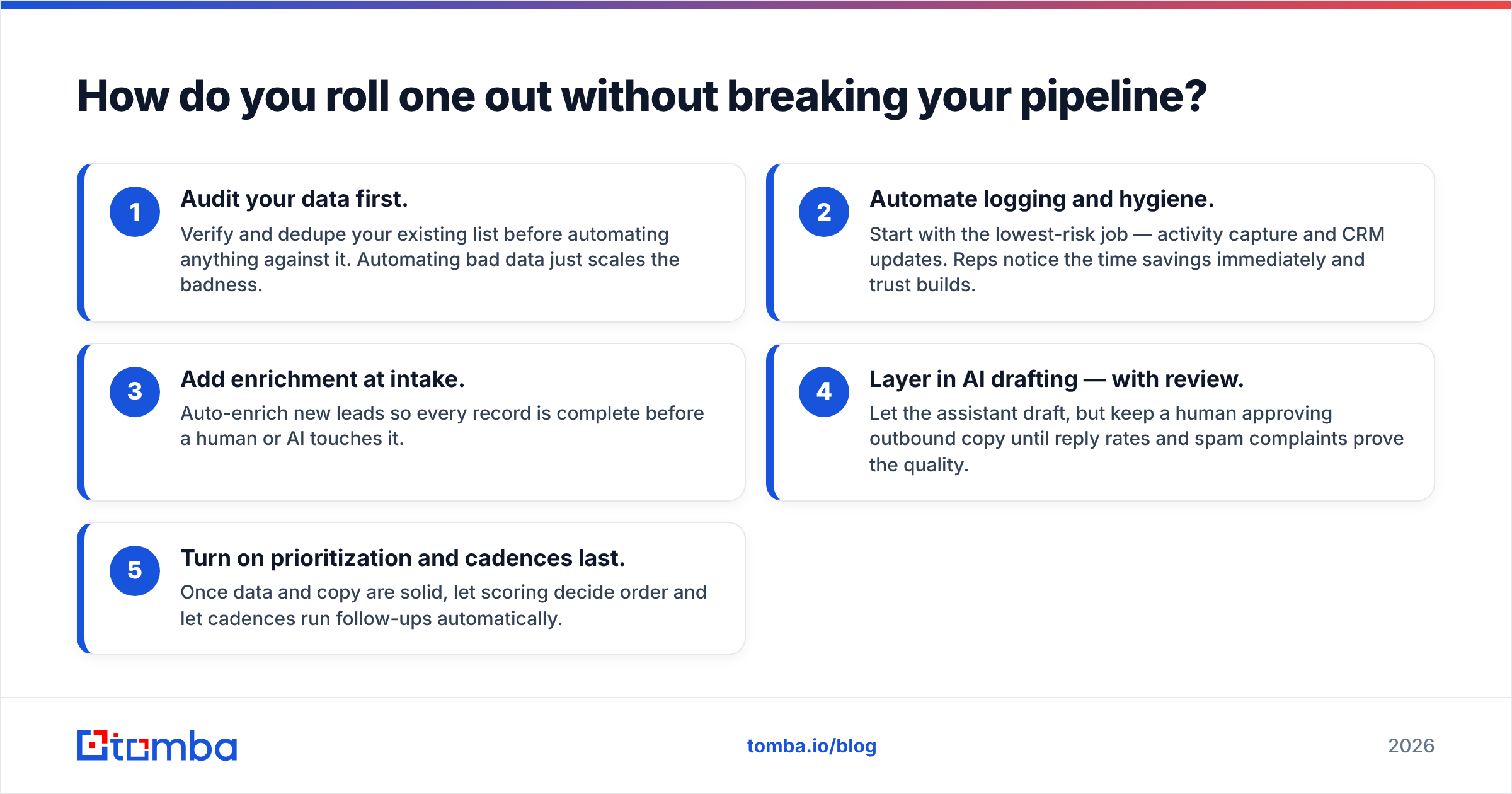
Phase it. Teams that flip every automation on at once usually create a mess that takes a quarter to untangle.
- Audit your data first. Verify and dedupe your existing list before automating anything against it. Automating bad data just scales the badness.
- Automate logging and hygiene. Start with the lowest-risk job — activity capture and CRM updates. Reps notice the time savings immediately and trust builds.
- Add enrichment at intake. Auto-enrich new leads so every record is complete before a human or AI touches it.
- Layer in AI drafting — with review. Let the assistant draft, but keep a human approving outbound copy until reply rates and spam complaints prove the quality.
- Turn on prioritization and cadences last. Once data and copy are solid, let scoring decide order and let cadences run follow-ups automatically.
Measure one thing per phase. Logging phase: hours saved per rep. Enrichment phase: field completeness. Drafting phase: reply rate and bounce rate. Cadence phase: meetings booked. If a phase doesn't move its metric, fix it before moving on. This sequencing keeps your response rate climbing instead of cratering the moment automation goes live.
What are the risks and limits?#
Three failure modes show up repeatedly.
Generic AI copy at scale. The fastest way to torch a domain is to blast lookalike AI emails to thousands of inboxes. Volume without relevance reads as spam to both filters and humans. Keep personalization anchored in real enriched data, and cap send volume per domain.
Over-trusting autonomy. "Autonomous SDR" demos are impressive, but full autonomy on outbound is still risky in 2026. Keep a human in the loop on messaging and on anything that touches your brand voice. Let the machine handle volume; let people own judgment.
Garbage-in data debt. An assistant that enriches from a weak source quietly fills your CRM with wrong titles and dead emails. That debt compounds — every report, every cadence, every forecast inherits the errors. Audit the data source's accuracy and ask where it comes from before you trust it; transparency about data sources is a green flag.
None of these are reasons to avoid automation. They're reasons to automate on a clean foundation and keep humans on the decisions that matter.
The bottom line#
An automated sales assistant earns its keep by removing the busywork between your reps and their buyers — but only when it runs on accurate, verified data. The workflow features are increasingly commoditized; the contact quality is the differentiator that shows up in your reply rate and your pipeline.
Buy the assistant that fits your CRM and motion, then feed it the cleanest data you can. Start by finding and verifying the contacts your automation will actually use: the Tomba Email Finder locates professional emails by name, company, or domain, verifies them, and plugs into your stack through the API or native integrations — so your sales assistant automates wins instead of bounces. Spin up the free tier, point it at one target account list, and watch how much cleaner the rest of your automation runs.
// get started
Find, verify and enrich your first contacts today
Start on the free plan with 25 searches a month, then scale when your team is ready.
Free plan · No credit card required · GDPR & CCPA
// about the author