How to Automatically Create Salesforce Leads From Email (2026)
Stop copy-pasting prospects into your CRM. Here is how to automatically create Salesforce leads from email — with verified data, dedup rules, and zero manual entry.
Every reply in your inbox is a potential lead. The problem is the 90 seconds your reps spend copying a name, guessing a job title, and pasting an email into Salesforce — multiplied across hundreds of conversations a week. That manual handoff is where data dies: fields get skipped, duplicates pile up, and follow-ups slip.
This guide shows you exactly how to automatically create Salesforce leads from email, what each approach costs you in setup and accuracy, and how to keep the records clean once they land.
TL;DR#
- The fastest win is a no-code connector (Zapier, Make, or a native integration) that watches an inbox or form and pushes a new Lead into Salesforce the moment an email arrives.
- Raw email-to-lead is not enough — enrich each record with verified job title, company, and a validated email before it hits your pipeline, or your reps inherit garbage.
- Deduplication rules in Salesforce (matching + duplicate rules) stop the same prospect from spawning five Lead records.
- For inbound replies and signups, parse the sender, verify the address, enrich the contact, then create or update the Lead via the Salesforce API.
- A finder-and-verifier layer like Tomba Email Finder fills the gaps a raw inbox can't — missing names, titles, and second contacts at the same company.
Why automate Salesforce lead creation from email at all?#
The short answer: manual entry is the single most expensive habit in your sales workflow, and it actively degrades data quality.
Think of your inbox as a busy restaurant kitchen during a dinner rush. Orders (emails) come in faster than anyone can write them down by hand. When a rep manually transcribes each one into Salesforce, two things happen — tickets get lost, and the ones that make it through are half-legible. Automation is the order-management screen that captures every ticket completely and instantly.
Concretely, automating lead creation gives you:
- Speed to lead. Studies on lead response consistently show that contacting a prospect within five minutes dramatically outperforms an hour-later reply. A human transcribing emails cannot hit that window at scale; an automation can.
- Complete records. Automated flows populate every required field — including enriched data the email itself never contained.
- Clean attribution. The source, campaign, and timestamp get stamped automatically, so revenue operations can actually trust the numbers.
- Rep time back. Selling, not data entry. A team handling 500 inbound emails a month easily reclaims 10–15 hours.
)
What are the ways to automatically create Salesforce leads from email?#
There are four practical patterns, from zero-code to fully custom. Each trades setup effort for control.
| Method | Setup effort | Real-time? | Enrichment built in | Best for |
|---|---|---|---|---|
| Salesforce Email-to-Lead / Web-to-Lead | Low | Yes | No | Form and inbox capture, basic |
| No-code connector ( |
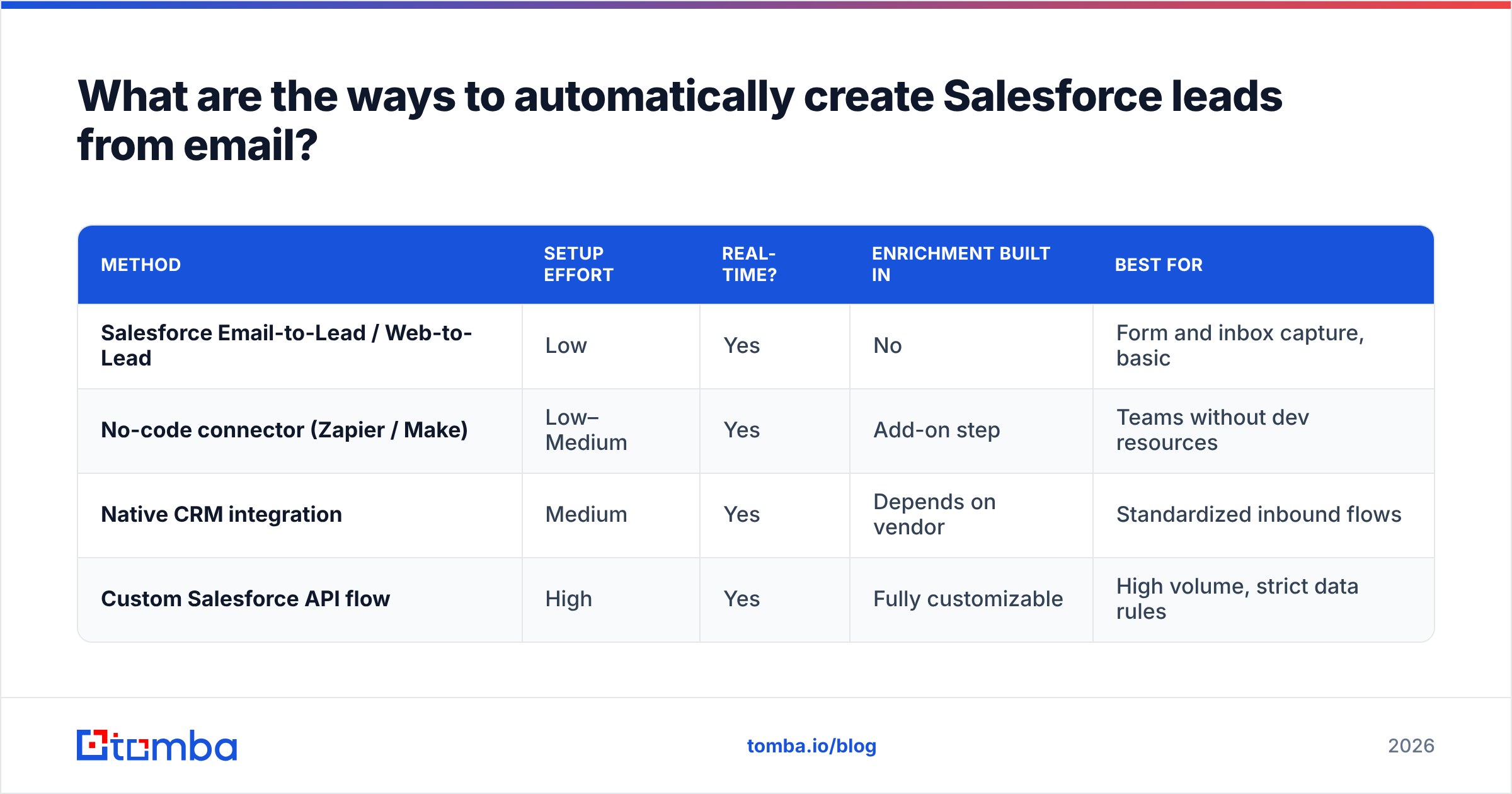
Zapier / Make) | Low–Medium | Yes | Add-on step | Teams without dev resources | | Native CRM integration | Medium | Yes | Depends on vendor | Standardized inbound flows | | Custom Salesforce API flow | High | Yes | Fully customizable | High volume, strict data rules |
Salesforce native capture#
Salesforce ships with Web-to-Lead and email-handler features that turn an inbound form submission or a forwarded email into a Lead record. It is the lowest-friction starting point and costs nothing extra. The catch: it captures only what the email or form contained. A reply from j.doe@acme.com with a one-line signature gives you an email and maybe a first name — no title, no company size, no phone. You can read the official mechanics in the Salesforce Web-to-Lead documentation.
No-code connectors#
Tools like Zapier and Make sit between your inbox (Gmail, Outlook, a form tool) and Salesforce. A trigger fires on "new email matching X," and an action creates or updates a Salesforce Lead. You can chain an enrichment or verification step in the middle. This is the sweet spot for most teams: no engineers required, real-time, and extensible.
Custom API flow#
For high volume or strict governance, you build directly against the Salesforce REST API and call an enrichment provider's API in the same flow. You control every field, every dedup check, and every fallback. More work up front, total control after.
How do you keep the lead data clean and verified?#
This is the step most teams skip, and it is the one that determines whether automation helps or hurts. A pipeline that automatically creates leads from unverified emails just automates the creation of bounces and bad records.
A raw email address is a guess until something confirms it routes to a real mailbox. Before any Lead is created, run two checks:
- Verify the address. Use an email verifier to confirm the mailbox exists and isn't a spam trap or role account. Catch-all domains need a catch-all verifier so you know whether
info@style addresses actually resolve. - Enrich the record. A reply rarely includes title, seniority, company size, or LinkedIn. Data enrichment appends those fields so reps open a complete Lead, not a name and an email.
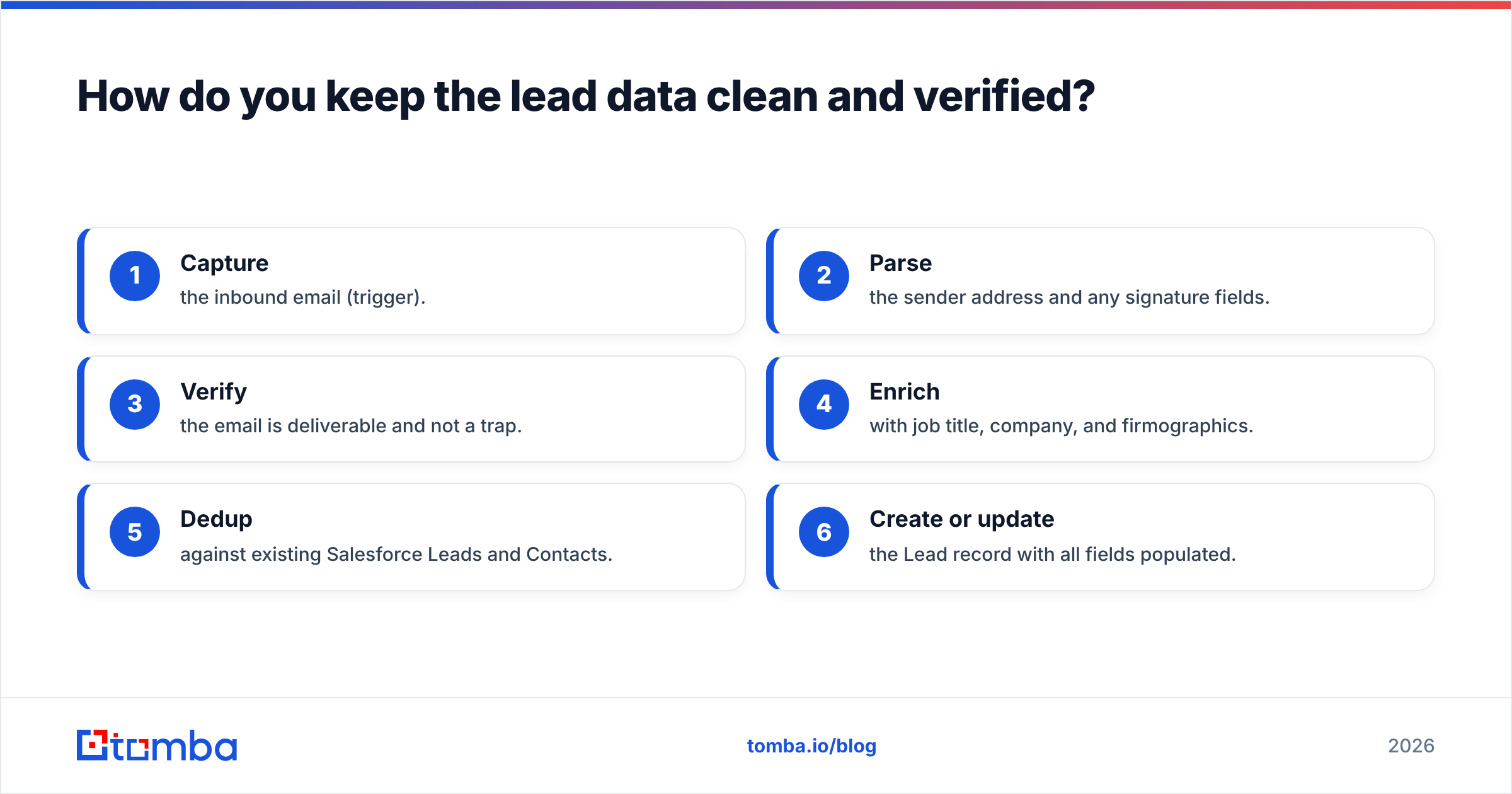
Here is the recommended order of operations for a clean automated flow:
- Capture the inbound email (trigger).
- Parse the sender address and any signature fields.
- Verify the email is deliverable and not a trap.
- Enrich with job title, company, and firmographics.
- Dedup against existing Salesforce Leads and Contacts.
- Create or update the Lead record with all fields populated.
Skip steps 3 and 4 and you will spend more time cleaning Salesforce than you saved by automating it.
)
How do you stop duplicate leads in Salesforce?#
Turn on Salesforce's built-in Matching Rules and Duplicate Rules before you flip on any automation — not after.
Duplicates are the predictable failure mode of email-to-lead automation. The same prospect emails twice, fills a form, and gets imported from a list — three records, three reps, one annoyed buyer. Salesforce can block or merge these automatically:
- Matching rules define what counts as a duplicate (e.g., same email, or same name + company).
- Duplicate rules decide what happens on a match — block creation, or allow it with an alert.
- In your automation's "create Lead" step, prefer an upsert (update-or-insert) keyed on email, so a returning prospect updates the existing record instead of spawning a new one.
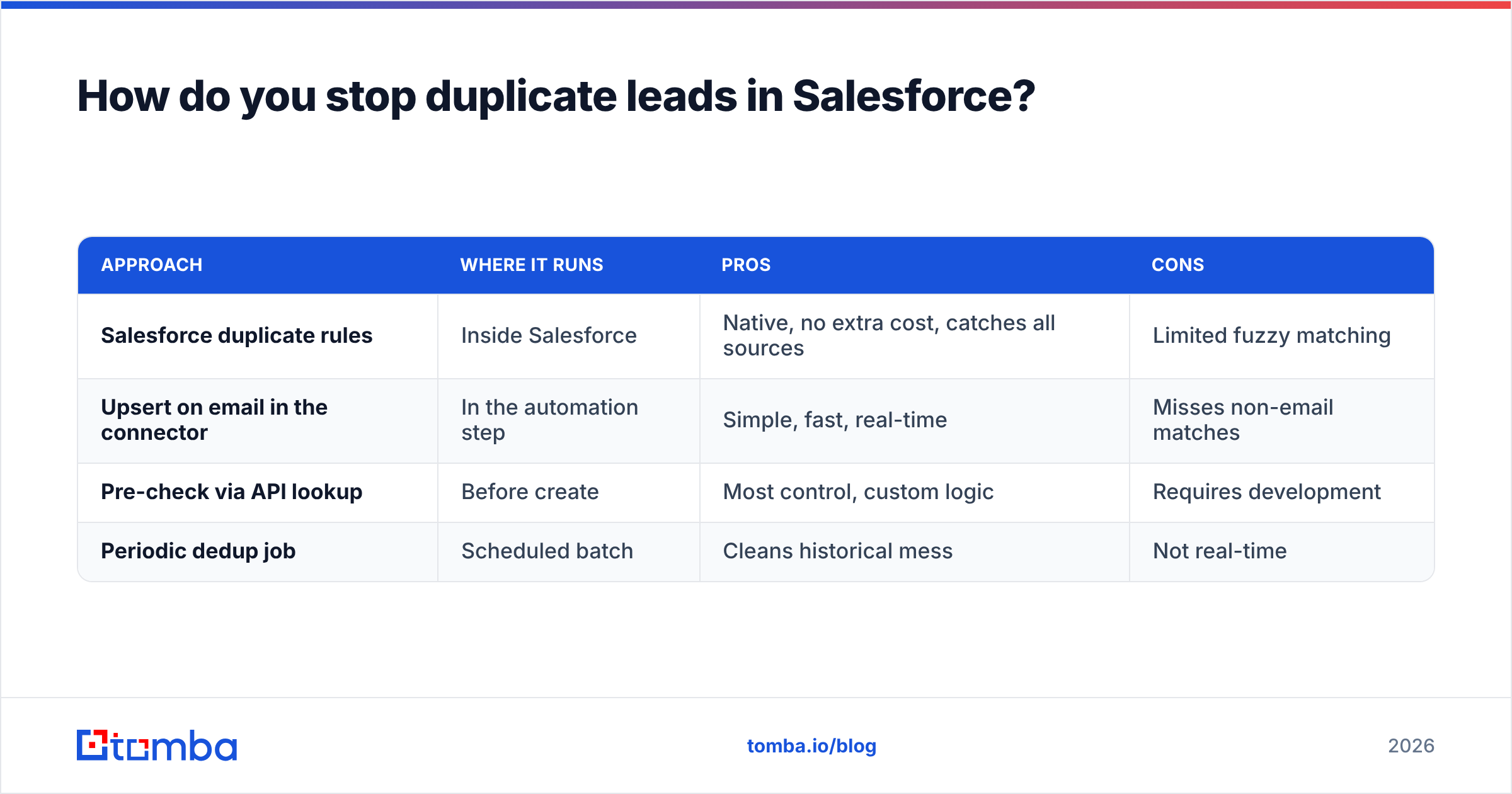
A quick comparison of the dedup approaches:
| Approach | Where it runs | Pros | Cons |
|---|---|---|---|
| Salesforce duplicate rules | Inside Salesforce | Native, no extra cost, catches all sources | Limited fuzzy matching |
| Upsert on email in the connector | In the automation step | Simple, fast, real-time | Misses non-email matches |
| Pre-check via API lookup | Before create | Most control, custom logic | Requires development |
| Periodic dedup job | Scheduled batch | Cleans historical mess | Not real-time |
Most teams combine native duplicate rules with an email-keyed upsert. That covers both the inbound trigger and any list imports running in parallel.
How do you handle replies and signups, not just forms?#
Inbound replies are where a finder-and-verifier layer earns its keep, because the email body rarely contains the data you need.
Picture an inbound reply: "Sounds interesting, can you send pricing? — Sam." You have a first name and a sending address. You're missing the last name, the title, the company, and any second stakeholder. This is the exact gap an email-finding layer closes:
- A domain search on the sender's company surfaces other decision-makers at the same account, so a single reply becomes a mapped buying committee.
- The Tomba API lets your automation call finder, verifier, and enrichment in one flow, then write the complete record to Salesforce.
- For partial data — you have a name and company but no email — the finder reconstructs the likely address and verifies it before it's written.
So a single "Sam" reply becomes a fully populated Lead: full name, verified email, title, company, and a list of adjacent contacts your reps can multithread.
What does this cost, and what's the ROI?#
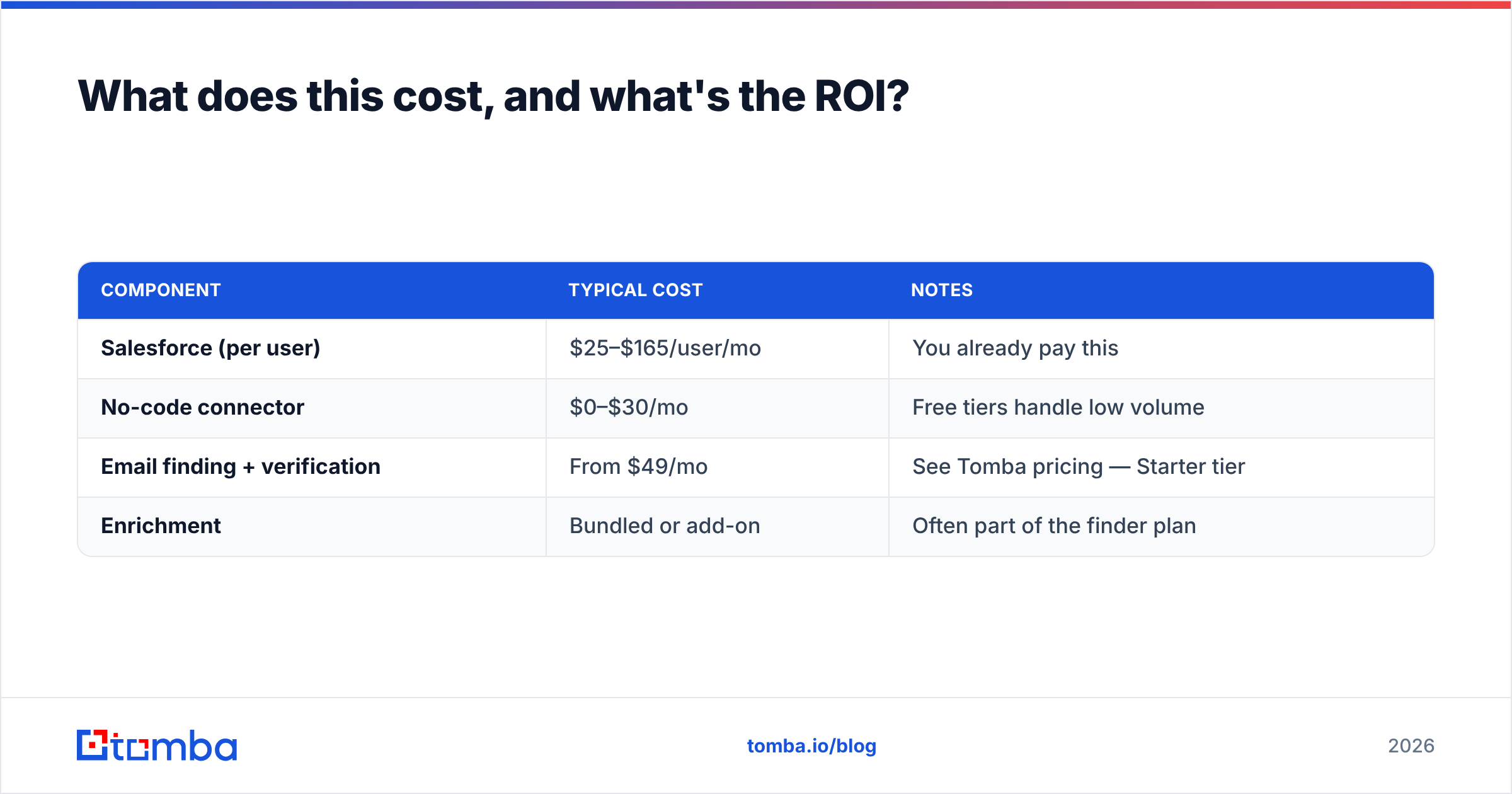
The tooling is cheap relative to a single rep's hourly cost; the real spend is design time, paid once.
A realistic monthly stack for a small team automating Salesforce lead creation from email:
| Component | Typical cost | Notes |
|---|---|---|
| Salesforce (per user) | $25–$165/user/mo | You already pay this |
| No-code connector | $0–$30/mo | Free tiers handle low volume |
| Email finding + verification | From $49/mo | See Tomba pricing — Starter tier |
| Enrichment | Bundled or add-on | Often part of the finder plan |
On the finding-and-verification line, Tomba's tiers are: Free (25 searches/mo), Starter at $49/mo, Growth at $99/mo, Pro at $249/mo, and custom Enterprise. For a team processing a few hundred inbound emails a month, the Starter or Growth plan covers verification and enrichment for less than the cost of one rep spending two hours a week on manual entry.
The ROI math is simple. If automation saves each rep 12 hours a month and a loaded rep hour is worth $50, that's $600 of recovered selling time per rep — against a tool stack that often runs under $150/month for the whole automation layer.
What should you watch out for?#
Three failure modes account for most botched rollouts. Plan for them up front.
- Garbage in, garbage in faster. Automation amplifies whatever it's fed. Without verification, you'll create leads from typo'd and dead addresses at machine speed. Always verify before create.
- Over-triggering. A poorly scoped trigger ("any new email") will create leads from newsletters, vendors, and internal threads. Filter by sender domain, keywords, or a dedicated capture address.
- Field mapping drift. When Salesforce admins rename or add required fields, silent automation breaks. Document your field map and review it quarterly.
One more: respect consent and data rules. Automatically scraping and storing personal data has compliance implications under GDPR and similar regimes. Capture a lawful basis (the prospect emailed you — that's a strong one) and honor opt-outs in the same flow.
Putting it together: a reference flow#
Here's the end-to-end shape most teams should build, regardless of which connector they pick:
- Trigger — new email to
sales@yourco.comor a form submission. - Parse — extract sender name, email, domain, and any signature fields.
- Verify — call the verifier; if undeliverable, route to a review queue instead of creating a Lead.
- Enrich — append title, company, size, and adjacent contacts via the finder and enrichment API.
- Dedup — upsert on email; let Salesforce duplicate rules backstop the rest.
- Create/Update — write the Lead with full fields, source, and timestamp.
- Notify — ping the owning rep in Slack or via Salesforce so speed-to-lead stays under five minutes.
Build it once, and every inbound email becomes a complete, verified, deduplicated Salesforce Lead with no human touching a keyboard.
Start with verified, enriched leads#
Automation is only as good as the data flowing through it. If your pipeline creates Salesforce leads from unverified emails, you've just automated your own data-quality problem. Fix the input first.
Tomba Email Finder gives your automation the missing layer: it finds the email behind a name and company, verifies it's deliverable, and enriches the record with title, firmographics, and adjacent contacts — all callable from the Tomba API so it drops straight into your Zapier, Make, or custom Salesforce flow. Start on the free tier with 25 searches, wire it into your inbound flow, and let every reply become a clean Lead your reps actually want to work.
Stop copy-pasting. Start closing.
// get started
Find, verify and enrich your first contacts today
Start on the free plan with 25 searches a month, then scale when your team is ready.
Free plan · No credit card required · GDPR & CCPA
// about the author